Changelist Conflicts
for Windows and Linux
for macOS
N/A 
Use this page to configure protection of files belonging to inactive changelists, from occasional conflicts.
| Item | Description |
|---|---|
| Enable changelist conflict tracking | If this checkbox is selected, MPS makes it possible to protect files in inactive changelists. Such protection can be performed on the various levels enabled by the options listed below. |
| Show conflict resolving dialog | If this checkbox is selected, MPS shows Resolve Changelist Conflict dialog box on an attempt to modify a file. 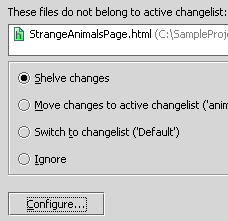 You need to define the way to resolve a conflict, before you proceed with changes. The possible ways to resolve a conflict are as follows: |
| Highlight files with conflicts | If this checkbox is selected, MPS shows a yellow stripe on top of a file from an inactive changelist, when such file has been modified.  In this stripe, you can choose one of the possible ways to resolve conflict:
Names of the files belonging to inactive changelists are shown in red font in the editor tabs and in the Project view. |
| Highlight files from non-active changelists | If this checkbox is selected, names of the files belonging to inactive changelists are shown in light-blue font in the editor tabs and in the Project view. |
| Files with ignored conflicts | This area shows the list of files, for which Ignore option has been selected in the Resolve Changelist Conflict dialog box, or in the editor stripe. |
| Clear | Click this button to remove all files from the list of files with ignored conflicts. |
Last modified: 10 January 2018