Baseline
The baseline is a snapshot of the codebase problems taken at a specific Qodana analysis for a specific Git branch and contained in the baseline.sarif.json file.
Using the baseline feature, you can compare your current code to its baseline state and see new, unchanged, and resolved problems. For example, you can configure and update the baseline for the main branch to monitor changes after merging pull or merge requests.
The baseline is supported by all linters and available under Community, Ultimate, and Ultimate Plus licenses and their trial versions. To learn more details about licenses, visit the Subscription Options and Pricing page. You can also request a demo.
How the baseline works
During the first analysis of your project, Qodana collects all found problems and moves them to the baseline available for review on the tab. On that tab, you can also download the baseline contained in the qodana.sarif.json file. After downloading the file, you can use it for comparing with later code states as explained in this section. The subsequent analyses do not add new problems to the existing baseline.
You can update the baseline by adding or removing problems as explained in the Analysis reports section. This will update the qodana.sarif.json file in the Qodana Cloud UI accordingly.
The baseline feature divides problems into these groups:
Unchanged – problems added to a baseline and remaining unchanged since then.
New – problems that arise in addition to the unchanged problems.
Absent – problems that were resolved since the baseline was created.
This diagram explains how these groups work.
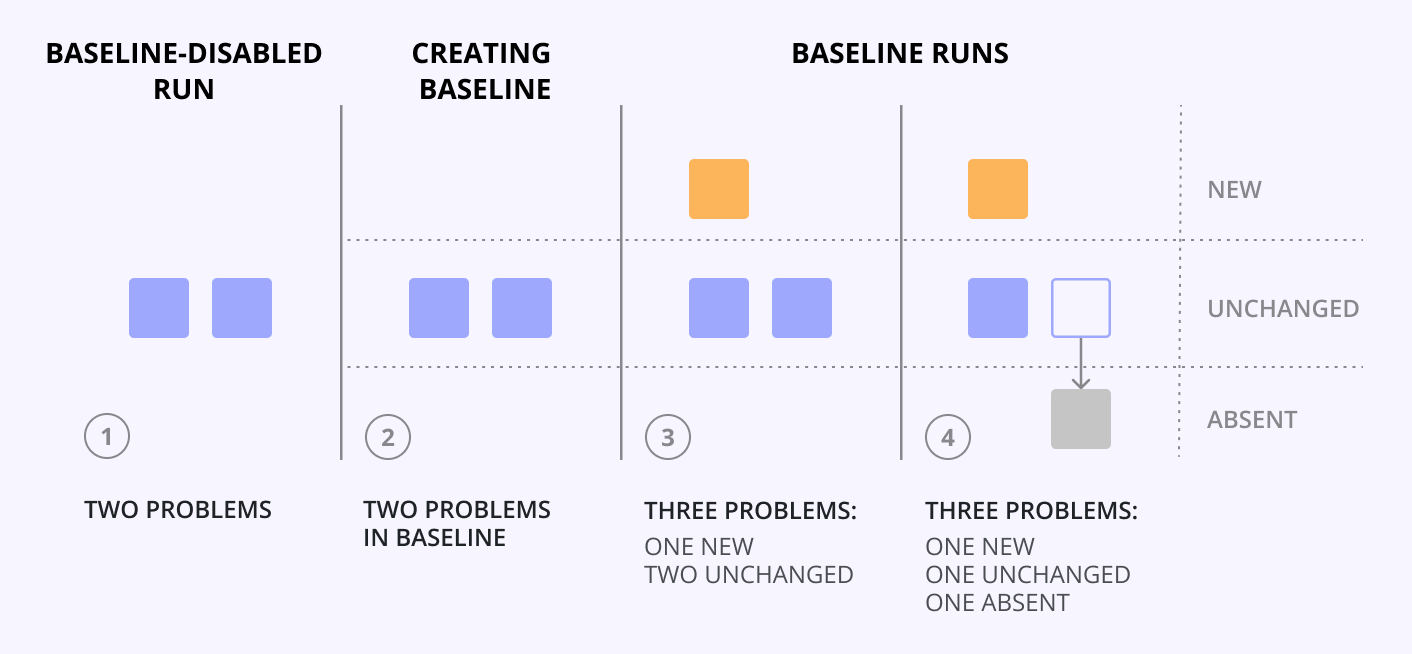
For example, the first Qodana analysis detected two problems that were added to the baseline.
The second Qodana analysis detected three problems. Fortunately, this time Qodana marks one of them as new. The other two are the unchanged problems; they are already reflected in the baseline report.
After one baseline problem had been resolved, the project was analyzed again. This time, the report will contain three problems. The new problem is the problem that was detected in Step 2 and still remains new. There is also one unchanged problem that has not changed since Step 1. Finally, one baseline problem was resolved and now is marked as absent.
As you can see, new problems do not automatically change theis status across Qodana analyses. To transform them to unchanged, you need to add such problems to your baseline, and then analyze your project again.
The new problem was moved to the unchanged group by adding that problem to the baseline, downloading the updated
qodana.sarif.jsonfile and then running Qodana with the updated baseline.
Run the baseline
After you have downloaded the qodana.sarif.json file from the tab, you can run Qodana with the baseline enabled as shown below:
Here, the QODANA_TOKEN variable refers to the project token required by the Ultimate and Ultimate Plus linters.
In this snippet, the --baseline option specifies the path to the baseline file from the Docker filesystem. The QODANA_TOKEN variable refers to the project token required by the Ultimate and Ultimate Plus linters.
In this snippet, the --baseline option specifies the path to the baseline.sarif.json file containing the baseline.
In this snippet, the --baseline option specifies the path to the baseline.sarif.json file containing a baseline.
In this snippet, the --baseline option specifies the path to the baseline.sarif.json file containing a baseline.
In the runner configuration, find the field and specify the path to the baseline.sarif.json file containing a baseline:
The list of the IDEs supporting this feature is available in the JetBrains IDEs section.
This animation shows how you can analyze your code using baseline.
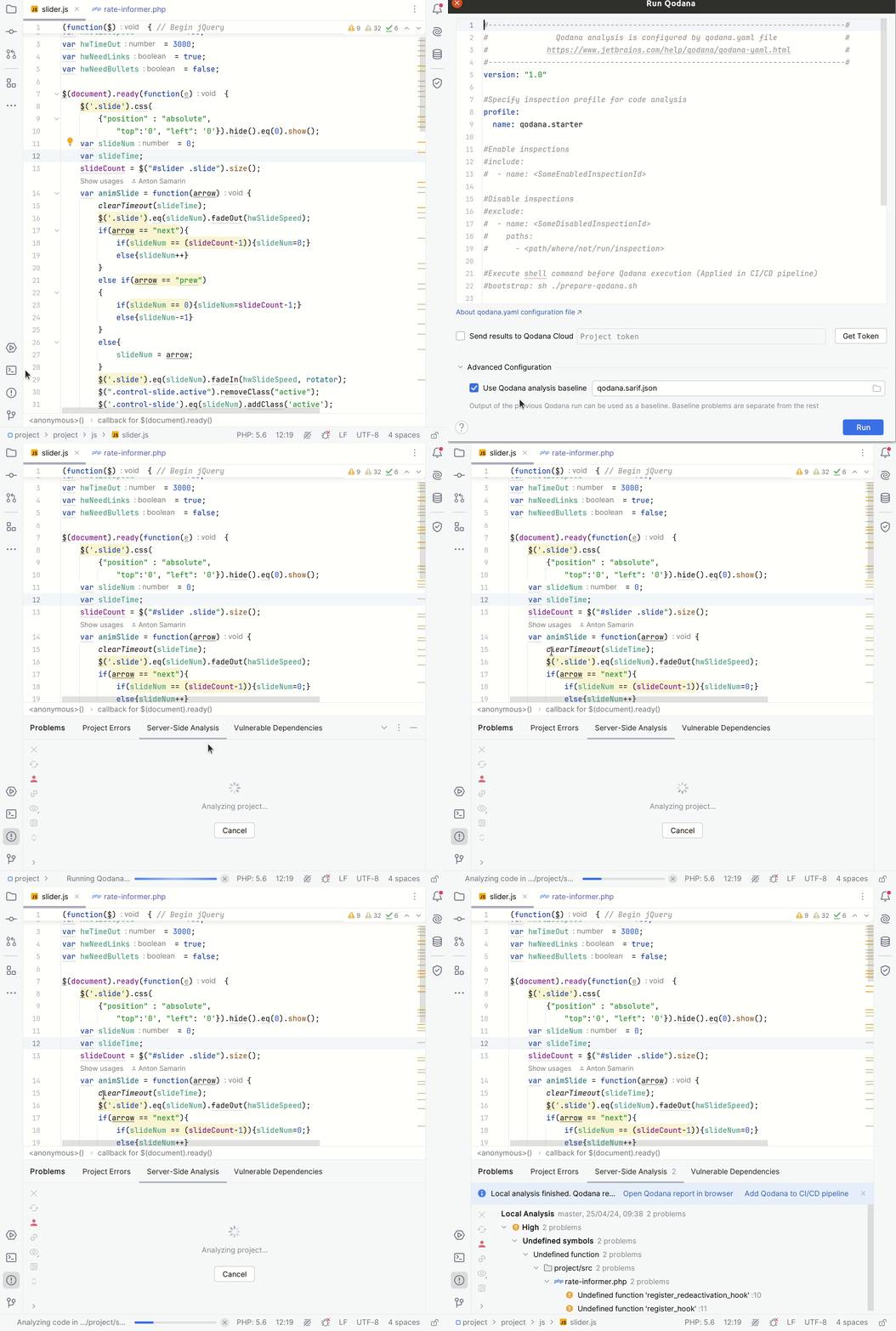
Here is the description of each step from the animation:
In your IDE, navigate to the tool window.
In the tool window, click the tab.
On the tab, click the button.
On the dialog that opens, expand the section, select the baseline file, and then click .
To include absent problems in the report, you need to run Qodana with the --baseline-include-absent option:
In the runner configuration, find the field and add the --baseline-include-absent option:
Customizing the baseline path
By default, Qodana expects the baseline file to be located at .qodana/baseline.sarif.json in your project root. You can override this as follows:
If you store the baseline file in a different path within the project directory, use the
--baselineoption to specify its location relative to the project root, e.g.,--baseline path/to/your/baseline.sarif.json.If your baseline file is located outside the project directory, you need to mount it into the container (for Docker-based runs) and then reference it using the mounted path with the
--baselineoption.