Value and nullability analysis
ReSharper for Visual Studio Code performs value analysis to help you find possible 'null' dereferences as well as redundant boolean comparisons and null checks.
Different ways of analyzing nullable values
ReSharper for Visual Studio Code can analyze values in several ways:
By understanding the behavior of language constructs.
In the example below, based on the fact that the parameter
objwas explicitly checked for nullability, ReSharper for Visual Studio Code reasonably supposes that the value ofobjcan be indeed 'null' and displays the corresponding warning: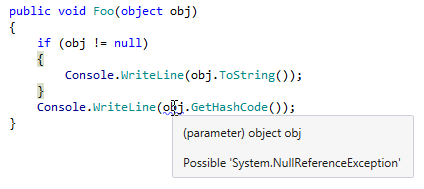
By relying on code annotation attributes ([CanBeNull], [NotNull], [ItemCanBeNull], [ItemNotNull]) when Nullable reference types are disabled.
In the following example, the method
Baris marked with the[CanBeNull]attribute. Using this information, ReSharper for Visual Studio Code warns you that the return value ofBarcan be null, and calling a method on it could lead to a 'null' dereference: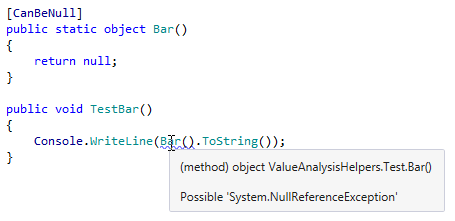
In C# 8.0 and later, ReSharper for Visual Studio Code can reuse results of the compiler analysis if Nullable reference types are enabled in the project.
Equality comparison analysis
ReSharper for Visual Studio Code helps you analyze the use of the equality operators (== and !=) in the following ways:
It reports equality comparison of floating point numbers.
In addition to compiler warnings of 'Possible unintended reference comparison' (CS0252 and CS0253), it also reports cases when only one of the compared types overrides
Equals().It provides the [CannotApplyEqualityOperator] attribute that helps detect unintended use of the equality operators for types that are designed to be compared using
Equals().
Nullable reference types
If nullable reference types (NRT) are enabled, ReSharper for Visual Studio Code reuses the results of C# compiler analysis.
NRT improve overall precision of the nullability analysis, but there are cases when NRT contracts can be violated, for example, when values are coming from code without #nullable context. In such cases, you may get false positive warnings for nullability checks (for example, Expression is always 'true' or 'false') . You can choose to ignore nullable API contracts and report a problem only when previous operations with the value in your code guarantee that it can or cannot be null.
Further examples of value analysis
Here are some more examples of ReSharper for Visual Studio Code's value and nullability analysis:
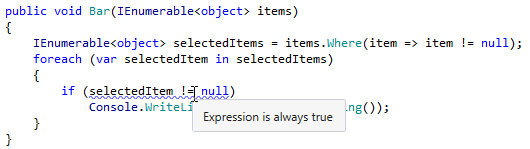
If a nullability check has been already done with a simple LINQ query, ReSharper for Visual Studio Code tells you that a further nullability check is redundant:
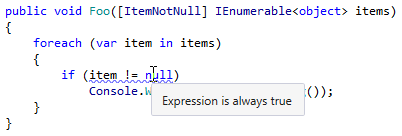
The same happens if you mark a collection with the
[ItemNotNull]attribute: