Navigate code
ReSharper uses the existing set of VS Code navigation and search actions but enhances their default behavior. Through understanding your solution structure, ReSharper provides significantly more accurate results.
Multiple results from navigation commands are listed in a frame right inside the editor, where you can switch between results by pressing ↑ and ↓, preview the code surrounding each result, and then jump to the desired result by pressing Enter or double-clicking it.
The frame is not closed automatically when you switch focus to the surrounding code; this lets you see both the context of the symbol in the current file and the contents of navigation results. To close the results frame, press Esc or click X in the frame.
Usages
Alt+Shift+F12 or
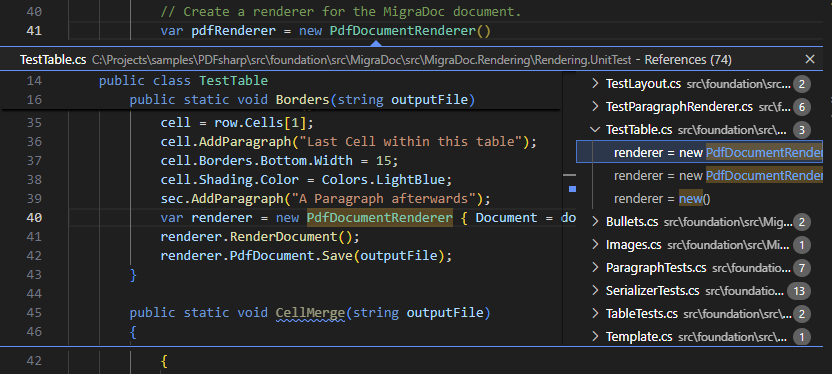
You can navigate from the declaration or any usage of a symbol (type, member, variable, parameter) to any reference to that symbol in the whole solution. The usages are listed in a frame right inside the editor, where you can preview the surrounding code and jump to the desired usage:
Definition
F12, Ctrl/Cmd-click, or
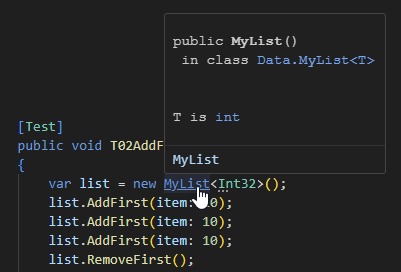
You can navigate from any usage of a symbol (type, member, variable, parameter) to the declaration of that symbol.
Type Definition
You can navigate from a variable or parameter to the declaration of its type. For example, if you have a variable Foo myVar = new Foo(); and invoke this command on a usage of myVar, it will bring you to the declaration of the class Foo.
Implementations
Ctrl+F12 or
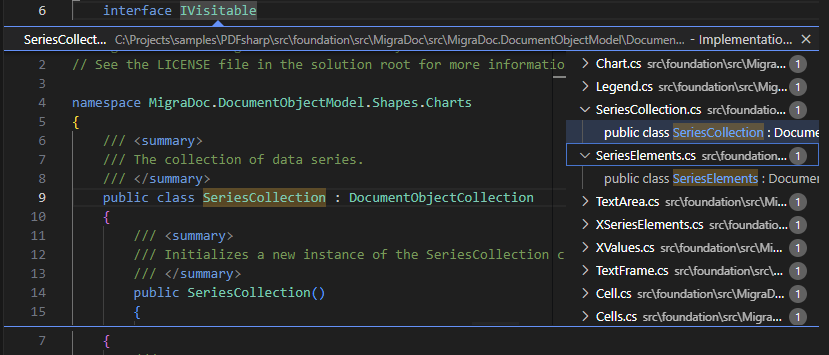
You can navigate from a type or a member to any of its implementations or overrides. If the symbol is implemented or overridden anywhere in the solution, the derived symbols are listed in a frame right inside the editor:
Navigate compiled code
All navigation features also work for compiled code. You can start navigation by going to the definition of a library type or method (F12 or Ctrl/Cmd-click). ReSharper will decompile the symbol or fetch it from a symbol server and display the corresponding file in a read-only mode.
You can continue navigation to study other types and methods that are defined and used in that file. For example, you can take another type in that file and find its usages in your solution.