Explore type hierarchy
With ReSharper for Visual Studio Code, you can investigate the inheritance hierarchy of types from your solution and from referenced libraries. You can see both base types and inheritors of the selected type and navigate to any of them with a mouse click.
Investigate type hierarchy
Locate the desired type in the editor .
Right-click it and choose Show Type Hierarchy.
Examine type hierarchy in the References window.
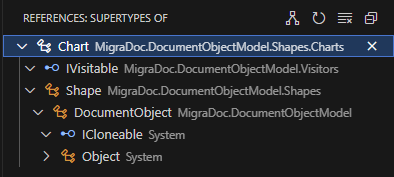
Expand a node with its subtypes or supertypes
In the hierarchy tree view, select the desired node.
Right-click the node and choose Show Subtypes/Show Supertypes.
10 August 2026