AI Assistant. Junie options
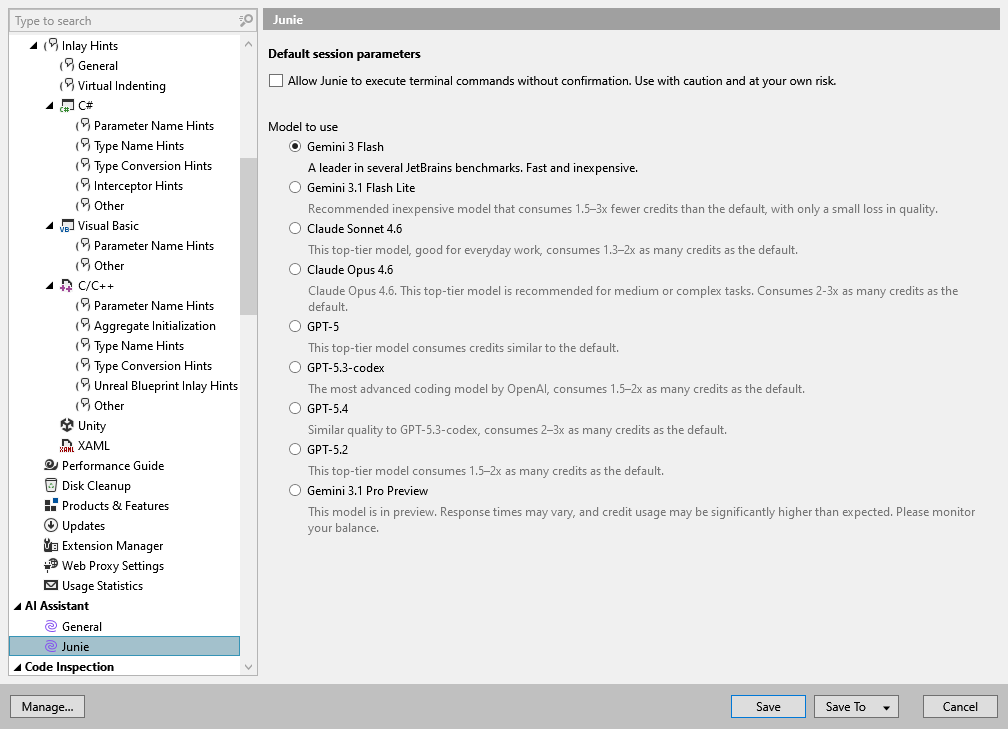
On this page of ReSharper options, you can configure the options of the Junie AI agent.
Allow Junie to execute terminal commands without confirmation | As a coding agent, Junie can perform a wide range of tasks, including editing files, generating code, refactoring, and more. By default, Junie executes non-sensitive tasks such as editing files within the solution directory or running simple console commands such as Enable this option to allow Junie to execute all terminal commands without confirmation. To do the same for a specific session, enable the Brave option in the AI Assistant window for a desired session. |
Model to use | Selects which LLM model the Junie agent uses. Available models include Gemini 3 Flash (Default), GPT-5, GPT-5.1-codex-max, GPT-5.2, Claude Sonnet 4.5, Claude Opus 4.5 (Fast), Claude Opus 4.5, Gemini 3 Pro, Gemini 3 Flash, and Grok 4.1 Fast Reasoning. Each model varies in response quality, speed, and credit consumption relative to the default. |