Products & Features
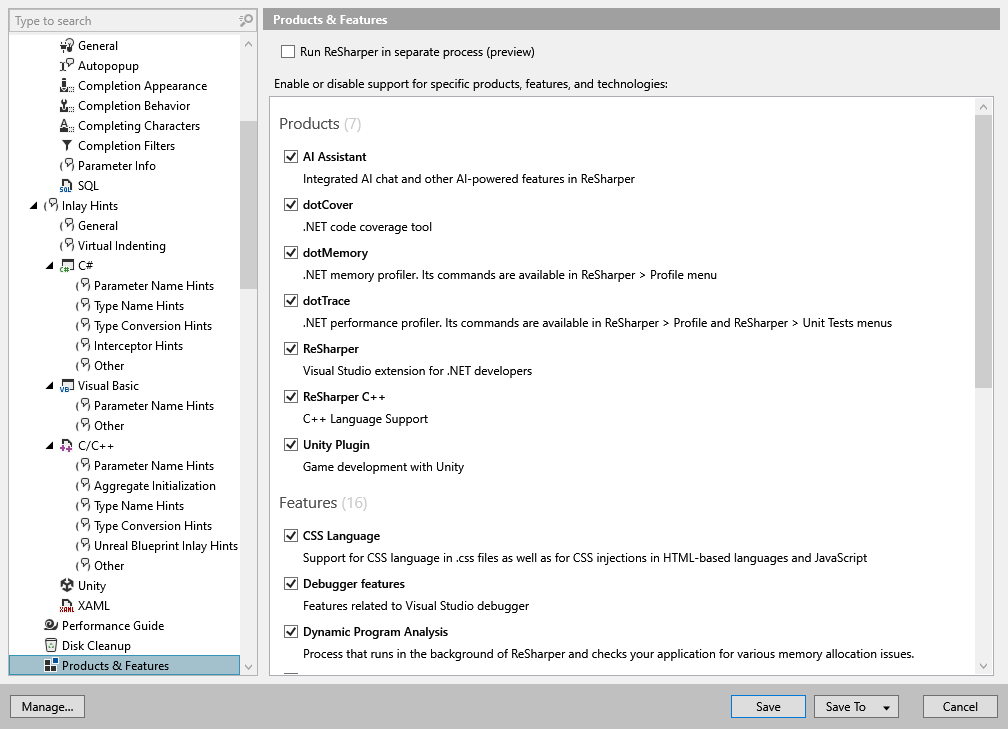
This page lists JetBrains .NET platform products, feature groups, and languages/technologies that can be enabled or disabled. To see the list of features available for each language/technology, refer to ReSharper features in different languages.
Use checkboxes to enable and disable the features. You will need to restart Visual Studio to apply changes.
Run ReSharper in separate process | Use this checkbox to toggle the Out-of-Process mode. |
Products
If your installation includes several JetBrains .NET platform products (ReSharper, ReSharper C++, dotTrace, dotMemory, dotCover, and so on), you can save system resources by disabling those that you are not using currently.
Check out product documentation pages to learn more about them:
AI Assistant — explains code, finds code issues, answers any programming-related questions, and much more
Qodana plugin
ReSharper C++ — a Visual Studio Extension for C++ Developers
Unity plugin — Unity-specific quick-fixes, context actions and inspections, code completion and syntax highlighting in shader files, and more
Features
Async typing | Use this checkbox to toggle the experimental feature that reduces typing latency (recommended). |
CSS Language | Use this checkbox to toggle ReSharper features in CSS files. |
Debugger features | Use this checkbox to toggle Visual helpers for debugger features. Note that this option does not affect Debug modules that have no debug information (PDB). |
Dynamic Program Analysis | Use this checkbox to toggle Dynamic Program Analysis (DPA) features. |
Entity Framework | Use this checkbox to toggle ReSharper features for Entity Framework and EF Core. |
Grammar and Spelling | Use this checkbox to toggle the ReSharper's grammar and spelling analysis. |
Internalization | Use this checkbox to toggle internationalization assistance features. |
JavaScript and TypeScript | Use this checkbox to toggle ReSharper features support in JavaScript and TypeScript. |
MSBuild and NAnt | Use this checkbox to toggle ReSharper features support in build scripts. |
Navigation and Search | Use this checkbox to enable or disable navigation and search features, code exploration features, integrated decompiler, debugging assistance, type and project dependency diagrams, project hierarchy, and project reference analysis. |
Protobuf | Use this checkbox to toggle ReSharper features support in Protobuf (.proto) files. |
ReSharper Build | Use this checkbox to enable or disable ReSharper Build by not loading corresponding modules and UI elements. |
SQL and NoSQL | Use this checkbox to enable or disable ReSharper features in SQL-like files and SQL injections in C# strings. |
Unit Testing | Use this checkbox to toggle unit testing support by not loading corresponding modules and UI elements. |
Web Languages | Use this checkbox to toggle ReSharper features in ASP.NET, ASP.NET MVC and Razor, and HTML. |