AI agent skills for Unreal Engine projects
Skills are reusable units of functionality that extend an agent’s capabilities. Each skill provides a specific ability that the agent can use to perform tasks or handle specific types of requests. By adding skills, you can enable the agent to support a wider range of scenarios without changing its core behavior.
To get the detailed instructions on how to configure and work with agent skills in JetBrains Rider, refer to the JetBrains AI Assistant documentation.
Enable the JetBrains AI assistant plugin
This functionality relies on the JetBrains AI assistant plugin, which is bundled and enabled in JetBrains Rider by default. If the relevant features are not available, make sure that you did not disable the plugin.
Press Ctrl+Alt+S to open settings and then select .
Open the Installed tab, find the JetBrains AI assistant plugin, and select the checkbox next to the plugin name.
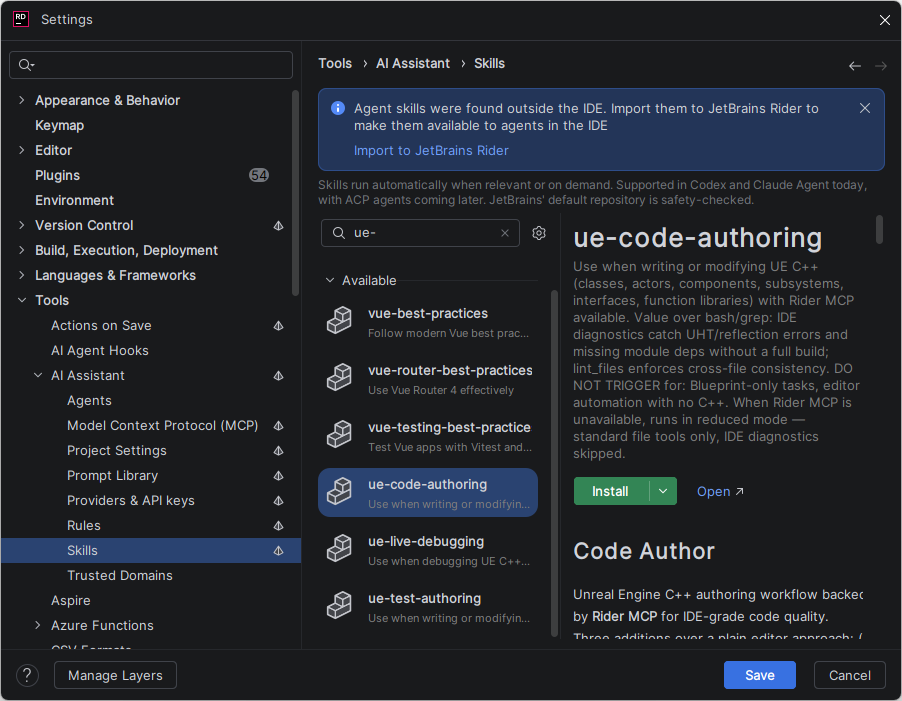
JetBrains Rider provides the following dedicated AI agent skills for working with Unreal Engine projects:
Use when writing or modifying UE C++ (classes, actors, components, subsystems, interfaces, function libraries).
Use when debugging UE C++ crashes, runtime bugs, or unexpected behavior.
Use when writing or modifying UE automated tests (Automation, CQTest, Functional, Gauntlet, LowLevel).
Configure agent skills for Unreal Engine projects on the Tools | AI Assistant | Skills settings page Ctrl+Alt+S. Use the search box to find the skill you need, then select it and click Install.