SpaceCode SDK
SpaceCode SDK is a library that lets you work with the JetBrains SpaceCode HTTP API and simplifies developing SpaceCode applications.
Quick start
1. Reference SpaceCode SDK in your project
Add the following dependencies to the project's build.gradle/build.gradle.kts file:
2. Create SpaceCode access token
To make any calls, your application must first authorize in SpaceCode. Normally, you should register your application in SpaceCode and use the received client ID and secret for authorization (Client Credentials OAuth 2.0 flow). But for testing purposes, it is faster and easier to create a personal token:
When creating the token, specify permissions required by your application (e.g., to send messages to SpaceCode users, grant Send direct messages in the global context). Note that a production application must use other ways to obtain the required permissions depending on its authorization flow.
3. Create SpaceCode client
SpaceCode SDK provides a client that simplifies making calls to SpaceCode:
4. Make a call to SpaceCode
Use the SpaceCode client to make calls to your SpaceCode instance:
1. Reference SpaceCode SDK in your project
Add the SpaceCode SDK client to your project. For example, with the dotnet command-line tool:
We use SDK 1.0.0-beta.v2022.2.0-DEV.113510.9115, but when you read this guide, a newer version may be available.
2. Create SpaceCode access token
To make any calls, your application must first authorize in SpaceCode. Normally, you should register your application in SpaceCode and use the received client ID and secret for authorization (Client Credentials OAuth 2.0 flow). But for testing purposes, it is faster and easier to create a personal token:
When creating the token, specify permissions required by your application (e.g., to send messages to SpaceCode users, grant Send direct messages in the global context). Note that a production application must use other ways to obtain the required permissions depending on its authorization flow.
3. Create SpaceCode connection
4. Make a call to SpaceCode
Create the required client and make calls to your SpaceCode instance:
What is inside SpaceCode SDK
SpaceCode SDK provides:
SpaceCode HTTP API client – The client provides access to SpaceCode endpoints and lets you
Processing requests from SpaceCode – A set of classes that helps you process payload received in SpaceCode requests.
Various helper utils that let you reduce boilerplate code, for example, formatting chat messages, processing SpaceCode payload, and so on.
SpaceCode SDK distributions
The SDK comes in two versions:
SpaceCode SDK for Kotlin available at the public JetBrains SpaceCode repository:
org.jetbrains:space-sdk-jvm:{version}– SpaceCode HTTP API client that can be used on the Java Virtual Machine (JVM).org.jetbrains:space-sdk-js:{version}– SpaceCode HTTP API client that can be used with Kotlin/JS.
SpaceCode SDK for .NET available at nuget.org:
JetBrains.SpaceCode.Client— The generated client code to work with the SpaceCode HTTP API.JetBrains.SpaceCode.AspNetCore— Helpers for using JetBrains.SpaceCode with ASP.NET Core.JetBrains.SpaceCode.AspNetCore.Authentication— Authentication provider that integrates with ASP.NET Core.
SpaceCode HTTP API client. Work with SpaceCode endpoints
The important part of SpaceCode SDK is the SpaceCode HTTP API client. Among many other things, the client provides direct access to SpaceCode endpoints. The corresponding properties and methods of SpaceCodeHttpClient are structured in the same way as in API Playground. You can always use the playground as interactive help and even client code generator:
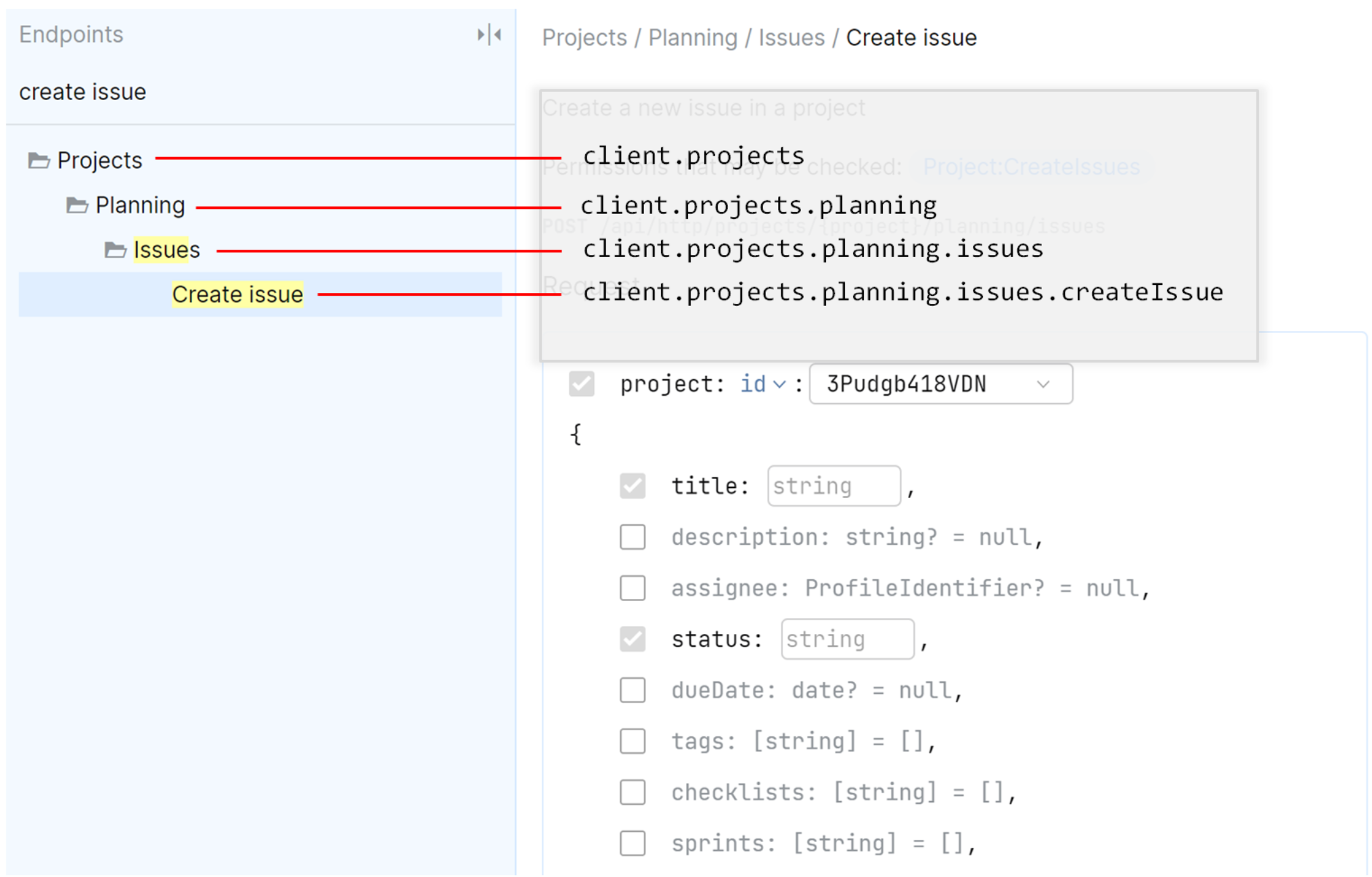
Get data from SpaceCode
You can use SpaceCode endpoints to get data from SpaceCode. For example, this is how you can get a user profile from the Team Directory
The memberProfile has properties of the profile such as id, username, and about.
Manipulate SpaceCode modules
SpaceCode endpoints let you perform many operations in SpaceCode, e.g. send a chat message, create a blog post, add a project member, close a code review, and so on. For example, this is how you can publish a blog post:
Application permissions
To perform get or set requests to SpaceCode endpoints, your application must have corresponding permissions. Learn how to request permissions.
You can find out what permissions are required to perform a certain call in API Playground.
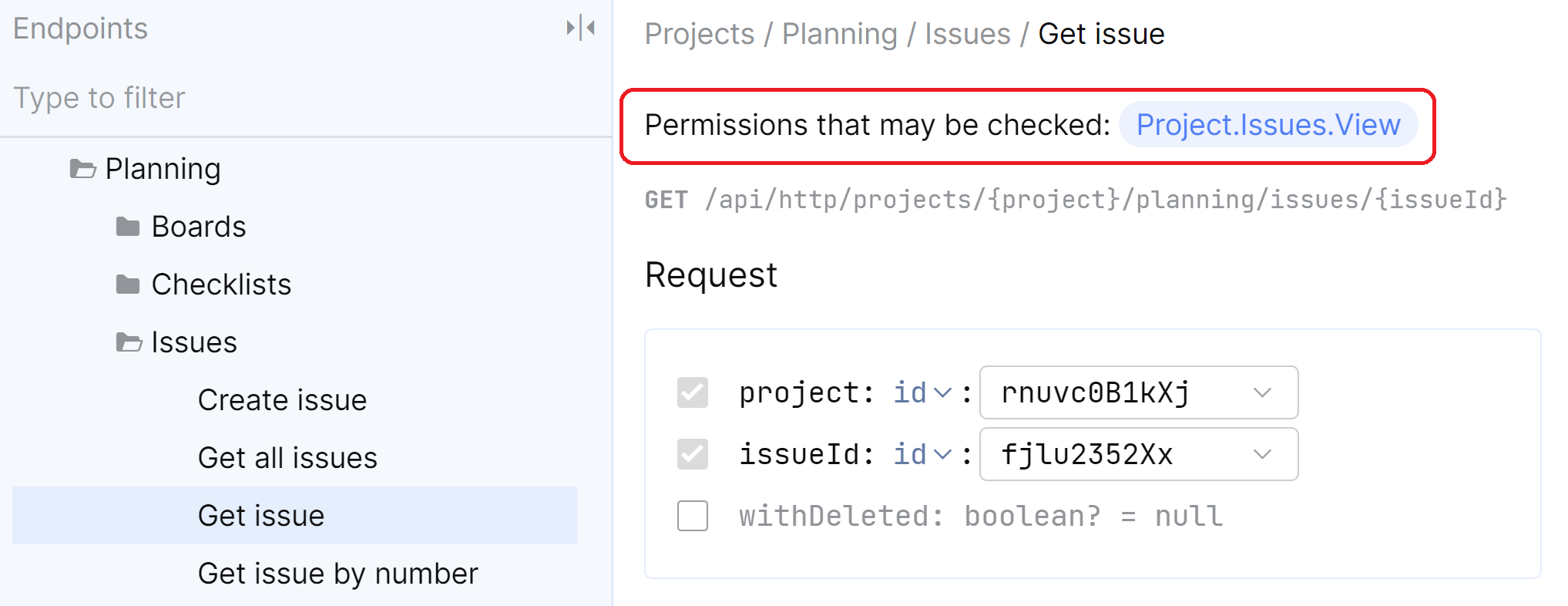
Fields and properties
All SpaceCode responses contain a JSON object with the requested data. By default, if you don't specify the fields you want to get, this JSON object will contain all top-level properties.
HTTP Request: GET https://jetbrains.team/api/http/team-directory/profiles/username:John.Doe
Authorization: Bearer abc123
Accept: application/json |
Response: {
"id": "2asfen24Jx6u",
"username": "John.Doe",
"name": {
"firstName": "John",
"lastName": "Doe"
},
"speaksEnglish": true,
"smallAvatar": "vYK0b1Qisdf2C",
"avatar": "40uDKb4RHdsst",
... |
You can do the same request with the SpaceCode SDK:
Partial responses
For most requests, you can shape the results you want to retrieve from SpaceCode. For example, to retrieve only the user id and the about description, you can set the $fields parameter in an API request to $fields=id,about.
Being able to retrieve just the information our application requires, helps to reduce the payload size and results in better overall performance.
HTTP Request: GET https://jetbrains.team/api/http/team-directory/profiles/username:John.Doe?$fields=id,about
Authorization: Bearer abc123
Accept: application/json |
Response: {
"id": "2asfen24Jx6u",
"about": "Johny is a nice man"
} |
To perform such a request with the SpaceCode SDK, you should use the so-called partial methods (id() and about() in our case):
If you try to access the memberProfile.name property, which is not in the response, the SpaceCode HTTP client will throw an IllegalStateException with additional information.
Worth noting that fields can be not only of a value type (integer, string, boolean, and so on), but of a complex type as well. As an example, a user profile has the name field of the TD_ProfileName, which in turn has the firstName and lastName fields. To request this hierarchy, you need to query $fields=name(firstName,lastName)
Nested properties
If you perform a request like that:
SpaceCode will return an instance of the TD_MemberProfile type which includes a lot of top-level properties: id, username, about, and others. Among them there is the managers property which is a collection of nested TD_MemberProfile instances. Such a property is not retrieved by default. You must do this explicitly.
For example, if you want to retrieve managers for a user profile including manager names, you should request these properties by extending the default partial result:
Here:
defaultPartial(): a special partial method that adds all fields at the current level (*field definition).
Recursive responses
The example with memberProfile.managers is quite interesting because every manager can have its own manager (who can also have a manager, who ...). As you don't know how many managers are in this tree, you can request a recursive response. It will return the entire managers tree.
The functions that represent such tree structures have special overloads for retrieving recursive responses. For example in case of managers, it's managers(recursiveAs: TD_MemberProfilePartial). This is how you can use it:
Inheritance
There are several SpaceCode endpoints that return subclasses (polymorphic responses).
One such example is spaceClient.projects.planning.issues.getAllIssues(), where the createdBy property can be a subclass of CPrincipalDetails:
CAutomationTaskPrincipalDetails, if the issue was created by an automation task.CBuiltInServicePrincipalDetails, if the issue was created by SpaceCode itself.CExternalServicePrincipalDetails, if the issue was created by an external service.CUserWithEmailPrincipalDetails, if the issue was created by a user that has an e-mail address.CUserPrincipalDetails, if the issue was created by a user.
The partial builder contains properties for all of these classes.
Here's an example retrieving issues from a project. For the createdBy property, you are defining that the response should contain:
CUserPrincipalDetailswith theuser.idproperty.CUserWithEmailPrincipalDetailswith thenameandemailproperties.
You can cast these types, use when expressions on them, and so on.
Batches
There are a lot of requests that can return a collection of results. To increase performance, these responses will be paginated, and can be retrieved in batches.
You must specify the properties of the data type you need. For example, let's retrieve the user's To-Do items for some date including their id and content:
Here:
hasNext(): an extension method that lets you to determine whether more results need to be retrieved:fun Batch<*>.hasNext() = !data.isEmpty()
The resulting batch will contain one page of results. To retrieve more To-Do items, you should make additional API calls.