Pull Requests
The Pull Requests build feature integrates TeamCity with pull (merge) requests in GitHub, Bitbucket Server, Bitbucket Cloud, GitLab, Azure DevOps, and JetBrains Space repositories.
Common Information
Adding the Pull Requests feature to a build configuration allows you to:
View pull request branches and their pending changes on the build configuration's overview page.

View pull request details on the Overview tab of the build results page.
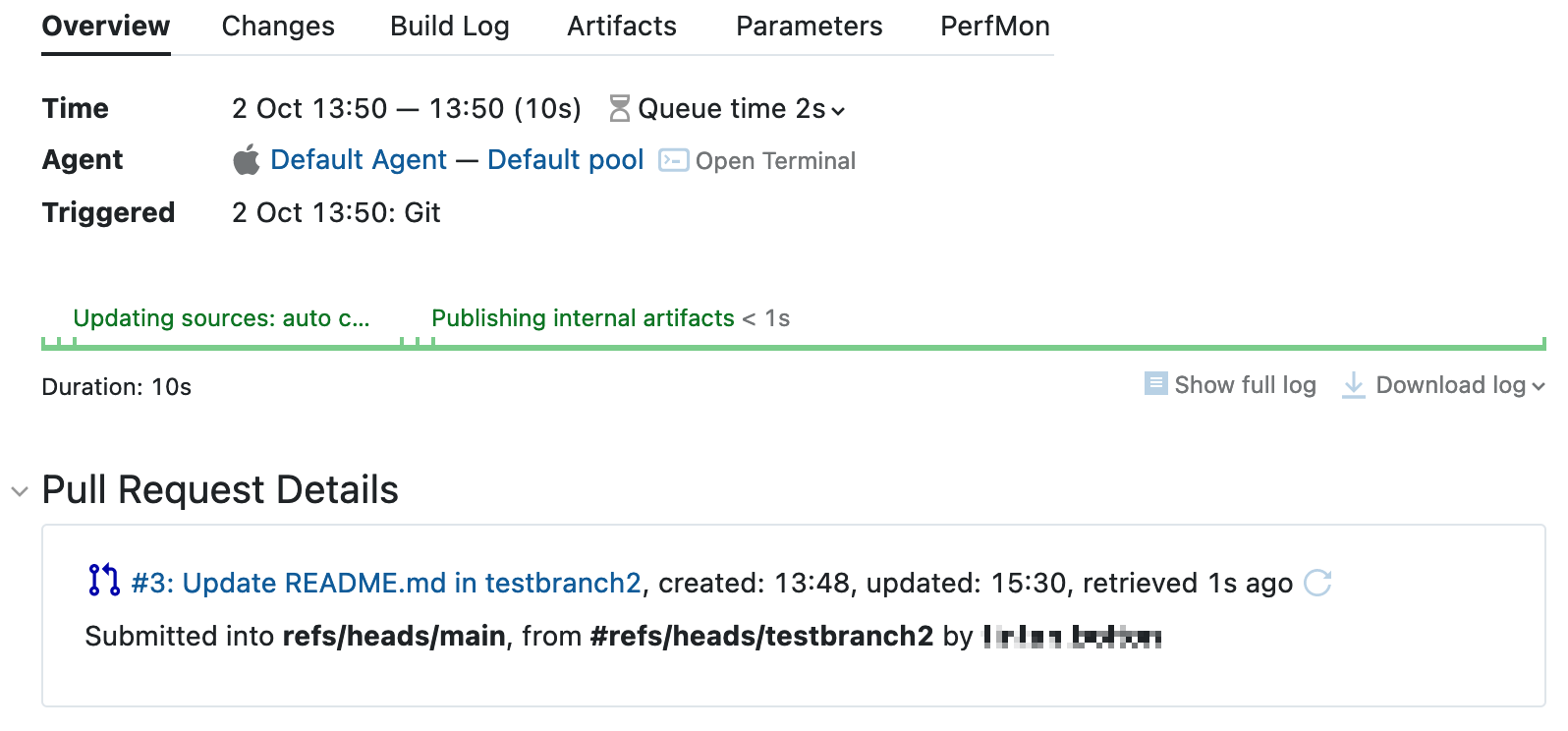
For a draft pull request, the icon is grayed-out and the Draft status appears before the pull request number:

Filter which pull requests to monitor by their authors, target branches, and origin branches.
Set up a workflow where developers work in local branches, and TeamCity only builds these changes once they are sent as a pull (merge) request — see Interaction with VCS Roots below.
The Pull Requests feature does not automatically trigger new builds against pull (merge) request branches. To assess changes from pull request branches before they are merged into the main codebase, add a VCS trigger that targets the required branches (for example, refs/pull/N/head for GitHub). New build configurations created in the TeamCity UI already include a trigger with the +:* specification, which lets TeamCity build changes from pull (merge) request branches.
If your project targets a GitHub or GitLab repository, you can go further and let TeamCity build pull request branches and merge those requests that yield successful builds. To do this, add the Automatic Merge build feature alongside Pull Requests.
Interaction with VCS Roots
The Pull Requests feature extends the original branch specification of VCS roots attached to the current build configuration. Because of this, branch specifications of a VCS root must not contain patterns that match pull request branches, to avoid ambiguous and unexpected behavior.
If a build configuration should build only pull requests, clear the branch specification of its parent VCS root:
If this VCS root is shared with other configurations, use configuration branch filters instead, to leave only pull request branches available:
The sample below shows how to set up a TeamCity project so that the root branch specifications and the Pull Requests feature complement each other to implement the following workflow:
TeamCity tracks only the
main,production, andsandboxbranches, as well as all branches starting with "release-" (for example,release-2077.02).Developers can create and work with local branches without any exposure to TeamCity.
When a developer is ready to publish their changes, they create a request to merge commits from a personal (untracked) branch into a core (tracked) one. This results in a new pull branch (for example,
refs/pull/54on GitHub). The Pull Requests feature detects this new branch, making it possible to build and test the changes in TeamCity before they are merged.Thanks to the feature's Filter by author setting, TeamCity ignores similar
refs/pull/<Int>branches created by unauthorized (external) users.
VCS-specific settings
GitHub Pull Requests
This feature supports GitHub and GitHub Enterprise. It monitors builds only on the refs/pull/*/head branch.
The following parameters are available for the GitHub hosting type:
- Authentication Type
Use VCS root credentials — TeamCity tries to extract username/password credentials or a personal access token/
x-oauth-basicfrom the VCS root settings if the VCS root uses an HTTP(S) fetch URL. This option does not work if the VCS root employs anonymous authentication or SSH. For a GitHub Enterprise repository, only the personal access token/x-oauth-basicpair works.Access token — if you have a configured OAuth connection to GitHub, click the magic wand button to let TeamCity automatically retrieve the corresponding access token.
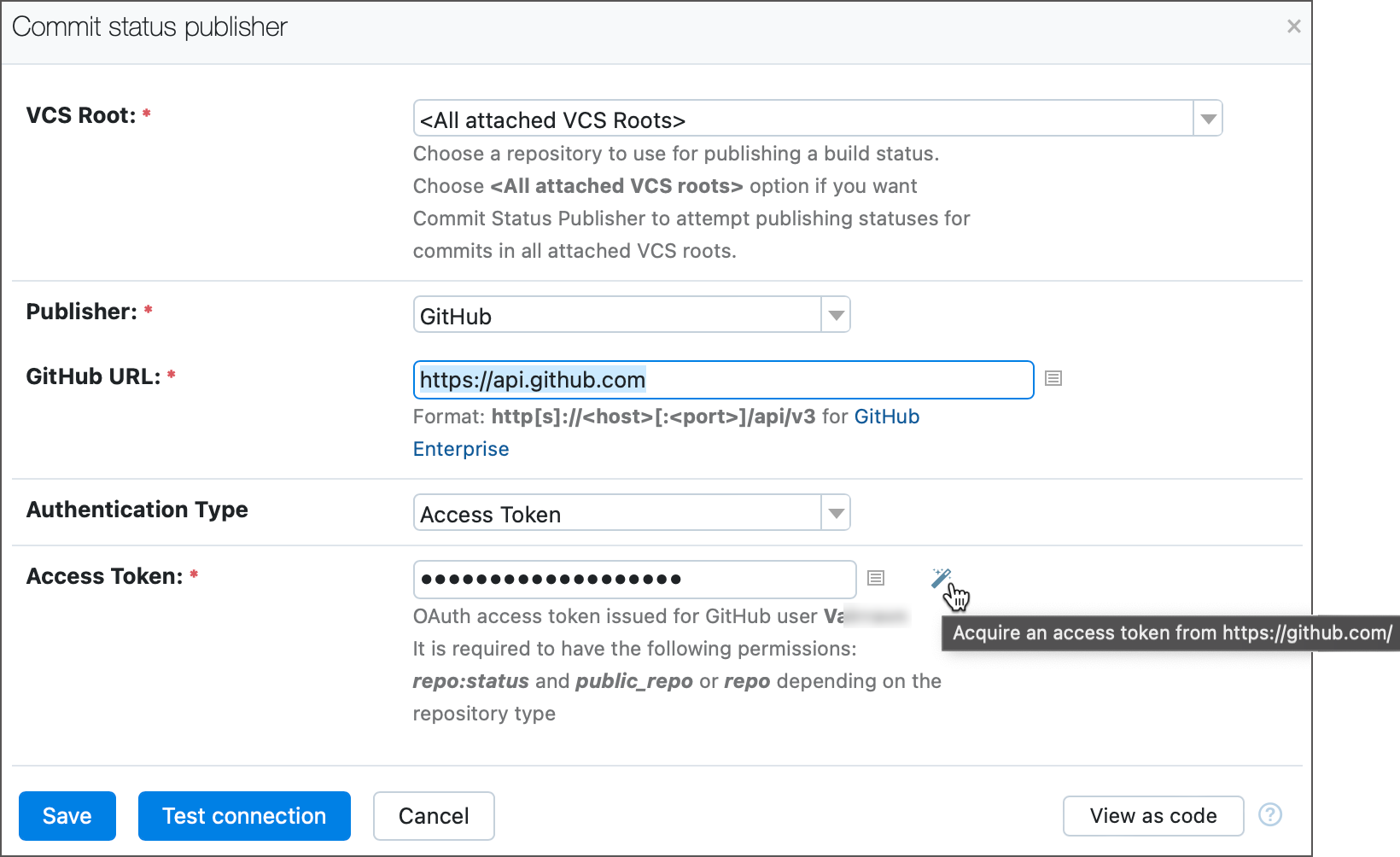
Otherwise, if you insert a token manually issued on the GitHub side, make sure it has the following permissions or scopes:
Classic GitHub tokens:
public_repofor public repositories,repofor private repositories. See also: Scopes for OAuth apps.Fine-grained tokens: add the
Pull requestspermission with the "Read-only" access type. This permission can only be added for tokens with the "All repositories" or "Only select repositories" access type. See also: Permissions required for fine-grained personal access tokens.
GitHub App access token — a non-personal short-lived token issued via the GitHub App. Available only when the VCS Root setting points to a specific VCS root configured using a GitHub App connection.
- Discovery mode
Determines how TeamCity identifies pull requests:
By branch specification refs (default) — TeamCity identifies pull requests by their actual
refs/pull/N/headbranches.By source branch names — Requests are identified by their source branches. Enabling mode has the following effects:
Pull requests from forks are ignored.
Different pull requests coming from the same source branch are aggregated into one, and can be processed inside the same build.
In TeamCity UI, source branch names are shown (compared to
pull/Nnames in the default mode).As a side effect, TeamCity more accurately synchronizes pull requests made to separate repositories if two configurations are linked into a build chain. For example, in the default mode, if an upstream configuration processes changes from the
pull/10branch, the downstream build runs against the same branch. Given that each repository has its own unique pull request counter, this chain can build unrelated changes. If the By source branch names mode is enabled, TeamCity recognizes that changes from thepull/10branch of one repository correspond to thepull/54branch of another one, since both originate from the samesandboxbranch.
Note that switching this mode changes how TeamCity recognizes pull requests, which may cause an influx of new pull requests (and, if automatic triggers are configured, an influx of queued builds). This is a one-time spike in build volumes that resolves once all newly discovered pull requests have been processed.
- By authors
Filters which pull requests TeamCity monitors by their author. Applies to public repositories only.
Members of the same organization — only detects pull requests submitted by members of the same organization.
Members and external collaborators — only detects pull requests submitted by members of the same organization and external collaborators.
Everybody — detects all pull requests. Be aware that this option may allow arbitrary users to execute malicious code on your build agents.
- By source branch
Restricts monitored pull requests to source branches matching this branch filter. Leave empty to apply no filter.
- By target branch
Restricts monitored pull requests to target branches matching this branch filter. Leave empty to apply no filter.
- Ignore Drafts
By default, the Pull Requests build feature loads GitHub draft pull requests information and runs builds on them — the build page shows a grayed-out icon and the Draft status next to the pull request number.
Check the box to ignore GitHub draft pull requests. TeamCity will not load draft pull request information until its status changes.
- Server URL
A GitHub URL for connection. If left empty, the URL is extracted from the VCS root fetch URL.
Bitbucket Server/Data Center Pull Requests
The following parameters are available for the Bitbucket Server/Data Center hosting type:
- Authentication Type
Use VCS root credentials — TeamCity tries to extract username/password credentials from the VCS root settings if the VCS root uses an HTTP(S) fetch URL. This option does not work if the VCS root uses an SSH fetch URL or employs anonymous authentication.
Username/password — specify a username and password for connection to Bitbucket Server/Data Center. You can submit an access token instead of the password; the token should have Read permissions for projects and repositories.
Refreshable access tokens are short-lived tokens acquired by TeamCity from a required VCS provider via existing OAuth connections (as opposed to static PAT tokens issued manually by users on a VCS hosting side). See the following article for more information on generating and using refreshable tokens: Manage Refreshable Access Tokens.
- By source branch
Restricts monitored pull requests to source branches matching this branch filter. Leave empty to apply no filter.
- By target branch
Restricts monitored pull requests to target branches matching this branch filter. Leave empty to apply no filter.
- Server URL
A Bitbucket URL for connection. If left empty, the URL is extracted from the VCS root fetch URL.
- Use pull request branches
Intended for backward compatibility only. Enables detection of officially unsupported Bitbucket pull request branches (
pull-requests/*) instead of source branches.Be careful: new builds might be triggered for changes committed within the last hour after switching.
Bitbucket Cloud Pull Requests
Since Bitbucket Cloud does not create dedicated branches for pull requests, this build feature monitors source branches directly in a source repository (forks are not supported). If more than one pull request is submitted from the same source branch at the moment the build starts, TeamCity displays all these requests in the build results. However, only commits from open PRs matching the filtering criteria are displayed as Changes of the build.
Note that the branch specification of the VCS root must not contain patterns matching pull request branches.
The following parameters are available for the Bitbucket Cloud hosting type:
- Authentication Type
Use VCS root credentials — TeamCity tries to extract username/password credentials from the VCS root settings if the VCS root uses an HTTP(S) fetch URL. This option does not work if the VCS root uses an SSH fetch URL or employs anonymous authentication.
Username/password — specify a username and password for connection to Bitbucket Cloud. We recommend using an app password with the Pull Requests | Read scope.
Refreshable access tokens are short-lived tokens acquired by TeamCity from a required VCS provider via existing OAuth connections (as opposed to static PAT tokens issued manually by users on a VCS hosting side). See the following article for more information on generating and using refreshable tokens: Manage Refreshable Access Tokens.
Permanent Access Token — enter a Bitbucket Repository Access Token, Project Access Token, or Workspace Access Token for long-lived access to a repository, workspace, or project. The token must have the Pull Requests | Read scope.
- By target branch
Restricts monitored pull requests to branches matching this branch filter. Leave empty to apply no filter.
GitLab Merge Requests
TeamCity processes GitLab merge requests similarly to how it processes pull requests in other hosting services. Currently, TeamCity only detects merge requests submitted after this build feature is enabled.
This feature monitors builds only on the refs/merge-requests/*/head branch.
The following parameters are available for the GitLab hosting type:
- Authentication Type
Use VCS root credentials — TeamCity tries to extract login credentials or an access token from the VCS root settings if the VCS root uses an HTTP(S) fetch URL. This option does not work if the VCS root employs anonymous authentication.
Personal Access Token — use a personal access token issued in GitLab. It must have the
apiscope.Refreshable access tokens are short-lived tokens acquired by TeamCity from a required VCS provider via existing OAuth connections (as opposed to static PAT tokens issued manually by users on a VCS hosting side). See the following article for more information on generating and using refreshable tokens: Manage Refreshable Access Tokens.
- By source branch
Restricts monitored merge requests to source branches matching this branch filter. Leave empty to apply no filter.
- By target branch
Restricts monitored merge requests to target branches matching this branch filter. Leave empty to apply no filter.
- Ignore Drafts
By default, the Pull Requests build feature loads GitLab draft merge requests information and runs builds on them — the build page shows a grayed-out icon and the Draft status next to the merge request number.
Check the box to ignore GitLab draft merge requests. TeamCity will not load draft merge request information, and a merge request is ignored until its status changes to non-draft.
- Server URL
A GitLab URL for connection. If left empty, the URL is extracted from the VCS root fetch URL.
Azure DevOps Pull Requests
This feature monitors builds only on the refs/pull/*/merge branch.
For Azure DevOps, TeamCity detects requests on a merge branch — not on the pull request itself as with other VCSs. Each build is launched on a virtual branch showing the actual result of the build after merging the PR, so the build contains both the commit with changes and the virtual merge commit.
Note that the feature ignores Azure DevOps draft pull requests.
- Authentication Type
Personal Access Token — a static token that you can issue in your Azure DevOps account settings. Your issued token should have the
Code (read)scope to allow Pull Requests to retrieve the required information.Refreshable access tokens are short-lived tokens acquired by TeamCity from a required VCS provider via existing OAuth connections (as opposed to static PAT tokens issued manually by users on a VCS hosting side). See the following article for more information on generating and using refreshable tokens: Manage Refreshable Access Tokens.
- By source branch
Restricts monitored pull requests to source branches matching this branch filter. Leave empty to apply no filter.
- By target branch
Restricts monitored pull requests to target branches matching this branch filter. Leave empty to apply no filter.
- Project URL
A project URL for synchronization with the remote Azure DevOps server. Recommended for on-premises Azure DevOps installations. If left empty, the URL is composed based on the VCS root fetch URL.
JetBrains Space Merge Requests
This feature monitors merge requests directly in the source branches of an origin repository. If more than one merge request is submitted from the same source branch, TeamCity displays all these requests in the build results. However, only commits from open requests matching the filtering criteria are displayed as Changes of the build.
The following parameters are available for the JetBrains Space hosting type:
- Connection
Choose a preconfigured connection to JetBrains Space.
- By target branch
Restricts monitored merge requests to branches matching this branch filter. Leave empty to apply no filter.
If you want to run several parallel builds to pretest a request before merging it, the best solution is to:
Create a composite build configuration and attach your JetBrains Space VCS root with an empty branch specification to it.
Add the composite build configuration at the end of the build chain by configuring its snapshot dependencies on parallel builds with tests.
Add the Pull Requests feature to each build configuration of the chain so that all builds can detect changes in a merge request branch. You can preconfigure all settings in a build configuration template and then create these build configurations based on it.
In the composite build configuration settings:
Add a VCS trigger to automatically run builds on changes detected in the merge request branch.
Add the Commit Status Publisher feature to send the build statuses to the commit details in JetBrains Space. If you want other builds of the chain to report their statuses to JetBrains Space (for example, deployment or integration testing builds), add the Commit Status Publisher feature to the corresponding build configurations.
After that, TeamCity automatically runs builds on changes in a merge request branch submitted to your JetBrains Space repo and publishes build statuses to the merge request timeline in Space:
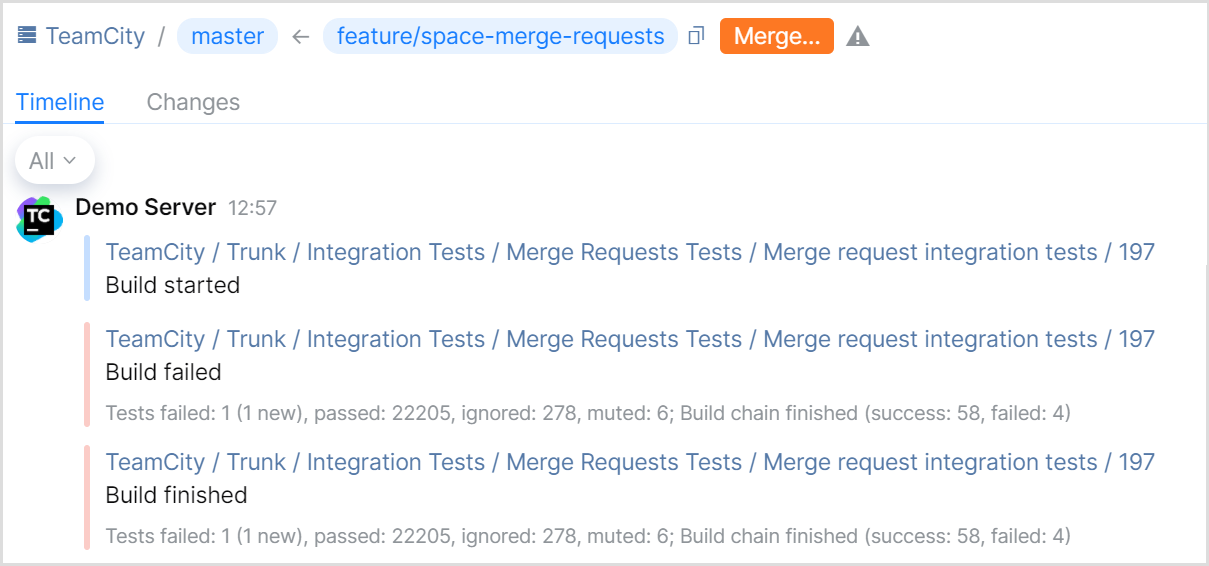
To protect a JetBrains Space branch from unverified merge requests, you can also configure Quality Gates in your repository settings. If you set a TeamCity build as an external check, JetBrains Space requires the build on a merge request to finish successfully before allowing this request to be merged.
See known issues with processing JetBrains Space merge requests here.
Predefined build parameters for pull requests
TeamCity provides several predefined build parameters that expose valuable pull request information for builds with the Pull Requests feature enabled:
You can use these parameters in the settings of a build configuration or in build scripts.
Pull Requests workflow example
Let's say you have the following environment set up:
Public GitHub repository
web-appwith the default branchmaster.TeamCity project.
Build configuration
web-appthat uses files from theweb-apprepository to build a web application.
The members of your organization propose changes to the sources by sending pull requests to the master branch, and you want these changes to be automatically built and tested in TeamCity before you merge them. TeamCity can detect each pull request sent to the master branch and build the web application based on the updated sources.
To configure this workflow for the web-app build configuration in TeamCity:
Add a VCS root to the build configuration:
Open configuration settings and navigate to the Version Control Settings settings tab.
Click Attach VCS root.
Configure the root parameters:
Type of VCS: Git
VCS root name: \<unique_root_name\>
Fetch URL: \<GitHub_repository_URL\>
Default branch: the branch to be monitored; by default,
refs/heads/master(read more about feature branches)Branch specification: a filter for additional branches to be monitored (for example,
+:refs/heads/*)Authentication Settings of the GitHub user that has access rights to the
web-apprepository
Test the connection and, if successful, click Create.
Add the Pull Requests build feature to the build configuration:
Open configuration settings and navigate to the Build Features settings tab.
Click Add build feature.
Configure the feature parameters:
VCS Root: the VCS root created at Step 1
VCS hosting type: GitHub
Authentication Type: Use VCS root credentials, or select Access token to use a GitHub token instead
Pull Requests filtering:
By authors: Members of the same organization
By target branch: leave empty to apply no filters and monitor all new pull requests in the repository, or explicitly specify the target branch (in this example,
master)
Test the connection and, if successful, click Save.
Add a VCS trigger to the build configuration.
With this integration in place, whenever a member of your GitHub organization sends a pull request to the master branch, TeamCity does the following:
Detects the pull request sent to the
masterbranch.Runs the
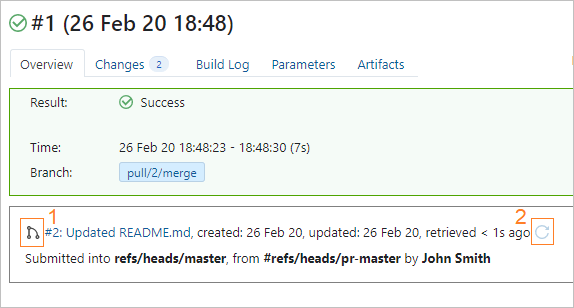
web-appbuild configuration: collects sources, builds and tests the app according to your predefined build steps.Displays information about the processed pull request on the build configuration Overview page. You can instantly see the pull request status (1) and refresh the information about its state (2).
Pro Tips
You can automate your setup further, so TeamCity:
Sends a build status back to GitHub after the build finishes, with the Commit Status Publisher build feature.
Merges the pull request in GitHub if the build finishes successfully, with the Automatic Merge build feature.
If you want to run a whole build chain on a pull request, remember to add the Pull Requests feature to each build configuration of the chain. To simplify this, you can set everything up in a build configuration template and then create these build configurations based on it.