AI Features
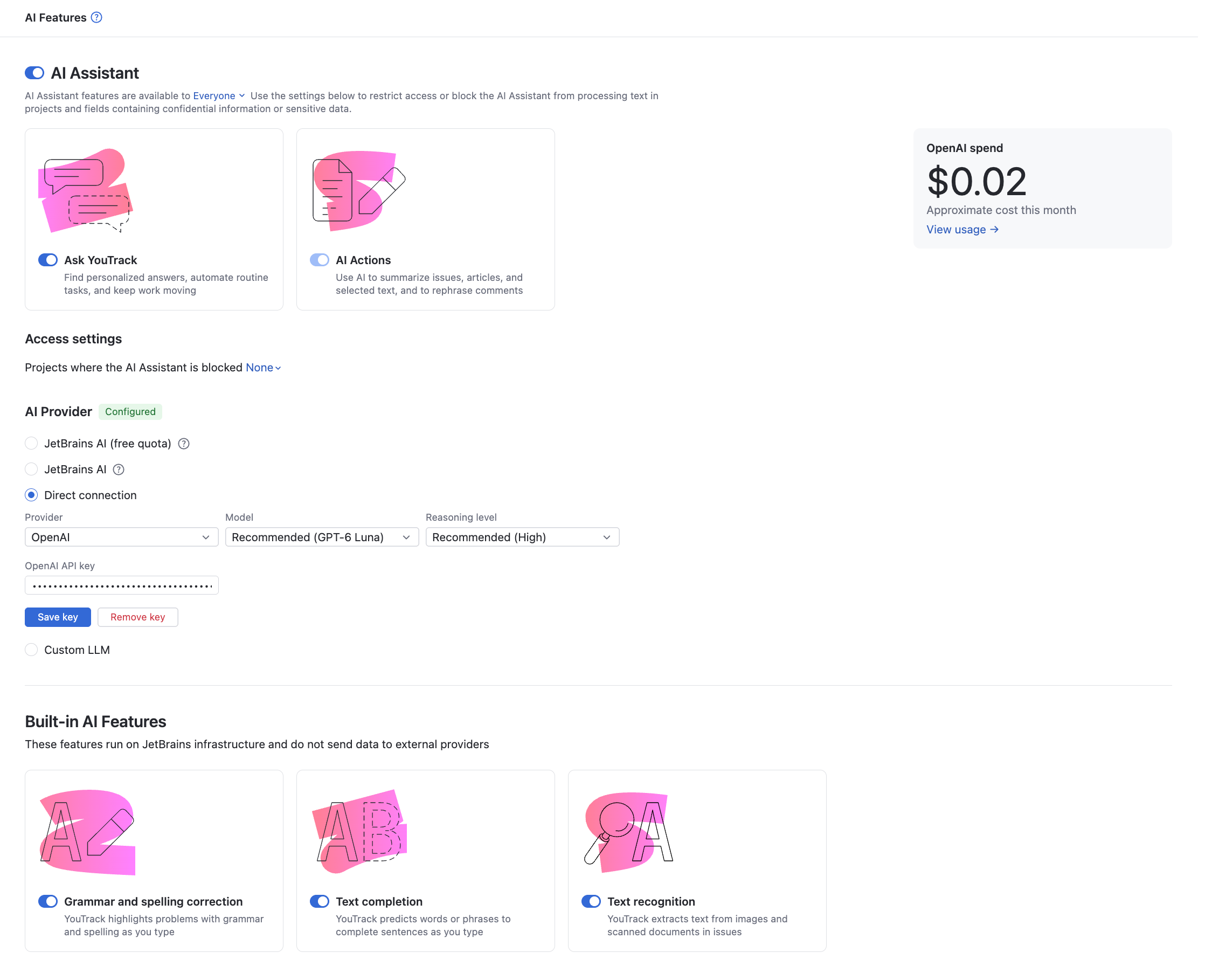
The AI Features settings let administrators manage access to AI-powered features in YouTrack. These settings include the AI Assistant, built-in AI features, access restrictions, provider connections, and usage information.
Availability
AI Assistant features are available in YouTrack Cloud.
For YouTrack Server, AI Assistant features are available on installations that run YouTrack version 2023.3 or later and have an active paid subscription.
Due to restrictions imposed by AI service providers, AI features are only available in specific locations. To determine whether these restrictions apply to your location, refer to the JetBrains AI service territory.
AI Assistant
AI Assistant helps users find information and work with text in YouTrack. It powers Ask YouTrack, which answers questions about your YouTrack data, and AI Actions for summarizing, rephrasing, and improving content.
Use the AI Assistant switch to activate or deactivate AI Assistant features for your YouTrack site. When the AI Assistant is deactivated, Ask YouTrack and AI Actions are unavailable to users.
When the AI Assistant is active, the page provides two access controls. Use the AI Assistant features are available to selector under the AI Assistant toggle to choose who can use AI Assistant features. Use Access settings to block AI Assistant from processing text in specific projects.
To choose who can use AI Assistant features:
From the main navigation menu, select
 .
In the sentence under the AI Assistant toggle, open the AI Assistant features are available to selector.
Select the users, groups, or teams that should have access to AI Assistant features. To make AI Assistant features available to all users, select Everyone.
To block AI Assistant in specific projects:
From the main navigation menu, select
.In the Access settings section, open the Projects where the AI Assistant is blocked selector.
Select the projects where AI Assistant must not process text. When a project is selected, AI Assistant features are unavailable for content in that project.
To allow AI Assistant features in a project again, remove the project from the selector.
Ask YouTrack
Ask YouTrack is a chat assistant for YouTrack-related tasks. Use its setting to make the chat assistant available or unavailable without changing the rest of the AI Assistant configuration.
If Ask YouTrack is disabled, users don't see Ask YouTrack in the main menu or on supported pages. If the AI Assistant is disabled, the Ask YouTrack setting is also unavailable.
For more information about the user experience, see Ask YouTrack.
AI Actions
AI Actions help users work with text in YouTrack. They include actions for summarizing issues, articles, and selected text, and for rephrasing comments.
AI Actions are part of the AI Assistant and can't be disabled separately. To make AI Actions unavailable, deactivate the AI Assistant.
AI Provider
The AI Provider settings control which provider and model YouTrack uses for AI Assistant features. The status next to the section heading shows whether the provider connection is configured.
For connections that use a provider-specific setup, the Provider field lets you select the AI provider that processes requests. After you select a provider, choose the Model and Reasoning level for that provider. The available models and reasoning levels depend on the selected provider.
YouTrack provides recommended options for the selected provider. You can use the recommended model and reasoning level or select specific values from the corresponding menus.
The following connection options are available:
Option | Description |
|---|---|
JetBrains AI (free quota) | Uses the shared free quota for AI Assistant features. The monthly quota is based on the size of your paid YouTrack license and is shared by the YouTrack instance.
|
JetBrains AI | Uses a JetBrains AI connection with your own credentials.
|
Direct connection | Connects directly to a supported AI provider.
|
Custom LLM | Connects to a custom language model endpoint.
|
Usage and Spending
The usage summary shows the remaining free quota or the approximate AI spend for the current month. For paid provider connections, the spend label reflects the selected AI provider.
Click View usage to open the AI Features / Usage page. This page shows AI Assistant usage for the current month in UTC. The report does not include built-in AI features.
The usage page shows the current billing mode and, for paid provider connections, the estimated total spend for the month. For the free quota mode, the report shows usage shares without estimated costs.
Usage is grouped by user. Each row shows the user's share of total AI Assistant usage for the month. For paid provider connections, each row also shows the user's estimated spend. The bar in each row shows how that user's usage is distributed across AI Assistant feature categories, such as Ask YouTrack, AI Actions, link suggestions, and comment suggestions.
Built-in AI features are free and do not consume your AI Assistant quota.
Built-in AI Features
Built-in AI features run on JetBrains infrastructure and do not send data to external providers.
The following built-in AI features are available:
Grammar and spelling correction: highlights problems with grammar and spelling as users type.
Text completion: predicts words or phrases to complete sentences as users type.
Text recognition: extracts text from images and scanned documents in issues.
When enabled by an administrator, built-in AI features are available to everyone on your YouTrack site. Registered users can open the AI Features tab in their profile to turn grammar and spelling correction or text completion off for their own account. For more information, see AI Features.
When disabled at the administration level, built-in AI features are deactivated system-wide.
How We Handle Your Data
When users work with AI Assistant features, YouTrack sends their requests to the configured LLM provider. In addition to the prompt text, YouTrack can send information about the context where the AI Assistant is used, for example an issue, article, or comment.
YouTrack installations that have opted into sharing feature usage statistics with JetBrains also collect detailed usage data for AI features, including the communication with the LLM. This data is kept confidential and is used by JetBrains for product improvement purposes only. It is not shared with external parties, used for training ML models that generate code or text, or revealed to other users.
The writing assistance provided by Grazie follows additional privacy safeguards:
JetBrains doesn't use any text you type for training language models.
JetBrains doesn't retain your texts in server memory or logs.
For more information, refer to the JetBrains AI Terms of Service, JetBrains Grazie Terms of Service, and the JetBrains Privacy Policy.