データベースダイアグラム
Diagrams プラグインを有効化
この機能は、Diagrams プラグインに依存しており、DataGrip にはデフォルトでバンドルされて有効になっています。 関連機能が利用できない場合は、プラグインを無効化していないことを確認してください。
Ctrl+Alt+S を押して設定を開き、 を選択します。
インストール済み タブを開き、 Diagrams プラグインを見つけて、プラグイン名の横にあるチェックボックスを選択します。
データベースダイアグラムは、データベースの構造とデータベースオブジェクト間の関係をグラフィカルに示します。 データソース、スキーマ、テーブルのダイアグラムを生成できます。 データベースオブジェクト間の関係を作成するには、 主キーと 外部キーの使用を検討してください。
次のビデオは、DataGrip のダイアグラムの概要を示しています。
生成されたダイアグラムは、UML と PNG の 2 つの形式で保存できます。 UML 形式は、DataGrip 向けに特別に開発された内部形式です。 他の製品ではサポートされていません。 作成したダイアグラムを共有したい場合は、PNG の使用を検討してください。
また、実行計画を構築することもできます。 実行計画は、データベース内のデータにアクセスするために使用される一連のステップです。 実行計画の作成方法の詳細については、 クエリプランの視覚化 を参照してください。
データベースオブジェクトのダイアグラムを生成する
データベースエクスプローラー で、データベースオブジェクトを右クリックし、 を選択します。
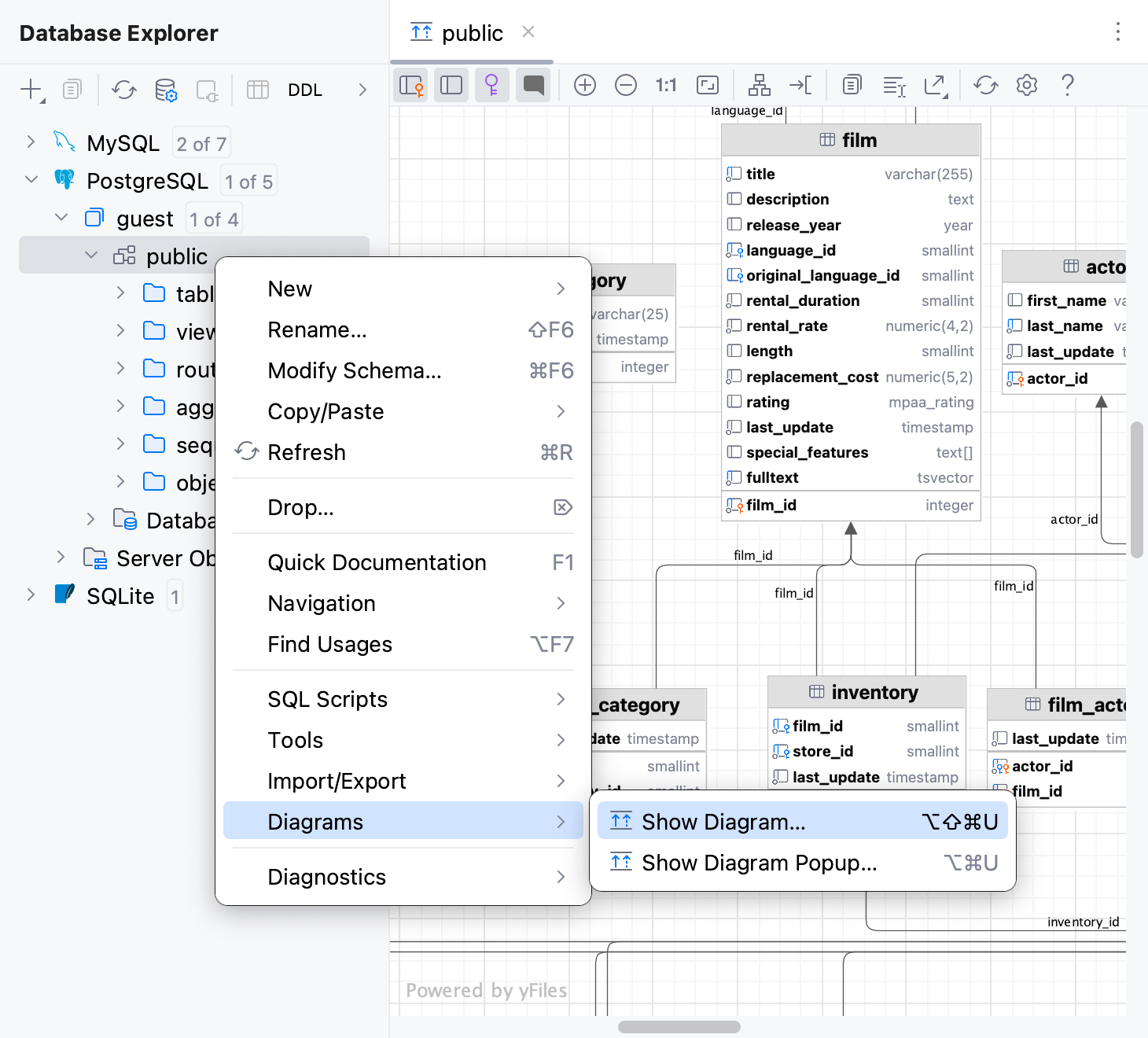
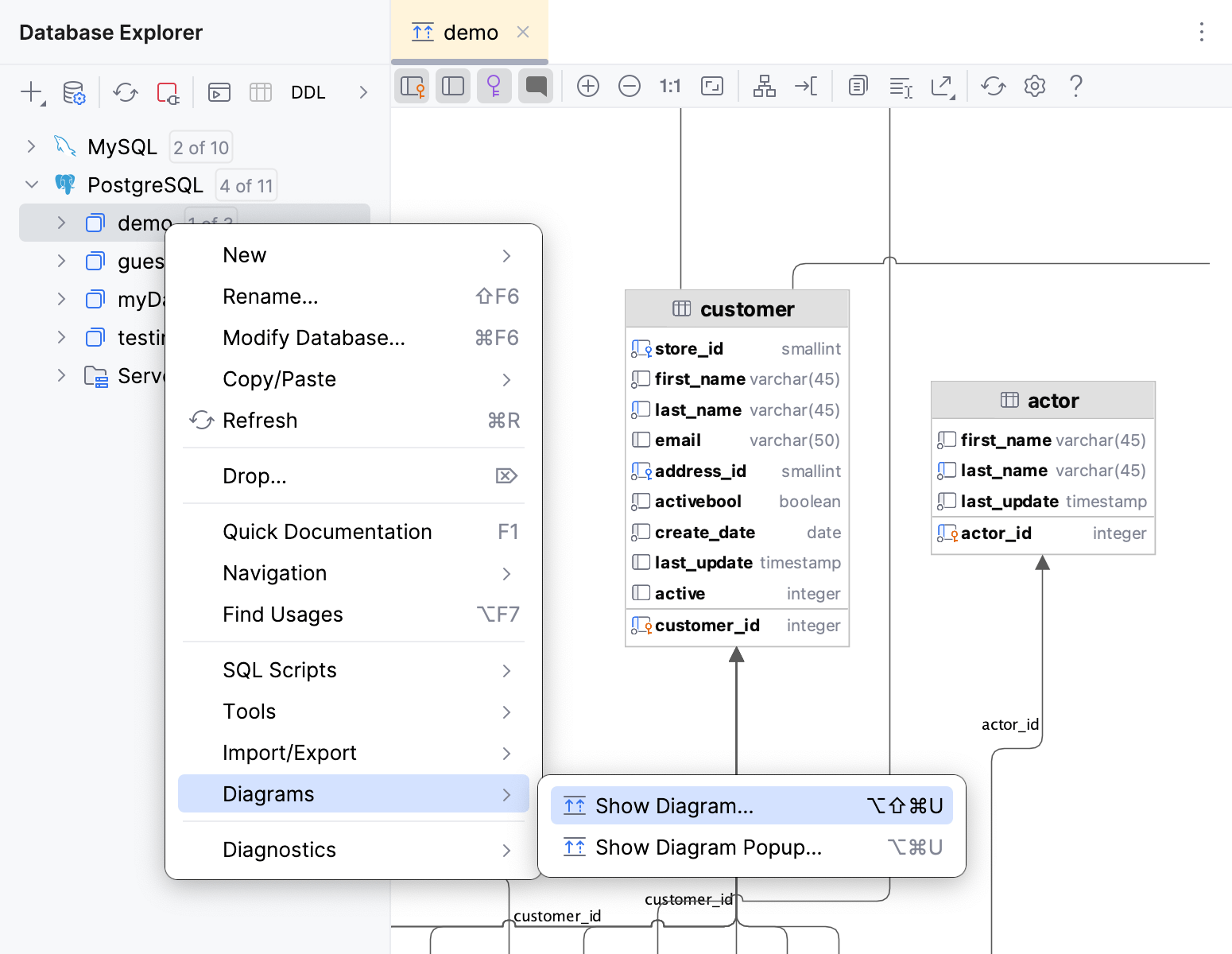
ダイアグラムに表を追加する
生成されたデータベースダイアグラムに、さらにテーブルを追加できます。
データベースエクスプローラー で、ダイアグラムに追加したいテーブルをダイアグラム領域にドラッグします。
ダイアグラムの表示と管理
パンとズーム
ダイアグラムをパンおよびズームするには、垂直スクロールにはタッチパッド、スクロールバー、またはマウスホイールを使用し、水平スクロールには Shift + マウスホイールを使用します。 Shift + マウスホイールを使用してズームすることもできます。
拡大鏡ツールを使用するには、 Alt キーを押したまま、ダイアグラムの目的の領域にマウスカーソルを合わせます。 マウスホイールで拡大鏡ツール内のダイアグラム領域をさらにズームできます。
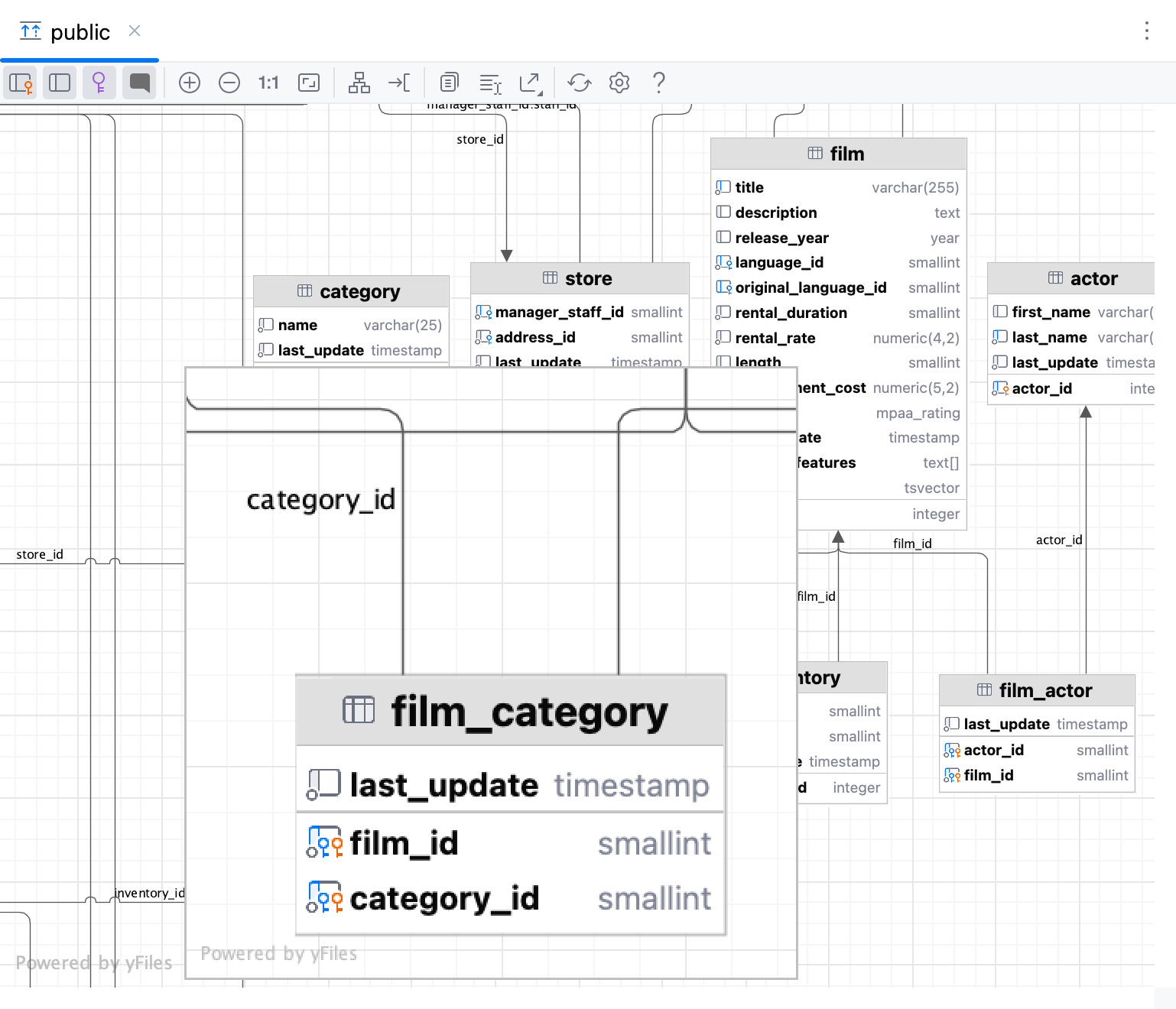
列コメントを有効にする
ダイアグラムを生成します。 ダイアグラムの生成の詳細については、「データベースオブジェクトのダイアグラムを生成する 」を参照してください。
コメント ボタン (
 ) をクリックします。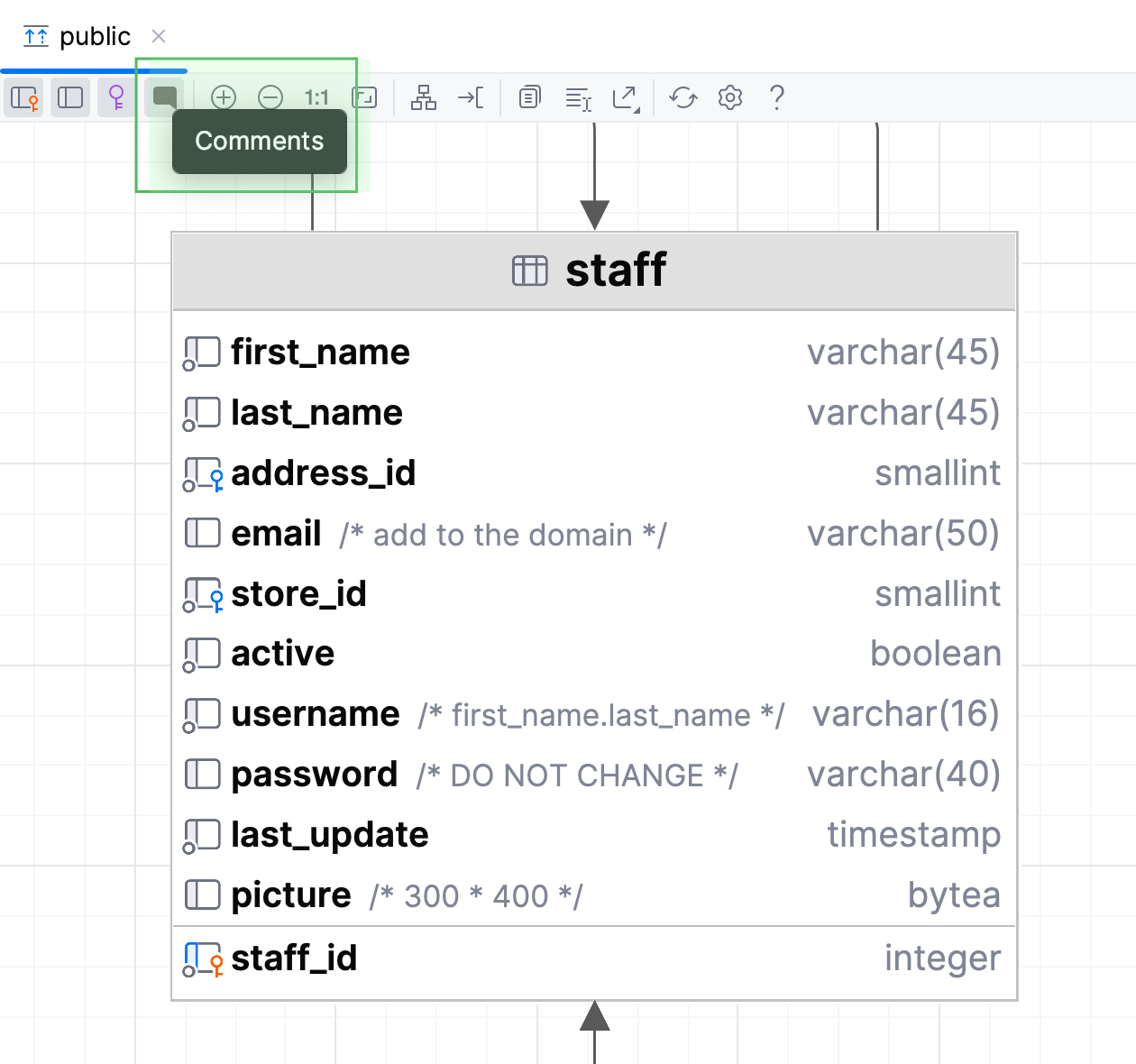
ダイアグラムオブジェクトに色を適用する
データベースエクスプローラー でオブジェクトを右クリックし、 を選択します。
色を選択し、 OK をクリックします。 リフレッシュ ボタン () をクリックして、ダイアグラムをリフレッシュして色を適用します。
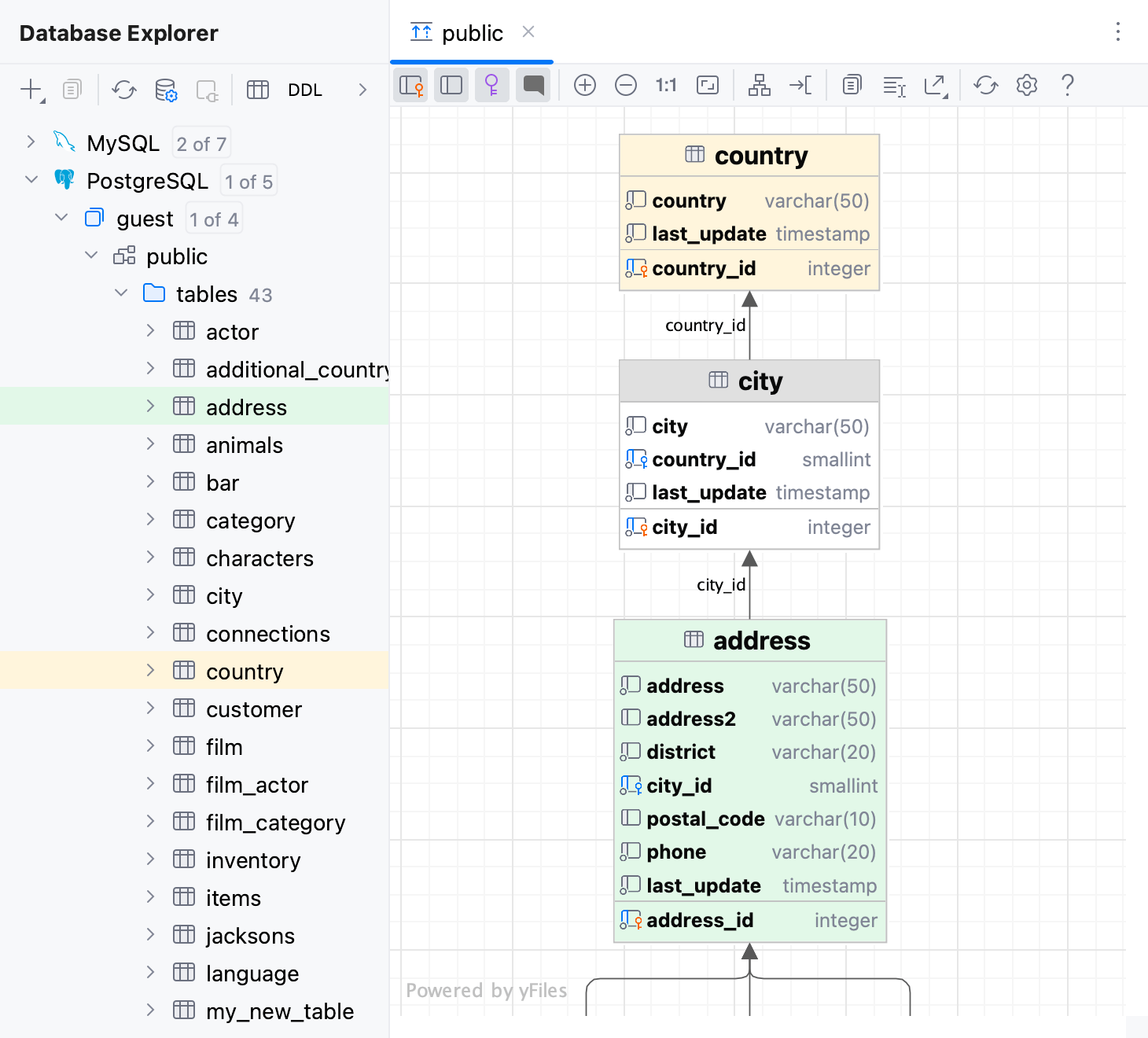
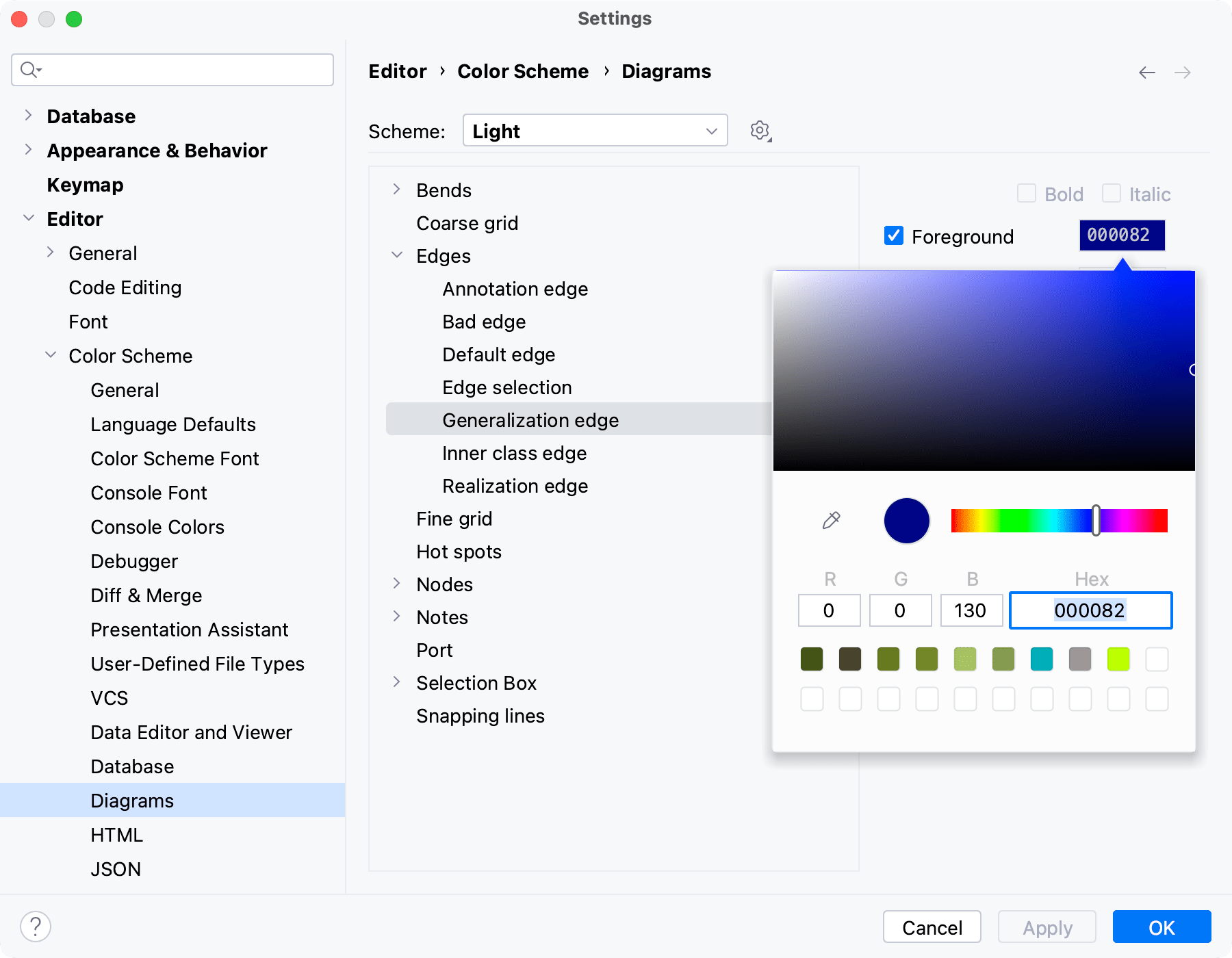
リンクの色を変更する
Ctrl+Alt+S を押して設定を開き、 に移動します。
エッジ // 汎化エッジ をクリックしてください。
フォアグラウンド チェックボックスの近くにあるカラーピッカーをクリックします。
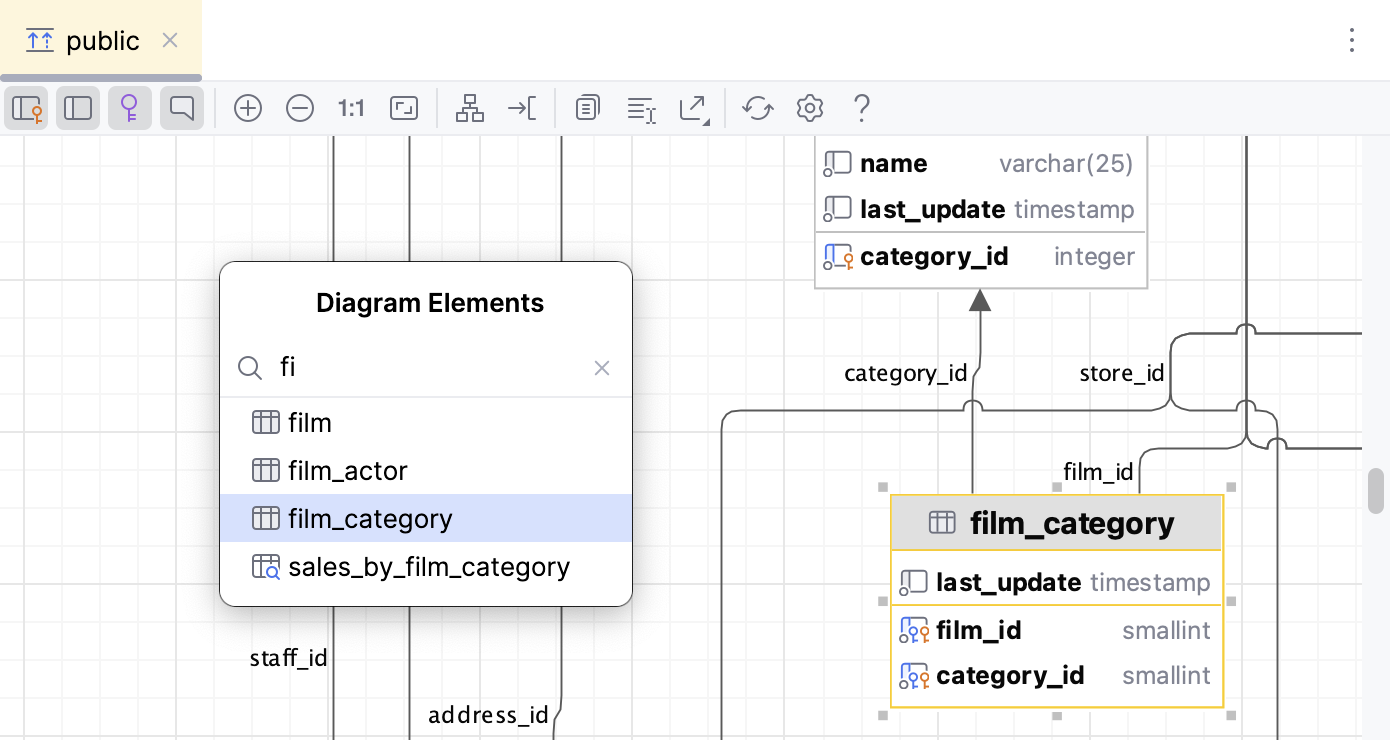
ダイアグラムの要素を見つける
ダイアグラム上で要素を見つけるには、次の手順を実行します。
Ctrl+F を押すと、 ダイアグラムの要素 ポップアップウィンドウが開きます。
要素の名前を入力し始め、それを選択して、 Enter を押します。
ダイアグラムのエクスポート
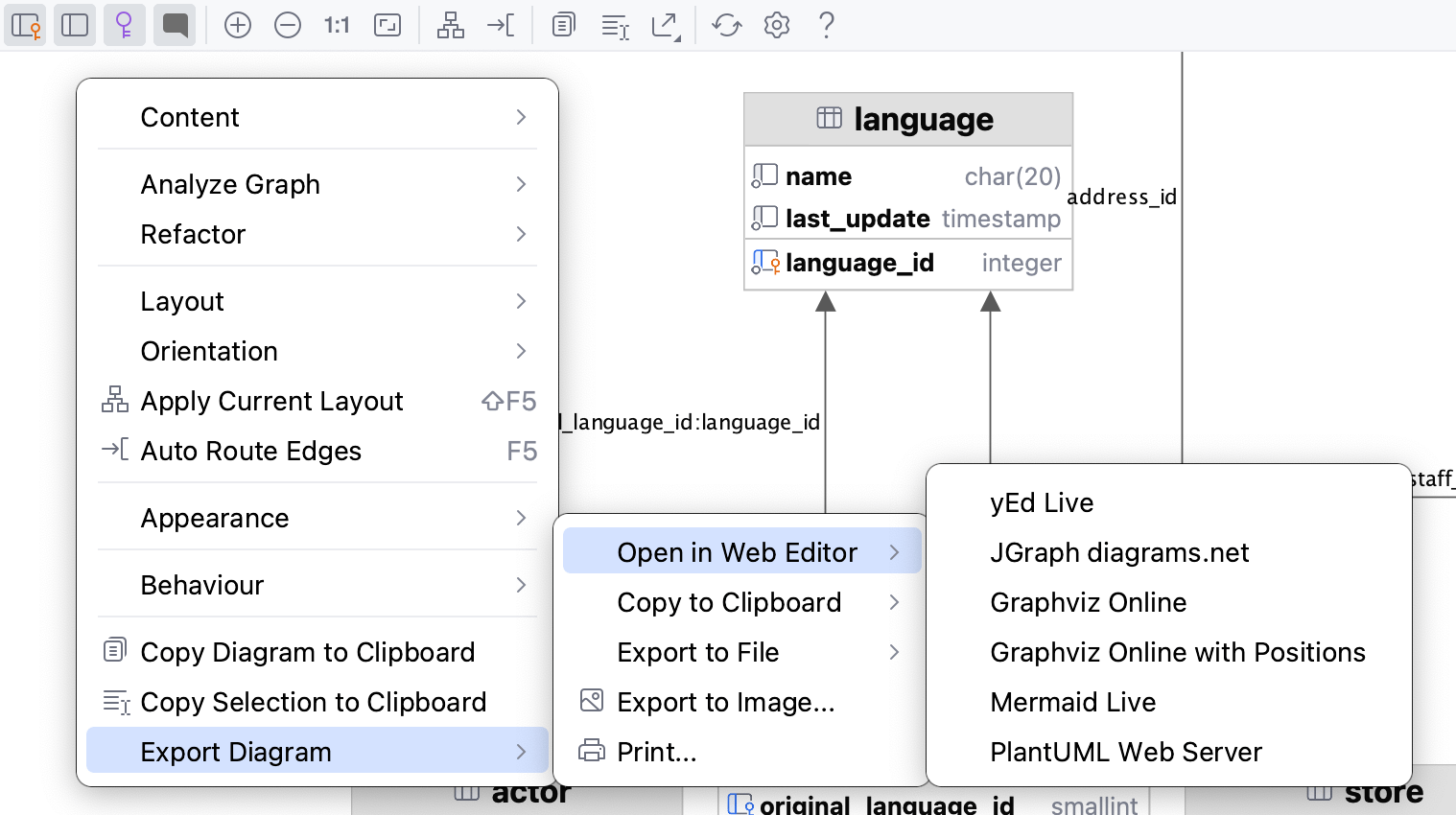
DataGrip では、ダイアグラムをさまざまな形式でファイルやクリップボードにエクスポートしたり、Web エディターで開いたりできます。 ダイアグラムを印刷してイメージとして保存することもできます。 これを行うには、ダイアグラムのコンテキストメニューで対応するアクションを使用します。
Web エディターでダイアグラムを開く
Web ブラウザーでダイアグラムをサードパーティエディターにエクスポートするには、ダイアグラムを右クリックし、 に移動してエディターを選択します。
または、ダイアグラムツールバーの ダイアグラムのエクスポート ボタン (
 ) をクリックし、対応するサブメニューでエディターを選択します。
サポートされているエディターは次のとおりです:
ダイアグラムをクリップボードにコピーする
ダイアグラムをクリップボードにコピーするには、ダイアグラムを右クリックし、 に移動して、形式を選択します。
または、ダイアグラムツールバーの ダイアグラムのエクスポート ボタン (
) をクリックし、対応するサブメニューで形式を選択します。サポートされている形式は次のとおりです:
Mermaid
classDiagram direction BT class actor { varchar(45) first_name varchar(45) last_name timestamp last_update smallint unsigned actor_id } class node19 { smallint unsigned actor_id varchar(45) first_name varchar(45) last_name timestamp last_update blob column_nameimg } class actor_info { smallint unsigned actor_id varchar(45) first_name varchar(45) last_name text film_info } class address { varchar(50) address varchar(50) address2 varchar(20) district smallint unsigned city_id varchar(10) postal_code varchar(20) phone timestamp last_update smallint unsigned address_id } class category { varchar(25) name timestamp last_update tinyint unsigned category_id } class city { varchar(50) city smallint unsigned country_id timestamp last_update smallint unsigned city_id } class country { varchar(50) country timestamp last_update smallint unsigned country_id } class customer { tinyint unsigned store_id varchar(45) first_name varchar(45) last_name varchar(50) email smallint unsigned address_id tinyint(1) active datetime create_date timestamp last_update smallint unsigned customer_id } class customer_list { smallint unsigned ID varchar(91) name varchar(50) address varchar(10) zip code varchar(20) phone varchar(50) city varchar(50) country varchar(6) notes tinyint unsigned SID } class film { varchar(255) title text description year release_year tinyint unsigned language_id tinyint unsigned original_language_id tinyint unsigned rental_duration decimal(4,2) rental_rate smallint unsigned length decimal(5,2) replacement_cost enum('g', 'pg', 'pg-13', 'r', 'nc-17') rating set('trailers', 'commentaries', 'deleted scenes', 'behind the scenes') special_features timestamp last_update smallint unsigned film_id } class film_actor { timestamp last_update smallint unsigned actor_id smallint unsigned film_id } class film_category { timestamp last_update smallint unsigned film_id tinyint unsigned category_id } class film_text { varchar(255) title text description smallint film_id } class inventory { smallint unsigned film_id tinyint unsigned store_id timestamp last_update mediumint unsigned inventory_id } class language { char(20) name timestamp last_update tinyint unsigned language_id } class payment { smallint unsigned customer_id tinyint unsigned staff_id int rental_id decimal(5,2) amount datetime payment_date timestamp last_update smallint unsigned payment_id } class pet { varchar(150) pet varchar(150) name varchar(150) owner } class rental { datetime rental_date mediumint unsigned inventory_id smallint unsigned customer_id datetime return_date tinyint unsigned staff_id timestamp last_update int rental_id } class sales_by_film_category { varchar(25) category decimal(27,2) total_sales } class sales_by_store { varchar(101) store varchar(91) manager decimal(27,2) total_sales } class staff { varchar(45) first_name varchar(45) last_name smallint unsigned address_id blob picture varchar(50) email tinyint unsigned store_id tinyint(1) active varchar(16) username varchar(40) password timestamp last_update tinyint unsigned staff_id } class staff_list { tinyint unsigned ID varchar(91) name varchar(50) address varchar(10) zip code varchar(20) phone varchar(50) city varchar(50) country tinyint unsigned SID } class store { tinyint unsigned manager_staff_id smallint unsigned address_id timestamp last_update tinyint unsigned store_id } address --> city : city_id city --> country : country_id customer --> address : address_id customer --> store : store_id film --> language : original_language_id:language_id film --> language : language_id film_actor --> actor : actor_id film_actor --> film : film_id film_category --> category : category_id film_category --> film : film_id inventory --> film : film_id inventory --> store : store_id payment --> customer : customer_id payment --> rental : rental_id payment --> staff : staff_id rental --> customer : customer_id rental --> inventory : inventory_id rental --> staff : staff_id staff --> address : address_id staff --> store : store_id store --> address : address_id store --> staff : manager_staff_id:staff_idPlantUML
@startuml !theme plain top to bottom direction skinparam linetype ortho class actor { first_name: varchar(45) last_name: varchar(45) last_update: timestamp actor_id: smallint unsigned } class node16 as "actor_1 /* backup table */" { actor_id: smallint unsigned first_name: varchar(45) last_name: varchar(45) last_update: timestamp column_nameimg: blob } class actor_info { actor_id: smallint unsigned first_name: varchar(45) last_name: varchar(45) film_info: text } class address { address: varchar(50) address2: varchar(50) district: varchar(20) city_id: smallint unsigned postal_code: varchar(10) phone: varchar(20) last_update: timestamp address_id: smallint unsigned } class category { name: varchar(25) last_update: timestamp category_id: tinyint unsigned } class city { city: varchar(50) country_id: smallint unsigned last_update: timestamp city_id: smallint unsigned } class country { country: varchar(50) last_update: timestamp country_id: smallint unsigned } class customer { store_id: tinyint unsigned first_name: varchar(45) last_name: varchar(45) email: varchar(50) address_id: smallint unsigned active: tinyint(1) create_date: datetime last_update: timestamp customer_id: smallint unsigned } class customer_list { ID: smallint unsigned name: varchar(91) address: varchar(50) zip code: varchar(10) phone: varchar(20) city: varchar(50) country: varchar(50) notes: varchar(6) SID: tinyint unsigned } class film { title: varchar(255) description: text release_year: year language_id: tinyint unsigned original_language_id: tinyint unsigned rental_duration: tinyint unsigned rental_rate: decimal(4,2) length: smallint unsigned replacement_cost: decimal(5,2) rating: enum('g', 'pg', 'pg-13', 'r', 'nc-17') special_features: set('trailers', 'commentaries', 'deleted scenes', 'behind the scenes') last_update: timestamp film_id: smallint unsigned } class film_actor { last_update: timestamp actor_id: smallint unsigned film_id: smallint unsigned } class film_category { last_update: timestamp film_id: smallint unsigned category_id: tinyint unsigned } class film_text { title: varchar(255) description: text film_id: smallint } class inventory { film_id: smallint unsigned store_id: tinyint unsigned last_update: timestamp inventory_id: mediumint unsigned } class language { name: char(20) last_update: timestamp language_id: tinyint unsigned } class payment { customer_id: smallint unsigned staff_id: tinyint unsigned rental_id: int amount: decimal(5,2) payment_date: datetime last_update: timestamp payment_id: smallint unsigned } class pet { pet: varchar(150) name: varchar(150) owner: varchar(150) } class rental { rental_date: datetime inventory_id: mediumint unsigned customer_id: smallint unsigned return_date: datetime staff_id: tinyint unsigned last_update: timestamp rental_id: int } class sales_by_film_category { category: varchar(25) total_sales: decimal(27,2) } class sales_by_store { store: varchar(101) manager: varchar(91) total_sales: decimal(27,2) } class staff { first_name: varchar(45) last_name: varchar(45) address_id: smallint unsigned picture: blob email: varchar(50) store_id: tinyint unsigned active: tinyint(1) username: varchar(16) password: varchar(40) last_update: timestamp staff_id: tinyint unsigned } class staff_list { ID: tinyint unsigned name: varchar(91) address: varchar(50) zip code: varchar(10) phone: varchar(20) city: varchar(50) country: varchar(50) SID: tinyint unsigned } class store { manager_staff_id: tinyint unsigned address_id: smallint unsigned last_update: timestamp store_id: tinyint unsigned } address -[#595959,plain]-^ city : "city_id" city -[#595959,plain]-^ country : "country_id" customer -[#595959,plain]-^ address : "address_id" customer -[#595959,plain]-^ store : "store_id" film -[#595959,plain]-^ language : "language_id" film -[#595959,plain]-^ language : "original_language_id:language_id" film_actor -[#595959,plain]-^ actor : "actor_id" film_actor -[#595959,plain]-^ film : "film_id" film_category -[#595959,plain]-^ category : "category_id" film_category -[#595959,plain]-^ film : "film_id" inventory -[#595959,plain]-^ film : "film_id" inventory -[#595959,plain]-^ store : "store_id" payment -[#595959,plain]-^ customer : "customer_id" payment -[#595959,plain]-^ rental : "rental_id" payment -[#595959,plain]-^ staff : "staff_id" rental -[#595959,plain]-^ customer : "customer_id" rental -[#595959,plain]-^ inventory : "inventory_id" rental -[#595959,plain]-^ staff : "staff_id" staff -[#595959,plain]-^ address : "address_id" staff -[#595959,plain]-^ store : "store_id" store -[#595959,plain]-^ address : "address_id" store -[#595959,plain]-^ staff : "manager_staff_id:staff_id" @endumlGraphviz DOT
digraph "sakila" { splines = ortho; fontname = "Inconsolata"; node [colorscheme = ylgnbu4]; edge [colorscheme = dark28, dir = both]; actor [shape = record, label = "{ actor | first_name : varchar(45)\l last_name : varchar(45)\l last_update : timestamp\l| actor_id : smallint unsigned\l }"]; "actor_1 /* backup table */" [shape = record, label = "{ actor_1 /* backup table */ | actor_id : smallint unsigned\l first_name : varchar(45)\l last_name : varchar(45)\l last_update : timestamp\l column_nameimg : blob\l }"]; actor_info [shape = record, label = "{ actor_info | actor_id : smallint unsigned\l first_name : varchar(45)\l last_name : varchar(45)\l film_info : text\l }"]; address [shape = record, label = "{ address | address : varchar(50)\l address2 : varchar(50)\l district : varchar(20)\l city_id : smallint unsigned\l postal_code : varchar(10)\l phone : varchar(20)\l last_update : timestamp\l| address_id : smallint unsigned\l }"]; category [shape = record, label = "{ category | name : varchar(25)\l last_update : timestamp\l| category_id : tinyint unsigned\l }"]; city [shape = record, label = "{ city | city : varchar(50)\l country_id : smallint unsigned\l last_update : timestamp\l| city_id : smallint unsigned\l }"]; country [shape = record, label = "{ country | country : varchar(50)\l last_update : timestamp\l| country_id : smallint unsigned\l }"]; customer [shape = record, label = "{ customer | store_id : tinyint unsigned\l first_name : varchar(45)\l last_name : varchar(45)\l email : varchar(50)\l address_id : smallint unsigned\l active : tinyint(1)\l create_date : datetime\l last_update : timestamp\l| customer_id : smallint unsigned\l }"]; customer_list [shape = record, label = "{ customer_list | ID : smallint unsigned\l name : varchar(91)\l address : varchar(50)\l zip code : varchar(10)\l phone : varchar(20)\l city : varchar(50)\l country : varchar(50)\l notes : varchar(6)\l SID : tinyint unsigned\l }"]; film [shape = record, label = "{ film | title : varchar(255)\l description : text\l release_year : year\l language_id : tinyint unsigned\l original_language_id : tinyint unsigned\l rental_duration : tinyint unsigned\l rental_rate : decimal(4,2)\l length : smallint unsigned\l replacement_cost : decimal(5,2)\l rating : enum('g', 'pg', 'pg-13', 'r', 'nc-17')\l special_features : set('trailers', 'commentaries', 'deleted scenes', 'behind the scenes')\l last_update : timestamp\l| film_id : smallint unsigned\l }"]; film_actor [shape = record, label = "{ film_actor | last_update : timestamp\l| actor_id : smallint unsigned\l film_id : smallint unsigned\l }"]; film_category [shape = record, label = "{ film_category | last_update : timestamp\l| film_id : smallint unsigned\l category_id : tinyint unsigned\l }"]; film_text [shape = record, label = "{ film_text | title : varchar(255)\l description : text\l| film_id : smallint\l }"]; inventory [shape = record, label = "{ inventory | film_id : smallint unsigned\l store_id : tinyint unsigned\l last_update : timestamp\l| inventory_id : mediumint unsigned\l }"]; language [shape = record, label = "{ language | name : char(20)\l last_update : timestamp\l| language_id : tinyint unsigned\l }"]; payment [shape = record, label = "{ payment | customer_id : smallint unsigned\l staff_id : tinyint unsigned\l rental_id : int\l amount : decimal(5,2)\l payment_date : datetime\l last_update : timestamp\l| payment_id : smallint unsigned\l }"]; pet [shape = record, label = "{ pet | pet : varchar(150)\l name : varchar(150)\l owner : varchar(150)\l }"]; rental [shape = record, label = "{ rental | rental_date : datetime\l inventory_id : mediumint unsigned\l customer_id : smallint unsigned\l return_date : datetime\l staff_id : tinyint unsigned\l last_update : timestamp\l| rental_id : int\l }"]; sales_by_film_category [shape = record, label = "{ sales_by_film_category | category : varchar(25)\l total_sales : decimal(27,2)\l }"]; sales_by_store [shape = record, label = "{ sales_by_store | store : varchar(101)\l manager : varchar(91)\l total_sales : decimal(27,2)\l }"]; staff [shape = record, label = "{ staff | first_name : varchar(45)\l last_name : varchar(45)\l address_id : smallint unsigned\l picture : blob\l email : varchar(50)\l store_id : tinyint unsigned\l active : tinyint(1)\l username : varchar(16)\l password : varchar(40)\l last_update : timestamp\l| staff_id : tinyint unsigned\l }"]; staff_list [shape = record, label = "{ staff_list | ID : tinyint unsigned\l name : varchar(91)\l address : varchar(50)\l zip code : varchar(10)\l phone : varchar(20)\l city : varchar(50)\l country : varchar(50)\l SID : tinyint unsigned\l }"]; store [shape = record, label = "{ store | manager_staff_id : tinyint unsigned\l address_id : smallint unsigned\l last_update : timestamp\l| store_id : tinyint unsigned\l }"]; address -> city [color = "#595959", style = solid , arrowtail = none , arrowhead = normal , taillabel = "", label = "city_id", headlabel = ""]; city -> country [color = "#595959", style = solid , arrowtail = none , arrowhead = normal , taillabel = "", label = "country_id", headlabel = ""]; customer -> address [color = "#595959", style = solid , arrowtail = none , arrowhead = normal , taillabel = "", label = "address_id", headlabel = ""]; customer -> store [color = "#595959", style = solid , arrowtail = none , arrowhead = normal , taillabel = "", label = "store_id", headlabel = ""]; film -> language [color = "#595959", style = solid , arrowtail = none , arrowhead = normal , taillabel = "", label = "language_id", headlabel = ""]; film -> language [color = "#595959", style = solid , arrowtail = none , arrowhead = normal , taillabel = "", label = "original_language_id:language_id", headlabel = ""]; film_actor -> actor [color = "#595959", style = solid , arrowtail = none , arrowhead = normal , taillabel = "", label = "actor_id", headlabel = ""]; film_actor -> film [color = "#595959", style = solid , arrowtail = none , arrowhead = normal , taillabel = "", label = "film_id", headlabel = ""]; film_category -> category [color = "#595959", style = solid , arrowtail = none , arrowhead = normal , taillabel = "", label = "category_id", headlabel = ""]; film_category -> film [color = "#595959", style = solid , arrowtail = none , arrowhead = normal , taillabel = "", label = "film_id", headlabel = ""]; inventory -> film [color = "#595959", style = solid , arrowtail = none , arrowhead = normal , taillabel = "", label = "film_id", headlabel = ""]; inventory -> store [color = "#595959", style = solid , arrowtail = none , arrowhead = normal , taillabel = "", label = "store_id", headlabel = ""]; payment -> customer [color = "#595959", style = solid , arrowtail = none , arrowhead = normal , taillabel = "", label = "customer_id", headlabel = ""]; payment -> rental [color = "#595959", style = solid , arrowtail = none , arrowhead = normal , taillabel = "", label = "rental_id", headlabel = ""]; payment -> staff [color = "#595959", style = solid , arrowtail = none , arrowhead = normal , taillabel = "", label = "staff_id", headlabel = ""]; rental -> customer [color = "#595959", style = solid , arrowtail = none , arrowhead = normal , taillabel = "", label = "customer_id", headlabel = ""]; rental -> inventory [color = "#595959", style = solid , arrowtail = none , arrowhead = normal , taillabel = "", label = "inventory_id", headlabel = ""]; rental -> staff [color = "#595959", style = solid , arrowtail = none , arrowhead = normal , taillabel = "", label = "staff_id", headlabel = ""]; staff -> address [color = "#595959", style = solid , arrowtail = none , arrowhead = normal , taillabel = "", label = "address_id", headlabel = ""]; staff -> store [color = "#595959", style = solid , arrowtail = none , arrowhead = normal , taillabel = "", label = "store_id", headlabel = ""]; store -> address [color = "#595959", style = solid , arrowtail = none , arrowhead = normal , taillabel = "", label = "address_id", headlabel = ""]; store -> staff [color = "#595959", style = solid , arrowtail = none , arrowhead = normal , taillabel = "", label = "manager_staff_id:staff_id", headlabel = ""]; }Graphviz DOT とポジション
digraph "sakila" { splines = ortho; fontname = "Inconsolata"; node [colorscheme = ylgnbu4]; edge [colorscheme = dark28, dir = both]; actor [shape = record, pos = "4.333,20.917!" , label = "{ actor | first_name : varchar(45)\l last_name : varchar(45)\l last_update : timestamp\l| actor_id : smallint unsigned\l }"]; "actor_1 /* backup table */" [shape = record, pos = "-4.111,4.681!" , label = "{ actor_1 /* backup table */ | actor_id : smallint unsigned\l first_name : varchar(45)\l last_name : varchar(45)\l last_update : timestamp\l column_nameimg : blob\l }"]; actor_info [shape = record, pos = "-0.611,4.681!" , label = "{ actor_info | actor_id : smallint unsigned\l first_name : varchar(45)\l last_name : varchar(45)\l film_info : text\l }"]; address [shape = record, pos = "-2.564,26.375!" , label = "{ address | address : varchar(50)\l address2 : varchar(50)\l district : varchar(20)\l city_id : smallint unsigned\l postal_code : varchar(10)\l phone : varchar(20)\l last_update : timestamp\l| address_id : smallint unsigned\l }"]; category [shape = record, pos = "15.972,20.750!" , label = "{ category | name : varchar(25)\l last_update : timestamp\l| category_id : tinyint unsigned\l }"]; city [shape = record, pos = "-2.550,28.972!" , label = "{ city | city : varchar(50)\l country_id : smallint unsigned\l last_update : timestamp\l| city_id : smallint unsigned\l }"]; country [shape = record, pos = "-2.550,31.236!" , label = "{ country | country : varchar(50)\l last_update : timestamp\l| country_id : smallint unsigned\l }"]; customer [shape = record, pos = "-0.681,16.458!" , label = "{ customer | store_id : tinyint unsigned\l first_name : varchar(45)\l last_name : varchar(45)\l email : varchar(50)\l address_id : smallint unsigned\l active : tinyint(1)\l create_date : datetime\l last_update : timestamp\l| customer_id : smallint unsigned\l }"]; customer_list [shape = record, pos = "19.694,31.236!" , label = "{ customer_list | ID : smallint unsigned\l name : varchar(91)\l address : varchar(50)\l zip code : varchar(10)\l phone : varchar(20)\l city : varchar(50)\l country : varchar(50)\l notes : varchar(6)\l SID : tinyint unsigned\l }"]; film [shape = record, pos = "7.486,22.417!" , label = "{ film | title : varchar(255)\l description : text\l release_year : year\l language_id : tinyint unsigned\l original_language_id : tinyint unsigned\l rental_duration : tinyint unsigned\l rental_rate : decimal(4,2)\l length : smallint unsigned\l replacement_cost : decimal(5,2)\l rating : enum('g', 'pg', 'pg-13', 'r', 'nc-17')\l special_features : set('trailers', 'commentaries', 'deleted scenes', 'behind the scenes')\l last_update : timestamp\l| film_id : smallint unsigned\l }"]; film_actor [shape = record, pos = "9.174,15.458!" , label = "{ film_actor | last_update : timestamp\l| actor_id : smallint unsigned\l film_id : smallint unsigned\l }"]; film_category [shape = record, pos = "14.592,15.458!" , label = "{ film_category | last_update : timestamp\l| film_id : smallint unsigned\l category_id : tinyint unsigned\l }"]; film_text [shape = record, pos = "2.889,4.681!" , label = "{ film_text | title : varchar(255)\l description : text\l| film_id : smallint\l }"]; inventory [shape = record, pos = "2.889,15.625!" , label = "{ inventory | film_id : smallint unsigned\l store_id : tinyint unsigned\l last_update : timestamp\l| inventory_id : mediumint unsigned\l }"]; language [shape = record, pos = "10.731,25.542!" , label = "{ language | name : char(20)\l last_update : timestamp\l| language_id : tinyint unsigned\l }"]; payment [shape = record, pos = "-1.459,8.208!" , label = "{ payment | customer_id : smallint unsigned\l staff_id : tinyint unsigned\l rental_id : int\l amount : decimal(5,2)\l payment_date : datetime\l last_update : timestamp\l| payment_id : smallint unsigned\l }"]; pet [shape = record, pos = "9.028,4.681!" , label = "{ pet | pet : varchar(150)\l name : varchar(150)\l owner : varchar(150)\l }"]; rental [shape = record, pos = "1.321,11.833!" , label = "{ rental | rental_date : datetime\l inventory_id : mediumint unsigned\l customer_id : smallint unsigned\l return_date : datetime\l staff_id : tinyint unsigned\l last_update : timestamp\l| rental_id : int\l }"]; sales_by_film_category [shape = record, pos = "11.917,4.681!" , label = "{ sales_by_film_category | category : varchar(25)\l total_sales : decimal(27,2)\l }"]; sales_by_store [shape = record, pos = "5.583,4.681!" , label = "{ sales_by_store | store : varchar(101)\l manager : varchar(91)\l total_sales : decimal(27,2)\l }"]; staff [shape = record, pos = "-4.111,16.792!" , label = "{ staff | first_name : varchar(45)\l last_name : varchar(45)\l address_id : smallint unsigned\l picture : blob\l email : varchar(50)\l store_id : tinyint unsigned\l active : tinyint(1)\l username : varchar(16)\l password : varchar(40)\l last_update : timestamp\l| staff_id : tinyint unsigned\l }"]; staff_list [shape = record, pos = "22.666,31.236!" , label = "{ staff_list | ID : tinyint unsigned\l name : varchar(91)\l address : varchar(50)\l zip code : varchar(10)\l phone : varchar(20)\l city : varchar(50)\l country : varchar(50)\l SID : tinyint unsigned\l }"]; store [shape = record, pos = "-2.638,20.917!" , label = "{ store | manager_staff_id : tinyint unsigned\l address_id : smallint unsigned\l last_update : timestamp\l| store_id : tinyint unsigned\l }"]; address -> city [color = "#595959", style = solid , arrowtail = none , arrowhead = normal , taillabel = "", label = "city_id", headlabel = ""]; city -> country [color = "#595959", style = solid , arrowtail = none , arrowhead = normal , taillabel = "", label = "country_id", headlabel = ""]; customer -> address [color = "#595959", style = solid , arrowtail = none , arrowhead = normal , taillabel = "", label = "address_id", headlabel = ""]; customer -> store [color = "#595959", style = solid , arrowtail = none , arrowhead = normal , taillabel = "", label = "store_id", headlabel = ""]; film -> language [color = "#595959", style = solid , arrowtail = none , arrowhead = normal , taillabel = "", label = "language_id", headlabel = ""]; film -> language [color = "#595959", style = solid , arrowtail = none , arrowhead = normal , taillabel = "", label = "original_language_id:language_id", headlabel = ""]; film_actor -> actor [color = "#595959", style = solid , arrowtail = none , arrowhead = normal , taillabel = "", label = "actor_id", headlabel = ""]; film_actor -> film [color = "#595959", style = solid , arrowtail = none , arrowhead = normal , taillabel = "", label = "film_id", headlabel = ""]; film_category -> category [color = "#595959", style = solid , arrowtail = none , arrowhead = normal , taillabel = "", label = "category_id", headlabel = ""]; film_category -> film [color = "#595959", style = solid , arrowtail = none , arrowhead = normal , taillabel = "", label = "film_id", headlabel = ""]; inventory -> film [color = "#595959", style = solid , arrowtail = none , arrowhead = normal , taillabel = "", label = "film_id", headlabel = ""]; inventory -> store [color = "#595959", style = solid , arrowtail = none , arrowhead = normal , taillabel = "", label = "store_id", headlabel = ""]; payment -> customer [color = "#595959", style = solid , arrowtail = none , arrowhead = normal , taillabel = "", label = "customer_id", headlabel = ""]; payment -> rental [color = "#595959", style = solid , arrowtail = none , arrowhead = normal , taillabel = "", label = "rental_id", headlabel = ""]; payment -> staff [color = "#595959", style = solid , arrowtail = none , arrowhead = normal , taillabel = "", label = "staff_id", headlabel = ""]; rental -> customer [color = "#595959", style = solid , arrowtail = none , arrowhead = normal , taillabel = "", label = "customer_id", headlabel = ""]; rental -> inventory [color = "#595959", style = solid , arrowtail = none , arrowhead = normal , taillabel = "", label = "inventory_id", headlabel = ""]; rental -> staff [color = "#595959", style = solid , arrowtail = none , arrowhead = normal , taillabel = "", label = "staff_id", headlabel = ""]; staff -> address [color = "#595959", style = solid , arrowtail = none , arrowhead = normal , taillabel = "", label = "address_id", headlabel = ""]; staff -> store [color = "#595959", style = solid , arrowtail = none , arrowhead = normal , taillabel = "", label = "store_id", headlabel = ""]; store -> address [color = "#595959", style = solid , arrowtail = none , arrowhead = normal , taillabel = "", label = "address_id", headlabel = ""]; store -> staff [color = "#595959", style = solid , arrowtail = none , arrowhead = normal , taillabel = "", label = "manager_staff_id:staff_id", headlabel = ""]; }
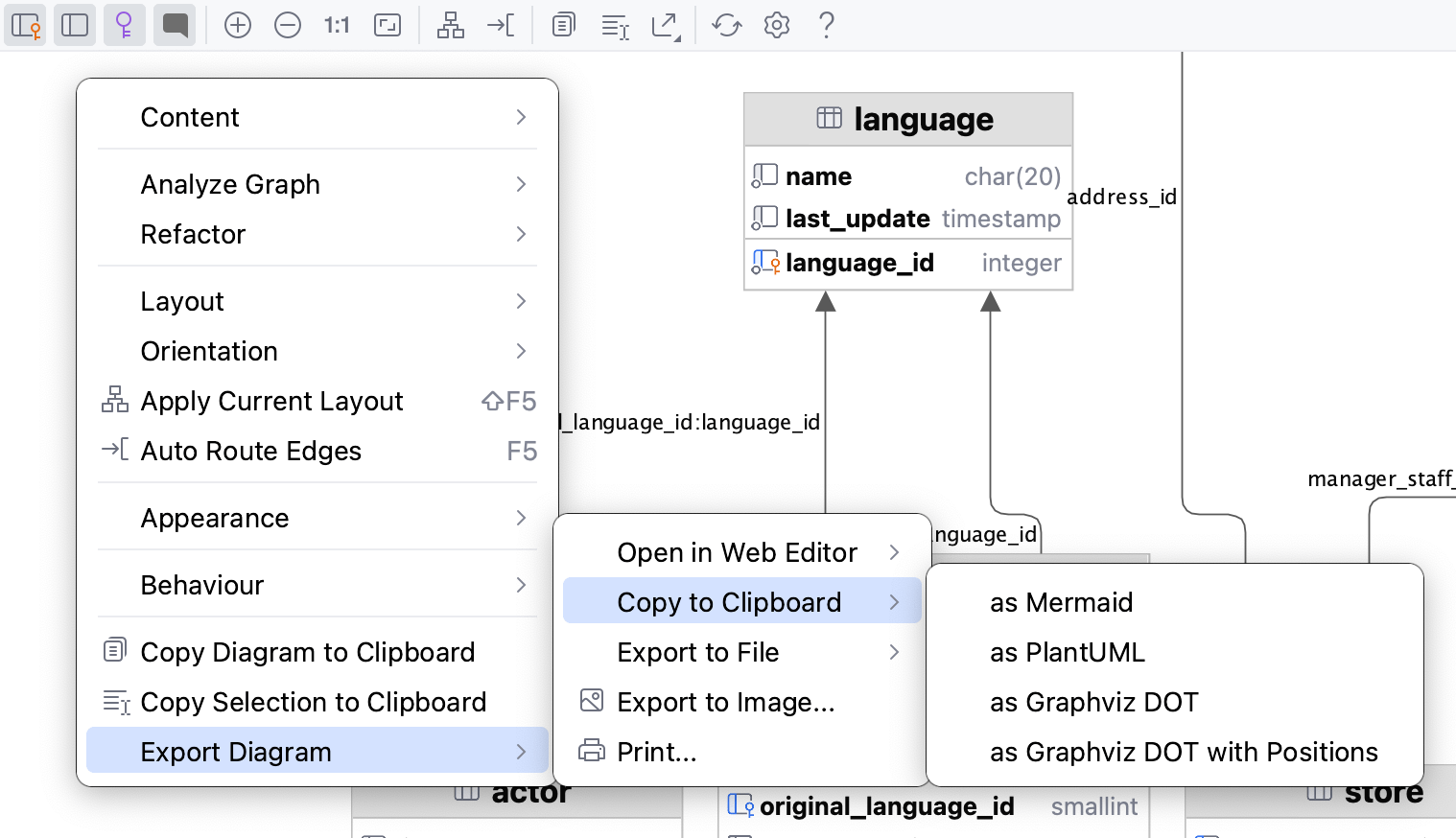
ダイアグラムをファイルにエクスポートする
ダイアグラムをファイルにエクスポートするには、ダイアグラムを右クリックし、 に移動して、形式を選択します。
または、ダイアグラムツールバーの ダイアグラムのエクスポート ボタン (
) をクリックし、対応するサブメニューで形式を選択します。サポートされている形式は次のとおりです:
YEd .graphml
JGraph .drawio
Graphviz .dot
Graphviz .dot とポジション
Mermaid .md
PlantUML
IDEA .uml : UML 形式は、DataGrip のみがサポートする内部形式です。 保存したダイアグラムを開くには、UML ファイルをエディターにドラッグします。
UML ファイルのスコープは元のプロジェクトに限定されていることに注意してください。 UML ファイルは、作成されたプロジェクト内でのみ開いて使用できます。
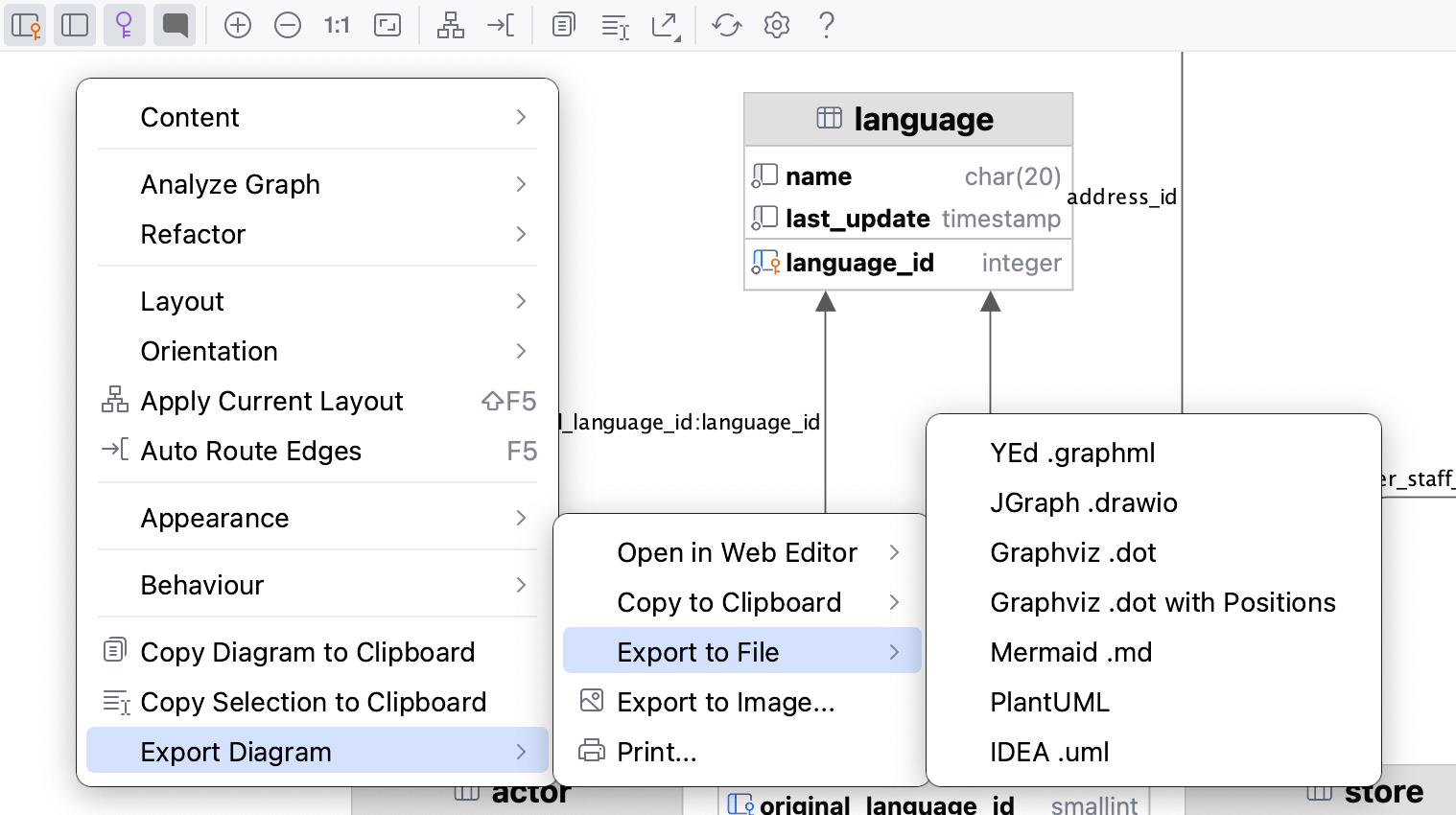
ダイアグラムを PNG 形式のイメージとしてエクスポート
ダイアグラムを PNG 形式のイメージとしてエクスポートするには、ダイアグラムを右クリックして を選択します。
または、ダイアグラムツールバーの ダイアグラムのエクスポート ボタン (
) をクリックし、 画像にエクスポート… を選択します。
グラフの分析
グラフの分析 アクショングループを使用すると、自動クラスター化の実行、ノードの中心性の測定、検索サイクル、2 つのノード間のパスのフィルター処理など、さまざまな方法でグラフを分析できます。
2 つのノード間のパスをフィルタリングする
ほとんどの場合、生成されるダイアグラムは大きくて複雑です。 通常、ダイアグラムの特定の部分のみに集中する必要があります。 DataGrip ではダイアグラム要素間のパスをフィルタリングできます。
ダイアグラムエディターで、フォーカスする 2 つのノードを選択し、そのうちの 1 つを右クリックして、コンテキストメニューを開きます。
コンテキストメニューから を選択します。
開いたダイアログで、必要に応じて追加のオプションを選択し、 検索 をクリックします。
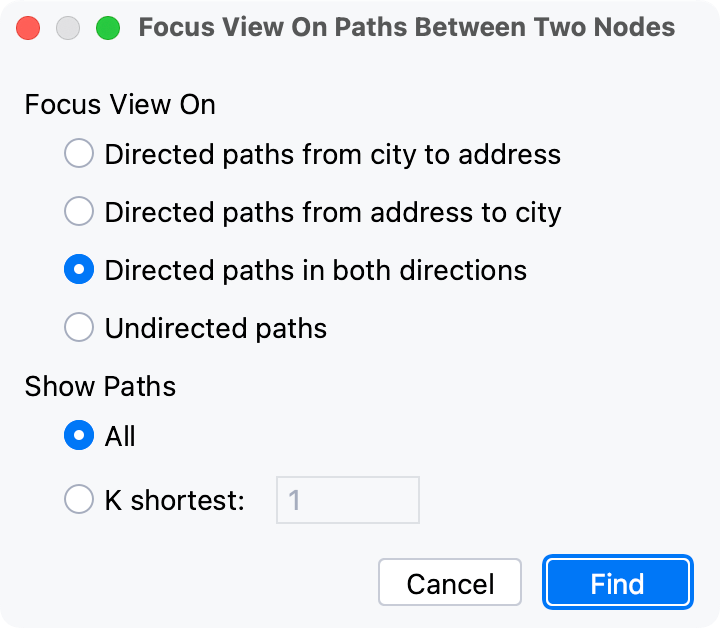
DataGrip は、選択したノードにのみ関連付けられている接続を表示します。
ダイアグラムの中心性を測定する
このアクションを使用して、グラフ内の重要なノードを特定できます。
ダイアグラムエディターで、エディター内の任意の場所を右クリックして、コンテキストメニューを開きます。
コンテキストメニューから を選択します。
開いたダイアログで、必要に応じて追加のオプションを選択し、 計測 をクリックします。
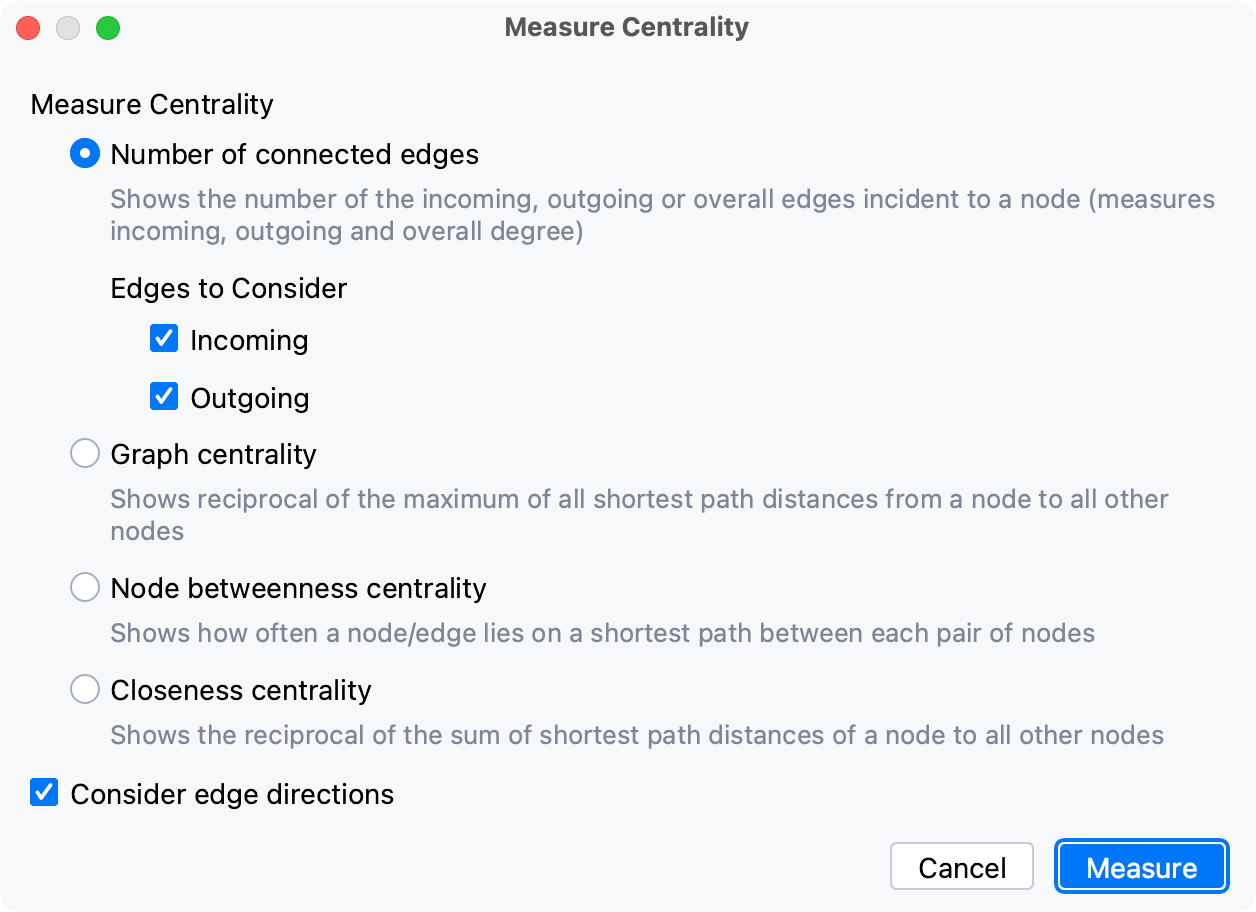
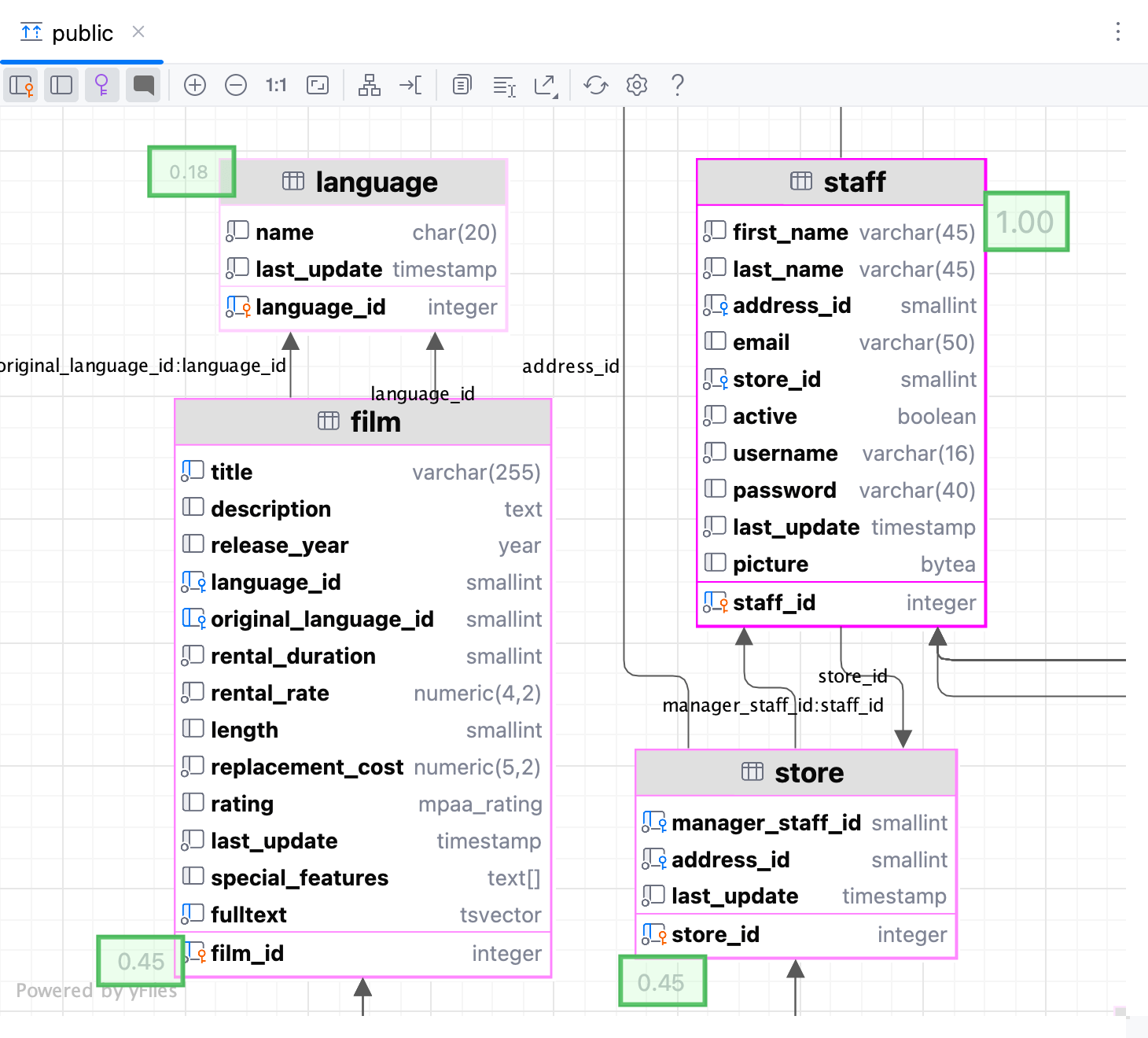
ノードの「重要性」は0.0から1.0までの小数値で表され、最も明るいノードの選択から探索する必要があります。
リファレンス
アイコン
ダイアグラム内の列の可能なアイコンの組み合わせは次のとおりです:
アイコン | 外部キー | 主キー | インデックス付き | 非 null |
|---|---|---|---|---|
| ||||
|
| |||
|
| |||
|
| |||
|
| |||
|
|
| ||
|
|
|
|
|
|
|
|
| |
|
|
|
| |
|
|
| ||
|
|
|
| |
|
|
| ||
|
|
| ||
|
|
|
| |
|
|
| ||
|
|
|


ダイアグラムの構成設定
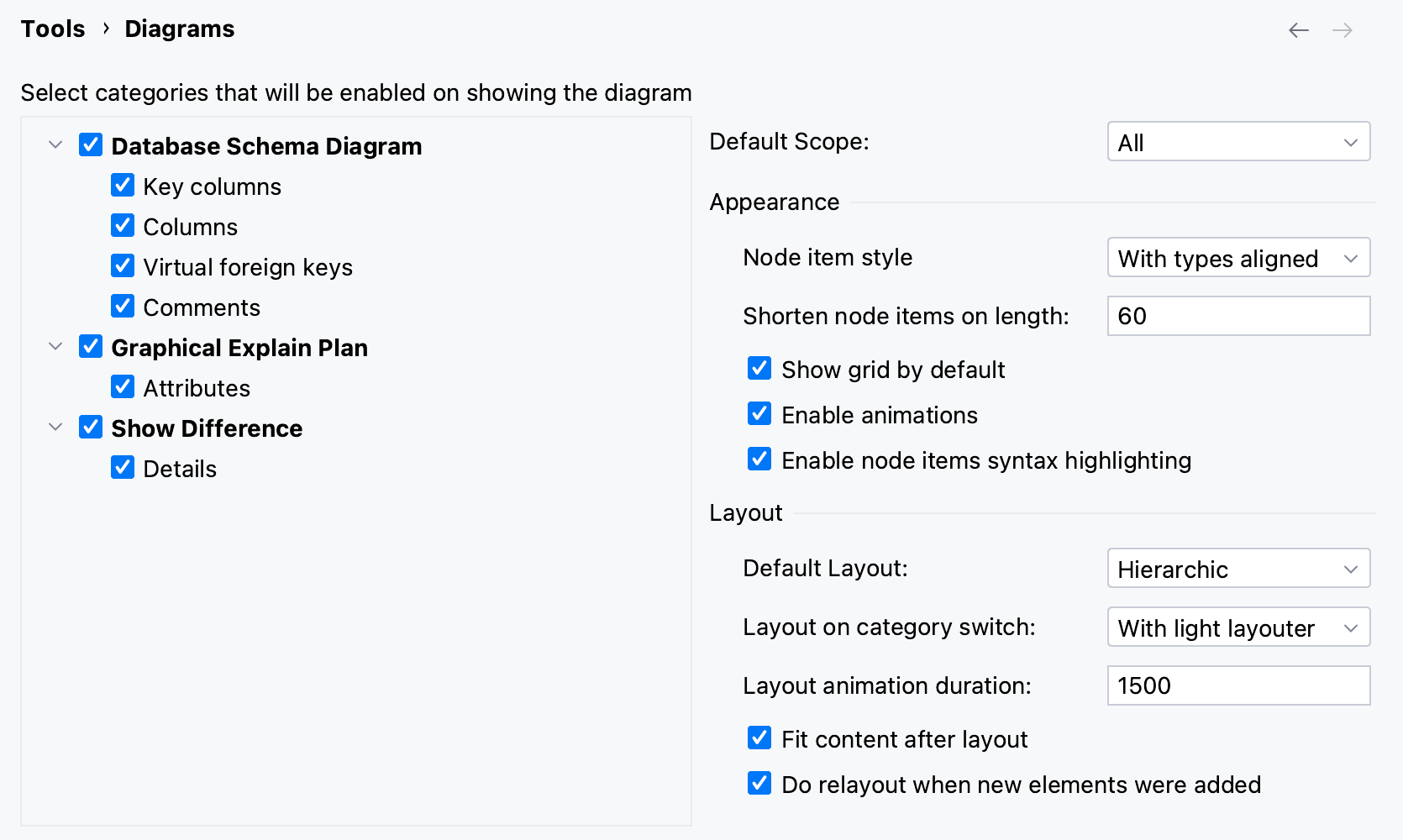
ダイアグラムのデフォルトの表示設定やレイアウトを構成するには、 Ctrl+Alt+S を押して設定を開き、 に移動します。 .
コンテンツペイン
ダイアグラムに表示される要素の横にあるチェックボックスを選択します。
項目 | 説明 |
|---|---|
差分を表示 | |
詳細 | このチェックボックスが選択されている場合、指定されたすべての要素の詳細がリビジョンの UML クラスダイアグラムに表示されます。 このチェックボックスが選択されていない場合、ノード要素のみがダイアグラムに含まれます。 |
データベーススキーマダイアグラム | |
キー列 | ダイアグラムが開いたときに主キー列を表示したい場合は、このチェックボックスを選択します。 エディターでダイアグラムを表示するときは、ツールバーの |
列 | ダイアグラムが開いたときに表示する主キー列以外の列は、このチェックボックスを選択します。 エディターでダイアグラムを表示するときは、ツールバーの |
グラフィカルな Explain Plan | |
属性 | クエリマップ上のクエリ属性の表示を切り替えます。 これらの属性には、行数、インデックス名、クエリに関するその他の追加情報を指定できます。 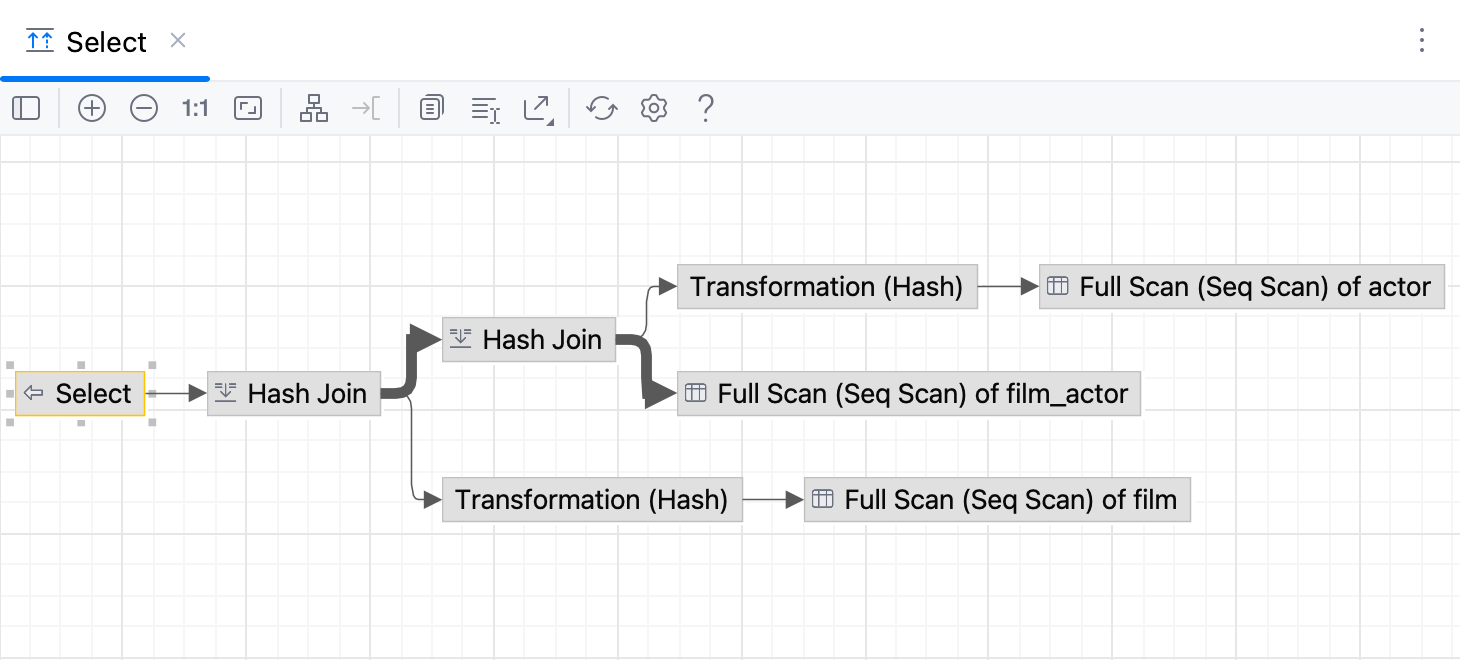 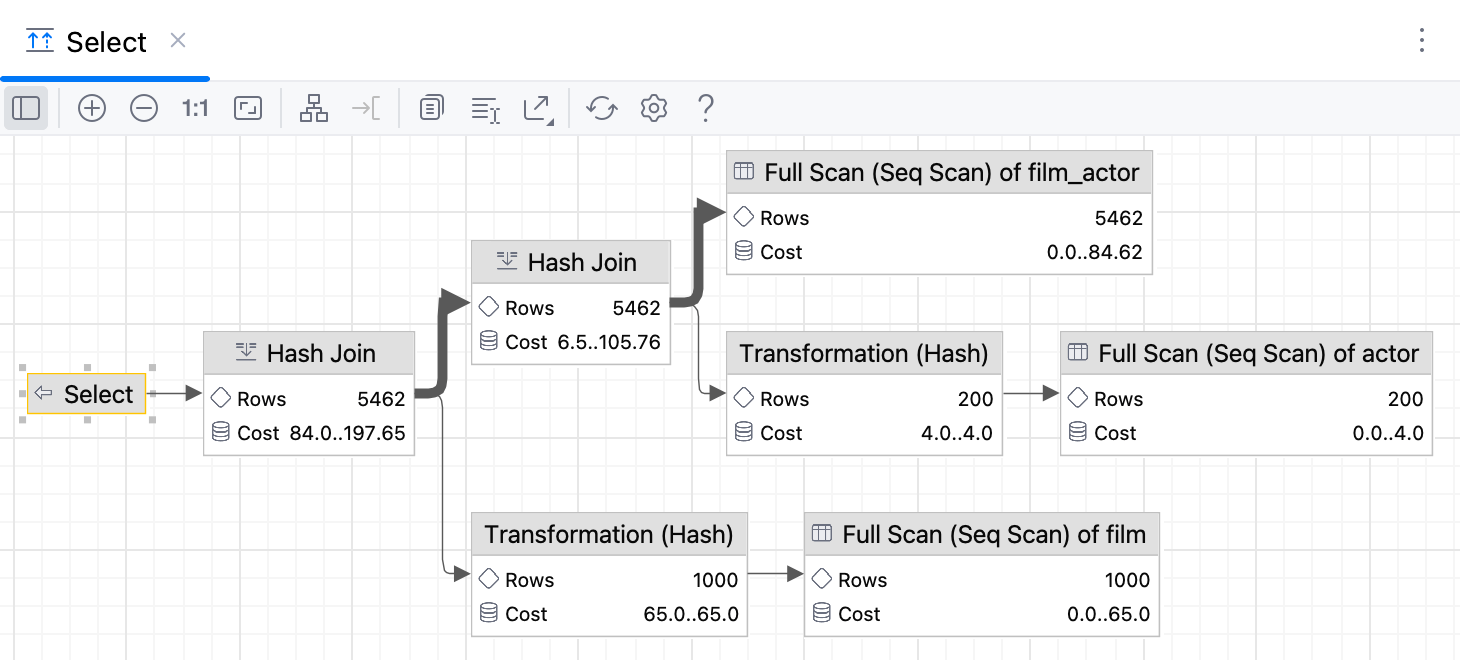 |
 を使用して対応する列を表示または非表示にします。
 を使用して対応する列を表示または非表示にします。
コントロール
項目 | 説明 |
|---|---|
デフォルトレイアウト | デフォルトレイアウト リストから希望のレイアウトを選択します。 新しく作成したダイアグラムのノード要素は、選択したレイアウトに従って配置されます。 |
デフォルトスコープ | デフォルトスコープ リストからスコープを選択します。 スコープを指定すると、不要な階層をダイアグラムに表示するのを避けることができます。 スコープページは、 設定 (Ctrl+Alt+S )ダイアログ内でプロジェクトのスコープを定義できます。 |
レイアウト後の内容に合わせる | このチェックボックスを選択すると、ダイアグラムのコンテキストメニューで選択したレイアウトを適用した後、すべてのダイアグラム要素が現在のダイアグラム領域に収まるようにサイズが変更されます。 ダイアグラムでは、 |
新規要素が追加されたときに再レイアウトする | このチェックボックスをオンにすると、新しい要素を追加した後で自動的にダイアグラムのレイアウトが実行されます。 |
 ツールバーボタンを使用します。
ツールバーとコンテキストメニュー
ダイアグラムエディターのツールバーを使ってアクションにすばやくアクセスし、コンテキストメニューで表示内容を管理できます。
ツールバー
項目 | 説明 |
|---|---|
| このボタンをクリックして、ダイアグラムに主キー列を表示します。 |
| 以下の表示を切り替えます。
|
| このボタンをクリックして、ダイアグラム内の仮想外部キーを表示または非表示にします。 |
| このボタンをクリックして、ダイアグラムのコメントを表示または非表示にします。 |
| このアイコンをクリックすると、ダイアグラムの縮尺が拡大されます。 または、 NumPad+ を押します。 |
| このアイコンをクリックすると、ダイアグラムの縮尺が縮小されます。 または、 NumPad- を押します。 |
| このアイコンをクリックすると、ダイアグラムの実際のサイズに戻ります。 |
| このアイコンをクリックして、内容を現在のダイアグラムのサイズに合わせます。 |
| このアイコンをクリックして、ダイアグラムのコンテキストメニューの レイアウト ノードから選択した現在のレイアウトを適用します。 |
| このアイコンをクリックして、ダイアグラムをウィンドウの端に合わせて拡大縮小します。 |
| このアイコンをクリックして、ダイアグラムをクリップボードにコピーします。 |
| このアイコンをクリックし、マウスで任意のダイアグラム領域を選択すると、選択した領域がクリップボードにコピーされます。 |
| このアイコンをクリックして、サードパーティ ツールと互換性のあるさまざまな形式でダイアグラムをファイルや画像にエクスポートしたり、ブラウザーでダイアグラムを開いたりできます。 次のオプションを選択して構成できます:
|
| このボタンをクリックして、ダイアグラム全体をリフレッシュします。 |
| このボタンをクリックして ダイアグラムの設定を開き、追加のオプションを構成できます。 |


コンテキストメニュー
以下の表には、ツールバーからは利用できないコマンドが含まれています。
項目 | 説明 |
|---|---|
選択した要素のアクション | このオプションを使用して、ダイアグラム内の選択した要素に適用されるアクションのリストを開きます。 アクションを選択して、要素のコピー、その定義とドキュメントの表示、 移動 アクションの使用などを行うことができます。 |
コンテンツ | このオプションを使用して、新しいメモの追加、属性の表示と非表示に役立つアクションのリストを開きます。
|
削除 | 選択したダイアグラムを削除します。 |
グラフの分析 | このノードを使用して、ダイアグラムを分析するコマンドの 1 つを選択します。 グラフの特性を確認したり、グラフの焦点を変更したり、グラフの中心性を測定したりすることができます。 |
レイアウト | サブメニューから目的のダイアグラムレイアウトを選択します。 |
方向 | 次の方向オプションを提供します: 下から上、上から下など。 |
現在のレイアウトを適用 | ダイアグラムのコンテキストメニューの レイアウト ノードから選択された現在のレイアウトを適用します |
自動ルートエッジ | ダイアグラムのコンテンツをダイアグラムウィンドウの端に合わせて拡大縮小します。 |
外観 | グリッド、エッジラベル、ブリッジを表示することにより、ダイアグラムの表示方法を管理します。 エッジをマージしてエッジ形状を選択できます。 |
振る舞い | このオプションを使用して、グリッドに対する要素の整列、選択したノードの構造ビューの表示、レイアウト後のコンテンツのフィッティングなど、ダイアグラムの動作に関連するコマンドを選択します。 |
ダイアグラムをクリップボードにコピー | このアイコンをクリックして、ダイアグラムをクリップボードにコピーします。 |
選択範囲をクリップボードにコピー | このアイコンをクリックし、マウスで任意のダイアグラム領域を選択すると、選択した領域がクリップボードにコピーされます。 |
ダイアグラムのエクスポート | このオプションを使用して、サードパーティのツールと互換性のあるさまざまな形式を使用してダイアグラムをファイルやイメージにエクスポートしたり、ブラウザーでダイアグラムを開いたりします。 次のオプションを選択して構成できます:
|