GoLand 2026.1 Help

データベースと Web フォームを使用して Notes アプリを構築する

このチュートリアルでは、Go、SQLite、基本的な HTML/JavaScript フォームを使用してメモを追加および削除する簡単なメモアプリケーションを作成する手順を説明します。

前提条件

  • マシンにインストールされた Go (バージョン 1.16 以上)

  • GoLand – ほとんどのバージョンで問題ありません。 このチュートリアルは GoLand 2024.2 を使用して作成されました。

  • SQLite 依存関係を取得するためのインターネット接続。

手順

  1. プロジェクトを初期化する

  2. データベースを設定する

  3. ノート構造を作成する

  4. CRUD 操作を実装する

  5. メイン関数を作成する

  6. HTML フォームを作成する

  7. アプリケーションの実行

ステップ 1: プロジェクトを初期化する

プロジェクト用の新しいディレクトリを作成し、Go モジュールを初期化します。

  1. ファイル | 新規 | プロジェクト… をクリックしてください。

    または、 {0} へようこそ 画面で 新規プロジェクト をクリックします。

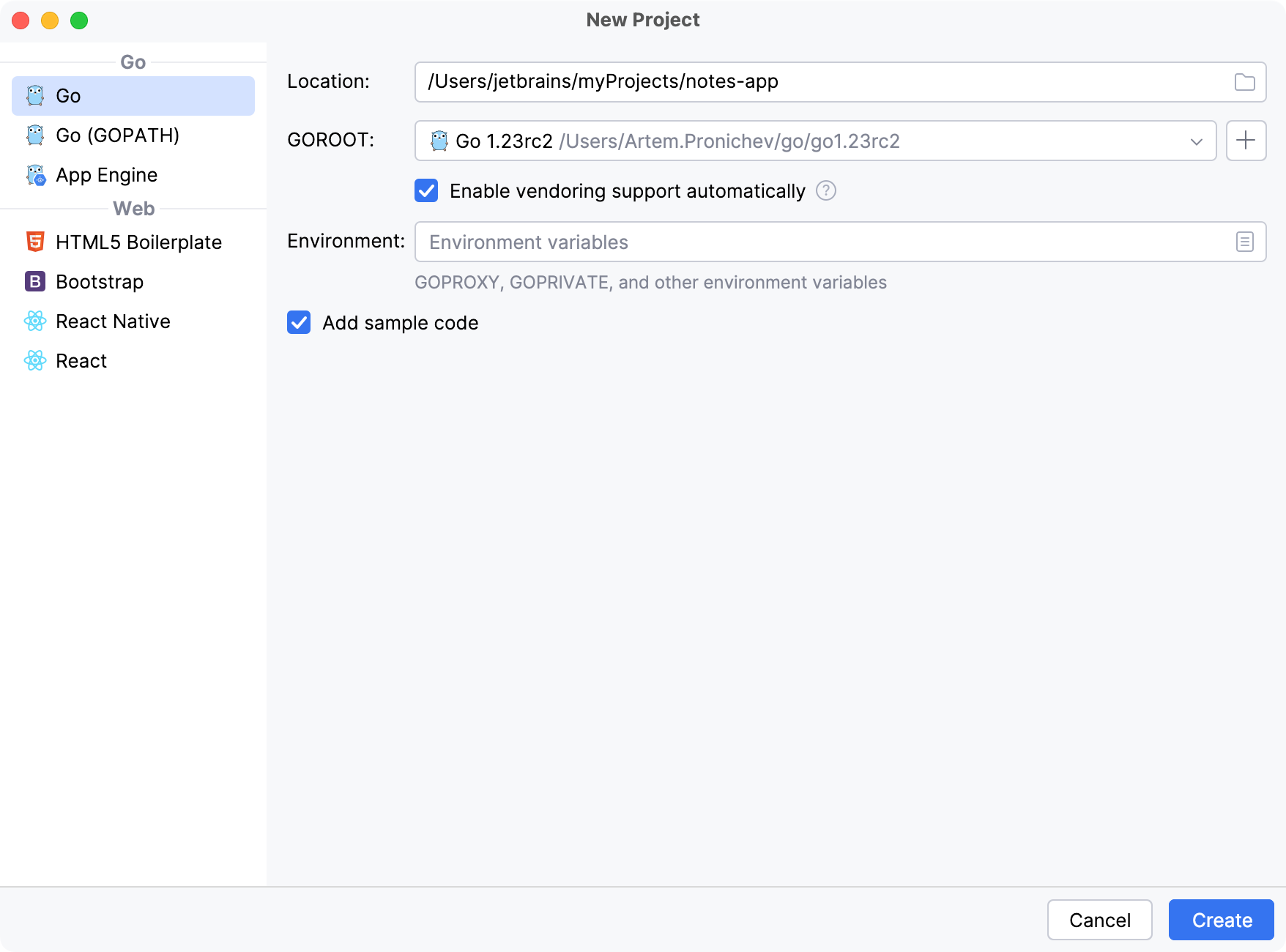
  2. 新規プロジェクト ダイアログで、 Go を選択します。

  3. ロケーション フィールドに、プロジェクトを保存する場所を入力するか、その場所に移動します。

  4. GOROOT フィールドで、Go のインストール場所を指定します。 GoLand は通常、この場所を自動的に検出します。

    Go SDK の新しいバージョンを変更またはインストールするには、 SDK の追加 (SDK 追加アイコン) をクリックし、次のいずれかのオプションを選択します。

    • ローカル: ローカルシステムから既存の SDK を使用します。

    • ダウンロード: 公式リポジトリから Go SDK バージョンをダウンロードします。

  5. サンプルコードの追加 チェックボックスをクリアします。 開始する前にオンボーディングのヒントが必要な場合は、このチェックボックスをそのままにしておきます。

  6. 作成 をクリックしてください。

    GoLand はプロジェクトフォルダーを作成し、プロジェクトを初期化して、次の Bash アクションをユーザーの代わりに実行します:

    mkdir notes-app cd notes-app go mod init notes-app
    プロジェクトを初期化する

ステップ 2: データベースを設定する

ここで、 database.go という名前の新しいファイルを作成しましょう。 このファイルでは、SQLite データベース接続を設定します。 全体的な構成には、データベースファイル ( notes.db ) と、情報を保存する notes テーブルの作成が含まれます。

プロジェクトのルートディレクトリに、次の内容の database.go を作成します。

package main import ( "database/sql" "log" // Import the SQLite driver anonymously to initialize it // without directly referencing _ "github.com/mattn/go-sqlite3" ) // Declare a global variable to hold the database connection pool var db *sql.DB // initDB initializes the database connection and creates // the 'notes' table if it doesn't exist func initDB() { var err error // Open a connection to the SQLite database file named "notes.db" db, err = sql.Open("sqlite3", "./notes.db") if err != nil { // Log any error that occurs and terminate the program log.Fatal(err) } // SQL statement to create the notes table if it doesn't exist createTable := ` CREATE TABLE IF NOT EXISTS notes ( id INTEGER PRIMARY KEY AUTOINCREMENT, title TEXT, content TEXT );` // Execute the SQL statement to create the table _, err = db.Exec(createTable) if err != nil { // Log any error that occurs while executing the SQL statement // and terminate the program log.Fatal(err) } }

以下の手順に従って、ファイル作成のプロセスを進めていきます。

Go ファイルを作成する

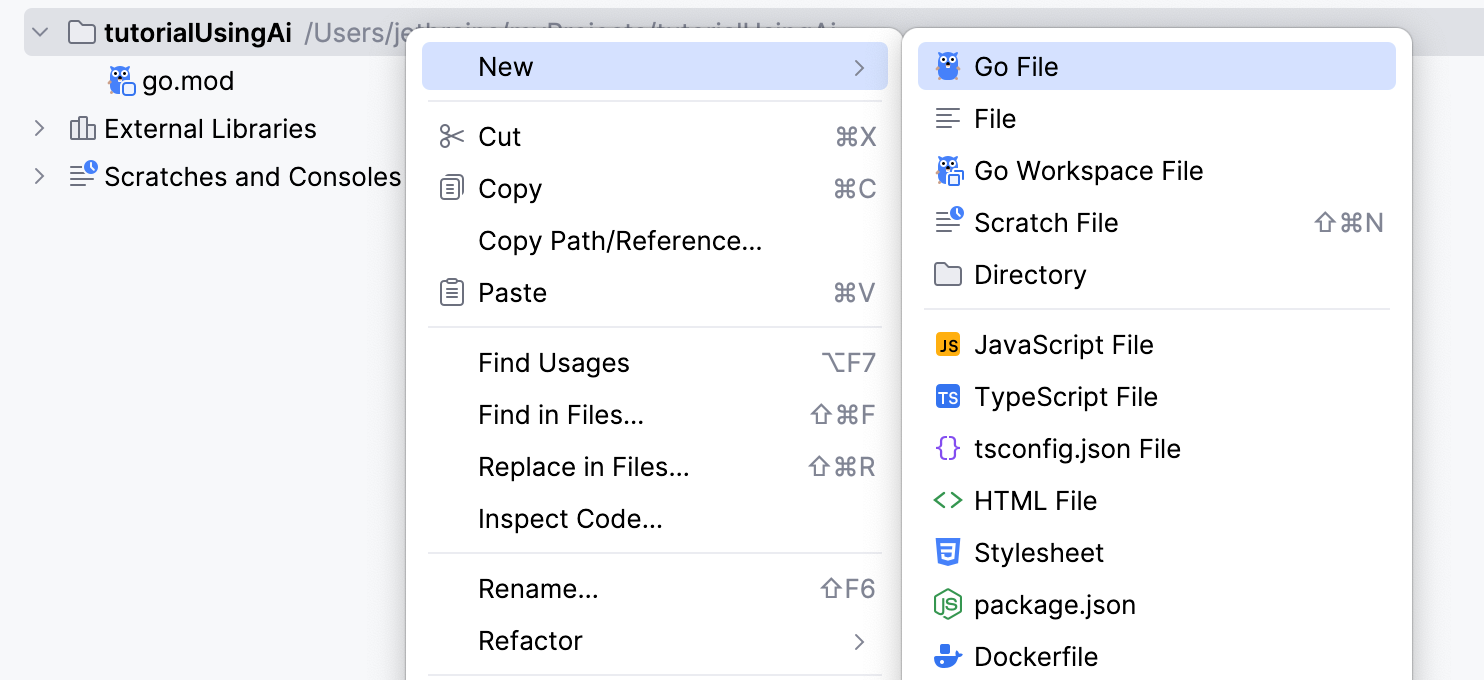
  1. Go ファイルを作成するには、次のいずれかのオプションを使用します。

    • プロジェクト ツールウィンドウで、プロジェクトの親フォルダーを右クリックし、 新規 | Go ファイル を選択します。

    • プロジェクトの親フォルダーをクリックし、 Alt+Insert を押して、 Go ファイル を選択します。

    • プロジェクトの親フォルダーをクリックし、 ファイル | 新規 | Go ファイル に移動します。

  2. 新規 Go ファイル ダイアログでファイル名を入力し、ファイルの種類を選択します。

    • 空のファイル — 空の Go ファイルを作成します。

    • シンプルアプリケーション — 定義済みの main 関数を含む Go ファイルを作成します。

    Go ファイルを作成する

ステップ 3: Note 構造体を作成する

note.go という名前の 新しいファイルを作成し、 Note 構造体を定義します。

Note 構造体は、ID、タイトル、コンテンツを含むメモの構造を定義します。 この構造体は、アプリケーションでメモを明確かつ整理された方法で表現できるようにします。

package main type Note struct { ID int Title string Content string }

また、データベースとやりとりする場合、データを構造的に処理する方法が重要です。 Note 構造体を使用すると、データベースの行を Go オブジェクトにマッピングしたり、その逆を行ったりできます。 例: データベースからメモを取得する場合、各行を Note 構造体にスキャンできます。

ステップ 4: CRUD 操作を実装する

note.go に CRUD 操作を追加してみましょう。 CRUD 操作は、データベースまたは永続ストレージと対話するために必要な基本機能です。 CRUD は、作成、読み取り、更新、削除の略です。

作成 操作は、データベースに新しいレコードまたはデータエントリを追加するために使用されます。 SQL では、これは通常、INSERT ステートメントを使用して実行されます。

func CreateNote(title, content string) { query := `INSERT INTO notes (title, content) VALUES (?, ?)` _, err := db.Exec(query, title, content) if err != nil { log.Fatal(err) } }

読み取り 操作は、データベースから既存のレコードまたはデータを取得するために使用されます。 SQL では、これは通常、SELECT ステートメントを使用して実行されます。

func GetNotes() ([]Note, error) { rows, err := db.Query("SELECT id, title, content FROM notes") if err != nil { return nil, err } defer rows.Close() var notes []Note for rows.Next() { var note Note err = rows.Scan(&note.ID, &note.Title, &note.Content) if err != nil { return nil, err } notes = append(notes, note) } return notes, nil }

更新 操作は、データベース内の既存のレコードまたはデータを変更するために使用されます。 SQL では、これは通常、UPDATE ステートメントを使用して実行されます。

func UpdateNote(id int, title, content string) { query := `UPDATE notes SET title = ?, content = ? WHERE id = ?` _, err := db.Exec(query, title, content, id) if err != nil { log.Fatal(err) } }

削除 操作は、データベースから既存のレコードまたはデータを削除するために使用されます。 SQL では、これは通常、DELETE ステートメントを使用して実行されます。

func DeleteNote(id int) { query := `DELETE FROM notes WHERE id = ?` _, err := db.Exec(query, id) if err != nil { log.Fatal(err) } }
package main import ( "log" ) type Note struct { ID int Title string Content string } // CreateNote adds a new note to the database func CreateNote(title, content string) { query := `INSERT INTO notes (title, content) VALUES (?, ?)` _, err := db.Exec(query, title, content) if err != nil { log.Fatal(err) } } // GetNotes retrieves all notes from the database func GetNotes() ([]Note, error) { rows, err := db.Query("SELECT id, title, content FROM notes") if err != nil { return nil, err } defer rows.Close() var notes []Note for rows.Next() { var note Note err = rows.Scan(&note.ID, &note.Title, &note.Content) if err != nil { return nil, err } notes = append(notes, note) } return notes, nil } // DeleteNote removes a note from the database func DeleteNote(id int) { query := `DELETE FROM notes WHERE id = ?` _, err := db.Exec(query, id) if err != nil { log.Fatal(err) } }

ステップ 5: メイン関数を作成する

ここで、 main.go を変更して、そこに main 関数を追加しましょう。 main.go のコードは、メモの表示、新しいメモの追加、既存のメモの削除を行うルートを備えた基本的な Web サーバーをセットアップします。 メモの保存には SQLite データベースを使用し、CRUD 操作を実行するために HTTP リクエストを処理します。

HTTP リクエストを処理するには、ハンドラーを使用します。 Go の HTTP ハンドラーは、HTTP リクエストを処理する関数です。 これらは、Go で Web サーバーを作成するための構成要素です。 HTTP ハンドラーは、HTTP リクエストを受け取り、処理して、HTTP レスポンスを生成します。 Go では、これらのハンドラーは、 http.Handler インターフェースを満たす関数またはメソッドであるか、 http.HandleFunc などの関数に直接渡されます。

まず main 関数から始めます。

機能: メイン

main 関数は次の機能を実行します。

  • データベースの初期化: データベース接続を設定するために initDB() が呼び出されます。 defer db.Close() ステートメントは、プログラム終了時にデータベース接続が閉じられることを保証します。

  • HTTP ハンドラー: http.HandleFunc 関数はルートとそれに対応するハンドラー関数を設定します。

    • /indexHandler によって処理されます。

    • /addaddHandler によって処理されます。

    • /delete は deleteHandler によって処理されます。

プログラムを実行すると、コードによってサーバーが開始されます。サーバーはポート 8080 で起動し、エラーが発生するとログに記録され、プログラムが終了します。

func main() { // Initialize the database initDB() // Ensure the database connection is closed when the main function exits defer db.Close() // Set up HTTP handlers for different routes http.HandleFunc("/", indexHandler) // Route for the homepage http.HandleFunc("/add", addHandler) // Route for adding a new note http.HandleFunc("/delete", deleteHandler) // Route for deleting a note // Log the server start and listen on port 8080 log.Println("Server started at :8080") log.Fatal(http.ListenAndServe(":8080", nil)) }

機能: インデックスハンドラー

インデックスハンドラーはいくつかの機能を実行します。

  • メモの取得: GetNotes() を呼び出して、データベースからすべてのメモを取得します。 エラーが発生した場合は、内部サーバーエラー応答を送信します。

  • テンプレートの解析: index.html テンプレートファイルを解析します。 テンプレートの解析中にエラーが発生した場合は、内部サーバーエラー応答を送信します。

  • テンプレートの実行: 取得したメモを使用してテンプレートを実行し、応答ライター w に HTML をレンダリングします。

func indexHandler(w http.ResponseWriter, r *http.Request) { // Retrieve all notes from the database notes, err := GetNotes() if err != nil { // Send an internal server error response if something goes wrong http.Error(w, err.Error(), http.StatusInternalServerError) return } // Parse the HTML template file tmpl, err := template.ParseFiles("index.html") if err != nil { // Send an internal server error response if the template cannot be parsed http.Error(w, err.Error(), http.StatusInternalServerError) return } // Execute the template with the notes data tmpl.Execute(w, notes) }

機能: 追加ハンドラー

add ハンドラーは、メモがデータベースに追加されることを保証します。 ハンドラーには次の機能が含まれます。

  • リクエストメソッドを確認:POST リクエストのみが処理されることを保証します。

  • フォームの値を取得: フォームからタイトルとコンテンツの値を取得します。

  • メモの作成: CreateNote を呼び出して、データベースに新しいメモを追加します。

  • リダイレクト: メモを追加した後、ユーザーをホームページにリダイレクトします。

func addHandler(w http.ResponseWriter, r *http.Request) { // Only handle POST requests if r.Method == "POST" { // Get the title and content from the form values title := r.FormValue("title") content := r.FormValue("content") // Create a new note with the provided title and content CreateNote(title, content) } // Redirect the user back to the homepage after adding the note http.Redirect(w, r, "/", http.StatusSeeOther) }

機能: 削除ハンドラー

削除ハンドラーは、データベースからメモを削除します。 このハンドラーは次の処理を実行します。

  • ID 変換: ID フォームの値を整数に変換します。 変換が失敗した場合は、不正な要求応答が送信されます。

  • メモの削除: DeleteNote を呼び出して、指定された ID のメモをデータベースから削除します。

  • リダイレクト: メモを削除した後、ユーザーをホームページにリダイレクトします。

func deleteHandler(w http.ResponseWriter, r *http.Request) { // Convert the ID from the form value to an integer id, err := strconv.Atoi(r.FormValue("id")) if err != nil { // Send a bad request response if the ID is not valid http.Error(w, "Invalid ID", http.StatusBadRequest) return } // Delete the note with the given ID DeleteNote(id) // Redirect the user back to the homepage after deleting the note http.Redirect(w, r, "/", http.StatusSeeOther) }
package main import ( "encoding/json" "fmt" "html/template" "log" "net/http" "strconv" ) // main function is the entry point of the program func main() { // Initialize the database initDB() // Ensure the database connection is closed when the main function exits defer db.Close() // Set up HTTP handlers for different routes http.HandleFunc("/", indexHandler) // Route for the homepage http.HandleFunc("/add", addHandler) // Route for adding a new note http.HandleFunc("/delete", deleteHandler) // Route for deleting a note // Log the server start and listen on port 8080 log.Println("Server started at :8080") log.Fatal(http.ListenAndServe(":8080", nil)) } // indexHandler handles the requests to the homepage func indexHandler(w http.ResponseWriter, r *http.Request) { // Retrieve all notes from the database notes, err := GetNotes() if err != nil { // Send an internal server error response if something goes // wrong http.Error(w, err.Error(), http.StatusInternalServerError) return } // Parse the HTML template file tmpl, err := template.ParseFiles("index.html") if err != nil { // Send an internal server error response if the template // cannot be parsed http.Error(w, err.Error(), http.StatusInternalServerError) return } // Execute the template with the notes data tmpl.Execute(w, notes) } // addHandler handles the requests to add a new note func addHandler(w http.ResponseWriter, r *http.Request) { // Only handle POST requests if r.Method == "POST" { // Get the title and content from the form values title := r.FormValue("title") content := r.FormValue("content") // Create a new note with the provided title and content CreateNote(title, content) } // Redirect the user back to the homepage after adding the note http.Redirect(w, r, "/", http.StatusSeeOther) } // deleteHandler handles the requests to delete a note func deleteHandler(w http.ResponseWriter, r *http.Request) { // Convert the ID from the form value to an integer id, err := strconv.Atoi(r.FormValue("id")) if err != nil { // Send a bad request response if the ID is not valid http.Error(w, "Invalid ID", http.StatusBadRequest) return } // Delete the note with the given ID DeleteNote(id) // Redirect the user back to the homepage after deleting the note http.Redirect(w, r, "/", http.StatusSeeOther) }

ステップ 6: HTML フォームを作成する

次に、メモを追加および削除するためのフォームを含む index.html という新しいファイルを作成しましょう。 このファイルは html/template パッケージを使用します。 Go の html/template パッケージは、テンプレートを解析して実行する機能を提供します。 {{range .}}{{.Title}} などのプレースホルダーは Go のテンプレート構文の一部であり、HTML に動的なコンテンツを挿入できます。

HTML テンプレートで使用される構文の詳細は次のとおりです。

  • {{range .}}: テンプレートに渡されたデータのコレクションに対してループを開始します。 この場合、 はテンプレートに渡されたデータ (Note 構造体のスライス) を表します。

  • {{range .}} はコレクション内の各要素を反復処理します。

  • {{.Title}}: {{range .}} ブロック内では、 は反復の現在の要素を参照します。 {{.Title}} は、現在の Note 構造体の タイトル フィールドにアクセスします。

  • {{else}}: 範囲がどの要素も反復処理しない場合 (たとえば、コレクションが空の場合) に表示する代替コンテンツを提供します。

  • {{end}}: 範囲ブロックの終了を示します。

<!DOCTYPE html> <html lang="en"> <head> <meta charset="UTF-8"> <meta name="viewport" content="width=device-width, initial-scale=1.0"> <title>Notes App</title> </head> <body> <h1>Notes</h1> <form action="/add" method="post"> <label for="title">Title:</label> <input type="text" id="title" name="title" required><br> <label for="content">Content:</label> <textarea id="content" name="content" required></textarea><br> <button type="submit">Add Note</button> </form> <h2>Existing Notes</h2> {{range .}} <div> <h3>{{.Title}}</h3> <p>{{.Content}}</p> <form action="/delete" method="post" style="display:inline;"> <input type="hidden" name="id" value="{{.ID}}"> <button type="submit">Delete</button> </form> </div> {{else}} <p>No notes available.</p> {{end}} </body> </html>

Go コードとの接続

Go コードの indexHandler 関数では、データベースからメモを取得してテンプレートに渡します。

次のコードスニペットでは、 template.ParseFiles("index.html")index.html ファイルを読み取って解析します。

tmpl.Execute(w, notes) はテンプレートを実行し、 notes をデータとして渡します。 この Note 構造体の notes スライスは、 {{range .}} が反復処理するものです。

// Parse the HTML template file tmpl, err := template.ParseFiles("index.html") if err != nil { // Send an internal server error response if the template cannot be parsed http.Error(w, err.Error(), http.StatusInternalServerError) return } // Execute the template with the notes data tmpl.Execute(w, notes)

ステップ 7: アプリケーションの実行

GoLand にはアプリケーションを実行するためのさまざまなオプションがあります。 最も簡単なのは、エディターから直接実行することです。

エディターから実行

プログラムにパラメーターを渡さず、開始前に特定のアクションが不要な場合は、エディターから直接実行できます。

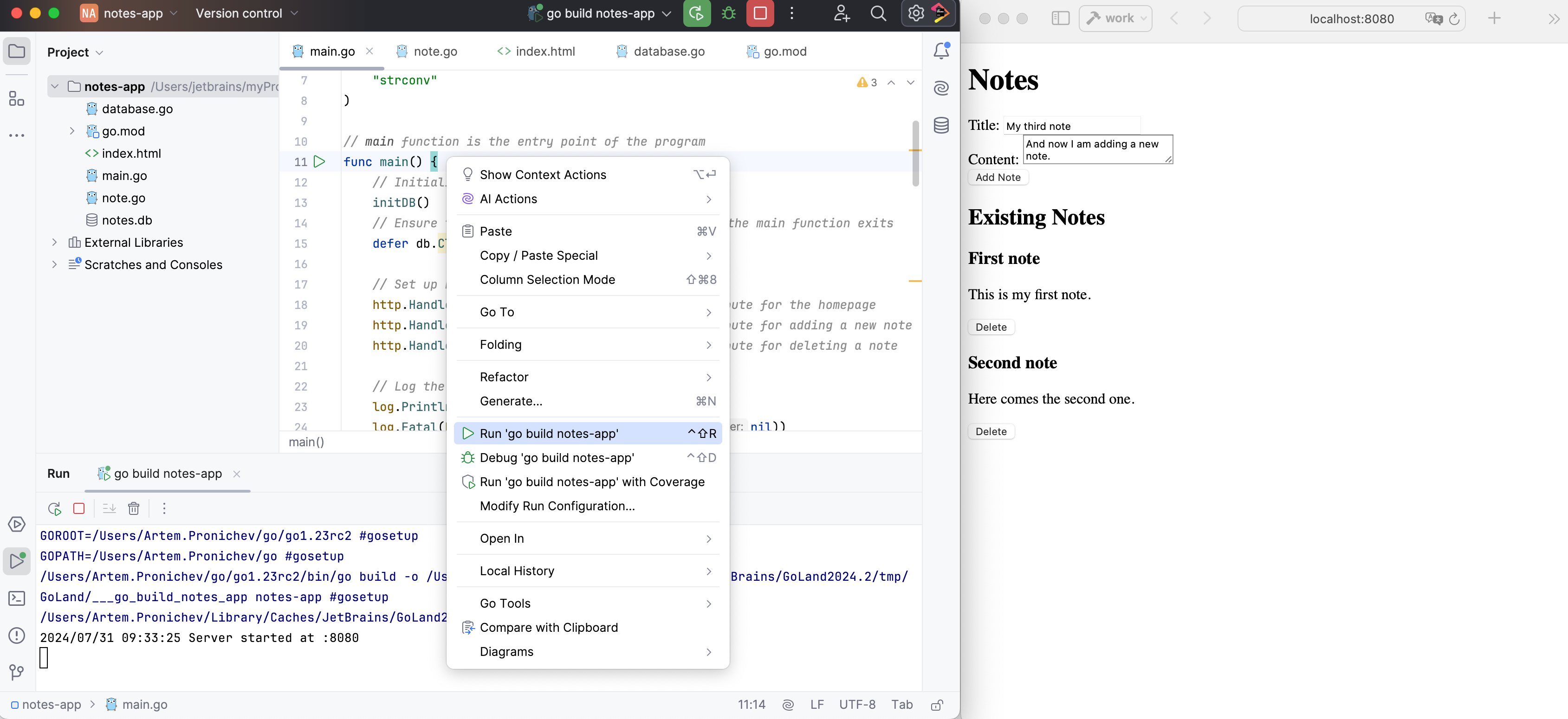
  • main 関数の近くの ガター をクリックし、 実行 を選択します。

  • スクリプトを実行するには、スクリプトをエディターで開くか、 プロジェクト ツールウィンドウで選択して、コンテキストメニューから <スクリプトファイル名> の実行 を選択します。

バックグラウンドでは、GoLand が go run main.go を実行し、出力を 実行 ツールウィンドウに表示します。

次に、Web ブラウザーを開いて http://localhost:8080 に移動します。 メモを追加するためのフォームと、既存のメモのリストと、削除するオプションが表示されます。

アプリケーションの実行
2026 年 5 月 22 日