TeamCity Roadmap
See what's in the pipeline
TeamCity vision
As AI agents produce more code, TeamCity helps teams build, test, and deliver it reliably. We’re improving performance, security, and flexibility while giving developers and AI agents better tools to verify changes, investigate failures, and use resources efficiently.
Our focus for 2026 and 2027
Agentic interfaces and scenarios
Ongoing developmentWe’re improving the TeamCity CLI, MCP server, and agent skills so AI agents can handle everyday CI/CD tasks:
- Configure projects and migrate workflows, including creating an initial TeamCity pipeline from GitHub Actions YAML.
- Run builds, check results, and inspect build and test data.
- Investigate failures and help fix build problems.
- Optimize pipelines to reduce build time and resource use.
Planned integrations include a TeamCity plugin for ChatGPT and an integration with JetBrains Air Teams to connect agent workflows with CI/CD.
Improving DevEx
2026.22026.3More ways to work with TeamCity:
- In IntelliJ IDEA: The TeamCity plugin includes the CLI and simplifies MCP setup.
- In the terminal: You can configure projects, run builds, and investigate results using the TeamCity CLI.
- Through your coding agent: Agents can access TeamCity via the CLI or MCP. Agent skills help it use the CLI more effectively.
We’re continuing to improve these interfaces so you can complete more of your CI/CD work without switching environments.
Agentic automations
EAPThe AI Agents plugin lets you run AI agents as TeamCity build steps, using your own AI provider credentials or JetBrains Air Governance.
Planned for 2027.1
Improve the setup experience and bundle the plugin with TeamCity.
Provide recipes for common AI tasks in builds, including:
- Code review with multiple agents.
- Fixing failing pipelines.
- Assessing the risks of AI-generated pull requests.
- Analyzing flaky tests.
AI governance
BYOK in TeamCity
ReleasedSupport for the use of local LLMs or approved AI providers in TeamCity’s in-product AI features and AI workflows launched from TeamCity.
Integration with JetBrains Air Governance
Available through the AI Agents plugin EAP
Connect AI agents running in TeamCity builds to JetBrains Air Governance, where you can manage AI usage across models and providers.
Air Governance supports BYOK, quotas, model selection, usage policies, and analytics, giving organizations visibility into how AI is used and control over its costs.
TeamCity Pipelines GA
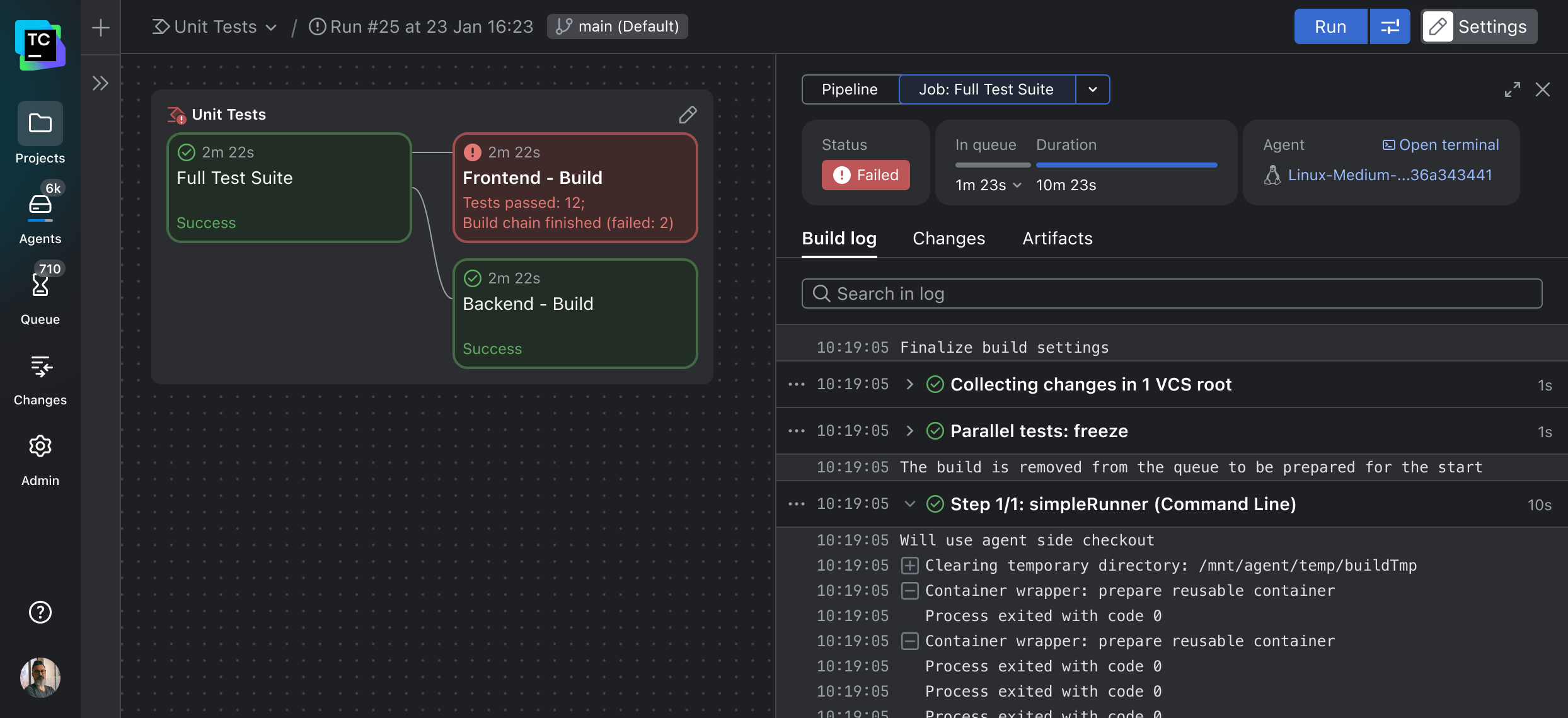
Get modern pipeline configuration for teams of any size, with fully branchable configuration as code (YAML and the Kotlin DSL), a visual drag-and-drop editor, and UI configuration.
GA since 2026.2.
Compatibility
Existing build configurations and build chains continue to evolve. Pipelines can be integrated into build chains, and the Kotlin DSL is supported in both pipelines and build configurations.
Performance monitor for jobs
Available since 2026.2Use the Performance Monitor tab to inspect resource usage during pipeline job runs.
Real-time pipeline debugging
Available since 2026.2Debug a job and its dependencies without running the entire pipeline. Inspect live build logs and open a terminal on the build agent to investigate problems.
Support for protected branches
Available since 2026.2When changes made in the visual editor cannot be committed directly to a protected branch, TeamCity warns you and lets you save the updated configuration to another branch.
Further Pipelines improvements
- Support has been added for all TeamCity runners in pipeline jobs (TW-100301).
- We’ve expanded support for build features in YAML and the visual editor (TW-100639).
- All YAML editor problems are now displayed in one list.
- Build tabs are now shown for pipeline and job runs, including custom reports, Qodana, Allure, Maven build information, and container information (TW-100509).
- Pending changes can now be displayed in pipeline views (TW-98059).
- We’ve added support for execution timeouts (TW-100636).
Planned for 2027.1
- GitHub integration improvements.
- Complete checkout rules support.
- Recipes in Pipelines.
- Conditional jobs.
- Reusable pipelines.
- Preservation of custom YAML formatting when editing pipelines visually.
- YAML versioning support.
Core CI/CD capabilities
2026Performance and scalability improvements
- Bundled support for maintaining a minimum number of running cloud agents, a capability currently only available through a plugin (TW-101751).
- Continuation of architectural work aimed at providing native horizontal scaling.
- Improvements to TeamCity’s performance and security.
Retries for failed dependencies within a build chain are already available in 2026.2, allowing a failing dependency to be retried without restarting the entire chain (TW-96371).
Flexibility
- Dynamic build chains (EAP planned for 2027.1)
Generate build configurations during execution to support workflows that need to determine their structure as they run (TW-44489).
Looking ahead
Our longer-term goal is for TeamCity to take a more proactive role in maintaining CI/CD workflows while keeping people in control.
This includes helping to fix failing pipelines, reducing build time and resource usage, and bringing issues that require a decision to your attention. We’re also working toward greater scalability and security for AI workloads, more complete tools for AI agents, and closer integration with agent workflows.
Get TeamCity product news and release updates.