转换为全局 using 的重构
此重构允许您将一个或多个本地 using 指令转换为 全局 using 指令 ,并将它们移动到新文件或现有文件中。
在下面的示例中,我们将此重构应用于文件 One.cs 中的 using System.Collections;。 ReSharper 会分析当前项目中的所有文件,找到 Two.cs 中相同的 using ,并将它们都移动到 GlobalUsings.cs 。
// One.cs
using System.Collections;
class One
{
void Test(ArrayList list)
{
// do something
}
}
// Two.cs
using System.Collections;
using System.Xml;
class Two
{
void Test(ArrayList list,
XmlReader reader)
{
// do something
}
}
// GlobalUsings.cs
global using System.Linq;
global using System.Threading.Tasks;
// One.cs
class One
{
void Test(ArrayList list)
{
// do something
}
}
// Two.cs
using System.Xml;
class Two
{
void Test(ArrayList list,
XmlReader reader)
{
// do something
}
}
// GlobalUsings.cs
global using System.Linq;
global using System.Threading.Tasks;
global using System.Collections;
转换为全局 using
将光标放在
using指令上或选择多个指令。执行以下操作之一:
按下 Control+Shift+R 然后选择 转换为 global using。
右键单击并从上下文菜单中选择 重构 | 转换为全局 using。
从主菜单中选择 。
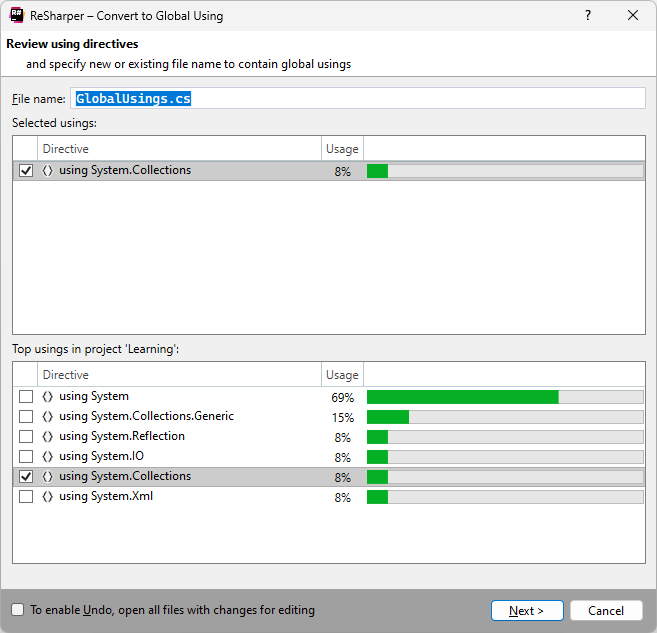
将打开 转换为 global using 对话框。
指定全局 using 应该移动到的位置 — 这可以是当前项目中的任何现有 .cs 文件或一个新的 .cs 文件。
(可选)选择当前项目中其他常用的
using指令,将它们也转换为全局 using。要应用此重构,请单击 下一步。
ReSharper 将从项目中的所有文件中移除所选命名空间的
using指令(因为一旦为同一命名空间出现全局 using,本地 using 就变得多余),并将这些指令作为global using指令添加到指定文件中。
此功能在以下语言和技术中是 支持的:
|
|
|
|
|
|
|
|
|
|---|---|---|---|---|---|---|---|---|
|
|
|
|
|
|
|
|
|


2026年 7月 16日