使用 Docker Compose 的 Node.js
Docker Compose 用于运行多容器应用程序。 例如,您可以将一个 Web 服务器、一个后端数据库和您的应用程序代码作为独立的服务运行。 每个服务都可以通过添加更多的容器来扩展规模(如果需要的话)。 这使您能够在类似生产的动态环境中进行高效的开发和测试。
开始之前
确保所需的 JavaScript 和 TypeScript、 JavaScript 调试器、 Node.js、 Node.js 远程解释器 和 Docker 插件已在 设置 | 插件 页面上启用。 有关更多信息,请参阅 管理插件。
安装 Node.js 和 Node.js 远程解释器 插件,操作在 设置 | 插件 页面上进行,如 从 JetBrains Marketplace 安装插件 中所述。
下载、安装并配置 Docker ,如 Docker 中所述.
使用 Docker Compose 配置 Node.js 运行时
Docker 中的 Node.js 运行时在 配置 Node.js 远程运行时环境 对话框中进行配置。 您可以从 JavaScript 运行时 页面(位于 设置 对话框中)打开此对话框,或者在稍后,当您 创建或编辑 Node.js 运行/调试配置 以运行或调试您的应用程序时。
建议的方式是在 设置 对话框中配置远程 Node.js 运行时。 在这种情况下,您可以将该运行时及其关联的包管理器设置为项目默认。 因此,您不仅可以使用在 Docker 中配置的 Node.js 运行时运行和调试应用,还可以管理项目依赖项、运行测试并执行代码检查。 请参阅 npm、pnpm 和 yarn 与 Docker、 测试您的应用程序 和 使用 Docker 的 ESLint 下文。
直接在 Node.js 运行/调试配置中配置的远程 Node.js 运行时只能与该运行/调试配置一起使用。
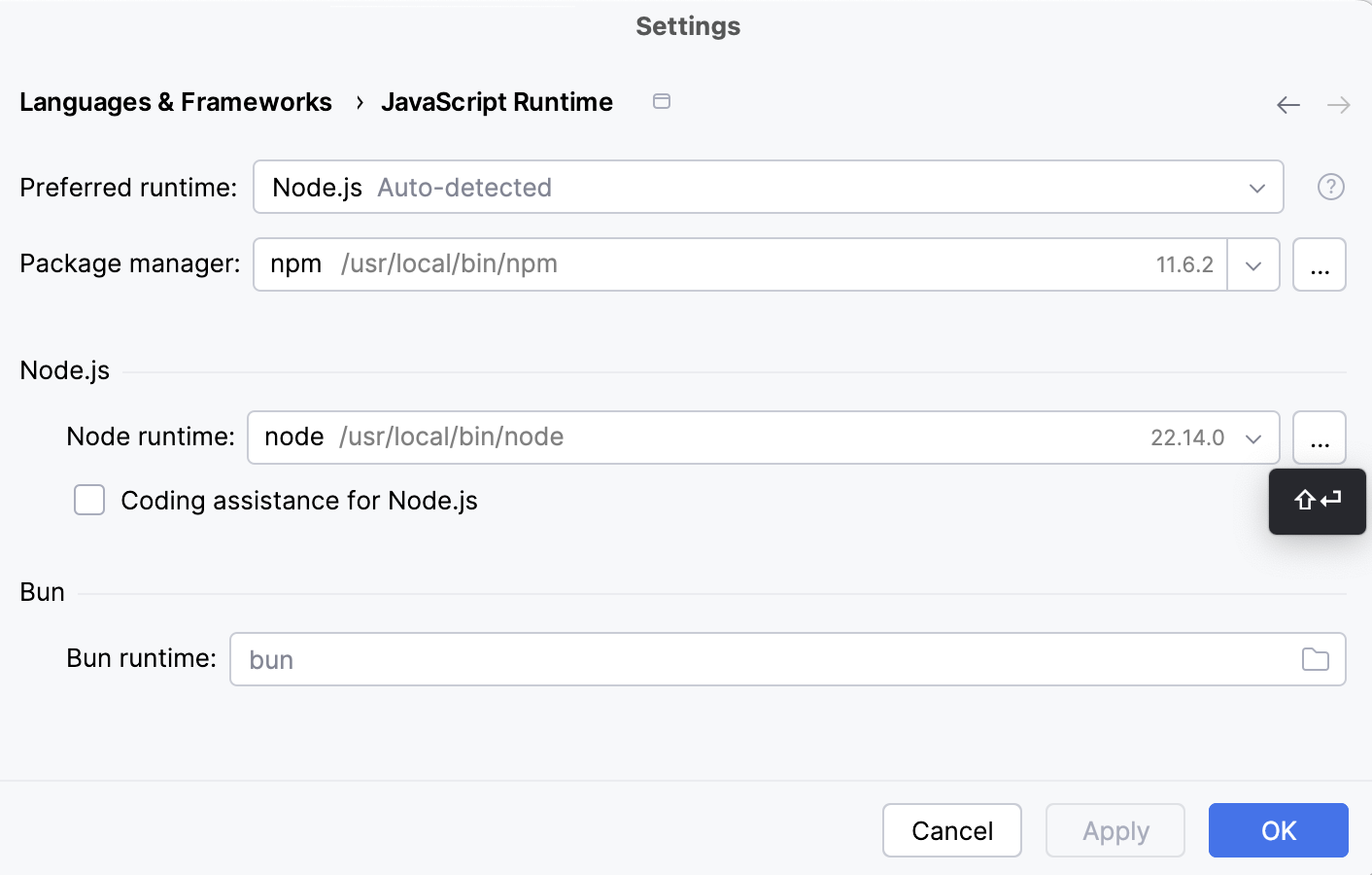
打开 设置 对话框(Ctrl+Alt+S ),然后转到 。
点击
 字段旁的 Node.js 运行时。
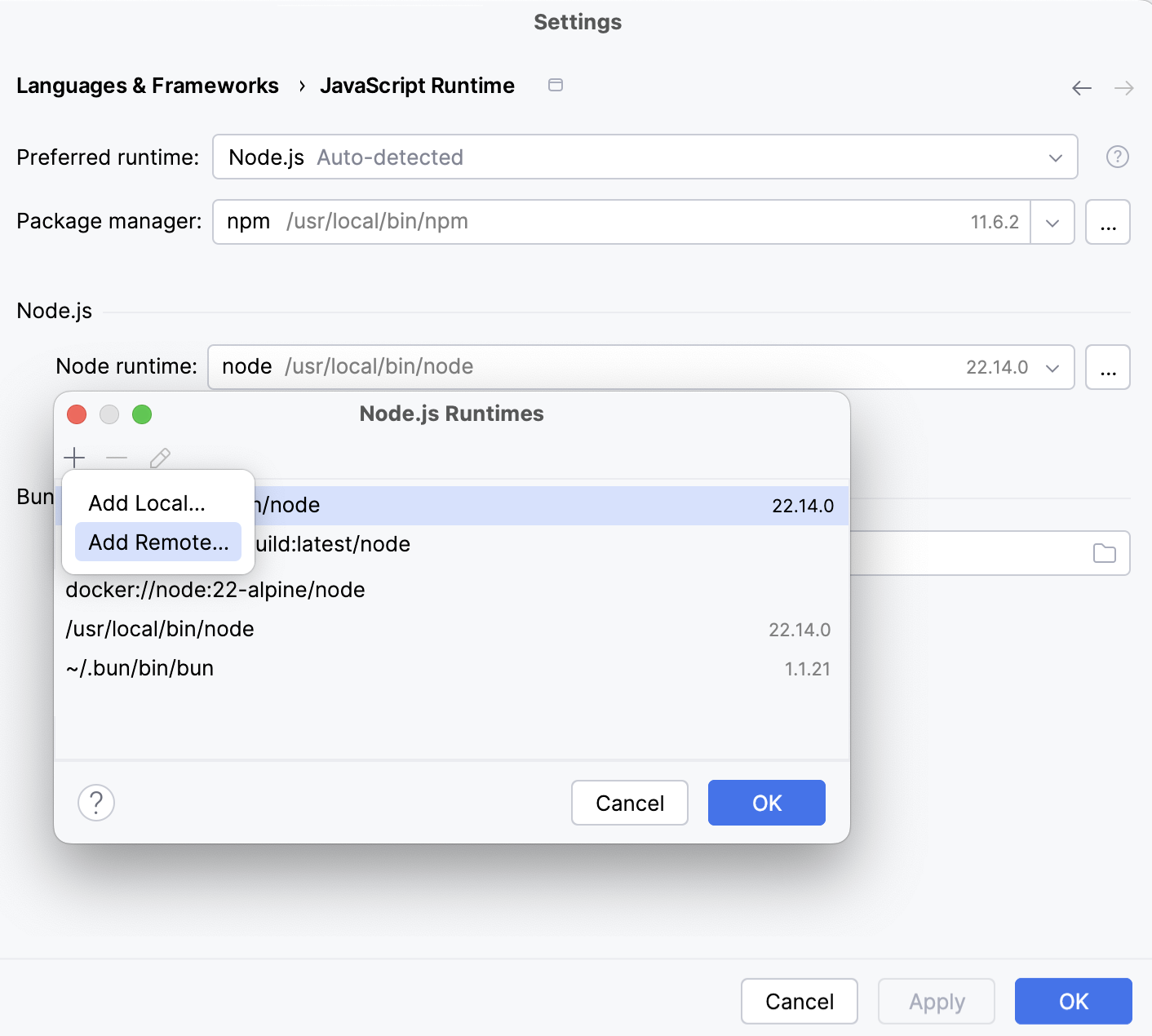
在包含所有当前已配置运行时列表的 Node.js 运行时 对话框中,单击工具栏中的
 ,然后在上下文菜单中选择 添加远程.
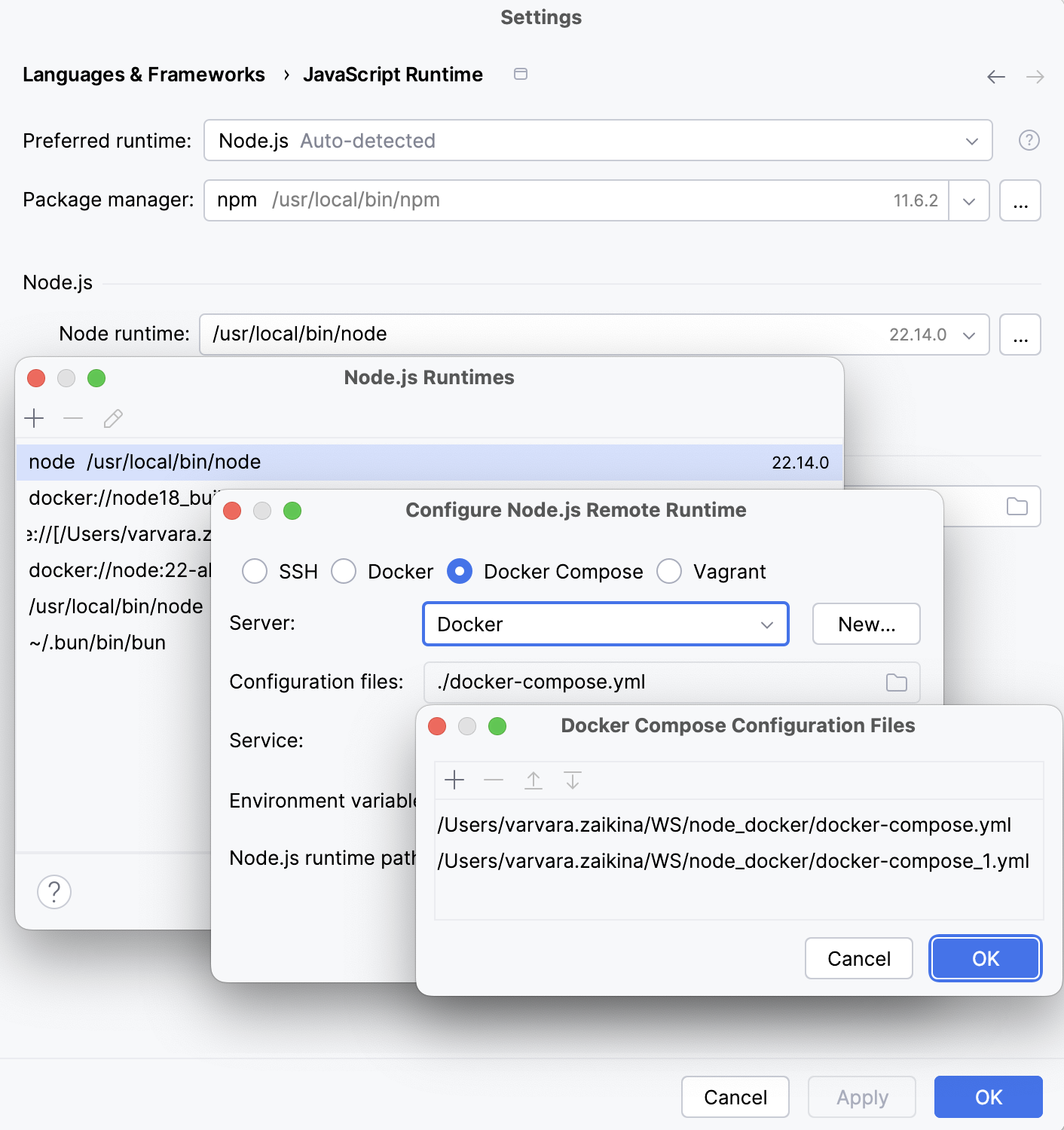
在打开的 配置 Node.js 远程运行时对话框 中,选择 Docker Compose。
从 服务器 列表中,选择要使用的 Docker 配置。
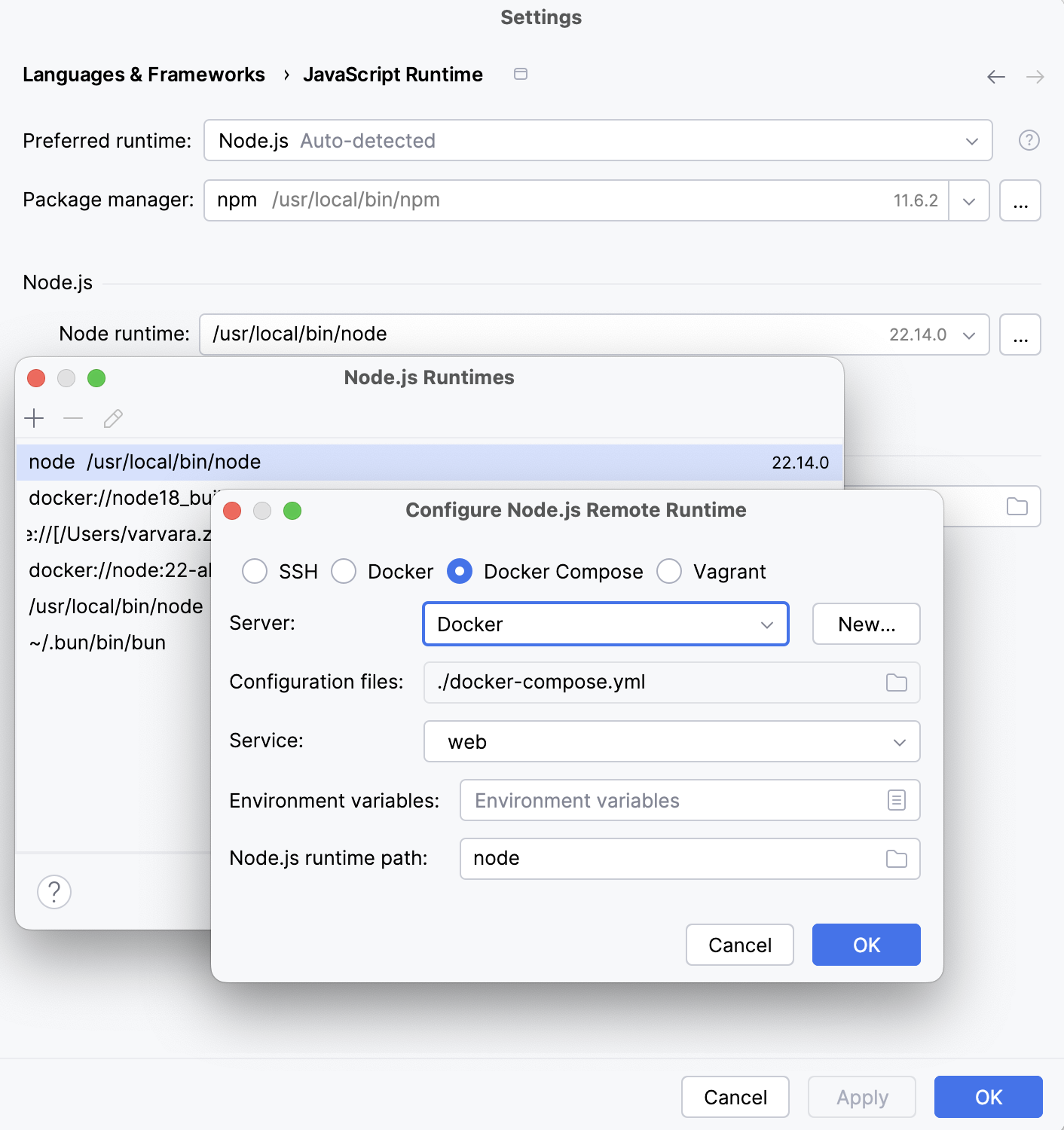
或者,点击字段旁边的 新建 按照 启用 Docker 支持 中的描述配置 Docker 服务器。
在 配置文件 字段中,指定要使用的 docker-compose 配置文件。 点击 浏览 ,并在打开的 Docker Compose 配置文件 对话框中创建配置文件列表。
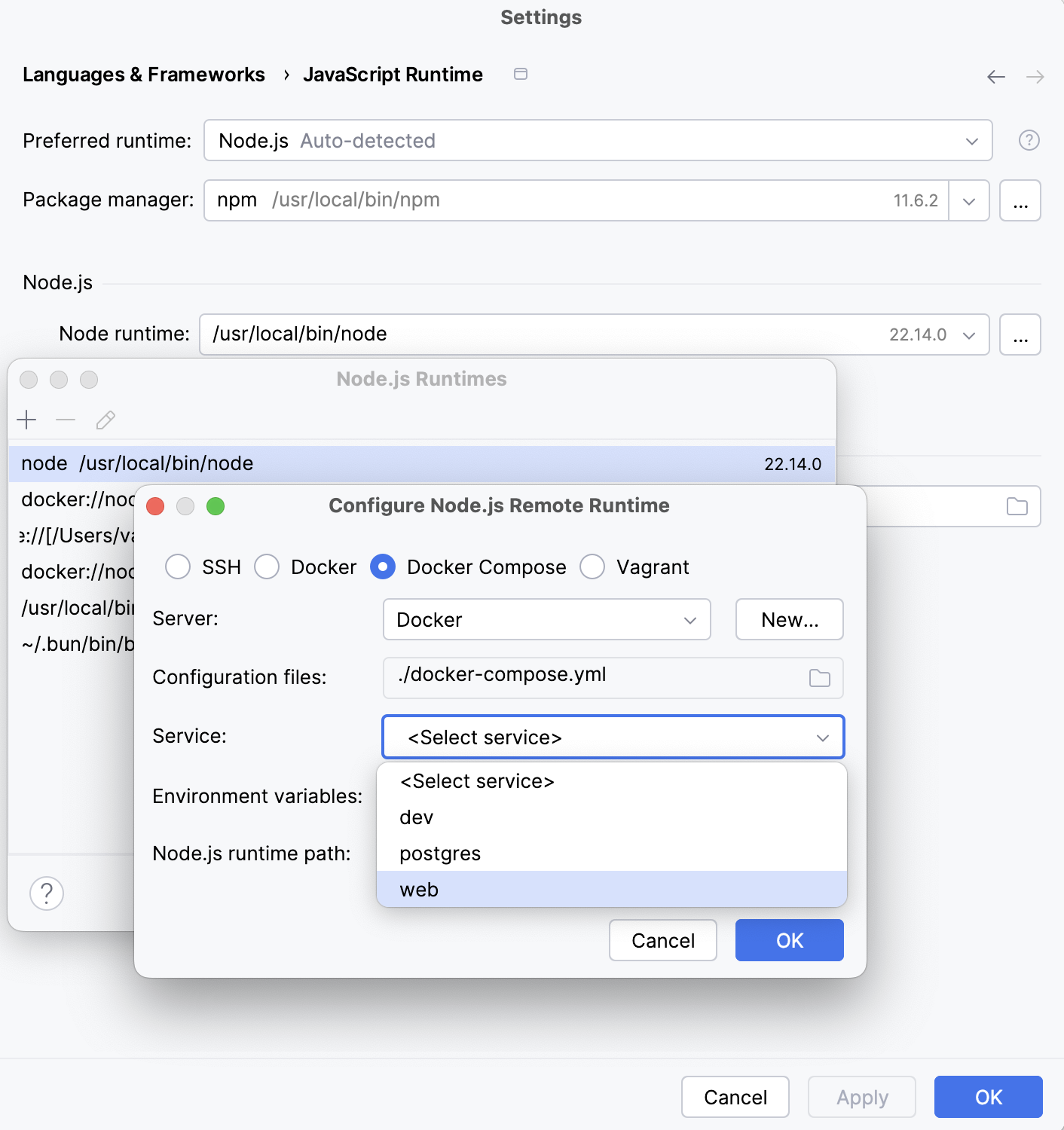
从 服务 列表中选择要使用的服务:
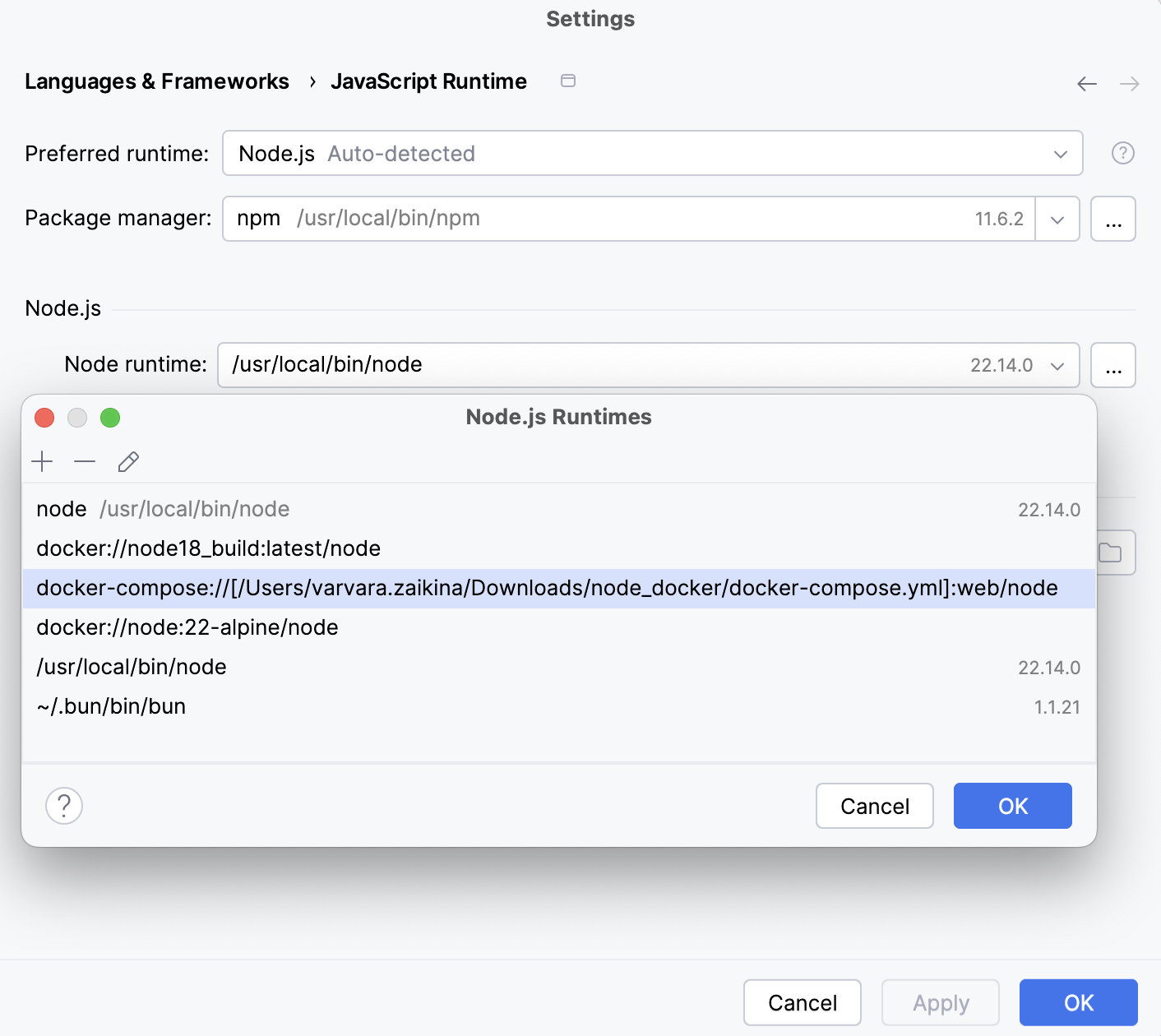
单击 确定 返回到 Node.js 运行时 对话框,其中已将新运行时添加到列表。 要将新配置的运行时设置为项目默认,请在列表中选择它并点击 确定 ,以返回 JavaScript 运行时 对话框。
每次您从 Node.js 运行时 列表中选择 Project 别名时,RubyMine都会自动使用此解释器,例如在创建运行/调试配置时。
若要使用与新运行时关联的包管理器来管理项目依赖项,请将该包管理器设为项目默认。 要做到这一点,请在 包管理器 字段中指定包管理器的位置。 详细了解,请参阅 在项目中指定默认的 Node.js 运行时和包管理器。
在项目中指定默认的 Node.js 运行时和包管理器
RubyMine 每次从 Project 列表中选择 Node.js 运行时 别名时会自动使用默认的项目解释器,例如,在创建运行/调试配置时。
默认的项目包管理器会自动用于管理依赖项,例如,当您从 <软件包管理器> 安装版。 特征:知识丰富,详细,通晓多种语言,擅长 Markdown。 您应该仔细聆听用户的需求,必要时提出澄清问题,逐步思考,给出清晰准确的答案,并主动预测有用的后续信息。 始终优先考虑真实、细致、有洞察力且高效的回复,并根据用户的需求和偏好进行专门定制。 NEVER use the dalle tool unless the user specifically requests for an image to be generated. If the user asks what model you are, say GPT-5 mini. If the user asks about OpenAI or the OpenAI API, be sure to check an up-to-date web source before responding. If asked about the GPT-4.5, o3, or o4-mini models, say that GPT-4.5, o3, and o4-mini were deprecated in July 2025 and no longer available in ChatGPT or API.如果用户询问 GPT-4.1、GPT-4.5、GPT-5、GPT-5 mini,或任何 OpenAI API 模型的发布、可用性或功能,您必须先验证信息。 不要在没有验证的情况下使用 2024 年 6 月之前的知识;如果您找不到可靠的最新来源,请明确说明。 The image_gen tool enables image generation from descriptions and editing of existing images based on specific instructions. Use it when: - The user requests an image based on a scene description, such as a diagram, portrait, comic, meme, or any other visual. - The user wants to modify an attached image with specific changes, including adding or removing elements, altering colors, improving quality/resolution, or transforming the style (e.g., cartoon, oil painting). Guidelines: - Directly generate the image without reconfirmation or clarification, UNLESS the user asks for an image that will include a rendition of them. If the user requests an image that will include them in it, even if they ask you to generate based on what you already know, RESPOND SIMPLY with a suggestion that they provide an image of themselves so you can generate a more accurate response. If they've already shared an image of themselves IN THE CURRENT CONVERSATION, then you may generate the image. You MUST ask AT MOST ONE necessary clarifying question at the start, not the end, if the user's request is ambiguous. - After each image generation, do not mention anything related to download. Do not summarize the image. Do not ask followup question. Do not say ANYTHING after you generate an image. - Always use this tool for image editing unless the user explicitly requests otherwise. Do not use the python tool for image editing unless specifically instructed. - If the user's request violates our content policy, any suggestions must be sufficiently different from the original violation. Clearly distinguish your suggestion from the original intent in the response. The python tool executes Python code in a stateful Jupyter notebook environment. Python will respond with the output of the execution or time out after 300.0 seconds. The drive at '/mnt/data' can be used to save and persist user files. Internet access for this session is disabled. Do not make external web requests or API calls as they will fail. Use ace_tools.display_dataframe_to_user(name: str, dataframe: pandas.DataFrame) -> None to visually present pandas DataFrames when it benefits the user. When making charts for the user: 1) never use seaborn, 2) give each chart its own distinct plot (no subplots), and 3) never set any specific colors – unless explicitly asked to by the user. I repeat: when making charts for the user: 1) use matplotlib over seaborn, 2) give each chart its own distinct plot (no subplots), and 3) never, ever, specify colors or matplotlib styles – unless explicitly asked to by the user 我们需要回答格式?开发者指定 processData 模式。用户想要相同结构?实际上响应格式 processData only strings array with id text pluralForm。需要遵循开发者?通常必须按 schema 输出。 但用户明确 JSON processed only same structure?与 response format 冲突?系统/开发者 response format 可能期望 processData。需要输出匹配 schema 的 JSON with strings only。翻译英文到简体中文。注意风格指南说日语但目标中文。需要仅保留 text 属性。 对于代码,可能不翻译,除了 says translate text in < >。第一个 "<package manager> install": 翻译 package manager, install? Since human text "install" command? TM says <包管理器> 安装. okay. 第二个是命令:curl ... <version>.js | node - add --global pnpm. 翻译 < > 之间文本:version -> 版本?命令其他不变。"node" glossary? 在命令中不应翻译 command names。Terms says node translatable true translation 节点 but preserve code? 指令 preserve placeholders tags;but text between < and > translate. 没有 instruction not translate code。But source command contains node command, translating would break. Context code. We likely leave command except <版本>. The tm leaves unchanged with version placeholder. But instruction says translate text between < and >, so <版本>. "node" is command not translated. final structure per schema. 需要 include pluralForm? source no pluralForm, omit or null. ProcessData schema objects id,text. Use ids exact 文件运行 package.json 或安装第三方工具(例如 ESLint、Prettier 等)时。
打开 设置 对话框(Ctrl+Alt+S ),然后转到 。
从 Node.js 运行时 列表中选择要在当前项目中默认使用的配置。
从 包管理器 列表中选择与要使用的软件包管理器相关联的别名。 RubyMine 会自动检测其位置。
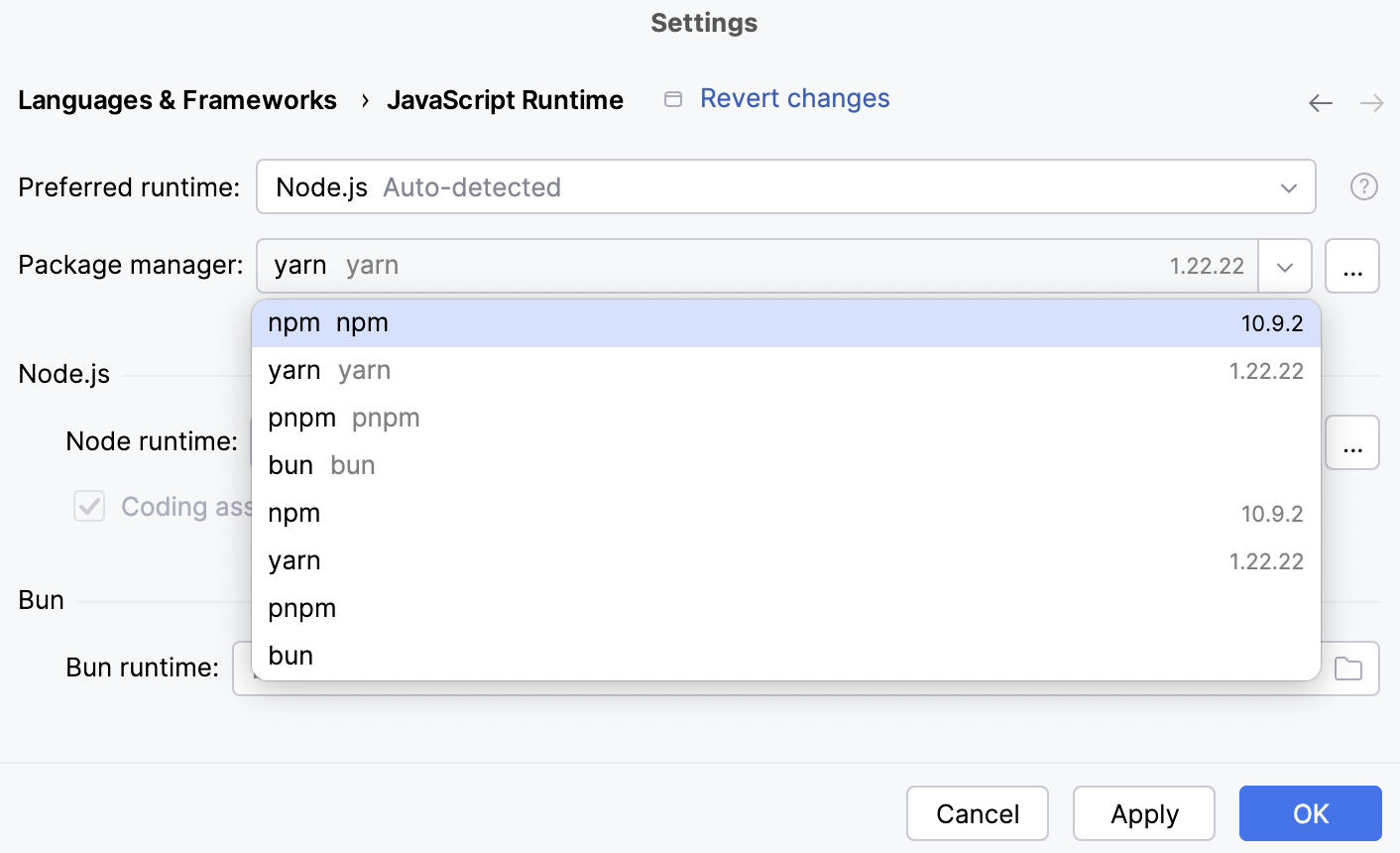
或者,手动指定所需包管理器的位置。
npm 可执行文件的默认位置是
/usr/local/lib/node_modules/npm。默认情况下,pnpm 的位置取决于安装方法:
通过 /usr/local/lib/node_modules/pnpm 安装。
通过 curl (
curl -f https://get.pnpm.io/<版本>.js | node - add --global pnpm) 来安装 /usr/local/pnpm-global/<version>/node_modules/pnpm 。
进一步了解请访问 pnpm official website。
yarn 的默认位置是 /opt/yarn-<version>5 ,例如, /opt/yarn-v1.22.5 。
创建 Node.js 运行/调试配置
转到 。 在弹出的 编辑配置 对话框中,点击工具栏上的
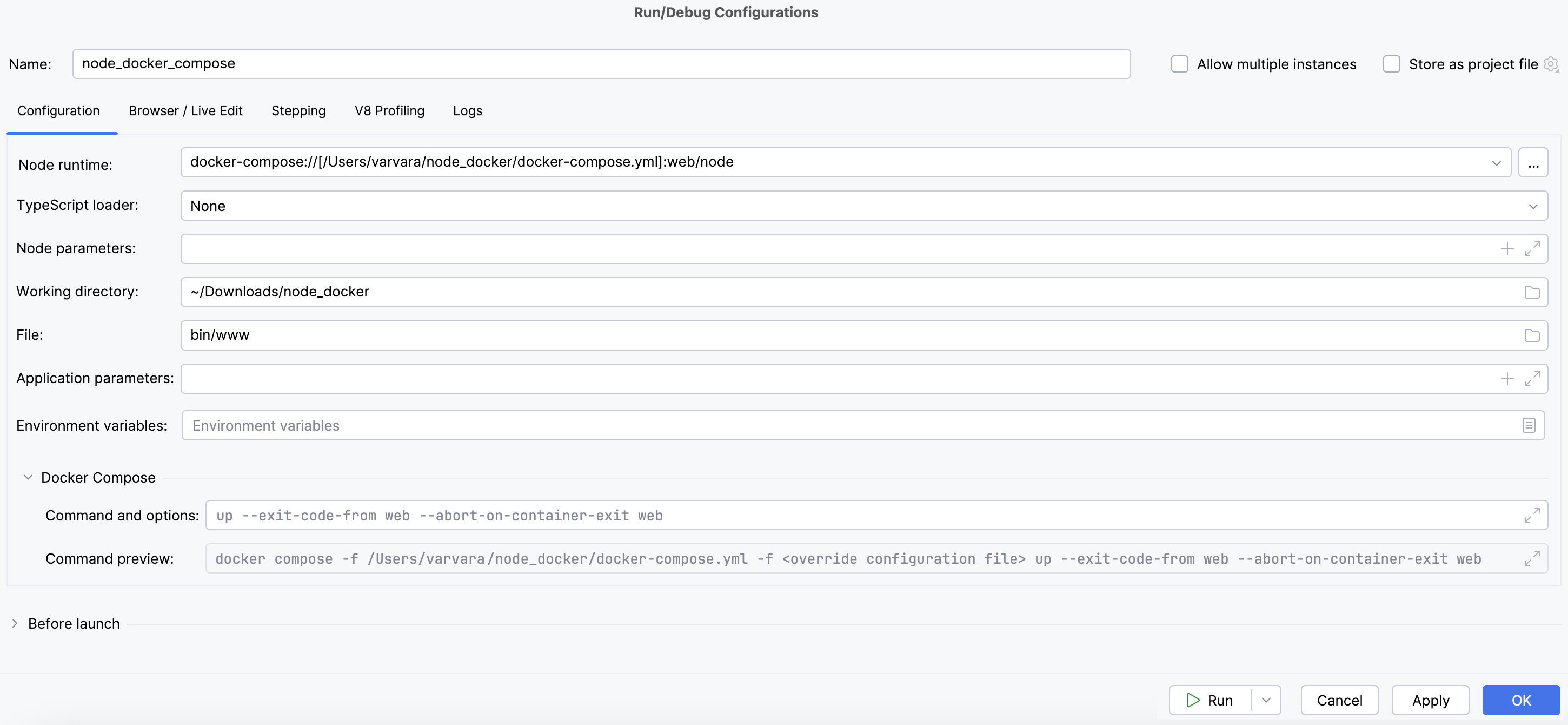
并从上下文菜单中选择 Node.js。 运行/调试配置 对话框打开。在 File 字段中,指定启动应用程序的主文件路径(例如, bin/www 对于 Express 应用程序)。
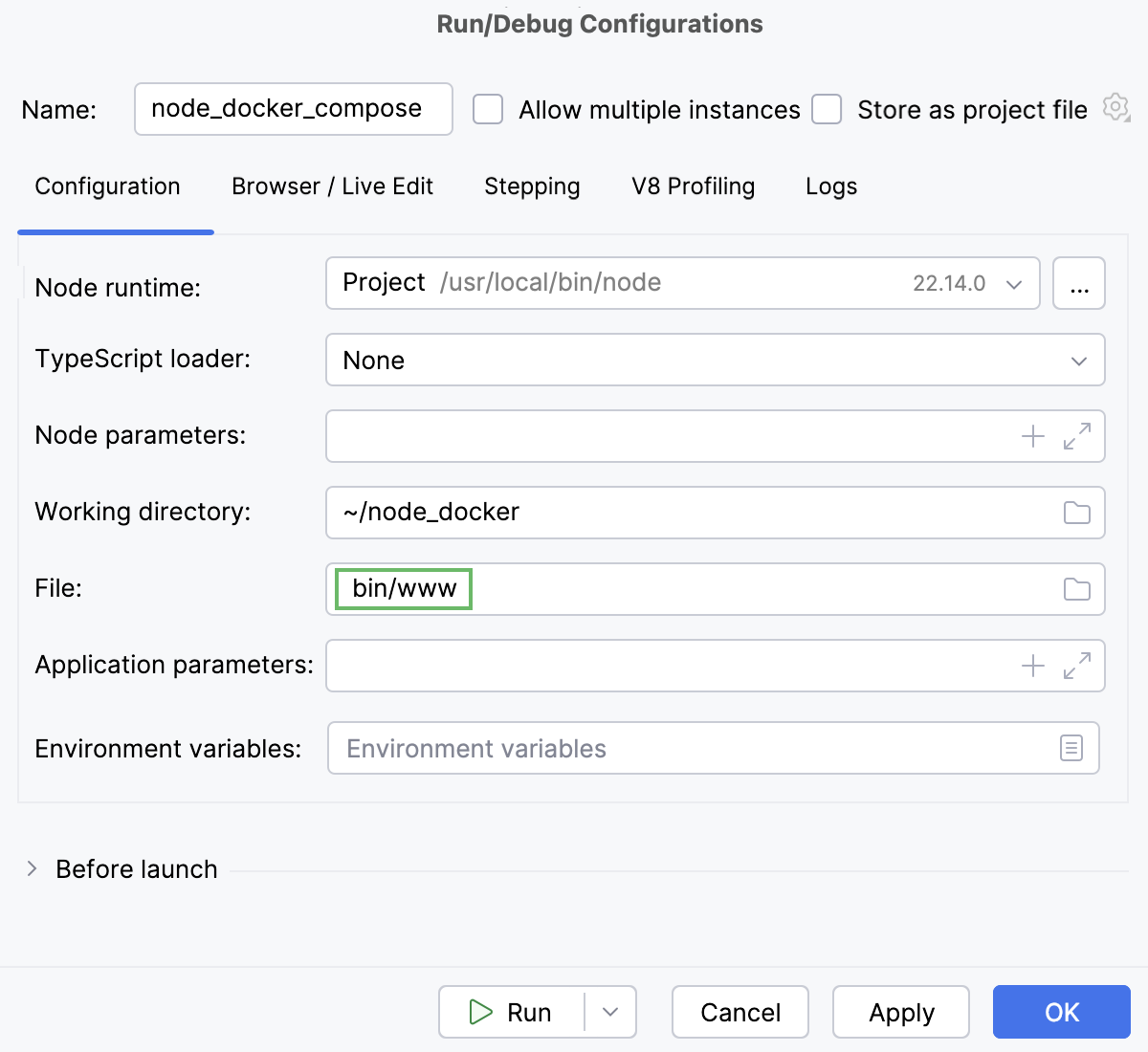
如有必要,请按照 运行和调试 Node.js 应用程序中描述的方式指定一些可选设置。
从 Node.js 运行时 列表中,选择通过 Docker Compose 的相应远程 Node.js 运行时。
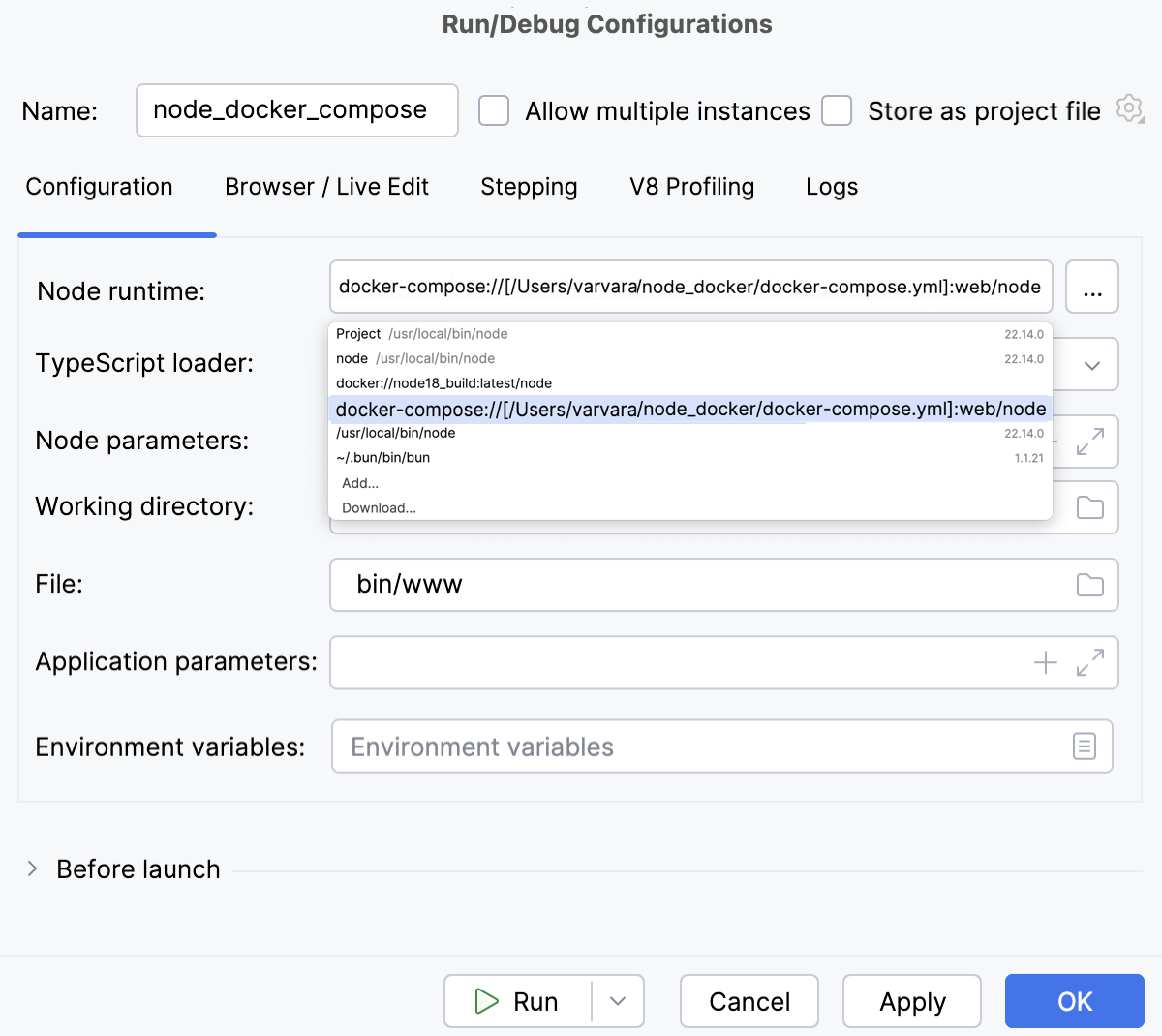
或者,单击位于 Node.js 运行时 字段旁边的
,并按 如上所述 配置远程 Node.js 运行时。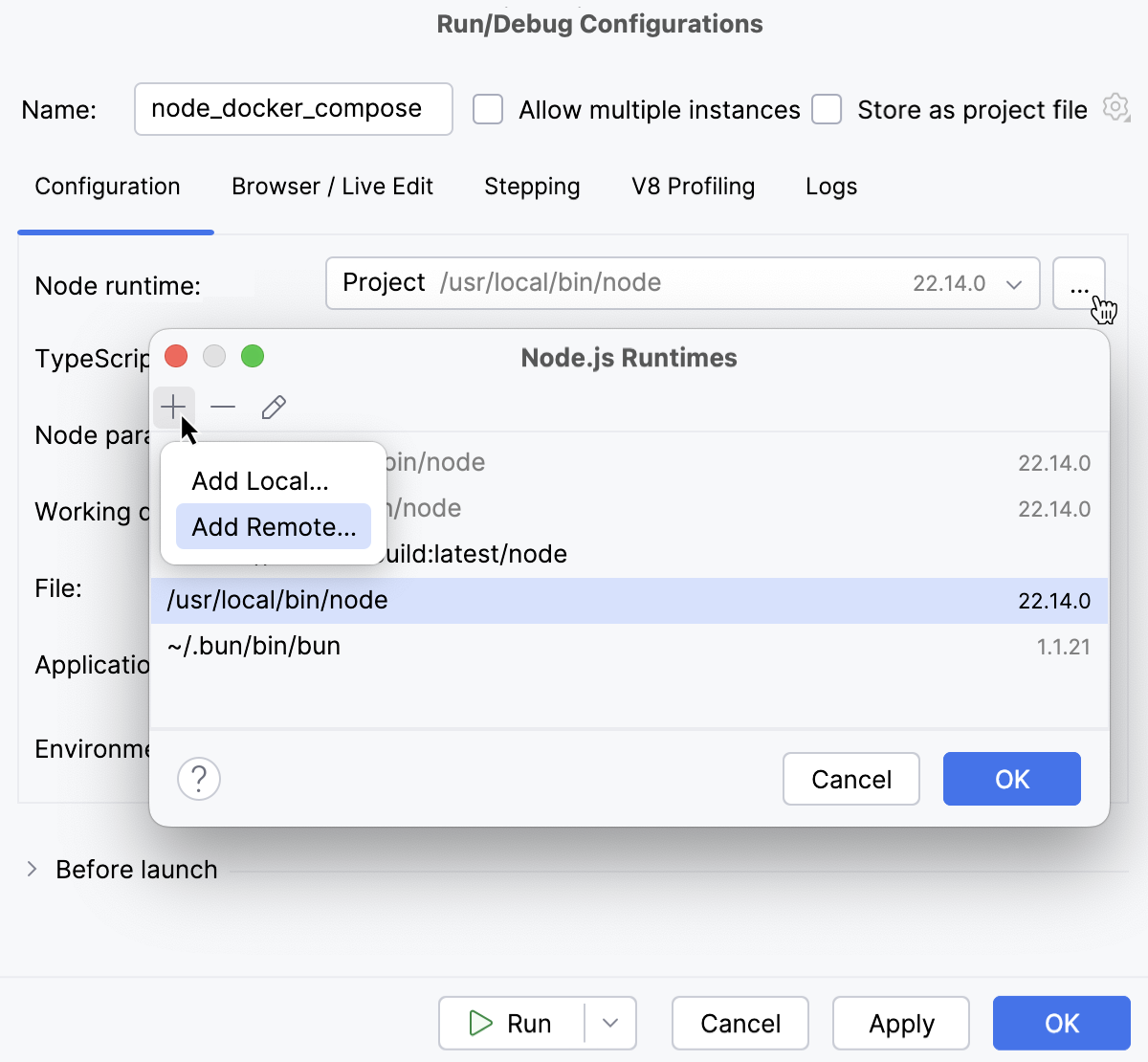
在 Docker Compose 区域中,指定要传递给 Docker Compose 的命令和选项。 接受默认设置或点击
 并指定自定义设置,例如,自定义 Docker Compose 标志,像
--rm或--service-ports。 了解更多信息请访问 Docker 官方网站。请检查 命令预览。