Moving Components
Components can be repositioned on a form the way you wish. The results of any move depend on the setting of the Layout Manager property of the target container.
This section describes how to move components using drag-and-drop operation, or using navigation keys on your keyboard.
To move one or more components
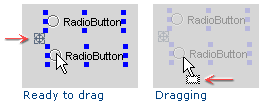
A drag handle appears near the selected components indicating that you can drag to a new position on the form. (It is not necessary to point to the handle itself. Hover anywhere over the selected components.)
Drag the selection to the target container, or to the target area within the same container. The valid drop locations are highlighted with blue borders.
To move a component using keyboard
Select the desire component on the form.
Press Ctrl+Arrow.
Last modified: 11 February 2024