Refactorings
ReSharper's set of refactorings surpasses that provided by Visual Studio, with regard to number, usability and scope of application. Each refactoring analyzes the entire scope of the code selection to which it is applied (as wide as the entire solution), including cross-language code, and uses this insight to update code in the most intelligent way possible.
All ReSharper's refactorings work in C#, vast majority is also available in VB.NET, some in ASP.NET, XAML, and other supported languages.
You might also want to check out ReSharper's context actions that implement less sophisticated, mostly local code transformations and not real refactorings in the way they are defined by Martin Fowler.
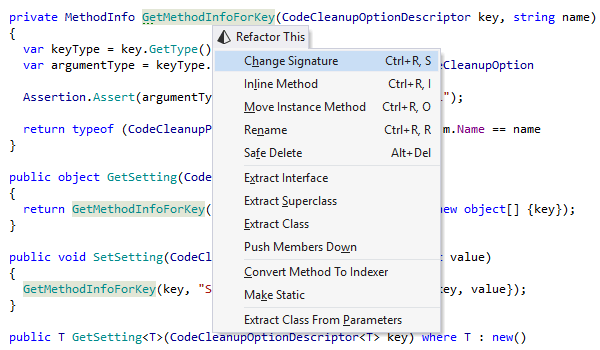
Using code refactorings
To use a refactoring, you can place the caret:
- On a symbol in the text editor.
- On a code selection in the text editor.
- On a file or a selection of files in the Solution Explorer tool window.
- On a type member or a selection of type members in File Structure or another ReSharper tool window.
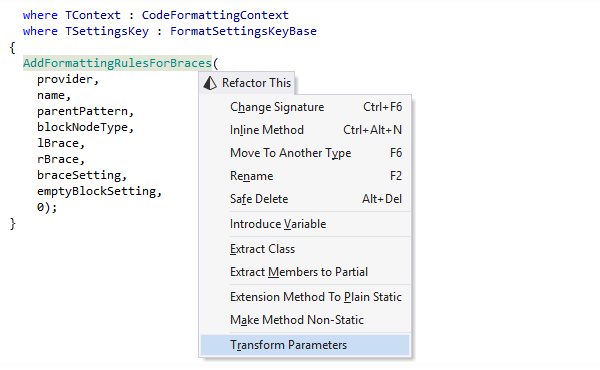
After that, you invoke a required refactoring from the ReSharper's Refactor menu, or by using its individual keyboard shortcut. Alternatively, the Refactor This command — Ctrl+Shift+R — lets you see which refactorings can be applied at the current caret position or for the current selection.
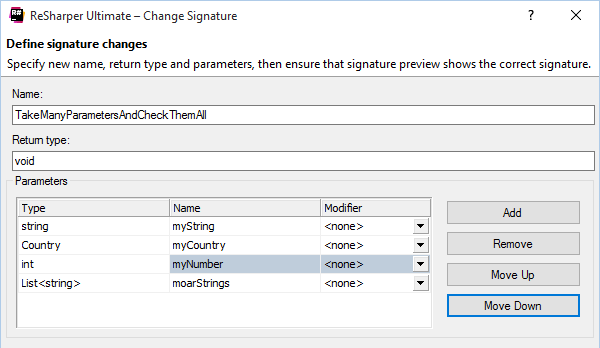
Change Signature
This refactoring allows you to modify a method signature in the following ways:
- Add, remove, rename, or reorder parameter(s)
- Change return type
- Change parameter type(s)
- Rename method
Along with changing the signature, ReSharper searches for all usages of the method and modifies all calls, implementations, and overrides of the method to reflect the change. In case of newly added parameters, default values for them supplied by the user are substituted in all method calls. In overrides, the original parameter passed to the method is passed to the base call.
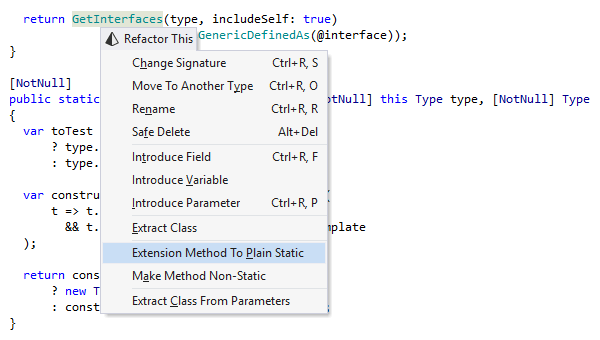
Convert Extension Method to Plain Static
This dialogless refactoring converts an extension method to a static method in the same class. The reverse functionality is provided by Convert Static to Extension Method.
Convert Static to Extension Method
This refactoring converts a static method to an extension method. For the conversion to be carried out successfully, the static method must (1) have at least one argument and (2) reside in a static class. The reverse functionality is available with Convert Extension Method to Plain Static.
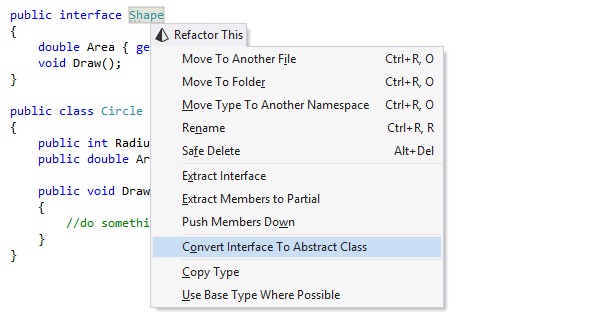
Convert Interface to Abstract Class
You should use this refactoring if you want to add some logic to an interface or you feel it better be a class. The refactoring checks for any conflicts, i.e. for types implementing the interface that already have base type (an error in C#, which has no multiple inheritance).
Convert Abstract Class to Interface
You can apply this refactoring to convert an abstract class to an interface. This is especially useful when you want a class to inherit from more than one abstract class, thus you need to convert one of them to an interface.
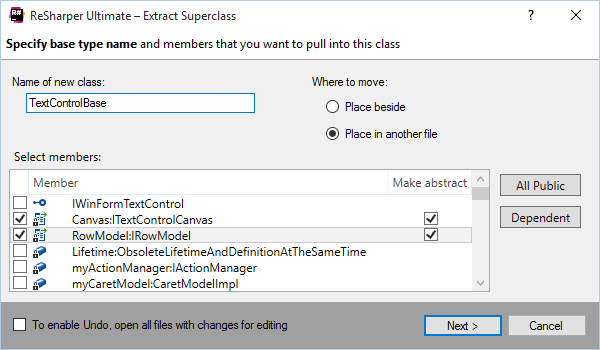
Extract Superclass
With this refactoring, you can create a base class for a class and move some members to it. Just place the caret at a class declaration, select members to extract, and run the refactoring. It is very useful for moving logic up an inheritance hierarchy so as to share it later.
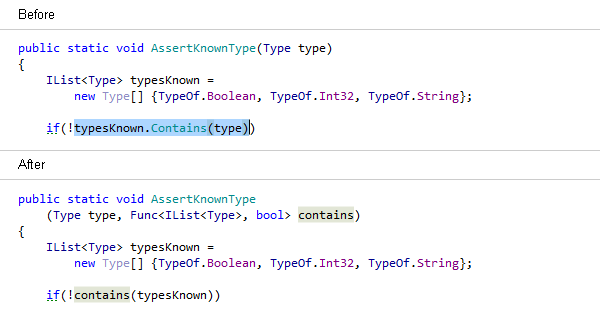
Introduce Parameter
Select an expression or a local variable in a method and use this refactoring to create a new parameter from it. All call sites will be updated to reflect the changed signature, while maintaining the logic and the semantics.
If an expression uses local variables that are inaccessible at a call site, this refactoring allows to pass them as delegates.
Make Method Static/Shared
This refactoring converts a non-static method into a static one (Shared in VB.NET)
by makingthis a parameter of the method. After refactoring, the target method will
be declared as static (Shared in VB.NET), and necessary parameters will be added to its call
sites. The refactoring is also useful when you want to move non-static methods (non-Shared in
VB.NET). In this case, use Make Method Static as a preparatory step for the Make Method
Non-static refactoring.
Make Method Non-Static/Non-Shared
This refactoring converts a static method (Shared in VB.NET) to an instance method
in the
selected parameter's
type (i.e. moves the method to parameter's type and transforms the parameter into
this) and transforms method
calls accordingly.
Move Instance Method
Using this refactoring, you can quickly move an instance method from the current type to one of the types that appear in the method parameters.
Move Static Member
The refactoring moves static fields and methods to another type. If you want to move non-static methods, use Move Instance Method instead.
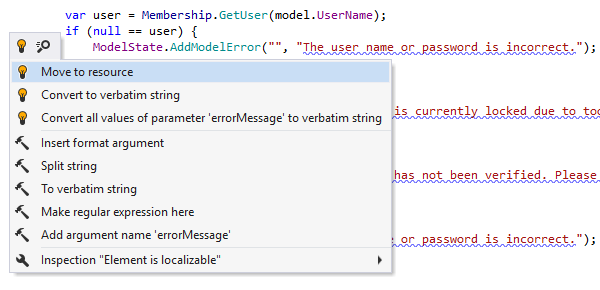
Move String to Resource
A part of ReSharper's internationalization feature pack, this refactoring helps extract localizable strings into resource files. During the refactoring, explicit string usages are replaced with references to resource wrappers.
You can call this refactoring with its dedicated shortcut or with the Refactor This command. However, ReSharper can also highlight strings that are not put into resource files as a code inspection, and suggest the Move String to Resource refactoring as a quick-fix. See ReSharper Help to learn how to configure ReSharper to do this.
Pull Members Up
This refactoring helps you move type members to a superclass or an interface. This operation is useful as a way to generalize behavior. ReSharper analyzes all members in the current class and makes a list of members that you can pull up. Before completing the refactoring, ReSharper also checks for possible conflicts, for example, whether the members that you are trying to move to a superclass will be accessible in the destination type. The reverse functionality is available with Push Members Down.
Push Members Down
This refactoring helps you clean up your type hierarchy by moving type members to a subtype. This operation is useful as a way to specialize behavior. ReSharper analyzes all members of the selected type and makes a list of members that you can push down. Before completing the refactoring, ReSharper also checks for possible conflicts, for example, whether the members you are trying to push down will be accessible in the destination type. The reverse functionality is available with Pull Members Up.
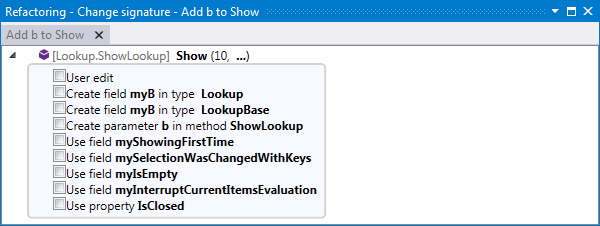
Pull Parameter
When you add a new parameter to a method — either with a quick-fix or with the Change Signature refactoring — not only does ReSharper update the signature and all usages of the method, but also analyses the call chain that the method is a part of, and allows you to 'pull' the new parameter anywhere within this chain.
Rename
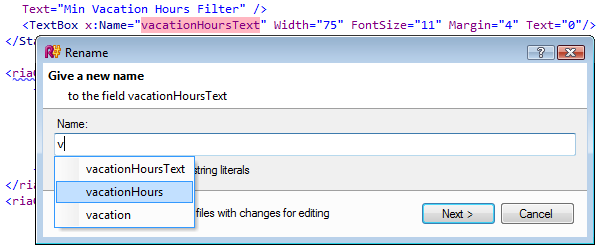
The Rename refactoring allows you to rename any symbol, including: namespaces, types, methods, parameters, local variables, properties, fields, and events. It automatically finds and corrects all references to the symbol. The Rename refactoring can be invoked directly from the editor and sometimes from other views (Class View, Object Browser).
Rename works with all supported languages and technologies, including C#, VB.NET, ASP.NET, XML, XAML, and build scripts.
Automatic reference correction fully extends to XAML markup when you use the Rename refactoring. In addition, specific XAML symbols such as namespace aliases and resources can be renamed easily.
For build scripts, when you rename a property or target with ReSharper, all its references and even usages in comments and strings are automatically updated to reflect the change.
Transform Parameters
This refactoring creates a new class or struct and converts parameters of the selected method into encapsulated fields of the newly created type. Usages of parameters are converted into usages of properties of the type being created.
It also lets you get rid of out
parameters: for void methods, one or multiple out
parameters are converted to a return that
uses a tuple object if necessary; and for non-void methods, they can be combined with
the
existing return type — again, using a tuple object.
Transform Parameters refactoring combines and replaces two other refactorings: Transform Out Parameters and Extract Class from Parameters.
Replace Constructor with Factory Method
This refactoring encapsulates a constructor with a static method that returns a new instance of a class.
The Factory Method pattern is a way of creating objects without specifying the exact class of object that will be created. ReSharper generates a separate method for creating objects. Subclasses can override it to specify the derived type of object that will be created.
Use Base Type where Possible
With this refactoring, your code is generalized by replacing particular type usages with references to its base type or interface where possible, that is, where no members of the derived type are used. It is especially useful after the Pull Members Up refactoring.
Copy Type
It will take you just a second to create a copy of a type with a different name or within another namespace. ReSharper will take care of creating a separate file for it. For partial types, all parts will be copied even if they are located in separate files.
Convert Anonymous to Named Type
This refactoring converts anonymous types to named types in the scope of either the current method (locally) or the whole solution (globally). In the dialog box that this refactoring provides, you can specify whether ReSharper should generate auto-properties or properties with backing fields, and also opt to generate equalify and formatting method overloads.
Convert Indexer to Method
This refactoring works a lot like Convert Property to Method but it is applied to indexers (default properties in VB.NET). You can convert only getter, only setter, or both, to a method. The reverse functionality is provided by Convert Method to Indexer.
Convert Method to Indexer
This is the reverse of Convert Indexer to Method. It works in dialogless mode, but you may have to apply it to two methods to generate both a getter and a setter in your indexer.
Convert Method to Property
This refactoring allows users to convert non-void methods without parameters to properties with read access, and void methods with exactly one parameter to properties with write access. Paired methods can be converted to a single read/write property.
Convert Property to Auto-Property
This refactoring helps you convert properties with private backing fields to auto-implemented properties (also known as auto-properties). The refactoring removes the backing field and replaces all its usages with the newly created auto-property.
Convert Property to Method
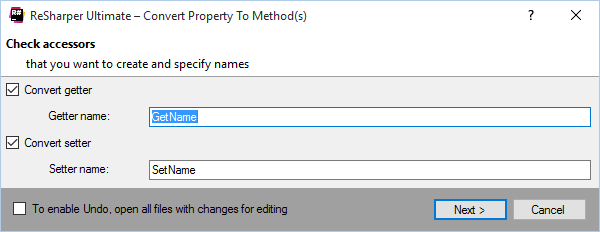
Using this refactoring, properties with read access can be converted to getter-type methods (non-void methods without parameters), and properties with write access can be converted to setter-type methods (void methods with exactly one parameter). As to properties allowing both read and write access, you can convert them to pairs of getter- and setter-type methods.
Extract Class
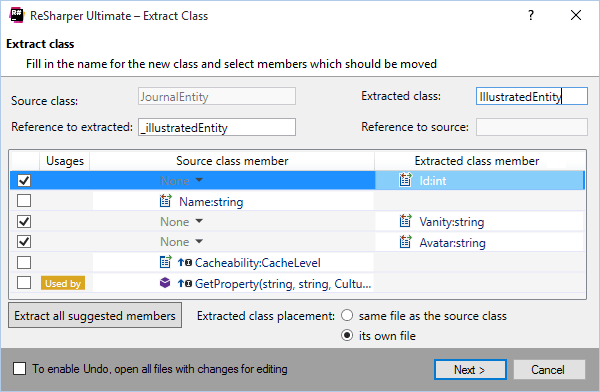
Do you have a class doing work that should be really done by two different classes? Use this refactoring to decompose a complex class into two single-responsibility classes. Extract Class will help you choose methods and fields to move from the old class to the new class. It will also warn of any broken dependencies and accessibility issues and suggest conflict resolution options.
Extract Interface
This refactoring allows you to create an interface from a class and make that class implement the created interface. You can choose the members to extract to the interface and specify a name for the interface.
Extract Method
Select a block of code and invoke the Extract Method refactoring to transform it into a method (Sub or Function in VB.NET). ReSharper will automatically analyze the code to detect the return value and/or out/ref parameters.
Introduce Field
Select an expression or a local variable and apply this refactoring. It will create a new field or constant and initialize it with the expression or local variable initializer. The field can be assigned in its initializer, type constructors or current members.
Inline Field
When a field has a single write usage, this refactoring substitutes read usages of the field with its initialization expression, deleting the field declaration and the write usage along the way.
Encapsulate Field
The Encapsulate Field refactoring allows you to quickly create an accessor property from an existing field. Usages of the field are automatically replaced with usages of the property. An apparent advantage of this refactoring is that you can disallow direct access to a field through the use of properties.
Inline Method
Whenever possible, this refactoring is able to transfer a method's body into the body of its callers and remove the method altogether. The reverse functionality is provided by Extract Method.
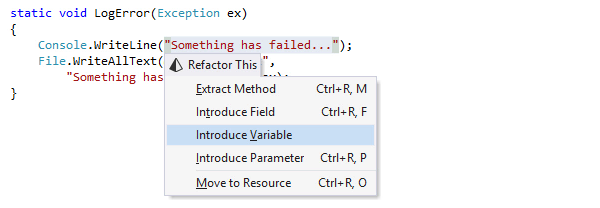
Introduce Variable
Select an arbitrary expression inside member code and invoke the Introduce Variable refactoring. A new implicitly or explicitly typed local variable will be declared and initialized with the selected expression. The original expression will be replaced with the name of the variable. Should there be multiple occurrences of the original expression in your code, you will be given an option to replace all of them with the newly created variable. In the same manner you may also introduce constants for constant expressions.
Inline Parameter
This refactoring helps you move a parameter of a method into its body. For example, if the same constant value is passed to the method in all its calls, then the parameter can be removed and the corresponding local variable can be added in the method body.
Inline Variable
Select an arbitrary variable or local constant and invoke the 'Inline Variable' refactoring. All occurrences of the selected variable in your code will be substituted with its initializer. The reverse functionality is provided by Introduce Variable.
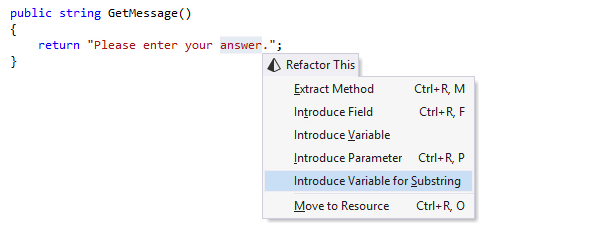
Introduce Variable for Substring
This refactoring helps you quickly move a part of a string to a separate
variable.
Depending on the target C# version, the refactoring will either use string interpolation
or
wrap the string into String.Format().
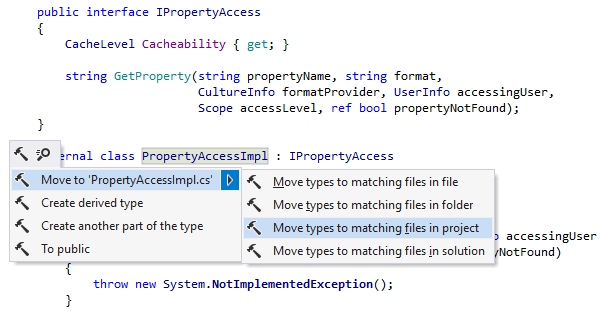
Move Types into Matching Files
This refactoring can be applied to a single file or a selection of files that have multiple types each. ReSharper creates dedicated files for each of these types and moves them there.
'Move Types into Matching Files' is an indispensable helper if you prefer to first use types, then declare them with ReSharper's Create from Usage feature.
There's also a shortcut for this refactoring that is available when you press Alt+Enter on the name of a class that doesn't match the name of the file it's in.
Move to Folder
This refactoring helps move a class, a file, or a selection of classes or files to another project or folder in solution. When executing the move, ReSharper updates using directives if necessary. Optionally, it can rename namespaces according to the new location and distribute classes being moved to separate files.
Move Type to Outer Scope
This refactoring moves an inner type to an upper level. In case that the inner type uses members of the enclosing type, a reference to the enclosing type is passed as an argument to the moved type's constructors. This refactoring can be accessed through the Move refactoring command.
Move Type to Another File or Namespace
You can easily move types between namespaces, with references automatically updated by
ReSharper. You can also
move a type to outer or nested
scope or to another
file.
Using this
refactoring, you can swiftly move the code implementing a given type into a separate
file.
This refactoring can
be accessed through the Move refactoring command.
When you use XAML and you move a .NET class to another namespace, XAML markup references to the class are updated, and XAML import directives are inserted/changed accordingly. This refactoring can also be invoked right from XAML markup on any type reference.
Safe Delete
If you are going to delete a type, type member, or any other symbol in C# or VB.NET code files, ASP.NET code and markup, build scripts, or XAML, use this refactoring to ensure that the delete operation is safe. If there are no symbol usages found, or if there are some that are safely collapsible, the symbol will be deleted. Otherwise, ReSharper will show you all the usages that are not safe to delete, allowing you to edit the corresponding code.
This refactoring can be applied to a selection of files or file members, enabling you to safely delete entire subsystems.
When you invoke Safe Delete on a target or a property in a build file, ReSharper does all necessary validations and operations to remove the selected symbol. ReSharper can also remove any conflicting references for you.
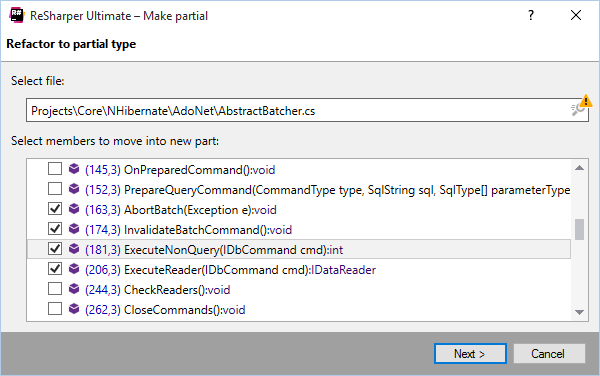
Extract Members to Partial
This refactoring helps you quickly move type members between different type parts of partial classes. Based on your input, the refactoring will use existing or create new type parts.
You can even invoke the refactoring over a #region to move all region
members
into a new file with a name inferred from the region name.
Note on shortcuts
All keyboard shortcuts provided in this page are available in ReSharper's default "Visual Studio" keymap. For details on ReSharper's two keymaps, see ReSharper Documentation.