Move Types into Matching Files
This command is a bulk fix that helps you organize types and/or delegates so that each type/delegate definition is located in a single file with the matching name — that is, if there are several types/delegates declared in a single file, new files are created for each declaration; if a filename does not match the single type/delegate declaration it contains, then the file is renamed.
All required imports are added in new files; all imports that are no longer necessary are removed from the original files.
Move types into matching files
In the Solution Explorer, select a node where you want to organize types into matching files.
Do one of the following:
Press Control+Shift+R and then choose Move Types into Matching Files.
Right-click and choose Refactor | Move Types into Matching Files from the context menu.
Choose from the main menu.
The Move Types into Matching Files dialog will open.
Select the kinds of declarations that should be moved into matching files.
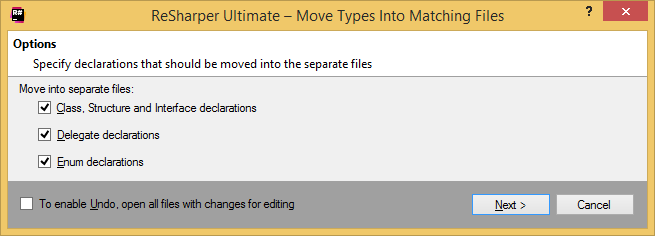
To apply the refactoring, click Next.
If there are no conflicts, the refactoring is performed immediately. If there are existing files that conflict with newly created or renamed files, the wizard displays a page with conflicts. You can double-click conflicts to navigate to the corresponding declarations and fix them.
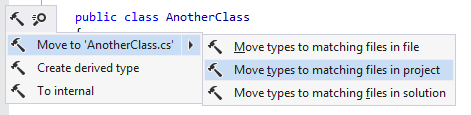
You can also move a single type into the matching file right from the editor using a context action or apply this action in a larger scope (which will give you the same result as performing the refactoring):
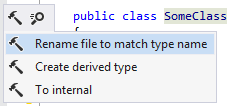
Mismatching type and file names can also be fixed from the editor with a context action:
You can also move any type to a new or existing file using the Move Type to Another File refactoring.