Das ist neu in Rider 2026.1
Rider 2026.1 brings improved support for the .NET ecosystem and game development workflows, as well as refinements to the overall developer experience. Einige Highlights in diesem Release:
Beliebige Agents – integriert
- ACP Registry: Finden und installieren Sie KI-Agents mit nur einem Klick.
- Git-Worktrees: Arbeiten Sie in parallelen Branches und übergeben Sie einen an einen Agent, während Sie in einem anderen weiterarbeiten.
The latest language support
- C# 14 newness, C# 15 Preview features, and more
.NET support and productivity improvements
- Unterstützung für dateibasierte C#-Programme
- NuGet Package Manager Console Preview
- Betrachter für .NET-Deassemblierungen
Game development improvements
- Complete mobile development support for Unreal Engine on Android and iOS
- CMake support for C++ gaming projects Beta
- Redesigned Unity Profiler integration
- Enhanced Godot editor integration
KI
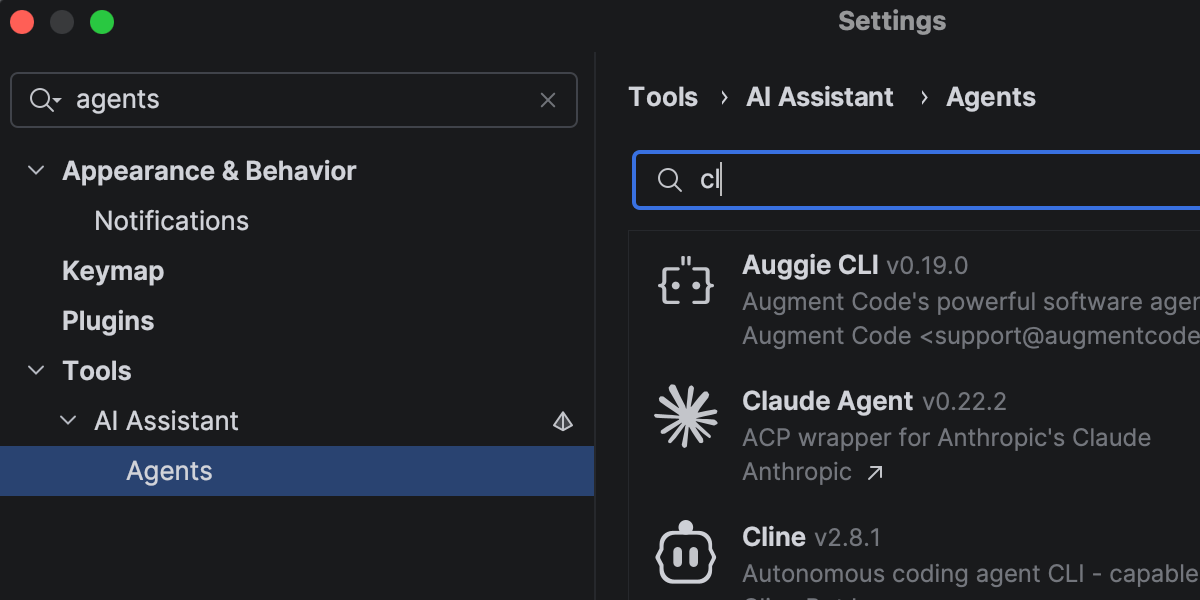
Rider entwickelt sich immer stärker zu einer offenen Plattform, die es Ihnen erlaubt, Ihre bevorzugten KI-Tools in Ihre professionellen Entwicklungsabläufe zu integrieren.
In addition to Junie, Claude Agent, and Codex in the AI chat, you can now choose from a wider range of agents, including GitHub Copilot and Cursor, and dozens of external agents supported via the Agent Client Protocol. Mit dem neuen ACP Registry können Sie verfügbare Agents entdecken und sie mit nur einem Klick installieren.
More improvements for working with AI agents in Rider here.
Faster solution loading and code completion
Rider 2026.1 improves performance in areas you notice during everyday work.
Opening solutions and attaching to running processes is now faster thanks to more efficient indexing of the referenced assemblies. Code completion is also more responsive, particularly for import suggestions, helping you stay in flow with fewer interruptions.
Code analysis has also been optimized, contributing to lower overall IDE overhead.
The latest language support
C#
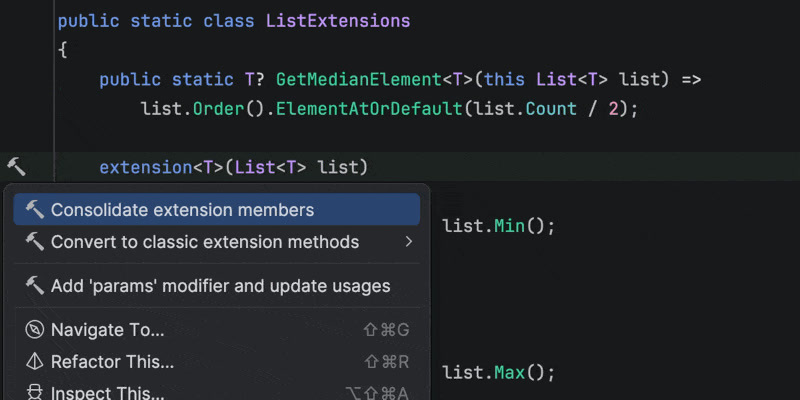
Rider 2026.1 brings improvements to code analysis, new inspections, and support for evolving language features. Enhanced support for C# extension members includes better navigation and refactorings, as well as improved quick-fixes that automatically import missing extension members when needed.
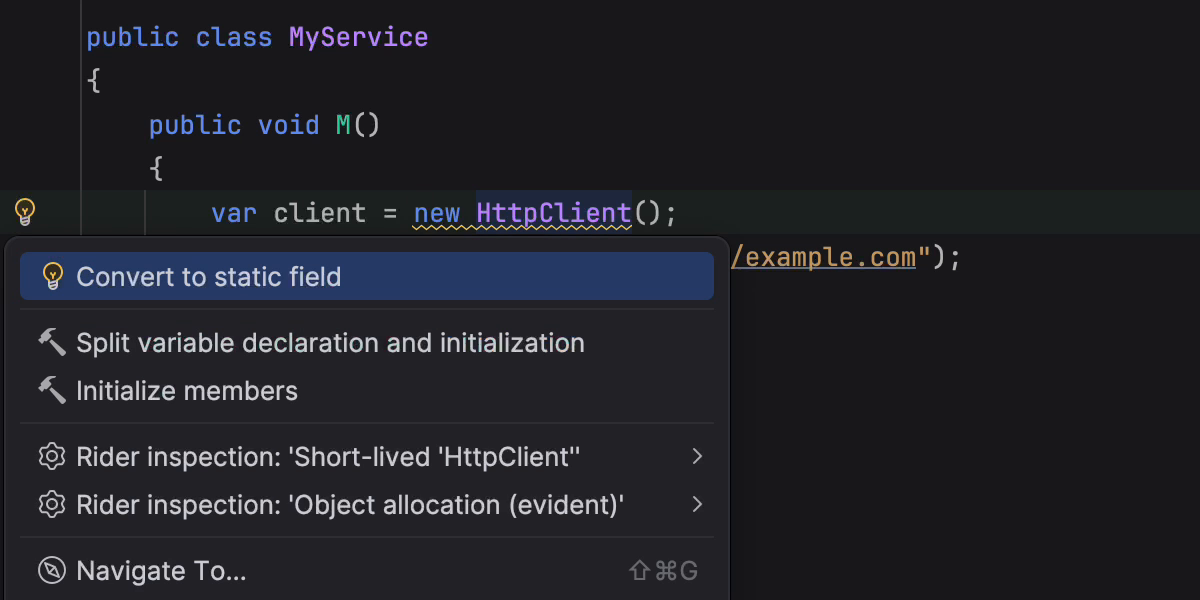
This release also introduces early support for C# 15 Preview language features, such as collection expression arguments and the [ExtendedLayout] attribute, helping you experiment with new syntax as the language evolves. In addition, several new inspections and style options help catch subtle issues, such as short-lived HttpClient instances or incorrect use of ImmutableArray<T> with collection initializers.
Rider’s C# code intelligence is powered by ReSharper. If you want to dive deeper into C# language updates, we describe them in detail on the What’s New in ReSharper 2026.1 page.
Improved debugging for F#
Rider's new Smart Step Into for F# support makes it easier for you to choose your step target. The debugger can also display return values for function calls, helping you understand program flow without adding extra logging. Stepping has been improved for async and task expressions, and multiple issues affecting F# debugging have been fixed.
For the full list of changes and fixes, see the F# plugin release notes.
.NET support and productivity improvements
Unterstützung für dateibasierte C#-Programme
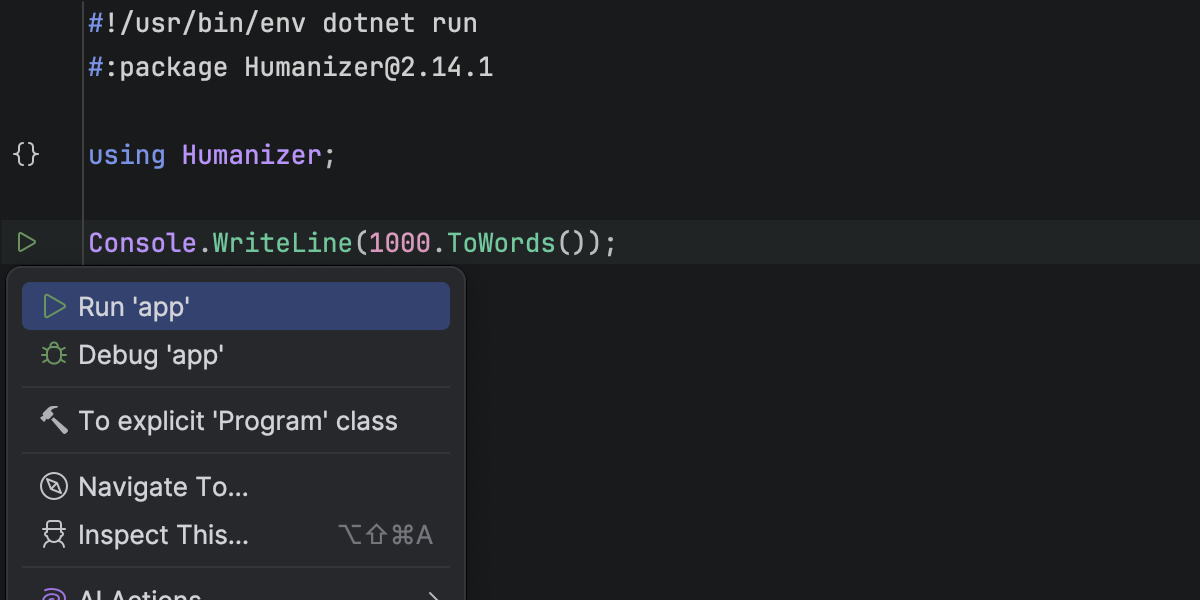
Rider unterstützt jetzt Einzeldatei-C#-Programme, die mit dotnet run datei.cs ausgeführt werden können. Sie können eigenständige .cs-Dateien direkt in der IDE öffnen und ausführen, ohne eine .csproj-Projektdatei zu benötigen.
Der Editor von Rider erkennt dateibasierte Programme mit Top-Level-Anweisungen, #!-Shebangs und #:-Direktiven, einschließlich #:package und #:sdk. Codehervorhebung, Completion, Ausführungsmarken und Debugging sind allesamt verfügbar, sodass Sie im Handumdrehen Skripte, Prototypen und Einzeltools erstellen können, die nur aus einer einzelnen C#-Datei bestehen.
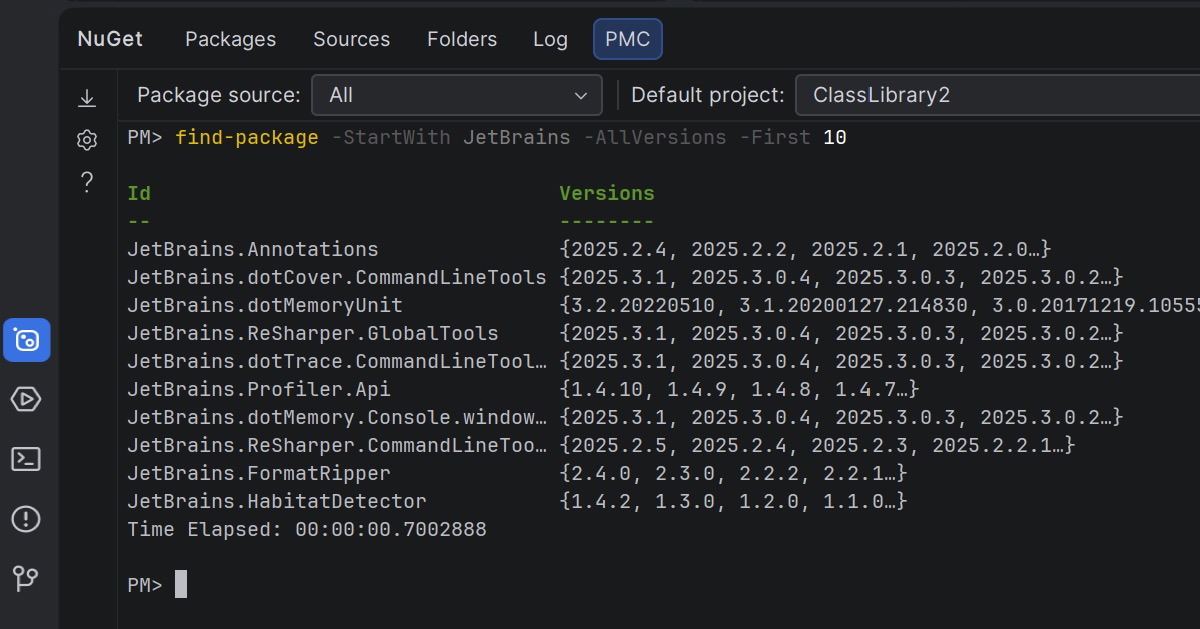
NuGet Package Manager Console Preview
Rider 2026.1 brings NuGet’s PowerShell-based workflow into the IDE, offering a Package Manager Console (PMC) that’s currently in preview.
The new console supports standard NuGet PowerShell commands, as well as commands provided by NuGet packages themselves. Die PowerShell-Befehle des Entity Framework Core werden vollständig unterstützt, sodass Sie die bekannten EF-Core-Workflows nutzen können, ohne Rider zu verlassen.
Sie können NuGet- und Entity-Framework-Core-Befehle entweder im NuGet-Toolfenster oder direkt im Terminal ausführen. In the NuGet tool window, you can select the package source and default project using UI controls. In the terminal-based console, this context is displayed in the PowerShell prompt and can be changed using PowerShell commands.
Let us know what you think about this feature here.
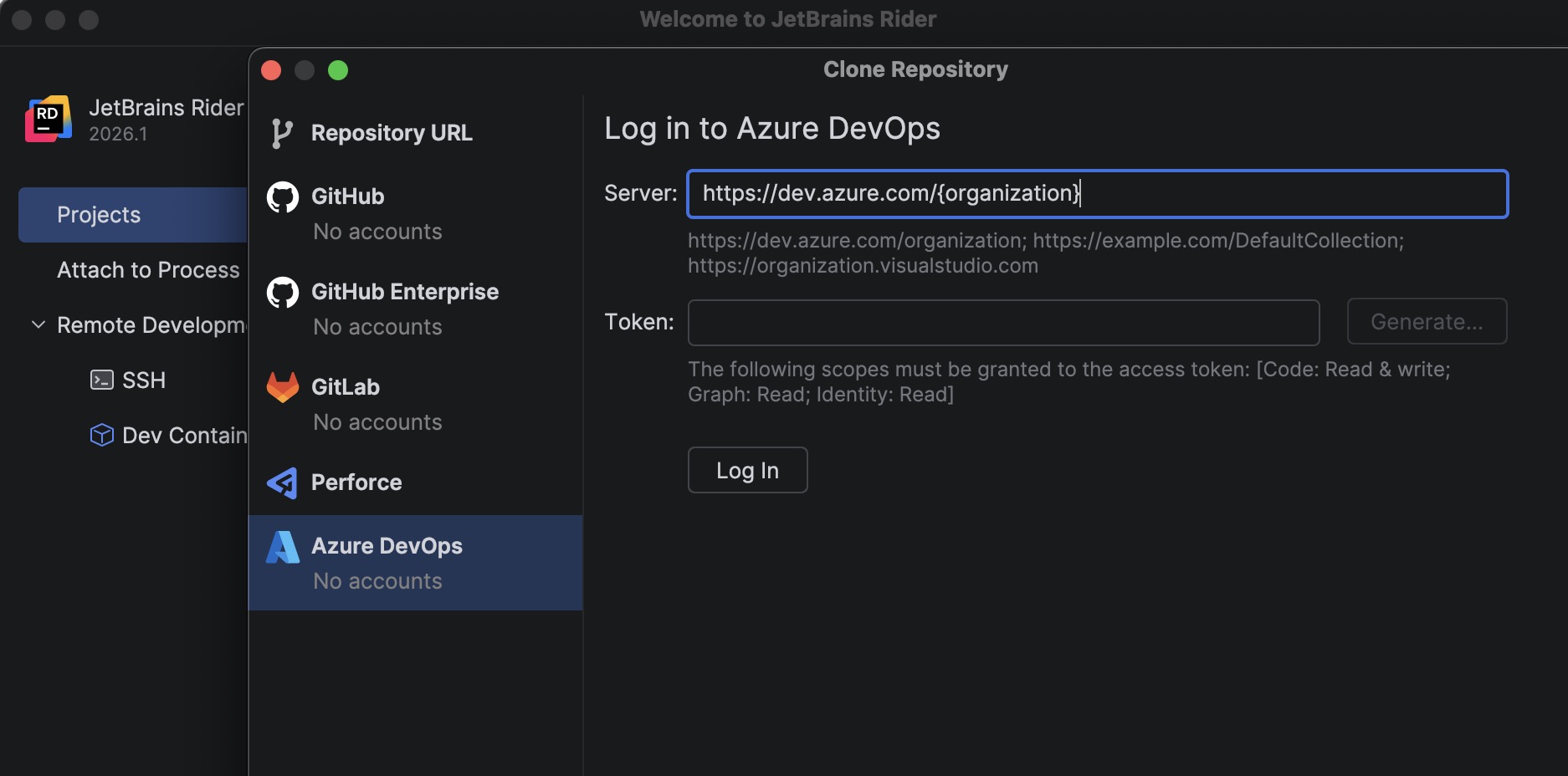
Azure DevOps: Repositories klonen
A new bundled Azure DevOps plugin allows you to clone repositories directly from Rider.
To get started, go to File | Open | Get from Version Control and select Azure DevOps from the list of providers. Rider authenticates you using a personal access token (PAT) and then displays the repositories available to your account so you can clone them directly from the IDE.
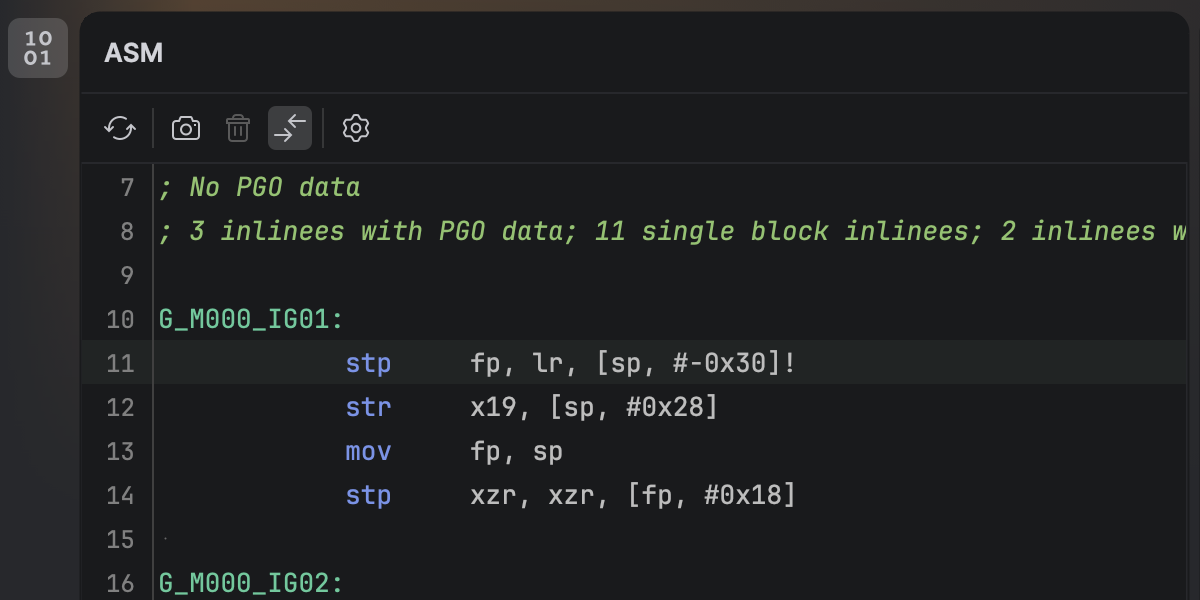
Betrachter für .NET-Deassemblierungen
Sie können jetzt die native Deassemblierung Ihres C#-Codes direkt in Rider einsehen. Nach der Installation des neuen .NET-Disassembler-Plugins können Sie im neuen ASM Viewer-Toolfenster die Ausgabe der JIT-, ReadyToRun- und NativeAOT-Compiler untersuchen.
Smoother MAUI iOS development workflow from Windows
Developing .NET MAUI applications for iOS from Windows requires connecting Rider to a Mac build host. Rider 2026.1 streamlines this workflow with a new setup experience that automatically prepares the remote environment.
When you connect to a Mac, Rider now verifies that the remote system has everything configured, including macOS, Xcode, the .NET SDK, and required MAUI workloads. If any components are missing, Rider can install or update them automatically, helping you get started faster.
Additionally, you can now build, deploy, and debug MAUI iOS applications from Windows more reliably. We’ve improved diagnostics and connection stability, and fixed issues that previously prevented MAUI apps from deploying to iOS simulators or Windows devices.
Game development improvements
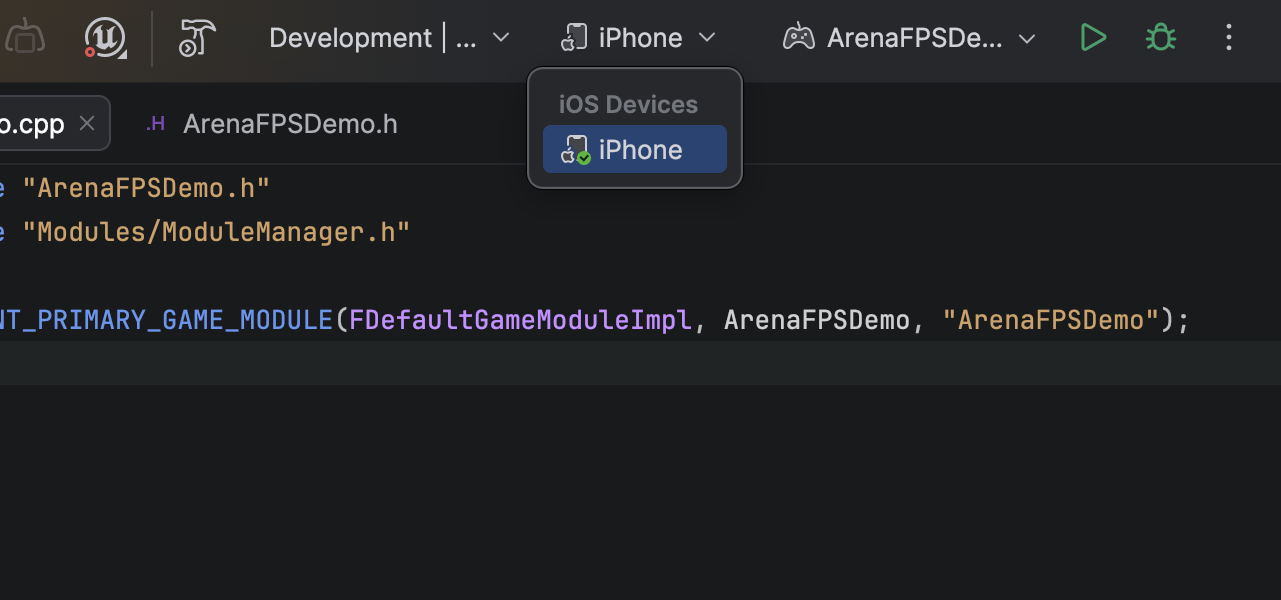
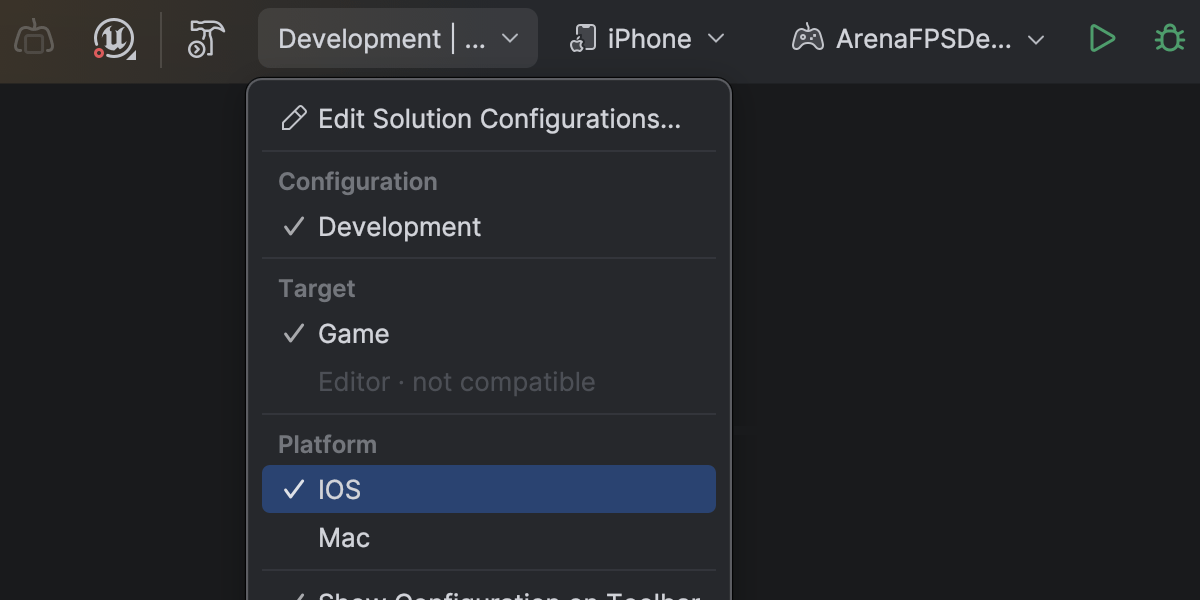
Complete mobile development support for Unreal Engine on Android and iOS
Rider 2026.1 fully supports mobile game development for Unreal Engine across both major mobile platforms. Dieses Release erweitert das in Rider 2025.3 eingeführte Debugging von Android-basierten Mobil- und VR-Geräten: Jetzt werden auch iOS-basierte Mobil- und VR-Geräte unterstützt.
Unter macOS können Sie Unreal-Engine-Spiele, die auf iOS-Geräten ausgeführt werden, direkt in Rider debuggen. Haltepunkte setzen, Variablen untersuchen, den Code schrittweise ausführen, Aufruflisten analysieren – all dies ist in der vertrauten Debugger-Oberfläche möglich.
Aufgrund der Apple-Vorgaben ist weiterhin eine Xcode-Ersteinrichtung für Provisionierung und Signierung erforderlich.
Dramatically faster variable inspections for UE projects
Inspecting complex variables while debugging Unreal Engine projects is now much faster and more responsive. Expanding containers no longer slows down your debugging session, making it easier to explore object state and understand what’s happening at runtime.
This improvement comes from a rewritten parser and evaluator for Natvis expressions used by Rider’s debugger. Variable inspection with the rewritten evaluator is up to 87 times faster on warm runs and 16 times faster on cold ones, and the debugger’s memory usage has dropped to just over a third of what it was.
Get the full story of how we were able to achieve that in this blog post.
Blueprint improvements
Finding usages, event implementations, and delegate bindings across Unreal Engine Blueprints and C++ code is now more reliable, making it easier to trace how gameplay logic connects across assets.
Code Vision now supports the BlueprintPure specifier and correctly detects blueprint events implementations in Blueprints. Find Usages has also been improved and now identifies additional BlueprintAssignable delegate bindings.
Blueprint usage search now relies on the asset path instead of the Blueprint name, ensuring accurate results even when multiple Blueprints share the same name.
Rider’s C++ intelligence is powered by JetBrains ReSharper C++. For a complete overview of the C++ improvements in this release, see the dedicated What’s New in ReSharper C++ 2026.1 page.
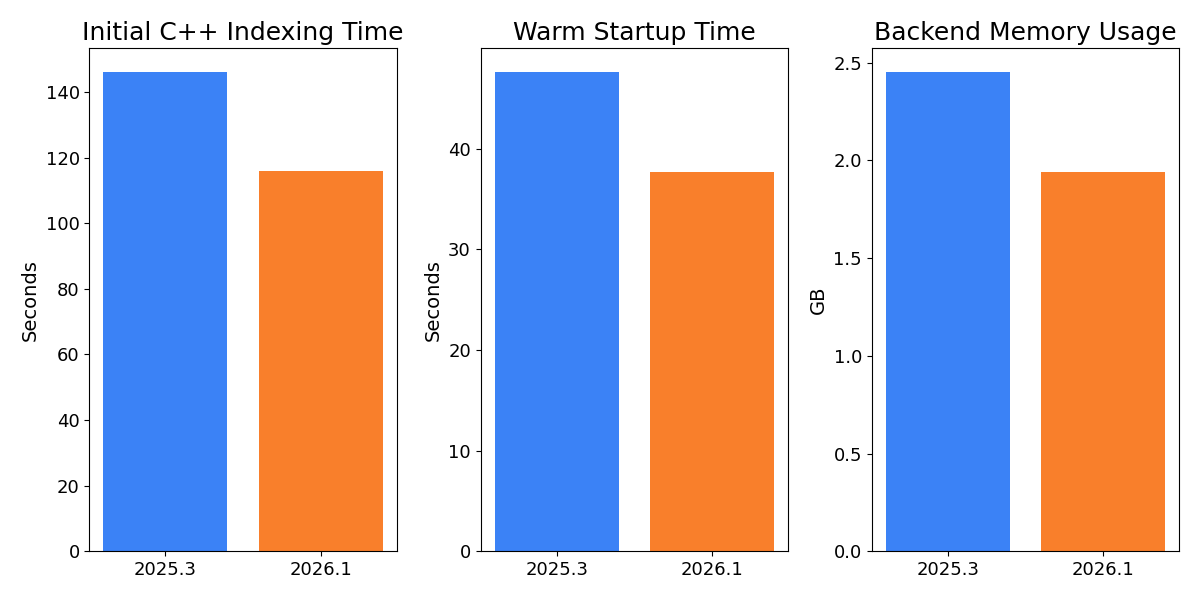
Faster indexing and lower memory usage for Unreal Engine projects
Working with large Unreal Engine codebases is now noticeably faster and more resource-efficient. In our measurements on Epic Games’ Lyra sample project, initial C++ indexing is over 20% faster, helping you get to work sooner when opening a project for the first time.
After opening an already indexed project, the backend uses approximately 14% less memory, reducing the IDE’s footprint and leaving more resources available for the rest of your workflow. Warm startup is also 10% faster, so returning to your project between sessions feels snappier.
Rider now also indexes Unreal Engine plugins by default. With the growing use of plugins in Unreal Engine projects and the recent performance gains, indexing plugins by default provides better code analysis and navigation out of the box. You can restore the previous behavior on the Language & Frameworks | C/C++ | Unreal Engine tab in Settings.
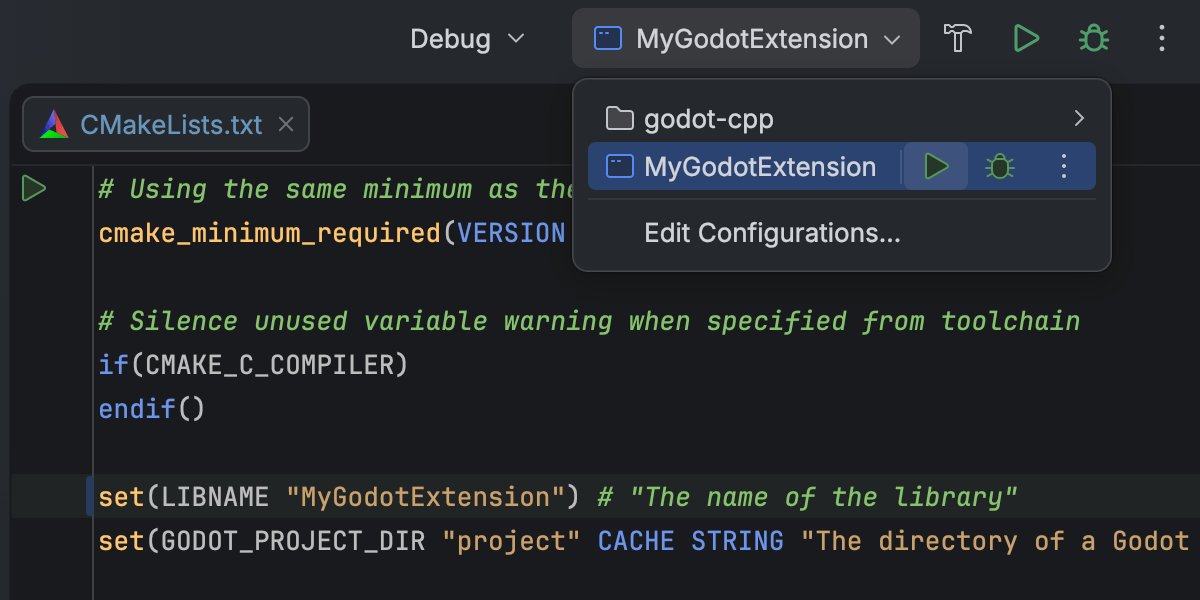
CMake support for C++ gaming projects Beta
Rider 2026.1 bietet Beta-Unterstützung für CMake-basierte C++-Projekte. Sie können diese nun direkt in der IDE öffnen, bearbeiten und kompilieren. So können Sie einfacher mit plattformübergreifenden Projekten arbeiten, ohne auf ein anderes Build-System auszuweichen.
Diese erste Implementierung konzentriert sich auf C++-Workflows, einschließlich Bearbeitung und Debugging von CMake-Konfigurationsdateien. Bei manchen Workflows und Randfällen sind möglicherweise noch Verbesserungen nötig, und wir werden die Performance und Kompatibilität in den nächsten Versionen weiter verbessern. We would love for you to share your experience in this ticket.
This addition is intended to support game development workflows that rely on CMake, such as projects built around CMake-based engines or tooling. For general-purpose C++ and embedded development, CLion remains the primary JetBrains IDE.
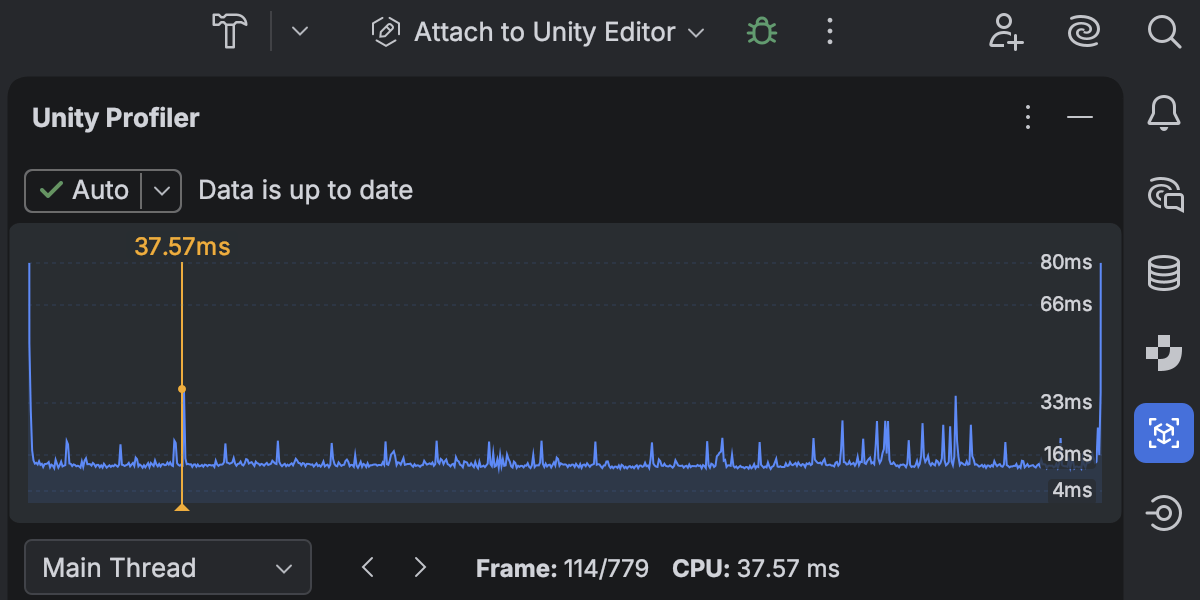
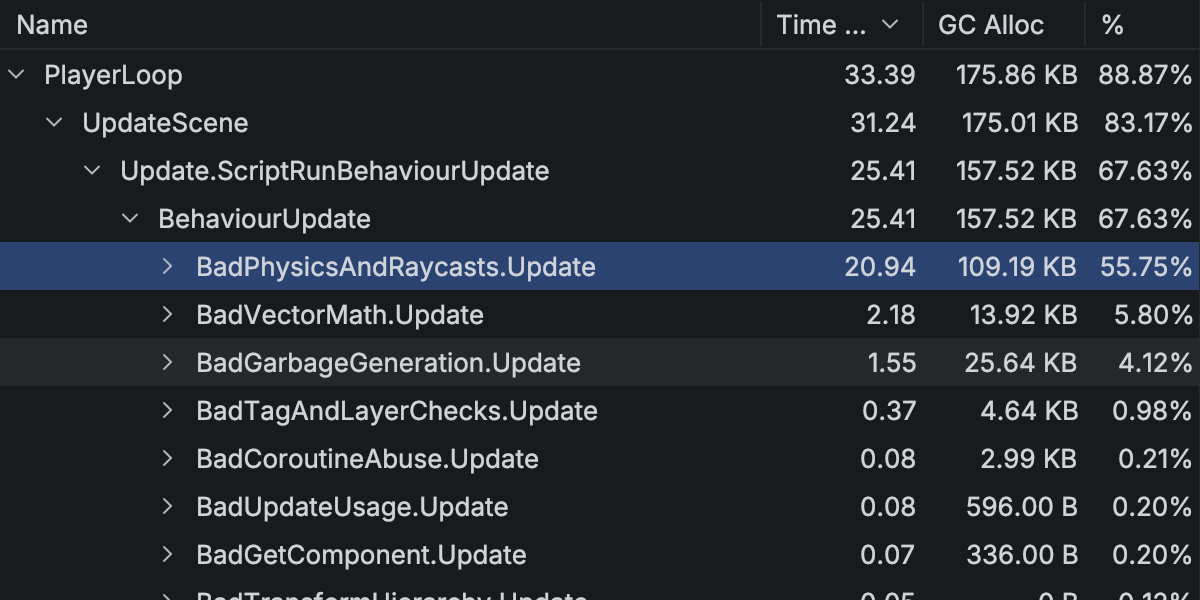
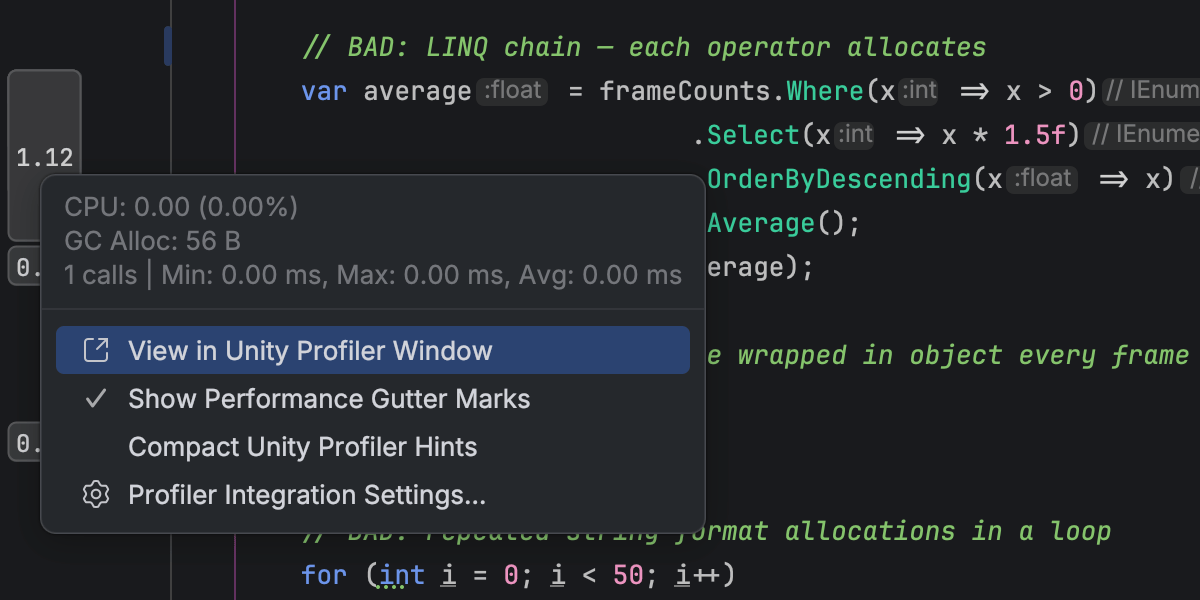
Neu gestaltete Unity-Profiler-Integration
Performance investigation for game projects has become a first-class workflow in Rider 2026.1, thanks to the redesigned Unity Profiler integration.
You can now open Unity Profiler snapshots directly in Rider and analyze them in a dedicated Profiler tool window with a structured view of frames and call stacks. A timeline view shows CPU time per frame, helping you quickly identify slow frames and performance hotspots.
Die Profiler-Daten sind eng in Ihren Code integriert. Sie können direkt von Profiler-Frames und Aufruflisten zum entsprechenden Quellcode navigieren, und in der Editor-Randleiste werden Ausführungszeiten und Speicherinformationen inline angezeigt.
This integration reduces context switching between the Unity Editor and Rider, allowing you to move more naturally between performance data and code when investigating runtime issues.
Please note that Rider does not perform profiling itself and relies on profiler data produced by Unity. Learn how to get started from our documentation.
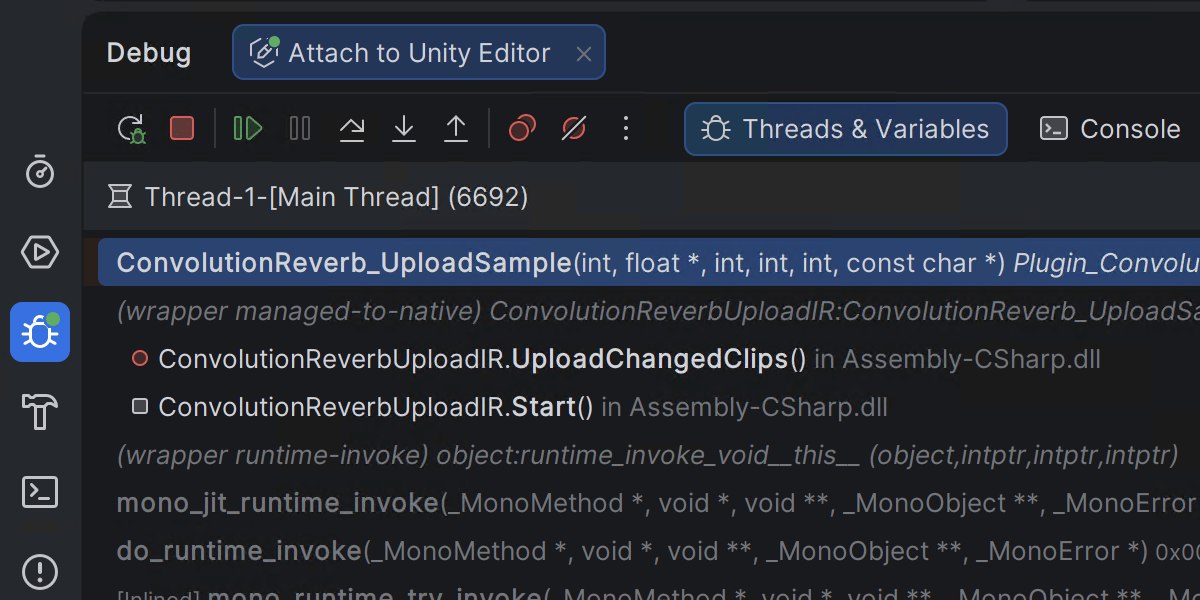
Mixed-Mode-.NET-Debugging unter Windows
Rider 2026.1 introduces mixed-mode debugging, which lets you debug both managed (.NET and .NET Framework) and native (C/C++) code in a single debugging session. This is particularly useful for applications that cross managed-native boundaries, such as those where .NET code calls into native libraries or game engines built from a mix of managed and native components.
This feature is currently available only on Windows. You can leave your feedback on the feature in this ticket.
Verbesserte Godot-Editor-Integration
Die Godot-Integration von Rider enthält ein neues Add-on, das den Godot-Editor mit Rider verbindet. Wenn das Add-on in der Godot-Symbolleiste aktiviert ist, werden für eine reibungslosere Entwicklungserfahrung in Rider Ihre Godot-Editor-Einstellungen automatisch konfiguriert.
Um loszulegen, suchen Sie in der AssetLib des Godot-Editors nach „JetBrains Rider Integration“.
Platform and IDE changes
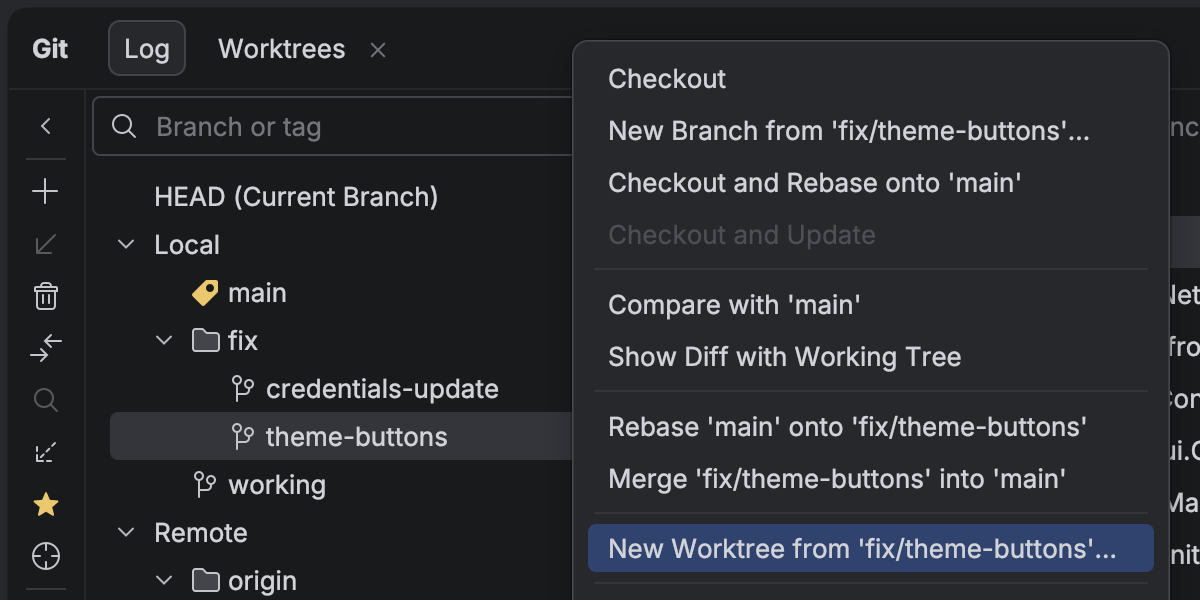
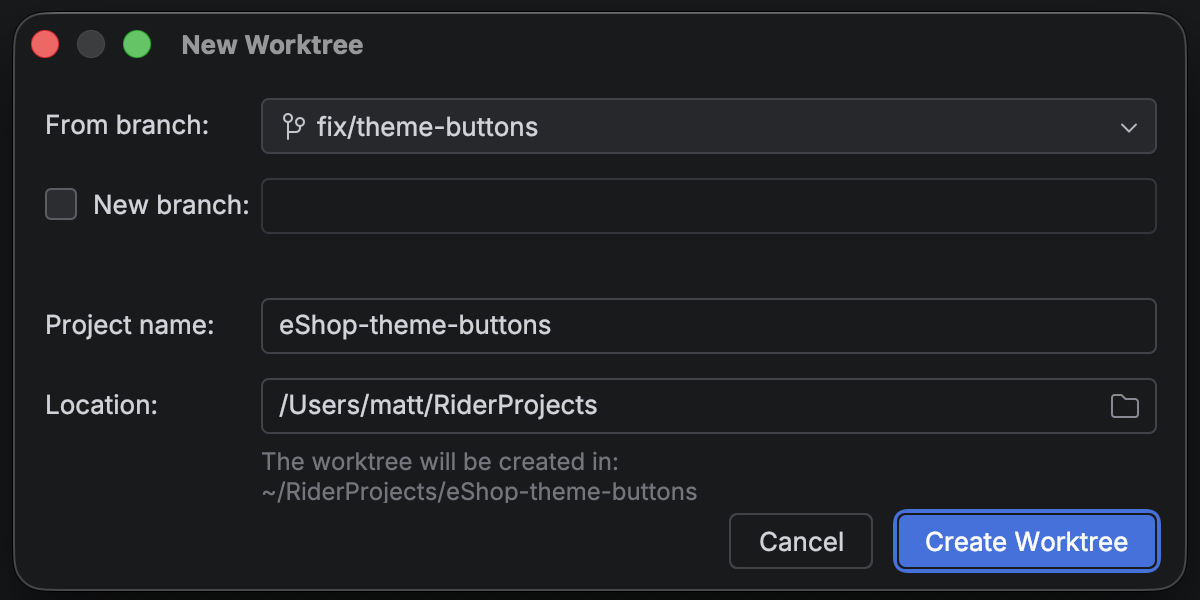
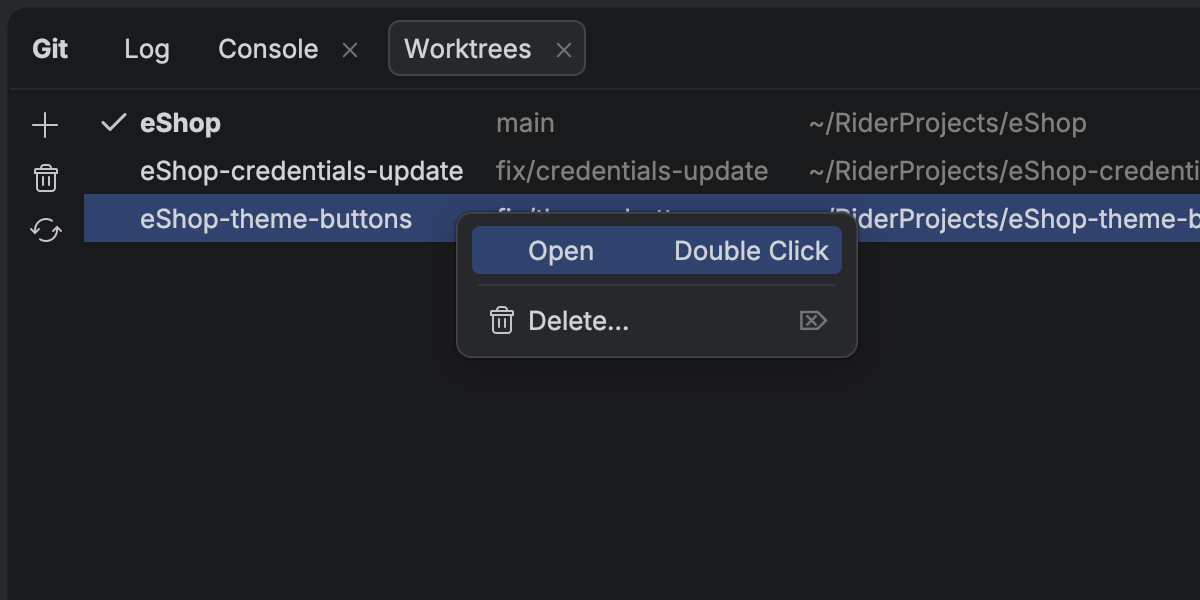
Mit Git-Worktrees gleichzeitig an mehreren Branches arbeiten
Rider entwickelt sich immer stärker zu einer offenen Plattform, die es Ihnen erlaubt, Ihre bevorzugten KI-Tools in Ihre professionellen Entwicklungsabläufe zu integrieren.
Dank der Weiterentwicklung von KI-Agents ermöglicht die parallele Ausführung mehrerer Aufgaben erhebliche Zeiteinsparungen, und dabei erweisen sich Git-Worktrees als äußerst nützlich. To support cutting-edge workflows for AI-boosted software development, Rider now provides first-class support for Git worktrees. Sie können nun einen separaten Worktree für einen dringenden Hotfix anlegen, einen weiteren an einen KI-Agent übergeben und in Ihrem Hauptbranch weiterarbeiten – alles gleichzeitig und ohne Unterbrechung.
Selbst wenn Sie keine Agents verwenden, sparen Sie mit Worktrees Zeit beim Wechseln zwischen Branches, insbesondere bei großen Projekten.
Arbeiten mit Datenbanken
Die KI-Chat-Integration für Codex und Claude Agent bietet jetzt vollständige, native Unterstützung für Ihre verbundenen Datenbanken. Sie können jetzt Ihre Datenbank mit natürlicher Sprache direkt aus der IDE abfragen, analysieren und modifizieren. Über einen MCP-Server steht die gleiche Funktionalität auch externen Agents zur Verfügung.
Ihre Datenquellen-Einstellungen können nun als Datenquellen-Vorlagen in Ihrem JetBrains-Account gespeichert werden. Besonders praktisch ist dieses Upgrade für Nutzer*innen des All Products Pack oder diejenigen, die mehrere Instanzen von JetBrains-IDEs verwenden, da es ihnen ermöglicht, in jeder JetBrains-IDE mit Datenbankfunktionalität auf Datenquellen-Vorlagen und -Einstellungen zuzugreifen.
Einstellung von Code With Me
Da wir unsere IDEs kontinuierlich weiterentwickeln und uns auf die Bereiche konzentrieren, die Entwickler*innen den größten Nutzen bieten, haben wir beschlossen, Code With Me, unseren Service für kollaborative und Paarprogrammierung, einzustellen. Die Nachfrage nach dieser Art von Funktionalität ist in den letzten Jahren zurückgegangen, und wir verlagern unseren Schwerpunkt auf modernere Workflows für die professionelle Softwareentwicklung.
Ab Version 2026.1 wird Code With Me aus dem Installationsumfang aller JetBrains-IDEs entfernt. Stattdessen wird es im JetBrains Marketplace als eigenständiges Plugin erhältlich sein. 2026.1 wird die letzte IDE-Version sein, die Code With Me offiziell unterstützt, da wir den Service schrittweise einstellen werden.
You can read the full announcement and see the sunset timeline in this blog post.