Co-term a subscription pack
All subscriptions in a subscription pack share the same billing cycle, payment method, and usually the same renewal date. If the dates don’t match, they can be aligned through a process called co-terming.
Subscriptions in a single pack automatically co-term on the nearest payment date, but you can also co-term them manually.
Automatic co-terming at renewal
When you renew your subscription pack, all subscriptions are automatically co-termed to a common payment date. How this date is calculated depends on how long you're renewing for.
One-month and one-year renewal
With standard 1-month or 1-year renewals, the co-terming anchor is the earliest expiration date in the pack. Add one billing period to it — a month or a year — and you get the new payment date. All subscriptions in the pack renew until that date:
Subscriptions with the earliest expiration date renew for a full billing period.
All other subscriptions renew for a shorter period, until the new common payment date. Their cost is adjusted accordingly.
Example
Here's how it works in practice. Say you have a subscription pack with 7 annual subscriptions:
3 × IntelliJ IDEA Ultimate, valid through April 24, 2025
1 × PyCharm, valid through January 30, 2026
3 × WebStorm, valid through March 24, 2026
IntelliJ IDEA Ultimate expires first, on April 25, 2025. This becomes the co-terming anchor: all 7 subscriptions renew for one year from that date, through April 24, 2026:
IntelliJ IDEA Ultimate renews for 365 days (April 25, 2025 – April 24, 2026).
PyCharm renews for 84 days (January 31 – April 24, 2026).
WebStorm renews for 31 days (March 25 – April 24, 2026).
Two and three-year renewals
With a multi-year renewal, the date you place your renewal order at checkout becomes the co-terming anchor. The new common payment date is set 2 or 3 years from that date.
Any subscriptions due for renewal on the day you place your order renew for the full period — 2 or 3 years.
The rest are extended to the new payment date, each for a different period. Subscriptions expiring before your order date renew for more than 2 or 3 years, and those expiring after renew for a shorter period.
Example
Let's get back to the subscription pack from the previous example.
3 × IntelliJ IDEA Ultimate, valid through April 24, 2025
1 × PyCharm, valid through January 30, 2026
3 × WebStorm, valid through March 24, 2026
Let's say you renew on April 27, 2025, which becomes the co-terming anchor. Renewing for 2 years will extend all 7 subscriptions through April 26, 2027:
IntelliJ IDEA Ultimate renews for a little more than two years — 732 days (April 27, 2025 – April 26, 2027).
PyCharm renews for about 15 months – 451 days (January 31, 2026 – April 26, 2027).
WebStorm renews for about 13 months – 398 days (March 25, 2026 – April 26, 2027).
Manual co-terming before renewal
Co-terming doesn't have to happen at renewal — you can do it at any time. Here’s how it works:
The common payment date moves up to match the latest renewal date in the pack. Subscriptions due on that date stay intact — no billing cycle changes or extra charges.
Subscriptions expiring sooner are extended to the new payment date, and you pay only for the extra time.
Example
Say you want to co-term th subscription pack from the earlier example:
3 × IntelliJ IDEA Ultimate, valid through April 24, 2025
1 × PyCharm, valid through January 30, 2026
3 × WebStorm, valid through March 24, 2026
When you do, the pack’s payment date moves to March 25, 2026, aligning it with your WebStorm subscriptions, which expire last:
IntelliJ IDEA Ultimate subscriptions are extended by 334 days (April 25, 2025 – March 24, 2026).
The PyCharm subscription are extended by 53 days (January 31 – March 24, 2026).
The WebStorm subscriptions keep their current renewal date.
Co-term a subscription pack manually before renewal
Log in to JetBrains Console.
In the sidebar under Billing select Subscription packs.
If you don't see this page, your role doesn't have the necessary permissions.
Find the subscription pack you’d like to renew and click Co-term to a single license validity.
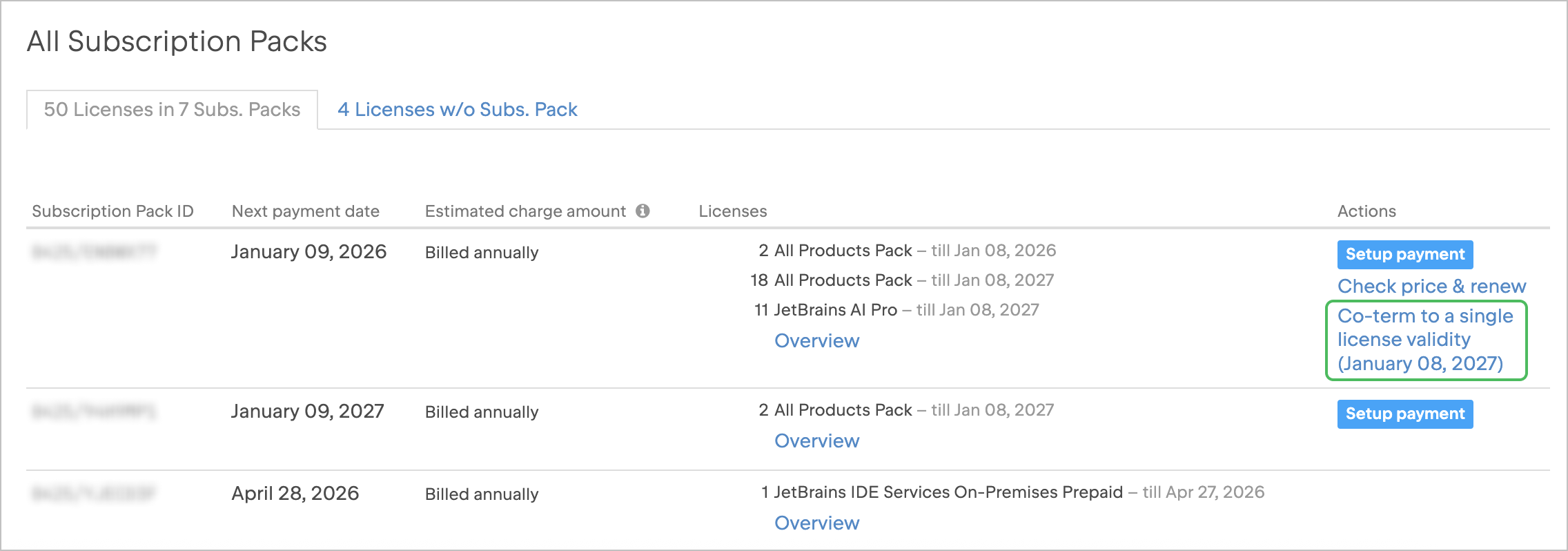
You’ll be taken to the checkout page, where you can view the co-terming cost for each license and either pay online or request a quote.