Top-up AI credits
Every license with AI includes some monthly AI Credits, known as AI quota. For example, 20 AI Credits per user for an AI Pro subscription and 70 AI Credits per user for an AI Ultimate subscription. You can also buy additional top-up credits so that users who run out of credits included in their license can continue their work.
JetBrains AI tools will start using top-up credits only after a user exhausts their monthly quota. When the quota renews next month, they switch back to using AI Credits included with the license. You can also limit the number of top-up credits for every user.
Add top-up credits
Expand the AI management section and select Settings.
In the Top-up AI Credits card, click Add AI Credits next to the number of currently available AI credits.
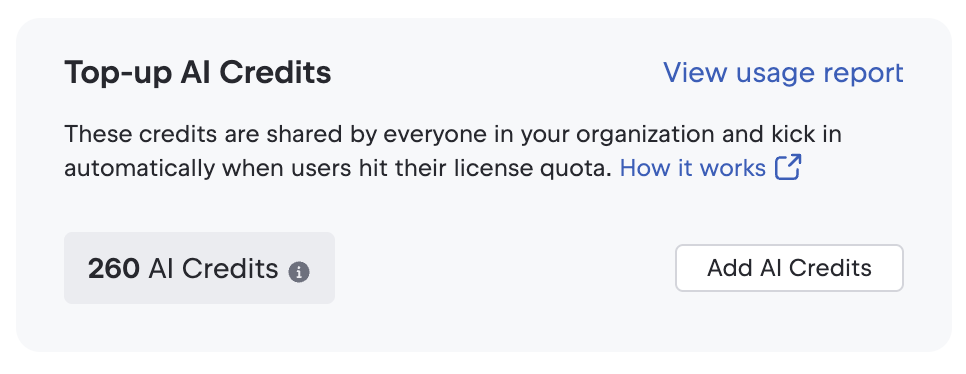
This will take you to the eStore page with the quote. Select how many AI credits you need, provide payment details, and pay. After you have paid, the credits will become available for your organization.
Configure default monthly top-up limit
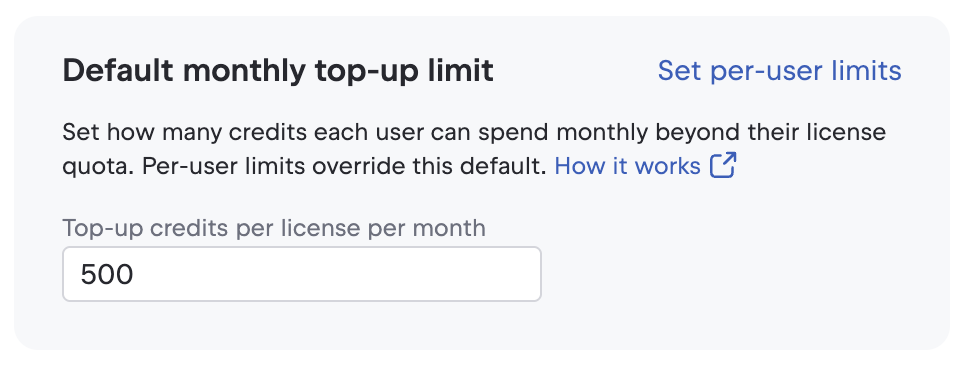
Every user gets the default monthly top-up limit, unless you specify a different limit for a user. Here is how you can change this default top-up value:
Expand the AI management section and select Settings.
Change the value in the text field in the Default monthly top-up limit card.