postpaid IDE licensing
postpaid IDE licensing is a billing option that allows you to use more licenses than you own and pay for the additional licenses later.
postpaid IDE licensing can help you:
Scale your team quickly and seamlessly, providing licenses for new users on the fly.
Avoid interruptions to your team's work during peak usage times.
Save money by using temporary postpaid licenses instead of buying annual subscriptions that might only be in use for a couple of weeks or months.
Save time by handling your subscription payments at the same time, at the end of the billing period, instead of going through tiresome paperwork for each individual license.
How it works
If you have postpaid IDE licensing enabled, check your License Vault's Dashboard to see the number of postpaid licenses available for each product. This number is determined by your postpaid IDE licensing limit.
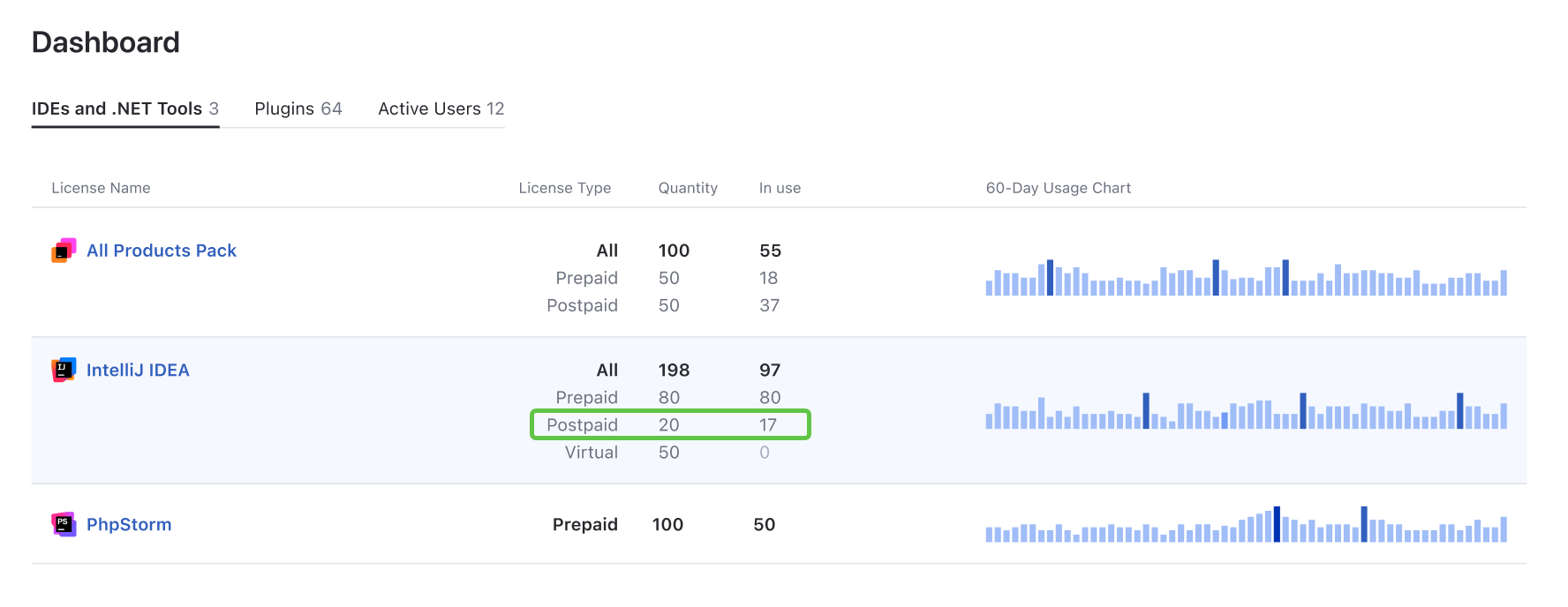
postpaid IDE licensing licenses remain unallocated as long as prepaid licenses are available. Once all prepaid licenses for the product are in use, License Vault automatically starts to allocate postpaid licenses to new users.
From the user's perspective, a postpaid license is the same as a prepaid one. However, there are a couple of important differences from the administrator's point of view:
Postpaid billing: You pay for postpaid licenses at the end of the billing period in which you used them. If you didn't use any, there's no charge. More about postpaid IDE licensing
Floating mode: postpaid IDE licensing licenses are always distributed in Floating mode, regardless of your usage plan. A postpaid license that is no longer in use is automatically released after 20 minutes.
In every other aspect, a postpaid license works just as a prepaid one would.
Start using postpaid IDE licensing
You can use postpaid IDE licensing with either of License Vault's commercial plans: Organization True-Up or Enterprise Floating. If you're still on the trial plan, you'll need to upgrade to a commercial one first. Refer to Choosing your plan and upgrading for guidance.
Organization True-Up
postpaid IDE licensing is included with this plan. It's enabled automatically for all IDEs, .NET tools, and product packs for which you have 10 or more licenses in your License Vault.
postpaid IDE licensing doesn't apply to plugins, regardless of quantity.
Enterprise Floating
postpaid IDE licensing is optional for this plan. You can choose to enable it for any IDEs, .NET tools, and product packs for which you have 10 or more licenses in your License Vault.
To enable or disable postpaid IDE licensing for any of your products, please get in touch with our sales team.
postpaid IDE licensing settings
Your usage plan determines your postpaid IDE licensing parameters and whether you can customize them. See the table below to compare postpaid IDE licensing configurations for License Vault plans.
Organization True-Up | Enterprise Floating | |
|---|---|---|
A calendar month | Customizable. A calendar month or quarter. | |
30% | Customizable. The default value is 30%. |
Billing period
This parameter specifies how often you are invoiced for any postpaid licenses you use.
postpaid IDE licensing limit
This parameter defines how many postpaid licenses you can simultaneously use in addition to your prepaid ones. It's always a percentage, like 30% or 50%.
The same postpaid limit applies to all products in your License Vault that have postpaid IDE licensing enabled.
For example, let's say you have 100 prepaid licenses for CLion and another 50 for PyCharm. With a 30% postpaid limit, you can simultaneously use up to 30 postpaid licenses for CLion and 15 for PyCharm.
Your postpaid limit doesn't affect how much you pay for postpaid IDE licensing at the end of each billing period. We don't charge you for postpaid licenses unless they are allocated to users during the billing period. If you use only 2 of the 50 available postpaid licenses, we'll charge you for exactly 2 licenses.
Paying for postpaid IDE licensing
If you use any postpaid licenses in addition to your prepaid ones, you can expect a postpaid IDE licensing invoice at the end of the billing period. No payment is due if you used only prepaid licenses for the whole billing period.
How you pay
If you're using License Vault with the Organization True-Up plan, the amount due will be automatically charged to the payment method you specified when upgrading to this plan.
With the Enterprise Floating plan, you're free to choose between getting an invoice and being automatically charged to a specified payment method.
How much you pay
At the end of each billing period, you're billed for any postpaid licenses you used during it. We calculate the payment independently for each IDE, based on its monthly subscription price. Here's how we do it:
We divide the billing period into calendar months.
The maximum number of postpaid licenses for each IDE that were simultaneously in use is recorded for each month.
We add up the numbers we got for each individual month.
We multiply the IDE's monthly subscription price by the total number of licenses.
For example, let's say you're billed on a quarterly basis, and you used 19 postpaid licenses for IntelliJ IDEA Ultimate in January, 17 in February, and 29 in March. Your payment for this billing period amounts to: (19 + 17 + 29) * $59.90 = USD 3,893.50
True-Forward
The Enterprise Floating plan provides an alternative billing scenario that allows you to buy extra subscriptions in lieu of paying your postpaid IDE licensing fee.
How it works
Instead of billing you for postpaid IDE licensing as described in the previous section, we offer you a streamlined flow to cover this charge by purchasing prepaid subscriptions at the end of the billing period.
We'll suggest the minimum number of prepaid subscriptions required to cover the amount due for postpaid IDE licensing. Depending on the True-Forward option you choose, you might be able to buy more subscriptions in the same order.
Available options
We offer three options for True-Forward billing:
Receive an email notification that suggests purchasing prepaid subscriptions to cover the postpaid IDE licensing fee. This is the default option. Refer to the next section to learn the specifics.
Always cover the True-Up fee by purchasing prepaid subscriptions. At the end of each billing period, we automatically create an order for the exact number of prepaid subscriptions required to cover the postpaid IDE licensing fee.
Always pay for True-Up. At the end of each billing period, we automatically charge you for any postpaid licenses you use, as described in Paying for postpaid IDE licensing.
Contact our support team or a sales representative to choose the True-Forward option that best suits your needs.
The billing procedure
Here's how the default True-Forward option works:
At the end of each billing period, you receive an email notification with a link to a payment page similar to this one:

On this page, you can select the billing option for each postpaid product independently. To help you make an informed decision, we provide a report that shows how many postpaid licenses you used for each product in this billing period.
To proceed with the payment, scroll to the bottom of the page. For each product, select one of the following options:
Pay for normal overage: If you pick this option, we'll charge you for the postpaid licenses as described in Paying for postpaid IDE licensing.
True-Forward payment: If you go with this option, we'll transform your postpaid IDE licensing fee into prepaid subscriptions. The default number you'll see in the corresponding field is the minimum number of subscriptions that will cover your postpaid IDE licensing fee. You can choose to buy more subscriptions in the same order. They'll be co-termed with your existing licenses.
Once you've selected the preferred option for each product, you can proceed to checkout. You'll be able to preview the final price and export a PDF invoice before paying.