AI Agents for Developers / Context engineering for AI agents

Context engineering for AI agents

How to Build Better Agent Context

A coding agent receives clear instructions and still returns a confident, incorrect patch. It rewrites a helper that already exists two directories over. It calls an API signature that changed three releases ago, or ignores the convention every other file in the repo follows. Reviewing that output would cost more than writing the change by hand. The instruction was fine; what the agent knew when it acted was not, and that gap is what context engineering for AI agents addresses.

This guide explains how to select, structure, retrieve, and update context throughout an agent workflow. It focuses on practical engineering decisions, from choosing relevant repository information to handling stale tool results and access boundaries. The goal is to give agents the information they need without adding unnecessary context, cost, or risk.

Around 23% of developers still primarily write code manually, while using AI only occasionally.

Source: Preliminary findings from the JetBrains Developer Ecosystem Survey 2026 • 15,000+ developers worldwide

What is context engineering for AI agents?

Context engineering means deliberately deciding what goes into an agent's context as it works on a task. Context is wider than most teams assume. It covers the user's request, the system and developer instructions, repository files, retrieved documents, tool outputs, whatever the workflow has already done, user and project preferences, details about the environment the agent is running in, and the permissions it has to work within. Any one of those can be the reason a run works or fails.

Context can describe the permissions and constraints relevant to a task, but access controls must be enforced by the runtime and underlying systems.

The job is picking what goes in, shaping it so the agent can actually use it, and delivering it at the step where it counts. That is closer to designing a schema than to writing a prompt. More context is not better context. And context does not hold still: It changes with the task, the user, the project, and where the agent is in the workflow. A coding agent planning a change needs different context than the same agent reading a failing test, and some of the information loaded at the start may need to be refreshed as the task progresses.

Context is more than the prompt

Instructions guide how the agent should behave, while the broader context also includes the task data, retrieved information, and tool results it needs to act. Take a one-line instruction like "fix this bug". As a prompt, it is fine, and it says nothing about which file is broken, which test is failing, what the stack trace points at, how this project writes code, or which dependency versions are in play. None of that arrives on its own. Someone has to decide it belongs and put it there.

Where one discipline ends, and the other begins, is worked through separately in Context Engineering vs. Prompt Engineering. The practical question is which of those pieces an agent should get for a given task, and that comes down to a handful of categories: what the user asked for, what the code says, what you retrieved from elsewhere, and what the run has turned up so far.

What belongs in agent context?

Each of these categories earns its place task by task. Loading all of them by default produces noise that the agent has to read past.

Task and user context

Task context is the starting point: the current request, the goal, the expected output format, any user or team preferences, and the relevant portion of conversation state. Carry forward only what applies to the current task. If a user asked five questions in a session and the current one stands alone, loading all five exchanges adds volume without adding signal.

Preferences belong here, too. If your team writes tests before implementation, or formats dates in ISO 8601, those conventions belong in the context of any task they touch. For an internal knowledge agent, the equivalent is the requester's role and region, which decides which policy actually applies to the question being asked.

Project and repository context

For coding agents, repository context is often the most consequential part of the set. It covers relevant source files, project structure, dependencies, configuration, tests, project conventions, and related modules. The goal is to include the information needed to understand and complete the task without loading unrelated parts of the repository.

On large codebases, selecting relevant context becomes harder, especially when work spans repositories, agents, and teams. JetBrains Air Context is designed to provide organizational memory for agentic work, helping relevant context carry across execution, automation, and coordination instead of being lost when developers switch tools or workflows.

Retrieved knowledge and external data

Retrieved context covers internal documentation, tickets, API documentation, policies, knowledge bases, search results, and tool outputs. Filter it on four criteria: relevance, freshness, authority, and access permissions. A document retrieved for a related query last week may be wrong for today's task, and an API spec updated three months ago may contradict the production behavior the agent is investigating.

Access controls apply here as much as anywhere else. Pulling a restricted runbook into general task context, or loading a document that the requesting user has no right to, creates a reliability problem and a security problem in one step.

Use relevance scores as one signal when filtering retrieved content, alongside source quality, freshness, and the task's information requirements. Avoid passing large numbers of marginally relevant chunks to the agent.

Workflow state and tool results

Agents working across multiple steps need dynamic context from those steps. A test failure is context, and so are a code search result, a malformed API response, a changed file, a rejected action, a decision the agent made and later revised, and the current state of the task.

Update workflow state as the task progresses. When a test passes after failing, the failure log stops describing the current state. When a file changes, the agent should distinguish the current version from earlier versions and retain previous content only when it remains useful for comparison or debugging. Appending every step indefinitely builds a context that contradicts itself.

How to engineer context for an AI agent

Context engineering runs as an iterative workflow, not a one-time assembly step before the agent starts. What the agent needs at step one is not what it needs at step seven.

Define the context needed for the task

Start from the task, not from what happens to be available. Four questions settle it for a given step:

  • What does the agent need to know to do this?
  • What can it retrieve on demand instead of receiving up front?
  • What would distract it?
  • What has to stay scoped or private, whether by user permission, project boundary, or security policy?

The answers move with the task type. A documentation lookup needs little more than the retrieved docs and the question. A code change pulls in source files, tests, project conventions, and build results. A dependency audit runs on the manifest, registry data, and current version constraints, and touches none of the above. Ask these during the agent's planning step, so it knows what to fetch before it starts acting.

Retrieve only relevant context

Target retrieval at the current step rather than loading whole repositories, conversations, or knowledge bases. The practical approaches:

  • File or symbol selection driven by the task description.
  • Metadata filters that scope by project or team.
  • Semantic retrieval on the task query.
  • Keyword retrieval for specific identifiers.
  • Repository search across the project.
  • Tool-based retrieval, where the agent calls a search tool and judges the results before admitting them.

Evaluate retrieval separately from the final answer. Use representative queries to check whether the retrieved results contain the information needed for the task, whether relevant sources are missing, and how much irrelevant material reaches the agent. Track retrieval quality alongside token usage and latency.

Structure context clearly

Structure tells the agent how to read what it receives. Keep instructions, task input, retrieved evidence, tool results, repository context, and constraints in separate, labeled sections rather than concatenating them into a single block. Each item then carries the metadata that makes it interpretable, and every field answers a question the agent would otherwise guess at:

  • Source: Where did this come from, and how much weight does it carry?
  • File path: Where does this snippet live in the project?
  • Timestamp: Does this describe current behavior, or a version deprecated two releases ago?
  • Scope: Which part of the system does it apply to?
  • Relevance: How strongly did it match, and is that above your threshold?
  • Permissions: Is the requesting user allowed to see it?

Tool definitions are context, too. The name, description, and parameter shape of each tool are what the agent reasons over when it picks one, so a description that says when to reach for a tool earns its tokens more than one that only says what it does.

Keep retrieved documents, tool outputs, and other untrusted content separate from trusted instructions. Treat instructions found inside that content as data rather than commands, and enforce permissions and tool restrictions outside the prompt.

Update context as the workflow changes

A multistep task generates new context at every step. The agent receives an issue description, retrieves the relevant files, makes a change, and runs the tests. They fail. The failure output is new context, and the agent revises the implementation against it. JetBrains Junie illustrates this workflow: It can investigate code, make changes, run tests, and use the results to guide its next steps. Junie works in JetBrains IDEs, through Junie CLI, and with compatible ACP clients.

The decision at each step is which outputs the next step still needs. The issue description usually persists across the whole task. Earlier test failures can be summarized or marked as resolved once they are no longer relevant. Keep the details when they help explain the current state or diagnose a recurring problem.

Context quality vs. context quantity

The most common context engineering mistake is responding to a struggling agent by giving it more to read. More is a real fix when the agent is missing something, and a real cost when it is not.

Too little context

An agent short on context fills the gaps with assumptions. Withhold your project's authentication conventions from a coding agent, and it will implement OAuth 2.0 in a way no other service in the repository does. Leave out the dependency manifest, and you get a proposal to add a library that is already installed. Give it half the call sites, and it changes one and leaves the rest. Knowledge agents fail from a different direction: With no plan tier in context, a support agent answers for the wrong product edition, or falls back on a generic answer that is true of every edition and useful for none.

What is missing in each case is completeness, and the result is usually a subtly wrong answer that reads plausibly and needs an experienced reviewer to catch.

Too much context

An agent buried in context gets slower and less precise. Irrelevant files dilute the signal from the relevant ones, so the most useful information competes for attention with the least. Duplicate content spends tokens and returns nothing. A full conversation history from a long session can bury the current task under 50 messages settled hours ago.

Token usage rises, and execution cost with it. Repeated retrieval and context assembly can also add latency, especially when they involve additional model calls or external services. And once context holds two versions of a file or two API specs that disagree, the agent spends its reasoning resolving the conflict instead of acting.

Treat every step as having a context budget: the share of the window you are willing to spend before the signal thins out. Aim for minimum sufficient context, enough to complete the current step accurately, with nothing that adds only noise or cost. How volume interacts with model behavior is handled in How to Manage AI Agent Context Windows.

Context engineering example: A coding agent fixing a bug

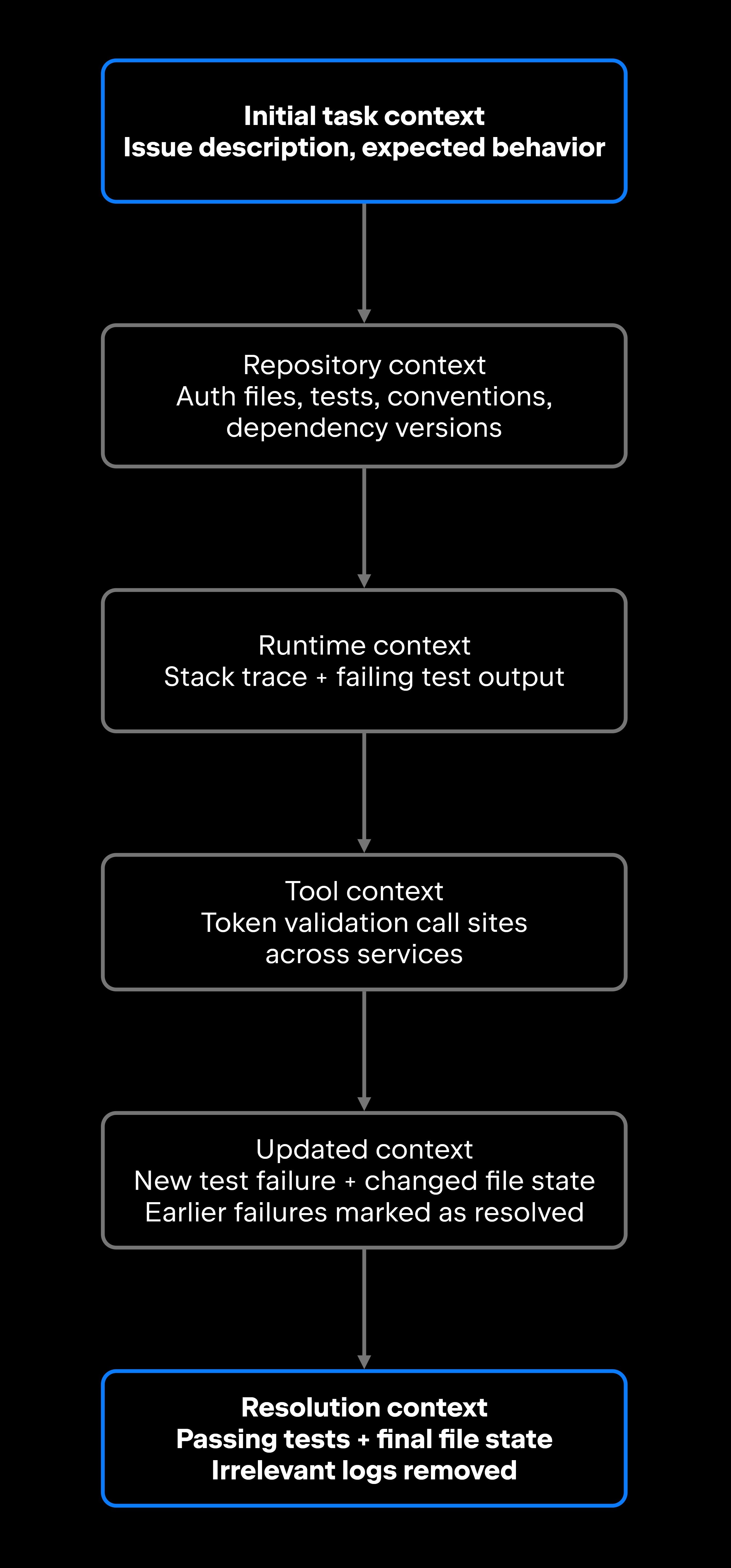
A developer opens a bug report describing intermittent authentication failures affecting a subset of users on the mobile API, and asks an agent to diagnose and fix it. The context set is rebuilt at every stage of the work, and what leaves matters as much as what arrives.

Initial task context. The agent starts with the issue description, the affected endpoint, and the expected behavior. Conversation history only appears where it carries constraints the developer stated.

Repository context. Next, the agent pulls the authentication module, the token validation logic, the relevant tests, and the project's auth conventions. For larger codebases, targeted repository search can help identify the relevant files and dependencies without loading unrelated modules into the agent's context.

Runtime context. The stack trace from the failing requests and the output of the failing test suite arrive here, and they become the most precise signal available. The general issue description stays in context to hold intent while the specific failure output drives the investigation.

Tool context. A search across the codebase locates every call site of the token validation method. Those results are context-scoped to the methods and services that bear on the failure.

Updated context. The first fix reveals another failing test. The agent adds the new result to its working context and marks resolved failures as superseded, retaining earlier evidence only where it remains useful.

Resolution context. Tests pass. What remains is the final file state, the passing test output, and enough of the issue description to write an accurate commit message. Intermediate failure logs, early search results, and superseded file versions have all been dropped.

Every stage carries an explicit decision about which information moves forward, which gets replaced, and which leaves entirely. That run went well. The failures are what it looks like when one of those decisions is skipped.

Common context engineering failure modes

The same handful of skipped decisions recur regardless of the underlying model, and each shows up in the output before you find it in the context. Work from the symptom you are seeing to the row that explains it.

Failure mode

Why it matters

Better approach

Buries the current task in resolved exchanges

Keep recent steps verbatim; compress older ones into per-subtask summaries

Loading the entire conversation history

Use targeted file, symbol, keyword, or semantic search based on the task.

Set a relevance threshold, cap items per step, track precision to tune both

Filter on last-modified date at retrieval; re-read volatile sources at the decision point

Give instructions, evidence, and tool output separate named slots. Never put retrieved text in the instruction slot

Filter by permission and project inside retrieval, so out-of-scope items are never candidates

Mark what each new result supersedes, so the replacement is recorded rather than implied

Detect duplicate and overlapping content before injection; track which sources and versions each step receives

Validate against relevance, freshness, authority, and access; pass those signals alongside the content

Floods context with irrelevant code and raises cost

Dilutes signal from high-relevance content

Agent acts on stale policies, API specs, or configuration

Untrusted content can shift agent behavior

Agent can reach data it should not, or bleeds context between users

Agent works from superseded information

Wastes tokens, bloats context without new information

Agent trusts a retrieved document that is wrong or outdated

Sending the entire repository for every task

Retrieving too many weakly relevant chunks

Using outdated documents

Mixing instructions and retrieved evidence

Failing to scope context by user or project

Carrying forward obsolete workflow state

Duplicating context across agent steps

Treating retrieved content as automatically correct

Best practices for AI agent context engineering

Well-designed context can improve agent reliability and efficiency by reducing unnecessary retrieval, repeated work, and reliance on outdated information.

  • Start from the task, and identify what this step requires before loading anything.
  • Retrieve for the current step only.
  • Give instructions and evidence separate, labeled slots.
  • Preserve source and metadata: file path, timestamp, scope, and access level.
  • Scope by user, project, repository, and environment.
  • Replace superseded state instead of appending to it.
  • Remove stale or duplicated information before each step.
  • Validate retrieved context against relevance, freshness, authority, and access permissions.
  • Measure retrieval quality separately from final output quality.
  • Keep context small enough to stay relevant and manageable.
  • Log which context sources influenced important agent actions, so you can debug and audit them later.
  • Test context behavior with real workflows rather than synthetic inputs.

Give agents the right context at the right time

Context engineering reduces to one question, asked at every step: What does the agent need to know right now, and what is still here from three steps ago that it does not? Answering it well means handing the agent the right information, evidence, state, and constraints at the moment it needs them, and nothing else.

These changes can reduce unnecessary exploration and rework, but their impact should be measured against real tasks, including task success, retrieval quality, latency, and cost.

None of that comes from a bigger context window. A larger window raises the ceiling on what you can send; it does not decide what belongs. When a step goes wrong, look at what the agent was handed and how much of it went unused before you look at the prompt or the model.

FAQ

What is context engineering for AI agents?

Context engineering for AI agents is the practice of deciding what goes into an agent's context at each step: what to retrieve, what to carry forward, what to drop, how to label what remains, and which permission and project boundaries to enforce.

What information should be included in AI agent context?

It depends on the task. Most tasks need the request and expected output, the source files, tests, and conventions the work touches, retrieved material that bears directly on it, current workflow state, and the permissions that apply. Loading every category for every task adds noise.

Is context engineering the same as RAG?

No. RAG is one technique inside context engineering: it retrieves documents and injects them into the agent's input. Context engineering also covers task context, workflow state, tool results, and access constraints, plus how all of it is filtered, structured, scoped, and refreshed.

How should context change during multistep agent workflows?

It should track the current state of the task. New tool outputs, test results, and file changes join the active set; resolved failures, superseded file versions, and spent search results leave it. Replace superseded state rather than appending more, or the agent parses a growing log to find what still applies.

How is context engineering different from prompt engineering?

Prompt engineering defines how an agent should behave: its role, constraints, and output format. Context engineering defines what the agent knows while it works: which files it can reach, what was retrieved, where the workflow stands, and what constraints apply. Agents need both.

Can an AI agent have too much context?

Yes. A large context raises token usage, adds latency, and dilutes the relevance signal the model reasons over. Conflicting material forces the agent to resolve contradictions instead of acting. Aim for the smallest context that lets it finish the current step accurately.

Is context engineering the same as managing a context window?

No. Context-window management is about fitting information inside a token limit. Context engineering decides what the agent should receive, from which sources, in what structure, and at which step. It does the design work well, and there are fewer windows to manage.

Damaso Sanoja

Damaso Sanoja is an engineer who is passionate about helping others make data-driven decisions to achieve their goals. This has motivated him to write numerous articles on the most popular relational databases, customer relationship management systems, enterprise resource planning systems, master data management tools, and, more recently, data warehouse systems used for machine learning and AI projects. You can blame this fixation on data management on his first computer being a Commodore 64 without a floppy disk.

Use AI agents in your development workflow

Explore JetBrains AI solutions that help you build, use, and scale AI agents across the software development lifecycle.

Air Gateway

Run terminal agents through one JetBrains account, with access, models, and usage governed centrally.

Junie

Plan, code, debug, and automate tasks with a coding agent that works across your terminal, IDE, GitHub, and GitLab.

Air in IDEs

Orchestrate AI agents and verify their output directly in JetBrains IDEs, with full control over how changes are reviewed.

Air Teams

Automate software delivery workflows, coordinate agentic work across teams, identify bottlenecks affecting delivery.

Air Governance

Govern AI usage, models, policies, and costs across your organization, including JetBrains and third-party tools.

Air Context

Give agents shared organizational memory and context that carries across tools, workflows, and execution environments.

JetBrains Air

An open system of AI products for developers, teams, and organizations – from coding with agents to automating workflows and governing AI at scale.

Continue Exploring the AI Agents for Developers Guide

Context Engineering vs. Prompt Engineering

Compare context engineering and prompt engineering, understand their differences, and learn when each approach improves AI agent performance.

How to Manage AI Agent Context Windows

Learn how to manage AI agent context windows, reduce context loss, and improve performance, accuracy, and reliability in long-running workflows.

What Is a RAG AI Agent? A Practical Guide

Learn how RAG AI agents combine retrieval-augmented generation with autonomous workflows to improve accuracy, context, and real-world performance.