Context engineering vs. prompt engineering
Source: Preliminary findings from the JetBrains Developer Ecosystem Survey 2026 • 15,000+ developers worldwide
Aspect
Prompt engineering
Context engineering
What it controls
Agent role, behavior, output format, decision rules
Information, tools, history, and constraints available at runtime
When it matters most
Defining behavior, format, boundaries, or operating rules
Grounding the task in specific data, files, or system state
Code analysis, RAG workflows, debugging agents, multistep tasks
Missing evidence, irrelevant noise, stale or incomplete data
Often changes by task, user, and workflow state
Classification, summarization, JSON output, role constraints
Inconsistent behavior, format violations, out-of-scope responses
Usually stable across similar tasks
Typical examples
Main risk when done poorly
Changes during execution
Want to see how project instructions and runtime context work together on a real codebase?
See how Junie handles a real development task using context from your own codebase.
Take agentic development beyond individual tasks
Explore how Air brings agent orchestration, team workflows, and organizational governance together.
FAQ
What is the main difference between context engineering and prompt engineering?
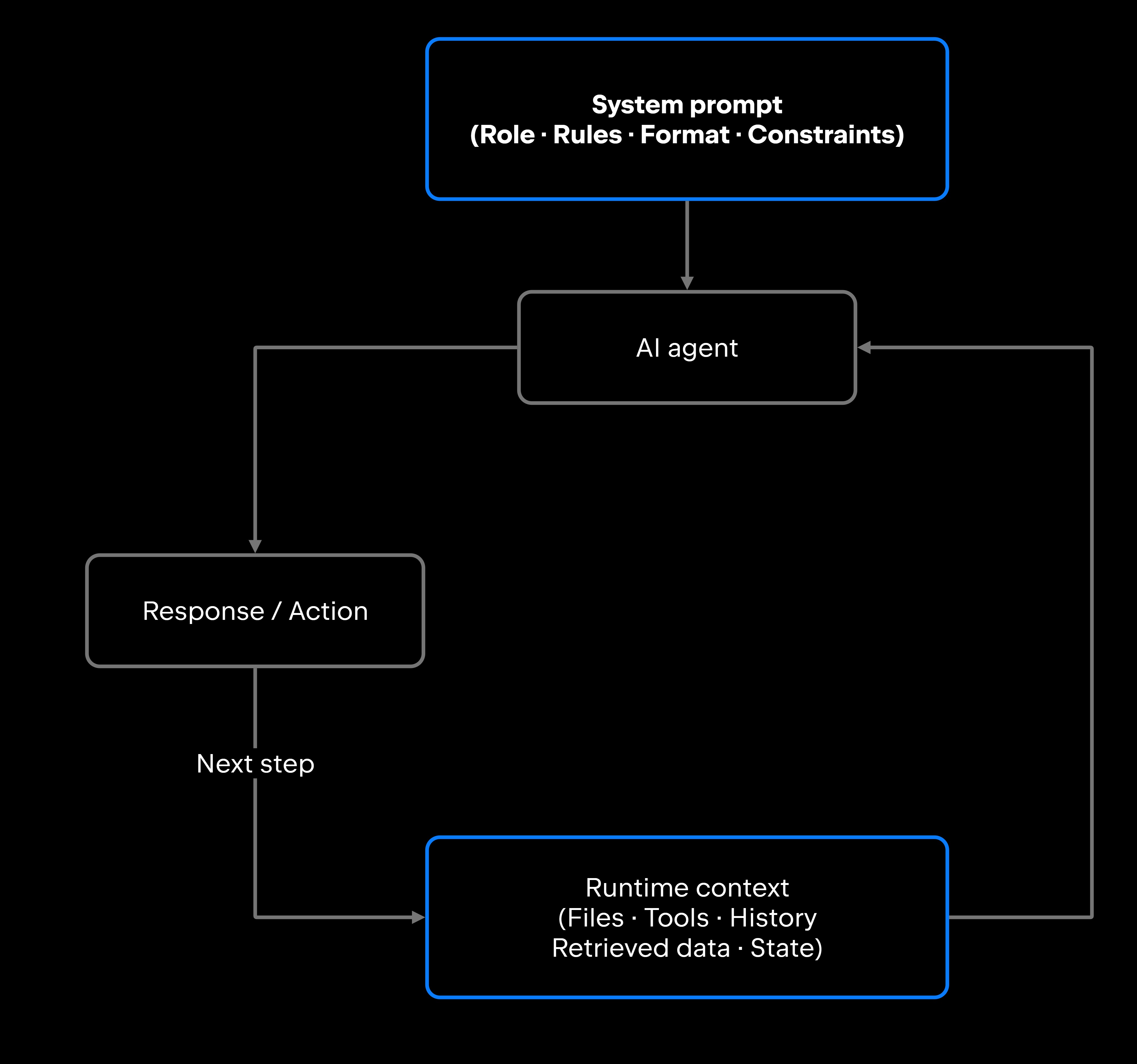
Prompt engineering controls how an agent behaves, covering its role, output format, and decision rules. Context engineering controls what information the agent has access to when it acts. Prompt instructions may remain stable across tasks, while runtime context often changes with the task, user, and workflow state.
Can strong prompts make up for weak context?
No. Clarity in the instructions does not put a file in front of the model. Instructions define the task, context provides the materials, and a task with no materials yields a well-formatted answer about nothing.
Is context engineering only about context windows?
Context windows are the mechanism, the finite space a model can read at once. Context engineering is the discipline of deciding what goes into that space and how it's organized, covering retrieval strategy, information filtering, tool integration, conversation history management, and how context is updated across a multistep workflow.
Should teams focus more on prompts or context for AI agents?
It depends on where the performance problem is. If the agent is behaving incorrectly, producing the wrong format, wrong tone, or ignoring constraints, start with the prompt. If the agent is behaving correctly but reaching wrong conclusions because it lacks the right data, context engineering is the priority.
How do developers know when context engineering is the real problem?
Check the output against the input. If the agent followed its instructions and produced the right format but landed on the wrong content, the instructions were not the constraint. The next step is to look at what actually reached the model on that run: Dump the assembled context and read it the way the agent received it. Inspecting the assembled context can reveal missing, outdated, or irrelevant information and help determine whether the problem lies in retrieval, context assembly, or the agent's reasoning.
How do prompt engineering and context engineering work together in agent workflows?
The prompt establishes the agent's policy: what it does, what it avoids, and how it responds. The context assembles the evidence, including the files, tool outputs, retrieved data, and state the agent uses to apply that policy to a specific task. Every invocation draws on both, which is why an agent can look well-engineered on one axis and still underperform.
Damaso Sanoja is an engineer who is passionate about helping others make data-driven decisions to achieve their goals. This has motivated him to write numerous articles on the most popular relational databases, customer relationship management systems, enterprise resource planning systems, master data management tools, and, more recently, data warehouse systems used for machine learning and AI projects. You can blame this fixation on data management on his first computer being a Commodore 64 without a floppy disk.
Use AI agents in your development workflow
Explore JetBrains AI solutions that help you build, use, and scale AI agents across the software development lifecycle.
Air Gateway
Run terminal agents through one JetBrains account, with access, models, and usage governed centrally.
Junie
Plan, code, debug, and automate tasks with a coding agent that works across your terminal, IDE, GitHub, and GitLab.
Air in IDEs
Orchestrate AI agents and verify their output directly in JetBrains IDEs, with full control over how changes are reviewed.
Air Teams
Automate software delivery workflows, coordinate agentic work across teams, identify bottlenecks affecting delivery.
Air Governance
Govern AI usage, models, policies, and costs across your organization, including JetBrains and third-party tools.
Air Context
Give agents shared organizational memory and context that carries across tools, workflows, and execution environments.
JetBrains Air
An open system of AI products for developers, teams, and organizations – from coding with agents to automating workflows and governing AI at scale.

Continue Exploring the AI Agents for Developers Guide
Learn prompt engineering techniques for AI agents, including planning, tool use, reasoning, and prompt patterns that improve agent performance.
Learn how to manage AI agent context windows, reduce context loss, and improve performance, accuracy, and reliability in long-running workflows.
Explores AI agent architecture, including core components, planning, memory, tool use, orchestration, and design patterns for building reliable AI agents.