AI Agents for Developers / Prompt Engineering for AI Agents

Prompt Engineering for AI Agents

Prompt engineering for AI agents is more demanding than prompt engineering for a single-turn chatbot. A chatbot responds once and stops. An agent plans, calls tools, evaluates results, and decides what to do next, so a weakness in your instructions compounds across several steps before you see any output.

This shift changes what a prompt is for. An agent prompt defines task behavior, tool-use boundaries, and workflow rules. It also sets output expectations and escalation behavior, and it guides multistep workflows that move through planning, action, validation, and human review. AI agent prompt engineering is closer to writing a runtime specification than to writing a good question.

This guide covers practical instruction design for agents rather than general chat prompt tips, including the core parts of an agent prompt, workflow prompt patterns, real examples, common mistakes, and best practices.

Approximately 24% of senior developers generate more than 80% of their code with AI agents, compared with around 14% of more junior developers.

Source: Preliminary findings from the JetBrains Developer Ecosystem Survey 2026 • 15,000+ developers worldwide
Core parts of an AI agent prompt

Effective AI agent prompts usually address six concerns:

  • Task scope
  • Available context
  • Tool access
  • Constraints
  • Output format
  • Success criteria

Together, these elements bound the agent's goal, narrow the room for unintended actions, and define what a completed run looks like. The result moves the agent away from open-ended reasoning and toward behavior you can predict and verify.

Role and task instructions

The prompt must tell the agent what it's responsible for and what outcome it's expected to produce. JetBrains' own guidance on writing effective prompts starts in the same place. Specific task instructions like "review this pull request for security regressions in the authentication module", "triage this Jira ticket and assign a severity label", or "summarize the failing test output from this CI run" give the agent a goal with edges.

Vague task definitions such as "help with code quality" force the agent to interpret scope on its own, which leads to unpredictable behavior in autonomous workflows.

Context and available tools

Prompts should specify what context the agent can access and which tools it has available. On the context side, the scope can include repository files, API documentation, issue metadata, test logs, or database schemas. On the tool side, it encompasses capabilities like search, code execution, web retrieval, or file system access.

An agent handed "the codebase" burns tokens scanning files nobody asked about, whereas an agent given the two directories that matter stays inside them. Tool access follows the same boundary logic; the exact mechanics of defining and executing tools are covered separately in Tool Use and Function Calling in AI Agents.

Constraints and boundaries

This is the part most prompts skip, and it's where agent runs go wrong. Prompts should name the actions that require human approval. Common examples include:

  • “Don't modify files outside the specified directory.”
  • “Don't change package.json dependencies.”
  • “Don't run commands with elevated privileges.”
  • “Don't touch production configuration files.”

Clear boundaries keep an agent's edits scoped to the task at hand. Without them, an agent with permission to modify files can make sweeping, functionally disruptive changes that are technically correct, touching dozens of files when the task covered just one module.

Output format and success criteria

An agent that completes a task but produces output that no downstream system can consume is a failed run. Prompts must clearly define what the output looks like, such as a structured JSON, a markdown summary, a diff patch, or a review checklist. They must also specify how completion is judged – whether that means all tests pass, all checklist items addressed, or a self-reported confidence score the agent has to justify before it counts as met.

Clear success criteria also give the agent a self-check, so it can test its output against the stated criteria before returning a result. Those six elements define a single prompt's anatomy. The prompt also changes shape as the agent moves through its loop.

Prompt patterns for AI agent workflows

Different AI agent prompt patterns serve different stages of the AI agent loop. A well-designed agent workflow uses distinct prompt structures for planning, tool use, validation, and escalation, each with different instruction needs. Mixing these concerns into a single undifferentiated prompt is a common cause of unpredictable agent behavior.

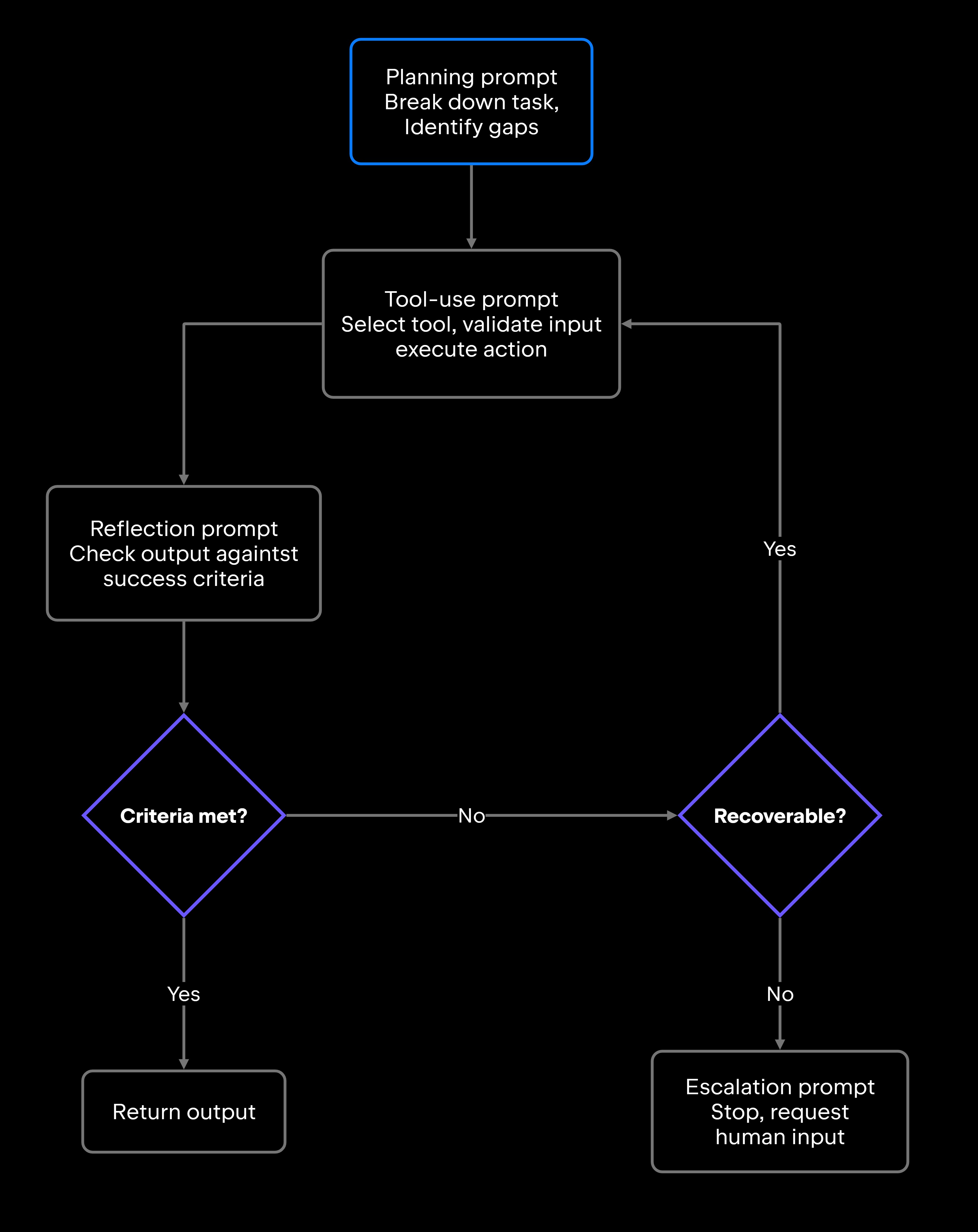
The four stages run as a loop, with reflection deciding whether the workflow returns output, retries, or escalates:

Planning prompts

Breaking a task into a bounded, executable sequence of steps is what planning prompts are for. The keyword is bounded: Planning instructions should require the agent to produce a concrete plan with a fixed number of steps.

A useful pattern is "Before taking any action, list the steps you will take to complete this task. If any step requires information you don't have, identify it explicitly before proceeding." Requiring the agent to flag missing information upfront surfaces ambiguities before the first tool call.

Planning prompts should also set a ceiling, so the plan stays sized to the task: "Produce a plan of no more than five steps. If the task needs more, stop and explain why." A concrete number gives both the agent and the reviewer something to check against. Agents left without a ceiling can produce elaborate plans for simple jobs, or defer action indefinitely while they gather more context.

Tool-use prompts

Tool-use prompts define when tools should be called, what inputs are valid, and when results need to be validated before the workflow continues. They guard against both overuse (calling a search tool for information already in context) and underuse (skipping test execution when output validation is required).

A useful pattern is: "Use run_tests to verify that all existing tests pass before and after making changes. Do not proceed if any test fails. Only call search_codebase when the relevant file path is not already in context."

Without these explicit constraints, tool calls begin to uncontrolled, and both cost and runtime climb.

Reflection and validation prompts

Before an agent finalizes output, validation prompts force a built-in review step. The agent checks whether the output actually meets the stated criteria, so it doesn't return the first result that looks correct.

Concrete examples include:

  • Verifying that all test cases referenced in the task pass after changes.
  • Confirming that a cited document section actually supports the claim.
  • Checking that a code diff touches only the files in scope.
  • Validating that a triage summary includes priority, category, and owner.

That review step is what distinguishes output from verified output.

Escalation prompts

Escalation prompts define the agent's stop conditions, so the agent reports a blocker – instead of retrying indefinitely, guessing at missing information, or taking risky actions it isn't authorized for.

Useful escalation triggers to encode include missing required permissions, three consecutive tool failures on the same step, a goal that contradicts earlier instructions, or a planned action that would modify production configuration. The pattern is straightforward: "If you cannot complete the task within these constraints, stop and explain what you need."

AI agent prompt real examples

These AI agent prompt examples are intentionally compact. Each shows structure without becoming a full template, covering task scope, context, allowed actions, constraints, and output format. The goal is a prompt specific enough that the agent can't misinterpret its scope, yet concise enough to leave room for actual task context.

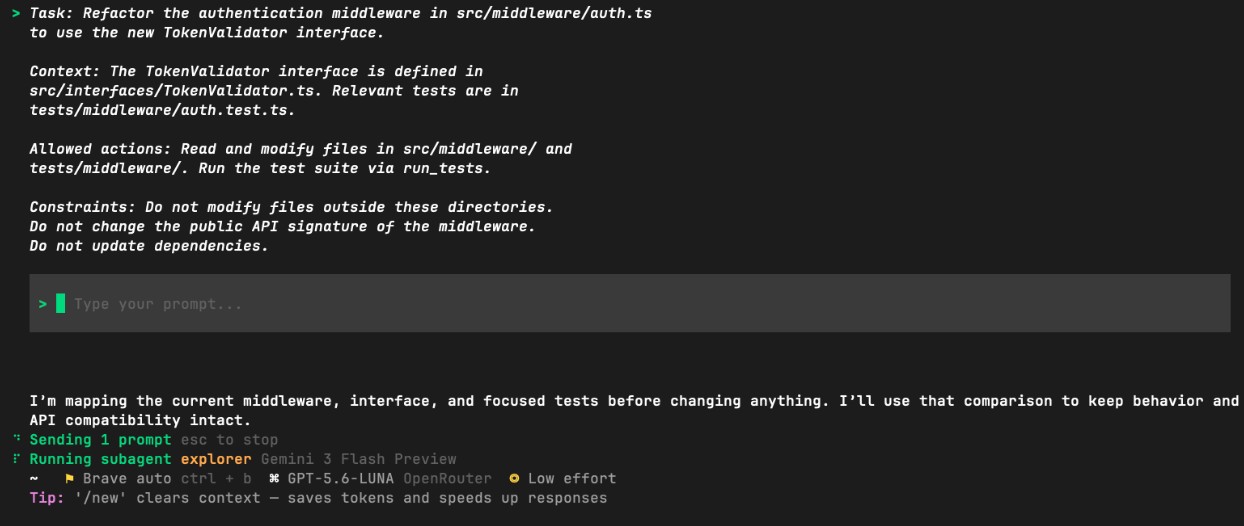
Coding agent prompt example

A coding agent needs two things from its prompt: a task boundary it cannot widen, and a validation step it cannot skip. JetBrains Junie, the JetBrains coding agent available in the AI chat of JetBrains IDEs, takes both from the instructions you give it. In Default mode, it executes multistep tasks autonomously, within the scope and permissions you grant it. It runs terminal commands, edits files, writes tests, verifies changes, and then returns the work for you to review.

This prompt gives Junie a clear task boundary and a validation step that the output has to pass before it's accepted.

Retrieval agent prompt example

A retrieval agent working against a codebase or knowledge source needs explicit guidance on two fronts: which sources it may use, and what to do when a result is ambiguous. The environment can narrow the first for you. JetBrains Air, the JetBrains agentic development environment, scopes task context to specific files, folders, symbols, or Git commits. The second has to come from the prompt.

The uncertainty handling instruction keeps retrieval agents from presenting uncertain results as confident findings. Downstream consumers would otherwise treat those findings as facts.

Support triage agent prompt example

Triage agents that feed downstream systems require structured output. A markdown summary works fine for an analyst reading results directly, but an automated routing system needs a JSON payload. Each of these examples works because every element is deliberate. Leave one out, and the failure modes are predictable enough to catalog.

Common prompt engineering mistakes

Most agent failures trace back to a small set of prompt problems. They're the kind of thing you catch when an agent modifies the wrong files, loops without stopping, or produces output that the next system can't parse.

Mistake

Why it causes problems

Better pattern

Vague task scope

Agent interprets the goal broadly and makes unintended changes

Define the exact file paths, functions, or systems in scope

No tool guidance

Agent calls tools unnecessarily or misses required ones

Specify which tools to use and when, and forbid redundant calls

Add explicit stop conditions, including max retries, ambiguous goals, and failed permissions

Allowlist specific directories, APIs, or commands, the way Junie's Action Allowlist governs which actions run without approval

Define the exact schema, fields, and types expected

Require the agent to check test results, diffs, or schema conformance before finishing

Make the "do nothing if not needed" case explicit

Agent retries indefinitely or escalates without reporting

Agent modifies files or systems outside the intended scope

Output can't be consumed by downstream steps

Agent marks tasks complete without verifying results

Agent creates tasks or calls tools to appear thorough

Missing stop rules

Overly broad permissions

Weak output format

No validation criteria

Instructions that encourage unnecessary actions

The costliest of these is usually the first – task scope wide enough for the agent to make a reasonable-looking but wrong decision. An agent told to "fix the failing tests" might just delete them. Point it at the specific test failure in UserService on line 47, and the scope is no longer open to interpretation. Avoiding these mistakes is mostly a matter of turning them into a standing checklist.

Best practices for AI agent instructions

Effective AI agent instructions share four properties. They are

  • Specific – named files and explicit actions.
  • Bounded – defined scope and stop conditions.
  • Testable – success criteria that both the agent and a human can verify.
  • Aligned with the actual risk level of the workflow.

Tactic

Action / Prompt example

Narrow task scope

Name the exact file, function, or system. "Update the /users endpoint in src/routes/users.ts to return 404 on missing IDs" rather than "update the API".

State allowed and disallowed actions

"You may read and modify files in src/. Do not run database migrations or modify environment files."

Define the exact format: "Return a JSON object with status, changes, and errors fields."

"Run the full test suite and include the pass/fail result in your output before marking the task complete."

"If you encounter a permissions error or cannot determine the correct action, stop and report the blocker."

"A correct summary includes file path, line number, and function name. An incorrect summary says only 'file was changed'."

Each instruction should have one clear meaning. Conflicting rules (such as "be thorough and minimize changes") cause unpredictable behavior.

Require structured output

Set validation rules

Define escalation conditions

Include examples of good and bad behavior

Keep prompts concise and non-conflicting

Writing a prompt once isn't enough. Prompts for AI agents need to be tested against real workflows and revised when they produce unexpected behavior. Treat them like code. Version them alongside the workflow they drive, as a prompt file in the repo and not a string buried in a script. Test them, and update them when the workflow changes.

Run the agent on a subset of real tasks with verbose logging enabled, then audit the steps it took against the steps you intended. Deltas in that comparison usually point directly to missing or ambiguous prompt instructions.

Prompts as runtime instructions for agents

An agent prompt is the runtime specification that determines how an agent interprets its task, selects tools, produces output, and decides when to stop. The prompts that hold up in production name the file, say where the scope ends, and define an output both the agent and a reviewer can check against.

Whether you're working with Junie in Default mode inside a JetBrains IDE, running parallel tasks in JetBrains Air, or building your own agent workflows, the prompt is where control happens. The same discipline carries across AI in JetBrains IDEs. The instructions you write are the interface you actually control.

FAQ

How do teams know when an AI agent prompt is too broad?

A reliable signal is inconsistency, where the same prompt produces different scopes of change across different runs. If an agent sometimes edits one file and sometimes rewrites a whole module for the same task, the task instructions are too open-ended. Adding specific file paths, function names, or explicit scope limits usually resolves the inconsistency.

How should developers handle conflicting instructions in agent prompts?

Prioritize explicitly. If an agent receives both "be thorough" and "minimize changes", it will resolve the conflict arbitrarily. Make precedence clear: "Minimize changes unless test coverage would drop below the project threshold." When two instructions genuinely conflict, pick one and remove the other, because an agent settles the ambiguity on its own – and rarely in the way you intended.

Can AI agent prompts conflict with tool permissions?

Yes, and this is a common source of silent failures. If a prompt instructs an agent to modify a file that the tool's permission model blocks, the agent may either fail without reporting it or find a workaround you didn't intend. The practical fix is to align prompt constraints with the actual tool permissions, so if the tool can't write to production config, the prompt should also state that explicitly.

When should prompt behavior be moved into code or configuration?

When the same rule appears in multiple prompts, it belongs in a shared layer, such as tool configuration, system-level instructions, or a policy file that the agent always loads. JetBrains Air handles this with project instructions that every task in a project inherits. Permissions, output schemas, and escalation conditions are good candidates: They rarely vary by task, and repeating them in every prompt makes them hard to update consistently.

Damaso Sanoja

Damaso Sanoja is an engineer who is passionate about helping others make data-driven decisions to achieve their goals. This has motivated him to write numerous articles on the most popular relational databases, customer relationship management systems, enterprise resource planning systems, master data management tools, and, more recently, data warehouse systems used for machine learning and AI projects. You can blame this fixation on data management on his first computer being a Commodore 64 without a floppy disk.

Use AI agents in your development workflow

Explore JetBrains AI solutions that help you build, use, and scale AI agents across the software development lifecycle.

Air Gateway

Run terminal agents through one JetBrains account, with access, models, and usage governed centrally.

Junie

Plan, code, debug, and automate tasks with a coding agent that works across your terminal, IDE, GitHub, and GitLab.

Air in IDEs

Orchestrate AI agents and verify their output directly in JetBrains IDEs, with full control over how changes are reviewed.

Air Teams

Automate software delivery workflows, coordinate agentic work across teams, identify bottlenecks affecting delivery.

Air Governance

Govern AI usage, models, policies, and costs across your organization, including JetBrains and third-party tools.

Air Context

Give agents shared organizational memory and context that carries across tools, workflows, and execution environments.

JetBrains Air

An open system of AI products for developers, teams, and organizations – from coding with agents to automating workflows and governing AI at scale.

Continue Exploring the AI Agents for Developers Guide

What Is an AI Agent Loop?

Explains how AI agent loops work, why infinite loops occur, and practical techniques for preventing runaway execution in production systems.

How to Manage AI Agent Context Windows

Learn how to manage AI agent context windows, reduce context loss, and improve performance, accuracy, and reliability in long-running workflows.

AI Agent Architecture Explained

Explores AI agent architecture, including core components, planning, memory, tool use, orchestration, and design patterns for building reliable AI agents.