AI Agents for Developers / How to Manage AI Agent Context Windows

How to Manage AI Agent Context Windows

Every AI agent works against a fixed ceiling. The AI agent context window is what the model can reason over in a single call, and it is a finite resource that everything competes for: system instructions, retrieved files, conversation history, and whichever tool outputs the runtime carries into the next call. A few hundred source files, a database schema, and a growing tool-call transcript add up to far more than fits. Deciding what goes in, call after call, is one of the hardest practical problems in building production agents.

This article covers where those limits come from, the strategies teams use to work within them, how long-running workflows stay coherent across many steps, the failures that show up most often, and the practices worth building in early. Getting this right improves reliability, lowers inference costs, and keeps a multistep workflow on track from the first step to the last.

Approximately 24% of senior developers generate more than 80% of their code with AI agents, compared with around 14% of more junior developers.

Source: Preliminary findings from the JetBrains Developer Ecosystem Survey 2026 • 15,000+ developers worldwide
The context window problem

Context windows in AI agents are a resource constraint, not a model defect. The model processes exactly what you place in a single invocation. Everything else the agent might need sits somewhere it cannot reach: a repository of several hundred files, or the transcript of its own previous 40 tool calls.

That distinction, between what exists across your systems and what is actively in front of the model, is the whole problem. Treat it like RAM. You have more data than fits, so something has to decide what goes in.

Context limits and token budgets

Token budgeting is the discipline of deciding, before the call, how much of the window goes to system instructions, retrieved documents, conversation history, and tool outputs, then enforcing those limits at assembly time. Enforcement needs a number to work against – many model APIs return prompt and completion token counts on the response, though what gets reported varies by provider and runtime, particularly for cached input, tool calls, and reasoning models, and a local tokenizer library will estimate a payload before you send it.

Cumulative usage is what tends to surprise people. A long-running task can consume a large number of tokens across many iterations, even when each individual call stays well inside the model's context limit. Track both the active context size for each call and total token usage across the full workflow. They fail in different ways, and they cost in different ways, too.

You can’t simply solve this with bigger windows. Cost and latency scale with the amount of context you actually send, not with the size of the window the model supports. Sending more also tends to lower answer quality on tasks that require precise reasoning within a narrow slice, since extra tokens introduce noise alongside signal.

Position matters too. A model's ability to use what sits in its window drops for information buried in the middle of a long context. Where a fact lands counts nearly as much as whether it is there at all. Keep system instructions, high-priority state, and the current task inputs prominent rather than buried in a long middle. The ordering that works best varies by model and provider.

Some agent tooling reports this directly. The Codex agent's /status command in JetBrains IDEs shows token usage against the context window still available, which turns budgeting from an estimate into a number you can check mid-task.

Active context vs. available knowledge

Your agent may be able to reach a repository of thousands of files, a documentation index, and the full history of the current workflow. Only a small fraction of that belongs in any single invocation.

Context selection is therefore an engineering problem, and it is the one that governs output quality. The model performs well or badly largely on whether the right information landed in its window. Making that selection correctly, over and over, across a workflow whose needs keep shifting, is the real work.

Common context management strategies

AI agent context management in production comes down to four common techniques. Each gives something up, and knowing what before you commit to an architecture saves a rewrite later.

1. Context trimming

Trimming removes irrelevant, duplicate, or outdated information before it reaches the model. If something does not contribute to the current task, leave it out.

Two filtering techniques cover most implementations. The first sets a threshold: Once the files attached to a message cross a set percentage of the window, they are trimmed, with smaller files prioritized and key content extracted from the larger ones. JetBrains IDEs express this concept as a message-trimming threshold. The second slides a window over the conversation, discarding the oldest queries and responses as newer ones arrive, keeping recent turns intact at the expense of older ones. That is one implementation strategy rather than a default behavior across agent runtimes.

Trimming will eventually discard something that turns out to matter. Which messages your system drops first is a design decision. Make it deliberately – the default is a choice too, just an unexamined one.

2. Context summarization

Summarization trades exactness for room. Previous interactions, workflow history, or long documents collapse into shorter representations that preserve meaning while consuming fewer tokens. An agent 10 tool calls deep can roll that history into a compact summary and carry the summary forward.

Compression is lossy, though. Summarize a dependency upgrade, and you may keep "migrated to v3" while losing the two call sites that needed a signature change. Production systems usually pair summarization with selective retention, compressing the general thread while preserving specific outputs verbatim, like file paths, error messages, and API responses.

3. Retrieval-based context

Retrieval systems fetch what the current task needs at runtime. The agent queries for information as it goes, and each step carries only what that step requires.

JetBrains Context, currently in early access, is built for this shape. Codebase knowledge held in a semantic index builds and updates incrementally, which is then queried on demand by whichever coding agent needs it. The agent stops rediscovering the same codebase every task, and stops spending tool calls hunting through files to do it.

Whether you adopt a managed index or assemble the retrieval layer yourself, the stack behind it is a bigger topic than this section covers. Building a RAG-powered AI agent is its own exercise, and what matters here is only its final step, where what you retrieved has to earn its place in the window.

4. Layered context systems

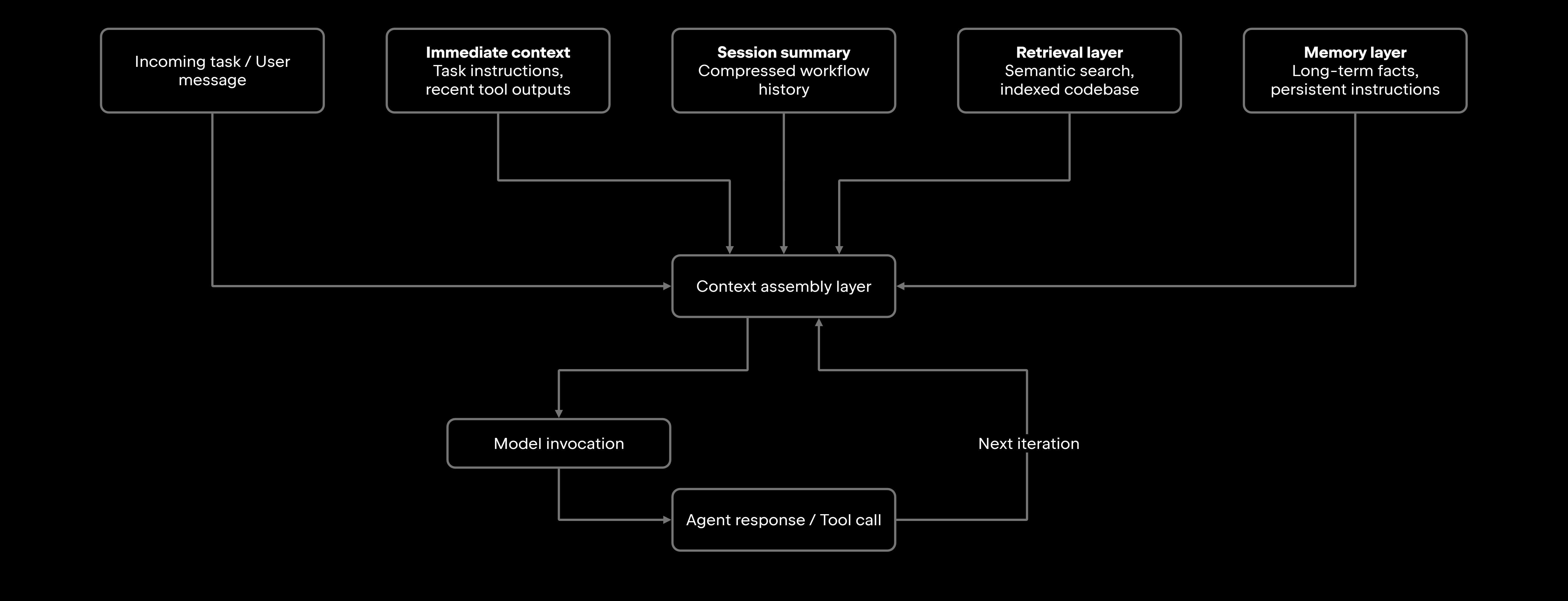
Most production systems combine several of these. A typical architecture holds immediate task instructions and recent tool outputs in active context. Around that sit three supporting layers: a rolling session summary for progress, a retrieval layer called on demand, and a memory layer for facts that must survive across sessions.

At an organizational scale, the retrieval layer is the piece that changes most. An agent working across several codebases needs a shared semantic context that it can query. That index is maintained per repository, and every later task draws on it.

Managing context in long-running agent workflows

By step 15 of a refactor, the context that made sense at step one is mostly noise. Where the runtime carries every result into the next prompt, each tool call appends output, each retrieval appends chunks, each model response appends more, and none of it is removed automatically. Systems that store outputs externally and inject only what the next step needs avoid much of that. A multistep task accumulates context faster than it sheds it, whether the agent is untangling a service, walking a code review, or driving a deployment pipeline. Quality erodes unless something actively manages the pile.

Maintaining workflow continuity

Continuity means the agent still holds what it needs to finish: Execution history, the decisions it has already made, and where the task currently stands, all inside the token budget.

Treat the working context as a structured document with explicit sections. System instructions and the task definition stay fixed. A rolling summary tracks progress. Pin the tool outputs that are still needed, and drop or summarize the ones that have become redundant or obsolete.

Be deliberate about what earns a fixed slot, because anything held there costs window space on every run. That is a fair price for rules the agent has to honor throughout, and a poor one for anything it could look up when the need actually arises.

Handling context drift

Context drift encompasses several related failures: the agent loses hold of the original goal, works from a stale state, shifts attention toward intermediate results that no longer matter, revisits decisions it already settled, or returns work that feels disconnected from what you asked for.

Active re-anchoring corrects it. At regular intervals, or after a significant branch in the workflow, inject a refreshed task summary, re-validate the current goal against the original instructions, and prune context belonging to completed subtasks. Some teams add explicit checkpoints, where the agent pauses, the system rebuilds context from a canonical task definition, and the workflow resumes from a clean base.

The wider execution loop these steps run inside is covered in the Agentic Workflows Explained guide.

Common context window failures

Six patterns account for the bulk of what goes wrong in production, and catching them early saves hours of debugging.

Failure Type

Symptoms

Mitigation Strategy

Lost information

Agent repeats completed work and forgets earlier decisions

Pin critical outputs and use structured state tracking

Context overload

Slow responses, incoherent reasoning, and ignored instructions

Trim aggressively and enforce per-section token budgets

Validate retrieved chunks before injection and refine query logic

Agent references unrelated code or documentation

Irrelevant retrieval

Timestamp context items and invalidate on state changes

Deduplicate before assembly and normalize retrieved chunks

Set hard token limits and summarize aggressively past thresholds

Agent uses outdated file versions or superseded decisions

Same content appears multiple times, wasting tokens

Costs spike and latency climbs mid-workflow

Stale context

Duplicated information

Excessive token consumption

Most of these are diagnosable after the fact. Once you can replay what entered the window at each step, the failing step is much easier to isolate, though the root cause may still sit in retrieval, summarization, model behavior, or tool state outside it.

Best practices for production AI agents

Context-management problems often become more visible under real workloads than in testing, which is why the practices below are operational rather than architectural.

  • Prioritize by category. Decide which information is fixed (task definition, system instructions), which gets summarized as it ages (workflow history), and which is fetched on demand (code, documentation). A window that fills by accident fills with the wrong things.
  • Validate retrieved chunks before injection. Semantic retrieval returns what is similar, which is not always what is relevant. A simple relevance filter ahead of injection stops irrelevant chunks from spending budget and adding noise.
  • Set a summary refresh policy. Rolling summaries go stale, too. Define what rebuilds them, whether a number of tool calls elapsed, a major workflow branch, or a detected inconsistency in the agent's output.
  • Budget by section. A large window split badly between a bloated system prompt, broad retrieval results, and a full transcript produces incoherent context. Set explicit per-category limits and enforce them at assembly time.
  • Instrument context in production. Log context size, composition, and retrieval quality at each step, and alert when a session crosses a threshold you set, leaving room for the expected response, tool results, and any recovery steps, so that compression or retrieval fires before the ceiling. Somewhere around 70–80% is a reasonable starting point for tuning.
  • Give every layer an owner. In a layered architecture, the expensive ambiguity is not which layers exist, but which one is responsible for a given fact. Write down which class of information lives in the summary, and which class is always retrieved, and which class is pinned. Unowned information ends up in all of them or none.
  • Match the strategy to the workflow. A single-file code-generation task and an overnight test-suite triage call for different context architectures. Design around the workflows you actually run.

None of this is a one-time optimization. Context management is ongoing operational work, and the instrumentation is what makes it tractable.

Where this sits among the wider design decisions falls under the topic of AI Agent Architecture Explained.

What this means for developers

Reliable agents put the right information in front of the model at the right moment. That depends far more on selection than on window size, which is why production systems lean on retrieval, summarization, and filtering.

The shift worth making is to treat the window as a budget you allocate rather than a ceiling you hit. Instrument it, set a threshold below the limit, and decide ahead of time what gets dropped when a session crosses it. An agent that spends a lot of tokens across a long debugging run is not necessarily malfunctioning – a hard task can need many valid calls. The questions worth asking are whether each call carried relevant context, and whether the total was worth what it produced. Reliability, inference cost, latency, and the quality of the workflow itself all follow from that one decision, and it is a decision you make before every call rather than once at design time.

FAQ

How often should AI agents rebuild or refresh their working context?

Refresh frequency follows workflow length and volatility. A short task usually runs fine on a single well-structured context. Longer workflows want a refresh at major branch points, like when the task shifts, after a discrete subtask closes, or when utilization crosses a threshold you set. Some teams refresh on a fixed interval every N steps, while others trigger it programmatically from the utilization signal.

How can teams reduce context-related token costs?

Three levers carry most of the savings. Retrieve selectively, pulling only the chunks the current step needs. Replace verbatim history with compact summaries wherever exact wording is not required. Keep a memory layer that persists across sessions, so the agent is not paying to re-derive the same background on every invocation.

What is the difference between context trimming and context summarization?

Trimming is subtractive, and summarization is compressive, and that difference decides which one you reach for. Trimming usually avoids an extra model call, which makes it the cheaper of the two, but whatever it drops is unrecoverable. Summarization survives a later reference to the material it compressed, at the price of an extra model call and some loss of fidelity. Most production systems trim the obviously dead weight and summarize anything that might still be needed downstream.

What happens when an AI agent receives too much context?

Latency climbs, costs rise, and accuracy tends to fall. Models may use information in very long contexts unevenly, particularly when relevant material sits buried in the middle, and can produce inconsistent output as the window fills. Enlarging the window is the intuitive fix and often the wrong one, since it treats the symptom while trimming and summarization address the cause.

When should developers split context across multiple agent steps instead of one large prompt?

Split when the task has natural subtask boundaries, and one step's output becomes the next step's focused input. A monolithic prompt carrying every requirement, all the code, and the full history usually performs worse than a pipeline where each step sees a clean, relevant subset. Cramming everything into one prompt to avoid losing context is itself the signal that the task needs decomposing.

Damaso Sanoja

Damaso Sanoja is an engineer who is passionate about helping others make data-driven decisions to achieve their goals. This has motivated him to write numerous articles on the most popular relational databases, customer relationship management systems, enterprise resource planning systems, master data management tools, and, more recently, data warehouse systems used for machine learning and AI projects. You can blame this fixation on data management on his first computer being a Commodore 64 without a floppy disk.

JetBrains AI Solutions

Optimize your workflow. With AI built for you.

Junie

The AI coding agent with deep IDE integration that plans before it writes, then codes and tests while you stay in flow.

JetBrains AI in IDEs

Set of AI-powered capabilities built into JetBrains IDEs for software developers. It is not a standalone product or service, but an IDE-native experience composed of AI features, LLMs, agents, and integrations.

AIR

Agentic Development Environment for engineering teams building products with AI.

AI for Teams and Organizations

An open system for agentic software development. Govern AI access across your engineering org, manage agents and models, and keep costs under control.

JetBrains Context

A repository intelligence layer for coding agents. It builds a semantic index of your codebase so agents retrieve what they need instead of exploring it file by file.

Central CLI

One CLI for every terminal agent. Claude Code, Codex, Gemini, and others plug into JetBrains AI and behave exactly as they do standalone. Access is granted centrally and instantly, with models, limits, and usage analytics governed in one place.

Continue Exploring the AI Agents for Developers Guide

AI Agent Architecture Explained

Explores AI agent architecture, including core components, planning, memory, tool use, orchestration, and design patterns for building reliable AI agents.

AI Agent Orchestration: How It Works

Learn how AI agent orchestration works, from planning and task routing to state management, multi-agent coordination, and reliable workflow execution.

Agentic Workflows Explained

Explains agentic workflows, how AI agents plan and execute multistep tasks, and the patterns that make autonomous workflows reliable and scalable.