AI Agents for Developers / Memory in AI Agents: Types and Implementation

Memory in AI Agents: Types and Implementation

Memory in AI agents is what keeps a task from starting over every time. A model call on its own carries nothing forward: Each run begins from zero, and whatever the previous step established is gone. Memory is the layer that maintains workflow continuity, tracks execution state, and returns the right context at each step.

That matters as soon as a workflow plans, retrieves, calls tools, and adapts over several steps instead of answering in one turn. Modern AI memory systems combine runtime state, external storage, and retrieval pipelines to do so, and the relative amounts of each a task needs vary widely. This article covers the core memory types, the storage architectures behind them, how retrieval and ranking work, what breaks at scale, and the implementation decisions you will face most often.

57% of developers write less than 20% of their code entirely manually, without any AI assistance.

Source: Preliminary findings from the JetBrains Developer Ecosystem Survey 2026 • 15,000+ developers worldwide
Why memory matters in AI agents

AI agent memory becomes necessary in proportion to a workflow's length and statefulness. A code completion call needs none: The context window holds everything. An agent resolving a GitHub issue runs tests, reads error logs, edits code, and opens a PR, and by the fourth step, it is acting on facts produced in the first three. That history outlives the turn that created it, so something has to hold it.

Memory also drives personalization and coordination. An agent that knows your team's naming conventions, preferred test framework, or deployment pipeline behaves more usefully than one starting blind. In multi-agent workflows, shared memory allows agents to hand off work without repeating context already established by the previous agent.

How memory works in AI agents

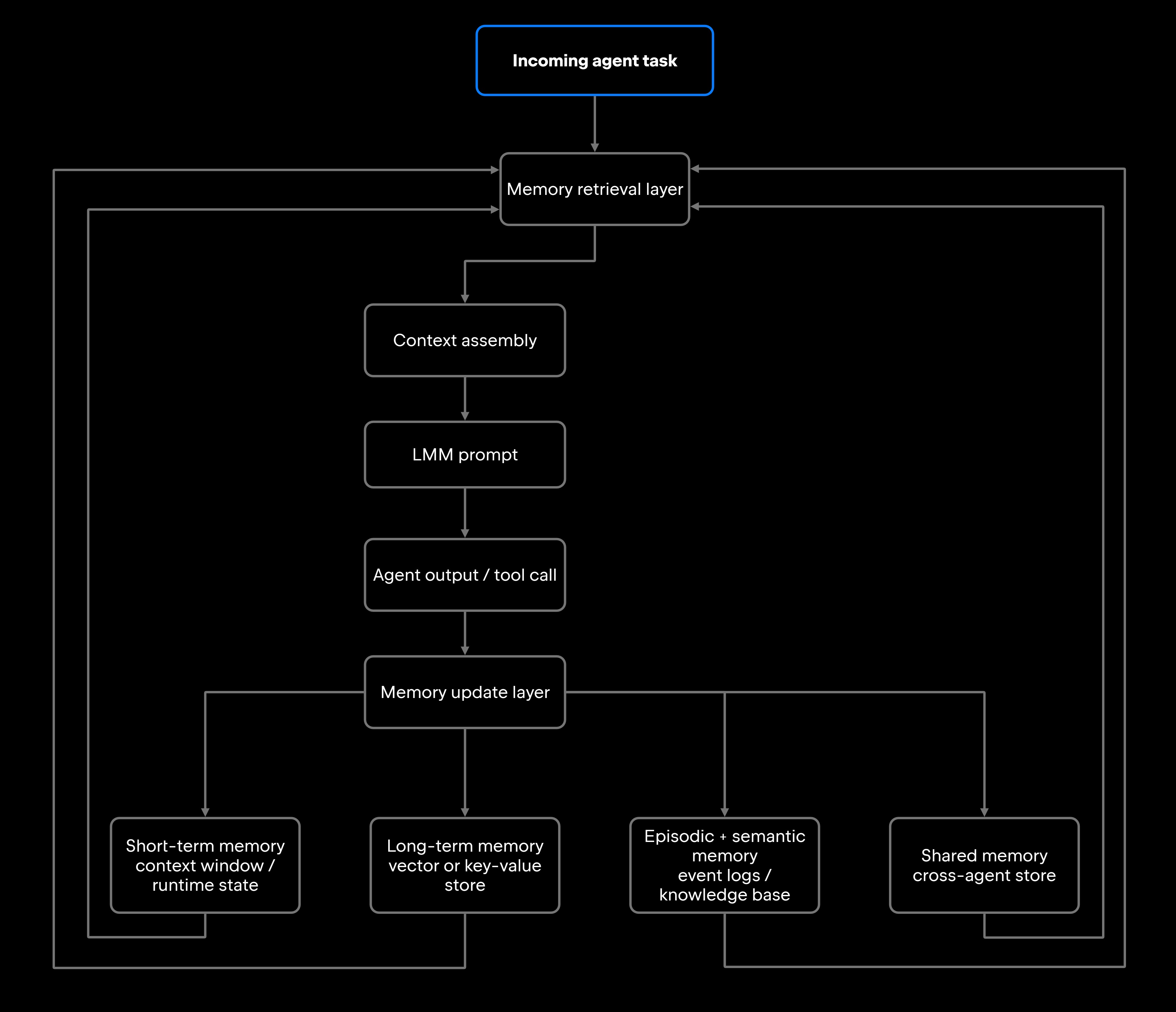
Understanding how memory works in AI agents starts with where it sits: alongside the orchestration and execution layers, not inside the model. An agent receives a task, the memory system retrieves relevant context and injects it into the prompt, the agent runs and produces output, and the results flow back to update what's stored. This cycle repeats on every step of a workflow.

That loop runs hand in hand with AI agent orchestration, the layer that sequences tool calls, manages state, and drives the agent forward, and memory acts as a service orchestration calls at each decision point. In agentic workflows, retrieval happens quietly and often through a session, without the developer triggering it by hand.

Memory retrieval and context injection

When an agent needs context, it doesn't dump its entire memory into the prompt. Every model's context window is finite, and filling it with irrelevant history degrades output quality as much as having no memory at all.

The memory system queries stored entries against the current task, retrieves the most relevant results, and injects them into the prompt alongside the active instruction. That injection might include recent tool call outputs, prior error messages, user preferences, or workflow results from an earlier session, along with other relevant repository context. A relevance-scoped injection layer gives coding agents fast access to cross-repository knowledge, code examples, and references without flooding the context window with unrelated files.

State tracking and workflow continuity

State tracking is memory at the execution layer. It records what the agent has done, what it is waiting for, and what it should do next: which tools fired, what those tools returned, intermediate outputs, and any error states hit along the way.

Tracking this state correctly allows a long-running agent to resume after a timeout or pick up where a previous agent left off in a handoff. Each additional state dimension adds complexity. Agents with deep state trees are harder to debug, monitor, and reason about, a direct trade-off you will face in production.

Memory updates and persistence

Memory changes after each agent step. New observations (tool responses, model outputs, and user corrections) flow back into storage, and how you handle those writes determines how reliable the memory stays over time. The decisions that matter are what gets written, when it expires, how conflicts are resolved, and whether the storage layer supports versioning.

The practical answer is to store more than the raw content. An entry that also carries its source, a timestamp, an expiration window, and a version is one you can filter, refresh, and clean up later. An entry without that provenance quickly becomes indistinguishable from stale junk, and the retriever can't tell it apart from the current truth. Many teams start with simple append-only logs and add this structure as retrieval failures surface, but setting expiration for volatile context and keeping validated results longer pays off far more when you design it upfront than when you bolt it on after the fact.

Retrieval, ranking, and recall

A system that returns semantically similar results but ranks them poorly is functionally broken: The agent gets plausible-looking but wrong context. That gap between similar and actually relevant is where most retrieval problems live. Semantic memory leans on vector embeddings to capture meaning, then on ranking logic to order results by relevance, recency, or task fit.

A retrieval pass moves through a few stages before anything reaches the prompt: The query becomes a vector, the store returns its nearest entries, metadata such as source or timestamp filters them down, and a re-ranking step keeps only the top few. Each stage narrows what reaches the model toward what is actually relevant, not merely nearby. A range of managed and open-source vector databases support this pattern, each with different trade-offs around latency, cost, and filtering.

Types of memory in AI agents

Two lenses describe AI agent memory types, and they overlap rather than compete: One sorts memory by where it physically lives, the other by how long it needs to persist. The former is the easiest to understand. Memory sits in the context window, where access is immediate but capacity is hard-capped; in an external vector, relational, or key-value store retrieved a step at a time, which is the retrieval-augmented generation (RAG) pattern; in the model's weights, which only a training run can change; or in the key-value (KV) cache that inference reuses across calls, which most providers expose as prompt caching, with reported reductions of up to 85%–90% on long, repeated inputs. Of the four, only external storage persists across sessions by design: The context window and the cache are ephemeral, and nothing is written to weights during operation.

By time horizon, those same capabilities regroup into short-term, long-term, episodic/semantic, and shared memory. Short-term maps closely to the context window and runtime state, long-term is almost always external storage, and caching accelerates whichever layer feeds the model. The rest of this section works through the time-horizon view, where most implementation decisions land.

Short-term memory

Short-term memory holds the active task context (current instruction, recent tool outputs, intermediate reasoning, and runtime state) in or near the context window, where it is readily accessible but temporary.

When the session ends or the context window fills, short-term memory is either discarded or promoted to longer-term storage, depending on your system's policies. This is the layer you interact with most directly when tuning prompts and debugging agents.

Long-term memory

Long-term memory persists across sessions, holding what the agent should keep indefinitely: project conventions, previously resolved bugs, team preferences, validated workflow outputs, and organizational knowledge. It almost always sits in an external vector or key-value store, and it depends on the same lifecycle discipline covered above, since a store this durable is exactly where unmanaged entries pile up unnoticed.

It doesn't always take a vector database, though. Sometimes the most effective long-term memory is the simplest: a plain guidelines file that travels with the repository, so an agent picks up your team's conventions and project rules on every run with no embedding infrastructure behind it. Junie, JetBrains' coding agent in the AI chat of JetBrains IDEs, works this way, which puts durable, low-effort memory in reach of a team long before anyone stands up a retrieval pipeline.

Episodic and semantic memory

Episodic memory captures what happened: timestamped records of past agent runs, decisions made, errors hit, and outcomes reached. Semantic memory stores structured knowledge without temporal context, such as API documentation, codebase structure, and domain concepts.

Episodic memory tends to answer questions like "what did we try last Tuesday?" while semantic memory tends to answer questions like "how does our auth service work?" The two often live in the same vector store, separated by metadata tags rather than by separate infrastructure, and the retrieval system filters by type based on the current task's needs.

Shared memory in multi-agent systems

Some multi-agent systems provide agents with a shared memory pool instead of isolated per-agent stores. Agents write their results to the shared store, and others read from it to coordinate, which spares each agent the work of rediscovering what a teammate already established. A shared semantic context layer spanning repositories, documentation, and development systems is one form of this, giving every agent the same grounding without a separate discovery pass each run.

Shared memory introduces coordination overhead. Multiple writers create consistency problems: What happens when two agents update the same entry at once, or one agent's output invalidates another's cached context? Design the shared layer for concurrent writes from the start, and add locking or consensus before you need it, not after the first race condition reaches production.

Memory architectures and storage patterns

AI agent memory architecture decisions shape everything downstream: retrieval quality, latency, workflow continuity, and how much the system degrades under load. A real deployment usually spans several storage layers at once, pairing fast ephemeral access for runtime state, semantic search for unstructured knowledge, and structured queries for factual lookups.

Vector databases and retrieval systems

Vector databases are the backbone of semantic retrieval, storing high-dimensional embeddings of text or code and returning the most semantically similar entries for a query. That similarity search is what lets a RAG-powered AI agent find relevant documentation or code without exact keyword matches. The commonly used options trade off along a few axes:

  • Qdrant: Open-source, strong filtering, solid performance for production workloads.
  • Weaviate: Schema-aware, built-in re-ranking, good for mixed structured and unstructured data.
  • pgvector: A Postgres extension, and the lowest-friction option if you already run Postgres.
  • Pinecone: A fully managed, low-operations option that scales without you running the infrastructure yourself.

Embedding model choice can significantly affect retrieval results, sometimes as much as the vector store itself. General-purpose embeddings like OpenAI's text-embedding-3-large work well for documentation, though code-specific embeddings can close additional gaps for source-code retrieval.

Stateful and stateless memory approaches

The choice between stateful vs. stateless AI agents is a broader architecture decision, but its memory implications are direct. Stateless agents lean entirely on external storage: Each invocation retrieves what it needs, processes it, and writes back. Stateful agents carry context in-process and cut retrieval overhead per step.

The trade-off is predictable. Stateful systems support long-running, multistep workflows well but are harder to scale and recover when they fail, while stateless systems suit short, one-shot tasks and stay more resilient at the cost of retrieval latency on every step. Most land in between, combining in-process short-term memory with external long-term storage.

Memory layers and context windows

Managing AI agent context windows is a direct function of memory architecture. The window sets a hard ceiling on how much active information an agent can use at once. When retrieved memory, current instructions, and tool outputs together approach that ceiling, the system has to make trade-offs, and poor decisions here are a common source of agent failures.

Layered strategies address this. The immediate context window holds the active task and recent history, a fast in-memory cache stores frequently accessed facts for quick injection, and the vector store holds a broader pool of knowledge that might be needed but isn't guaranteed to be retrieved on every step. The retrieval pipeline controls what gets promoted from the vector store into the window, capping injected memory at a fixed token budget. In one production example, memory files consumed around 15% of a 200,000-token budget, a range worth testing as a starting point for your own workload.

Why memory becomes important at scale

A single-session, single-agent workflow with a narrow task scope can often run with no persistent memory at all. The failure modes that show up at scale, on the other hand, are expensive to fix after the fact.

Long-running workflows lose context between sessions without persistent state. A large refactoring or a feature spanning several branches starts each new session unaware of what was already done, and the agent ends up redoing work or making conflicting changes. Multisession tasks compound the problem: an agent that runs Monday, Wednesday, and Friday needs to remember what it did and learned each time, or without episodic memory, it may attempt the same failed approach three times over.

Volume strains a different seam. Agents drawing on large knowledge bases, codebases across multiple repositories, or shared organizational documentation degrade without good AI memory architecture, because the retrieval layer becomes the bottleneck and poor ranking surfaces the wrong context even when the right context exists in the store. Coordination adds one more dimension: When several agents work concurrently on the same system, memory consistency becomes a first-class engineering concern.

Reliability challenges in AI agent memory systems

Memory systems tend to fail in a set of recurring, nameable ways. Knowing these failure modes before you meet them in production saves real debugging time later. The table below pairs the most common ones with their consequences and mitigations.

Challenge

Consequence

Mitigation approach

Stale memory

Outdated entries retrieved as current truth

TTL-based expiration, version metadata

Incorrect retrieval

Wrong context injected, agent acts on bad data

Metadata filtering, retrieval evaluation metrics

Atomic writes, consistency checks on write

Event-driven re-embedding, entry versioning

Atomic writes, locking, consensus for shared stores

Re-ranking models, hybrid search (vector + keyword)

Caching hot entries, index optimization, async retrieval

Conflicting entries degrade output quality

Semantic meaning of entries shifts over time

Multi-agent writes produce inconsistent state

Relevant entries rank below noise

Slow memory lookup blocks workflow execution

Context corruption

Memory drift

Synchronization failures

Ranking quality degradation

Retrieval latency

Several of these problems stay invisible until you have enough production volume to surface them. AI agent monitoring catches retrieval-quality regressions early, so track retrieval hit rate, context relevance scores, and latency percentiles from day one.

Memory design checklist

Good AI memory management comes down to a handful of decisions you make before committing to an implementation:

  • Scoped retention: Define what gets stored, and for how long, per memory type.
  • Retrieval validation: Test that retrieved context is accurate before injecting it into prompts.
  • Metadata filtering: Give every stored entry enough metadata to filter precisely.
  • Lifecycle management: Have a process for expiring, versioning, and cleaning up entries.
  • Expiration policies: Set TTLs on volatile context and protect validated, long-lived entries.
  • Ranking optimization: Evaluate ranking quality on representative queries before shipping.
  • Observability: Log retrieval events, score distributions, and latency from the start.
  • Layered retrieval: Combine context window, hot cache, and vector store rather than relying on a single layer.

Simpler memory systems are easier to monitor, debug, and improve. If a key-value lookup answers a retrieval need, start there and add complexity as the workflow demands it. Memory is one layer of the larger question of how to build an AI agent, and keeping it as simple as the workflow keeps everything built on top of it easier to reason about.

What this means for developers

Memory systems let AI agents maintain workflow continuity, coordinate long-running execution, and retrieve relevant context on demand, but they take deliberate design to work reliably in production. Few real agents rely on a single type; they layer several, and the right mix follows the workload: how long tasks run, how often knowledge changes, how many agents are involved, and how much retrieval complexity you are willing to own.

Reliable AI memory systems don't happen by accident. Validation, monitoring, synchronization controls, and lifecycle policies are non-negotiable at any scale, and retrofitting them onto a system already misbehaving in production is far harder than designing for them from the start.

FAQ

How do developers prevent AI agents from storing outdated memory?

Use TTL-based expiration for time-sensitive entries and version metadata for knowledge that changes gradually. For critical facts, pair storage with a validation step that confirms accuracy before the entry is written. Some teams also run event-driven re-embedding to keep semantic representations up to date as the codebase evolves.

How do developers measure memory quality in AI agent systems?

Track retrieval hit rate (the share of queries that return relevant results), context precision (the fraction of retrieved entries the agent actually uses), and downstream task quality (whether the agent succeeded with this context versus without it). Some teams run offline evaluation sets of curated queries and expected-result pairs to catch retrieval regressions before they reach production.

How does retrieval-augmented generation differ from in-weights knowledge?

RAG pulls information from an external store at runtime, so the knowledge base updates without retraining. In-weights knowledge is encoded into model parameters during training and takes a full fine-tuning cycle to change. RAG suits frequently changing or large-scale knowledge, while in-weights storage suits stable domain patterns that the model needs to absorb through training.

Can AI agents selectively forget information?

Yes. Most vector stores support deletion by ID or metadata filter, so you can remove specific entries without wiping the store. Selective forgetting helps for clearing stale task history, dropping entries that retrieval evaluation flags as “low-quality”, or complying with data lifecycle policies. The catch is knowing when to delete, which is why storing metadata like source, creation time, and session context alongside each entry helps.

What happens when AI agents retrieve conflicting memories?

Conflicting memories produce inconsistent behavior. The agent might execute contradictory instructions or default to whichever entry ranks higher without registering the conflict. Mitigations include conflict detection on write (comparing new entries against existing ones before committing), recency weighting in ranking (newer entries win ties), and explicit resolution prompts that surface the ambiguity to the agent rather than silently resolving it.

Damaso Sanoja

Damaso Sanoja is an engineer who is passionate about helping others make data-driven decisions to achieve their goals. This has motivated him to write numerous articles on the most popular relational databases, customer relationship management systems, enterprise resource planning systems, master data management tools, and, more recently, data warehouse systems used for machine learning and AI projects. You can blame this fixation on data management on his first computer being a Commodore 64 without a floppy disk.

JetBrains AI Solutions

Optimize your workflow. With AI built for you.

Junie

The AI coding agent with deep IDE integration that plans before it writes, then codes and tests while you stay in flow.

JetBrains AI in IDEs

Set of AI-powered capabilities built into JetBrains IDEs for software developers. It is not a standalone product or service, but an IDE-native experience composed of AI features, LLMs, agents, and integrations.

AIR

Agentic Development Environment for engineering teams building products with AI.

AI for Teams and Organizations

An open system for agentic software development. Govern AI access across your engineering org, manage agents and models, and keep costs under control.

JetBrains Context

A repository intelligence layer for coding agents. It builds a semantic index of your codebase so agents retrieve what they need instead of exploring it file by file.

Central CLI

One CLI for every terminal agent. Claude Code, Codex, Gemini, and others plug into JetBrains AI and behave exactly as they do standalone. Access is granted centrally and instantly, with models, limits, and usage analytics governed in one place.

Continue Exploring the AI Agents for Developers Guide

AI Agent Architecture Explained

Explores AI agent architecture, including core components, planning, memory, tool use, orchestration, and design patterns for building reliable AI agents.

How to Manage AI Agent Context Windows

Learn how to manage AI agent context windows, reduce context loss, and improve performance, accuracy, and reliability in long-running workflows.

Agentic Workflows Explained: A Complete Guide

Explains agentic workflows, how AI agents plan and execute multistep tasks, and the patterns that make autonomous workflows reliable and scalable.