AI Agents for Developers Guide / A Complete Guide to Agentic Workflows

A Complete Guide to Agentic Workflows

An agentic workflow is the multistep, adaptive execution that an AI agent runs to reach a goal, rather than a single response to a single input. The agent plans, calls tools, observes what comes back, and adjusts its next step, looping until the goal is met or it hits a stopping condition. That is what separates it from traditional automation: A scripted pipeline runs the same path every time, while an agentic workflow adapts based on context, feedback, and runtime state. In practice, that means an agent can investigate a failing build, prepare a code review, or sweep a dependency update across repositories on its own, adapting as it goes.

This guide covers how agentic workflows execute, the patterns they use, how they compare to traditional automation, the implementation challenges they raise in production, and where they fit in day-to-day software development.

Approximately 24% of senior developers generate more than 80% of their code with AI agents, compared with around 14% of more junior developers.

Source: Preliminary findings from the JetBrains Developer Ecosystem Survey 2026 • 15,000+ developers worldwide
How agentic workflows work

Four pieces make an agentic workflow run:

  • The LLM that reasons about what to do.
  • The tools it can call.
  • The memory that carries context across steps.
  • And the orchestration layer that ties them into a loop.

The full breakdown of these AI agent components is its own topic; what matters here is how they interact: The agent takes an action, observes the result, and uses it to decide the next one. That is what distinguishes an agentic system from a standard LLM call that answers once and stops.

In this workflow, the model’s role is reasoning. It proposes the next action, and nothing more. The orchestration layer does the rest, deciding when actions fire, in what order, with what tools, and under what constraints, and keeping the loop running until the goal is reached, a limit is hit, or a human approval point is triggered. That is why the loop, not the model alone, is what makes a workflow agentic. The centralized, distributed, and hierarchical shapes orchestration can take are a subject in their own right.

Goal interpretation and task planning

When an agent receives a task (for example, "investigate why the nightly build is failing"), it interprets the goal, identifies what information it needs, and decomposes the work into executable steps. This might include checking the latest CI logs, identifying the failing test, looking at the relevant commit history, tracing the change to a file, and inspecting the file.

The plan isn't always fixed upfront. If the CI logs point to a flaky test rather than a genuine regression, a well-designed workflow adapts by escalating to a human instead of retrying indefinitely. Treat planning as a starting point that the workflow refines as it gathers information.

Tool use and workflow execution

Agents execute by calling tools. In a software development context, that means interacting with terminals, Git repositories, CI/CD systems, IDEs, issue trackers, and external APIs. This is where AI workflow automation happens, as the agent acts across connected systems, wherever permissions allow.

An agent investigating a bug might read source files via the filesystem, run a test suite via a CLI, query a ticket for context, and post a summary to a chat channel, all in a single workflow. Each action is bounded by the permissions, runtime limits, and approval boundaries you configure.

Observations, feedback, and adaptation

After each action, the agent evaluates the response: a passing test confirms progress, a 403 from an API points to a permissions issue, and a lint failure on a diff signals it's time to revise. The workflow uses these outcomes to decide what happens next rather than simply logging them. Retry logic, fallback paths, and escalation behavior all follow from that outcome-driven decision-making.

A good workflow retries transient failures like network timeouts and rate limits automatically. If the agent can't access a service directly, it might try an alternative endpoint or log the failure and continue. In ambiguous situations, it escalates to a human review step rather than guessing.

State and context management

Agentic workflows need to track what's happened. State includes the current execution position, intermediate outputs, tool call results, and the memory of earlier decisions. Without state continuity, a multistep workflow loses context between actions, and the agent might re-read files it has already processed or repeat work already done.

The practical tension is reach versus cost. In-context memory is fast but bounded by the window, while external memory reaches further at the risk of retrieving the wrong thing. What a workflow needs is a memory-design decision, and the deeper mechanics of memory in AI agents run past what a single workflow decision needs to settle. What matters here is only that state survives between steps, and for most software development workflows, that much is not optional.

Common agentic workflow patterns

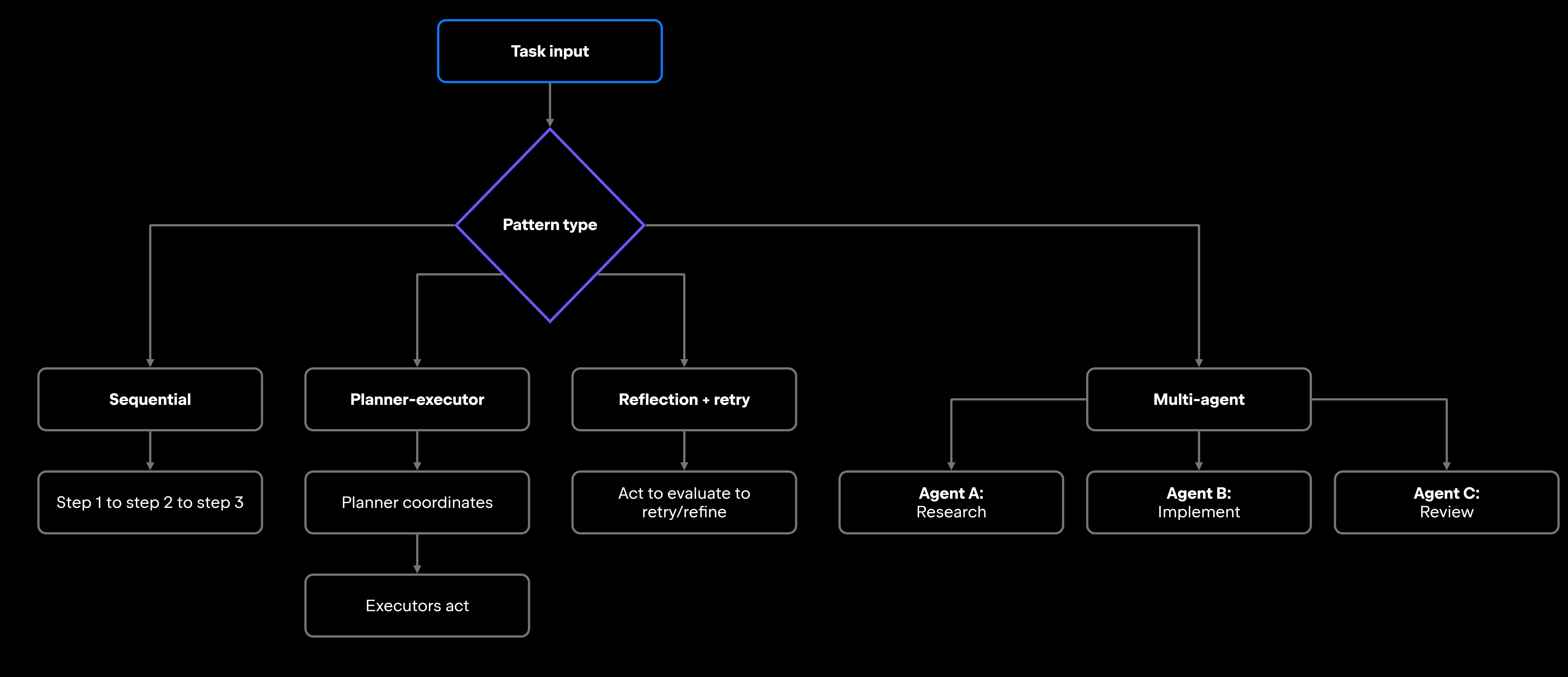
In agentic workflows, the loop is the main building block; how you arrange it around a task is where patterns come in. Different patterns organize planning, execution, retries, and coordination in different ways.

The right choice depends on the task's complexity, the need for parallelism, and how much human review you want in the loop. Choosing planning algorithms and multi-agent coordination that match your workflow's requirements tends to matter more than picking a popular framework.

Sequential workflows

Sequential workflows execute tasks in predefined stages, with each step depending on the previous one completing. Generate code, run the linter, run tests, validate the output, commit. The stages are clear and easy to reason about.

That simplicity comes at a cost. Sequential workflows don't adapt well to unexpected states. If a step fails partway through, the workflow needs explicit logic to handle that; otherwise, it either stops or continues unquestioningly. They're a good starting point for well-understood, repeatable tasks where the steps don't change much.

Planner-executor workflows

In a planner-executor pattern, one component coordinates the overall objective while separate components handle execution. The planner breaks down the goal, decides what needs to happen, and delegates to executors. The executors focus on individual actions, like running a tool, calling an API, or generating a code block.

This separation improves modularity. The planner can revise its strategy based on executor feedback, while executors handle the details of how tools work. For complex workflows, like investigating a production incident across multiple services, this separation makes the system easier to debug and extend.

Reflection and retry loops

Reflection workflows include an evaluation step after actions complete. The agent reviews the output, decides whether it's good enough, and either accepts it or tries again with a modified approach. This is useful for workflows where quality is hard to specify upfront.

A common software development example of reflection workflows is test-fixing: The agent writes a function, runs the tests, reads the failures, and revises the implementation. Each iteration uses the previous result as input. LangGraph and similar frameworks implement this pattern explicitly, though you don't need a framework to use it.

Multi-agent workflows

Multi-agent workflows distribute work across specialized agents. How those agents get architected and coordinated at scale is a separate subject, covered in the dedicated Multi-Agent Systems for Developers guide; what matters here is the shape of the patterns themselves. Three recur:

  • Planner-reviewer – one agent plans while another validates.
  • Researcher-executor – one gathers context, another implements.
  • Or coordinator-worker – a central agent routes tasks to specialized sub-agents.

Running genuinely independent work in parallel – rather than waiting for each task to finish in series – is where the coordination overhead pays for itself. An example would be one agent refactoring a module while a second one adds tests for it and a third one investigates a related bug report.

The trade-off, however, is that every agent boundary is a new place for context to get lost or an error to slip through, so multi-agent designs need validation at each handoff.

Agentic workflows vs. traditional automation

Whatever pattern a workflow uses, one thing sets them apart from traditional automation: how they handle the unexpected.

Traditional automation follows deterministic paths. A CI/CD pipeline runs the same steps in the same order every time; a bash script executes each command regardless of what the last one returned, unless you added explicit conditional logic. This predictability is a strength, as you know exactly what traditional automation will do.

Agentic workflows trade that predictability for adaptability. The workflow can change course based on what it observes at runtime, retrying a failed step, escalating a decision, or switching tools. That flexibility pays off when the task space is too large or too variable to script exhaustively upfront.

That trade-off runs through every dimension, and it does not favor one side across the board:

Dimension

Traditional automation

Agentic workflows

Execution behavior

Fixed, deterministic

Adaptive, context-driven

Adaptability

Requires explicit branching logic

Tool coordination

Human oversight

Operational complexity

Debugging

Composable, runtime-selected

Configurable approval gates

Higher

Harder (requires observability tooling)

Predefined integrations

Built into the pipeline design

Lower

Straightforward

Dynamic at runtime

Use traditional automation for well-understood, stable workflows where consistent output is the priority. Use agentic workflows where the task space is variable, multistep, and requires judgment calls that are too expensive to encode as rules.

In practice, the two aren't exclusive: Most production systems are hybrid, running deterministic steps where the path is known and handing off to an agent only where it isn't. A scripted pipeline that runs its fixed steps but escalates an unexpected failure to an agent stays deterministic where it can and adaptive where it can't.

Agentic workflows in software development

In software development, the AI agent workflows that actually stick offload the coordination overhead that interrupts focused work.

Debugging and issue investigation is a strong fit. Point an agent at a production exception, and it can pull the stack trace, map the failing path to the services involved, check what shipped recently, and hand back a summary, all without pulling you off your current task.

Code review preparation is another. An agent can run a static analysis pass, check test coverage for the changed files, summarize the diff, and flag the risky chunks before a human reviewer opens the pull request, so the reviewer starts with context available instead of having to gather it.

Test generation and dependency management are repetitive enough that agents handle them with low risk. Generating unit tests for a new function, or running a dependency update across several repositories and checking for breaking changes, are tasks where the output needs review, but the work itself is mechanical.

A few patterns recur in teams that have adopted these workflows:

  • Agents running asynchronously across several repositories at once, rather than one task at a time.
  • Long-running jobs that keep going while the developer focuses on other tasks, delivering results for review later.
  • Shared workflow templates across a team, so agent-assisted practices stay consistent instead of being siloed with individuals.

Most real-world workflows still include human review points, which is the right design wherever automated confidence checks aren't enough.

Common challenges in agentic workflows

Those workflows only pay off if they survive production, and that's mostly an engineering problem rather than a modeling one. The challenges you'll actually hit are the kind any distributed system has.

Start with latency. A workflow that makes 10 tool calls can run for several minutes, since each LLM call adds latency, and that's often too slow for interactive use. Most production workflows are either asynchronous, fire and read the result later, or are scoped to fast, bounded subtasks.

State consistency gets tricky the moment a workflow spans many tool calls and maybe several agents, because a step that fails midway can leave partial writes and confused state unless you've planned for it with checkpointing, idempotent calls, and clear rollback.

Context has a parallel problem on long runs. As the window fills, earlier constraints and decisions get truncated, and the agent drifts off track, so summarize or prune older context and keep critical state checkpointed outside the window.

Then there are the ways an agent overreaches:

  • The runaway retry loop: An agent that retries a failing step without a ceiling will keep going, burning quota and firing unexpected tool-call volume. Cap retries and define what "give up and escalate" means before you deploy.
  • Permissions: An agent that can write to production databases, merge pull requests, or change CI config is a real risk surface. Scope its access to exactly what the task needs: read-only by default, with human approval for high-impact actions.

Orchestration complexity climbs fast, too. One agent is manageable. Add a second, plus shared context and conditional routing, and the moving parts multiply. Teams that build multi-agent systems without structured orchestration tooling like LangGraph or CrewAI tend to hit coordination and maintenance friction as they grow.

None of it is debuggable without observability. When intermediate state isn't logged, tracing which step produced a bad output is slow going, so production setups lean on structured logging per tool call, per-step input and output traces, and dashboards over workflow runs.

What this means for developers

Agentic workflows let AI systems coordinate planning, execution, tool use, and adaptation across multistep operations in ways scripted automation can't match. For teams buried in coordination overhead, that's a real gain: less time lost to triaging CI failures, writing boilerplate tests, and the mechanical investigation that used to force a context switch.

The catch is that the capability is the easy part. Teams build production-grade workflows on orchestration, runtime controls, monitoring, and approval gates, and those constraints, not the model, decide whether the workflows hold up. The design work lives in the escalation, logging, and stopping rules.

That calculus shifts again at the team and organization scale. Once dozens of developers are running agents across the codebase, the open problem is no longer any single workflow. It is governing all of them, including which models and tools agents may use and how cost-effective they are, and monitoring their activity. Governing and observing agents across the entire software delivery lifecycle is where JetBrains Central is designed to make a direct impact.

FAQ

What tools are commonly used to build agentic workflows?

For orchestration frameworks: LangChain and LangGraph (Python-based), CrewAI (multi-agent coordination), and AutoGen (Microsoft's multi-agent framework). For IDE-integrated agentic development, JetBrains Air is an agentic development environment that runs coding agents in isolated, parallel tasks. Most teams start with a single-agent framework and add multi-agent coordination only when task complexity warrants it.

Can agentic workflows run without human approval steps?

Full autonomy tends to fit low-risk, reversible tasks, such as generating a test file, posting a draft pull request, or commenting on an issue. High-impact actions like merging code, changing infrastructure, or writing to production data benefit from a human in the loop. The durable pattern is to make that review a structural part of the workflow rather than an afterthought, so oversight doesn't depend on someone remembering to look.

What causes agentic workflows to fail in production?

Most failures are operational, not intellectual, like:

  • State left inconsistent by a failed mid-workflow step.
  • Retry loops with no escalation.
  • Permissions too tight to succeed yet too quiet to report the error.
  • Context windows overflowing on long runs.
  • Orchestration so tangled that no one can trace what went wrong.

If these examples read like ordinary distributed-systems trouble, that's the point. The model is rarely the weak link.

How do agentic workflows handle failed actions and retries?

Retry logic lives in the orchestration layer, not the model. Frameworks commonly let you set retry limits, backoff strategies, and escalation rules per action type. Transient failures like timeouts and rate limits retry automatically, while logic failures or ambiguous results route to a fallback or a human. The one rule that isn't optional is a ceiling, since uncapped retries spiral into cascading load.

How do developers monitor long-running agentic workflows?

They log at the tool-call level, not just overall success or failure. Each action should record its inputs, outputs, and duration, and the best setups let you replay a run to see exactly what the agent did and why. LangSmith (for LangChain workflows) and Weights & Biases both provide this kind of agent tracing out of the box.

Damaso Sanoja

Damaso Sanoja is an engineer who is passionate about helping others make data-driven decisions to achieve their goals. This has motivated him to write numerous articles on the most popular relational databases, customer relationship management systems, enterprise resource planning systems, master data management tools, and, more recently, data warehouse systems used for machine learning and AI projects. You can blame this fixation on data management on his first computer being a Commodore 64 without a floppy disk.

JetBrains AI Solutions

Optimize your workflow. With AI built for you.

Junie

The AI coding agent with deep IDE integration that plans before it writes, then codes and tests while you stay in flow.

JetBrains AI in IDEs

Set of AI-powered capabilities built into JetBrains IDEs for software developers. It is not a standalone product or service, but an IDE-native experience composed of AI features, LLMs, agents, and integrations.

AIR

Agentic Development Environment for engineering teams building products with AI.

AI for Teams and Organizations

An open system for agentic software development. Govern AI access across your engineering org, manage agents and models, and keep costs under control.

JetBrains Context

A repository intelligence layer for coding agents. It builds a semantic index of your codebase so agents retrieve what they need instead of exploring it file by file.

Central CLI

One CLI for every terminal agent. Claude Code, Codex, Gemini, and others plug into JetBrains AI and behave exactly as they do standalone. Access is granted centrally and instantly, with models, limits, and usage analytics governed in one place.

Continue Exploring the AI Agents for Developers Guide

AI Agent Orchestration: How It Works

Learn how AI agent orchestration works, from planning and task routing to state management, multi-agent coordination, and reliable workflow execution.

Multi-Agent Systems for Developers

Learn how multi-agent systems coordinate AI agents, compare architecture patterns, solve complex workflows, and improve software development.

ReAct Agents Explained: How They Work

Learn how ReAct agents combine reasoning, tool use, and feedback loops, where they work best, and how to manage reliability, cost, and latency.