AI Agents for Developers / What is a ReAct agent?
What is a ReAct agent?

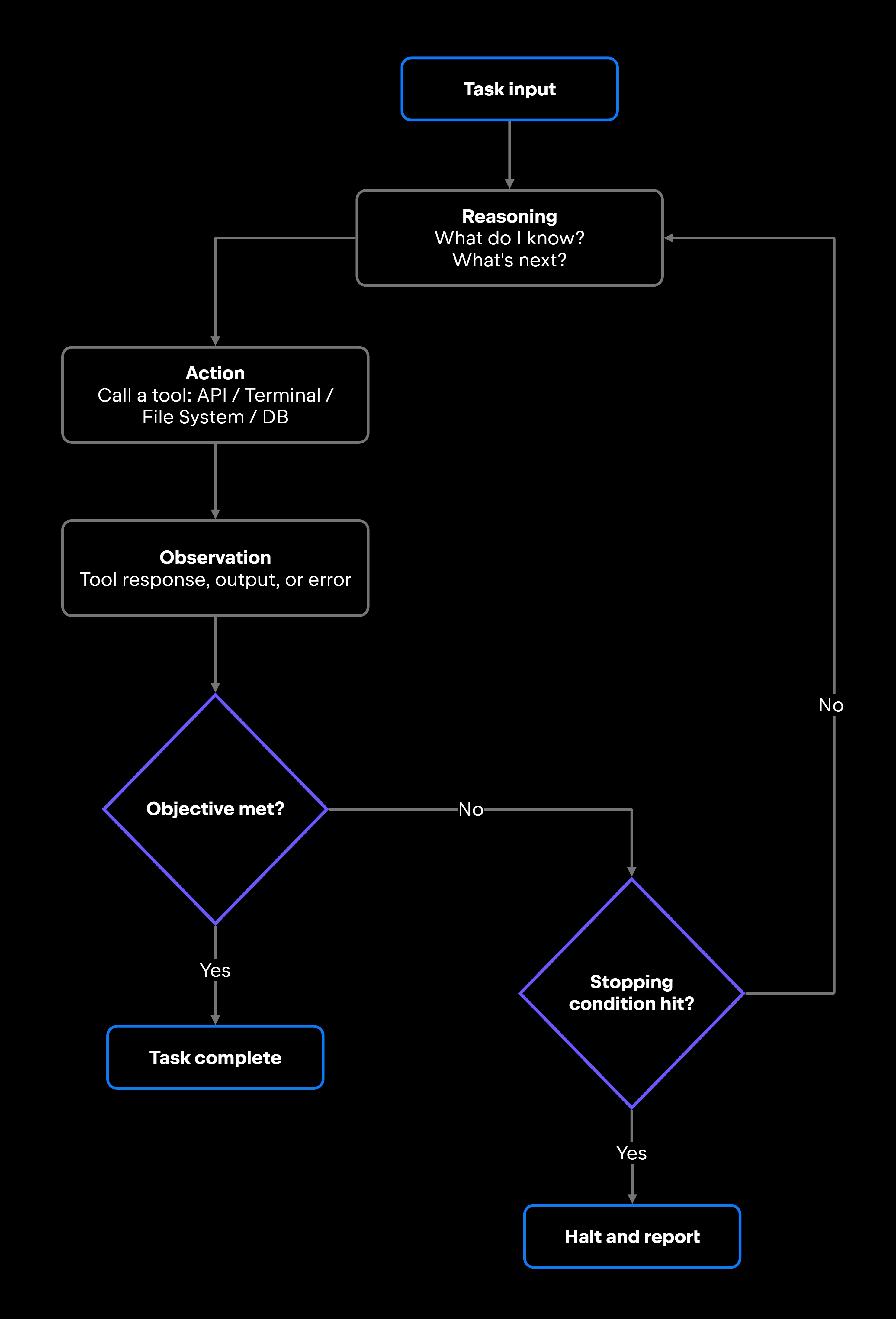
ReAct agents interleave reasoning and action to address a common failure mode: Language models that reason without external grounding tend to compound errors across steps and produce confidently wrong answers. ReAct (short for Reasoning + Acting) is a prompting framework that makes a language model alternate between reasoning through a problem and acting on that reasoning, then observing the result and reasoning again until it reaches a grounded answer. A standard LLM call is a single-shot – input in, output out. A ReAct agent runs a loop instead, and each pass produces a thought (what to do next), an action (a tool call), and an observation (what the tool returned) that feeds the next thought.

The pattern is common in production AI agents because that loop improves workflow continuity, tool coordination, and multistep execution. This article covers how the ReAct loop works, how it compares to traditional prompt workflows, where it performs best, the reliability challenges it introduces, and when to use it in production systems.

How ReAct agents work

Where a single LLM call ends after one response, a ReAct agent keeps state across iterations and decides each step based on what the previous one returned. Interleaving thought and action lets it course-correct on what tools actually return instead of committing to a plan that breaks when reality differs from expectation. A real observation between reasoning steps forces each thought to reconcile with retrieved data, so an error surfaces at the next step rather than compounding silently. Those reasoning traces can offer a second payoff: when the implementation exposes them, you can read the trace and see where the model went wrong, which makes debugging more tractable than a black-box single-shot output. Some production models hide or summarize their reasoning, so how much of this you get depends on the tooling rather than on ReAct itself.

The ReAct agent architecture is deliberately minimal: one model, one loop, and a context that grows with each observation. The loop has three components, reasoning, action, and observation, that repeat across iterations until the task is complete or a stopping condition fires.

Reasoning and planning

At the start of each cycle, the agent takes stock of what it knows, what it still needs, and what to do next, working from the latest context rather than a plan fixed up front. Reasoning means decomposing a task into smaller steps, identifying which tool is most likely to produce useful information, and sequencing actions so each one builds on the last. An agent asked to add a feature might decide it needs to read the existing module and its tests before writing anything, choosing what to look at first rather than guessing at the change.

LLM-based reasoning is not fully reliable or transparent. The agent's thought is generated text, not a verified chain of logic. It can misidentify the root cause, select the wrong tool, or produce a confident rationale for a bad decision. That is why the observed result matters more than the reasoning behind it: treating the trace as ground truth is a mistake.

Actions and tool execution

The agent executes each action by selecting and invoking a tool through function calling, and increasingly through Model Context Protocol (MCP) servers that expose many tools behind one standard interface. Tool-using AI agents can interact with a wide range of external systems, scoped by their granted permissions: APIs, code execution environments, file systems, terminal commands, version control repositories, browsers, and databases.

Each action type carries a different risk. Reading a file is low-risk; running a shell command or committing to a repository is not. That gradient is why actions run within set permissions and runtime rules, and why high-impact actions, especially anything that touches production or external systems, require explicit approval instead of firing on their own.

Observations and feedback loops

After executing an action, the agent receives an observation: the tool's response, whether that is file contents, test output, an API response, an error message, or a developer's review of a proposed change. That observation feeds back into its context and shapes the next reasoning step. This feedback is where the ReAct agent pattern pays off.

If a test passes, the agent moves on; if it fails, it reads the error, traces it to a likely source, and plans a fix without a human stepping in at every turn. If the tool call itself fails because of a timeout, an authentication error, a malformed response, the agent can retry, fall back to an alternative, or stop and surface the failure. Stopping conditions keep this loop from running forever, and the Reliability section covers how to configure them.

Iterative workflow execution

The thought-action-observation cycle repeats until the agent reaches one of three outcomes: the objective is satisfied, a stopping condition fires, or an unrecoverable error occurs. Simple tasks might resolve in just a few iterations. Complex workflows, such as analyzing a large codebase for a security regression, can take many more.

Iterative execution is what gives ReAct systems their adaptability: an agent that hits an unexpected error mid-workflow can adjust rather than fail outright. The cost is operational complexity, and that is exactly where ReAct diverges most sharply from a single prompt.

ReAct agents vs. traditional prompt workflows

ReAct agents and traditional prompt workflows differ architecturally, not just in degree. For simple, bounded tasks, a single prompt is faster and cheaper; for anything that needs tools, intermediate decisions, or runtime adaptation, it falls short.

Characteristic

Traditional prompting

ReAct agent

Workflow behavior

Single-pass, stateless

Iterative, stateful

Feedback loop

None (open loop)

Adaptability

Closed loop, observation-driven

Adapts based on observations

Fixed at prompt time

Tool use

None (or separate integration)

Native, multistep

Maintained across iterations

None

State management

High

Low

Operational complexity

The high operational complexity in the ReAct column is not about integration effort; it comes from managing iteration counts, carrying context state across steps, and debugging multistep execution traces. ReAct became a common foundation for tool-using AI agents because it covers the full cycle in one loop: reasoning, action, observation, and another reasoning step. Earlier designs often split planning from execution, which made them less adaptable when a plan met conditions it did not expect. That loop pays off only in the right contexts, and the next section identifies where.

Where ReAct works best

ReAct earns its overhead in workflows where each observation meaningfully changes the next decision, separating a correct result from an incorrect one. It outperforms single-shot prompting here because a single prompt has to commit before it sees any result, while a ReAct loop lets each observation reshape the following step. Debugging and troubleshooting are the clearest fit, because they already follow the thought-action-observation shape: read the output, form a hypothesis, change something, re-run, and repeat. In JetBrains IDEs, an AI agent can run failing tests, read the stack trace, search the codebase for the relevant function, apply a fix, and verify the result, all as part of a single agentic workflow where each step informs the next. Repository analysis and issue investigation fit for the same reason: tracing a bug across files, mapping where a public API is used in a large codebase, or investigating a performance regression across recent commits involves too many intermediate decisions for one prompt to handle.

Testing fits naturally too: An agent that writes new code can run the suite, catch its own failures, and fix them before a human ever sees the change. Retrieval workflows (querying a database, pulling from documentation spread across several sources, assembling context from multiple API calls) let each retrieval inform the next reasoning step, so an agent that gets incomplete data back can recognize the gap and plan a follow-up query rather than hallucinate the missing pieces. For AI agent orchestration across complex pipelines or coordinated teams of agents, ReAct provides a consistent, interpretable execution model that can reduce unpredictability compared to unstructured tool-call sequences.

Reliability challenges in ReAct systems

ReAct's iterative loop is also where its failure modes concentrate. Infinite loops, context overflow, and hallucinated actions can all occur, and most have practical mitigations.

Excessive iteration is one of the most common problems. An agent stuck cycling through the same failed action, observing an error, retrying the same call, and receiving the same error back, burns tokens and wall-clock time without making progress. Without an explicit cap, the loop runs until the context window fills or the cost budget hits a ceiling. A maximum iteration count (often set in the low tens, adjusted for task complexity) and a hard timeout are essential configuration items.

Hallucinated reasoning is a subtler failure mode. The agent's reasoning trace can look internally consistent but leads to a wrong action: calling the wrong API endpoint, searching the wrong file, or assuming the wrong system state. The observation may correct course later, but not before the hallucinated step has caused real side effects. This is the main reason high-impact actions, such as file writes, deploys, and deletions, need human approval gates or automated validation before they execute.

Invalid actions are a related but distinct failure: The agent calls a tool with a malformed request, exceeds the permissions it was granted, or triggers a partial execution that cannot be rolled back. Validating tool inputs against a schema before execution, and gating side-effecting actions behind explicit approval, catches most of these before they reach the system. Those same gates are the first line of defense against prompt injection, where untrusted content the agent reads, such as a web page, issue, or code comment, smuggles in instructions it then acts on.

Orchestration failures happen when the agent loses track of its progress in a long workflow. This becomes common when the context window fills partway through an extended task and the model has to reason over incomplete history. Summarizing prior steps periodically, or checkpointing workflow state in a store outside the model's context, reduces this failure mode substantially.

Workflow latency is the quieter cost. Each iteration adds at least one LLM call and one tool round-trip, so a 10-iteration workflow can take many times longer than a single prompt. Routing intermediate steps through faster models and setting aggressive per-call timeouts keeps the cumulative latency in check.

Debugging complexity carries its own operational cost. When a 15-iteration workflow produces a wrong result, tracing which iteration introduced the error means inspecting the full thought-action-observation sequence. Without structured logging, including each tool call with its inputs, each observation, and whatever reasoning the model exposes, that work is painful. Tools like LangSmith (LangChain's native trace explorer), Arize (model monitoring and drift detection), and Helicone (a lightweight LLM request proxy with replay) can help instrument ReAct loops and make trace analysis practical. Across many agents and teams, centralizing that observability, along with policy and cost controls, is what JetBrains Central is built for.

Controlling AI agent runaway behavior comes down to pairing runtime limits with observability. These controls are practical to implement, but teams that skip them risk runaway loops in production.

When developers should use ReAct agents

ReAct is the right tool for a specific class of problems, and overusing it adds latency, cost, and debugging surface you do not need.

Reach for ReAct when the task genuinely requires iterative reasoning, tool coordination, and observation-driven decisions. Does completing it require reading something, deciding what to do based on what you read, doing that thing, and checking whether it worked? If it does, that is a ReAct workflow. Debugging, autonomous code generation with test-and-fix loops, multisource data assembly, and repository analysis all pass this test.

Skip ReAct when a single well-structured prompt reliably produces the right output. A formatting pass or a one-shot classification has nothing to observe that would change the result, so a reasoning loop there only buys you latency and token cost.

A fixed prompt is also the better choice when determinism matters. A ReAct agent can take different paths to the same result depending on what it observes at runtime, which makes its output harder to reproduce. When you need consistent, auditable behavior across runs, a structured prompt with a defined output schema is easier to validate and maintain than an iterative reasoning loop.

If your team is evaluating AI-assisted developer tooling, the decision comes down to workflow structure. Tasks with a natural feedback loop (write, run, observe, fix) are a fit for the ReAct pattern; for how agents are structured more broadly, see AI agent architecture. Tasks without that loop will be faster to build, cheaper to run, and easier to debug with a simpler prompt-based workflow.

What this means for developers

ReAct agents run a continuous loop of reasoning, action, and observation, adapting their approach at each cycle based on what tools return. That loop is what makes them effective for multistep tasks that need tool use and runtime decisions, and it is also what makes them harder to operate than a standard prompt-response system.

The pattern has become a common foundation for production AI agent systems because it handles the full execution cycle in one model. Frameworks like LangChain, AutoGen, LlamaIndex, and others support ReAct-style agent patterns alongside alternative architectures. The same pattern also ships ready-made inside developer tools: In JetBrains IDEs, Junie executes a ReAct-style cycle in its Code mode, and JetBrains Air runs agents like Claude Agent, OpenAI Codex, and Junie against your codebase, one per task and several in parallel. The pattern is widespread and, within its scope, effective.

What separates a ReAct deployment that works in practice from one that stalls is operational discipline: bounded iteration, explicit stopping conditions, approval gates for high-impact actions, and end-to-end observability. Without those controls, the same adaptability that makes ReAct powerful turns into runaway loops, hallucinated actions, and multistep failures that are hard to debug after the fact. The fastest way to get real value from ReAct is to put those controls in place from the first run, so the loop stays reliable as you hand it more of your actual work.

FAQ

Why do production AI agents commonly use the ReAct pattern?

ReAct runs planning and execution together in one loop instead of as separate phases. The agent revises its plan based on what each tool returns, so it doesn’t ever get locked into an upfront plan that real conditions break. For workflows that involve tool use, intermediate decisions, and variable data, that adaptability is what makes the difference. It is also straightforward to implement on top of any LLM that supports function calling, which is why frameworks like LangChain and LlamaIndex support ReAct-style agent patterns.

What kinds of tasks are inefficient for ReAct workflows?

Classification, template generation, single-function documentation, code formatting, and other narrow tasks with well-defined inputs and outputs do not benefit from iterative observation. The agent has nothing to observe that would change what it produces. A structured prompt with a defined output schema is faster, cheaper, and more predictable than a ReAct loop for these cases.

Can ReAct workflows scale across multiple coordinated agents?

Yes. Multiple ReAct agents can be chained so that one agent's observations feed another's inputs. A planning agent breaks a task into subtasks, specialized agents run each subtask with their own loops, and the results get aggregated back. LangGraph and CrewAI can support this kind of orchestration; AutoGen coordinates agents as a conversational team, collaborating through message exchange rather than explicit observation-chaining. The trade-off is higher orchestration complexity: debugging a multi-agent system means tracing reasoning chains across agent boundaries, and that tracing demands structured logging at every level and a clear model of which agent owns which part of the workflow state.

When should developers avoid using ReAct agent architectures?

Avoid ReAct when the task is narrow, deterministic, and does not require tools or intermediate decisions. Adding an iterative reasoning loop to a task that a single prompt handles correctly introduces latency, token cost, and new failure modes without improving the result. ReAct also adds debugging complexity and makes output reproducibility harder to guarantee, which matters when you need consistent, auditable results across runs.

How do ReAct agents affect latency and token usage?

They can increase both significantly. Each reasoning step, action, and observation adds at least one LLM call and potentially one external tool call. A 10-iteration ReAct loop can consume substantially more tokens than a single prompt, because each step appends the full prior context, and wall-clock latency scales with both the iteration count and tool response times. You can cut this cost by setting tight iteration caps and routing routine intermediate steps through a smaller, faster model while reserving a frontier model for the decisions that need it, where your frameworks support that routing.

How does the ReAct pattern differ from chain-of-thought prompting?

Chain-of-thought prompting generates reasoning steps as text but takes no external actions. The model reasons entirely from its training data and whatever context is in the prompt. ReAct extends the chain of thought by pairing each reasoning step with a real tool call, so observations from the external world feed back into subsequent reasoning. That feedback is the whole difference: on multistep tasks, external observations help to keep reasoning errors from compounding unchecked, which a text-only chain of thought has no way to do.

Damaso Sanoja

Damaso Sanoja is an engineer who is passionate about helping others make data-driven decisions to achieve their goals. This has motivated him to write numerous articles on the most popular relational databases, customer relationship management systems, enterprise resource planning systems, master data management tools, and, more recently, data warehouse systems used for machine learning and AI projects. You can blame this fixation on data management on his first computer being a Commodore 64 without a floppy disk.

JetBrains AI Solutions

Optimize your workflow. With AI built for you.

Junie

The AI coding agent with deep IDE integration that plans before it writes, then codes and tests while you stay in flow.

JetBrains AI in IDEs

Set of AI-powered capabilities built into JetBrains IDEs for software developers. It is not a standalone product or service, but an IDE-native experience composed of AI features, LLMs, agents, and integrations.

AIR

Agentic Development Environment for engineering teams building products with AI.

AI for Teams and Organizations

An open system for agentic software development. Govern AI access across your engineering org, manage agents and models, and keep costs under control.

JetBrains Context

A repository intelligence layer for coding agents. It builds a semantic index of your codebase so agents retrieve what they need instead of exploring it file by file.

Central CLI

One CLI for every terminal agent. Claude Code, Codex, Gemini, and others plug into JetBrains AI and behave exactly as they do standalone. Access is granted centrally and instantly, with models, limits, and usage analytics governed in one place.

Continue Exploring the AI Agents for Developers Guide

What Are AI Agents? Complete Developer Guide

Learn what AI agents are, how they work, their core architecture, common use cases, and how developers build systems that reason, use tools, and complete multistep tasks.

LLMs vs AI Agents: How They Differ

Understand how AI agents extend large language models with tools, memory, planning, and iterative execution, and when an agent is a better fit than a standalone LLM.

Multi-Agent Systems for Developers

Explore how multiple AI agents coordinate tasks, share context, divide responsibilities, and work together to execute complex developer workflows.