AI Agents for Developers Guide / LLMs vs. AI Agents: What Is the Difference?

LLMs vs. AI Agents: What Is the Difference?

The question of how LLM and AI agents differ comes up constantly. Most developers have used the two terms interchangeably at some point, yet the distinction matters more than it first appears, especially when you are evaluating AI-assisted development workflows or deciding whether to wire up a model API, configure an agent framework, or adopt a broader orchestration system.

The core difference is structural. An LLM (large language model) takes a prompt and context as input, generates output, and stops. An AI agent is a system that wraps one or more models with tools, memory, orchestration logic, permissions, and runtime state to execute multistep workflows. The LLM is typically one component inside the broader agent system, not the system itself. Put simply: An LLM answers questions, and an agent completes tasks.

This article covers the definitions, architectural differences, how each handles tool use, memory, and autonomy, and what it all means when you’re choosing or configuring AI tooling for your team.

Why developers confuse LLMs and AI agents

The confusion is understandable. Most AI agents today are built on top of LLMs, so the terms bleed together in documentation, product marketing, and team conversations.

GitHub Copilot is the clearest example. It launched as inline code completion powered by an LLM, then added Copilot agent mode, which wraps a model in a system that can read your repository, edit across files, run tests, and iterate on failures. Both use an LLM; only one is an agent, yet the marketing called both AI.

Vendors selling "AI" products rarely separate a raw model API from a full agent system. A chat interface backed by GPT and a CI/CD orchestration system backed by the same model are structurally different, yet both are labeled "AI-powered" in the product copy. The practical consequence is that developers evaluating tooling end up comparing things that are not comparable. A model API and an agent framework solve different problems at different layers of the stack, and treating them as equivalent produces architectural decisions that do not hold up.

The rest of this piece is about seeing where the model ends and the agent begins.

LLMs are models

An LLM is a model trained to generate, transform, summarize, classify, and explain content based on a prompt and the context you provide at inference time. Give it a prompt, it returns an output, and that is the full scope of what it does. It has no persistent memory between calls, no ability to execute code on its own, and no way to call an API unless you explicitly build that infrastructure around it. The model itself is stateless: Each inference request is independent.

For developers, LLMs are genuinely useful across a wide range of tasks without any agent infrastructure:

  • Code generation: Ask GPT or Claude to write a Python function, and it will. Ask it to generate a Jest test suite for a given module, and it handles that, too.
  • Documentation: Feed it a function signature and inline comments, and it produces readable API docs.
  • Code explanation: Paste a Rust lifetime annotation you do not understand, and it gives you a clear explanation.
  • Summarization and classification: Summarize a pull request description, classify an error log by category, or extract action items from a Slack thread.

These are all single-turn or bounded tasks: one prompt in, one response out. You provide context in the prompt, the model generates output, and the interaction ends. There is no loop, no tool call, no external state. Generative AI as a category sits here too, since these are models that generate outputs. The quality of those outputs depends on how well you construct the prompt, which is why prompt engineering has become its own discipline.

LLMs hit real limits when a task requires more than a single generation step. Without agent infrastructure around them, they cannot read from your database, run your test suite, or check whether the code they just wrote actually compiles. For those tasks, you need an agent.

AI agents are systems

An AI agent is a system built around a model, and what makes it a system rather than a model is a loop. Rather than generating a response and stopping, the agent reasons about what to do next, takes an action, observes the result, and continues until the task is complete. That loop is the defining structural difference, and it is what gives an agent its autonomy: within the permissions you grant, the agent chooses each next step and keeps working without a human prompting every move.

In a development context, AI agents work like this:

  • A debugging agent can read an error message, identify the relevant source file, apply a fix, run the failing test, and retry if the test still fails, without a developer having to manually coordinate each step.
  • A documentation agent can scan changed files in a pull request, identify undocumented functions, generate docstrings, and open a draft PR for review.
  • A CI/CD coordination agent can detect a build failure, trace it to a recent commit, identify the likely cause, and notify the relevant team member with a proposed fix.

Each of these involves multiple steps, external tool calls, conditional logic, and state that persists across the workflow. None of that comes from the LLM alone.

The AI agent architecture behind these systems wraps a model in the parts that let it act: tools, memory, and an execution runtime that handles permissions, retries, and monitoring. AI agent orchestration is what turns that collection of tools and a model into a coherent system; without it, you have individual capabilities but no workflow.

The real difference: Models vs. workflow systems

The clearest way to see the difference between LLMs and AI agents is dimension by dimension. The table below maps the structural gap across eight of them, from what each thing is to how it handles failure, so you can locate exactly where LLMs end and agent systems begin:

Dimension

LLM

AI Agent

What it is

A model

A system

Primary function

Output generation

Workflow execution

Input

Prompt and context

Goal or task

Coordination

None (single inference)

Orchestration layer

State

Stateless per request

Stateful across steps

Output type

None (model only)

Calls APIs, IDEs, terminals, databases

Tool access

The closest known nebula to Earth is called the Helix Nebula. It is the remnant of a dying star — possibly one like the Sun.

The closest known nebula to Earth is called the Helix Nebula. It is the remnant of a dying star — possibly one like the Sun.

Failure handling

None (generates or fails)

Retries, fallbacks, monitoring
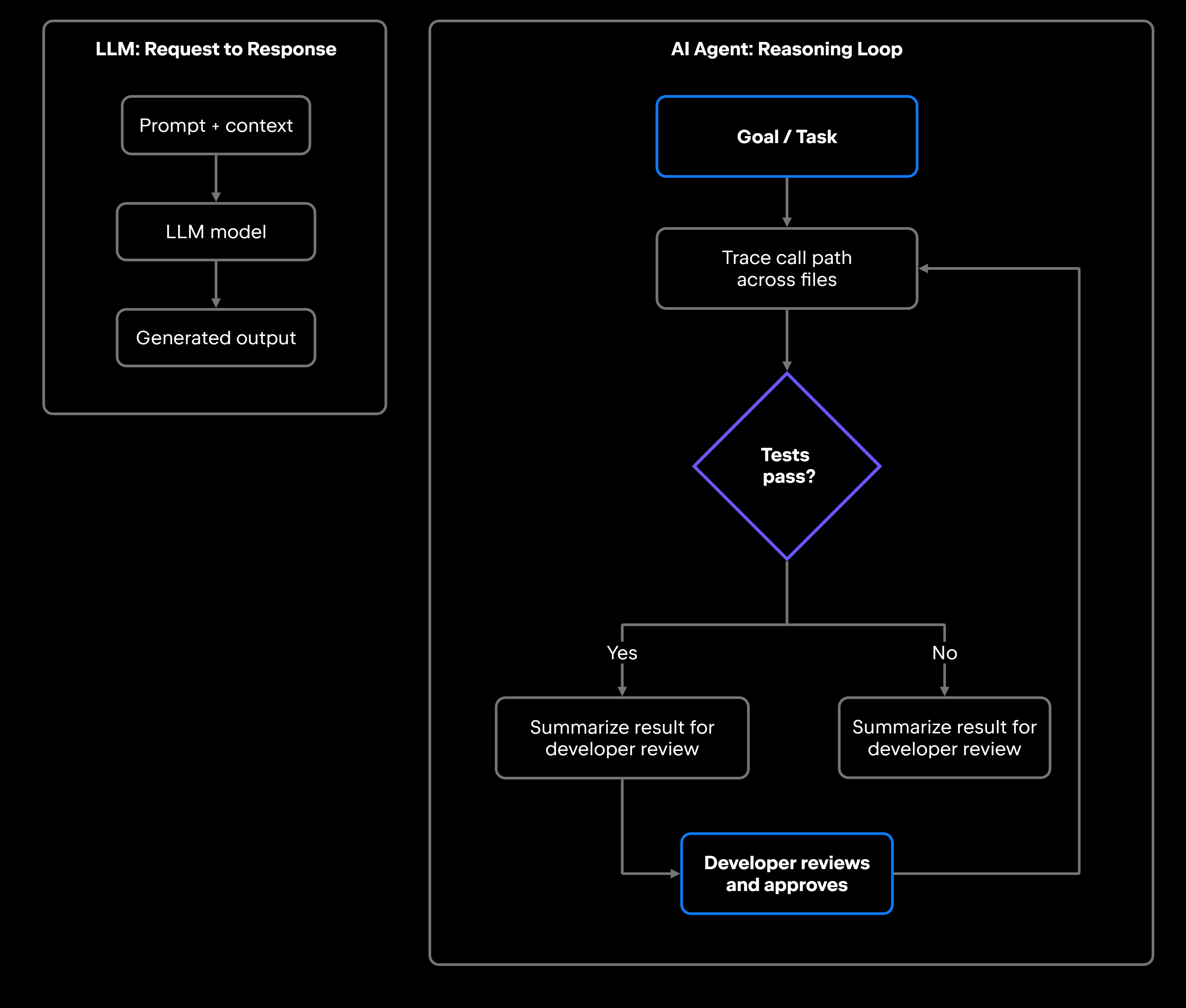
A single LLM request-response cycle takes a prompt and returns output in one step. An AI agent's reasoning loop cycles through model inference, tool execution, and result observation until the goal is met:

Single LLM request-response vs AI Agent reasoning loop

The LLM path is linear: one input, one output. The agent path is a loop that calls tools and feeds results back into the model until the task resolves.

Many modern AI agents use LLMs as their reasoning or language layer, the part that decides what to do next, generates content, or interprets tool output. Swapping the underlying model from one provider to another, say a Claude model for a Gemini model, changes the quality of reasoning but does not change the agent's architecture, toolset, or orchestration logic. In practice, though, models differ in tool-calling support, context window size, and function-calling reliability, so a swap may still require prompt calibration before the new model performs well inside the same system.

Tool use, memory, and workflow execution

Building on that stateless foundation, production agents add three capabilities the model alone lacks: coordinated tool access, persistent memory, and orchestration logic. A context window (whether 8K, 128K, or 1M tokens) is everything the model sees in a single call. The agent's job is to manage the state and context around that hard limit.

The kinds of tools an agent in a development workflow might call include:

  • IDE actions: Read a file, open a diff view, apply an edit to a specific line range, or trigger a refactoring action.
  • Terminal: Run a shell command, execute a test suite, compile a project, or inspect process output.
  • Version control: Query Git history, create a branch, stage changes, or read a blame annotation.
  • CI/CD systems: Trigger a pipeline run, poll for build status, retrieve test results, or parse a failure log.
  • External APIs: Call a REST endpoint, query a database, retrieve documentation from a vector store, or look up a ticket in Jira.

Tool use and function calling connect the model's reasoning to these external systems. The model outputs a structured call (a function name and arguments), the runtime executes it, and the result flows back into the model's context for the next reasoning step.

Memory in AI agents works at two levels. Short-term memory is the active context window during a session: the history of actions, observations, and intermediate results the agent accumulates as it works. Long-term memory persists across sessions, holding project structure, past decisions, and team conventions that the agent retrieves when relevant and injects into the model's context. That memory layer is what makes an agent effective across a multiday debugging investigation or a refactoring spanning dozens of files; the model alone cannot hold that context.

Workflow execution also depends on AI agent orchestration: the logic that determines step sequencing, handles permission checks before sensitive operations, retries failed tool calls with adjusted parameters, and monitors execution health. A well-orchestrated agent handles forks, failures, and timeouts without human intervention; the specific framework you use shapes how much of that logic you write versus configure.

What this means for developers

When you evaluate AI systems for your team, the architectural difference between models and agents shapes almost every decision you will make. If the task is a single generation step, a direct LLM call is simpler and faster. If the task requires multiple steps, tool access, or persistent state across a workflow, you need an agent.

For autocomplete, chat-based question answering, inline code suggestions, one-shot test generation, or on-demand documentation, a direct LLM integration is the right tool. You do not need orchestration, tool management, or persistent memory for any of those tasks.

If the task does not fit those patterns cleanly, if you find yourself needing to coordinate multiple calls, hold state, or call external systems, use these questions to evaluate whether an agent is warranted:

  • Standalone model vs. agent workflow: Does the task require multiple steps with conditional logic, or is it a single generation request?
  • Orchestration needs: Do you need a system that can sequence actions, handle retries, and manage step dependencies?
  • Tool access: Does the workflow need to call external systems, including APIs, terminals, CI/CD pipelines, and databases?
  • Observability: Can you inspect what the agent did, why it took each action, and where it failed? In practice, this means structured trace logs: a record of each reasoning step, the tool called, the arguments passed, the result returned, and any retry that occurred. Without it, diagnosing unexpected agent behavior is guesswork.
  • Permissions: Does the agent have appropriate access controls before it touches production systems or modifies files?
  • Runtime reliability: What happens when a tool call fails, times out, or returns unexpected output?
  • Cost and latency: Each step in an agent workflow invokes at least one model call plus tool execution overhead, so multistep runs are slower and more expensive than a single call. For near-real-time or high-volume use cases, factor in per-workflow inference cost and end-to-end latency before committing to an agent.

The answers determine whether you need a model, an agent workflow, or a full orchestration system. When the answer is an agent, JetBrains Air, the agentic development environment (ADE) from JetBrains, gives developers a dedicated environment to delegate coding tasks to AI agents and review their results, while JetBrains AI for teams and organizations, an emerging control plane, adds policy management, cost analytics, governance, and observability as a complementary layer for organizations standardizing AI across teams.

Getting this architecture decision wrong in either direction is expensive. Building agent infrastructure for a task that only needs a single model call adds unnecessary complexity. Calling an LLM directly for a workflow that needs state, tools, and coordination means rebuilding agent infrastructure by hand, badly, and incrementally. Framed as an AI agent vs. LLM, the decision is architectural, not cosmetic: Match the tool to the layer your task actually lives at.

FAQ

Are AI agents just LLMs?

No. An LLM is usually one component of an agent, its reasoning layer, but the model alone does not make an agent. What makes it an agent is the system around the model: the part that calls tools, holds state across steps, and drives the reason-act-observe loop. Strip that system away, and you are left with a model that generates text and stops.

Can an AI agent work without an LLM?

Yes, though most modern agents use LLMs as their reasoning layer. Rule-based agents, classical planning systems, and reinforcement learning agents can operate without a language model. LLMs have become the dominant reasoning mechanism in software development agents because they handle ambiguous natural language instructions and unstructured tool output better than rigid rule systems. An agent's architecture requires a reasoning mechanism, tools, and orchestration, but not specifically an LLM. The LLM is currently the most practical choice for that reasoning layer in development workflows.

When should developers use AI agents instead of standalone LLMs?

Use an LLM directly when the task is a single generation step: write this function, explain this error, summarize this PR, generate these tests. Use an agent when the task requires multiple steps, tool access, or persistent state: Investigate and fix a bug across multiple files, coordinate a deployment pipeline, or maintain a living documentation system. The cleaner signal is whether you would otherwise need to manually coordinate multiple model calls and stitch their outputs together. If yes, an agent is the right abstraction. If the task fits in a single well-constructed prompt, a direct model call is simpler and faster.

Which AI agent frameworks should developers know about?

The most widely adopted open-source agent frameworks include LangGraph for stateful, graph-based multiagent orchestration (built on LangChain, the broader framework for composing LLM applications), AutoGen from Microsoft for multiagent conversation patterns, and CrewAI for role-based agent collaboration. For development-environment-native workflows, JetBrains offers agent capabilities across its tooling, with AI agents integrated into the IDEs, the Junie coding agent available both in the IDEs and as a CLI, and JetBrains Air providing a dedicated agentic development environment that sits alongside the IDE rather than requiring external third-party infrastructure. The right choice depends on whether you need a standalone orchestration layer or an agent system embedded in your existing tooling.

What is the difference between an AI agent and an LLM?

An LLM is a stateless model that takes a prompt and returns generated output, with no memory between calls, no tool access, and no ability to act in external systems. An AI agent is a system built around such a model, adding persistent memory, access to external tools (APIs, terminals, and file systems), orchestration logic, and runtime state management so it can run multistep workflows and adapt based on what it observes.

Do AI agents always use tools and memory?

Most production agents do, but not all. A minimal agent might use an LLM in a reasoning loop without external tool calls, for example, an agent that iteratively refines code by critiquing and rewriting its own output without reading from a file system. Most useful development agents call at least some external tools (terminal, file system, and APIs) and maintain some form of short-term memory across steps. Long-term memory persisted across sessions becomes important for agents handling complex, ongoing workflows like multisprint refactoring or long-running investigation tasks.

How do LLMs and AI agents handle memory differently?

LLMs are stateless. Each inference request starts fresh with only the context you explicitly provide in the prompt, and there is no carryover between separate API calls. AI agents maintain memory at two levels: short-term (the active context window accumulating actions and observations during a session) and long-term (structured storage like vector databases that persist project knowledge, user preferences, and past decisions across sessions). That memory layer is what lets an agent carry context through a long-running investigation or a migration that touches hundreds of files, work that would overflow any single prompt.

Damaso Sanoja

Damaso Sanoja is an engineer who is passionate about helping others make data-driven decisions to achieve their goals. This has motivated him to write numerous articles on the most popular relational databases, customer relationship management systems, enterprise resource planning systems, master data management tools, and, more recently, data warehouse systems used for machine learning and AI projects. You can blame this fixation on data management on his first computer being a Commodore 64 without a floppy disk.

JetBrains AI Solutions

Optimize your workflow. With AI built for you.

Junie

The AI coding agent with deep IDE integration that plans before it writes, then codes and tests while you stay in flow.

JetBrains AI in IDEs

Set of AI-powered capabilities built into JetBrains IDEs for software developers. It is not a standalone product or service, but an IDE-native experience composed of AI features, LLMs, agents, and integrations.

AIR

The Agentic Development Environment where Codex, Claude Agent, Gemini CLI, and Junie execute independent task loops without interfering with each other.

AI for Teams and Organizations

An open system for agentic software development. Govern AI access across your engineering org, manage agents and models, and keep costs under control.

Continue Exploring the AI Agents for Developers Guide

A Complete Developer Guide to AI Agents

Discover what AI agents are, how they work, their architecture, types, use cases, and how developers can build intelligent autonomous systems.

A Complete Guide to Agentic AI

Learn what agentic AI is, how it works, its core components, real-world use cases, benefits, challenges, and how it differs from other AI systems.

Agentic AI vs AI Agents: Key Differences

Understand the difference between agentic AI and AI agents, including their roles, capabilities, relationship, and practical applications.