AI Agents for Developers Guide / Agentic AI vs AI Agents: Key Differences

Agentic AI vs
AI Agents:
Key Differences

The "agentic AI vs. AI agents" dichotomy trips up more developers than it should, because the two are not the same thing. Agentic AI describes a behavioral quality – the capacity to pursue a goal across multiple steps, adapt to new information, and make bounded decisions without constant human input. An AI agent is the software system that exhibits it – a model wrapped in a harness of tools, memory, and execution logic that carries out a specific task.

That gives you the one axis this comparison turns on: agentic AI is about how a system behaves, while an AI agent is what the system is. The two are related but not interchangeable, and conflating them creates real confusion when evaluating tooling or scoping a workflow. This guide to the AI agents vs. agentic AI distinction defines both terms, compares them through real developer workflows, covers autonomy and where the concepts overlap, clears up common misconceptions, and closes with a practical guide for choosing between them.

Why developers confuse agentic AI and AI agents

The confusion is a terminology problem: the two words name different layers of the same systems, but vendor documentation, blog posts, and developer forums use them interchangeably. A product can be described as "agentic" (its behavior) and as "an AI agent" (its architecture) in the same breath – and both labels are correct.

In JetBrains IDEs, you can use integrated AI agents or connect any ACP-compatible agent through the AI chat. Agents can take on multi-step development tasks while keeping the developer’s workflow centered on human-led coding. In JetBrains IDEs, agents work alongside you as part of your coding workflow, with you reviewing their output and guiding their progress. JetBrains Air, by contrast, is a separate agentic development environment built around agentic workflows. In Air, the agent does the coding work, while the developer steers the task, guides the process, and reviews the result.

A system can be an AI agent with little agentic behavior. A simple rule-based tool with a model bolted on runs a fixed perceive-respond step with no real planning or adaptation. Agentic behavior can also emerge from orchestrating several agents rather than from one component. Many developer tools combine both, which is part of why the terms blur.

The timing adds to it, too. The term "AI agent" predates the current wave of language-model tooling, with roots in classical AI research, describing software that perceives and acts in an environment. "Agentic AI" emerged more recently for goal-directed, multistep language-model systems. When an older architectural word meets a newer behavioral one in the same documentation, inconsistent labeling follows.

Agentic AI is about behavior

Agentic AI is a behavioral quality, not a particular architecture. A system behaves agentically when it can pursue a goal across multiple steps, adapt its approach, coordinate across tools and agents, and operate with bounded autonomy, acting between human check-ins rather than pausing for direction at each step.

These characteristics are easy to list and easy to misread, so it helps to name the mechanism behind each one.

  • Planning: The model decomposes a high-level goal into a sequence of sub-tasks and then works through them in order. In practice, this often means the model generates an explicit plan first, which it then executes step by step.
  • Adaptation: When a step produces an unexpected or failed result (a failing test, an API error), that result is fed back into the model's context, and the model revises its next action instead of blindly repeating the original plan.
  • Workflow execution: The system runs multistep processes that span tools, APIs, file systems, or other agents, rather than answering a single prompt.
  • Tool coordination: At each step, the model selects which tool to call through function calling, reaching external tools and data through MCP (Model Context Protocol) servers instead of following a hardcoded script.
  • Context awareness: The state from earlier steps is carried forward (re-injected into the context window or stored in memory), so the result of step 2 informs the approach to step 5.
  • Bounded autonomy: The system operates independently within a defined scope and escalates to a human when an action would exceed that scope.

The bounded-autonomy point matters. In production contexts, agentic AI operates with supervision and defined limits: production-grade agentic workflows typically run with permission scopes, approval checkpoints, and rollback mechanisms. When JetBrains Air assigns an agent to work inside an isolated environment, that agent has genuine freedom to write and commit code there, but the changes stay isolated from the main branch until a developer reviews and merges them. The agentic system plans and executes; the human reviews and approves.

Agentic behavior is also architecturally flexible. A single AI agent running its core loop behaves agentically. In JetBrains IDEs, integrated AI agents demonstrate this by carrying a multistep coding task from start to finish on their own. The fuller autonomous test-fix-retest cycle is most clearly exhibited by Junie, JetBrains dedicated coding agent. An orchestration layer coordinating multiple specialized agents also behaves agentically. JetBrains Air uses this model: You assign separate tasks to different agents, each running in an isolated environment, and Air orchestrates them in parallel. The behavioral profile is consistent across both architectural patterns.

AI agents are systems

An AI agent is the system that turns a model into something that can act. Around the model sits a harness: a set of instructions defining its scope, tools it can call (file systems, APIs, code execution, and increasingly MCP servers), memory to hold context, and a control loop that sequences its actions. Designing that harness, sometimes called harness engineering, is most of what separates a working agent from a raw model.

Memory is where agent designs differ most. The simplest agents keep state only in the model's context window for the duration of a task (in-context memory). More involved agents add persistent memory across sessions, often backed by a vector store, so the agent can retrieve relevant prior context on demand. The choice changes what the agent can do: an in-context agent forgets everything between invocations, while a persistent-memory agent can carry knowledge of a codebase or a prior conversation forward, at the cost of extra storage and retrieval overhead.

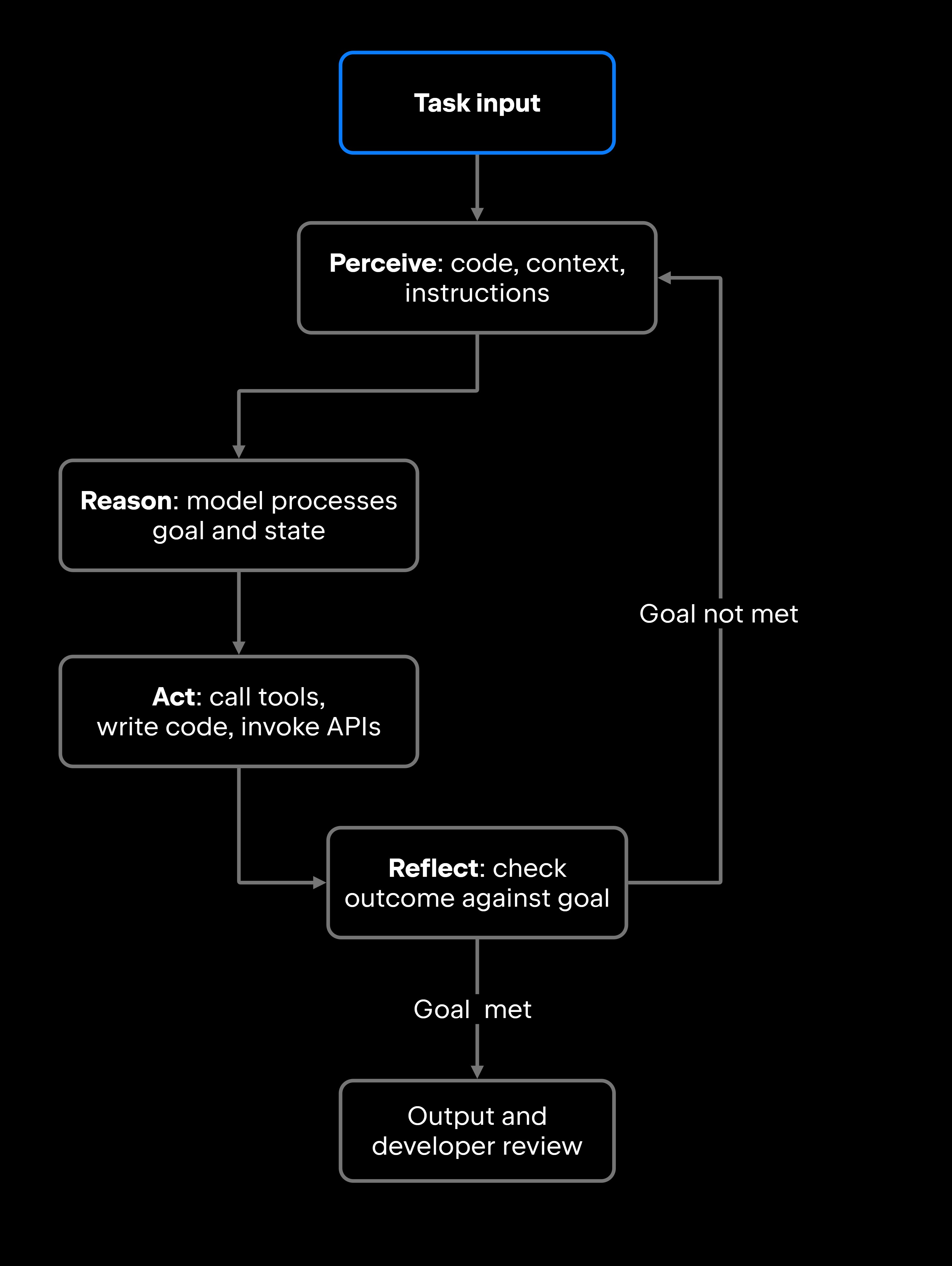
The control loop at the center of the harness is usually described as perceiving, reasoning, acting, and reflecting, sometimes abbreviated PRAR. The agent first gathers context from its environment (reading files, checking test results, and querying the codebase). It then reasons about the goal and its current state. Next, it acts, calling a tool, writing code, invoking an API, or updating a file. Finally, it reflects: Did that action move it closer to the goal? If not, the cycle repeats.

The perceive-reason-act-reflect loop that a single AI agent runs to handle a multistep task.

Developers encounter AI agents across a wide range of workflows: generating and refactoring code, running and interpreting test results, triaging and routing bug reports, writing documentation from code comments, investigating production issues by querying logs, researching unfamiliar APIs, and automating repetitive support tasks. In most cases, the agent is a system you install, configure, and invoke with a specific task boundary.

JetBrains Junie is a concrete example of an AI agent inside a developer environment: a coding agent that autonomously plans and executes multistep actions from your prompt. You run it inside the JetBrains AI Chat tool window, available across IntelliJ IDEA, PyCharm, GoLand, and other supported JetBrains IDEs on a JetBrains AI subscription or your own API key (Google Gemini, OpenAI, or Anthropic), or from the Junie command line. In AI Chat, it automatically picks up your open file and selected code; from the CLI, it discovers your running IDE session to enable symbol-aware search, safer edits, and test workflows. Ask Junie to implement a bug fix that touches multiple files, and it does not just suggest code: it reasons about the scope of the change, reads the relevant files, makes the edits, and presents the results for your review. The loop runs inside the IDE, with each step visible to the developer.

That combination, a model plus tool access plus context management plus reflection, is what separates an AI agent from a simple autocomplete or chatbot. For more on how the pieces fit together and coordinate, see JetBrains' coverage of AI agent architecture and AI agent orchestration.

The real difference: Behavior vs. systems

The difference between AI agents and agentic AI comes down to one line: Agentic AI describes how a system behaves; an AI agent is what the system is.

Agentic AI is a behavioral capability. Can a system carry a goal forward on its own, step after step? Can it adapt when a sub-task fails? Can it coordinate across tools and, in some cases, across other agents to reach a higher-level objective? An AI agent, by contrast, is the operational system that does the work: Whether it is a ticket-routing agent that classifies and assigns incoming bug reports or an IDE coding agent that refactors methods across a codebase, it is a harness you can inspect, constrain, and observe.

The same dimensions, side by side:

Dimension

Agentic AI

AI agents

What it describes

A behavioral capability

A system or component

Core concept

Behavior: planning, adaptation, and goal pursuit

Architecture: a harness around a model (tools, memory, and control loop)

Task scope

Multistep, goal-oriented workflows

Typically, a single, well-defined task

Execution style

Adaptive, context-driven execution

Structured, bounded perceive-reason-act loop

Orchestration vs. autonomy

Autonomous: self-directs across steps within a bounded scope

Orchestrated: invoked and sequenced by a developer or a controlling layer

Human oversight

Typically with workflow boundaries and escalation rules

Typically, with task invocation and results review

Dependency

Typically implemented through one or more AI agents

Can exist without agentic behavior

JetBrains example

Air: orchestrates several agents in parallel environments

AI in JetBrains IDEs: A single agent working on a task
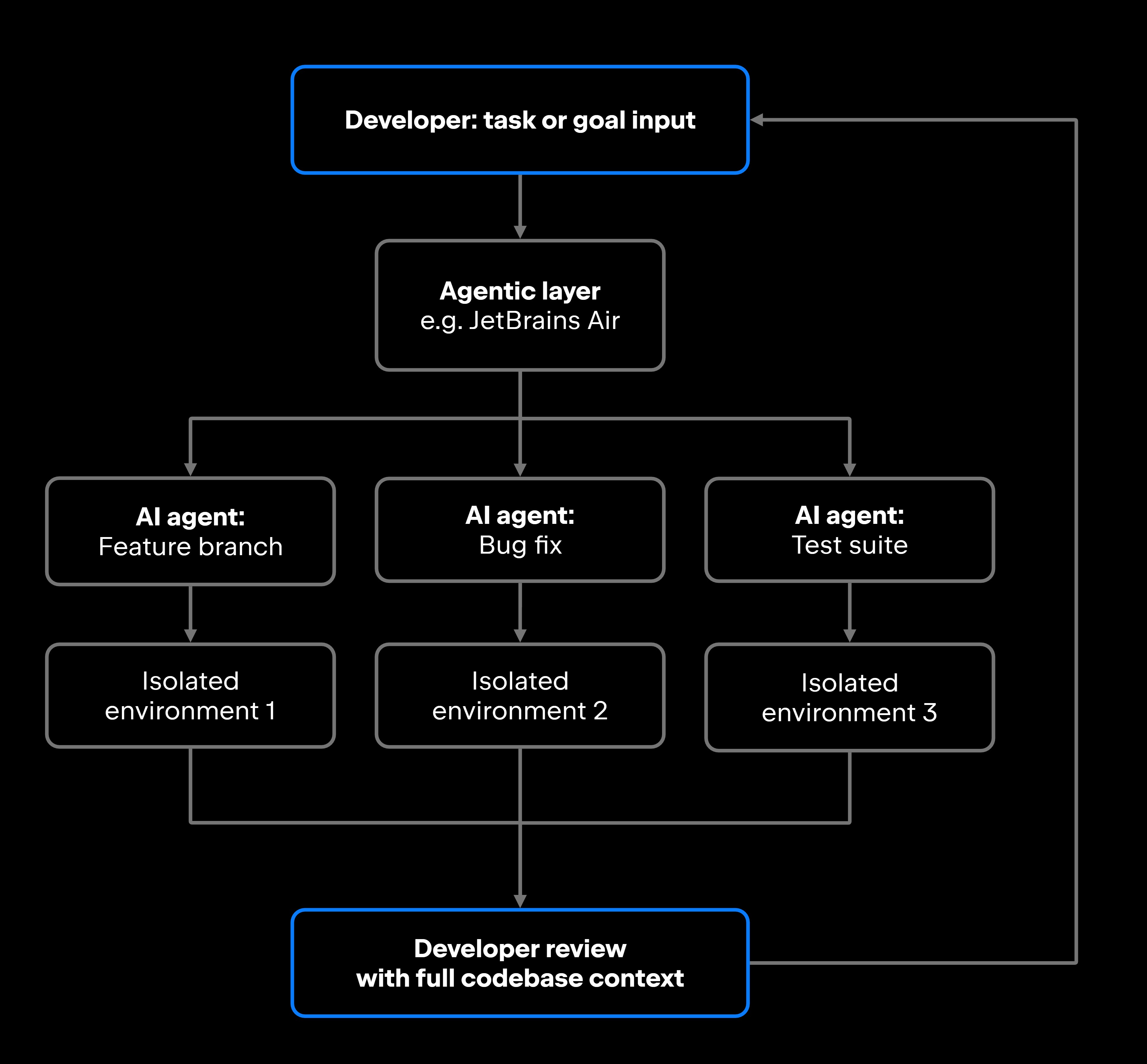
The orchestration-versus-autonomy row is the one developers miss most often, so it is worth drawing out. Agentic behavior is defined partly by autonomy: The system self-directs across steps within a bounded scope. An AI agent is typically orchestrated: A developer or a controlling layer invokes it and sequences its work. The two meet in a tool like JetBrains Air, where an orchestration layer coordinates several agents that each act autonomously inside their own environment.

That orchestration pattern is easier to see as a picture than to read as prose:

Agentic behavior expressed as orchestration: An agentic layer dispatches developer-assigned tasks to individual AI agents, each isolated until review.

The two concepts overlap heavily. Most tools that expose AI agent capabilities also implement agentic behavior: Each agent runs its own loop, while an orchestration layer plans across them, adapts to results, and holds the broader workflow state. When you are working through a real product decision, the useful question is which layer you are reasoning about – the behavior (agentic execution) or the component (the agent architecture).

Common misconceptions about agentic AI and AI agents

Before turning the distinction into a tooling decision, it helps to clear up the misreadings that cause the most trouble in practice.

"Agentic AI and AI agents are the same thing."

They are not competing categories; they describe different dimensions of the same system. A chatbot with a fixed response tree, for example, is a simple agent, but it follows a fixed perceive-respond pattern and cannot plan, adapt, or pursue a multistep goal on its own, so it is not behaving agentically. By contrast, JetBrains Air is agentic and is also built on AI agents. Both labels apply, at different levels of abstraction.

"Agentic AI means fully autonomous AI."

Practical agentic systems operate with bounded autonomy by design. The agents running in JetBrains Air do not push directly to main; they work in isolated environments and present diffs for review before anything merges. "Agentic" means a system can run multistep workflows without a human prompt at every step, not that it runs unsupervised.

"An AI agent that uses tools is automatically agentic."

Tool use is necessary but not sufficient. An agent that calls a single documentation API and returns an answer completes a single-turn task. Agentic behavior requires planning across multiple steps and adapting when intermediate results do not match expectations. The tool calls have to be part of a goal-directed, adaptive loop.

"Agentic AI only applies to large, complex workflows."

Even a short workflow can be agentic if each step depends on evaluating the output of the previous one. In JetBrains IDEs, you can work with integrated AI agents through the AI chat to generate code, run tests, evaluate failures, and revise the implementation within a single IDE session. Junie, JetBrains dedicated coding agent, most explicitly documents the full generate-test-evaluate-revise cycle. A bounded scope with no human prompt between steps is still agentic behavior, at a scale any developer team can work with.

"You need a purpose-built orchestration framework to implement agentic workflows."

You do not need a separate orchestration framework to get agentic behavior. In JetBrains IDEs, AI agents are available directly through the AI chat, built into the IDEs you already use. A standalone environment like JetBrains Air adds value when you want to run several agents in parallel across isolated environments, not because agentic behavior is otherwise out of reach.

What this means for developers

Understanding the difference between AI agents and agentic AI matters most at decision points: choosing the right tooling for a workflow, scoping what the system can and cannot do, and deciding how much autonomous execution your team is actually comfortable with. The questions worth asking map directly onto the behavior vs. systems split.

When evaluating agentic behavior:

  • How many sequential steps is the workflow allowed to take before a human reviews the output?
  • Does the system need to adapt mid-workflow (for example, rewriting its approach when a dependency upgrade breaks the build), or is it running a fixed sequence?
  • Are you running one agent through a complex process, or coordinating multiple agents working on parallel tasks simultaneously?
  • How do you judge the system's reliability, and what is the practical blast radius if it makes a wrong decision at step four of an eight-step workflow?

When evaluating the agent harness:

  • What tools does the agent need direct access to (file system, Git, test runner, external APIs, MCP servers, databases)?
  • What context and memory does it need to maintain across the steps of a task, and does that memory need to persist between sessions?
  • Which systems should the agent never be allowed to modify?
  • How does your team observe what the agent actually did? Can you inspect its tool calls and intermediate states, and can you roll back the results if something goes wrong?

The two JetBrains products sit at different points on the autonomy axis, which makes them a useful illustration. JetBrains IDEs support agentic workflows inside the IDE, where AI agents handle multistep tasks while the developer remains present to review and guide the work. JetBrains Air is designed for a higher degree of parallel autonomy: You assign separate tasks to different agents, each running in its own isolated environment, while you work on something else. Air notifies you when a task needs human judgment; everything else runs in the background.

Those isolated environments come in two forms, and the distinction is easy to conflate. A Git worktree isolates an agent's work at the branch level on your local filesystem, so each agent commits to its own branch. A Docker container isolates at the runtime level, giving an agent its own filesystem and dependencies. Both keep an agent's changes separate until you review and integrate them, but they answer different questions: worktrees keep version-control history clean, while containers keep execution environments from colliding.

At the team and organization level, JetBrains is extending the same orchestration idea into JetBrains Central, a layer for running, governing, and observing AI agents (along with the models and MCP servers they rely on) across the software delivery lifecycle (in development, with select features arriving soon). For an individual developer, the practical decision stays simpler: how reversible the actions are, how much context you need to review changes meaningfully, and whether parallelism actually translates to throughput gains for your workflow.

Choosing between agentic AI and AI agents

Because the two terms describe different layers of the same systems, the practical choice is rarely "agent or agentic". It is "how much agentic behavior does this workflow need, and what harness delivers it". Here are a few clear practical rules to follow:

  • Lean on stronger agentic behavior when the work spans many steps, has to adapt mid-flight (reworking a plan when a migration script hits an edge case), or benefits from several agents working in parallel. A standalone agentic environment like JetBrains Air is built for it: higher autonomy, parallel execution, review at the boundaries.
  • Reach for a single AI agent when the task has a well-defined boundary, runs through a predictable set of tools, and benefits from a developer reviewing each step. An AI agent of your choice in JetBrains IDEs fits this shape – bounded scope, high oversight, and a low blast radius.
  • Stay with a simple AI assistant (a completion model answering a one-off question) when the task is single-turn and needs no tool coordination or state. Not every automation problem requires adaptive, multistep execution, and reaching for an agent where a completion would suffice adds cost and review overhead without payoff.

One useful heuristic ties it together: If you find yourself manually taking model output, handing it off to a tool, reviewing the result, and then prompting the model again, that loop is a good signal that an AI agent with agentic behavior would serve you better than a simple assistant. The manual loop you are running by hand is exactly what agentic execution is designed to close.

FAQ

Are agentic AI and AI agents the same?

They are related but distinct. Agentic AI is a behavioral description covering the capacity to pursue goals across multiple steps, adapt to feedback, and operate with bounded autonomy. An AI agent is the system that delivers it: a harness around a model that combines tools, memory, and a control loop to handle a category of task. Most modern AI development tools implement both at once, which is why the terms get used interchangeably. The distinction matters when you are reasoning about how a system executes work versus what the system is.

Are agentic AI systems fully autonomous?

No. Production agentic systems operate within defined permission boundaries and human approval checkpoints. The goal is bounded autonomy: enough independent execution to cut manual interruptions, with clear limits on what the system can change. In JetBrains Air, for example, an agent's work stays in its isolated environment until you review and integrate it.

When should developers use AI agents instead of simpler AI assistants?

Use an AI agent when the task involves multiple sequential steps, requires coordination across tools (file system, test runner, version control, external APIs), or benefits from maintaining state between actions. A simple AI assistant, a completion model generating a snippet or answering a one-off question, is the right tool for single-turn tasks. The practical signal is the manual loop described above: if you are shuttling output between the model and your tools by hand, that is the work an agentic agent is built to automate.

How does agentic AI differ from traditional automation?

Traditional automation executes a fixed, predefined sequence of steps. Agentic AI adapts that sequence based on intermediate results. If a step fails or produces unexpected output, an agentic system revises its plan rather than stopping or erroring out. This distinction matters in development workflows where conditions vary: Tests fail unexpectedly, APIs return edge-case responses, or code changes introduce downstream effects that were not anticipated when the task was defined.

Can an AI agent exist without agentic behavior?

Yes, and it is common. A rule-based ticket classifier with a thin language-model wrapper follows the basic perceive-reason-act structure, so it may qualify as a simple AI agent, though most definitions also expect some goal-directed reasoning. If it cannot plan a multistep approach, adapt when classification confidence is low, or pursue a broader goal without a human prompt for each input, it is not behaving agentically. Single-step, single-tool agents frequently fall into this category, and that is fine. Not every automation problem requires adaptive, multistep execution.

Can agentic AI systems work inside IDEs and developer tools?

Yes. AI agents in JetBrains IDEs are a working example: They run in the IDEs you already use, on a JetBrains AI subscription or your own API key, handling multi-step tasks under developer supervision. For work that spans multiple agents in parallel, JetBrains Air extends this idea into a standalone multi-agent environment.

What is the PRAR cycle in AI agent development?

PRAR stands for “perceive, reason, act, reflect”, a well-documented control loop for AI agents. The agent perceives its environment (reads files, checks test results), reasons about the goal and current state, acts by calling tools or writing code, then reflects on whether the action moved it closer to the goal. If not, the loop repeats. This cycle is what gives an agent the ability to handle multistep tasks without a human prompt between each step.

Damaso Sanoja

Damaso Sanoja is an engineer who is passionate about helping others make data-driven decisions to achieve their goals. This has motivated him to write numerous articles on the most popular relational databases, customer relationship management systems, enterprise resource planning systems, master data management tools, and, more recently, data warehouse systems used for machine learning and AI projects. You can blame this fixation on data management on his first computer being a Commodore 64 without a floppy disk.

JetBrains AI Solutions

Optimize your workflow. With AI built for you.

Junie

The AI coding agent with deep IDE integration that plans before it writes, then codes and tests while you stay in flow.

JetBrains AI in IDEs

Set of AI-powered capabilities built into JetBrains IDEs for software developers. It is not a standalone product or service, but an IDE-native experience composed of AI features, LLMs, agents, and integrations.

AIR

The Agentic Development Environment where Codex, Claude Agent, Gemini CLI, and Junie execute independent task loops without interfering with each other.

AI for Teams and Organizations

An open system for agentic software development. Govern AI access across your engineering org, manage agents and models, and keep costs under control.