AI Agents for Developers Guide / Agentic AI vs. Generative AI: Key Differences

Agentic AI vs. Generative AI: Key Differences

Agentic AI pursues goals. Generative AI produces outputs. That difference between generative AI and agentic AI shapes how you design, deploy, and trust these systems.

An agentic system keeps working toward a goal: It breaks it into steps, decides which tools to call, acts on your project, checks its own work, and adapts. A generative model does far less. Ask it to write a function from a comment, draft a commit message, or explain a stack trace, and it returns one output, then stops. The same language model can power both, but the architectures built around it change each AI system's behavior entirely.

This article compares the two across workflow scope, context handling, tool access, and risk, with coding, debugging, testing, and documentation examples throughout. It uses JetBrains Junie, Air, and AI in IDEs as reference points, then covers where they combine, which tasks suit each, and what the shift means for IDEs.

Agentic AI vs. generative AI: The core distinction

Agentic AI vs. generative AI comes down to what the system does with its output: generative AI creates outputs like code, tests, and documentation, while agentic AI completes goals through planning, tool use, and workflow execution. The more useful framing, though, is that the two are not rivals but layers. An agentic system uses generative models internally to produce each piece of code or text, then wraps planning, tool calls, and verification around them, so the question is rarely which one to use but where each fits. With that relationship clear, the detailed comparison below looks at where they actually diverge.

Where agentic and generative AI diverge

The difference between generative AI and agentic AI, often searched as generative AI vs. agentic AI, comes down to four dimensions: workflow scope, autonomy, context, and tool access. Two systems can run the same LLM and still behave completely differently; how they are architected, not which model they run, is what sets them apart.

A quick orientation on the three JetBrains tools this article uses as reference points, since they recur throughout. JetBrains AI in IDEs is the AI layer built into JetBrains IDEs; it spans both kinds of behavior, with a chat mode that generates code, tests, and explanations for review and an Agent mode that plans and executes multistep tasks. Junie is JetBrains' coding agent and one of the integrated agents available inside JetBrains IDEs. Air is JetBrains' agentic development environment, a workspace for running coding agents in parallel across local and cloud environments, available now for individual developers. To keep the comparison concrete, this article uses Junie and Air for the agentic side and the AI chat and code completion features available within JetBrains IDEs for the generative one.

Mapped onto those tools: Assign Junie a task like "refactor this service to use dependency injection", and it reads the codebase, edits the affected files, fixes broken imports, and runs the test suite in supported IDEs, sequencing and verifying the work as it goes. Ask the AI chat in your IDE to generate a docstring or explain a regex, and it returns the output and stops. Same underlying models, different amount of workflow wrapped around them.

Dimension

Agentic AI

Generative AI

Primary purpose

Complete goals through planned, multistep execution

Create outputs (code, docs, tests, explanations)

Workflow scope

Multistep workflows with planning and adaptation

Single task per prompt

Autonomy

Goal-directed (initiates and sequences actions)

Reactive (responds to prompts)

Context

Project-wide: repo, terminal, test results, documentation

Current file, selected code, or prompt

Tool access

May read, write, or execute tools when permitted

Produces suggestions

Human role

Reviews plans, approvals, and final results

Reviews each output

Typical tasks

Debugging, migrations, refactoring, and issue investigation

Code completion, doc generation, unit tests, and commit messages

Primary risks

Unintended file changes, cascading errors, and permission over-scoping (agent granted broader access than the task requires)

Hallucinated code, weak test coverage
One term in that table warrants definition, as the rest of the comparison depends on it. In agentic AI, a "tool" is a discrete callable function exposed to the language model, such as read_file, write_file, run_tests, or query_database. When the model decides a tool call is needed, the agentic layer executes it and feeds the result back into the model's context. Many tools reach external systems through the Model Context Protocol (MCP), an open standard for exposing a database, an API, or another service to an agent; Junie, for example, can call the MCP servers you configure when a task needs them. Tool access is what lets an agentic system act on the world rather than only describe it.

Workflow scope and autonomy

Agentic AI handles sequences. Junie takes a natural language task, breaks it into sub-steps, and works through them using the IDE's project intelligence. When it refactors a service across multiple files, it updates the affected code, fixes call sites, resolves imports, and verifies the build passes. You define the goal; it sequences the execution.

That autonomy operates within developer-defined boundaries. By default, Junie asks for your confirmation before sensitive actions such as running terminal commands, and Air can run tasks in isolated environments where you inspect changes before merging. The developer stays in control of scope.

Generative AI, by contrast, handles one thing at a time. You prompt it, it responds. JetBrains AI in IDEs code completion triggers as you type and generates line or block completions, and the AI chat window answers questions about your code. These are useful interactions, but they are bounded: one request in, one response out.

Context and tool access

Agentic AI pulls broad context by default. Junie has access to the full project structure, build state, test results, and recent changes. Air bundles a terminal, Git history, browser previews, and code navigation into a single workspace. When an agent investigates a bug, it can run the failing test, read the stack trace, trace the call through multiple files, and propose a fix with full project context.

Generative AI, on the other hand, works with what you give it: the file you have open, the code you have selected, or the text you have typed into the AI chat window. JetBrains IDEs also support image attachments with models that can process them, including Anthropic and OpenAI models, which helps with UI bugs or architecture diagrams, but each session is still isolated to what you have provided.

Tool access follows directly from that broader context. Agentic AI interacts with tools directly when scoped permissions allow, running test commands, reading CI output, and writing files, whereas generative AI produces suggestions you apply yourself. Air supports several coding agents, including Claude Agent, OpenAI Codex, Gemini CLI, and Junie, each operating on assigned tasks in the same workspace, connected through your JetBrains AI subscription or your own provider key.

Risk and human oversight

Agentic AI introduces operational risks because it executes actions: a refactoring task that touches dozens of files carries more risk than a single suggestion. Junie mitigates this by verifying that changes compile, imports resolve, and tests pass before presenting results. Air mitigates it architecturally by running each task in an isolated environment (local, Docker, or a Git worktree, which is a lightweight parallel copy of the repository), so changes surface as a reviewable branch diff rather than in-place edits to your working tree.

Generative AI's risks are narrower, centered on output quality. AI in IDEs might generate a unit test that passes without testing the right conditions, or hallucinate a method that does not exist. You catch these errors at review time because you read the output before using it.

For agentic work, the approval gate takes one of two shapes: You review a plan before execution begins, or you review the diff after the run. Either way, nothing reaches your main branch without an explicit developer action. Scoped permissions add a second layer, limiting which directories the agent can access, whether it can run shell commands or access the network, and whether a database exposed through an MCP server is read-only or writable. Reviewing those before you assign a task is the main lever you have over operational risk.

That complementary risk profile points to why agentic and generative AI work best together rather than as alternatives, as the next section explains.

How agentic and generative AI work together

Agentic and generative AI are complementary parts of the same workflow, with the agentic layer orchestrating and the generative layer creating.

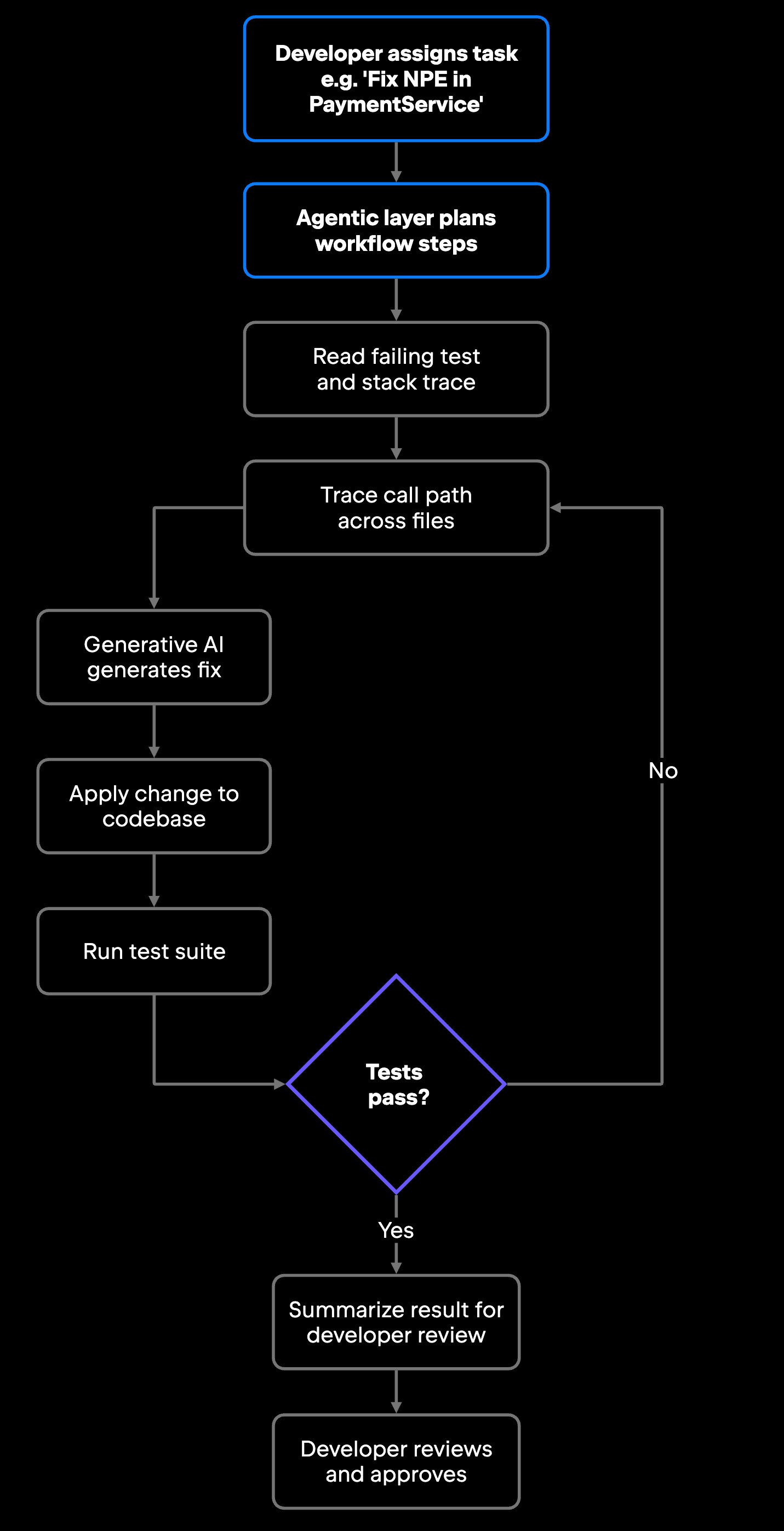
Consider a concrete example using JetBrains tooling. You are tracking down a null pointer exception that only surfaces under load, so you assign the investigation to Junie. It reads the test failure, traces the call path, identifies the unguarded dereference, generates a fix using an underlying LLM, applies the change, runs the test suite, and summarizes the result, flagging that one edge case still needs a guard clause. The generative model produced the fix; the agentic layer ran the investigation, applied the change, and closed the loop.

Figure 1: The generate-apply-verify-adapt loop. The generative layer produces the fix; the agentic layer drives the surrounding steps and iterates until the tests pass.

That loop is what the two layers accomplish together: an agentic system can run every step in the workflow but needs a generative model to produce the fix in the first place, while a generative model can produce that fix but cannot run the test to confirm it works.

Air extends this to parallel workstreams: one agent writing tests while another refactors a module. Because each task runs in isolation, the two agents cannot write to each other's files or produce conflicting intermediate states, and you review each task's output as a separate diff and merge independently. That architecture produces concrete benefits for development teams, both in daily output tasks and in multistep workflow execution.

Benefits for software teams

The clearest benefit of agentic AI is less context switching on multistep workflows: You delegate an investigation as a task and return when there is something to review. Debugging a race condition normally means jumping between the test runner, the profiler, the source files, and the documentation. With Junie or Air, you assign the investigation and come back to a result. That is a different shape of work, not a faster version of the old one.

Generative AI's benefit is more immediate: it accelerates output on repetitive tasks. AI in IDEs generates commit messages that actually describe what changed, writes Javadoc for a class in seconds, and drafts a unit test scaffold before you have opened the test file. These are time savings on tasks that were never the interesting part of the job.

For engineering teams, the combination matters most at the workflow boundary – when a task is too large to hand-write efficiently but too complex to trust to a single prompt. Junie's multi-file work, applying changes across a codebase and verifying compilation using the IDE's own test runner, is a good example. That kind of cross-codebase work used to require substantial manual effort; with Junie handling the mechanical steps, the developer's role shifts to reviewing the result.

At the team level, the shift is less about individual speed and more about workflow shape. Because agentic changes surface as diffs rather than in-flight edits, they flow into the same pull request workflow the team already uses: One developer reviews an agent's diff while another assigns a new task. The main coordination adjustment is that the review scope changes. A single agent task may touch many files, so reviewers read the diff summary the agent produces alongside the raw diff, not just the individual file changes.

Both approaches still require engineering judgment. Agentic workflows need approval gates; generative output needs review. The benefit is that you direct your judgment toward higher-leverage decisions (architecture, design trade-offs, and correctness) rather than mechanical implementation steps.

How to choose between agentic and generative AI

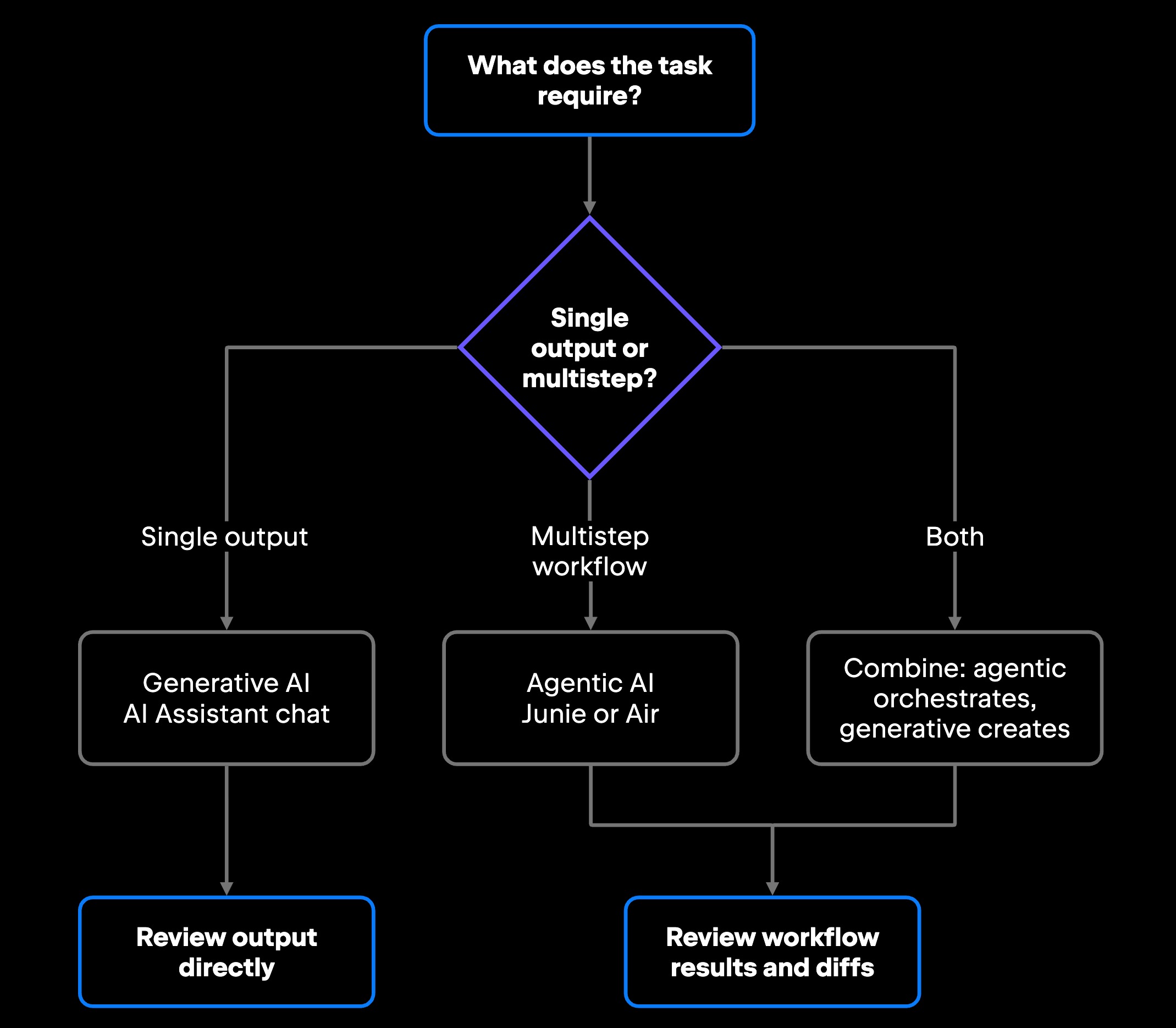
When you weigh agentic AI vs. generative AI for a given piece of work, match the tool to the task, and often use both in sequence. The three cases below walk through how that decision plays out.

Use generative AI when you're driving

AI in IDEs chat is the right tool when you want to stay in control of each step: generating a docstring, explaining what a regex does, drafting a pull request summary, thinking through an architectural decision, working through a bug by iterating on hypotheses, or reviewing and restructuring code across multiple turns. You're directing the work, reviewing output at each step, and deciding what comes next. That tight feedback loop is what makes chat a natural fit for tasks where human judgment should stay in the loop throughout.

Use agentic AI for multistep workflows

Reach for Junie, third party agents or Air when the task involves multiple steps, cross-file context, tool execution, or iteration based on feedback: debugging a flaky test, migrating a module from one API version to another (identifying deprecated call sites, reading the changelog for breaking changes, updating implementations, and running the test suite to catch regressions), reconciling a database schema with the ORM models that map to it to find columns that have drifted out of sync, or investigating why a CI job is failing.

These tasks require reading state, making decisions, executing steps, and checking results. Generative AI can contribute individual steps, but it cannot manage the sequence. That is what agentic infrastructure is built for, and what lets you delegate the whole task end-to-end, reviewing the result rather than supervising each step.

There is a third case worth naming: tasks that are too large for a single prompt but too ambiguous for an agent to plan reliably. A poorly specified goal ("make this codebase better") produces an unfocused agent plan. These tasks need human decomposition first. Break the goal into specific, scoped sub-tasks, then delegate each to the appropriate tool. This is where generative AI helps before you hand off to Junie: Use the AI chat to think through the task structure, then assign the concrete steps.

Figure 2: A decision aid for matching task shape to approach. Single-output tasks go to generative AI; multistep workflows go to agentic AI; most real work combines both.

Use both for end-to-end development workflows

Most non-trivial tasks combine generation and execution. You ask Junie to implement a new API endpoint, and it generates the handler code, writes the tests, runs them, fixes the failures, and summarizes what it built, generation and orchestration in a single assignment.

Agentic and generative assistance also run side by side: While Junie works a refactoring task in the background, you keep using the AI chat in your main workspace to autocomplete code, answer questions, and draft documentation – each performing the tasks it is most suitable for within the scope of work in front of you. As both approaches mature and converge inside development environments, that scope question is shaping how IDEs themselves are evolving.

What this means for the future of IDEs

IDEs have been evolving from editors to full development environments for decades, adding debuggers, refactoring tools, linters, and version control integration. The latest generation adds project-aware AI that can take actions, not just suggest them.

JetBrains Air is one concrete version of that direction: an agentic development environment that bundles a terminal, Git, browser previews, and code navigation around AI agents running on real tasks, with results you review before merging. The same shift is visible inside the IDEs themselves. JetBrains’ AI chat now uses the Agent Client Protocol (ACP) to connect external AI agents in JetBrains IDEs. ACP is an open protocol created by Zed. It standardizes how a coding editor and an AI agent communicate, just as the Language Server Protocol standardized how editors talk to language tooling, so an ACP-compatible agent integrates without bespoke, vendor-specific wiring. Claude Agent, for instance, now connects to JetBrains AI viathrough ACP instead of a custom integration.

The practical payoff for developers is less repetitive work and less context switching. You delegate the mechanical parts of investigation and refactoring to a layer that holds project context and runs tools, and you stay responsible for review and the final decision. As agents take on more execution, that review step becomes the center of gravity.

None of this collapses the distinction this article started with: the two are layers, and most real development needs both. JetBrains AI in IDEs, Junie, and Air are built to run them side by side. AI in IDEs and Junie are available to all, and Air is available to individual developers with team support on the way. The skill worth building is reading a task for its shape, then handing it to the most appropriate tool.

FAQ

Is agentic AI always autonomous?

Agentic AI operates within developer-defined boundaries and approval gates. Tools like Junie and Air do not execute arbitrary actions: they work within scoped permissions, run tasks in sandboxed environments, like Docker containers or Git worktrees, and present results for human review before anything merges. The autonomy covers workflow execution, leaving deployment decisions to you.

What kinds of development tasks are best suited for agentic AI?

Tasks that require planning, cross-file context, tool execution, and iterative feedback. Debugging a failing test, migrating from one API version to another, performing a large-scale refactoring, investigating a CI failure, and coordinating code changes with test updates are all strong fits. If the task needs multiple steps that depend on each other's results, agentic AI handles the sequencing.

Can developers use generative AI and agentic AI together?

The normal pattern combines both. The AI chat in JetBrains IDEs handles immediate output tasks (code completion, documentation, and commit messages), while Junie or Air handles workflow-level tasks like debugging, refactoring, and test coordination. The two run alongside each other in modern JetBrains IDEs, each suited to a different scope of work.

How does agentic AI maintain context across a multistep workflow?

Agentic systems maintain state across steps by tracking intermediate results, tool outputs, and progress toward the goal between each action. Unlike a generative model, which starts fresh with each prompt, an agent carries forward what it learned from each step (a test result, a file read, and a build error) and uses that accumulated context to decide what to do next.

Can generative AI complete multistep workflows?

Generative AI produces outputs in response to prompts. It does not maintain workflow state, execute tool commands, or adapt based on test results unless an agentic layer orchestrates those steps. You can chain prompts manually to approximate a workflow, but that is the developer doing the agentic work, not the AI.

Do agentic AI systems need access to IDEs and external tools?

Yes, to be effective. Agentic AI relies on tool access to do anything beyond text generation. Junie integrates with the JetBrains IDE's project intelligence (file system, build state, and test runner). Air bundles terminal access, Git, and browser previews. Without those integrations, an agentic system is a generative model with a planning layer and nowhere to act.

What is the main risk difference between generative AI and agentic AI?

Generative AI risks center on output quality: hallucinated methods, weak test coverage, or inaccurate explanations that you catch during review. Agentic AI introduces operational risks because it executes actions before you see results – cascading errors across files, unintended writes, or permission scope violations. Sandboxed environments and approval gates address agentic risk; careful output review addresses generative risk.

Damaso Sanoja

Damaso Sanoja is an engineer who is passionate about helping others make data-driven decisions to achieve their goals. This has motivated him to write numerous articles on the most popular relational databases, customer relationship management systems, enterprise resource planning systems, master data management tools, and, more recently, data warehouse systems used for machine learning and AI projects. You can blame this fixation on data management on his first computer being a Commodore 64 without a floppy disk.

JetBrains AI Solutions

Optimize your workflow. With AI built for you.

Junie

The AI coding agent with deep IDE integration that plans before it writes, then codes and tests while you stay in flow.

JetBrains AI in IDEs

Set of AI-powered capabilities built into JetBrains IDEs for software developers. It is not a standalone product or service, but an IDE-native experience composed of AI features, LLMs, agents, and integrations.

AIR

The Agentic Development Environment where Codex, Claude Agent, Gemini CLI, and Junie execute independent task loops without interfering with each other.

AI for Teams and Organizations

An open system for agentic software development. Govern AI access across your engineering org, manage agents and models, and keep costs under control.