AI Agents for Developers / Multi-Agent Systems for Developers

Multi-Agent Systems
for Developers

A single capable agent already does a lot on its own: give one a clear goal and the right tools, and it will plan, pull context, write code, and check its own work in a single loop. That is how most AI-assisted development runs today. The question is not whether one agent can do the job, but what happens to that workflow as the job grows.

As a task lengthens and branches, one agent has to hold every tool, permission, and piece of context in a single context window and run every step in sequence. The context window fills, and independent work that could run in parallel gets serialized. One broad permission scope widens the blast radius of any mistake, and a single faulty step can affect everything downstream. Multi-agent systems answer those limits by splitting the work: several agents each own a slice of the workflow, each with its own scoped context, tools, and permissions, while a coordination layer manages the handoffs. That split comes with its own price in coordination overhead, which this article explores, so one capable agent remains the better choice until a job genuinely outgrows it.

This article covers how these systems coordinate work, the architecture patterns that organize them, where they fit in everyday software development, and the reliability problems they create in production.

"About 21% of developers generate more than 80% of their code using AI agents."

Source: Preliminary findings from the JetBrains Developer Ecosystem Survey 2026 • 15,000+ developers worldwide
What Are Multi-Agent Systems?

Multi-agent systems distribute responsibility across cooperating AI agents rather than routing the entire workflow through a single agent. Each agent runs inside its own scope, with its own tools, permissions, and context, so a retrieval agent never needs write access to your database and a code review agent never needs the full deployment history. Scoping each agent this tightly improves both security and accuracy.

Coordination is the hard part. Agents have to share state, pass outputs, and act on each other's results without colliding. They do this through orchestration layers, shared memory, workflow state, or messaging systems, depending on what the design calls for. The comparison of single-agent and multi-agent systems goes deeper into when that coordination cost is worth paying.

Specialization also buys modularity and scalability. Move your testing agent from pytest to a custom runner, and you change that one agent while the rest of the workflow stays untouched; scale a busy capability by adding more agents of that type rather than rebuilding the pipeline.

How Multi-Agent Systems Work

A multi-agent system is a coordinated execution environment: each agent receives a task, acts on it, returns an output, and may trigger the next agent. AI agent orchestration holds the sequence together and coordinates the four mechanics below.

1. Task distribution and coordination

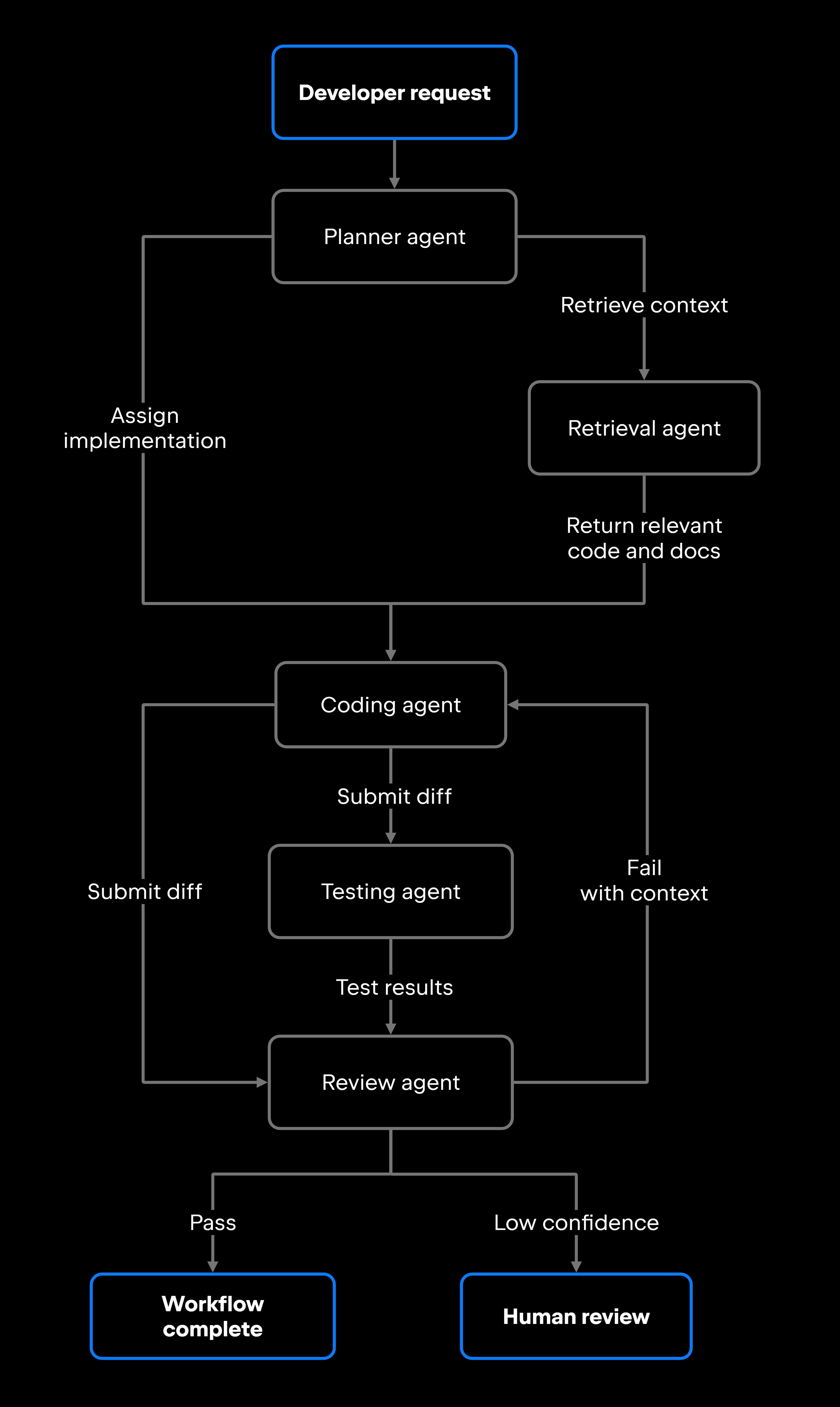
Workflows are split into specialized tasks and routed to whichever agent is best equipped for each one. A planner agent breaks a high-level goal into discrete steps. A retrieval agent pulls the relevant code and documentation. A coding agent implements the change, a reviewer agent checks the diff against your standards, and a monitoring agent watches how the deployed change behaves.

Routing depends on each agent's declared capabilities, its permissions, and the current workflow state. A coding agent never receives a task that needs database schema access if it was never provisioned for it. Capability and permission constraints keep agents from overstepping their scope.

Some tasks run in parallel. Running a linter while a documentation agent drafts release notes cuts overall latency. Sequential tasks, where one output feeds the next, need explicit dependency tracking. Each agent declares the inputs it requires and the outputs it produces, and the coordination layer resolves that graph before it dispatches anything.

2. Agent communication and shared context

Agents exchange information through several mechanisms: orchestration systems that pass outputs between steps, shared memory stores that several agents can read, workflow state objects that track what has happened and what is pending, and direct messaging for event-driven coordination.

Communication quality tends to decide output quality. If a coding agent produces a fix but the testing agent never receives the right file context, the test run is meaningless. Making sure each agent has the state it needs before executing is a real engineering problem, not an afterthought.

3. Workflow execution and orchestration

Orchestration keeps a multi-agent workflow from sliding into chaos. The orchestration layer sets execution order, manages dependencies, retries on failure, enforces stopping conditions, and routes tasks that need human approval before they proceed.

The more agents in play, the more that layer earns its keep. You can wire a two-agent handoff by hand. Once you have many agents running parallel paths and conditional branching, manual coordination breaks down, and you need orchestration logic that understands the full workflow graph and makes routing decisions at runtime. Agentic workflows lean harder on this layer as they grow.

JetBrains Air shows the idea in practice. It lets developers hand coding tasks to several agents at once, including Claude Agent, OpenAI Codex, and Junie, running concurrently in isolated Docker containers or Git worktrees. Each agent runs its own isolated task session without stepping on the others, while Air handles assignments and keeps the whole set visible.

4. Feedback loops and runtime adaptation

Feedback loops close the gap between what an agent produced and what the workflow expected. When a coding agent's output fails the reviewer's checks, the system routes the task back with the failure context attached rather than surfacing a raw error. When a retrieval agent comes back empty, the workflow can widen the search instead of pressing on with missing information.

Runtime adaptation goes beyond simple retries. It reroutes tasks based on intermediate results, escalates to a human when confidence drops, and swaps in a fallback agent when a primary one times out. That adaptive behavior is what most separates a demo from something you can run in production, and it depends on choosing a coordination pattern that fits the workflow.

Multi-Agent Systems for Developers

Common Multi-Agent Architecture Patterns

Once a workflow genuinely needs multiple agents, the next decision is how to coordinate them. These four patterns organize coordination in different ways, along a spectrum from centralized control, where one agent directs the rest, to decentralized coordination, where peers act on shared state with no single director. They trade off coordination cost, runtime adaptability, and operational complexity; the table contrasts them at a glance, and the sections below go deeper.

Pattern

Coordination cost (tokens and latency)

Adapts at runtime

Planner-Executor

Low: plan once, replan only on failure

Low: executors follow a fixed plan

Supervisor-Worker

High: the supervisor reasons on every hop

High: re-routes after each result

Specialized Collaborative

Medium: routing by task type, no central reasoner per step

Medium: routing adapts, but no replanning

Hierarchical

High: multiple coordination layers

Most complex: many failure surfaces and state to keep in sync

Long, well-structured tasks whose steps are knowable up front

Limitations

Work that needs runtime adaptation and a single point of control and visibility

Tasks are split across distinct expertise: retrieval, coding, testing, and review

Large workflows spanning several domains, each needing its own coordination

Best for

Rigid: must stop and replan when a step diverges from the plan

The supervisor is a per-step bottleneck and single point of failure

No central visibility or replanning

Medium: within each layer, with more moving parts

To choose, start from the workflow, not the pattern. Two forces push you up the spectrum: complexity, since more branching and more distinct skills need more structure, and coordination requirements, since audit trails, central visibility, and human checkpoints favor a supervisor or a hierarchy. Weigh that pull against operational overhead, because every added layer of coordination costs more tokens, more latency, and more time to run and debug. The rule that holds across all four: pick the least-structured pattern that covers your workflow's complexity and control needs, and add structure only when a concrete requirement forces it. The AI agent architecture guide covers the broader design trade-offs.

Planner-executor systems

A planner-executor system splits the work into two phases. A planner decomposes the goal into an ordered plan up front; executor agents then carry out the steps. The planner reasons once and never touches a file or calls an API itself, which keeps the expensive reasoning off the per-step path and produces a plan you can inspect or approve before anything runs. The trade-off is rigidity: executors follow the plan and have no authority to deviate, so when a step reaches a state the plan did not anticipate, the system has to stop and replan rather than adjust in place. How well the system decomposes goals and recovers when execution diverges comes down to its planning algorithms.

Supervisor-worker architectures

A supervisor-worker architecture makes the opposite trade: It does not commit to any plan up front. A central supervisor delegates one task at a time, reads each worker's result, and only then decides the next move, whether to continue, retry, reassign, escalate, or stop. Because that routing decision happens at runtime on every hop, the system adapts to surprises a fixed plan would miss, and routing every task through a single agent gives you a single place to watch the whole workflow. That adaptability has a price. Re-invoking the supervisor on every step spends more tokens and adds more latency than planning once and replanning only when something breaks. Concentrating control in one agent also makes it a per-step bottleneck and a single point of failure: if it stalls, the workflow stalls with it.

Specialized collaborative agents

Some workflows are better served by peers than by a boss. Each agent specializes: one handles retrieval and semantic search, one handles code generation, one handles test execution, and one handles static analysis. No single agent runs the show. The orchestration layer routes work by task type and workflow state instead.

A code review agent tuned for security checks beats a general-purpose agent on the same task, and the design stays open-ended. When you need a compliance validation agent, you add it to the pool without redrawing the workflow.

Hierarchical multi-agent systems

Hierarchical architectures stack coordination across levels. A top-level coordinator manages domain supervisors, and each supervisor manages its own workers. This pattern fits large-scale engineering efforts that span distinct domains, such as infrastructure, application code, testing, and deployment, each with its own coordination logic. You pay for it in complexity: every added layer is another failure surface, more state to keep in sync, and more orchestration overhead. Teams reach for this pattern only when a flatter design produces too much coordination noise to manage.

Multi-Agent Systems in Software Development

Software development is one of the clearest places multi-agent systems pay off. The work decomposes naturally, since debugging, testing, code review, and deployment are distinct tasks with distinct expertise, and the feedback loops are explicit enough to automate. A few coordinated workflows show what that looks like in practice, and the AI agents for software development guide covers more examples.

  • Repository analysis and issue investigation. A retrieval agent scans the codebase for the relevant files, recent commits, and related issues; a reasoning agent reads across those artifacts to pin down a likely root cause. The developer gets a structured summary instead of a wall of search results.
  • Code review preparation. Before a human opens the PR, a static analysis agent flags style violations, security anti-patterns, and likely regressions, while a documentation agent checks whether changed functions still match their docstrings. Their findings arrive as one structured review comment.
  • Testing coordination. A planner agent works out which suites a change affects, a testing agent runs them in parallel, and a validation agent flags coverage gaps and untested paths. The whole loop, from change detection to test report, runs inside a CI/CD pipeline without a manual step.
  • DevOps automation. A monitoring agent notices anomalous latency, a debugging agent ties it to a recent deployment, and a remediation agent proposes a rollback or a targeted config change for a human to approve.

Each of these workflows depends on agents passing a clean state to one another, and that dependency is exactly where multi-agent systems get fragile.

Reliability Challenges in Multi-Agent Systems

Multi-agent systems bring failure modes that single-agent workflows never face. The gap between a system that produces reliable output and one that fails quietly comes down to recognizing each failure mode and handling it deliberately.

Synchronization failures happen when an agent acts on a stale or incomplete state. If a coding agent starts a fix before the retrieval agent has finished returning context, the result can be technically valid and still wrong. The fix is explicit dependency tracking: an agent should not execute until the state it depends on is confirmed complete.

State consistency problems show up in parallel work. Two agents touching related parts of the codebase at once, one refactoring a utility and another writing tests against it, can produce conflicts that are painful to trace. Isolation mechanisms like Git worktrees, which JetBrains Air supports, give each agent its own workspace and remove a whole class of concurrency bugs.

Orchestration overhead compounds as a workflow grows. Every coordination step adds latency, and a long pipeline with several handoffs can finish slower than one capable agent on a straightforward task. Profile before you reach for multiple agents: they are not automatically faster, even when they are more accurate.

Debugging difficulty is real. When a multi-agent workflow returns a wrong answer, finding which agent introduced the error takes end-to-end observability: structured logging at every agent boundary, correlation IDs that follow a task through the full workflow, and AI agent monitoring that surfaces per-agent outcomes. The companion guide on debugging AI agents covers the diagnostic patterns.

Cascading failures occur when one agent's bad output poisons the agents downstream. A retrieval agent that returns hallucinated file paths leads the coding agent to edit files that do not exist, and a validation agent may pass the result through if it lacks the context to catch the mistake. The defense is a validation gate between agents: each output is checked before the next agent acts on it.

A few mitigations apply across all of these:

  • Retries with context. Retry a failed task with the failure reason attached, never a silent restart.
  • Schema validation at handoff points. Define a structured output schema and validate against it at every boundary, so malformed data cannot move downstream.
  • Human escalation triggers. Define the explicit conditions under which a workflow stops for human review rather than proceeding on a low-confidence output.
  • Timeout-based fallbacks. If an agent does not return within its window, route the task to a fallback agent or surface the timeout instead of letting the workflow hang.
  • Shared state audits. Log every write to a shared context so a failure can be replayed and diagnosed.

These controls keep a single workflow reliable. Running many agentic workflows across an engineering organization adds a second layer of the same problem, which is the gap JetBrains AI for Teams and Organizations is built to close: it centralizes observability, policy, and cost control over agents spread across IDEs, the CLI, and the web, so the per-agent discipline described above holds at organization scale.

What This Means for Developers

Multi-agent systems let AI workflows scale through specialization, distributed execution, and coordinated task management. They justify that cost when a workflow genuinely needs decomposition, concurrent execution, or several specialized capabilities that no single agent can combine cleanly. That is the single-agent ceiling from the start of this article: the point where adding agents solves a problem instead of inventing one. Below it, one capable agent with the right tools is the better engineering choice, and the coordination layer adds cost without return.

Making that work depends on three things working together: orchestration that is explicit about dependencies, state handling that stays rigorous about synchronization, and observability fine-grained enough to trace a failure down to the agent that caused it. JetBrains Air is one place to put this into practice today, running several agents in parallel against real tasks while keeping each one isolated and visible.

FAQ

How do developers test communication between multiple AI agents?

Start with each agent in isolation and confirm it produces well-structured output from well-formed input. Then test handoffs in pairs: mock the adjacent agent and check that the receiver handles upstream output correctly. End-to-end tests that run the full workflow against a controlled dataset catch the coordination failures that only appear when every agent runs together. Capturing each agent's inputs and outputs at the boundary is what lets you localize a failure to the agent that caused it.

Can multi-agent systems operate without centralized orchestration?

Yes. Decentralized designs route tasks through peer-to-peer communication or event-driven messaging instead of a central coordinator: agents publish outputs to a shared event stream, and downstream agents subscribe to the events they care about. That removes the single point of failure that a central orchestrator introduces. The cost is visibility, since no one component tracks the full workflow state, which makes debugging harder. Teams usually accept the visibility trade-off only when availability requirements rule out central coordination.

Do all agents in a multi-agent system need access to the same tools and context?

In a well-designed system, no. Giving each agent only the tools and context its role requires improves security, lowers the risk of unintended actions, and keeps the system easier to reason about. A test execution agent needs to run code in a sandbox but never production credentials; a documentation agent needs to read the codebase but does not need permission to change it.

What causes synchronization failures in multi-agent workflows?

They happen when an agent acts before the state it depends on is ready. The usual culprits are missing dependency declarations in the orchestration layer, race conditions where two parallel agents write shared state without locking, and timeout-based progression that advances the workflow before a slow agent has returned. Declaring those dependencies explicitly, so the orchestration layer can enforce them before it advances, prevents most synchronization failures at design time.

When should developers choose multi-agent systems over simpler architectures?

Default to the simplest design that can do the job, and add agents only when you hit a concrete wall: context-window saturation, a capability no single agent covers, or sequential latency you cannot accept. The wall is the signal, not the ambition to run more agents. Until you reach it, one well-equipped agent is cheaper to build, test, and debug than a coordinated set of agents.

Damaso Sanoja

Damaso Sanoja is an engineer who is passionate about helping others make data-driven decisions to achieve their goals. This has motivated him to write numerous articles on the most popular relational databases, customer relationship management systems, enterprise resource planning systems, master data management tools, and, more recently, data warehouse systems used for machine learning and AI projects. You can blame this fixation on data management on his first computer being a Commodore 64 without a floppy disk.

JetBrains AI Solutions

Optimize your workflow. With AI built for you.

Junie

The AI coding agent with deep IDE integration that plans before it writes, then codes and tests while you stay in flow.

JetBrains AI in IDEs

Set of AI-powered capabilities built into JetBrains IDEs for software developers. It is not a standalone product or service, but an IDE-native experience composed of AI features, LLMs, agents, and integrations.

AIR

Agentic Development Environment for engineering teams building products with AI.

AI for Teams and Organizations

An open system for agentic software development. Govern AI access across your engineering org, manage agents and models, and keep costs under control.

JetBrains Context

A repository intelligence layer for coding agents. It builds a semantic index of your codebase so agents retrieve what they need instead of exploring it file by file.

Central CLI

One CLI for every terminal agent. Claude Code, Codex, Gemini, and others plug into JetBrains AI and behave exactly as they do standalone. Access is granted centrally and instantly, with models, limits, and usage analytics governed in one place.

Continue Exploring the AI Agents for Developers Guide

What Are AI Agents?

Discover what AI agents are, how they work, their architecture, types, use cases, and how developers can build intelligent autonomous systems.

What Are Autonomous AI Agents?

Learn what autonomous AI agents are, how they execute workflows, their levels of autonomy, key guardrails, risks, and software development use cases.

AI Agents vs AI Assistants

Understand the difference between AI agents and AI assistants, their architectures, capabilities, use cases, and how to choose the right approach for development workflows