AI Agents for Developers Guide / What Are Autonomous AI Agents?

What Are Autonomous
AI Agents?
Autonomous AI agents are AI systems that can make bounded decisions, coordinate multistep workflows, and execute tasks with varying degrees of independence, without waiting for a human to approve every action. The keyword is bounded. Autonomy in production AI systems is almost always constrained by permissions, runtime rules, approval flows, monitoring, and escalation paths defined by the teams deploying it. For engineering teams, the practical question is rarely whether an agent is autonomous, but rather how far its autonomy extends and where its boundaries lie.

This guide is for developers evaluating autonomous workflow execution, not a general AI overview. It covers how autonomy actually works in practice: the levels of independence available, how agents execute workflows, what oversight and guardrails look like, where autonomous AI agents fit in software development, and the operational risks you need to plan for before you deploy anything.

What makes an AI agent autonomous?

What are autonomous AI agents, operationally? Autonomy means an agent can make decisions, coordinate actions, adapt to feedback, and continue a workflow without constant prompting. A non-autonomous system waits for your input: you ask, it answers; you issue a command, it runs once. An autonomous agent evaluates an objective and runs a full loop on its own, planning a sequence of actions, selecting tools, executing them, observing the results, retrying on failure, and escalating when it cannot proceed.

Autonomy here describes how the agent behaves once you set it running, not that it starts or supervises itself: you still invoke it, scope what it can touch, and review what it produces. Between those points, it self-directs across steps instead of pausing for a prompt at each one.

Underneath, an autonomous agent is a model running inside a control loop: it reasons about the goal, uses tools to act on the world rather than just describe it, carries context forward in memory, and keeps checking progress and revising until the task is done or a stopping condition is hit.

The standard definition of an AI agent as a system that perceives its environment and takes actions doesn't capture the distinction that matters to engineering teams. The operational characteristics that do are:

  • Planning: Deciding what to do next.
  • Workflow execution: Acting on that plan.
  • Tool coordination: Calling APIs, terminals, databases, and IDEs.
  • Retries: Recovering from failure without stopping.
  • Escalation: Knowing when to hand off to a human.
  • Runtime decision-making: Adapting when context changes mid-workflow.

This category of behavior is what agentic AI refers to, and AI agent orchestration is how those behaviors are coordinated across a workflow. Autonomy is never unlimited: an autonomous agent is designed to operate inside defined boundaries, which we cover in detail under oversight and guardrails below.

Levels of autonomy in AI agents

Autonomy is a spectrum, not a binary capability. Where a given workflow sits on that spectrum should be a deliberate design choice based on operational risk and the cost of undoing a wrong action.

Suggestion-only systems

At the lowest level, an AI system generates suggestions and stops. There is no execution and no autonomous action. Inline code completion and chat-based assistance operate here, including AI Assistant's code completion. The AI produces a recommendation, such as a code block or a refactoring, and the developer chooses whether to apply it. The trade-off is that these systems don't reduce the work of multistep tasks: every action still needs a manual trigger. AI Assistant is not limited to suggestion-only mode, though; its Agents mode runs multistep tasks further up the spectrum.

Human-approved workflows

One step up, the agent prepares and stages actions, but execution requires explicit human sign-off. You might ask Junie, our dedicated coding agent, to rename a widely used API and update every call site across the codebase. Junie analyzes the affected files, proposes the changes, and presents a diff, but it does not commit until you approve. The same pattern fits dependency updates, deployment preparation, and infrastructure changes. This mode is appropriate when an action is irreversible, touches shared resources, or affects production. The approval step is the guardrail.

Semi-autonomous workflow execution

Semi-autonomous agents coordinate multiple steps, run retries, and call tools within predefined boundaries, without asking for approval at each step. A debugging workflow might let the agent run tests, read error logs, modify code, and rerun the suite on its own. A CI/CD coordination agent might trigger builds, collect results, and post a summary to a pull request, as long as it stays within its permitted scope.

Low-risk autonomous systems

Some workflows are safe to run with near-full autonomy because the operational risk is minimal and rollback is trivial. Ticket routing, log analysis, internal documentation generation, test-result aggregation, and repetitive support triage fit here. The potential damage from a wrong action is low, and you can quickly reverse outcomes, which makes these good candidates for higher-autonomy workflows.

How autonomous AI agents execute workflows

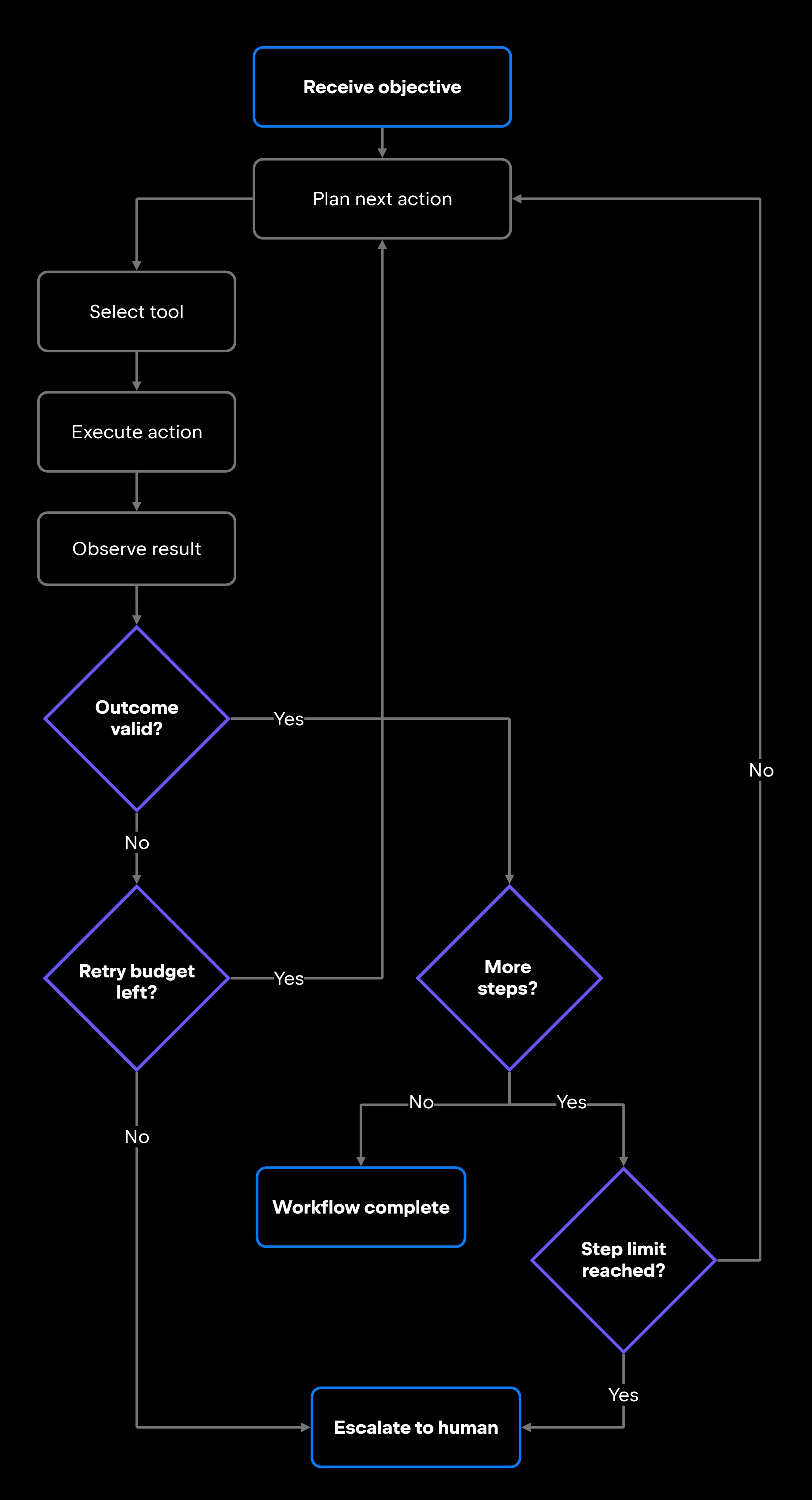
Wherever a workflow sits on the autonomy spectrum, the underlying execution loop is the same. What changes is how much of it runs without a human in the loop. That loop follows a consistent pattern: plan, act, observe, then retry or escalate. The diagram below traces it, including the controls that keep it from running unchecked.

How autonomous AI agents execute workflows

Autonomous execution depends on orchestration, runtime controls, permissions, and workflow state management. Each part of the loop is a place to set a boundary.

Planning and decision-making

When an autonomous agent receives an objective, it breaks the goal into a sequence of actions, evaluates what information it needs, identifies which tools can provide it, and decides the order of the steps. At each decision point, it chooses the next action based on the current state.

This planning is imperfect and not always transparent. The agent might reason incorrectly, misread the state, or choose the wrong tool. Design for that: stopping conditions, step limits, and rollback paths exist precisely because planning can fail.

Tool use and runtime actions

Autonomous agents act by calling tools: running terminal commands, reading and writing files, querying databases, calling APIs, triggering CI/CD pipelines, or working inside an IDE. A coding agent in an IDE, for instance, can read the project structure, modify source files, run tests, and inspect build results within a single run, all through the tools it has been granted access to.

Scope those tools deliberately. Standards like the Model Context Protocol (MCP) define how agents connect to external data sources and tools, but connecting a tool and permitting its use are two different decisions: making a tool available is separate from allowing the agent to use it without approval. A coding agent with access to your production database carries categorically higher risk than one scoped to a local test environment, so runtime actions should always operate within explicit permissions and tool schemas.

Feedback, retries, and escalation

After each action, the agent observes the result and decides what to do next. If a test run fails, it might modify the code and retry, or escalate once it has hit its retry limit. If an API call returns an unexpected schema, it should either adapt or stop and ask for help.

The escalation path matters as much as the execution path. An agent with no escalation logic will either loop indefinitely or fail silently. Define explicit thresholds: after a set number of retries, stop and surface the state to a human; if a tool call outside the permitted scope is attempted, terminate and log. A useful escalation carries the objective, the step that failed, the tool call and the error it returned, and the retry count, so a developer can act without reconstructing the run.

Human oversight and guardrails

"Autonomous" can mislead teams into thinking these agents need less oversight. They need different oversight, structured into the workflow rather than applied by hand at each step. The execution constraints that define which tools an agent can call, what permissions it holds, how many retries it gets, and when it must escalate are defined before deployment and enforced at runtime, though some are evaluated dynamically as the workflow runs.

Practical guardrails include:

  • Scoped permissions: The agent can only call tools to which it has been explicitly granted access. A common pattern is a guideline file that travels with the repository, defining the build and test commands, code style and architectural conventions, and the project rules the agent must follow, alongside a separate allowlist that controls which actions the agent may take without asking.
  • Approval flows: Human review gates for high-risk actions such as commits, deployments, and infrastructure changes.
  • Audit logs: Every tool call, state change, and decision is recorded for later review.
  • Runtime limits: Step-count caps, execution timeouts, and token budgets that prevent unbounded runs.
  • Rollback paths: Every action that modifies state should have a defined reversal. For a dependency-update agent, that is the revert commit or a closed pull request; for an infrastructure change, it is the prior known-good configuration, captured before the change is applied.
  • Monitoring: Active visibility into what the agent does while it runs, rather than only after it finishes. Watch decisions, tool calls, and workflow state as they happen.
  • Stopping conditions: Explicit criteria that end the workflow on success, failure, or uncertainty.

AI agent security, AI agent runaway behavior, and AI agent monitoring are all downstream of how well these guardrails are designed. Getting them right at the design stage costs far less than debugging autonomous behavior in production.

Autonomous AI agents in software development

Software development is one area where autonomous agents can deliver immediate, practical value. The workflows that tend to work well share a property: they operate on artifacts (code, test results, logs, configuration files) rather than directly on running systems. Most real-world cases still involve human review and operational constraints. AI agents for software development can support a range of tasks:

  • Debugging: An agent can analyze a failing test, trace the error through the call stack, propose a fix, apply it, and rerun the test, within the guardrails it has been given.
  • Issue investigation: An agent can pull recent commits, correlate them with error-log timestamps, and produce a structured diagnosis without a human running the queries by hand.
  • CI/CD coordination: An agent running on a CI server (e.g. TeamCity, GitHub Actions, Jenkins, or similar) can monitor build results, identify failing jobs, collect relevant logs, and either retry or surface the failure with context. The agent handles mechanical coordination; a developer decides whether to merge.
  • Test execution and analysis: An agent can run a target test suite, parse the failures, and report which cases regressed and why, so a developer reviews a triaged summary rather than raw output.
  • Dependency management: An update agent can scan for outdated packages, check changelogs for breaking changes, open pull requests with proposed updates, and flag anything that needs manual review.
  • Code review preparation: An agent can analyze a diff, check it against your project's conventions, and add structured review comments before a human opens the file.
  • Infrastructure monitoring: Agents connected through MCP to monitoring systems can detect anomalies, correlate them with recent deployments, and escalate with context rather than alerting on raw signals.

AI agents for DevOps pipelines follow the same pattern: bounded execution, structured output, and a human decision on significant state changes.

Risks and limitations of autonomous AI agents

Higher autonomy increases operational risk. An agent that can execute actions, coordinate workflows, and interact with production-adjacent systems can also cause real damage when something goes wrong, and that applies to any autonomous deployment, not just experimental ones.

Risk

Why it matters

Mitigation

Runaway workflows

Agent loops or makes unintended state changes indefinitely

Step-count limits, execution timeouts, explicit stopping conditions

Incorrect actions

Agent executes the wrong tool call or misinterprets the current state

Scoped permissions, dry-run modes, approval gates before irreversible actions

Hallucinated decisions

Agent reasons from false or stale context

Input validation, schema enforcement, context refreshes on retry

Permission misuse

Agent accesses resources outside the intended scope

Principle of least privilege, per-tool API token scoping

Monitoring gaps

Failures go undetected until production impact is visible

Structured logging, real-time alerts, agent-activity observability

Escalation failures

Agent continues past low-confidence decision points

Explicit escalation thresholds, fallback paths defined at design time

Unreliable context

Stale or incomplete state drives wrong decisions

State validation, checkpointing (saving recoverable state the agent can resume from), and context refresh between steps

All of these risks are manageable with bounded autonomy, observability, tested escalation paths, appropriate approvals, and runtime controls in place before you deploy. Treat an autonomous AI system the way you would treat any system with write access to important resources: minimal permissions, observable behavior, and a tested rollback plan.

What this means for developers

Those risks and controls turn adoption into a design question: autonomy is a workflow design decision, not a vendor feature you toggle on. Before adopting an autonomous workflow, evaluate it against a concrete checklist:

  • How complex is the workflow, and can the agent handle edge cases gracefully?
  • What is the operational risk if the agent makes a wrong decision?
  • Is there a clear rollback path if execution fails?
  • What permissions does the agent need, and are they the minimum required?
  • What visibility do you have into the agent's intermediate steps, not just its final output?
  • How will you monitor execution in real time?
  • What triggers escalation, and who receives it?
  • Where does a human stay in the loop, and who owns the review?

The tooling is starting to match these patterns at two levels: an agentic development environment can orchestrate several agents in parallel for a single developer, while organization-level systems add governance, observability, and cost visibility across many agents. JetBrains Air and JetBrains AI for teams and organizations are our entries at those two tiers. Either way, autonomous agents earn their place by handling mechanical coordination so developers can focus on the decisions that actually require judgment.

Start with low-risk, high-repetition workflows. Define your boundaries before you hand off the first one, and treat every new autonomous workflow like a deployment: test it, monitor it, and keep a rollback plan ready.

FAQ

Are autonomous AI agents fully independent?

No. Autonomous AI agents in production operate within explicit constraints: scoped permissions, step limits, execution timeouts, approval flows for high-risk actions, and defined escalation paths. Full independence would mean an agent could access any resource, take any action, and continue indefinitely, and well-designed systems don't work that way. The goal is bounded autonomy: enough independence to handle complex multistep workflows without constant prompting, with hard limits on what the agent can do and clear paths to escalate when it cannot proceed safely.

Can autonomous AI agents safely interact with production systems?

Yes, but safety depends entirely on how permissions and guardrails are configured. An agent with read-only access to production logs is low-risk. An agent that can write to a production database or trigger deployments is high-risk and needs approval gates, scoped credentials, audit logging, and tested rollback paths. The MCP integration in AI Assistant lets you define which external tools and data sources an agent can access, so define that scope deliberately rather than granting broad permissions.

How do developers monitor autonomous AI agents?

Effective monitoring happens in real time, not as a post-hoc log review: an agent you can only audit after the fact is one you cannot stop in time. Inside the IDE, integrated AI agents like Junie expose an agent's planned steps and actions as a run progresses. For agents in CI/CD pipelines or longer-lived infrastructure workflows, structured logging and integration with observability platforms and standards, such as Datadog and OpenTelemetry, are the standard approach. At the organizational level, JetBrains Central is designed to provide teams with centralized visibility into agent activity, cost, and performance across projects.

What kinds of workflows are best suited for autonomous AI agents?

Repetitive workflows operate on well-defined inputs and outputs, carry a low risk of irreversible changes, and don't require nuanced judgment at every step. Concrete examples include test execution and analysis, log triage, dependency scanning, CI/CD build monitoring, ticket classification, and documentation generation. Workflows involving direct production writes, financial transactions, or actions with broad organizational impact require human approval gates even when an agent handles the preparation work.

What happens when an autonomous AI workflow fails?

A well-designed workflow fails predictably. When a step fails, the agent observes the error, retries if it is within budget, and escalates to a human once retries are exhausted or the failure falls outside its defined scope. The escalation should carry enough context for a developer to understand what the agent was doing and why it stopped, not a generic error message. An agent that fails silently, loops without stopping, or pushes past clear errors reflects a configuration problem, not an inherent property of autonomous AI systems.

Damaso Sanoja

Damaso Sanoja is an engineer who is passionate about helping others make data-driven decisions to achieve their goals. This has motivated him to write numerous articles on the most popular relational databases, customer relationship management systems, enterprise resource planning systems, master data management tools, and, more recently, data warehouse systems used for machine learning and AI projects. You can blame this fixation on data management on his first computer being a Commodore 64 without a floppy disk.

JetBrains AI Solutions

Optimize your workflow. With AI built for you.

Junie

The AI coding agent with deep IDE integration that plans before it writes, then codes and tests while you stay in flow.

JetBrains AI in IDEs

Set of AI-powered capabilities built into JetBrains IDEs for software developers. It is not a standalone product or service, but an IDE-native experience composed of AI features, LLMs, agents, and integrations.

AIR

Agentic Development Environment for engineering teams building products with AI.

AI for Teams and Organizations

An open system for agentic software development. Govern AI access across your engineering org, manage agents and models, and keep costs under control.

Continue Exploring the AI Agents for Developers Guide

What Are AI Agents? A Complete Guide

Discover what AI agents are, how they work, their architecture, types, use cases, and how developers can build intelligent autonomous systems.

What Is Agentic AI? Complete Guide

Learn what agentic AI is, how it works, its core components, real-world use cases, benefits, challenges, and how it differs from other AI systems.

Agentic AI vs AI Agents: What Is the Difference?

Understand the difference between agentic AI and AI agents, including their roles, capabilities, relationship, and practical applications.