AI Agents for Developers Guide / AI Agents vs. AI Assistants: Key Differences

AI Agents vs.
AI Assistants:
Key Differences

AI agents vs. AI assistants is a comparison developers encounter frequently, and the two terms are used interchangeably across tooling conversations, vendor marketing, and engineering blog posts. They are related, but they are not interchangeable. AI assistants focus on responding to prompts and helping you complete individual tasks. AI agents execute workflows: They coordinate tools, manage state across build steps, and pursue goals that span multiple actions. Confusing the two leads to mismatched tooling expectations, poorly scoped automation projects, and wasted engineering time.

This article is a practical clarification guide for developers evaluating AI-assisted workflows and IDE tooling. It maps the real operational difference, shows where the line blurs, and gives you a framework for deciding which one your use case actually needs.

Why developers confuse AI agents and AI assistants

Marketing teams apply the word "agent" to almost anything that involves an LLM, regardless of whether the system coordinates a multistep workflow or simply returns a good response to a chat prompt. Every chat interface with a memory feature gets called an “agent”. Every code-completion tool with context awareness is labeled “agentic”.

Modern AI assistants have genuinely narrowed the behavioral gap, making it harder to see through the labeling. Tools like AI chat in JetBrains IDEs now support context-aware recommendations, configurable models, autonomy settings, and multiturn conversations that maintain code context across a session. When an assistant starts remembering prior exchanges, accessing file contents, and triggering completions across multiple files, the behavioral gap between the assistant and the agent begins to narrow noticeably.

The durable way to test whether something is truly an agent is to examine its execution model rather than its feature surface. An assistant with memory still waits for your next prompt before taking the next action. An agent with the same memory decides its next action from the output of the previous one, with no human in the loop between steps. Adding context, file awareness, or even multifile editing to an assistant does not make it an agent unless the system also gains the ability to plan and execute a sequence of steps without needing a new prompt after each one.

AI assistants focus on interactive help

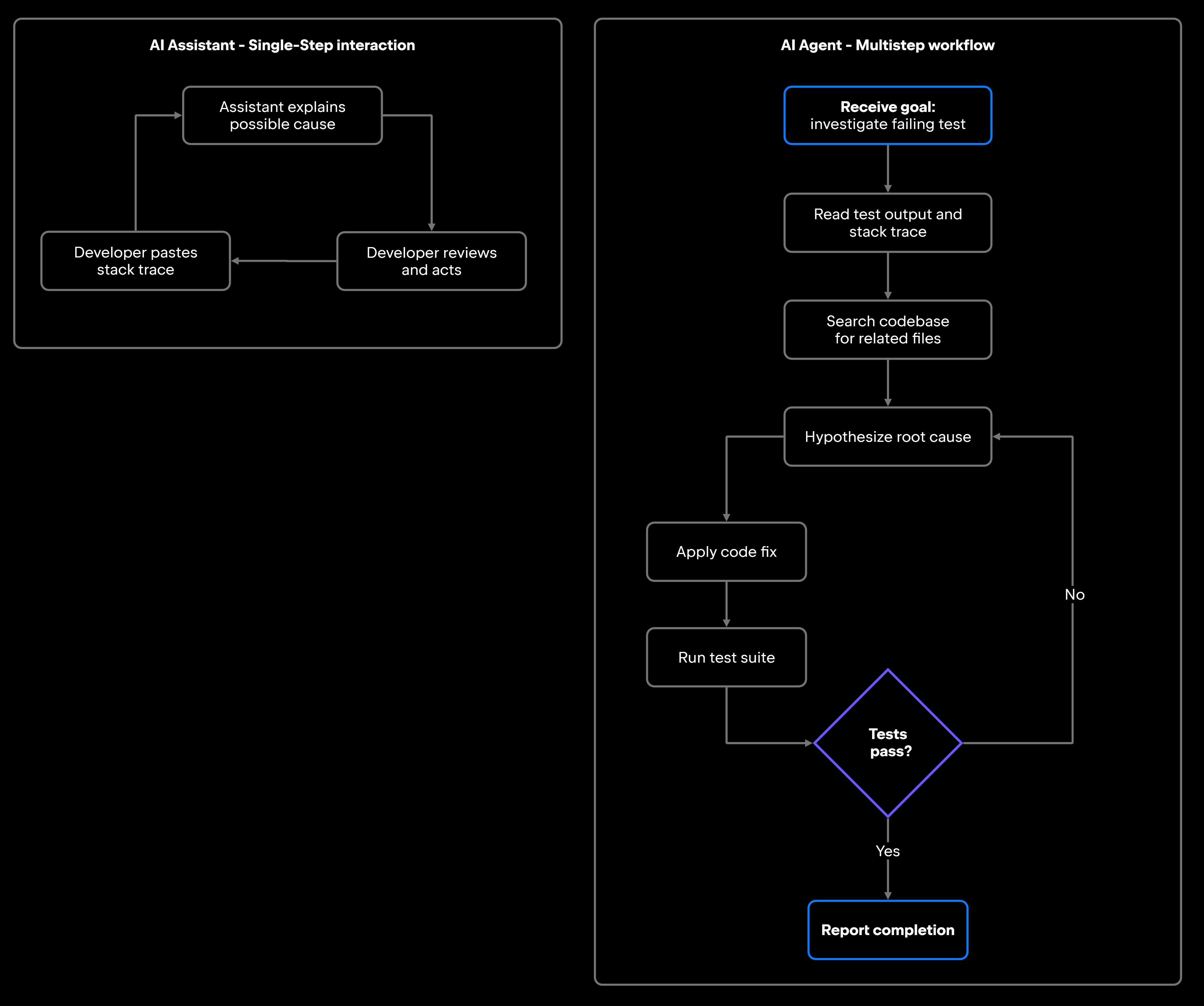
AI assistants respond to developer prompts and help you complete discrete tasks. The interaction model is straightforward: One prompt triggers one response; you review and act, then you enter another prompt. Each task is bound to a single exchange, and the human stays in the loop at every step. The assistant does not chain actions autonomously between requests.

Inside JetBrains IDEs, this takes the form of an AI Chat tool window, where you can ask the assistant to explain a block of code, generate unit tests, write documentation, or summarize a diff, each a single-step, developer-directed request. It runs on cloud-hosted models by default, with local-model and private-infrastructure options for teams with data-residency requirements.

In its standard chat mode, the assistant operates within the boundaries of your prompt. It will not run a test suite, check a CI build, or browse your repository for related files unless you explicitly ask it to in each request, though AI Chat can extend these boundaries. That dependency on direct user input is the defining characteristic of assistant-style help.

Common assistant workflows in developer contexts include:

  • Code generation: "Write a Kotlin function that parses this JSON schema."
  • Explanations: "What does this regex actually do?"
  • Documentation: "Write Javadoc for this class."
  • Unit test generation: "Generate JUnit 5 tests for edge cases in this method."
  • Summaries: "Summarize what changed in this pull request."

Each task relies on developer judgment to validate and apply the output. At the architectural level, the contrast between how LLMs and AI agents work is that an LLM is a stateless text-in, text-out function, while an agent wraps that function in an execution loop that manages state, calls tools, and iterates toward a goal. In that framing, generative AI sits as a content and output layer that responds to human direction rather than pursuing goals on its own.

AI agents focus on workflow execution

AI agents are built around a different model: They receive a goal, decompose it into steps, execute those steps using available tools, observe the results, and adapt accordingly. The human sets the goal and reviews the outcome; the agent coordinates everything in between.

In an agent framework, a "tool" is a callable function exposed to the model: a REST endpoint, a filesystem read or write, a shell command, or a call to a Model Context Protocol (MCP) server – the standard interface that connects an agent to many tools without a custom integration for each one. The agent decides which tools to invoke based on the current state of the workflow and the output of the previous step. Tool use is what lets an agent act on the world rather than only generate text about it. With that capability, AI agents in a development context can interact with IDEs, terminals, CI/CD systems, APIs, repositories, databases, and external services, depending on what permissions they hold. They take actions, check results, handle failures, and loop until the goal is complete or a defined threshold is reached.

JetBrains has shipped two notable implementations of this model, Koog and Air, each targeting a different level of the agent stack.

Koog, a JVM-native open-source framework, is one example: You register typed Kotlin functions as tools and supply an LLM provider, and the framework runs the plan-execute-observe loop for you, invoking tools in response to the model's decisions and feeding results back for the next step. The behavior is the point: the agent acts on tool results across steps, not the framework's full feature set.

JetBrains Air takes AI agent orchestration to the environment level. Described as an agentic development environment, JetBrains Air lets you assign an agent and a model to each task and run several tasks in parallel. Each task runs in its own execution environment chosen by you. That lets several agentic workflows run side by side without colliding, coordinated by an environment built for the purpose rather than driven by a single conversation thread.

The diagram below contrasts the two execution shapes: The agent loop runs autonomously until a terminal condition, while the assistant loop requires a human in every iteration.

One constraint is often overlooked: Agents do not operate with unlimited autonomy. They work within defined permissions, approval gates, runtime rules, and orchestration logic. An agent tasked with preparing a deployment does not get unconditional write access to production systems; it executes within whatever boundaries the team running it has configured. The workflow is automated, but the guardrails are engineered deliberately. This is the foundation of AI agent orchestration: coordinating agentic workflows within boundaries the team controls.

The real difference: Assistance vs. workflow execution

The difference between AI agents and AI assistants is what happens between the trigger and the outcome. The table puts both models side by side on the dimensions that drive a tooling decision.

Dimension

AI assistant

AI agent

Interaction model

Prompt–response

Goal, plan, execute, observe, iterate

User involvement

Every step

Goal-setting and review

Primary output

Actions and results

Suggestions, generated content

Tool use

Optional, user-directed

Core to operation

Multistep execution

No (or minimal)

Yes

State management

Within conversation

Across workflow steps

Workflow coordination

No

Yes

Autonomy scope

Bound to prompt

Bounded by permissions and runtime rules

Failure handling

You correct the output in the next prompt

Retry, escalate, or halt per configured strategy

Setup complexity

Low: installs as an IDE plugin

High: requires a permission model, approval gates, and observability design

Modern developer tooling increasingly blurs this line. Some assistants can chain a limited sequence of actions within a session when you relax the confirmation threshold, but that is still not a full agent loop: the tool does not plan steps, manage persistent state across sessions, or retry failed tool calls on its own. What shifts is how much it does without asking, not the underlying operational model.

The same convergence shows up across the market. GitHub Copilot has added agent-style workspace features that modify multiple files in a single operation, and Cursor runs in a hybrid space where a chat interface can trigger multifile edits that look more like agent behavior than traditional assistant responses. The architectural distinction still matters when you are deciding what to build or buy, and how much autonomous execution you are actually delegating, even as the practical boundary keeps blurring.

What this means for developers

Choosing between an AI assistant and an AI agent comes down to whether your use case needs interactive help at individual task checkpoints or autonomous end-to-end execution of multistep workflows.

For interactive assistance, an AI assistant is the right fit. If your team needs faster code generation, inline documentation, unit test scaffolding, or on-demand explanations, JetBrains IDEs provide these capabilities through integrated AI features. The criteria that matter here concern the interactive experience: suggestion quality across your language and framework stack, context window size (how much code the model can reason over in one request), response latency, and how cleanly the assistant integrates into your existing IDE workflow.

For workflow automation, you need an agent. Common scenarios where agent-style execution adds real value include:

  • Automated bug investigation: Read logs, trace the call stack, identify the likely source, apply a fix, and re-run tests, without manual handoffs between steps.
  • CI/CD triage: Detect a failing build, identify the failing step, review recent commits, and surface a root-cause hypothesis with supporting evidence.
  • Dependency updates: Scan for outdated packages, check changelogs for breaking changes, and open a PR with the update and a human-readable summary.
  • Support ticket routing: Classify an incoming issue, search the codebase for related components, and assign it to the relevant team with context attached.

These workflows have multiple steps, require tool access, and involve decision points that benefit from automation. An assistant can help you write the code for each step, but it will not execute the sequence end to end without continuous prompting.

An agent is the wrong choice when the task is a one-shot generation or explanation, when the cost of a wrong autonomous action exceeds the cost of a manual handoff, or when the workflow is too unpredictable to define tool permissions reliably. For those cases, the assistant model, where a human reviews each output before the next action, is lower risk and lower overhead.

For teams evaluating AI tooling more broadly, the right questions to ask before committing to a system are:

  • Orchestration needs: Does your use case require coordinating multiple tools or systems, or generating output at a single point?
  • Tool access: Does the system need read or write access to your repository, terminal, CI/CD pipeline, or external APIs?
  • Permissions and approval gates: What actions can the system take without human review, and what requires explicit confirmation?
  • Observability: Can you inspect what the agent did at each step and why? Look for built-in execution tracing that records each step's tool call, model decision, and outcome.
  • Reliability: How does the system handle failures, retries, and unexpected states mid-workflow?

Assistants are low-stakes to deploy; the worst outcome is a suggestion you do not apply. Agents take real actions with real consequences, so getting the permission model and approval gates right before an agent touches your production environment or mainline repository is a hard requirement.

The tooling space is moving fast, and the line between assistant and agent will keep blurring as tools converge. The decision rule still holds: Reach for an assistant when you want help inside a step you control, and an agent when you want a multistep process executed for you. Increasingly, choosing between them means weighing agent architecture, permission boundaries, and orchestration strategy, not just picking a chat plugin.

FAQ

Are AI assistants and AI agents the same thing?

No. The cleanest way to tell them apart is by looking at who drives the loop. With an assistant, you do: It responds to your prompt and waits for the next one. With an agent, the system does: It pursues a goal across multiple steps, using tools and tracking state, and comes back to you only at the goal-setting and review phase.

When should developers use AI agents instead of AI assistants?

Use an agent when the task involves multiple sequential steps, requires interaction with external tools or systems, and would benefit from running without manual intervention at each step. Bug investigation pipelines, CI triage automation, dependency management workflows, and support ticket routing are all strong fits. Use an assistant when you need fast help with discrete tasks (generating code, explaining behavior, and writing tests) and want to stay in the review loop throughout. If the cost of a wrong autonomous action outweighs the cost of a manual handoff, stay with the assistant.

What is an example of an AI agent in software development?

Koog, JetBrains' open-source JVM-native framework, is a concrete example. Pointed toward a goal like "update our outdated dependencies", a Koog agent can scan the build manifest, read each package's changelog for breaking changes, apply the compatible upgrades, run the test suite, and open a pull request that explains what changed, deciding each step from the result of the last one. JetBrains Air extends this by letting you assign an agent (Claude Agent, OpenAI Codex, Gemini CLI, or Junie) to each task and run several tasks in parallel, each in its own isolated execution environment.

How do AI agents handle failures and retries in workflows?

Well-designed agent frameworks like JetBrains’ open-source Koog include built-in retry logic, agent state persistence for recovery, and execution tracing. When a step fails (a tool call returns an error, a test does not pass, or an API times out), the agent can retry with adjusted parameters, escalate to a fallback strategy, or halt and surface the failure for human review, depending on how the workflow is configured. Structured logs and step-level traces make these failure paths auditable after the fact.

Can an AI assistant become an AI agent?

In some cases, yes, though it depends on the tooling and configuration. When an AI assistant gains the ability to take actions autonomously across multiple steps, coordinate tools, and manage state between those steps, it has effectively crossed into agent territory. GitHub Copilot's workspace features follow a similar logic, extending what looks like a chat interface into something that performs multistep file operations.

What is an example of an AI assistant workflow in software development?

A developer opens an unfamiliar class and asks the AI chat in JetBrains IDEs to explain how it works, then to draft documentation for its public methods. The assistant returns an explanation and a javadoc; the developer reviews it, corrects a detail the model got wrong, and commits the result. Every step needs developer judgment: the assistant generates and explains, but the loop is human-driven. This is the right fit when you want control over each decision, or when the work needs context that the assistant cannot reach on its own, such as a production database, a private API, or a proprietary CI system.

What is the difference between agentic AI and generative AI?

Generative AI refers to models that produce content (text, code, and images) in response to a prompt. Agentic AI uses those generative capabilities inside an autonomous execution loop: planning steps, calling tools, observing results, and iterating toward a goal. All agentic AI systems use generative AI under the hood, but generative AI systems are not agentic by default.

Damaso Sanoja

Damaso Sanoja is an engineer who is passionate about helping others make data-driven decisions to achieve their goals. This has motivated him to write numerous articles on the most popular relational databases, customer relationship management systems, enterprise resource planning systems, master data management tools, and, more recently, data warehouse systems used for machine learning and AI projects. You can blame this fixation on data management on his first computer being a Commodore 64 without a floppy disk.

JetBrains AI Solutions

Optimize your workflow. With AI built for you.

Junie

The AI coding agent with deep IDE integration that plans before it writes, then codes and tests while you stay in flow.

JetBrains AI in IDEs

Set of AI-powered capabilities built into JetBrains IDEs for software developers. It is not a standalone product or service, but an IDE-native experience composed of AI features, LLMs, agents, and integrations.

AIR

Agentic Development Environment for engineering teams building products with AI.

AI for Teams and Organizations

An open system for agentic software development. Govern AI access across your engineering org, manage agents and models, and keep costs under control.

Continue Exploring the AI Agents for Developers Guide

Agentic AI vs AI Agents: What Is the Difference?

Understand the difference between agentic AI and AI agents, including their roles, capabilities, relationship, and practical applications.

LLMs vs AI Agents: How They Differ

Understand the difference between LLMs and AI agents, including how they work, their capabilities, limitations, and roles in building intelligent autonomous systems.

What Are Autonomous AI Agents?

Discover what AI agents are, how they work, their architecture, types, use cases, and how developers can build intelligent autonomous systems.