AI Agents for Developers / What Is an AI Agent Loop?

What Is an AI Agent Loop?

How to Prevent Infinite Loops

An AI agent loop is the core execution cycle that drives autonomous AI agents: The agent decides what to do next, takes an action, observes the result, and decides whether to keep going. Loops are what let an agent handle work that takes more than one step, and they are also where that work can go wrong. Without explicit controls, your agents either stall on complex tasks or spiral into infinite repetition, burning compute and making little or no useful progress.

This guide is a practical look at loop behavior, covering:

  • Where loops fail.
  • The signals that let you detect a runaway one.
  • The techniques that prevent it.
  • A compact set of loop-control patterns.
  • What to log when a loop fails.
Around 23% of developers still primarily write code manually, while using AI only occasionally.

Source: Preliminary findings from the JetBrains Developer Ecosystem Survey 2026 • 15,000+ developers worldwide
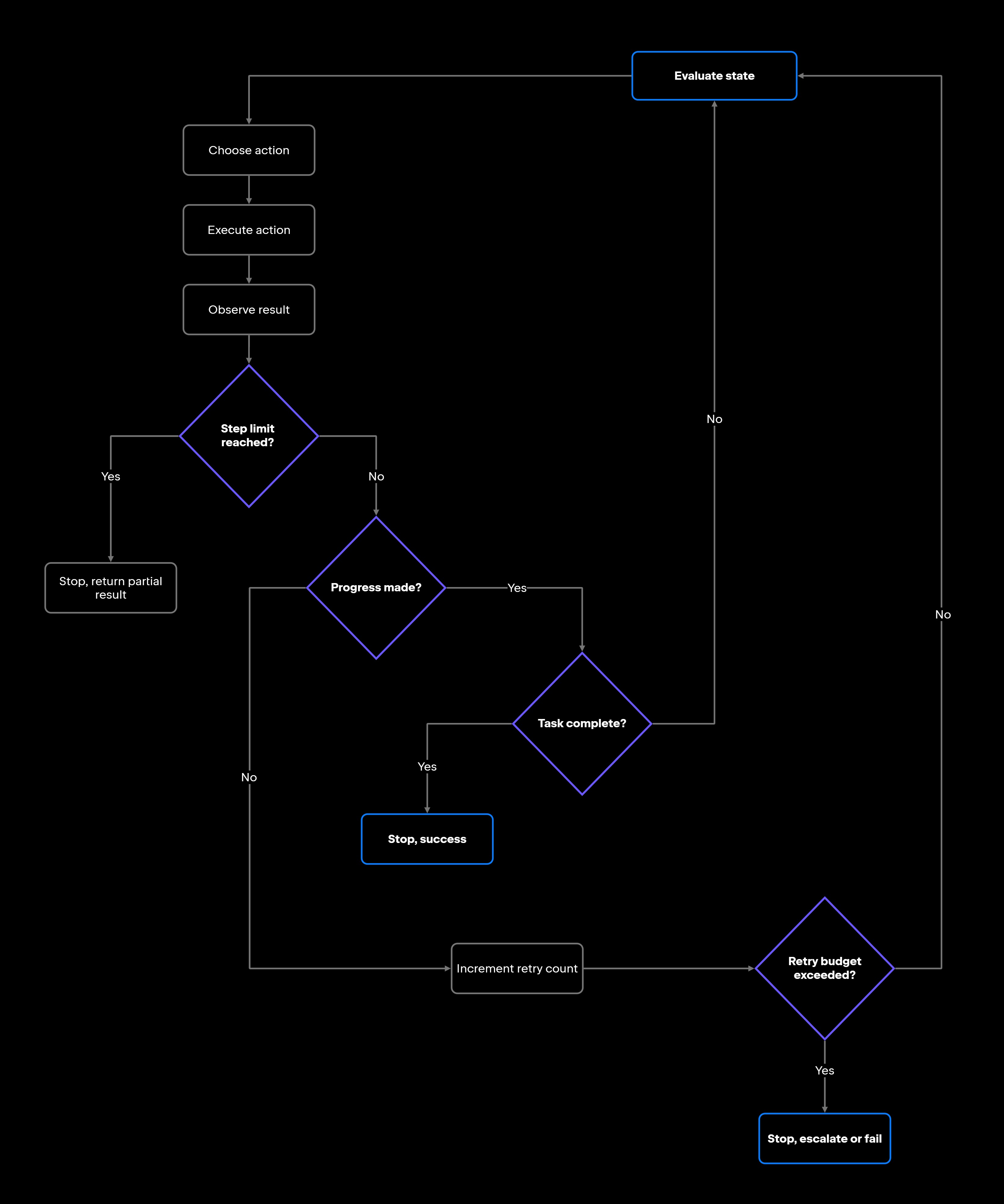
What is an AI agent loop?

Asking what an AI agent loop is really means asking what happens to each result. In a single prompt-response call, the output is the end of the road. In a loop, it becomes the input to the next decision, which is why this pattern is also called an AI agent feedback loop.

Formally, it's a runtime cycle in which the agent evaluates its current state, chooses an action, executes it, observes the result, and updates its plan for the next step, then it repeats this process. The reasoning usually runs through a large language model, which proposes the next action, and the runtime executes it within whatever permissions the agent has been given.

That cycle is what lets an agent handle multi-step work, including retries after a failure, validation passes, and any workflow where the next tool call depends on what the last one returned. In practice, that means upgrading a dependency and fixing what breaks, searching a codebase and applying a change, or validating output and retrying when it falls short.

The agent doesn't know upfront how many iterations a task will take, so the loop keeps running until a stop condition or a limit is reached. Most production agent frameworks implement the same basic cycle, though they differ in how they handle state, memory, and termination. For how one specific reasoning pattern structures the decision step inside that cycle, see ReAct agents.

Where agent loops fail

Agent loops fail when execution keeps repeating without producing meaningful progress. The agent keeps running, consuming tokens, and making tool calls while its context keeps growing – without getting closer to finishing the task. A few failure modes account for most of these cases.

Repeating the same action

The clearest sign of a stuck loop is the agent repeating a tool call, running the same command, or generating the same fix iteration after iteration. A coding agent asked to fix a failing test might run npm test, see the same three failures, apply the same patch, and run npm test again without changing strategy. Without explicit progress tracking or retry controls, the agent may fail to recognize that the same approach has already been tried.

Retrying without new information

Retries are legitimate. A transient error like a 503 is generally worth retrying. An agent that retries a 400 Bad Request 20 times with the same payload, or reruns a failing build after editing an unrelated file, is looping. A retry is only useful when the agent changes something, like the parameters, the available context, or the plan. Without new information to justify another attempt, the loop should stop or escalate rather than keep restarting.

Losing track of progress

Some loops come from poor state tracking. An agent that keeps no persistent record of what it has already finished can revisit the same work repeatedly. An agent migrating a list of modules might complete module A, and then on the next pass, read the same list and start module A over, because nothing in its working state marks it as done.

The record of completed work is runtime state: something the agent writes as it goes and reads before it decides. Without it, every pass starts from a blank slate, and the agent rederives the same next action it derived last time.

Missing stop conditions

A common root cause of infinite loops is an agent with no explicit rules for when to stop, escalate, ask for help, or declare a task failed. Without them, the loop defaults to "keep trying", and the only termination signal left is running out of token budget. Agents like Junie (JetBrains' coding agent available in the AI chat of JetBrains IDEs) pick up rules like these from a configuration that already lives in the project, which makes a missing rule a configuration gap rather than a limit of the model.

Underspecified goals make this worse. When the goal is vague, the model struggles to produce output it can confidently treat as finished, so it keeps trying variations against a success condition it cannot evaluate.

How to detect an infinite agent loop

AI agent loop detection isn't always obvious in real time. The agent may look busy, making tool calls and generating output, without moving the task forward. Three signals are worth watching:

Repeated tool calls

Check whether the agent is calling the same tool with the same inputs several times in one task run. A coding agent that runs the same git grep query over and over without refining it is almost surely stuck, and the same pattern shows up in terminal commands, API requests, and search queries. Logging tool call inputs and hashing them makes this detectable programmatically: If one hash appears more than twice in a run, treat it as a loop signal. Legitimate polling and long-running checks repeat calls by design, so scope the check to a single task run and confirm it against a progress signal before acting on it.

No change in state

This is the signal you notice from outside the loop. Watch the artifacts that should be moving, like files modified, error counts falling, or subtasks marked complete. When several iterations go by with an empty diff and an untouched task list, the loop is spending budget without advancing the work. The tell isn't that progress is slow – it's that the observable record is exactly the same it was several steps ago.

Growing cost without progress

Token usage and tool call volume rising while completion stays flat is a useful detection signal, alongside its cost impact. If a task's model-call count climbs far past its normal range with no resolved subtasks, something is wrong. Treating cost growth as a detection signal rather than a billing concern alone means you catch runaway agents before they cause serious damage. A cost alert tied to a task's expected range is a practical starting point.

How to prevent AI agent infinite loops

Preventing AI agent infinite loops depends on explicit controls: iteration limits, termination rules, state tracking, and escalation paths. Agents may not reliably self-terminate without them.

Set iteration limits

Every agent loop needs a maximum step count that acts as an unconditional circuit breaker. Once it is reached, the loop halts no matter what the agent wants to do next. Pair this with a wall-clock time limit so a slow or hanging tool call can't stall the run indefinitely.

Two separate things decide where that ceiling sits, and they are easy to conflate. Task complexity sets how many steps the work legitimately needs. A formatting pass might finish in five, while a multi-file refactor can justify 20 or 30, and a ceiling below that cuts productive runs short. Risk determines what happens when the ceiling is reached.

For low-risk work, an extra iteration costs little, so a generous ceiling is cheap insurance. For anything touching databases, production configuration, or external APIs, keep the ceiling tight and require a human checkpoint before the agent continues. When the agent does hit the limit, it should return whatever partial result it has, rather than stopping silently.

Define termination conditions

Step limits alone are not enough. The agent also needs explicit rules for when a task is complete, when it should escalate, and when a user has to approve the next move. Avoid relying solely on the model's own judgment about whether it's finished. Encode termination conditions in your orchestration layer – success criteria the output must satisfy, or a defined set of terminal actions like finish or return_answer.

Project configuration is where the definition of done – the observable conditions that mark a task complete – belongs. For a dependency upgrade, that might be a clean build with no new warnings; for a search task, the target function located with its callers listed. Define the failure path, too – the conditions under which a task is marked failed rather than retried. Three consecutive identical errors should bea failure condition, not a reason for a fourth attempt.

Give tool failures their own rule. Every tool call needs a timeout and a defined failure mode, because a tool that fails silently is indistinguishable from one that ran and found nothing. Returning a structured error instead of an empty response lets the agent retry once, try an alternative, or stop.

Track state changes

Detection tells you a loop went wrong after the fact. Instrumentation lets the loop catch it while running. Take a snapshot of the state that matters at the end of each pass and hand it to the loop's control logic, so the decision to continue is made based on evidence rather than the agent's optimism.

Keep the snapshot small and canonical. Serialize it the same way every time so that two identical situations don’t produce different-looking snapshots and the check doesn’t quietly pass. What counts as state depends on the task – tool outputs, a task checklist, and the current error set all work.

Add human escalation rules

Some situations the agent can't resolve, and making it keep trying is what turns them into loops. Define the hand-off points: an exhausted retry budget, missing permissions, the same structured error hitting repeatedly, or confidence too low to continue safely. Escalation is a first-class loop control rather than an admission of failure, and routing an ambiguous decision to a person keeps human oversight where the consequences are. In a multi-agent setup, a supervisor agent can play the same role programmatically, watching the message flow and ending a conversation that isn't converging.

Loop prevention patterns for developers

Here’s a compact checklist version of the controls above, for when you're implementing rather than designing.

Progress checks

Pick the metrics that define movement for your task and check them every pass: failing-test count, files changed, error message text, subtasks marked complete. If none of them moved, the last iteration accomplished nothing, and the next one should change strategy rather than repeat it.

Retry budgets

Set separate budgets for different parts of the loop rather than one figure for the whole run. Tool calls, model calls, and full workflow attempts each get their own. A few retries per tool call, a slightly higher allowance for model calls per subtask, and one or two workflow restarts should be a reasonable starting point to tune against your own failure data.

Confidence thresholds

An agent can stop or escalate when it isn't confident enough to continue safely. That signal comes from the agent's own checks, including validation results, whether a tool returned a clean result, and how closely the outcome matches the success criteria. Ambiguity is the trigger. A fix that leaves the type checker with a different set of errors than before, neither clearly better nor clearly unchanged, is a reason to pause and ask for human judgment.

Fail-safe defaults

When the loop state is unclear, stopping is the safer default. Preserve the current system state, log the reason, and surface the failure for review. An unnecessary stop costs almost nothing, while continuing from a state you can't characterize risks making the mess larger.

What to log when agent loops fail

Iteration limits catch loops before they exhaust your budget, but they don't tell you why the loop happened. That needs observability at the loop level: logging for every step, along with the step count and wall-clock time per task.

Good loop logs tell you why the agent repeated itself. For each iteration, log:

  • Iteration count: Which loop cycle this action belongs to.
  • Selected action: What the agent decided to do.
  • Tool inputs: The exact parameters passed to each tool call.
  • Tool outputs: The full response, not a summary.
  • State changes: What changed in the environment after the action.
  • Retry count: How many times this action or tool has been attempted.
  • Stop reason: Why the loop ended (success, step limit, escalation, or confidence threshold).
  • Escalation reason: If escalated, what triggered the escalation.

These logs help distinguish productive retries, where the agent tried something different and made progress, from infinite loops where the same action produced the same result repeatedly. The step limit is your safety net; the trace tells you whether the net is catching the right things. For reading those traces when a run goes wrong, see debugging AI agents, and for keeping watch across many runs in production, see AI agent monitoring.

Designing safer agent loops

Loops are core to how agents work, and they're also a common source of runaway, expensive behavior. The controls in this guide are not a layer to add at the end. Safe loop design rests on five of them: iteration limits, termination rules, state tracking, retry budgets, and escalation paths.

Treat infinite-loop prevention as part of the runtime design rather than an afterthought. An agent with no loop controls has no reliable exit, so build the exit before you need it.

FAQ

Can an AI agent loop be useful instead of harmful?

An AI agent loop is how agents accomplish anything non-trivial. Loops let agents run tests, retry after failures, apply fixes and revalidate, and search repositories while refining queries based on results. The risk appears when loops run without progress checks, retry budgets, or termination conditions. Without those guardrails, a useful cycle becomes a runaway one.

Can infinite loops happen even when an agent has correct instructions?

They can. More precise instructions reduce the risk, though runtime conditions still produce loops. A well-specified task can loop if the environment shifts in ways the instructions didn't anticipate – a tool that starts returning unexpected errors, a file changed by a concurrent process, or a flaky test suite that never reliably passes. Instructions lower the odds; runtime controls catch what gets through.

How do loop limits differ between low-risk and high-risk workflows?

Low-risk workflows, such as formatting or documentation updates, can run a generous step limit, since overshooting wastes a little budget and nothing else. High-risk workflows (database migrations, production deployments, API-modifying tasks) should run tight limits paired with human checkpoints. At the ceiling, the default should be to require explicit approval before going further.

What should happen after an AI agent reaches its loop limit?

Treat the output as a hand-off. Whoever picks the task up needs the stop reason, the iteration count, and the state of any work in progress, with enough context to see what the agent was attempting when it hit the ceiling. What the agent should not do is restart quietly or raise its own limit.

Damaso Sanoja

Damaso Sanoja is an engineer who is passionate about helping others make data-driven decisions to achieve their goals. This has motivated him to write numerous articles on the most popular relational databases, customer relationship management systems, enterprise resource planning systems, master data management tools, and, more recently, data warehouse systems used for machine learning and AI projects. You can blame this fixation on data management on his first computer being a Commodore 64 without a floppy disk.

JetBrains AI Solutions

Optimize your workflow. With AI built for you.

Junie

The AI coding agent with deep IDE integration that plans before it writes, then codes and tests while you stay in flow.

JetBrains AI in IDEs

Set of AI-powered capabilities built into JetBrains IDEs for software developers. It is not a standalone product or service, but an IDE-native experience composed of AI features, LLMs, agents, and integrations.

AIR

Agentic Development Environment for engineering teams building products with AI.

AI for Teams and Organizations

An open system for agentic software development. Govern AI access across your engineering org, manage agents and models, and keep costs under control.

JetBrains Context

A repository intelligence layer for coding agents. It builds a semantic index of your codebase so agents retrieve what they need instead of exploring it file by file.

Central CLI

One CLI for every terminal agent. Claude Code, Codex, Gemini, and others plug into JetBrains AI and behave exactly as they do standalone. Access is granted centrally and instantly, with models, limits, and usage analytics governed in one place.

Continue Exploring the AI Agents for Developers Guide

Agentic Workflows Explained: A Complete Guide

Explains agentic workflows, how AI agents plan and execute multistep tasks, and the patterns that make autonomous workflows reliable and scalable.

AI Agent Orchestration: How It Works

Learn how AI agent orchestration works, from planning and task routing to state management, multi-agent coordination, and reliable workflow execution.

AI Agent Architecture Explained

Explores AI agent architecture, including core components, planning, memory, tool use, orchestration, and design patterns for building reliable AI agents.