AI Agents for Developers / Building Autonomous Coding Agents

Building Autonomous Coding Agents

Autonomous coding agents inspect a codebase, reason about a development task, propose or apply a code change, and validate the result through tests, builds, or review signals. Between your instructions and your review, the loop runs on its own. Most AI coding tools stop at the suggestion and wait for you.

This article covers code-focused agent implementation rather than general AI agent construction. The workflows that pay off first are bug fixing, repository analysis, refactoring, test generation, dependency updates, and code review preparation. The sections ahead work through what makes them reliable: codebase context, scoped tools for repository operations, the coding workflow from intake through validation, reviewable diffs, guardrails, and the failure modes worth anticipating before you hand an agent write access.

Around 23% of developers still primarily write code manually, while using AI only occasionally.

Source: Preliminary findings from the JetBrains Developer Ecosystem Survey 2026 • 15,000+ developers worldwide
What makes coding agents different

A general AI agent browses the web, calls an API, or summarizes a document. A coding agent changes a live codebase where the existing behavior still has to work afterward, and that constraint drives everything else about its design.

Coding agents work inside file systems. They interact with version control, invoke build systems, and run test suites, and their output is judged largely on whether the tests pass, the build succeeds, and the diff is reviewable. Correctness, regressions, dependency relationships, style conventions, and reviewability are the constraints that separate them from general agents. A patch that works in isolation but breaks a dependent module has failed, however elegant it looks.

Codebase context

Before an agent touches a file, it needs to know where it's working. A codebase-aware agent gathers the project's dependencies, test coverage, configuration files, coding conventions, and whatever issue description or error log prompted the task.

Without that grounding, agents tend to make changes in isolation. They fix the immediate problem while missing the other modules that import the function they just renamed, or the error-handling pattern the project enforces and the new code violates.

Closing that gap is a tooling problem rather than a prompting one. Dedicated retrieval layers now sit between the agent and the repository.

For example, Air Context, currently in early access, builds a semantic index of your repositories so agents including JetBrains Junie can query relevant repository knowledge instead of reading files one by one.

File and repository operations

Coding agents read and write. Reading operations (file search, file inspection, symbol lookup, and diff review) carry little risk. Writing operations (editing source files, applying patches, modifying configuration) carry real consequences, so they need stricter boundaries: explicit scope, logged actions, and human review before the change lands.

Read-only tasks are the exception. Summarizing code, identifying the files a bug likely touches, or flagging deprecated patterns can run with minimal oversight, because nothing they produce reaches the repository without you.

Test-driven validation

Generated code that looks correct and generated code that is correct are two different things. Telling them apart means running the validation infrastructure your project already has.

Compiling is a low bar. Clearing the existing suite, adding tests that cover the changed behavior, and passing the linter is a different claim entirely. Agents that skip validation are producing suggestions with extra steps.

Coding agent workflow

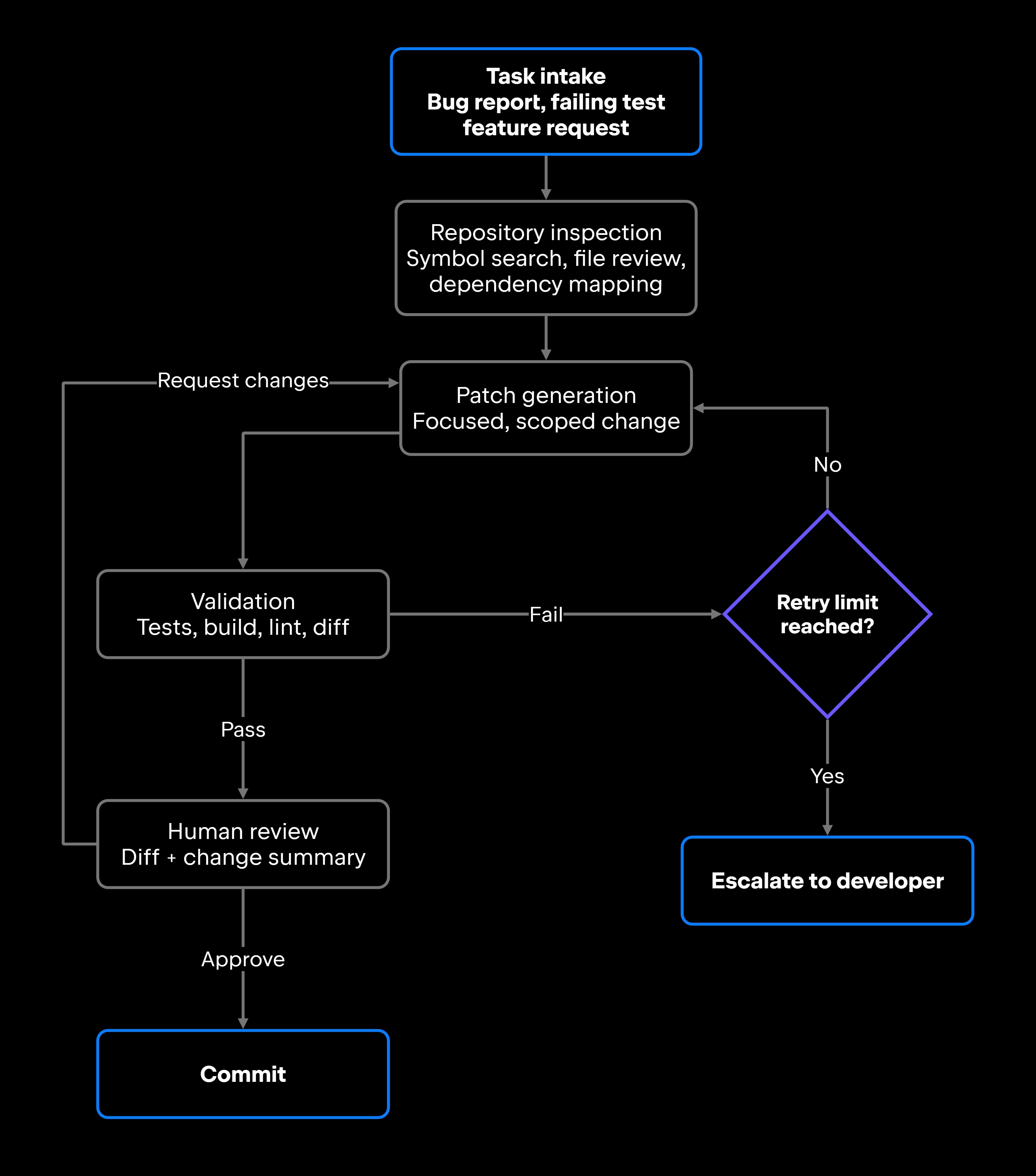
A coding agent workflow runs from task intake through repository inspection, patch generation, and validation, with defined exit conditions at the end. Shortcuts in any one step surface as errors in the final output.

Task intake

Clear inputs make the difference. A bug report with a stack trace and reproduction steps gives the agent something concrete. A failing test is better still, because the expected behavior is already encoded. Feature requests and review comments work when they're scoped tightly enough to act on.

An instruction like "improve performance" leaves an agent nowhere to start. Good implementations either ask for clarification or reduce the scope to something testable, profiling a single hot path rather than attempting a broad optimization pass. Junie takes tasks from the AI chat in your JetBrains IDE or from its CLI, and the specificity of what you write there shapes how focused the resulting change is.

Repository inspection

With a task in hand, the agent maps the relevant territory: searching for symbols, reviewing the files most likely affected, checking existing test coverage, and tracing how the code under inspection connects to the wider dependency graph.

An agent that patches an obvious bug in auth/session.py without noticing that middleware/csrf.py and tests/test_session.py depend on the behavior it changed will introduce a regression, even when the original fix is technically sound. Inspection is the step that keeps a local fix from breaking dependent code or conflicting with existing patterns elsewhere in the project.

Multirepository search extends inspection to code that isn't checked out locally, which helps when you need to validate an API contract across services.

Patch generation and validation

The strongest patches are usually the smallest ones that still fully address the task. Wide refactors that touch unrelated code are harder to review, harder to roll back, and more likely to carry side effects nobody asked for.

Then validation runs: tests, build, and linter. When it fails, the agent revises and retries, and a hard ceiling on those retries matters more than it sounds. Unlimited retries against a failing test are among the most common failure modes in agentic systems, so cap the loop (three attempts is a reasonable starting point) and escalate to a developer once it's exhausted.

Junie's Plan mode produces an implementation plan you can read before any implementation starts, which pays off on tasks large enough that you'd rather correct the approach than the diff.

Tools coding agents need

Coding agents need tools built for repository operations. A conversational tool set doesn't survive contact with a codebase. In a coding agent, tool use and function calling covers a specific inventory: reading and writing files, running validation commands, and interacting with version control.

File read and write tools

On the read side: file search, file read, symbol lookup, and cross-reference navigation – enough for the agent to understand the code before changing it. Symbol-level tools have to resolve what a name binds to, not match text that looks like it.

On the write side: file edit, diff generation, and patch application. Scope write tools so the agent names the exact lines it's modifying instead of replacing whole files. Log every write action, and make the resulting diff reviewable before you apply it.

Run write tools against a branch or an isolated environment instead of your working tree, so a bad run never touches code you haven't reviewed.

Test, build, and lint tools

These supply the objective signals that separate working code from plausible-looking code. Most projects need a test runner (pytest, jest, or go test), a build command (gradle build, cargo build, make), a type checker (mypy or tsc), and a linter or formatter (ruff, eslint, gofmt).

In an unfamiliar repository, the agent must determine which commands apply. That usually means reading the project manifest and its scripts (package.json, pyproject.toml, a Makefile) or the CI workflow, which encodes the commands the project already trusts. Getting this wrong fails quietly: The agent reports success after running a suite that never covered the changed code.

Interpreting the output matters as much as running it. A failing assertion tells the agent something different from a compile error or a lint violation, and iterative refinement depends on that structured result returning to its reasoning loop.

Version control tools

Agents touch git throughout the workflow. They read diffs, branch to isolate work, draft commit messages, and leave a rollback path.

Safe repository workflows keep the agent on an isolated branch or worktree, entirely off the main branch. Rollback stays cheap while the work lives there: The main branch never receives the change unless you merge it, and discarding a rejected attempt takes a single command.

Guardrails for code-modifying agents

An agent with write access and no guardrails can introduce regressions, break builds, expose security issues, or corrupt configurations that can take hours to reconstruct. Guardrails keep autonomous coding workflows safe enough to run.

Read-only mode first

Start with read-only work. The agent's file summaries and impact analysis are either right or they aren't, and you find out with nothing at risk. Once that reasoning holds up across a range of tasks, expand its permissions to include writes.

The same approach works for onboarding an agent to an unfamiliar codebase. Let it explore, map the structure, and report back. Junie's Ask mode covers this kind of read-only exploration.

Approval before file changes

Every file modification, dependency change, production configuration update, or command with an unpredictable blast radius should pass through you first. Put that approval point somewhere visible and easy to act on; a gate buried in a log is a gate nobody uses.

Keep the permission boundary explicit. Junie's Action Allowlist controls which actions run without asking, so you decide in advance where the agent proceeds on its own and where it stops for your decision.

Rollback and diff review

Even with approval gates, mistakes happen. Coding agents should produce a reviewable diff and a plain-language summary of what changed and why, so you catch a bad change before it merges.

Reviewable patches do a second job: they build your understanding of how the agent actually behaves. Without that, every later decision about how much rope to give it is a guess.

Evaluating coding agent output

Evaluating a coding agent means looking at working code, test results, reviewability, and consistency with your project's conventions. Production work adds a harder requirement, since the evaluation has to hold up on real codebases carrying real history. General AI agent testing practice applies here, with one advantage specific to code: The output can be verified mechanically by running it.

Test results

Passing tests are among the strongest signals we have, though they confirm only what's currently tested. Coverage gaps are where regressions hide.

Watch for a patch that skips or edits a test to force a pass, which is a red flag wearing a green check. Coverage that grows alongside the change is the strongest signal an agent can give you here.

Code quality signals

Beyond tests, look at readability, maintainability, style consistency, type safety, and dependency impact. Fixing a bug while introducing an untyped function into a fully typed codebase trades one problem for another. Pulling in a dependency for something the standard library already handles is wasteful.

Security-sensitive changes deserve closer reading. Modifications to authentication, authorization, input handling, or cryptography warrant more scrutiny than changes to business logic, because the agent may not recognize a change as security-relevant, while you will.

Regression checks

Regression checks ask a narrow question: Does this change break something that used to work? They matter most for refactoring and dependency updates, where the whole point is to change the code and keep the behavior.

Run the full test suite rather than only the tests nearest the change, confirm that public APIs haven't shifted, and verify that dependent modules still build. A failure in any of them sends the patch back for revision.

Common coding agent failure modes

Coding agents fail in predictable ways, and most of those failures are structural rather than incidental. Several are properties of the AI agent loop itself rather than of any one model. Knowing the shapes makes them easier to catch before they reach the repository.

Failure Mode

Consequence

Mitigation

Editing the wrong file

Fix doesn't address the root cause and may introduce new bugs

Require repository inspection before writes and diff review

Fixing symptoms, not causes

Problem recurs and code complexity increases

Structured task intake with root cause analysis step

Include style guide and conventions in agent context

Code fails review and style inconsistency accumulates

Ignoring project conventions

Full test suite run required before approval

Existing functionality breaks

Introducing regressions

Scope patches to the minimum necessary change

Large diffs are hard to review and risk surface increases

Over-broad refactors

Hard retry limit with developer escalation

Agent cycles indefinitely with no forward progress

Repeated failed test loops

Build and type checks catch most; tests catch the rest

Code references functions that don't exist

Hallucinated APIs

Approval gate on any dependency modification

Security vulnerabilities and breaking version constraints

Unsafe dependency changes

Treat repository content as untrusted input and keep approval gates on writes and terminal commands

Instructions hidden in code comments, issue text, or a dependency get followed as if you wrote them

Prompt injection via repository content

Most of these share a root cause. The agent lacked enough codebase context, tried to do too much at once, or ran without a validation loop that would have caught its own error.

From code suggestions to controlled code changes

Autonomous coding agents earn their place when they move past generating suggestions into producing controlled, validated changes. That takes repository context so the agent knows what it's working with, scoped tools that limit what it can reach, validation loops that catch errors before the change is committed, reviewable diffs, and a rollback path for the times things go sideways.

Expand autonomy gradually, and let evidence set the pace. Once an agent's read-only analysis has held up across a representative range of tasks, it has earned a narrow write scope, gated behind explicit approval and a full validation run before any patch is accepted.

Junie follows this shape, running in the AI chat of your JetBrains IDE or from the CLI, working through a plan you can review before implementation, and querying Air Context for semantic codebase understanding, where available. The autonomy works because the controls around it are well designed.

FAQ

How much autonomy should a coding agent have in early prototypes?

Less than feels natural to give it. A prototype's job is to tell you whether the agent reasons soundly about your codebase, and having it propose a patch without applying it answers that question with none of the risk. Widen the scope once the proposals have been right often enough to be boring, and keep the approval gate even then.

How can developers compare coding-agent performance across different codebases?

Track test pass rate before and after agent patches, regression rate, review acceptance rate, and time to a reviewable diff. Run the same representative task set across codebases so the comparison holds. Break the numbers out by bug fixes, refactoring, and test generation separately, since agents often perform differently across task types.

What stopping conditions work best for coding agent loops?

Exit codes and structured tool output beat parsing free-text model responses. For a test-writing agent, all tests passing is the right signal; for a refactoring agent, a linter exiting zero works well. Add a circuit breaker alongside the task-level condition: when the agent calls the same tool with the same arguments three times, it's looping, not working.

What repository permissions should teams avoid giving coding agents?

Reserve direct write access to the main and production branches for humans. Require approval for changes to CI/CD configuration, production environment variables, and dependency lock files. Keep secrets and credentials out of reach entirely. Give the agent isolated branches or worktrees you can discard when a run goes wrong.

When should a coding agent stop and hand the task back to a developer?

Escalate on an exhausted retry limit, on a task ambiguous enough to need clarification, when the change would touch production configuration or security-sensitive code, or when the patch has grown too large to review at a glance. An agent that escalates well is more useful than one that pushes through to a harmful change.

Damaso Sanoja

Damaso Sanoja is an engineer who is passionate about helping others make data-driven decisions to achieve their goals. This has motivated him to write numerous articles on the most popular relational databases, customer relationship management systems, enterprise resource planning systems, master data management tools, and, more recently, data warehouse systems used for machine learning and AI projects. You can blame this fixation on data management on his first computer being a Commodore 64 without a floppy disk.

JetBrains AI Solutions

Optimize your workflow. With AI built for you.

Junie

The AI coding agent with deep IDE integration that plans before it writes, then codes and tests while you stay in flow.

JetBrains AI in IDEs

Set of AI-powered capabilities built into JetBrains IDEs for software developers. It is not a standalone product or service, but an IDE-native experience composed of AI features, LLMs, agents, and integrations.

AIR

Agentic Development Environment for engineering teams building products with AI.

AI for Teams and Organizations

An open system for agentic software development. Govern AI access across your engineering org, manage agents and models, and keep costs under control.

JetBrains Context

A repository intelligence layer for coding agents. It builds a semantic index of your codebase so agents retrieve what they need instead of exploring it file by file.

Central CLI

One CLI for every terminal agent. Claude Code, Codex, Gemini, and others plug into JetBrains AI and behave exactly as they do standalone. Access is granted centrally and instantly, with models, limits, and usage analytics governed in one place.

Continue Exploring the AI Agents for Developers Guide

AI Agent Orchestration: How It Works

Learn how AI agent orchestration works, from planning and task routing to state management, multi-agent coordination, and reliable workflow execution.

What Is an AI Agent Loop?

Explains how AI agent loops work, why infinite loops occur, and practical techniques for preventing runaway execution in production systems.

AI Agent Architecture Explained

Explores AI agent architecture, including core components, planning, memory, tool use, orchestration, and design patterns for building reliable AI agents.