AI Agents for Developers / What Is Long-Term Memory in AI Agents? A Practical Guide

What Is Long-Term Memory in AI Agents? A Practical Guide

Sessions with an AI coding agent often start the same way. You re-explain that the team uses snake_case, that deployments go through staging first, and that the payments service has its own release rules. The agent is capable. It just doesn't remember.

Long-term memory is the mechanism that closes that gap. It stores selected facts, preferences, and decisions outside the context window, then pulls them back when they bear on the task at hand. It is not a transcript of everything that has been said. Saving every conversation gives you a bigger haystack, while long-term memory is deliberate about what goes in, so that what comes back out is worth acting on.

This guide covers how long-term memory works, when to use it, what to store, how to implement it, and where implementations break in production.

Around 23% of developers still primarily write code manually, while using AI only occasionally.

Source: Preliminary findings from the JetBrains Developer Ecosystem Survey 2026 • 15,000+ developers worldwide

What is long-term memory in AI agents?

Long-term memory is a persistence layer that sits outside the model's context window. It holds stable facts about a user, a project, a team, or a recurring workflow, and the agent queries it selectively when those facts are relevant to the current task.

A context window holds what the agent is working with right now, and it gets rebuilt for every request. Long-term memory holds what the agent should still know next week, in a structured record that outlives the session.

What makes memory long-term

Information earns a place in long-term memory when it stays useful after the interaction that produced it. In a development context, that usually means:

  • User preferences, such as preferred language, verbosity level, and output format.
  • Coding conventions, from naming style to linting rules to test naming patterns.
  • Project terminology, including internal service names and domain abbreviations.
  • Recurring workflows, such as release steps, pull request (PR) conventions, and environment setup.
  • Architectural decisions, along with the documented rationale behind them.
  • Team and organization rules, such as review requirements, approved libraries, and security policies.

What ties these together is continuity, which is a different goal from simply having a bigger context window. Each one is something you would otherwise repeat, and an agent that recalls them behaves more consistently from one session to the next.

These also differ in who they belong to. A preference is yours, a convention belongs to the repository, and a review policy belongs to the team or the whole organization, which is why scope is part of the record rather than an afterthought.

Why AI agents need long-term memory

Not every agent needs it. A stateless agent handles simple, self-contained tasks perfectly well: converting JSON, explaining a stack trace, generating a regex. Nothing carries over, and nothing needs to.

Ongoing projects are the clearest case, as they accumulate architectural context and conventions that should carry forward. Repeated workflows are worth recording once the agent has worked through them a few times. A personalized assistant needs your preferences to outlive the session that established them. Long-running tasks also need durable workflow state or checkpoints so they can resume after interruptions. That state is related to memory, but it is not necessarily long-term memory – task progress and intermediate results often belong in a dedicated state store.

Long-term memory vs. other types of memory

Three neighboring mechanisms get grouped under the same word, and they behave differently. Knowing which one you actually need saves you from building the wrong thing.

Long-term memory vs. context windows

The context window is working space. Long-term memory is storage.

Property

Context Window

Long-Term Memory

Duration

Temporary

Persistent

Scope

Current model invocation / Active working context

Multiple sessions

External

Retrieved when needed

Bounded by storage, not tokens

In the prompt

Assembled per request

Fixed token limit

Storage

Lifecycle

Size limit
A larger context window does not create persistence by itself. The application still has to decide what information to assemble and send on each model invocation, and what should survive across sessions. Long-term memory keeps persistent information outside the active context and retrieves only what is relevant when it is needed.

Long-term memory vs. RAG

RAG and long-term memory often use similar retrieval mechanisms, but they serve different purposes. RAG typically retrieves knowledge from an external corpus, such as documentation, code, or a knowledge base, while long-term memory preserves durable information learned or established across users, projects, workflows, or previous interactions. Long-term memory holds what emerged from working with you.

A useful rule of thumb: RAG answers what a framework does, and long-term memory answers what your team decided to do with it. The boundary is not architectural: A memory system may itself use embeddings or vector retrieval, and RAG can also retrieve project-specific decisions stored in documents. Plenty of agents use both, with RAG supplying general knowledge and memory layering project-specific context on top.

Long-term memory vs. conversation history

Persisting the full transcript is not the same as having memory. Conversation history grows without structure, and the useful parts get harder to find as it accumulates. Long-term memory is filtered on the way in: You extract the durable fact and discard the exchange around it. A long conversation might yield a single line worth keeping, such as a team's preference for integration tests at service boundaries.

What should AI agents remember?

Store less than you think you need. The test for any candidate memory is whether it will still be true, and still useful, the next time it comes up.

Good candidates for long-term memory

Good candidates tend to be stable, reusable, and expressible as a clear fact or rule.

User preferences qualify, including preferred language, output format, or how much explanation you want alongside a change. The same goes for repository conventions, ranging from branch naming and commit message format to PR template requirements. Deployment rules belong here, such as which environment requires manual approval, and so do organization-wide constraints like the approved dependency list or which services require a security review before changes ship. The architectural decisions a team has already argued through qualify, too, like choosing PostgreSQL over MongoDB for reporting reasons. Project vocabulary travels with these decisions, like knowing that the "gateway" service is what the UI team calls the API layer.

Store these as structured facts, not prose. A record like {"type": "convention", "value": "use snake_case for Python variables", "project": "billing-service"} is easier to retrieve, scope, and validate than a paragraph lifted from a chat log.

What should not be remembered

Some categories should never reach the store:

  • Secrets and credentials should never be stored as agent memory.
  • Sensitive personal data should only be retained when it is genuinely required, explicitly permitted, and protected by appropriate access and retention controls.
  • Temporary instructions, unverified assumptions, and obsolete project information should generally stay out of long-term memory. The same goes for conventions the team abandoned months ago.

The governing rule should be an explicit memory policy: Users should know what categories may be retained, and systems should require confirmation where appropriate. Team or organization-level memories may also be governed by documented project or organizational policy rather than per-item user approval.

How long-term memory works

Capturing memories

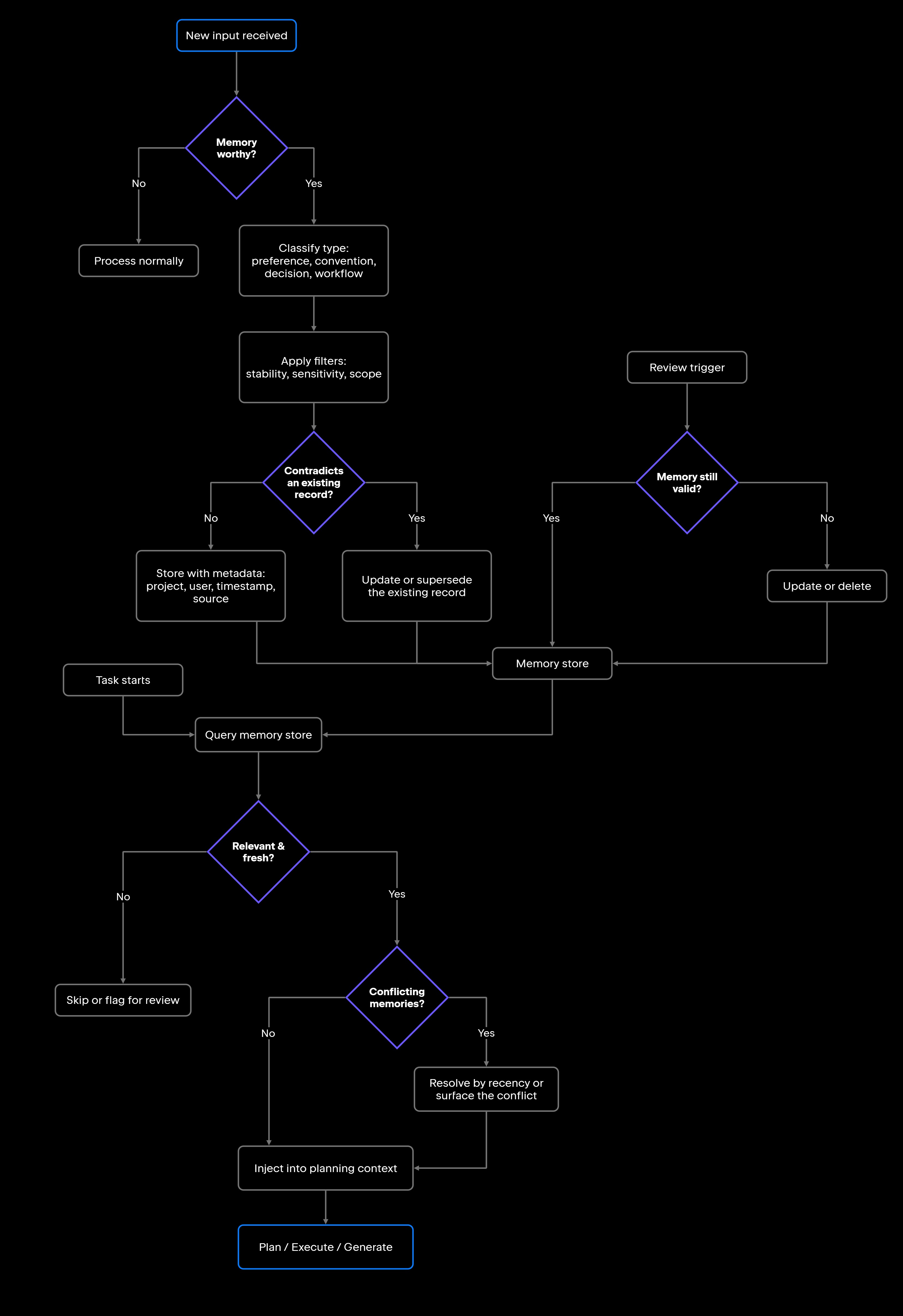
Capture runs in stages, beginning with detection. Something in the exchange looks like a preference, a decision, or a reusable fact. In practice, that happens either through an explicit instruction from you (such as "always squash merge into main") or through a classification pass where a model reads the exchange and proposes candidates.

Classification then assigns the candidate a type – user preference, project convention, architectural decision, or workflow rule. Filtering follows to check whether the memory is stable, whether it is sensitive, and whether it falls in scope.

Whatever survives gets stored with metadata: who it belongs to, which project, when you captured it, and where it came from. That metadata is what makes the store searchable later, and without it, retrieval degrades toward scanning an undifferentiated pile.

Retrieving memories

Memory retrieval should happen at the points where persistent context can affect the outcome. Planning is a common retrieval point, because prior decisions or conventions may shape the approach. Additional retrieval may be useful before high-impact tool calls or code changes when the task requires extra precision.

Ranking decides what actually reaches the prompt. Common retrieval strategies combine semantic or keyword relevance with metadata such as scope, source, freshness, and last-confirmed date. If you pull too many memories, you crowd out the task itself, which is why a small, well-ranked set beats a large one.

Conflicts need handling at both ends. Write-time deduplication catches the obvious cases, such as when a new record contradicts an existing one on the same key and scope. Whatever slips through has to be caught at retrieval, usually because one memory superseded another without the original being removed. You can resolve these conflicts using source authority, explicit versioning, scope, and freshness, or simply surface them when the correct value is unclear. Recency can be one signal, but it should not automatically win out.

Updating and forgetting

A store without a deletion path eventually fills up with things that used to be true. Give every memory a review trigger, whether that means assigning a date, tracking a usage count, or tying it to an event like a major version bump. When a memory is corrected, supersede or invalidate the old record, so retrieval stops using it. Keeping the previous version may still be useful for auditing and debugging.

When a project ends or a preference changes, your deletion policy must clear the entries associated with it. A stale memory can ultimately do more damage than a missing one, because the agent has no way to tell that what it recalls has already expired.

How developers implement long-term memory

Three decisions shape your implementation: what the agent may remember, where those memories live, and when they get retrieved.

Define memory rules

Settle the policy before writing any storage code, because it determines everything downstream. Define which categories are eligible at all, which ones store automatically versus needing explicit confirmation, and who is allowed to see a given memory. While retention and deletion mechanics are covered above, the decisions about which categories are subject to those rules belong here.

Write the policy down and make it inspectable. If you cannot see what the agent has stored and why, you have no real basis for trusting it.

Choose an appropriate memory store

Query patterns should drive your storage choice:

  • Key-value stores (Redis, for example) handle exact-match lookups well.
  • Relational databases suit structured memories with clear relationships.
  • Document stores absorb varying schemas smoothly.
  • Vector stores support semantic search using either a dedicated service or pgvector on a Postgres instance you already run.

A common pattern is to combine structured storage for precise lookups with semantic retrieval for fuzzy recall. This can use separate systems, or a single database that supports both structured queries and vector search. The storage architecture behind each option, and the retrieval mechanics that go with it, are worked through separately in the dedicated Memory in AI Agents guide.

Integrate memory into the agent workflow

The lifecycle already answers when memory may be useful. What remains is deciding how retrieval fits into the control flow. Some systems retrieve memory deterministically at predefined workflow stages, while others expose memory as a tool the agent can query on demand. In either case, retrieval should follow an explicit policy for scope, relevance, and permissions.

IDE-connected agents may also benefit from persistent project context, but not all persistence is agent memory. JetBrains Junie, for example, supports project-level and global guidelines that provide reusable instructions such as coding conventions and architectural rules across tasks. These guidelines are explicitly authored instructions rather than memories inferred and stored by the agent. Long-term memory is different: It selectively preserves information learned or established over time and retrieves it when the current task requires it.

Common challenges and failure modes

Memory systems fail in a small number of predictable ways, and most of those failures trace back to a design decision rather than a bug in the store. The table below pairs the symptom developers actually notice with the cause behind it and the fix that removes it.

Failure

Cause

Mitigation

Storing too much

No filtering rules

Define explicit memory categories before implementation

Stale memories

No review or deletion policy

Set retention periods and trigger review on key events

Tag memories with user, project, and task type

Isolate data by user, team, and project ID, and scope every query to the caller

Compare against existing records at write time; resolve using source authority, version, scope, and freshness at retrieval

Missing scope metadata

Flat memory structure

No deduplication logic

Irrelevant retrieval

Wrong user scope

Conflicting memories

Classify and filter before storing, and never store credentials

Rank session instructions above stored memories at injection time

Sensitive data stored

Retrieval weight too high

Privacy issues

Memory overriding current instructions

The mitigations share one discipline: Decide what memory is allowed to hold, and for how long, before the store starts filling up. Retrofitting those rules onto a populated store means auditing entries nobody remembers writing.

Best practices

The practices below are the ones that implementations most often skip:

  • Save information that holds still, since anything changing week to week is a weak fit for a long-term store.
  • Validate before use, treating retrieved memories as inputs to check rather than ground truth.
  • Scope memories explicitly, marking each one as user-level, project-level, team-level, or organization-level.
  • Support updates and deletion, so every memory stays replaceable and removable.
  • Log memory reads and writes, but avoid duplicating sensitive memory content in telemetry.
  • Test memory behavior, confirming what gets stored, what gets retrieved, and what gets skipped.
  • Keep humans in control, with visibility into stored memories and the ability to correct or delete them.

Conclusion

Long-term memory buys continuity, not intelligence. What changes is that the agent stops starting over. Systems that work well are selective about what they store, scope memories carefully so retrieval stays relevant, and keep entries current instead of letting them pile up.

Start narrow. Pick the handful of stable facts you know you repeat, store those, and confirm that retrieval behaves before widening your categories. Build deletion in from the first version, because retrofitting it onto a full store is harder than it sounds.

As AI in IDEs evolves from completion toward longer-running agent workflows, persistent context becomes increasingly important. In JetBrains Junie, explicit project and global guidelines provide one form of persistence across tasks. Systems that add true long-term memory need the additional lifecycle controls described above for capture, retrieval, updates, scope, and deletion.

FAQ

What is long-term memory in AI agents?

Long-term memory is a persistence mechanism that keeps selected information available across sessions, including user preferences, project conventions, architectural decisions, and their documented rationale. The memory system stores those facts externally and retrieves them when the current task calls for them. The emphasis belongs on “selected”: A good store keeps the few things worth recalling later and lets the rest of the conversation go.

Is long-term memory the same as RAG?

No, and they are not alternatives either. Reach for RAG when the answer already exists in a document somewhere, like API docs, a runbook, or the codebase. Reach for long-term memory when the answer exists only because of something that happened between you and the agent, like a decision your team settled last quarter. The two rarely compete for the same question, which is why systems often carry both.

Can long-term memory make an AI agent less reliable?

Yes, if you manage it poorly. Stale entries make the agent act on outdated information with no signal that it has expired. Storing memories without telling the user erodes trust. A scoping mistake can surface one user's preferences in another user's session. Expiry, deletion, and conflict handling belong in the design from the start.

How is long-term memory different from a context window?

A context window is temporary and scoped to a single request: Whatever it held is gone unless something puts it back. Long-term memory lives in an external store and comes back based on relevance, so a decision made three months ago can surface without occupying context space until the moment it's needed.

When does an AI agent need long-term memory?

When stable information repeatedly needs to survive beyond the session or workflow that produced it. Conventions, preferences, and decisions that keep resurfacing are good candidates. A one-off task needs none of it, and a stateless agent is simpler to reason about.

How should AI agents forget outdated information?

They should forget information through an explicit lifecycle policy that relies on retention periods to trigger review. Event-based invalidation should occur whenever a project version changes or a user issues a correction, alongside complete deletion on request. When you correct the agent, the system should supersede or invalidate the old entry so it is no longer retrieved. Meanwhile, version history can be retained where useful for auditing, and your cleanup process should drop expired memories on a defined schedule.

Damaso Sanoja

Damaso Sanoja is an engineer who is passionate about helping others make data-driven decisions to achieve their goals. This has motivated him to write numerous articles on the most popular relational databases, customer relationship management systems, enterprise resource planning systems, master data management tools, and, more recently, data warehouse systems used for machine learning and AI projects. You can blame this fixation on data management on his first computer being a Commodore 64 without a floppy disk.

Use AI agents in your development workflow

Explore JetBrains AI solutions that help you build, use, and scale AI agents across the software development lifecycle.

Air Gateway

Run terminal agents through one JetBrains account, with access, models, and usage governed centrally.

Junie

Plan, code, debug, and automate tasks with a coding agent that works across your terminal, IDE, GitHub, and GitLab.

Air in IDEs

Orchestrate AI agents and verify their output directly in JetBrains IDEs, with full control over how changes are reviewed.

Air Teams

Automate software delivery workflows, coordinate agentic work across teams, identify bottlenecks affecting delivery.

Air Governance

Govern AI usage, models, policies, and costs across your organization, including JetBrains and third-party tools.

Air Context

Give agents shared organizational memory and context that carries across tools, workflows, and execution environments.

JetBrains Air

An open system of AI products for developers, teams, and organizations – from coding with agents to automating workflows and governing AI at scale.

Continue Exploring the AI Agents for Developers Guide

Memory in AI Agents: Types and Implementation

Learn how memory enables AI agents to retain context, manage long-term knowledge, and improve planning, reasoning, and multistep task execution.

How to Manage AI Agent Context Windows

Learn how to manage AI agent context windows, reduce context loss, and improve performance, accuracy, and reliability in long-running workflows.

AI Agent Architecture Explained

Explores AI agent architecture, including core components, planning, memory, tool use, orchestration, and design patterns for building reliable AI agents.