Variables and secrets
Give the agent the values your project needs at run time: plain environment variables for configuration, and secrets for anything you don't want stored or shown. A secret can also be read from an external secrets manager instead of being stored in Air Teams.
Under Environment Variables, store values that the agent receives as environment variables in the cloud environment, such as configuration flags, tokens, passwords, or API keys.
Add a variable or secret
Under Environment Variables, click New Variable.
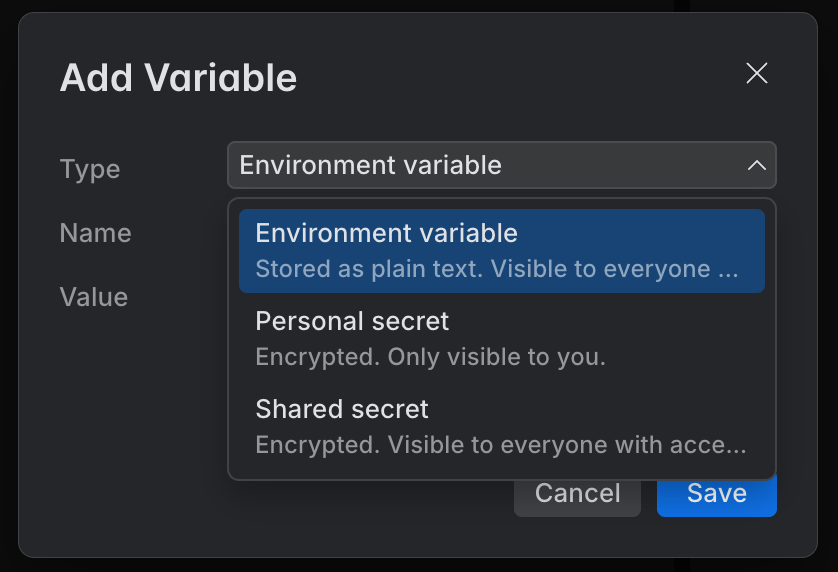
Select a Type, then enter a Name and Value.
Save the configuration.
The type controls how the value is stored and who can see it once the configuration is shared:
Type | Storage | Visible to | Use for |
|---|---|---|---|
Environment variable | Plain text | Everyone with access | Non-sensitive configuration values |
Personal secret | Encrypted | Only user | Sensitive values for personal use, e.g., a personal API token |
Shared secret | Encrypted | Everyone with access | Sensitive values the whole team shares, such as a common service token |
Provider secret, listed as <Provider> shared secret | Not stored in Air Teams – read from the provider | Everyone with access to the project | Sensitive values your team already keeps in an external secrets manager |
HashiCorp Vault secrets
Instead of storing a secret in Air Teams, a variable can read it from a secrets provider – an external secrets manager that a project connects. HashiCorp Vault is the first supported provider.
Air Teams stores the reference, not the value: the name of the provider and the path of the secret in it. The value is read from the vault when the cloud environment starts, so it never reaches JetBrains storage. Cloud tasks and automations resolve these variables the same way.
Two things have to be in place first:
The environment configuration belongs to a project, and a project admin has connected the vault to it. See Add secrets providers to a project.
The vault is reachable from the cloud environment. Air Teams reads the secret from the cloud, so a vault that's only available inside your network doesn't work.
These variables are always shared: everyone with access to the project gets the same value, and there's no personal equivalent. For a secret only you should have, use a personal secret instead.
Read a variable from a provider
Under Environment Variables, click New Variable.
Open Type and select the provider you need. Each connected provider is listed as <Provider> shared secret, with the provider type next to it.
If you're a project admin, you can connect a vault without leaving the form: select Add External Provider….
In Name, enter the name the agent gets the value under, such as
DEPLOY_KEY.In Path, enter the path of the secret in the vault, for example
secret/data/air/deploy_key.Save the configuration.