AI activity and impact
The AI activity and impact analytics segment lets you understand how AI supports your teams in everyday coding. It provides insights into code suggestions generated and accepted through different AI tools and features, as well as metrics that help you estimate how AI is used in your organization.
IDE and plugin version requirements
Data required for this analytics segment is sent from the IDEs with AI Assistant and Junie plugins. The following versions of the IDEs and plugins are supported:
IDE version 2025.3.0 or later
AI Assistant version 2025.3.0 or later
Junie version 253.487.77 or later
Earlier versions of IDEs and plugins don't send data required for this analytics segment. In the case of partially meeting version requirements, AI activity and impact will not include data for all AI tools and features. For example, if the IDE and AI Assistant versions are up to date but the Junie version is older than the minimum requirement, Junie-related data will not be included in the analytics.
AI tools and features included in the metrics
The charts on this page provide data for a specific subset of AI tools and features that provide AI-generated code inside JetBrains IDEs. The subset is divided into two categories, based on the type of interaction with the user:
Chat-based interactions: Data related to chat interactions with AI models and coding agents, such as lines of code generated and inserted by agents or the number of messages sent in chat modes. The metrics include data related to actions performed using the following tools:
Junie. The data is collected for the use of Junie through AI Assistant and through the dedicated Junie tool window when used in Code mode.
Claude Agent, a third-party coding agent by Anthropic integrated with AI Assistant. The sub-metrics include data for all authentication options used to authenticate Claude Agent in your JetBrains IDE.
Codex, a third-party coding agent by OpenAI integrated with AI Assistant. Activity and impact sub-metrics include all Codex-related data, for all authentication options used to authenticate Codex in your JetBrains IDE.
AI Assistant, for messages sent in Chat mode that are included in the counts on the Messages sent to AI chats chart.
In-editor interactions: Code suggestions generated inside the editor by the following features:
Code completion: Cloud-based completion that can autocomplete single lines, blocks of code, and even entire functions in real time based on the project context.
Next edit suggestions: Prediction of the code segments to change next and suggestion of likely edits.
Data filtering
You can set filters for all activity and impact metrics to focus on specific data. The following filters are available:
In the time range filter, select one of the predefined filters that show the last specified period, or select a custom date range. The data includes both the first and the last day of the selected period.
In the tool filter, which displays All tools by default, show only the data that originates from the selected tools. In addition to JetBrains IDEs, the dropdown includes the following tools:
JetBrains Air, the agentic development environment (ADE) by JetBrains.
JetBrains Central CLI, which is a local command-line proxy rather than a development environment. Select it to show the data that comes from the coding agents that it routes.
In the user filter, which displays All users by default, search for and select users or groups. Selecting a group includes all of its members and members of its subgroups. Expand a group to select its subgroups.
These filters apply to all charts on the page. In addition, an individual chart can have its own filter to further narrow the data.
Filters of different types are combined with a logical AND. For example, data will match both the selected date range and the user the data is attributed to.
Multiple selections of the same filter are combined with a logical OR. For example, selecting a group along with an individual user shows data for that user and all members of the group.
Filter selections are preserved across analytics segments. The filters that you set in one segment are automatically preselected when you switch to another segment.
General activity and impact metrics
General activity and impact metrics provide insights into the overall effectiveness of AI tools and features. The currently available metrics are described in the following sections.
AI contribution rate
This metric shows the rate of AI-generated code in your organization. It is calculated by dividing the number of committed AI-generated lines of code by the sum of committed AI-generated and human-authored lines of code.
This is a general metric that shows the overall rate of AI-generated code for all AI tools. To get optional per-tool rates, see AI contribution rate in Code origin breakdown that can be filtered by sources of AI-generated code.
AI code acceptance rate
This metric represents the overall percentage of accepted suggestions out of the total number of generated lines of code for all AI tools and features included in the collection of analytics data. This metric is an indication of the general quality, relevance, and trust in AI suggestions.
Specific metrics
Specific metrics let you get more details about the activity and impact of AI tools and features for specific types of interactions. For more information about each metric, see the following sections.
Code origin breakdown
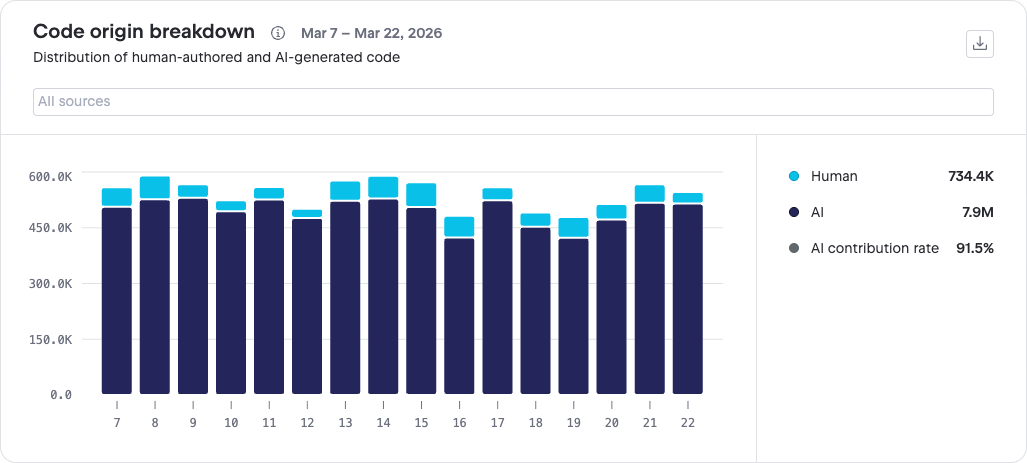
This chart shows the breakdown of lines of code committed by humans and AI tools for the selected period, helping you understand the relative impact of AI-generated code. The chart shows the following sub-metrics by default:
Human: The number of lines of code committed by human users.
AI: Lines of code generated and committed by AI. When you hover a bar that shows AI-generated code, a tooltip is displayed with lines of code additionally split by individual AI tool. Uncategorized in the tooltip includes lines of code that were generated by a new or less common AI tool that doesn't have a dedicated categorization in AI Analytics yet.
You can filter the chart by the source of authored or generated code. Available sources include human-authored code, as well as different AI code generation tools. To see the list of sources, open the dropdown above the chart.
Unlike the general AI contribution rate that shows the contribution of AI-generated code for all AI tools, the AI contribution rate sub-metric in Code origin breakdown is calculated only for the selected AI tools, according to the following formula:
Rate = (Lines from selected AI tools) / (Lines from selected AI tools + Human-authored lines)
If only Human or only AI sources are selected in the chart filter, the rate is neither calculated nor displayed.
AI-generated code
This section includes charts that show a breakdown of sources that the code came from, the acceptance rate of AI-generated code, and the related sub-metrics that were used to calculate the acceptance rate. These metrics and sub-metrics measure the share of AI-generated code and how good and relevant AI suggestions are.
Code generated by chat-based agents
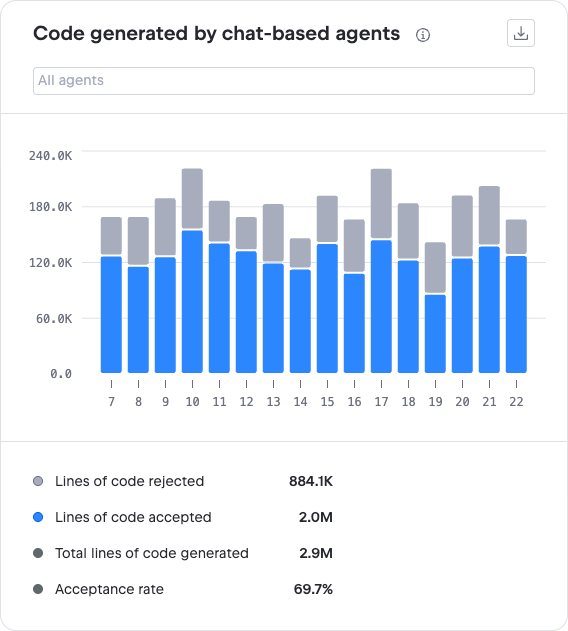
This chart shows data related to the additions and deletions of lines of code generated by AI agents in chat interactions and the number of lines of code that the users accepted. The chart shows the following sub-metrics:
Lines of code rejected: The suggested lines of code that were discarded or rolled back.
Lines of code accepted: All added or removed lines of code that the users did not discard or roll back.
The data also includes the following sub-metrics:
Total lines of code generated: All generated lines of code resulting from agent runs. Does not include code generated in read-only modes, such as Ask mode in Junie or Chat mode in AI Assistant. For more information about available modes and what they represent, see Junie and AI Assistant documentation.
Acceptance rate: The percentage of accepted lines out of the generated lines of code.
This is what the code generation and acceptance flow looks like with different chat-based coding agents:
After a task run, Junie makes changes to one or more files and lists the changes along with the number of added and deleted lines of code per file. The sum of added and deleted lines represents the number of generated lines of code. This sum also represents the number of accepted lines of code before any rollbacks.
If the user decides to roll back some or all changes, the number of added and deleted lines that were rolled back is then subtracted from the total number of accepted lines of code. As Junie can be used through the Junie plugin tool window and through AI Assistant, here are the details about user actions in the IDE count as rollbacks for both ways of using Junie:
Junie plugin tool window | Junie in AI Assistant |
|---|---|
The following user actions in the Junie plugin tool window count as rollbacks:
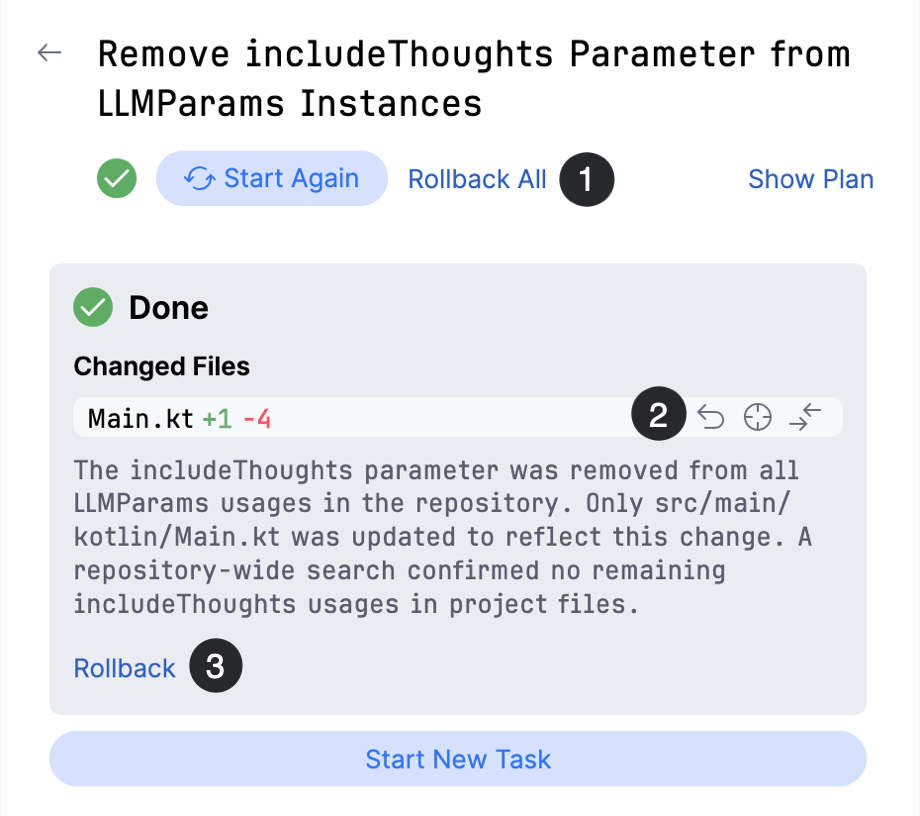 | The following user actions when using Junie through AI Assistant count as rollbacks:
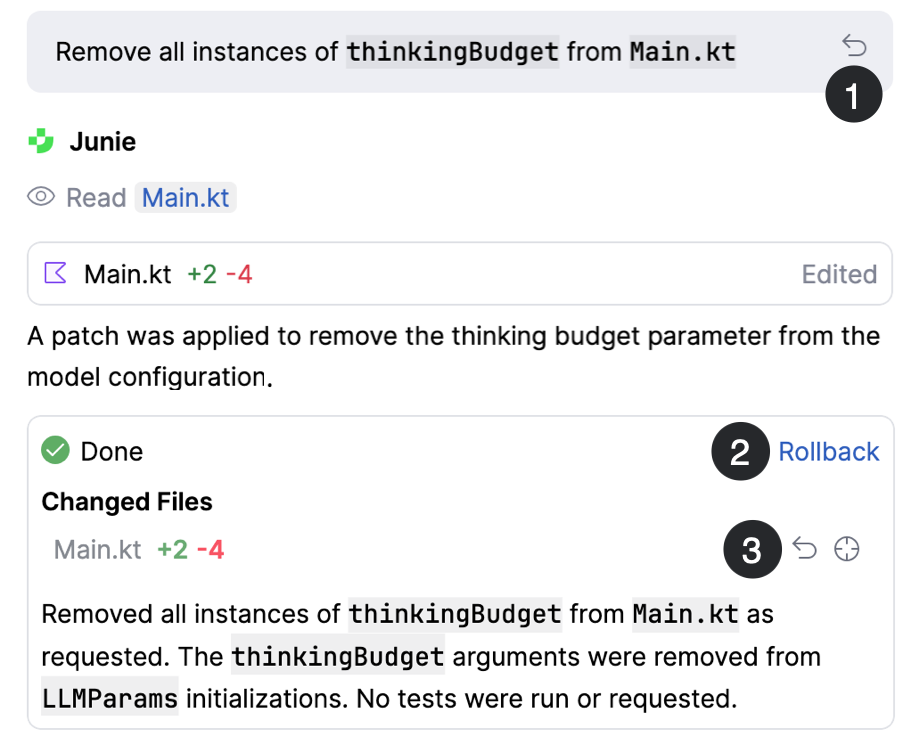 |
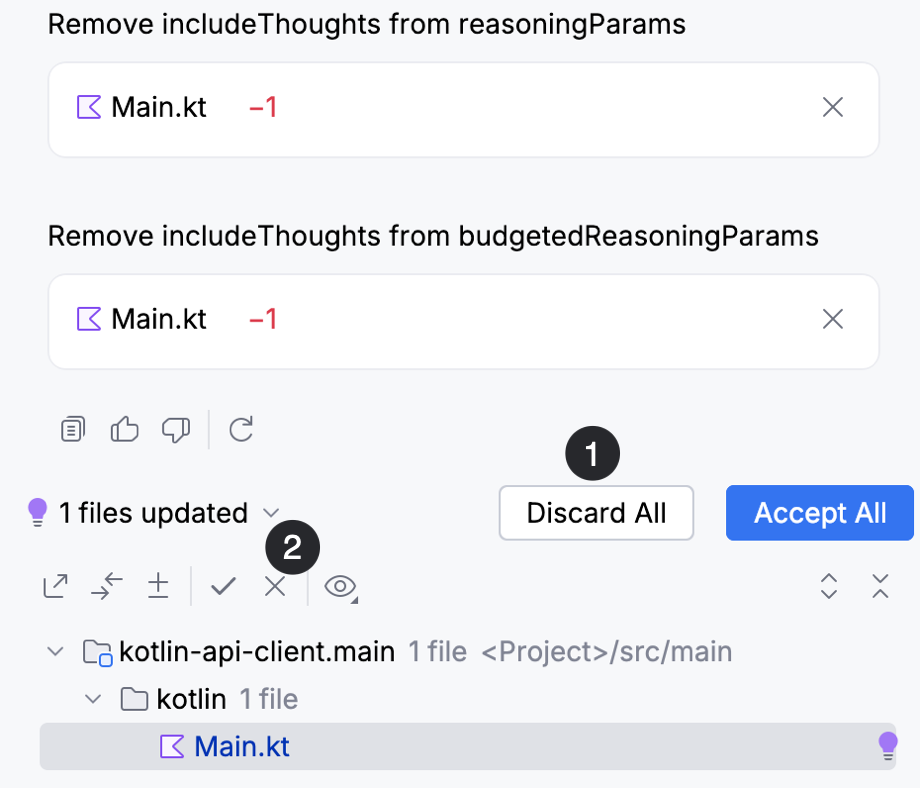
When using Claude Agent, a completed agent run results in a summary of changes to the files, along with the number of added and deleted lines of code per file. The sum of added and deleted lines counts as the number of generated lines of code. The user can then decide to accept or discard the changes made by the agent completely or partially. All accepted lines of code are added to the total number of accepted lines. Rejected lines of code are those that weren't accepted by the user through one of the following actions:
Clicking the Discard all button. This discards all changes generated by the agent.
Clicking
 Discard for a single file. This action discards only the changes made to the specific file.
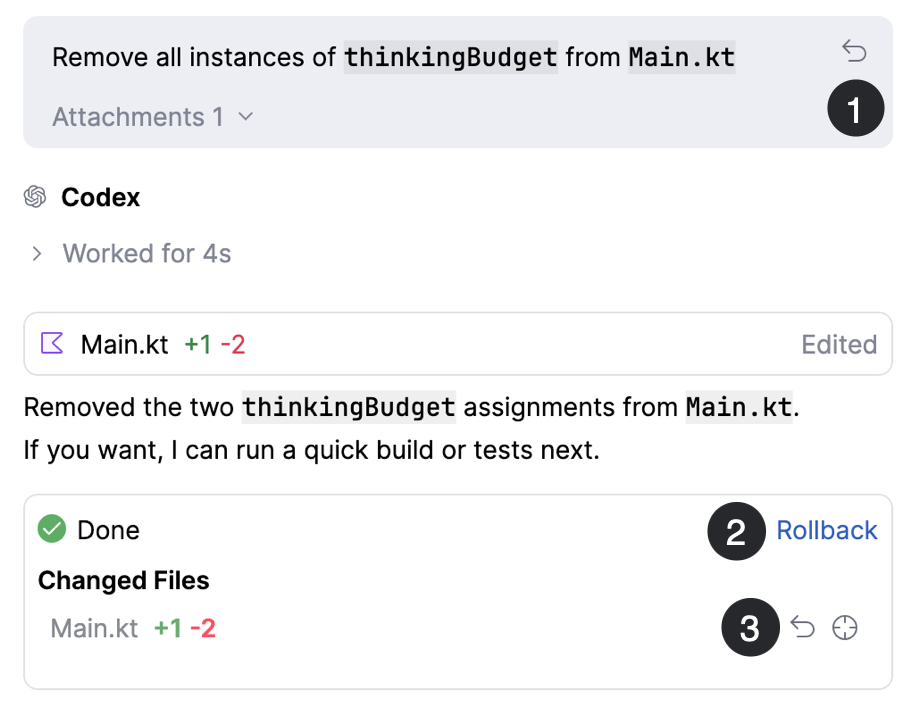
After a task run, Codex makes changes to one or more files and lists the changes along with the number of added and deleted lines of code per file. The sum of added and deleted lines represents the number of generated lines of code. This sum also represents the number of accepted lines of code before any rollbacks.
If the user decides to roll back some or all changes, the number of added and deleted lines that were rolled back is then subtracted from the total number of accepted lines of code. The following user actions when using Codex count as rollbacks:
Clicking
 Rollback here at the beginning of a task. This rolls back all changes made after the task has started.
Clicking Rollback at the end of a task. This rolls back changes made by the specific agent task.
Clicking the rollback button
for changes made to a specific file.
Code generated by in-editor features
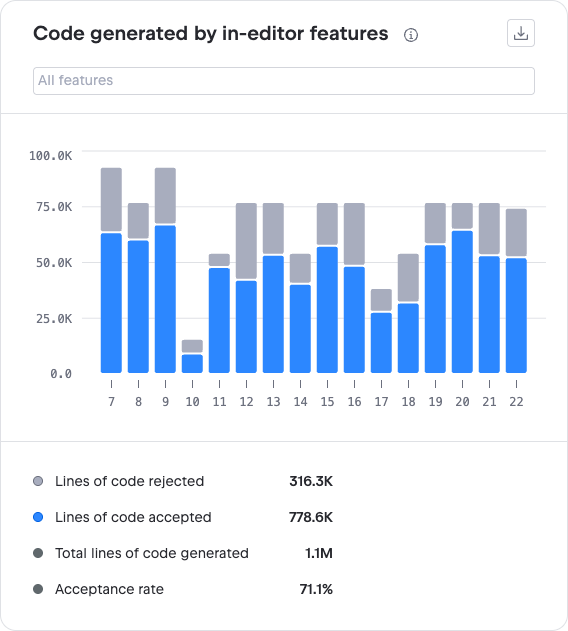
This chart includes data related to the lines of code generated by Code completion and Next edit suggestions and the number of lines that the users accepted. The chart shows the following sub-metrics:
Lines of code rejected: The suggested lines of code that weren't accepted by the user.
Lines of code accepted: Depending on the feature, accepted lines of code are counted as follows:
Code completion: All lines of code that were inserted into the editor. When the user partially accepts a suggestion, lines are counted as follows:
When the user accepts a part of a single line, this counts as one accepted line.
In multi-line suggestions, the number of accepted lines is the number of lines that the user accepted to insert.
Next edit suggestions: The number of lines that the user accepted to insert into the editor or delete from the editor. In a multistep suggestion flow, the number of accepted lines is added to the total count after each step.
For more information about user actions in the IDE to accept or reject suggestions, see Code completion and Next edit suggestions.
The data also includes the following sub-metrics:
Total lines of code generated: Depending on the specific code suggestion feature, generated lines of code are counted as follows:
Code completion: The total number of lines that were shown to the users as suggestions in the editor.
Next edit suggestions: The total number of shown lines in the editor that the user can choose to insert and delete.
Acceptance rate: The percentage of accepted lines of code out of all generated lines.
AI-modified code
This section includes charts that show the number of lines of code that were modified by AI tools and features.
Lines of code modified by chat-based agents
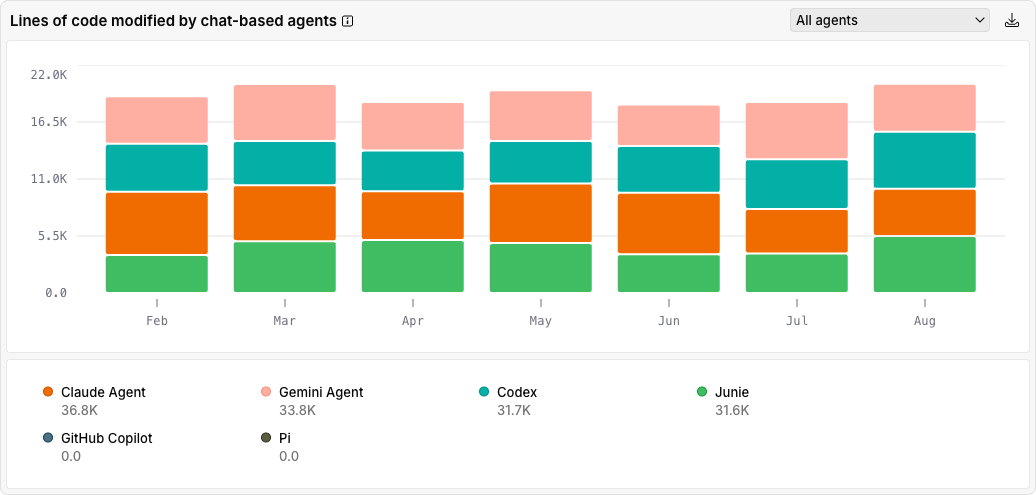
This chart shows the number of lines that were added, modified, or deleted as a result of chat interactions with a chat-based agent. You can optionally select to show data only for a subset of agents.
Lines of code modified by in-editor features
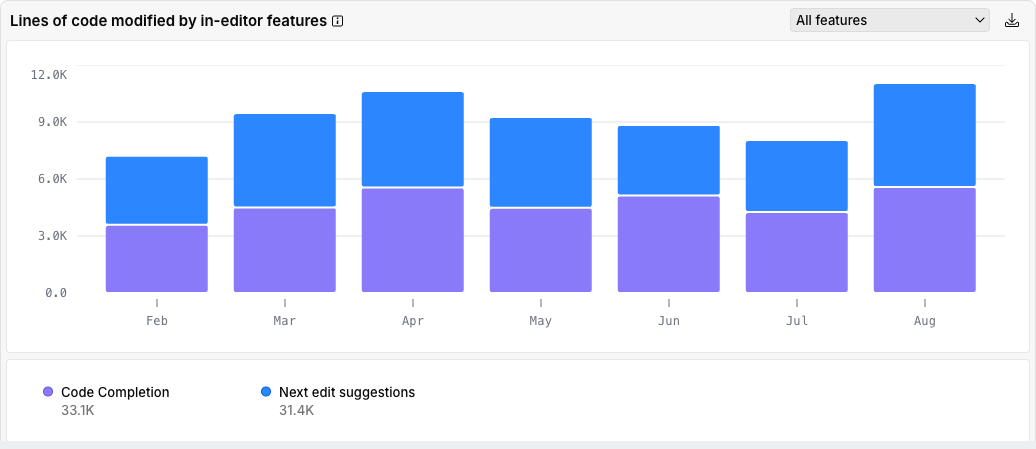
This chart shows the number of lines that were added, modified, or deleted by in-editor code suggestion features. You can optionally choose to show data for a subset of features.
AI feature activity
This section includes charts that provide insights into the number of interactions with AI tools and in-editor features. For AI tools, interactions are measured as the number of messages sent through AI chat. For in-editor features, interactions are measured as the number of suggestions shown to the user.
Messages sent to AI chats
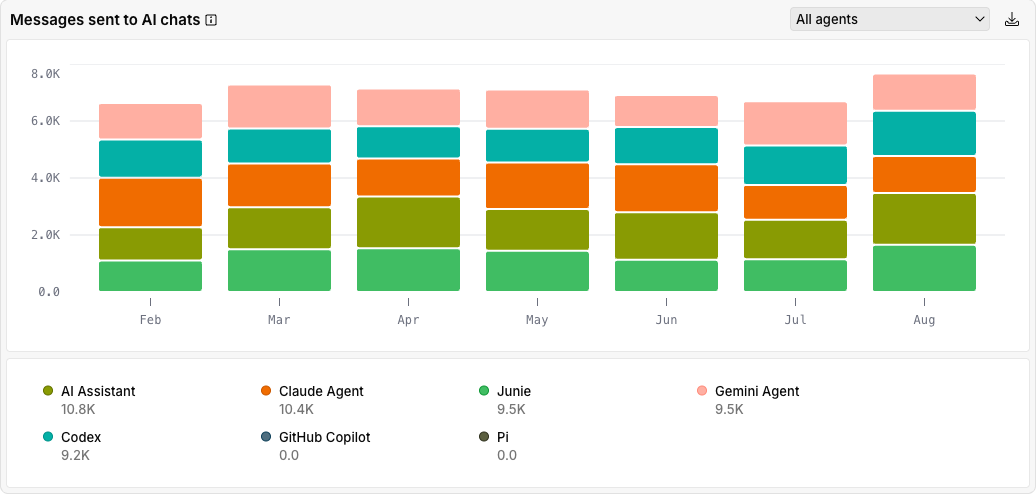
This chart shows the number of messages that the users sent to AI chats for the selected period. It provides insights into the number of interactions with AI tools over a period of time, which can help you understand agent adoption and usage volume trends in your organization.
Each message that the user sends increases the number of sent messages by one.
You can optionally select to show data only for the selected agents.
Suggestions shown by in-editor features
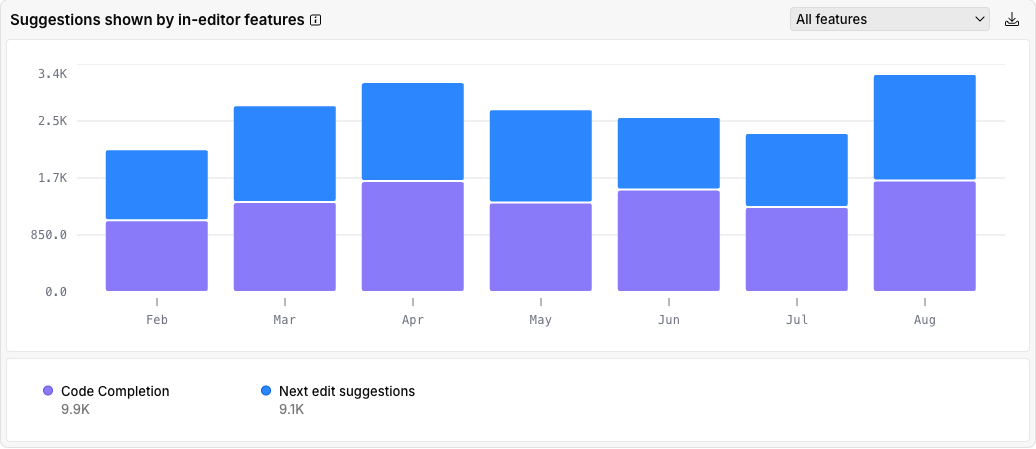
This chart shows the number of suggestions that the in-editor code suggestion features showed to the users. Each time the editor shows a suggestion increases the number of suggestions shown by one, regardless of how many lines the suggestion includes. You can optionally select to show data only for the selected AI features.