AI Agents for Developers / What Are Agent Skills and How To Use Them

What Are Agent Skills and How To Use Them

AI agent skills are reusable packages of instructions and supporting resources that give an agent specialized knowledge or a repeatable way to perform a task. A skill is stored as a directory with a required SKILL.md file that defines what the skill does and how the agent should use it, plus optional resources such as scripts, references, or templates. For example, a skill might encode how to query a database or review a diff against your team's style guide.

Skills complement tools and workflows rather than sitting at a fixed architectural layer between them. A tool exposes an action an agent can take; a workflow coordinates a sequence of steps; a skill packages reusable instructions, domain knowledge, and supporting resources that can guide either. Agents that support the Agent Skills format can discover and load relevant skills when a task calls for them, which makes repeated procedures easier to reuse and maintain.

The rest of this article covers the skill types teams actually build, how agents discover and use them, what good skill design looks like, and where larger skill libraries tend to break down.

On average, developers report that approximately 46% of the code they produce is fully generated by AI agents, 39% is written with AI assistance, and 27% is written entirely manually.

Source: Preliminary findings from the JetBrains Developer Ecosystem Survey 2026 • 15,000+ developers worldwide
What are agent skills?

An agent skill is a reusable package for a specific capability or workflow. At minimum, it contains a SKILL.md file with metadata and instructions. It can also include scripts, reference material, templates, or other files that the agent loads or executes when the task requires them.

Skills can also be portable across agents and projects. A run_test_suite skill, for example, could be reused by a refactoring agent, a migration agent, or a release agent rather than redefining the same procedure for each one.

That portability is enabled by the Agent Skills specification, an open format in which each skill is a directory containing a required SKILL.md file and optional supporting resources such as scripts, references, and templates. JetBrains Junie, OpenAI Codex, and Claude Code all support filesystem-based skills built around SKILL.md, although their discovery locations and implementation details differ.

Common types of agent skills

Most teams converge on the same few AI agent skills because the same tasks keep coming back. The four below are the most commonly used types of agent skills:

Search and retrieval skills

Retrieval skills give agents a structured way to find information, using consistent output formats when locating content in a project. A documentation lookup skill might query internal wiki endpoints, filter results by recency, and format the retrieved content for downstream use. A repository search skill can traverse codebases, locate function definitions, or find all usages of a deprecated API. Any agent following the open format can pair a retrieval skill with a references/ directory.

Coding and development skills

Developers reach for these agent skills most often:

  • Code generation: Instructions for the agent to follow project conventions, naming patterns, and architectural constraints when writing new code.
  • Debugging assistance: A skill that guides the agent to analyze the failure context, check for common failure modes, and suggest a fix.
  • Test creation: Instructions to generate unit tests that match your project's test framework, coverage expectations, and naming conventions.
  • Code review support: A skill that applies your team's review checklist, flags anti-patterns, and checks for security issues.
  • Repository analysis: Instructions for traversing a codebase to generate summaries and identify likely areas of impact.

A skill-creator skill can scaffold any of these for you: Describe what the skill should do, and it generates the folder and SKILL.md, leaving you to refine the instructions.

Analysis and decision-making skills

Decision-support agent skills help agents perform more consistent classification, prioritization, and recommendation tasks:

  • Issue triage: Classify a bug report's severity, component, and likely owner.
  • Change prioritization: Rank a backlog of technical debt items by blast radius and effort.
  • Summarization: Condense PR descriptions and related discussion into structured summaries.
  • Recommendation generation: Evaluate trade-offs between implementation approaches and surface a recommendation with reasoning.

These skills pay off when the same decision logic needs to apply uniformly across a team. Encoding it in a skill eliminates individual variation.

Communication and productivity skills

The routine writing tasks that pile up during a development cycle are a natural fit for communication skills, including:

  • Status and sprint reports assembled from commit history and ticket data.
  • Release notes from PR descriptions and changelogs.
  • Documentation writing that keeps READMEs and API references up to date as the code changes.
  • Ticket updates that translate code changes into product-readable summaries.
  • Meeting summaries from transcripts.

A well-designed communication skill saves you real time per PR cycle, and those minutes compound across an active team.

Knowing what a skill does is only half the picture, though. The more consequential question is how the agent decides which skill to use, and when.

How agent skills work

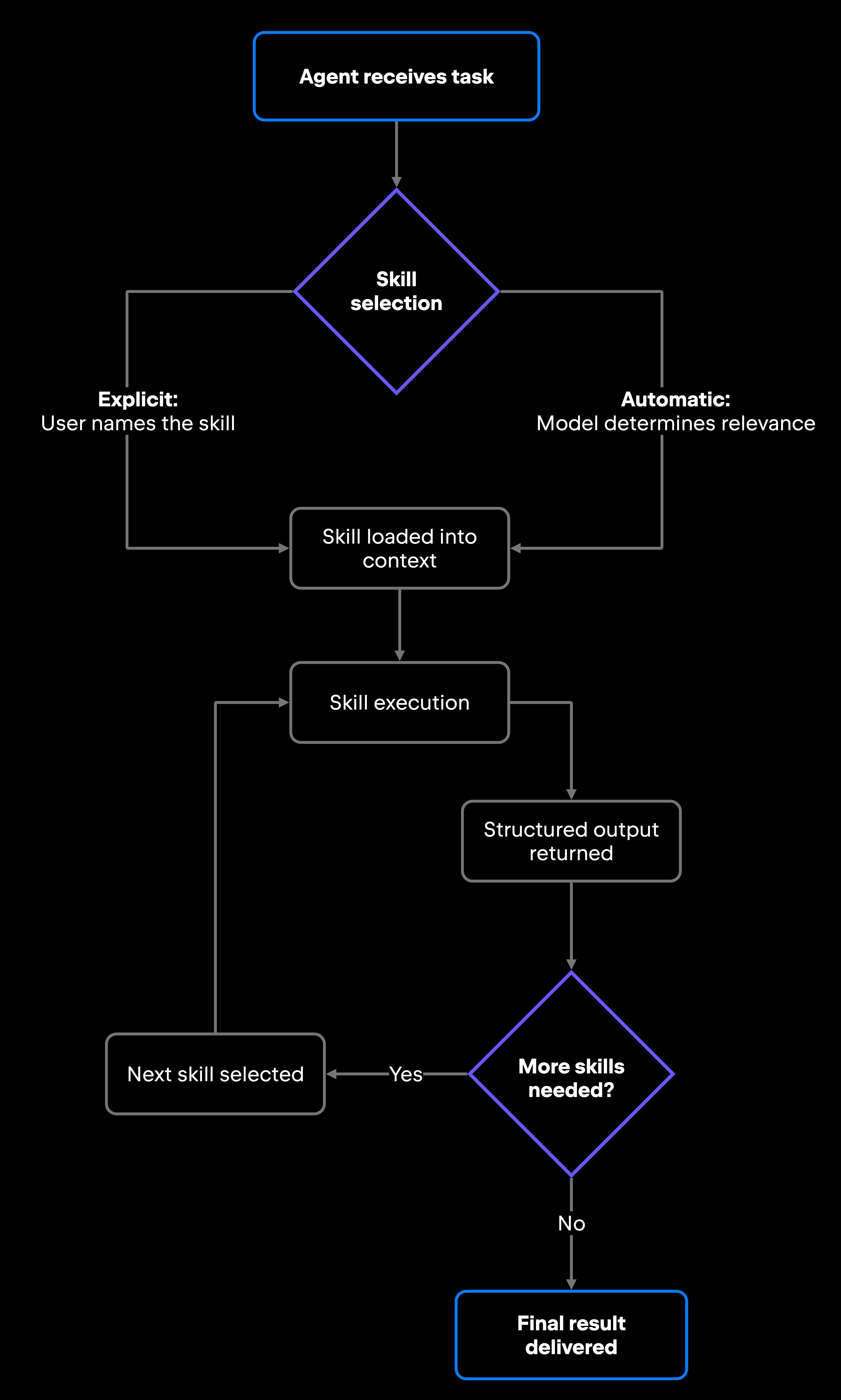
The runtime around a skill decides how reliable it turns out to be. How agent skills work comes down to three moments: The agent selects one, executes it, then feeds the output into whatever comes next. At any of them, a skill may lean on prompts, tool calls, memory carried across steps, or external services.

AI agent skill selection and execution flow

Any of the three can go wrong on their own, and the earlier they do, the less the remaining ones matter.

Skill selection

At inference time, the agent weighs the available skills against the objective it has been given, the context it is working in, the permissions it holds, and whatever the surrounding workflow requires.

Selection runs through the same model as everything else, working from what the model can read: the skill's name and its description. Two skills with similar names or overlapping descriptions could send the agent to the wrong one. A large, undifferentiated skill library makes that more likely, because more of the model's attention goes to choosing rather than executing.

How the choice gets made varies. Rule-based selection binds a skill to a trigger, so the same condition always loads the same skill. Leave the judgment to the agent, and you get model-driven selection that is more flexible and harder to predict. In orchestrated setups, a coordinating layer decides, picking skills as a plan advances. Most implementations mix these, and most also let you bypass the question by naming the skill you want directly in your prompt.

Scoping narrows the field before any of that runs. A skill installed for a single project stays unavailable elsewhere, which keeps the candidate set small and the choice easier.

Skill execution

Once selected, a skill loads its instructions into the agent's context. Supporting material stays out until the task calls for it, so the agent reads a reference file or runs a helper script only when it needs one. A well-stocked skill can therefore stay large without flooding the context window. The agent then executes the defined capability and returns a structured output: a code diff, a triage classification, a test file, or a document.

Execution happens within defined boundaries. Skills can specify validation rules (output must cover all changed files; response must include a severity classification) and runtime controls (specific tools the agent should use; output format requirements). The skill defines what to do, how to do it, and what the output should look like, which helps keep results consistent from one invocation to the next.

Combining multiple skills

A single-agent task often calls for more than one skill. A dependency bump might start with a repository search skill finding every call site the new version affects, hand off to a change prioritization skill ranking those call sites by blast radius, and end with a communication skill writing the PR description. The agent chains them without being told to.

Composition is where output discipline pays off. Each skill in the chain needs to produce a well-defined output format that the next skill or workflow step can consume reliably; without one, a chain produces inconsistent or broken downstream results.

Agent skills vs. tools vs. workflows

The agent skills vs. tools vs. workflows distinction is the one developers hit first, usually while building their second or third skill. Tools perform discrete actions; skills package reusable capabilities with context and constraints; and workflows coordinate the execution sequence. Conflating the three leads to poorly scoped implementations that mix concerns and reduce reusability.

Aspect

Tools

Skills

Purpose

Execute a discrete action

Package a reusable capability

Scope

Single operation

Workflows

Coordinate execution sequence

Single-responsibility capability

Multistep process

Reusability

Callable by any agent or code with access to it

Reusable across agents and projects

Reusable as end-to-end patterns

Execution model

Direct invocation, immediate result

Agent-mediated, context-dependent

Orchestrated, may involve multiple agents

Typical examples

File read, API call, shell command

Code review, issue triage, doc generation

CI pipeline agent, PR review flow, onboarding automation

Take code review as the worked example. A tool calls the GitHub API to fetch a diff. The skill is what tells the agent how to read it: style guide context, the checklist, and what counts as a finding. Sequencing the two, with approval gates where they're needed, is the workflow. How those sequences get built and run is the subject of the dedicated Agentic Workflows Explained guide.

Designing effective agent skills

Single responsibility is the principle that carries most of the weight here. A skill that does one thing, takes structured inputs, and returns a predictable format stays debuggable; a skill that covers several concerns across hundreds of lines of instructions does not, because a failure gives you no obvious place to look.

The most common mistake when building skills is making them too broad. A "development" skill that covers code generation, debugging, testing, and documentation review is hard to test and harder to debug, because the agent cannot tell which part applies to the task in front of it.

Good skill design comes down to a few concrete principles:

  • Each skill should do one thing. A test generation skill generates tests and does not do code review or documentation. When you need both, chain two focused skills rather than build a single combined skill. It is the principle that slips first, usually when a skill quietly grows a second responsibility that should have been its own sibling.
  • Name the inputs the skill requires. An issue triage skill needs the bug report, the component list it can assign to, and your severity definitions. Missing inputs produce unreliable outputs.
  • Design skills to generalize across similar task types where possible. A documentation generation skill scoped only to Python functions is a narrower investment than one that handles multiple languages, with language-specific behavior parameterized in the references/ directory.
  • Define what a valid output looks like. If a triage skill should always return a specific set of fields, such as a severity level and a suggested owner, build that into the instructions. Well-defined output contracts help composition stay reliable.
  • Give the skill rules it can use to check its own work against. A review skill might require every changed file to appear in the findings; a test generation skill might require each new test to compile. Validation rules catch a bad run before you do.
  • Keep the SKILL.md precise. Skills that span several hundred lines tend to exhibit inconsistent behavior. If you need that much context, split the skill or move supporting material into the references/ directory.

As mentioned, skill descriptions deserve particular attention because they are what the agent reads when deciding whether to invoke the skill. A vague description causes misfires: The agent invokes the skill at the wrong moment, or skips it when it should run. A good description states both what the skill does and when to use it, in vocabulary specific enough for the agent to match against a real request: "Generates unit tests for a changed file using the project's test framework and naming conventions. Use when the user asks for tests and names a file or a diff."

Common challenges when using agent skills

Skill libraries that aren't actively maintained become liabilities. Overlapping scope, skill sprawl, and inconsistent outputs all trace back to the same habit: treating skills as write-once artifacts rather than code that needs ownership and versioning.

Challenge

Concrete risk

Mitigation approach

Overlapping skills

Two skills with similar descriptions cause the agent to invoke the wrong one, or both

Define non-overlapping scope in each SKILL.md. Use distinct names and clear capability boundaries

Skill sprawl

Inconsistent outputs

Version management

Discoverability

Maintenance overhead

Testing complexity

Too many specialized skills for the agent to navigate efficiently as the library grows

Audit skill usage and overlap regularly. Consolidate skills that share most of their instructions

The same skill produces inconsistent output formats across invocations

Add explicit output format requirements to the skill's instructions

Skill updates can silently break workflows built on the old behavior

Pin consumers to a tested version before rolling out changes; see the FAQ below for the full versioning workflow

Developers don't know which skills exist, so they create duplicates

Maintain a skill registry. In JetBrains' AI in IDEs, use the built-in Skill Repository for shared skills

Skills can become outdated as codebases and practices evolve

Assign skill ownership and treat SKILL.md updates as part of normal development work, with review as appropriate

Hard to validate that a skill produces the right output across edge cases

Define example inputs and expected outputs. Test skills before deploying to production workflows

Discoverability is the failure mode teams hit fastest: A developer who cannot find an existing skill writes a second one, and the library accumulates duplicates faster than coverage. A registry is the fix, and a curated one also screens what you adopt, since an unvetted skill folder can carry malicious code the same way an unreviewed dependency can. In JetBrains' AI in IDEs, the Skill Repository is that curated list, so teams start from a verified skill rather than from scratch.

What this means for developers

Skills are the building blocks of a maintainable AI agent setup. Each stays deliberately narrow, a component the agent composes with others, and a skill that grows into a system of its own has outgrown the format. A well-organized skill library lets you reuse consistent capabilities across agents, projects, and workflows without copy-pasting prompts or rebuilding context from scratch every time.

The discipline required matches good software engineering: single responsibility, clear interfaces, version control, and regular refactoring. Skills that follow these principles compose cleanly into larger workflows. Skills that skip the discipline create the same problems monolithic functions do: they work until they don't, and an unaddressed edge case starts failing quietly. Agentic failures rarely surface as cleanly as a traditional bug.

Start with one or two focused skills for the tasks your team repeats most often, and get those right before expanding. A small, curated library is what actually compounds.

FAQ

Can agent skills be updated independently of the AI agent itself?

Yes. Because skills are defined as separate files (in JetBrains' AI in IDEs, a folder with a SKILL.md), you can update, version, and deploy them independently of the underlying agent. Updating a skill's instructions generally takes effect on a subsequent invocation, though the exact timing can depend on the agent. Test updates against known inputs before rolling them to production workflows, because a changed skill's output can quietly affect the pipelines that depend on it.

What happens when two agent skills produce conflicting results?

The agent has to work through the conflict, and without explicit guidance, the output may be unpredictable. Non-overlapping scope prevents most of these collisions: Give skills different, well-defined responsibilities, and they have far less room to contradict each other on the same task. When conflicts are unavoidable (for example, two review skills with different standards for the same language), naming the skill directly in your prompt removes automatic selection from the decision-making process.

How do teams version and manage agent skills across large projects?

Treat skill folders as first-class code artifacts. Store them in version control alongside your application code, review changes in PRs, and tag stable versions. In JetBrains' AI in IDEs, you can configure project-level skill directories in the settings, which means skills live in your repository and get the same version control treatment as everything else. For shared skills across multiple projects, use an external registry (such as a dedicated GitHub repository) and reference it as a remote skill source.

Should developers build custom skills or rely on shared skill libraries?

Check whether a skill already exists in a community registry or your organization's shared library before building one from scratch. In JetBrains' AI in IDEs, the Skill Repository provides a vetted starting point. If an existing skill is close but not quite right, adapt it rather than building from scratch. You keep the benefit of a working starting structure while tailoring it to your own context. Custom skills make sense for organization-specific patterns, internal API conventions, or proprietary review standards that a shared skill can't capture.

Damaso Sanoja

Damaso Sanoja is an engineer who is passionate about helping others make data-driven decisions to achieve their goals. This has motivated him to write numerous articles on the most popular relational databases, customer relationship management systems, enterprise resource planning systems, master data management tools, and, more recently, data warehouse systems used for machine learning and AI projects. You can blame this fixation on data management on his first computer being a Commodore 64 without a floppy disk.

JetBrains AI Solutions

Optimize your workflow. With AI built for you.

Junie

The AI coding agent with deep IDE integration that plans before it writes, then codes and tests while you stay in flow.

JetBrains AI in IDEs

Set of AI-powered capabilities built into JetBrains IDEs for software developers. It is not a standalone product or service, but an IDE-native experience composed of AI features, LLMs, agents, and integrations.

AIR

Agentic Development Environment for engineering teams building products with AI.

AI for Teams and Organizations

An open system for agentic software development. Govern AI access across your engineering org, manage agents and models, and keep costs under control.

JetBrains Context

A repository intelligence layer for coding agents. It builds a semantic index of your codebase so agents retrieve what they need instead of exploring it file by file.

Central CLI

One CLI for every terminal agent. Claude Code, Codex, Gemini, and others plug into JetBrains AI and behave exactly as they do standalone. Access is granted centrally and instantly, with models, limits, and usage analytics governed in one place.

Continue Exploring the AI Agents for Developers Guide

What Is Model Context Protocol?

Learn what Model Context Protocol (MCP) is, how it connects AI agents with external tools and data, and why it matters for developers.

AI Agent Architecture

Explores AI agent architecture, including core components, planning, memory, tool use, orchestration, and design patterns for building reliable AI agents.

Agentic Workflows

Explains agentic workflows, how AI agents plan and execute multistep tasks, and the patterns that make autonomous workflows reliable and scalable.