AI Agents for Developers / What Is Model Context Protocol?

What Is Model Context Protocol?

An AI model that requires a live database or an internal API needs a connector for each. Build enough of them, and the connectors become the project. The Model Context Protocol (MCP) is an open standard that provides AI applications with a consistent way to access external tools and data sources. Through MCP clients and servers, an application can discover available tools, invoke them, and exchange structured information with them.

Anthropic introduced MCP in November 2024, and support has since expanded across major AI development tools and platforms, including Junie, Claude, ChatGPT, and Gemini. The reason it dominates so much of the agent conversation is pretty simple: a workflow that can't reach its tools reliably can't run at all.

This article covers the MCP architecture, clients and servers, tool invocation, workflow integration, and operational considerations that arise in production.

20% of developers report writing none of their code without AI assistance.

Source: Preliminary findings from the JetBrains Developer Ecosystem Survey 2026 • 15,000+ developers worldwide
What is the Model Context Protocol?

MCP is a communication and integration protocol for connecting AI systems with tools, external services, and runtime workflows. Both ends implement the same spec, so they negotiate protocol versions and capabilities through a shared handshake rather than through a custom integration built for that one pair. The protocol standardizes how systems expose capabilities, exchange structured context, and coordinate actions.

It shows up in four main surfaces: AI agents, orchestration systems, IDE integrations, and workflow automation. JetBrains IDEs implement it directly, so AI tools in your IDE can access external services like PostgreSQL databases or local filesystems over a shared protocol rather than custom connectors.

The protocol specifies how a client announces what it needs, how a server responds with available tools, and how execution requests and results flow between them. Any conforming implementation can join that handshake.

Why MCP matters for AI agents

Modern AI agents constantly rely on external tools. They read from version control, query databases, call external APIs, and trigger builds. Each of those integrations traditionally meant custom work, wired to one client, one tool, one runtime configuration.

Stand up an MCP server once, and the economics change across four dimensions at once:

  • One protocol covers many tools and stays reusable across clients, which cuts integration overhead.
  • Agents ask the server what's available at runtime and get a current answer.
  • Tool inputs and outputs follow predictable schemas, which makes error handling and validation easier to standardize.
  • The same MCP server works with Claude Desktop, Cursor, Codex, and JetBrains IDEs, though each client registers it in its own configuration.

All four fall out of the same small design.

How MCP works

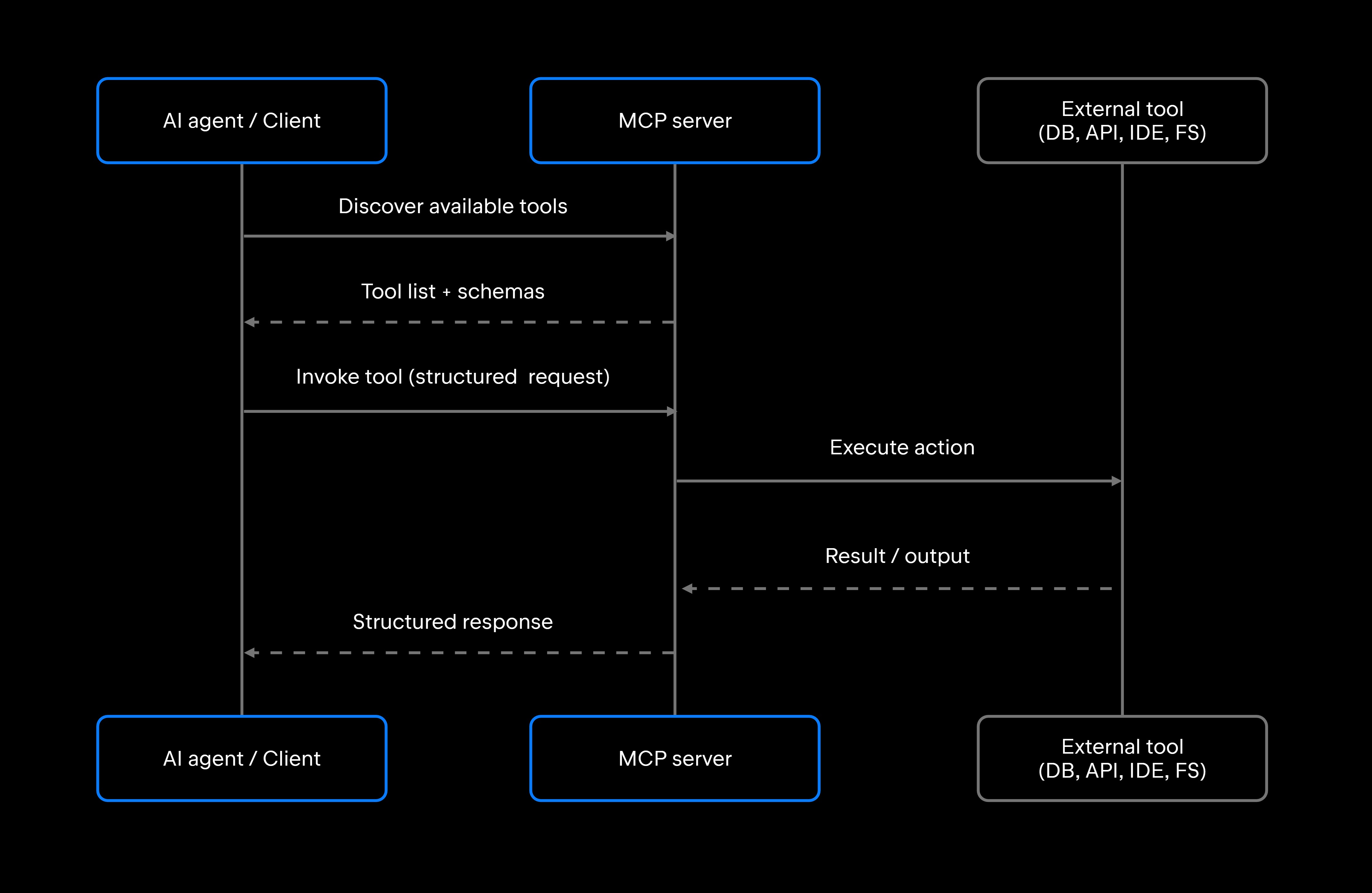
Under the hood, Model Context Protocol setups consist of three main roles: a host application that runs the AI workflow, an MCP client that the host manages to hold each connection, and an MCP server that exposes capabilities. A structured communication layer handles discovery, invocation, and response between them, and every one of those exchanges is a JSON-RPC 2.0 message, with the same request/response format regardless of how it’s transported. The AI system talks to the MCP server, which mediates interaction with the underlying tool.

MCP clients and servers

MCP clients initiate requests. Your IDE plugin is one; so is an orchestration layer dispatching work on your behalf. A server sits at the other end, wrapping something real – a Jira board or a build system – and advertises what it can do. Servers expose capability in three forms: tools the agent can invoke, resources it can read, and reusable prompt templates. Most agent workflows lean on tools, which is what this article will focus on.

That client-server split is the core mental model for everything else in this article.

JetBrains IDEs support two primary transport mechanisms: STDIO for local MCP servers launched as subprocesses, and Streamable HTTP for local or remote servers via a single endpoint. Legacy setups may also use SSE (server-sent events) transport.

You can scope an MCP server to a single project or make it globally available. A PostgreSQL MCP server configured at the project level is available only within that project's scope, not globally.

Tool discovery and invocation

When a client connects to an MCP server, the server responds with a tool manifest. Every capability on it carries a typed parameter schema, metadata, and an execution contract. How tool discovery and invocation fit into broader agent design is a subject in its own right.

That typed interface is a large part of what makes invocation predictable. MCP requires the server to declare exactly what it expects (parameter names, types, required and optional parameters) and the client to conform to that schema, which gives you a typed contract to validate against before your application code runs. An agent submits structured invocation requests against that schema; how strictly they are checked, and where, depends on the client, SDK, and server implementation.

If you already run MCP servers in Claude Desktop, JetBrains imports that configuration directly, so you don't have to recreate it by hand.

Context exchange and workflow state

MCP structures the requests and responses that carry runtime context: tool outputs, execution metadata, and whatever else the next step needs. What accumulates that context across a multistep workflow is the host or orchestrator, which decides what to retain and pass into later calls.

Most of that threading is the agent's own work. MCP standardizes how calls and results are structured, and the agent decides which results to carry into the next call. Where a tool genuinely needs to remember something between calls, the cleanest pattern is for the server to expose that state explicitly, returning an identifier that the agent passes on the next invocation. Once the IDE’s MCP server is enabled and the client is configured, agents like Codex can use the tools exposed by the IDE to interact with the open project – for example, to analyze code, modify files, or run configurations.

Runtime communication workflows

Coordination across tool stacks, orchestration systems, memory layers, and distributed runtimes operates over the same client-server interface, so a single agent reaches all of them through a single path rather than a bespoke one per system. An orchestration system can act as an MCP client while simultaneously serving as an MCP server for downstream agents. TeamCity, for example, exposes an /app/mcp endpoint with tools for retrieving build logs, making REST API requests, and triggering builds, which slots into an MCP-enabled workflow alongside IDE tools and database connectors. How these moving parts coordinate is covered in our AI Agent Orchestration guide.

MCP and AI agent architectures

Whether you're running a single tool-using agent or distributed Multi-Agent Systems, MCP and AI agent architectures meet at the same boundary: MCP owns the interface layer, and orchestration logic stays your problem. That boundary is what makes it composable with the AI Agent Architecture you already have, rather than a replacement for it.

MCP in tool-using agents

A single tool-using agent reaches external systems through its MCP server: APIs, IDEs, repositories, databases, and execution environments. It calls each tool by name, so nothing is pinned to a specific connection at build time, and a replacement that keeps the same schema and behavior can be swapped in without changing the agent.

Developers can define persistent context for agent behavior in configuration files. Those files give the agent reusable, project-specific instructions it can draw on across sessions.

MCP in multi-agent systems

One way to share capability between agents is over MCP: One agent exposes its tools as an MCP server, and another acts as a client and calls them. MCP defines that capability interface rather than agent-to-agent coordination in general. That pattern lets you compose specialized agents, one for repository analysis, another for test generation, over a common interface.

Interoperability across agents from different vendors (Claude Agent, Codex, Junie) depends on shared protocol compliance, and MCP provides that shared ground, though compliance alone doesn't eliminate every semantic mismatch between agents.

MCP and workflow orchestration

Orchestration systems use MCP to standardize how they coordinate tool execution and hand off state between workflow steps. Because every tool answers on the same interface, the orchestrator never has to learn the implementation details of the things it invokes, which is what keeps a workflow editable as the tool set changes underneath it.

MCP vs. traditional tool integrations

Weighing MCP vs. traditional tool integrations means picking one of two failure curves: a bespoke connector for every client-tool pair or a shared spec that both sides implement.

Traditional integrations are tightly coupled. You write an adapter, then another, then another, and every one of them is yours to maintain forever. Agents work with whatever was hardcoded at build time, so adding a tool means shipping code. MCP removes the per-client adapter work, though you still implement or deploy the server, configure the client, handle authentication, and keep versions compatible.

Factor

Traditional integration

MCP

Integration style

Custom adapter per client-tool pair

Standardized protocol, reusable across clients

Scalability

Can grow with every client-tool pair

Server deployed once, used by many clients

Any MCP-compliant client can connect, given compatible versions, transports, and auth

Single protocol surface to monitor

Dynamic discovery at runtime

Client-specific, hard to reuse

Per-integration maintenance

Static tooling, hardcoded at build time

Interoperability

Operational complexity

Workflow flexibility

Standardization pays off as the number of tools and runtime environments grows. A team running three AI agents across five tools faces 15 potential integration pairs under the traditional N×M model, and each pair needs its own custom connector. Deploy one server per tool instead, teach each client the single spec, and those 15 pairs become eight pieces that already know how to talk to each other.

MCP in software development workflows

Software development is a strong case for MCP: Tool count is high, and the maintenance overhead of custom integrations tends to compound as that count grows. AI Agents for Software Development span a wide range of surfaces (IDEs, repositories, test runners, databases, CI/CD systems, deployment pipelines, and more), and each of those surfaces can be an MCP server.

  • IDE integration: The IDE itself can be a server rather than just a client. JetBrains IDEs ship with an integrated MCP server, so a connected agent can analyze code, modify files, run configurations, and execute terminal commands through the same interface it uses for any other tool.
  • Repository analysis: An agent can call a Filesystem MCP Server to traverse a codebase, then cross-reference query performance data from a PostgreSQL MCP Server with the code that generates the queries, all within a single agent session.
  • Retrieval systems: A documentation or vector-store MCP server supplies project-specific context on demand, so an agent pulls what it needs mid-task rather than carrying everything in the prompt.
  • CI/CD coordination: TeamCity's /app/mcp endpoint exposes build logs and REST API access, addressable from any MCP-compliant agent workflow.
  • DevOps automation: Deployment and infrastructure tooling exposed as MCP servers lets an agent read cluster state or trigger a rollout through the same interface it uses for everything else.
  • Debugging workflows: With the IDE's debugger MCP tools enabled, an agent can inspect a paused debug session, including variable values and the call stack, without needing IDE-specific API knowledge. The debugger tools are provided by the bundled Debugger MCP Toolset plugin, with availability depending on the IDE and version.
  • Code review preparation: agents can combine repository, linting, and test coverage tools through a single MCP client session to produce structured review artifacts.

Operational challenges and security considerations

MCP defines a protocol; security enforcement is a separate layer you build around it. Deploying MCP in production surfaces familiar service-to-service integration risks, plus concerns specific to AI-controlled tool invocation.

An agent holding admin credentials on your production database is one prompt injection away from a bad afternoon. Scope permissions at the tool level within the server, not at the agent layer: read-only vs. read-write, specific paths vs. full access, and specific database roles vs. admin. MCP names each tool that a server publishes individually. Whether those names can be granted separately depends on the server and the host: A database server that exposes reads and writes as distinct tools makes it possible for one agent to hold the read tool alone while another gets both. JetBrains IDEs apply the same idea to their own server, where individual exposed tools can be switched off.

The approval layer is coarser, and worth knowing before you rely on it. Junie’s Action Allowlist decides which actions can run without confirmation, but MCP permissions are currently all or nothing: a single MCP rule authorizes all MCP tools, with no way to limit approval to specific servers or individual tools. Brave mode is broader still: when fully enabled, it allows all potentially sensitive actions to run without confirmation, while Auto mode selectively approves actions it considers safe.

Input validation at the MCP server layer prevents malformed or adversarial invocations from reaching underlying tools. Even with typed schemas, business logic validation, confirming a request makes sense and stays within expected bounds, remains the server implementation's responsibility.

Compatibility and versioning become live problems as the protocol evolves. Servers and clients from different vendors may implement different protocol versions, and transport mechanisms add another surface for incompatibility. Test the combinations you actually run.

Latency is the quieter one. A workflow chaining multiple MCP tool calls, each with network overhead, server processing, and response parsing, can add meaningful delay to what looks like a single agent action. Instrument each call as part of ongoing observability, not once you're already debugging a production timeout.

Treat MCP server logs as first-class operational telemetry: every invocation, its parameters, its result, and its duration should be visible in your monitoring stack.

Runtime failures (tool unavailability, schema mismatches, permission denials) need explicit handling in the client. An agent that receives an error response from an MCP server should fail gracefully.

What this means for developers

MCP shifts how AI systems connect to tooling, away from bespoke adapters and toward a shared protocol layer. The practical consequence is that today's work keeps its value: A server you stand up now still answers to whatever client you adopt in a year, because the interface was never yours to renegotiate.

The protocol standardizes the communication layer. Orchestration, permission scoping, validation, error handling, and observability are still engineering tasks that you own.

For teams already running AI-assisted development workflows, MCP integration is an increasingly common connection layer rather than an advanced option. Understanding the protocol and its operational surface is useful for developers building or evaluating these workflows.

FAQ

What problem does MCP solve for AI developers?

It removes the integration tax that scales with your tool count. Every AI client you add would otherwise need its own adapter to every tool you already run, and each of those adapters carries an auth flow, a schema, and an owner. Expose the tool through MCP instead, and that work happens once, no matter how many clients arrive later or which vendors they come from.

Can MCP work with existing AI agent frameworks?

Yes. MCP functions as an integration layer alongside orchestration frameworks, memory systems, and agent runtimes. Any framework that can make structured requests to an MCP server, including LangChain, LangGraph, BeeAI, LlamaIndex, and crewAI, can use MCP-exposed tools.

When does MCP make sense over a direct API connection?

MCP becomes worth the setup cost when you're connecting more than one AI client to more than one external tool, or when you expect that set to change over time. For a single, static integration between one model and one tool, a direct API connection is simpler.

Does MCP replace APIs?

MCP typically runs on top of existing APIs and services. An MCP server for a database still calls the database's API internally and exposes that capability through the MCP protocol to AI clients. MCP standardizes the AI-to-tool interface. The tool's internal implementation typically stays unchanged, since MCP wraps the existing API rather than replacing it.

Is MCP only useful for AI agents?

The protocol itself isn't agent-specific, but it is designed primarily for AI applications: assistants, IDE integrations, and model-driven workflows. Nothing in the spec assumes a model sits behind the request; AI agent tooling is simply where the demand first accumulated.

Damaso Sanoja

Damaso Sanoja is an engineer who is passionate about helping others make data-driven decisions to achieve their goals. This has motivated him to write numerous articles on the most popular relational databases, customer relationship management systems, enterprise resource planning systems, master data management tools, and, more recently, data warehouse systems used for machine learning and AI projects. You can blame this fixation on data management on his first computer being a Commodore 64 without a floppy disk.

JetBrains AI Solutions

Optimize your workflow. With AI built for you.

Junie

The AI coding agent with deep IDE integration that plans before it writes, then codes and tests while you stay in flow.

JetBrains AI in IDEs

Set of AI-powered capabilities built into JetBrains IDEs for software developers. It is not a standalone product or service, but an IDE-native experience composed of AI features, LLMs, agents, and integrations.

AIR

Agentic Development Environment for engineering teams building products with AI.

AI for Teams and Organizations

An open system for agentic software development. Govern AI access across your engineering org, manage agents and models, and keep costs under control.

JetBrains Context

A repository intelligence layer for coding agents. It builds a semantic index of your codebase so agents retrieve what they need instead of exploring it file by file.

Central CLI

One CLI for every terminal agent. Claude Code, Codex, Gemini, and others plug into JetBrains AI and behave exactly as they do standalone. Access is granted centrally and instantly, with models, limits, and usage analytics governed in one place.

Continue Exploring the AI Agents for Developers Guide

AI Agent Architecture Explained

Explores AI agent architecture, including core components, planning, memory, tool use, orchestration, and design patterns for building reliable AI agents.

AI Agent Orchestration: How It Works

Learn how AI agent orchestration works, from planning and task routing to state management, multi-agent coordination, and reliable workflow execution.

What Are AI Agents? Complete Developer Guide

Discover what AI agents are, how they work, their architecture, types, use cases, and how developers can build intelligent autonomous systems.