AI Agents for Developers / AI Agent Cost Management

AI Agent Cost Management: Reducing Token Spend

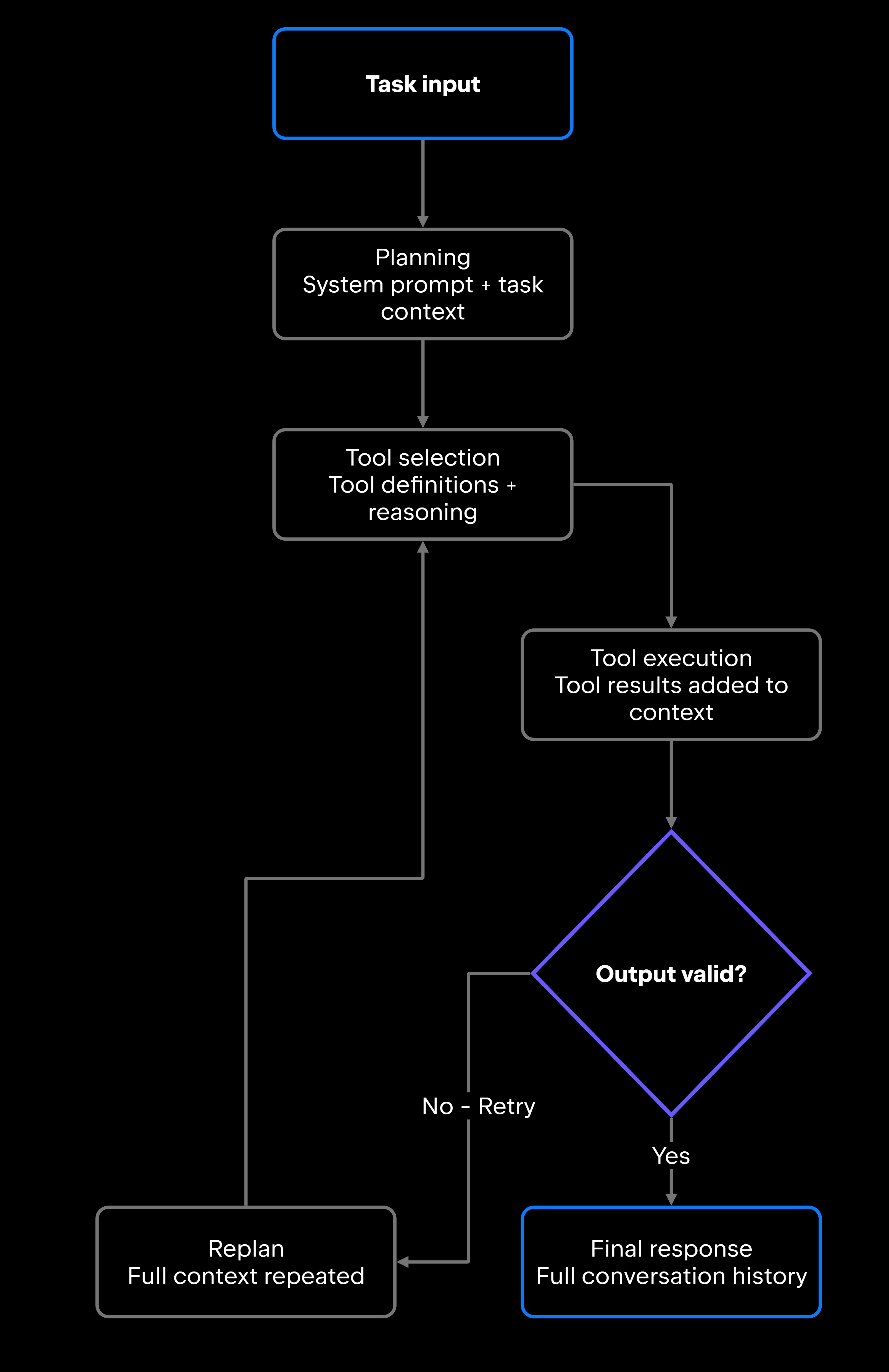
AI agent costs rarely announce themselves. The bill arrives, it is bigger than last month's, and nothing in it tells you which agent, which workflow, or which retry loop spent the money. A request that returns a single answer may have called the model several times on the way there: interpreting the task, planning, selecting and invoking tools, reading results back, validating the output, and starting over when validation failed. Depending on how the workflow is configured, these calls may include system instructions, conversation history, and additional task context.

This article covers practical ways to cut token spend in agent systems rather than general AI budgeting: where the cost accumulates, how to measure it before you change anything, how to reduce it through workflow design and context control, how to route work across models and tools, how to control spend across teams, and which mistakes cost the most. Prompt trimming, the fix most teams reach for first, is rarely where the money is, and that is the reason measurement comes before optimization here.

Approximately 24% of senior developers generate more than 80% of their code with AI agents, compared with around 14% of more junior developers.

Source: Preliminary findings from the JetBrains Developer Ecosystem Survey 2026 • 15,000+ developers worldwide
Where AI agent costs come from

Agentic AI costs are hard to spot because no individual call looks expensive. Planning, tool use, validation, and retries each add their own model calls, and the cost builds steadily across the workflow rather than spiking at one obviously costly step. Benchmark prompts one at a time, and you find nothing. Total the whole workflow, including the calls that produced nothing, and the money shows up.

Multistep workflows, tool calls, and retries

Agentic coding often involves multiple model calls. Junie, JetBrains' coding agent for professional software development, can work through a task by exploring the repository, using tools, generating code iteratively, running tests, and validating results. Each of these stages may involve additional model calls and context, so multistep coding tasks can consume substantially more tokens than a single completion.

What lifts the bill above that floor is workflow design rather than the agent. A failed tool input, repeated validation, or an unnecessary retry can trigger additional model calls and resend substantial parts of the accumulated context without adding useful progress.

Long context and multi-agent tasks

Agents often carry far more context than the current task requires. Instructions, conversation history, retrieved documents, tool outputs, logs, and file contents can all consume context. When large portions are repeatedly included across model calls, input-token costs grow even if the current step needs only a fraction of that information.

Multi-agent systems multiply this context bloat. When each agent in a pipeline receives overlapping context or repeats reasoning that another agent already completed, you're paying for the same tokens multiple times, and the cost compounds with each handoff.

Measure token spend before optimizing

AI token spend is not distributed the way most teams assume. Jumping straight to prompt compression can save fractions of a cent per call while a retry loop elsewhere spends dollars. At its simplest, cost per call is input tokens multiplied by the model's input price, plus output tokens multiplied by its output price. Providers may price cached input, reasoning tokens, or other usage differently. Applied to a whole workflow rather than a single prompt, it ranks the workflows by what they actually cost and tells you which one to open first.

Track usage by agent, workflow, and team

Useful cost visibility means tracking token usage at several levels, including agent type, workflow, model, specific feature, team, and environment. Separate development, staging, and production usage, because usage patterns differ significantly across environments.

JetBrains Air Governance brings LLM billing and AI consumption across an organization into a single place. It helps organizations understand which models and agents are being used, what AI costs, and how usage extends across JetBrains and third-party agents.

Review traces or execution logs to find where the cost lands. Most model APIs return prompt and completion token counts with each response; aggregate those by workflow rather than by call. What usually surfaces is unnecessary file contents riding along inside a long context payload, the same retrieval results resent on every call, mid-workflow summaries nobody reads, failed tool calls that trigger replanning, and planning steps that repeat.

Set usage limits and budget thresholds

Measurement tells you where you are; limits tell you when you've gone too far. Set explicit thresholds for token usage, model calls, retries, tool calls, and long-running workflows, not just total monthly spend, and apply them at the right granularity: by team, by workflow, by environment, or by agent capability. A team running exploratory tests shouldn't share a budget pool with a production workflow serving customers.

Reduce token spend in agent workflows

AI token cost optimization comes from three places: context you did not need to send, reasoning the agent already did once, and calls that should not have happened. Prompt length matters too, but it is only one part of the overall workflow cost. The other three are properties of the workflow, which is why they survive any amount of prompt editing.

A retry loop repeats much of the accumulated context, adding tokens with each pass.

Shorter prompts and smaller context

System prompts accumulate cruft over time, picking up duplicated instructions, conflicting rules, overly long examples, boilerplate disclaimers, and context copied from earlier iterations, all of which add tokens on every call. Keep reusable system instructions concise, stable, and specific, and cut anything that doesn't directly affect safety, tool use, or output requirements.

Beyond the system prompt, the test for any piece of context is whether the current step can finish without it. That usually narrows a whole document to one file section, a result set to one chunk, a tool response to the field you asked for, and a log to one excerpt. Conversation history and previous reasoning traces need the same test, and they are where most multi-turn workflows leak.

Caching, batching, and stop conditions

Anything an agent regenerates identically is a caching candidate: summaries of stable documents, retrieval results, classification outputs, common tool responses. The constraint is staleness, so design the invalidation before the cache. Data changes, permissions shift, and time-sensitive sources expire on their own schedule rather than yours.

Batching works on structurally similar tasks: validate a set of fields in one pass instead of one call per field, or classify a queue of tickets together rather than individually. The saving scales with how often you would otherwise repeat the call. The trade is per-call size for per-call count, so a single malformed item can force a reprocess of the whole batch.

An agent with no stop condition will keep paying to fail. Iteration limits, retry budgets, and stop conditions bound that, and an escalation rule that hands off to a human after repeated failures is worth building into any workflow touching external tools or unpredictable data. Both AI agent context windows and the AI agent loop are covered in separate articles.

Optimize model and tool usage

AI agent token optimization covers both what you send to the model and which model receives it, plus whether that call was necessary at all. Workflow depth moves cost more than the choice of model does.

Route tasks to the right model

Classification, extraction, formatting, routing decisions, and short summaries do not need a frontier reasoning model. These tasks can often be routed to smaller, lower-cost models, provided they meet the workflow's quality and reliability requirements.

Route on what the task actually requires: complexity, risk level, the depth of reasoning involved, and how far you trust the input. Generating a PR description and assessing a security vulnerability are not the same call. High-risk decisions, long reasoning chains, and work with real downstream consequences still warrant the stronger model. Overprovisioning everything else rarely improves the output and needlessly adds latency.

Avoid unnecessary tool calls

The token cost of tool use extends beyond the tool result itself. The agent may need model calls to select the tool, construct its input, interpret the result, and decide what to do next. The agent must reason about whether to call it, construct the input, parse the result, interpret it in context, and validate the output, so one invocation multiplies into several token-consuming steps.

Define clearly when tools are required, when they're optional, and when they're disallowed. For workflows that modify external systems, read-only checks can verify preconditions before write actions. This primarily reduces operational risk and may also prevent costly retries or corrective work after an incorrect write. Structuring those definitions is a matter of tool use and function calling, covered in a separate article.

Managing AI agent costs across teams and organizations

Individual workflow optimization gets harder to maintain as more developers, teams, and workflows share the same AI infrastructure: what one team optimizes, another can undo by adding a workflow without limits. Sustainable cost management depends on two things: visibility into where AI is being used, and efficient agent execution.

Usage visibility and team-level controls

What to track barely changes at organization scale. Who needs to see it, and how quickly, does. The same usage now has to be readable by team, by environment, and by agent capability, and it has to be actionable rather than retrospective: when one team's workflow suddenly costs ten times what it did last week, that needs to surface before the billing cycle closes.

Air Governance provides organizations with centralized visibility into AI usage and costs across JetBrains and third-party agents. It brings LLM billing and AI consumption into a single place, helping organizations understand which models and agents are being used, monitor expenditure, and assess how AI usage affects software delivery. This gives organizations greater oversight of AI consumption while allowing teams to work with different agents and models.

Improve agent efficiency with better context

Applied across a team rather than a single workflow, model choice becomes a mix rather than a decision: cheaper, faster models on the routine steps, more capable ones only where the reasoning demands it. The larger organization-level lever, though, is what agents know before they start.

Well-designed context reduces cost by cutting unnecessary retrieval, repeated exploration, duplicate reasoning, and extra agent turns: agents that receive relevant repository knowledge early spend fewer tokens rediscovering it. JetBrains Air Context provides organizational memory for agentic work, helping relevant context carry across execution, automation, and coordination. By preserving context across different stages of development, it helps reduce the need to re-establish information when developers or agents move between tools and workflows. Access to relevant context earlier in a task can also reduce repeated exploration and unnecessary file reads, potentially lowering token usage and execution costs.

Common AI agent cost mistakes

Most cost problems in agent systems come from a short list of repeatable mistakes.

Mistake

Why it increases cost

Better approach

Sending full conversation history every turn

Every model call includes all previous turns as input tokens

Summarize or trim history, passing only what the current step needs

Retrieving too many chunks

Large context payloads on every call, much of it irrelevant

Use tighter retrieval with more specific queries and cap chunk count

Route simple tasks to cheaper models

Frontier models cost significantly more per call than smaller models

Using the largest model for every step

Set retry budgets and stop conditions, then escalate after a set number of failures

Each attempt re-sends everything accumulated so far

Allowing unlimited retries

Design handoffs to pass only what the next agent needs

Agents receive overlapping context when roles aren't clearly scoped

Running redundant multi-agent workflows

Cache stable outputs and invalidate when source data changes

Repeated classification, retrieval, or summarization results are regenerated each time

Not caching reusable results

Add explicit failure handling and loop detection

Measure total cost per workflow before tuning individual prompts or calls

Track cost at the workflow and agent level, not just the account

Unhandled failures trigger replanning cycles that add token usage

You may improve the wrong thing and miss the actual cost driver

High-cost workflows hide inside aggregated totals

Ignoring failed tool-call loops

Optimizing token cost before measuring workflow cost

Measuring only total spend, not cost per workflow

Cost management as part of agent design

Cost controls belong in workflow design from the start; retrofitting them onto an agent already in production is considerably harder. The most effective optimizations improve how a workflow runs rather than simply cutting tokens out of it: measure token spend, reduce unnecessary context, avoid repeated reasoning, reuse context and agent workflows where appropriate, route tasks to models that match the requirement, control tool use, and manage usage across teams.

Reducing token spend should never come at the expense of safety, reliability, or useful output. An agent that hallucinates because its context was trimmed too aggressively, or fails silently because its retries were cut too short, costs more than it saved.

At organization scale, shared context, reusable agentic workflows, centralized usage visibility, and governance move those same levers for every team at once, which is where cost efficiency stops being a per-workflow exercise.

FAQ

Why do AI agents cost more than simple LLM prompts?

A single LLM prompt may require only one model call. An agent workflow can involve multiple calls for planning, tool use, validation, and retries, often carrying substantial context between steps. The total cost, therefore, depends on the workflow as a whole rather than on any single call. A workflow can be expensive even when every prompt in it looks cheap.

What agent workflows usually create the highest token costs?

Workflows with retry loops, multi-agent handoffs with overlapping context, long conversation histories sent on every call, and high-frequency tool use generate the most token spend. Repository exploration is a common one in coding work: with no index to query, an agent rebuilds its picture of the codebase from scratch on every task.

How can teams reduce AI token spend without reducing output quality?

Start by measuring which workflows generate the most cost. The biggest savings come from removing unnecessary context, eliminating redundant reasoning, and caching reusable results rather than shortening system prompts. Routing simpler tasks to smaller models reduces costs without compromising the quality of complex reasoning.

How should teams set usage limits for shared AI agents?

Start with the workflows your usage reports already show as most expensive, rather than covering everything at once. Define retry budgets and tool call limits inside individual workflows, then use organization-level controls to cap total consumption by team or group. Review the reports on a cadence, not after a billing surprise.

Damaso Sanoja

Damaso Sanoja is an engineer who is passionate about helping others make data-driven decisions to achieve their goals. This has motivated him to write numerous articles on the most popular relational databases, customer relationship management systems, enterprise resource planning systems, master data management tools, and, more recently, data warehouse systems used for machine learning and AI projects. You can blame this fixation on data management on his first computer being a Commodore 64 without a floppy disk.

Use AI agents in your development workflow

Explore JetBrains AI solutions that help you build, use, and scale AI agents across the software development lifecycle.

Air Gateway

Run terminal agents through one JetBrains account, with access, models, and usage governed centrally.

Junie

Plan, code, debug, and automate tasks with a coding agent that works across your terminal, IDE, GitHub, and GitLab.

Air in IDEs

Orchestrate AI agents and verify their output directly in JetBrains IDEs, with full control over how changes are reviewed.

Air Teams

Automate software delivery workflows, coordinate agentic work across teams, identify bottlenecks affecting delivery.

Air Governance

Govern AI usage, models, policies, and costs across your organization, including JetBrains and third-party tools.

Air Context

Give agents shared organizational memory and context that carries across tools, workflows, and execution environments.

JetBrains Air

An open system of AI products for developers, teams, and organizations – from coding with agents to automating workflows and governing AI at scale.

Continue Exploring the AI Agents for Developers Guide

How to Manage AI Agent Context Windows

Learn how to manage AI agent context windows, reduce context loss, and improve performance, accuracy, and reliability in long-running workflows.

AI Agent Orchestration: How It Works

Learn how AI agent orchestration works, from planning and task routing to state management, multi-agent coordination.

What Is an AI Agent Loop?

Explains how AI agent loops work, why infinite loops occur, and practical techniques for preventing runaway execution in production systems.