AI Agents for Developers / What Is a RAG AI Agent? A Practical Guide

What Is a RAG AI Agent? A Practical Guide

AI agents fail when they reason from wrong, incomplete, or outdated information. The knowledge required to guide them accurately usually exists inside your organization, but no off-the-shelf model was trained on it. A retrieval-augmented generation (RAG) AI agent closes that gap by pulling in relevant, current knowledge before it acts.

Bigger context windows don't eliminate the need for retrieval. Filling one still means guessing which files matter before you know what the answer depends on, and a larger window only makes room for a bigger guess. Load the six files that look relevant, and you’ll pay latency and token cost on all six, while the two that actually mattered compete for attention with the four that didn't. Retrieval, on the other hand, operates surgically by supplying the agent with exactly what it needs when it needs it.

RAG for AI agents is also a different problem from RAG for search. A search system hands its results to a person who decides what to do with them. An agent acts on what it retrieves, so a bad chunk becomes a bad edit rather than a bad answer. This article covers how RAG works inside an agent, when to use it, how to build a reliable implementation, what it looks like in practice, and where teams typically go wrong.

About 21% of developers generate more than 80% of their code using AI agents.

Source: Preliminary findings from the JetBrains Developer Ecosystem Survey 2026 • 15,000+ developers worldwide

What is a RAG AI agent?

A RAG AI agent, or retrieval augmented generation agent, is a system that retrieves relevant external knowledge before reasoning, generating responses, or taking actions. It uses retrieved information from sources such as documentation, codebases, or internal knowledge bases to ground the model's reasoning and outputs.

A standard LLM call relies on model parameters or whatever fits in the current prompt. By contrast, a RAG agent queries an indexed knowledge base (your docs, your codebase, and your Confluence pages) and receives back a focused set of relevant chunks that become scoped working context. The model then reasons against that context.

Retrieval before reasoning

When a task depends on external knowledge, retrieval should happen before the agent makes decisions that rely on that knowledge. The agent may retrieve before planning, answering, generating code, or taking an action, depending on the workflow. What matters is that relevant evidence reaches the model before it commits to an output or action that depends on it.

Retrieval brings in fresh information the model was never trained on, narrows the scope to your specific context, and gives the model sources it can cite rather than patterns it can only approximate. If you ask a prompt-only model how your public API should paginate a large result set, it will offer you the most common pattern found on the internet. A RAG agent, on the other hand, retrieves your existing pagination helper and your API style guide first, ensuring its response matches the exact conventions your API already uses.

Why developers use RAG

If the answer lives in your organization's systems rather than on the public internet, RAG is the mechanism that surfaces it to an AI agent. The clearest use cases all involve private or fast-changing knowledge that a base model doesn't have:

  • Internal documentation and runbooks.
  • Private code repositories and module APIs.
  • API references and integration contracts.
  • Architecture decision records (ADRs) and design docs.
  • Engineering wikis and team conventions.
  • Support knowledge bases and incident histories.
  • Company policies and compliance requirements.

When should you use RAG?

RAG works well for a specific set of problems, and knowing which problems those are saves you from overengineering.

Two other neighboring mechanisms come up in the same conversation. A context window is the working prompt the model reasons over in a single call. Long-term memory is external storage an agent queries across sessions to recall user-specific facts. The three overlap enough to be worth separating:

Problem type

RAG

Context window

Internal company documentation

Best fit

Works for excerpts you paste in

Current conversation history

Adds latency for little gain

Best fit

Holds them for a single session

Practical for a handful of files

Works for small, explicitly provided rules

Long-term memory

Better served by an index

Better served by session state

Best fit

Too coarse for file-level recall

Useful for persistent learned preferences or decisions

Changes too often to index cleanly

Best fit

Good fit when stored in docs or repository files

User preferences and habits

Large repositories

Project conventions and style guides
Use RAG when the knowledge is external, specific, and too large or private to fit reliably in a prompt. Use context windows for what's happening right now in the conversation. Finally, use long-term memory where user-level preferences accumulate over time. For more on the trade-offs between the latter two, see the dedicated AI Agent Context Windows and Long-Term Memory in AI Agents guides.

How RAG works inside an AI agent

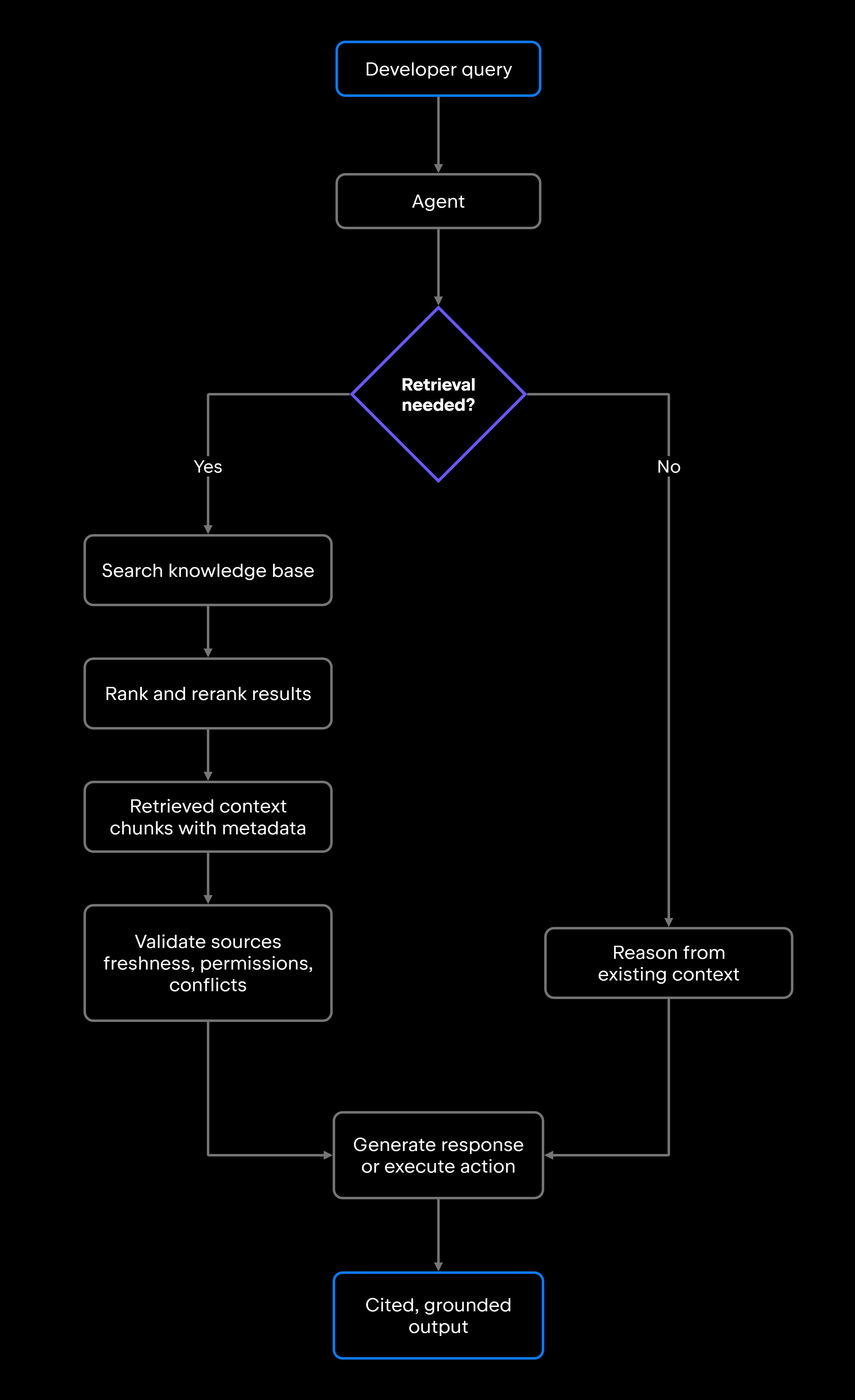
A RAG agent architecture dictates what happens before the model receives any input. The system first identifies and indexes domain knowledge, retrieves relevant chunks of context at query time, and only then allows the agent to reason against the returned data.

Knowledge sources

A RAG agent is only as good as its sources. Common sources for developer tooling include:

  • Source code files and inline documentation.
  • API reference docs and OpenAPI specs.
  • Architecture decision records.
  • Jira tickets, GitHub issues, and pull request descriptions.
  • Internal wikis, Confluence pages, or Notion docs.
  • Runbooks and incident post-mortems.

A smaller, well-maintained knowledge base can outperform a much larger index full of stale, duplicated, or contradictory content. Before you build the retrieval pipeline, audit what you're actually putting into it.

Retrieval pipeline

The retrieval pipeline turns raw documents into queryable chunks and then surfaces the most relevant ones at runtime. It runs in six steps:

  1. Chunking: Split documents into retrievable units. Smaller chunks give precise matches, while larger chunks preserve more context. Common approaches include overlapping chunks and structure-aware chunking based on headings, functions, classes, or logical sections rather than arbitrary character boundaries.
  2. Indexing with metadata: Attach metadata to every chunk, including source file, last-modified date, author, and access permissions. This is what lets you filter results before they reach the model.
  3. Embedding and storage: Convert chunks to vector embeddings and store them in a vector database such as Pinecone, Weaviate, or pgvector. This enables semantic search.
  4. Hybrid retrieval: Combine vector (semantic) search with keyword search, such as BM25. Semantic search finds conceptually similar content, while keyword search catches exact terms, function names, or error codes. Code-heavy knowledge bases can particularly benefit from hybrid retrieval because exact identifiers and semantic similarity are both useful signals.
  5. Filtering: Narrow the candidate set on metadata before anything gets ranked, by source, recency, or the requesting user's permissions. This is where a shared index stops returning documents that a given user shouldn't see.
  6. Reranking: Run a second-pass reranker – typically a cross-encoder model that scores each query and chunk pair together – to reorder results by relevance before passing them to the agent. Reranking can improve retrieval precision, but it adds latency and should be evaluated against the needs of the workflow.

You don't need to become a vector database expert to build a working RAG pipeline. You can start with a managed service or an existing database with vector-search support and focus first on retrieval quality rather than infrastructure complexity.

Agent reasoning with retrieved context

Once the retrieval pipeline returns a set of chunks, the agent treats them as scoped working context. The governing principle is that a well-designed agent treats retrieved chunks as claims to verify rather than facts to accept, and the validation pass described below covers what that means in practice.

Agents that blindly trust retrieved content will eventually surface a deprecated API, a reverted decision, or a document that was never accurate to begin with.

Building a RAG AI agent

Most RAG agent tutorials start with a framework. Four decisions come first, and they compound. What you index constrains what retrieval can find, and what retrieval returns constrains what the agent can safely act on.

Prepare your knowledge base

The documents feeding the pipeline set its reliability ceiling. Before you index anything, do the following:

  • Start by cutting what shouldn't be there: Duplicates, superseded versions, and anything the team stopped maintaining. Otherwise, the agent will retrieve stale documents and present them as current.
  • Preserve metadata. Last-modified timestamps, owner, source system, and access permissions should travel with every chunk.
  • Check permissions. Skip documents that not every user of the agent should be able to read. Index-time filtering alone won't hold, because the index is shared and the reader is not.
  • Enforce freshness. Set an indexing cadence that matches how quickly the source changes and how costly stale information would be. Fast-moving codebases or operational data may require incremental or near-real-time updates, while slower-changing documentation can tolerate a longer interval.

Build the retrieval pipeline

With a clean knowledge base, the question shifts from what each step does to what order you make the decisions in.

Chunking and metadata determine what can be retrieved and filtered. From there, choose the retrieval and reranking approach based on the content and query patterns you actually have. Hybrid retrieval and reranking are useful tools, but not every RAG implementation needs both.

Start simple. A first pipeline only has to be useful enough to run against real queries and instrumented enough to tell you where it fails.

Connect retrieval to the agent workflow

Retrieval doesn't have to happen only when the user asks a question. In an agentic workflow, retrieval can trigger at multiple points:

  • Before planning: The agent retrieves project conventions before deciding how to structure a task.
  • Before code generation: The agent retrieves relevant modules, interfaces, or existing implementations before writing new code.
  • Before answering: The agent retrieves documentation before responding to a question about an API.
  • Before tool execution: The agent retrieves guardrails or policies before calling an external service.

Log every retrieval query. If the agent retrieved the wrong documents, you need to know what query it ran, what it got back, and why the top results were missed. Without that log, debugging retrieval failures becomes guesswork.

Validate sources before acting

Before the agent acts on retrieved content, run a validation pass:

  • Freshness: Is this document still current? Check the last-modified date against your freshness threshold.
  • Permissions: Does the requesting user have access to this source?
  • Conflicting signals: If two retrieved chunks say opposite things, flag the conflict instead of silently picking one.
  • Missing evidence: Treat missing evidence explicitly. The agent may retry with a different query, use another approved source, ask for clarification, or stop and report that it could not find sufficient evidence, rather than filling the gap from assumption.

Require citations where the stakes are high, especially anything touching production systems, security policy, or financial logic.

RAG agent example

Retrieval justifies its operational overhead only when the answer is spread across files that no single search returns together.

Codebase knowledge agent

A developer asks the agent where retry logic is implemented. The agent handles this in four steps:

  1. Parses the query and identifies it as a code search task requiring repository knowledge.
  2. Retrieves from the indexed codebase: finds utils/retry.py, locates references to the @retry decorator across service files, and surfaces the architecture decision record that established the retry policy.
  3. Checks architecture docs for the team's conventions on retry limits and backoff strategies.
  4. Generates a grounded answer with direct references: "Retry logic is implemented in utils/retry.py. The @retry decorator is applied in services/payment_service.py at line 47 and services/notification_service.py at line 83. ADR-012 documents the team's backoff policy.”

The developer gets a precise answer with sources they can open and check.

IDE-connected agents can gather repository context without relying on a separate RAG pipeline for every lookup. JetBrains Junie, for example, can use JetBrains IDE awareness for symbol-aware search, project structure, code inspections, tests, and other project-aware workflows. This kind of IDE context access is useful for repository exploration, but it is not the same thing as a dedicated RAG system.

For repository-scale semantic retrieval, JetBrains Context provides a separate repository intelligence layer. It incrementally indexes repositories and lets coding agents, including Junie CLI, Codex CLI, and Claude Code, retrieve relevant code semantically instead of repeatedly exploring files from scratch.

When RAG is the wrong choice

RAG adds complexity, and it's the wrong choice in several situations.

When the answer is simple and universal, retrieval adds nothing. "What's the syntax for a Python list comprehension?" doesn't need retrieval, because the model knows this kind of syntax reliably from training. A throwaway script with no existing codebase to reference gets nothing from retrieval except added latency.

If a document updates every few minutes and your indexing pipeline runs hourly, the agent will consistently retrieve stale data. Fix the freshness problem first, or keep that source out of RAG. Retrieval from low-quality, inconsistent, or unstructured content produces low-quality outputs regardless of how well you build the rest of the pipeline.

User-specific preferences, including coding style, preferred patterns, and task history, belong in long-term memory or agent state rather than a shared retrieval index.

Common failure modes

Failure

Why it matters

Mitigation

Irrelevant retrieval

The agent reasons from the wrong context, so answers look plausible but are wrong

Improve chunking strategy and add reranking

Stale knowledge

The agent surfaces deprecated APIs, reverted decisions, or outdated procedures

Add freshness metadata and re-index frequently

Detect conflicts at retrieval time and require citations

Use semantic or structure-based chunking instead of fixed character counts

Enforce permission filtering at retrieval time, scoped to the requesting user

Two retrieved docs say opposite things, and the agent picks one without flagging

Chunks split logical concepts, losing necessary context

The agent surfaces documents the requesting user shouldn't see

Conflicting sources

Poor chunking

Missing permissions

Require groundedness evaluation and enforce citation on outputs

Cap what reaches the model after reranking, and filter aggressively on metadata before it gets there

The agent generates text that retrieved docs don't actually support

Too many retrieved chunks dilute the signal for the model

Unsupported claims

Context overload

Testing and evaluating a RAG agent

Retrieval quality and answer quality are different problems, so evaluate them separately.

Retrieval evaluation checks whether the most relevant chunks are actually returned for a set of test queries. Useful signals include whether the correct source appears in the top results and how much irrelevant context is retrieved alongside it.

Answer evaluation is the second question: Given that context, did the model actually use it? Groundedness is the metric here, meaning every claim in the answer is traceable back to the retrieved documents.

Other metrics worth tracking:

  • Citation accuracy: When the agent cites a source, does that source actually support the claim?
  • Latency: Measure how much retrieval and reranking add to end-to-end response time, and define an acceptable budget for the workflow.
  • Missing-source handling: When retrieval returns nothing useful, does the agent say so or does it hallucinate?

Build the test set from real queries. Log a sample of production queries, hand-label which chunks should have been retrieved, and re-run that set whenever you change chunking, embeddings, or reranking. Open-source evaluation libraries such as Ragas and DeepEval automate groundedness and citation-accuracy scoring against a labeled set like this.

The most common mistake is evaluating only end-to-end answer quality. If the answer is wrong, you don't know whether the problem is retrieval, reasoning, or both. Isolating retrieval evaluation catches problems earlier and makes them far easier to fix.

Best practices

A reliable RAG implementation comes down to a handful of decisions that compound across the pipeline.

  • Start with a focused knowledge base: Begin with a focused, high-quality knowledge base and expand it as retrieval needs grow.
  • Preserve metadata at index time: Source, timestamp, author, and permissions should travel with every chunk.
  • Filter by permissions at retrieval time: User context, not index membership, decides what comes back.
  • Rerank retrieved results: Consider reranking retrieved results when first-stage retrieval does not rank the most useful evidence highly enough.
  • Retrieve only the amount of context the task needs: Tune the final number of chunks against retrieval quality, context size, latency, and answer accuracy rather than using a fixed default.
  • Require citations: Treat it as a product decision. A developer who cannot trace one claim will discount the next one, too.
  • Monitor retrieval quality: Track the queries where the agent retrieved nothing useful, or where the top result was missed.
  • Evaluate on a cadence: Retrieval quality drifts as your knowledge base grows, so set a regular cadence for evaluation and re-tuning.

Conclusion

Retrieval quality strongly constrains the quality of a RAG agent's output. A more capable model cannot reliably compensate for missing, stale, or irrelevant evidence. Teams that get this right focus first on trusted knowledge sources, then on retrieval quality, and only then on increasing agent autonomy.

The engineering work is real. Chunking, indexing, reranking, and permission filtering all have to be built and maintained, but none of them is exotic. Start small and instrument it. The knowledge base is a production system, and it decays like one.

FAQ

Can a RAG AI agent search a codebase?

Yes. Code repositories can be indexed and retrieved from like other knowledge sources, often using structure-aware chunking and hybrid search. Separately, IDE-connected agents, such as JetBrains Junie, can use IDE project awareness for symbol-aware search and repository exploration, while repository intelligence layers, such as JetBrains Context, provide semantic retrieval across indexed codebases.

What is the difference between a RAG chatbot and a RAG AI agent?

A RAG chatbot retrieves context to answer a question. A RAG agent retrieves context to plan and execute multistep tasks, including generating code, calling tools, running tests, and updating files. The retrieval mechanism is similar, but the scope of downstream action is much broader.

How do developers know whether a RAG agent retrieved the right information?

Log every retrieval query and the top results returned,and then evaluate retrieval independently from answer quality. If the retrieved chunks don't contain the answer, the problem is in the retrieval pipeline, not in the model's reasoning.

How do developers know whether the retrieved information is reliable?

Check the source metadata. When was the document last modified, who authored it, and does it conflict with other retrieved chunks? Requiring citations in agent responses gives developers a direct path to verify every claim against its source.

Should a RAG agent retrieve documents before every response?

Not necessarily. Simple factual questions that the model can answer reliably from training data don't benefit from retrieval. The agent should decide whether retrieval is needed based on query type, confidence threshold, or explicit triggers, because retrieving unconditionally adds latency without always improving quality.

Can a RAG agent use both vector search and keyword search?

Yes. Hybrid retrieval can be particularly useful for code and technical documentation because semantic search captures conceptual similarity while keyword search catches exact identifiers, error codes, and API names. Whether it outperforms a simpler retrieval approach should be validated on your own query set.

Damaso Sanoja

Damaso Sanoja is an engineer who is passionate about helping others make data-driven decisions to achieve their goals. This has motivated him to write numerous articles on the most popular relational databases, customer relationship management systems, enterprise resource planning systems, master data management tools, and, more recently, data warehouse systems used for machine learning and AI projects. You can blame this fixation on data management on his first computer being a Commodore 64 without a floppy disk.

Use AI agents in your development workflow

Explore JetBrains AI solutions that help you build, use, and scale AI agents across the software development lifecycle.

Air Gateway

Run terminal agents through one JetBrains account, with access, models, and usage governed centrally.

Junie

Plan, code, debug, and automate tasks with a coding agent that works across your terminal, IDE, GitHub, and GitLab.

Air in IDEs

Orchestrate AI agents and verify their output directly in JetBrains IDEs, with full control over how changes are reviewed.

Air Teams

Automate software delivery workflows, coordinate agentic work across teams, identify bottlenecks affecting delivery.

Air Governance

Govern AI usage, models, policies, and costs across your organization, including JetBrains and third-party tools.

Air Context

Give agents shared organizational memory and context that carries across tools, workflows, and execution environments.

JetBrains Air

An open system of AI products for developers, teams, and organizations – from coding with agents to automating workflows and governing AI at scale.

Continue Exploring the AI Agents for Developers Guide

How to Manage AI Agent Context Windows

Learn how to manage AI agent context windows, reduce context loss, and improve performance, accuracy, and reliability in long-running workflows.

What Is Long-Term Memory in AI Agents?

Learn how long-term memory helps AI agents retain knowledge, improve decision-making, and support reliable multistep workflows over time.

AI Agent Architecture Explained

Explores AI agent architecture, including core components, planning, memory, tool use, orchestration, and design patterns for building reliable AI agents.