AI Agents for Developers / AI Agent Testing Strategies for Production

AI Agent Testing Strategies for Production

Prompt testing asks whether one response looks correct. AI agent testing has to ask a great deal more, because production agents plan multiple steps, call external tools, modify state, retry failed actions, and interact with live systems, often without a human in the loop. A single isolated response tells you almost nothing about whether any of that is safe.

This article covers what to validate before shipping an agent: release criteria, realistic workflow tests, tool interactions, regression suites, CI/CD automation, non-deterministic behavior, and the most common testing mistakes. The focus is pre-production testing, not production monitoring or post-deployment evaluation.

Approximately 24% of senior developers generate more than 80% of their code with AI agents, compared with around 14% of more junior developers.

Source: Preliminary findings from the JetBrains Developer Ecosystem Survey 2026 • 15,000+ developers worldwide
What makes AI agent testing different?

AI agent testing differs from traditional software evaluation because the question changes from what the system returned to how it got there. A unit test asks whether a function returned the expected value. A prompt test asks whether the text it got back holds up against a rubric. Applied to an agent, both can pass on a run that was never safe.

An agent decides something at every step, so AI agent validation follows the path those decisions make. Did it pick the right tool, or one that happened to work? Did it stop at its retry limit, or keep going in a degraded state? When an API timed out, did it recover, or invent a result that looks like success? And would it do the same tomorrow, once the data it reads has moved?

Every one of those questions assumes you already know what a correct run looks like.

Define what the agent must prove before release

Before writing a single test, you need documented release criteria covering expected tasks, failure boundaries, and human review requirements. Vague success criteria produce vague tests, and vague tests tend to miss the failures that turn into serious production incidents. These criteria are also what turns "we think it works" into a release decision someone can sign off on.

Expected tasks and success conditions

Document what the agent is actually supposed to do. Every production agent should have a defined list of responsibilities, such as summarizing support tickets, answering documentation questions, reviewing pull requests, generating release notes, and routing incoming requests.

For each task, define what success looks like: The workflow runs to completion, the output arrives in the correct format, the agent uses the tools you expected, and it asks for approval where your design says it should. If the agent routes a support ticket, success means it landed in the right queue with an appropriate priority tag and no sensitive fields exposed, not simply that it moved.

Risky actions and failure boundaries

Every agent also needs a documented list of things it must never do. Editing restricted files, exposing sensitive credentials, changing production configuration, sending external communications without approval, and continuing past a defined retry limit are all hard failure boundaries.

Write these down before building tests. Designing cases around explicit limits is easier than discovering them after something goes wrong, and the boundaries double as a definition of failure. Cross one and the test fails regardless of how the final output looks.

Human review requirements

Some actions should pause for human review rather than proceeding automatically. Ambiguous requests, conflicting tool results, low-confidence decisions, missing permissions, and high-risk operations are all situations where a well-designed agent should stop and ask.

Test that the agent triggers review requests at the right moments, and test what happens after a human responds. Approval should resume the workflow from where it paused; denial should stop it cleanly. Both paths need coverage, since a denial that leaves the agent halfway through a state change is its own failure mode.

Build test cases around real agent workflows

Test cases built from isolated, idealized prompts rarely catch the failures that show up in production. Use real workflows as your test source, drawing from historical incidents, actual support tickets, documentation questions that real users have asked, pull request reviews from your codebase, and production-like coding tasks.

Happy path tests

These verify that the agent executes the expected workflow when everything works: the right sequence of tool calls, output grounded in what those calls actually returned, and successful completion. Handling the ideal case well says little about behavior when conditions shift, so treat happy-path coverage as a baseline and build edge-case and failure tests on top of it.

Ambiguous request tests

Feed the agent vague or incomplete inputs: a bug report with no reproduction steps, a question that could mean two things, or a request with no clear success criteria. The failure you are testing for is a confident guess acted on without checking. Which response counts as correct depends on your design. The agent might ask for clarification, hold its output to what it can safely confirm, hand the request to a human reviewer, or decline it outright.

Failure and recovery tests

Simulate tool failures, missing data, invalid inputs, API timeouts, and partial failures mid-workflow. Check that the agent respects retry limits, falls back safely when a tool is unavailable, and stops cleanly rather than continuing in a degraded state.

An agent that invents a successful result when a tool fails is more dangerous than one that stops and reports an error. The broader taxonomy of how agentic workflows break, from context overflow to goal drift, is laid out in Agentic Workflows Explained; what matters here is giving each mode you care about a test that provokes it deliberately.

Test tool calls and external actions

Tool execution is a common source of production agent failures. An agent can reason correctly and still cause serious problems if it selects the wrong tool, formats inputs incorrectly, or reaches for a write operation where a read would have done.

Testing any of this needs visibility into what the agent actually did. Capture an execution trace for every run, the ordered record of tool calls, their arguments, and each result, then assert against that trace rather than the final message. Run against mocked or sandboxed tools so you can force specific responses, including failures that are hard to reproduce live.

A concrete case for a code review agent: The input is a pull request that adds a function with no accompanying test. The expected trace is a read call such as pr.diff, followed by a review comment naming the untested function, and the assertion is that no commit or merge call appears anywhere in the trace. Written that way, the test fails loudly the day a model upgrade makes the agent push a fix instead of flagging one.

Tool selection tests

Verify that the agent picks the correct tool for each task, and that read operations use read-only access rather than requesting write permissions they don't need. For risky actions, such as sending an email, updating a calendar entry, or closing a ticket, confirm the agent requests permission before proceeding.

Concrete pairs worth testing: repository search versus code execution, ticket read versus ticket update, documentation lookup versus external API call.

Invalid input and error handling tests

Send the agent malformed inputs and force API failures. Use missing parameters, incorrect data types, rate-limited endpoints, expired credentials, and permission errors on tools the agent is otherwise allowed to call. The agent should recognize the failure, surface an appropriate error, and stop rather than construct a plausible-sounding result from incomplete information.

This category is easy to skip, and its failures hide well: a fabricated result looks like a successful run in any log that records only the final output.

Permission and approval tests

Confirm the agent won't perform restricted operations without explicit authorization, and test rejected approvals specifically: When a human denies a request, the agent should stop and report the denial rather than routing around it to reach the same outcome.

Also cover operations the agent lacks access to. The correct behavior is a clean failure and a clear error, with no silent retry using elevated permissions.

Run regression tests before prompt, model, or tool changes

Agent behavior can shift significantly after what looks like a minor update. A cosmetic-seeming prompt tweak can change which tool the agent reaches for. Model upgrades tend to move refusal behavior, a retrieval index update changes which documentation the agent cites, and a modified tool can introduce error conditions the agent has never encountered. Even an agent you haven't touched can drift. A provider might change a model behind the same version number, and an API the agent depends on can start answering differently after an environment update.

Regression testing belongs in the release cycle, not just at launch.

Golden test cases

Maintain a stable regression suite covering the agent's most common workflows, its riskiest actions, and failure scenarios you've already investigated. Evaluate expected behavior rather than exact output strings, since agent output varies between runs even when behavior is correct (covered in detail below). You're checking that the agent still routes requests correctly and calls the right tools, not that it uses identical phrasing.

Prompt and model change checks

After a prompt update or model version change, run the full regression suite and specifically check for changes in tool selection, output structure, refusal behavior, and approval logic. These are the behaviors most likely to shift unexpectedly after what appear to be contained changes.

Workflow regression tests

For complex agents, regression tests need to cover the complete execution path. That starts at the planning step and runs through any retrieval or lookup operations, the tool calls in sequence, the approval steps and retries they trigger, and only then the final output.

JetBrains Junie is a practical example. Junie can be told to /plan before it edits anything. It explores the codebase without modifying it, then produces an implementation plan you read, edit, and approve. Only after approval does it implement that plan, running tests and terminal commands through the IDE or the CLI. A regression suite for an agent like Junie should validate repository navigation, code modifications, refactoring steps, test generation, and approval workflows across the full execution path, not just the final code suggestion. We evaluate Junie with a TeamCity pipeline against SWE-rebench tasks, tracking solved-task percentage and failure types across agent versions.

Automate AI agent testing in CI/CD

Manual review of agent behavior stops scaling past a handful of scenarios. AI agent test automation lets you catch regressions before they reach production, especially when you're iterating quickly on prompts, models, or tool configurations.

Automated test suites

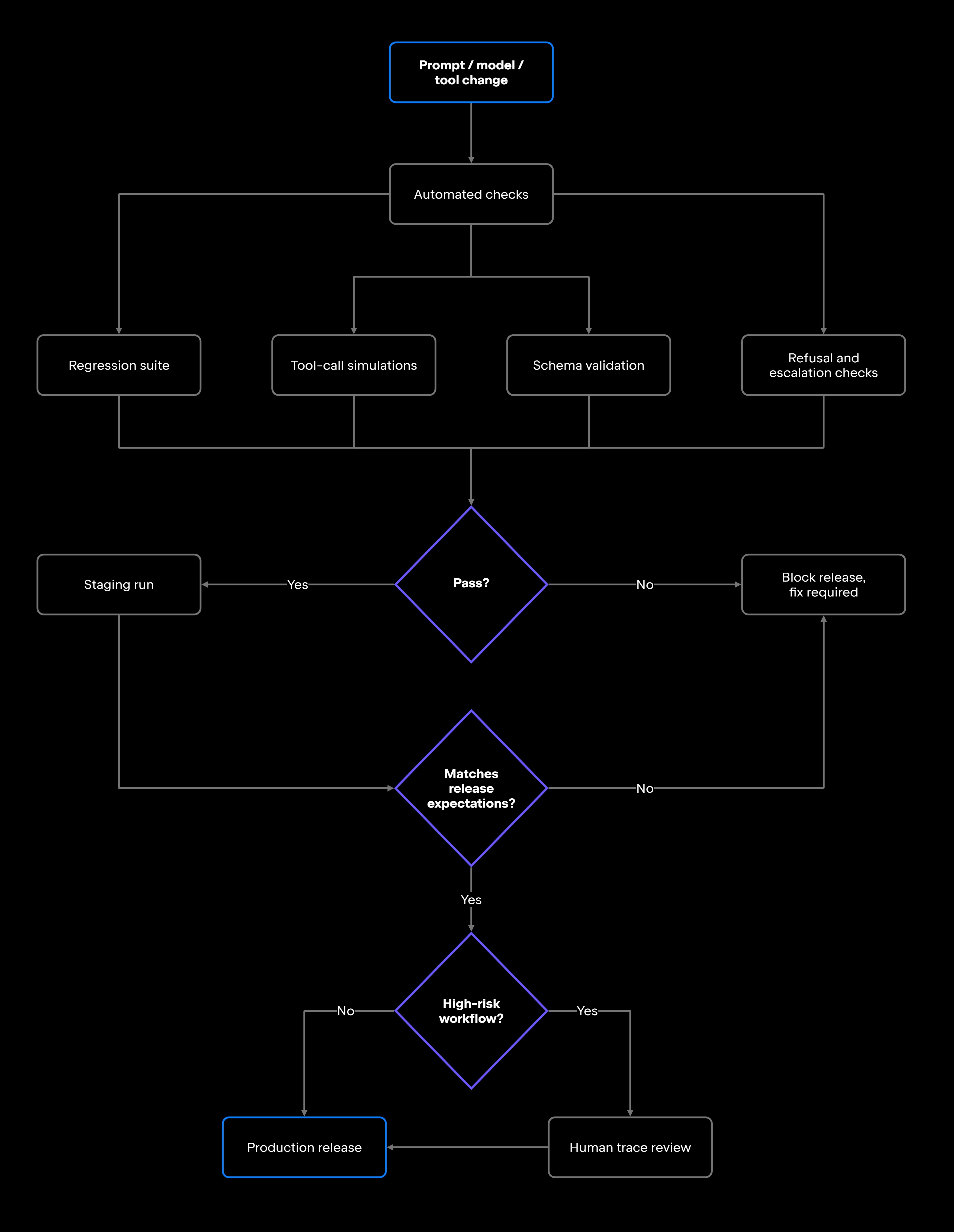
Scenario tests, tool-call simulations, and regression suites automate cleanly, but so do the negative cases, such as the refusals you expect the agent to make, and the escalations it should trigger. Add schema validation, which asserts that structured output still matches the shape downstream systems expect, with required fields present and correctly typed. Run risky operations against sandboxes, meaning isolated instances of the systems the agent writes to, with production's interfaces and none of its consequences. A CI job that updates real tickets or sends real emails during testing is a liability.

The pipeline below shows where each of those checks sits relative to the release decision.

Any agent that exposes a CLI can run inside the pipeline you already have. Junie runs headlessly that way, on GitHub Actions, GitLab CI, or TeamCity, so agent tests slot in beside your existing jobs.

Staging environment runs

Run the agent in a staging environment that mirrors production closely on the axes that matter: production-like permissions, realistic repositories, API configurations pointed at sandboxes, the same knowledge bases production uses, and real workflow scenarios.

Compare staging behavior against your documented release expectations before each deployment, and treat any divergence as a release blocker until you have explained it.

Human review for high-risk cases

Full automation isn't appropriate for every workflow. For high-risk operations, review execution traces manually: which tools the agent called, in what order, with what inputs, whether it requested the right approvals, what the diffs looked like, and what the decision logs say about why it chose the path it did. Automated checks should run ahead of prompt updates, model upgrades, and releases, with manual trace review reserved for the scenarios where mistakes cost the most.

Testing non-deterministic agent behavior

AI agents don't produce identical outputs for every run. The same task might result in different but equally valid responses, and that variance is inherent to how these systems work, which is what makes exact-string comparison unworkable as a pass condition.

Validate at the behavioral level instead. Define success as the workflow executing as designed and completing its task, with the expected tool calls, output that conforms to your schema, and permission and safety constraints intact; then check each run against those criteria rather than against a reference string. Where variance is high, run the same scenario a fixed number of times and assert a success rate rather than a single exact result. A scenario that selects the correct tool in 8 of 10 runs then has a measured pass rate you can set a threshold against, instead of a test that looks flaky.

Common AI agent testing mistakes

Each mistake below leaves a real failure path unexercised while the test suite still passes.

Mistake

Why it creates risk

Better approach

Validating only the final response

Can miss failures in planning, tool selection, and intermediate steps

Evaluate the full execution trace, not just the output

Ignoring tool execution traces

Hides incorrect tool calls and silent failures

Log and review every tool call and its actual result

Include ambiguous, invalid, and failure-mode test cases

Explicitly test boundaries, rejections, and post-denial behavior

Validate behavior, schema, and tool usage, not exact strings

Run the regression suite ahead of each release

Automate scenario tests, schema checks, and refusal verification

Verify actual execution results, not the agent's self-report

Production failures happen at edges and under unexpected inputs

Agent may perform restricted operations or bypass review steps

Whole categories of behavior go untested

Prompt or model changes silently break previously working behavior

Doesn't scale and misses regressions between releases

Agents sometimes report success when underlying calls failed

Testing only happy paths

Skipping permission and approval tests

Assuming non-deterministic outputs can't be tested

Not performing regression tests after updates

Relying only on manual review

Assuming tool calls succeeded

Read the left-hand column against your current suite, and the gaps name themselves.

Production AI agent testing is release engineering

Treat AI agent validation as a pipeline rather than a final check. Define release criteria before writing tests, build workflow-based test cases from realistic scenarios, validate tool interactions including failures and permission boundaries, run regression suites when prompts, models, or tools change, automate where possible, and use targeted human review for the cases where automated checks fall short.

If you're starting from nothing, write down the failure boundaries first. That list is the shortest path to a suite that catches the incidents you actually care about. Strong pre-production testing means fewer of these failures reach the systems you monitor, and catching a broken approval workflow in staging is far cheaper than diagnosing why an agent modified configuration it should have left alone.

For anyone deciding whether an agent ships, that suite is the artifact worth asking about. A team pointing to documented failure boundaries and a passing regression run against them is describing a measured risk; a team reporting that the agent "seems to work well" is describing an untested one.

FAQ

How many test cases does an AI agent need before production?

There's no fixed number; it depends on the agent's scope and risk profile. Cover every major workflow the agent handles, every failure boundary you have defined, and every external tool it calls, exercising each on its expected path and on the ways it can fail. Sized that way, the count falls out of the agent's surface area rather than a target picked in advance.

What should teams test after changing an agent prompt?

Run the full regression suite, then compare results against a golden baseline captured before the change rather than reading them in isolation. Any behavior that differs from the baseline is a regression until you confirm the change was intentional, which is the whole value of keeping one. Treat an unexplained shift in a high-risk workflow as a release blocker, not a curiosity for later.

How should teams test AI agents that use external tools?

Mock or sandbox the tool wherever you can. Where you can't, and plenty of third-party APIs have no test mode, record a real response once and replay it, keeping the few genuinely live tests behind a manual trigger rather than in the suite that runs on every change. Whichever approach you land on, one assertion matters most. The agent must not report success when the underlying call failed. Test that against errors, timeouts, and malformed responses.

Can AI agent testing be fully automated?

Mostly, but the line moves as the agent's scope grows. Automation covers scenario tests, schema validation, tool-call verification, and regression suites, and its share should keep growing, because every failure mode you meet once becomes a regression case you never review by hand again. What stays human is the first encounter with a novel failure and any workflow whose blast radius you cannot undo, the same line published agent evaluation guidance draws. If manual review time isn't falling as the suite matures, the suite isn't absorbing what it learns.

How do developers test AI agents when outputs are non-deterministic?

Set a threshold instead of demanding one exact result, and derive it from observed behavior rather than a round number: Run the scenario enough times to see its real spread, then set the bar below that spread and above what you would tolerate in production. When runs fail intermittently, read the failing traces together. If they all break at the same step, you have a bug, not variance, and telling those apart is what keeps a behavioral suite from blocking every release or none.

Damaso Sanoja

Damaso Sanoja is an engineer who is passionate about helping others make data-driven decisions to achieve their goals. This has motivated him to write numerous articles on the most popular relational databases, customer relationship management systems, enterprise resource planning systems, master data management tools, and, more recently, data warehouse systems used for machine learning and AI projects. You can blame this fixation on data management on his first computer being a Commodore 64 without a floppy disk.

Use AI agents in your development workflow

Explore JetBrains AI solutions that help you build, use, and scale AI agents across the software development lifecycle.

Air Gateway

Run terminal agents through one JetBrains account, with access, models, and usage governed centrally.

Junie

Plan, code, debug, and automate tasks with a coding agent that works across your terminal, IDE, GitHub, and GitLab.

Air in IDEs

Orchestrate AI agents and verify their output directly in JetBrains IDEs, with full control over how changes are reviewed.

Air Teams

Automate software delivery workflows, coordinate agentic work across teams, identify bottlenecks affecting delivery.

Air Governance

Govern AI usage, models, policies, and costs across your organization, including JetBrains and third-party tools.

Air Context

Give agents shared organizational memory and context that carries across tools, workflows, and execution environments.

JetBrains Air

An open system of AI products for developers, teams, and organizations – from coding with agents to automating workflows and governing AI at scale.

Continue Exploring the AI Agents for Developers Guide

How to Evaluate AI Agents

Learn how to evaluate AI agents using practical metrics, benchmarks, testing strategies, and performance measurements for real-world applications.

Agentic Workflows Explained

Explains agentic workflows, how AI agents plan and execute multistep tasks, and the patterns that make autonomous workflows reliable and scalable.

What Is an AI Agent Loop?

Explains how AI agent loops work, why infinite loops occur, and practical techniques for preventing runaway execution in production systems.