AI Agents for Developers / AI Agents for DevOps Automation

AI Agents for DevOps Automation

An alert fires mid-release, and the context needed to judge it sits across a dashboard, a deploy history, and a month-old Slack thread. The runbook exists, but it assumes you already know which service owns the failure. The fix is rarely the slow part. Reconstructing what happened is, and it falls to whoever happens to be on call. That is the work teams want to hand off when they look at AI agents for DevOps.

Reconstruction is mostly retrieval, and that is work an agent can take on. It can read the logs, check what deployed recently, and surface the runbook step that fits, while the responder is still opening tabs. The gain is lower operational overhead and shorter feedback loops, not a transfer of judgment. Anything that touches production still goes through human review. This article is about using agents in DevOps rather than building them: where they fit, the workflows they suit, the benefits, the risks, and how to adopt them safely.

Approximately 24% of senior developers generate more than 80% of their code with AI agents, compared with around 14% of more junior developers.

Source: Preliminary findings from the JetBrains Developer Ecosystem Survey 2026 • 15,000+ developers worldwide
Where AI agents fit in DevOps automation

AI agents can add value in DevOps workflows where the next step depends on changing operational conditions. Traditional automation relies on predefined rules and conditions, making it effective for predictable tasks. AI agents can complement these workflows by interpreting less structured information, selecting relevant tools, and proposing next steps when predefined procedures don't fully address the situation.

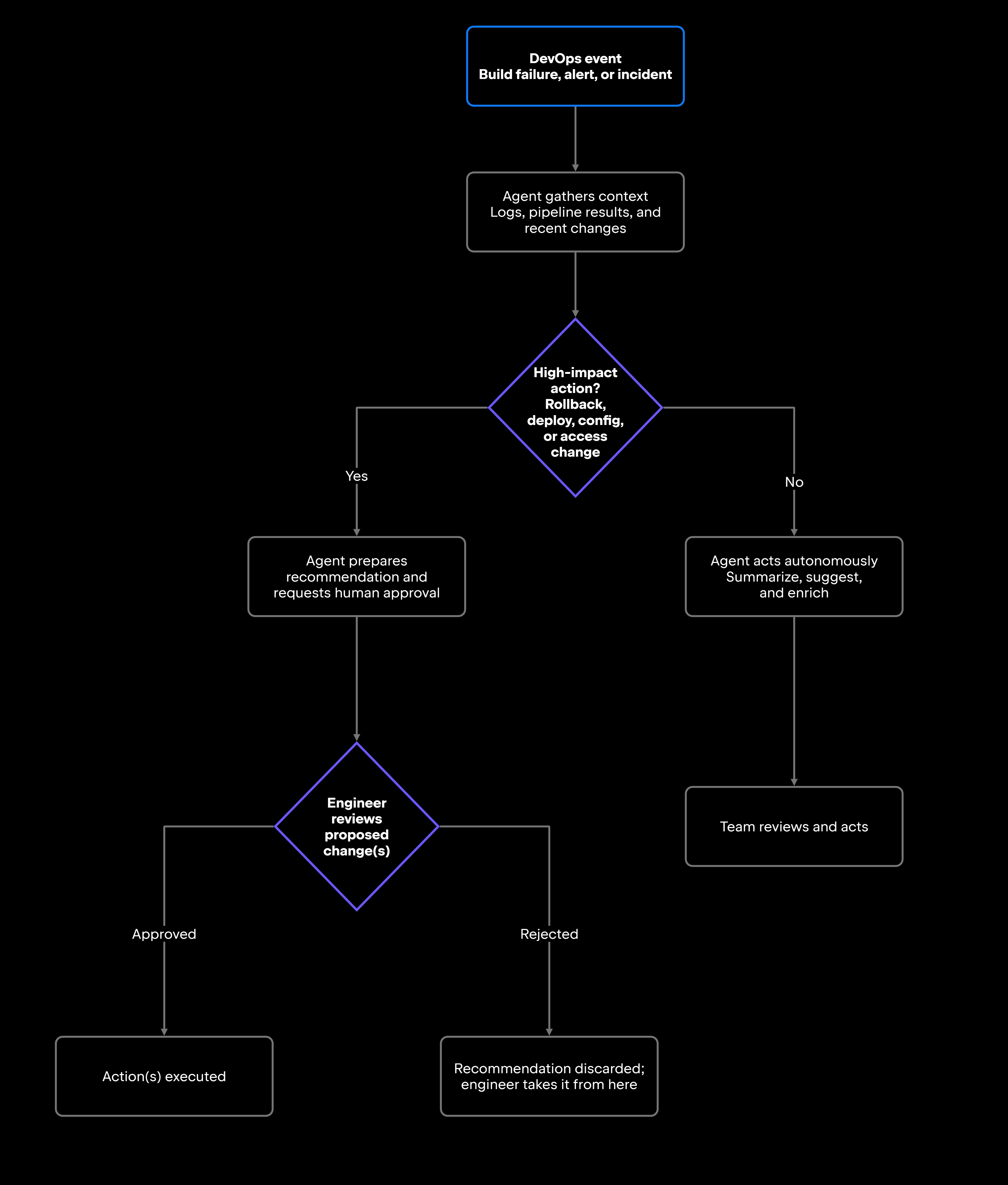
Agentic AI for DevOps names the behavioral difference: reading the operational context, choosing the next step, calling the tools that answer the question, and escalating when a human should decide. That is a change in how automation behaves, not in where it sits in your stack.

From static runbooks to agentic workflows

A runbook is a fixed procedure: Check service health, inspect the logs, and then page the owning team. That rigidity is the point, and it holds for as long as the incident matches the procedure. It stops holding when the situation is novel, or when the engineer on call has never worked on the service that broke.

An agent works the same procedure differently. It can report which errors are new since the last release, pull the current deployment status, compare what changed in the past few hours, and propose a remediation step with the supporting evidence attached. The responder still makes the call, but they make it from an advanced position instead of from scratch.

None of this replaces the runbook. A well-tested procedure is a reliable artifact, and procedural consistency matters most under pressure. What an agent adds is speed in applying it, and completeness when the person applying it is new to the system.

Human-in-the-loop operations

For anything that directly affects production, the agent prepares a recommendation and waits for explicit approval. Rollbacks, configuration changes, infrastructure modifications, access changes, and deployment approvals all sit on that side of the line. An agent can assess whether a rollback is warranted from error rates and recent deploy history, but a human confirms it before it executes.

Most of what an agent does in a day never reaches that gate.

Common DevOps workflows for AI agents

DevOps automation with AI agents pays off first where the manual work is slow, and the wrong answer is cheap.

CI/CD failure investigation

Failed builds and broken pipelines are a constant source of friction. A developer pushes a change, the CI run fails, and now they need to figure out whether the failure is a flaky test, a dependency version conflict, a configuration regression, or something in the code they just changed.

An agent can diff the failing run against the last few that passed, name the suite that broke and why, and propose one next action: Rerun a specific test, pin a dependency, or revert the config change.

Junie, JetBrains' coding agent for professional software development, can help developers investigate build failures, identify potential causes, and propose fixes within their development workflow. In Junie CLI's Plan mode, the agent analyzes the codebase using read-only operations and prepares an implementation plan before making changes. Developers can review and refine the proposed approach before proceeding with implementation.

AI-assisted investigation can also extend beyond the developer's desktop. Junie CLI supports headless execution in CI/CD pipelines, allowing teams to automate tasks such as code reviews and investigations of failing tests. JetBrains TeamCity provides CI/CD infrastructure for running builds, collecting test results, and tracking failures. Through its integrations with AI agents, TeamCity can also expose build information and logs that agents use to investigate problems. JetBrains has demonstrated this approach internally, using TeamCity to orchestrate large-scale evaluations of Junie across parallel execution environments.

Log analysis and incident triage

During an active incident, the first bottleneck is almost always information assembly. What are the symptoms, which services are affected, and what does the log trail actually say? Engineers spend the early phase of an incident reading logs by hand, correlating alerts, and trying to separate signal from noise.

An agent can cluster repeated errors into a single line, correlate the alerts that fired together, and flag what does not fit the usual pattern. The responder gets the key events in sequence, an estimate of who is affected, and the runbook section that matches the symptoms.

Deployment, infrastructure, and configuration support

Before a release goes out, someone decides whether it is ready. That decision draws on static analysis results, the state of recent pipeline runs, and whatever differs between staging and production, and those rarely sit in the same place. The cross-referencing is manual, and it happens under time pressure.

AI agents can help assemble release-readiness information from multiple sources. JetBrains Qodana provides static code analysis within CI/CD pipelines, helping teams identify code quality and security issues before deployment. JetBrains TeamCity manages build and test execution and provides information about pipeline results, failures, and build configurations. With access to these tools and the relevant environments, an agent can help summarize release readiness, investigate failed checks, and identify configuration differences that may require further review.

The same context serves the routine work around a release. An agent can draft release notes from what actually shipped, explain an infrastructure-as-code change to an engineer who did not author it, or compare configuration across Kubernetes namespaces and flag drift between version control and what is running. Applying a manifest, scaling a deployment, or changing cloud resources still needs explicit approval.

How AI agents support DevOps teams

Each of those workflows saves an engineer time. What matters at team level is different: how long the team waits on information, how much the response varies depending on who picks it up, and how much attention goes to work that produces nothing. Agents are most useful where they reduce that friction, and they stay useful only while production-impacting decisions remain with engineers.

Faster operational feedback

Operational delay accumulates in the wait to know enough to act, and that wait multiplies across everyone who needs the same context. An agent that has already inspected the logs, worked out why the pipeline failed, summarized the incident so far, and gathered the deployment context turns that wait into a read. The team decides on a current picture, not one that was accurate 20 minutes ago, which is most important during incidents, releases, and failed CI/CD runs.

More consistent runbook execution

The same incident handled by your longest-tenured engineer and by someone three weeks into the team produces two different responses. That spread is a team-level cost, and it is mostly a knowledge problem: which steps apply, what context they assume, and whether the documentation still matches the system.

An agent narrows the spread by surfacing the applicable steps and checking what those steps assume (is the service actually down, and did the last deployment match the tag in the runbook?) before anyone begins, so the same procedure is followed more consistently, whoever is on call. Newer engineers get the team's existing runbooks, documentation, and practices applied as written rather than as remembered.

Reduced manual triage

Routine triage activities, such as enriching tickets with build context, summarizing logs, and drafting incident reports, can consume significant engineering time. AI agents can help automate the information-gathering and documentation aspects of these tasks, allowing engineers to focus on interpreting complex failures, validating recommendations, and making operational decisions.

The boundary holds here too. An agent prepares the triage and a responder confirms it. An agent closing its own tickets with nobody checking has crossed into decisions it has not earned.

Risks and limits in DevOps automation

DevOps workflows touch production systems, sensitive logs, credentials, infrastructure, and customer-facing services. The risks of getting agent behavior wrong here are higher than in most domains, and they are worth taking seriously before you expand what agents are allowed to do.

Production action risks

An agent with write access to production can do real damage when its recommendations are wrong, or its context is incomplete. Deploying code, changing infrastructure, rotating credentials, modifying access, and triggering rollbacks all belong in that category.

The danger is how difficult some actions are to reverse. A rollback can execute quickly but take much longer to recover from. Rotating credentials may lock out responders, and deleted resources may not return in the same state. Reducing the blast radius requires narrowly scoped permissions and approval gates before high-impact actions are executed. At the organizational level, JetBrains Air Governance helps administrators control which AI agents and tools are available to users and teams, while permissions to modify production systems must still be enforced in those systems.

Incomplete operational context

Agents make recommendations based on the context they can access. When logs are incomplete, alerts are noisy, runbooks are outdated, or deployment history is missing, the agent's output degrades. A recommendation that looks confident but rests on partial data can send a responder in the wrong direction during a time-sensitive incident.

A well-designed DevOps agent should say so when its context is weak. In practice, that looks like the agent reporting "logs only cover the last 15 minutes; the deploy that may have triggered this happened 40 minutes ago" before offering anything else. The alternative, a best-guess recommendation dressed up as a confident one, is worse than no recommendation at all.

Permission and security boundaries

DevOps agents need permissions scoped to the job: which tools they can call, which environments they can reach, which repositories they can read, and which infrastructure systems they can touch. An agent used for CI failure investigation needs build logs and pipeline history, and nothing beyond that.

Read-only is the right place to start, and permissions widen as reliability is established. The deeper mechanics of tool authorization, least-privilege design, and confirmation gates are handled in Tool Use and Function Calling in AI Agents, and the wider control set in AI Agent Security Best Practices for Developers.

How teams should adopt AI agents for DevOps

Most teams that succeed with DevOps agents run the same three phases in the same order: read-only access first, approval gates when write access is granted, and wider autonomy only once the evidence supports it.

Start with read-only automation

Phase one is everything an agent can do without a write path: log summaries, CI failure explanations, runbook suggestions, incident summaries, deployment checklists, and ticket enrichment. The agent reads, produces output, and an engineer decides what happens next.

What this phase buys is evidence. If engineers routinely rewrite the summaries, the problem is the agent's context or its configuration, and granting write permissions will not fix it. If they use the output as it arrives, you have the signal that justifies the next step.

Add approval gates for production changes

Phase two starts when the agent gets a write path, and the question shifts from capability to ownership. Deployments, rollbacks, infrastructure changes, access changes, and configuration updates each need a named approver and a visible confirmation step, not a policy document stating that approval is required. That arrangement is what makes DevOps automation safe: The agent absorbs the preparation, and an accountable engineer authorizes the change.

Measure reliability before expanding autonomy

Phase three is a judgment call, and it rests on what the agent has already done rather than on how capable it looks. Useful signals: how often engineers accept a suggestion without editing it, whether incident summaries match what actually happened, whether triage time has dropped on the workflows it covers, whether the same manual steps keep recurring, and whether it escalates when its context runs thin.

Capture these lightly at first. A thumbs up or down on agent output, a tag recording whether a suggestion was used as is, and an occasional post-incident comparison of the agent's summary against the real timeline will tell you most of what you need. Formal dashboards can wait until there is enough volume for the numbers to mean anything. The metric families and evaluation-set construction behind a more formal program are laid out in How to Evaluate AI Agents.

As AI agent adoption expands across teams, organizations need centralized visibility into usage, costs, and the tools developers rely on. Air Governance provides organization-wide oversight of AI consumption across JetBrains and third-party agents, helping teams understand adoption patterns and manage access to AI models and agents. Combined with workflow-specific reliability metrics, these insights can help engineering managers make informed decisions about expanding agent-assisted automation while maintaining appropriate organizational controls.

Measure reliability before expanding autonomy

Phase three is a judgment call, and it rests on what the agent has already done rather than on how capable it looks. Useful signals: how often engineers accept a suggestion without editing it, whether incident summaries match what actually happened, whether triage time has dropped on the workflows it covers, whether the same manual steps keep recurring, and whether it escalates when its context runs thin.

Capture these lightly at first. A thumbs up or down on agent output, a tag recording whether a suggestion was used as is, and an occasional post-incident comparison of the agent's summary against the real timeline will tell you most of what you need. Formal dashboards can wait until there is enough volume for the numbers to mean anything. The metric families and evaluation-set construction behind a more formal program are laid out in How to Evaluate AI Agents.

As AI agent adoption expands across teams, organizations need centralized visibility into usage, costs, and the tools developers rely on. Air Governance provides organization-wide oversight of AI consumption across JetBrains and third-party agents, helping teams understand adoption patterns and manage access to AI models and agents. Combined with workflow-specific reliability metrics, these insights can help engineering managers make informed decisions about expanding agent-assisted automation while maintaining appropriate organizational controls.

AI agents as DevOps automation partners

Across incident triage, CI/CD investigation, runbook execution, and release checks, the pattern that holds is the same: The agent assembles, and the engineer decides. Teams that use agents well run them as a layer inside existing delivery pipelines, where an agent brings operational context into an incident, explains what broke in CI, works through an infrastructure change, and absorbs the repetitive triage. They augment the CI/CD, operational, and review processes a team already runs; they do not replace them.

The safest adoption path is to start with read-only support workflows, keep humans in the loop for any action that touches production, and expand agent autonomy only once its recommendations have proven consistently accurate and safe.

FAQ

How can AI agents help DevOps teams?

AI agents reduce manual work in context gathering, CI/CD failure investigation, log summarization, and incident reporting. They query build results, cluster alert patterns, and compare deployment histories faster than an engineer could by hand. The result is shorter feedback loops during incidents and releases.

Can AI agents automate incident response?

Partially. Agents can automate the information-gathering phase, assembling logs, correlating alerts, and summarizing what's affected. The decision-making phase, including any action that changes the production environment, needs human confirmation. Fully autonomous incident response creates unacceptable risk for most production systems.

How should teams start using AI agents for DevOps automation?

Start with workflows where the agent only reads and reports. Confirm the outputs are accurate and useful before granting write or execution permissions. Add approval gates before extending the agent to any production-impacting action, and measure reliability signals before expanding what it can do on its own.

What DevOps tasks are best suited for AI agents?

Read-only investigation and summarization are good starting points, including CI failure analysis, log summarization, incident context preparation, and deployment readiness checks. These tasks are frequent and time-consuming, and they allow teams to evaluate agent output before granting broader execution permissions. However, even read-only workflows require appropriate access controls because logs and operational data may contain sensitive information. Once reliability is established, agents can gradually support more complex workflows, including configuration review and supervised remediation.

Should AI agents be allowed to make production changes?

High-impact production changes, such as deployments, rollbacks, infrastructure modifications, and access changes, should be subject to explicit approval and clearly defined organizational policies. AI agents can prepare recommended actions and supporting evidence, while authorized engineers retain responsibility for approving consequential changes. Lower-risk operations may follow predefined automation policies when appropriate safeguards and monitoring are in place.

What are the main risks of using AI agents in DevOps workflows?

Three. Production action risk, where agents execute high-impact changes without approval. Incomplete context risk, where partial logs or history produce confident but incorrect recommendations. Permission scope risk, where agents accumulate broader access than their workflows require. All three are manageable with approval gates, honest uncertainty signaling, and scoped permissions that start read-only.

Damaso Sanoja

Damaso Sanoja is an engineer who is passionate about helping others make data-driven decisions to achieve their goals. This has motivated him to write numerous articles on the most popular relational databases, customer relationship management systems, enterprise resource planning systems, master data management tools, and, more recently, data warehouse systems used for machine learning and AI projects. You can blame this fixation on data management on his first computer being a Commodore 64 without a floppy disk.

Use AI agents in your development workflow

Explore JetBrains AI solutions that help you build, use, and scale AI agents across the software development lifecycle.

Air Gateway

Run terminal agents through one JetBrains account, with access, models, and usage governed centrally.

Junie

Plan, code, debug, and automate tasks with a coding agent that works across your terminal, IDE, GitHub, and GitLab.

Air in IDEs

Orchestrate AI agents and verify their output directly in JetBrains IDEs, with full control over how changes are reviewed.

Air Teams

Automate software delivery workflows, coordinate agentic work across teams, identify bottlenecks affecting delivery.

Air Governance

Govern AI usage, models, policies, and costs across your organization, including JetBrains and third-party tools.

Air Context

Give agents shared organizational memory and context that carries across tools, workflows, and execution environments.

JetBrains Air

An open system of AI products for developers, teams, and organizations – from coding with agents to automating workflows and governing AI at scale.

Continue Exploring the AI Agents for Developers Guide

AI Agent Security Best Practices for Developers

Learn AI agent security best practices, including permission management, validation, monitoring, and secure workflow design for production deployments.

AI Agent Testing Strategies for Production

Learn how to test AI agents in production using evaluation frameworks, benchmarks, monitoring, and reliability practices for autonomous systems.

How to Evaluate AI Agents

Learn how to evaluate AI agents using practical metrics, benchmarks, testing strategies.