AI Agents for Developers / Tool Use and Function Calling in AI Agents

Tool Use and Function Calling in AI Agents

Function calling in AI agents is what turns a language model from a text generator into a system that can act. On its own, a model can describe how to run a test or draft a database query, but it cannot execute either. Tool use closes that gap: through structured function calls, an agent can interact with APIs, IDEs, terminals, databases, browsers, and external services, then adapt based on what those systems return. That capability is the foundation of modern agent workflows and production AI systems, where the goal is to complete work rather than produce suggestions.

This article walks through how function calling for AI agents executes actions, how agents select tools, how the pattern compares to plain prompting, where it delivers the most operational value, and the reliability concerns that come with giving an agent the ability to act.

Approximately 24% of senior developers generate more than 80% of their code with AI agents, compared with around 14% of more junior developers.

Source: Preliminary findings from the JetBrains Developer Ecosystem Survey 2026 • 15,000+ developers worldwide
What is tool use and function calling in AI agents?

AI agent tool use is the ability of an AI system to invoke structured actions rather than produce only natural-language responses. A tool is any external function, API, or service the agent can call to retrieve information or trigger an action: information retrieval, such as web search or knowledge base queries, data operations against a database, external service calls, code execution, or the delegation of tasks to another agent. The agent does not run these tools itself. It generates a structured request, the host application executes it, and the result flows back into the agent's context. That separation is what makes agent actions auditable and sandboxable.

That separation is also the difference between acting and advising. Asked to check a failing test, an agent with tool use calls a run_tests function and works from the actual output, instead of returning "you should run pytest tests/auth/" and leaving you to act. What makes this possible is the function calling pattern, popularized by OpenAI's function-calling API and now supported across Claude, Gemini, and other model providers: The model is given a set of functions defined by typed schemas and can call one whenever a task needs a real action. Prompt engineering alone cannot produce that, since prompting yields text, never a change in an external system.

In a development context, tools typically include capabilities such as reading files, searching code, running tests, executing commands, querying data, and managing pull requests. The set of available tools, combined with the schemas that define them, determines what the agent can actually do. A model that knows it has a matching tool available will generally use that tool rather than generating a generic text explanation of how the task might be done.

How function calling works in AI agents

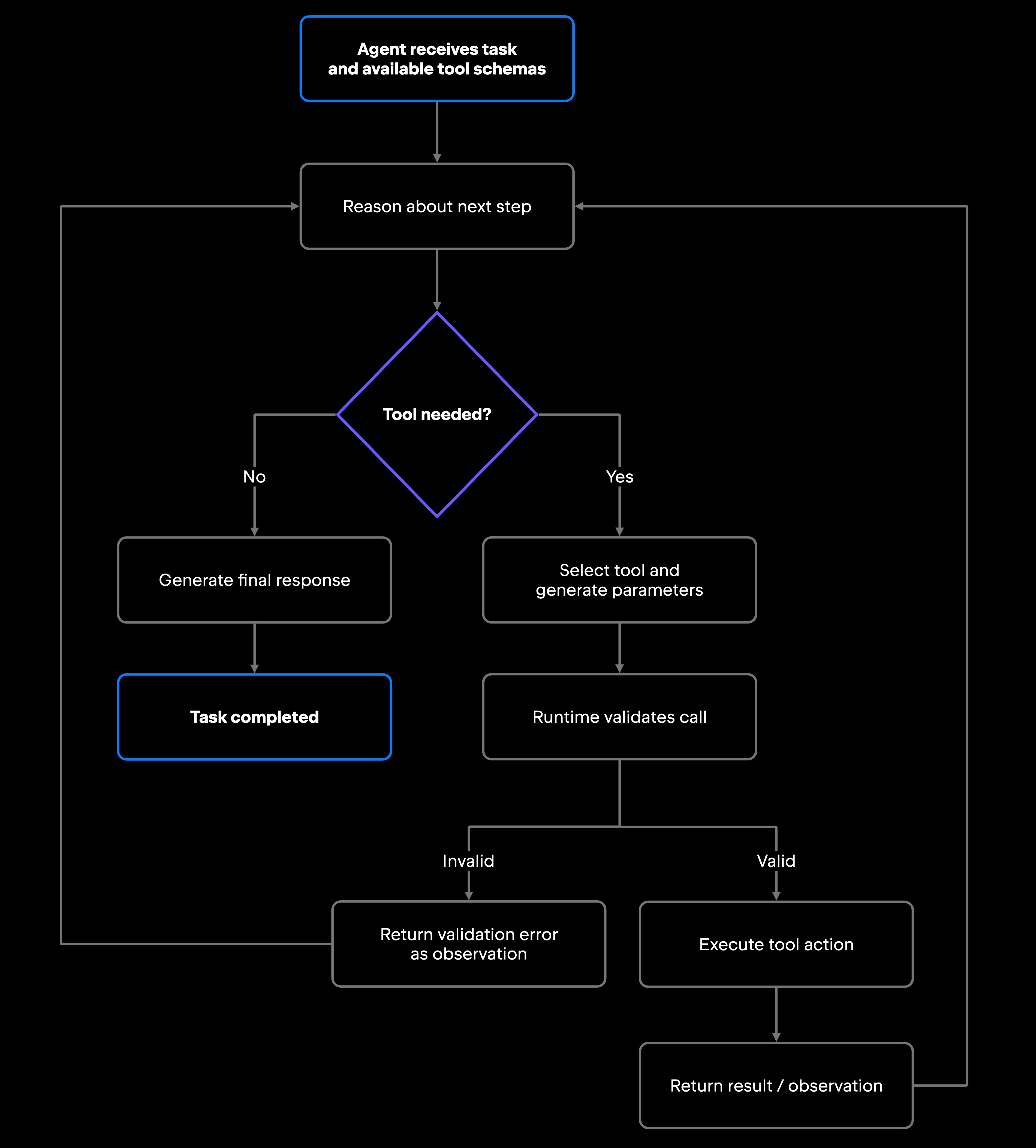
Function calling in AI agents runs as an execution loop. The agent receives a task alongside available tool schemas, reasons about what is needed, generates a structured call, hands it to the runtime for validation and execution, receives the result as an observation, and decides the next step, repeating until the task is complete or a final response is produced. Each iteration grounds the next decision in real output rather than inference.

This loop connects AI reasoning with operational systems, extending reasoning into actions that change or query external systems. The reasoning that selects a tool at each step, together with any orchestration layer coordinating multiple agents and tools, is what makes complex multistep workflows possible. Both topics have their own depth: planning algorithms and AI agent orchestration are covered in dedicated articles, so this section remains focused on the mechanics of the call itself.

Tool selection and decision-making

Before executing any action, an agent evaluates several factors: the current objective, the results of previous steps, the available tools and their documented capabilities, and any permission boundaries set by the runtime. For a task like adding a field to an existing API response, an agent might search the codebase for the endpoint handler, review the data model it returns, and edit the relevant files. Each of those steps is a separate tool call, and the agent determines the sequence based on the results of each step.

Tool selection is not fully reliable. Agents can pick the wrong tool for a step, use the right tool with incorrect parameters, or get stuck when outputs do not match expectations. These failure modes are covered in the reliability section below. Selection involves active reasoning, and the quality of that reasoning depends on how well the tools are documented and how clearly they are scoped.

Structured function calls

Function calls are defined through structured schemas, typically JSON Schema for most model APIs. A tool definition gives the function a name, a short description of what it does, and a typed list of parameters, flagging which ones are required. An order-status tool, for instance, takes a single required order ID:

{
"name": "get_order_status",
"description": "Retrieve the current status of a customer order.",
"parameters": {
"type": "object",
"properties": {
"order_id": {
"type": "string",
"description": "Unique identifier for the order, for example ORD-10482"
}
},
"required": ["order_id"]
}
}

When the model decides that the tool in question applies, its response carries a structured call that names the function and supplies arguments matching the schema, rather than plain text:

{
  "name": "get_order_status",
  "arguments": { "order_id": "ORD-10482" }
}

The schema does real work here. It tells the model which parameters the function accepts and what they mean, lets the runtime validate calls before execution, and establishes a formal contract between the reasoning layer and the execution layer. A call whose arguments do not match the declared types fails at validation rather than at execution, and required parameters keep the model from invoking a function without the inputs it needs. Descriptive fields with example values help the model generate well-formed calls rather than plausible-looking but incorrect inputs.

Major model providers support structured tool calling, although request and response formats differ between APIs. Local endpoints via Ollama follow the same request pattern.

Executing actions and receiving results

Once the runtime validates a call, it executes the action and returns a result that flows back into the agent's context as an observation. Results vary by tool: A run_tests call returns structured results the agent can act on, such as pass/fail status and error details; a search_codebase call returns structured location and match information; a query_database call returns structured rows or error results. Each result typically either confirms the agent's hypothesis and points to the next step, or surfaces new information that changes the approach, and that chain of calls and observations keeps the agent's output tied to what the systems actually return.

Not every step has to run in sequence. Models that support parallel function calling can request several independent tools in one response, which cuts latency: A research task can kick off a web search, a database lookup, and a knowledge base query at once, then synthesize the results. Sequential calling applies when each step depends on the previous one, such as looking up a customer ID, using it to fetch order history, and then checking fulfillment status. Real workflows mix both, and the execution graph emerges from the model's reasoning rather than from hardcoded orchestration logic.

Validation, retries, and feedback

Production function-calling systems handle failures with a few common patterns: schema validation before execution, result validation to confirm returned data matches the expected format, and boundary checks on retry counts and execution-time budgets. Irreversible actions need a firmer guard than a retry cap, a job for the authorization controls covered further on.

When a call fails from a network error, an invalid parameter, or a runtime exception, the result returns as an error observation. Well-designed systems include fallback paths: a retry with corrected parameters, an alternative tool, or escalation to a human reviewer. Retry logic needs hard limits, since an agent that retries indefinitely on a bad parameter burns its budget cycling on the same failure instead of making progress.

Function calling vs. traditional prompting

The difference between traditional prompting and function calling comes down to what happens after the model responds. Prompting describes the work; function calling executes it. With prompting, you send a question and receive text, whether code, instructions, or analysis, and then act on it yourself, copying the code to run it or following the steps by hand. The model works from its own output alone, so it cannot check a result against a live system or adjust to what execution actually returns. Function calling removes that manual step: The agent does the work directly, within the permissions and constraints of its execution environment, which makes it a more practical approach for workflows that span multiple tools and depend on observed results.

Dimension

Traditional prompting

Function calling

Execution

Suggests code or steps

Executes actions directly

Tool access

None, text output only

APIs, databases, and other external systems

Workflow continuity

Runtime validation

Operational complexity

Single-turn responses

Multistep, stateful execution loops

No built-in validation

Parameters validated before execution

Lower

Higher, requires schemas, permissions, and error handling

The trade-off is real. Function calling requires more upfront work: defining schemas, configuring permissions, building error handling, and planning for failure modes that do not exist in simple prompt-response interactions. For any workflow where the agent needs to interact with real systems, prompting alone does not get the job done. Function calling became foundational to modern agent workflows because production software development involves real systems and in situations where consequences matter.

Where tool use delivers the most value

Tool use pays off most in development workflows involving connected systems, structured data, and iterative execution, work that would otherwise require a developer to manually chain multiple tools across multiple interfaces. Debugging, repository analysis, test execution, deployment preparation, and support automation are workflows in which tool use delivers strong returns because the agent works directly with live systems rather than reasoning about them from a distance.

Debugging and issue investigation are the clearest examples. A developer drops a ticket into an agent: A service is returning errors in production. An agent with tool access can pull the relevant logs, search the codebase for the error handler, check recent commits, run the test suite, and surface the specific change that introduced the regression. Without tool use, the agent is limited to more generic debugging advice. With it, the output is grounded in your actual code rather than general patterns. JetBrains Junie, for example, can investigate issues across a codebase, read relevant files, run tests, and make changes across multiple files. It works in JetBrains IDEs, through Junie CLI, and with compatible ACP clients. Developers can review the resulting changes and guide the agent as needed.

Repository analysis benefits from the same pattern. An agent asked to explain an authentication flow can read the relevant files and trace calls through the import graph, so its explanation describes how this codebase actually wires things together, not how such flows usually look in the abstract.

Test execution adds direct operational value: An agent writing new functionality can run the suite, observe failures, revise the implementation, and run again in a loop, without a developer triggering each step.

Deployment preparation is repetitive, error-prone work well-suited to agents that can query APIs and run validation scripts automatically.

Support automation and DevOps workflows see similar gains: An agent integrated with your monitoring stack, ticketing platform, and version control can cross-reference an alert, find the relevant code, check whether a fix already exists on a branch, and draft a pull request description without a developer orchestrating each step. This is where AI agents for software development change what is feasible at a given team size, and the structural patterns behind these connected workflows are covered in a dedicated article on agentic workflows.

Reliability challenges in tool-using AI agents

Tool-using agents introduce operational risks that pure text-generation systems do not carry. The capability that makes these agents useful, the ability to take real actions, is also what gives their failures real consequences.

Hallucinated parameters are a frequent failure mode. The model generates a call with plausible-looking but incorrect inputs: a file path that does not exist, a slightly wrong column name, or an endpoint from an older version of a service. The practical fix is tight schemas whose parameter descriptions carry concrete examples, such as a sample relative path, so the model has a reference point instead of guessing at conventions. Pair that with validation before execution and error feedback detailed enough for the model to correct and retry.

Tool selection failures are largely a design problem. A narrowly scoped tool with a clear, non-overlapping description is easier for the model to pick correctly than a multipurpose function with many optional parameters, so the description field earns real attention: State what the tool does, what it returns, and when to use it over a similar one. Structured output helps too, since a tool that returns clean, labeled results and structured errors gives the model something it can reason about rather than a wall of text or a raw stack trace it has to parse.

Permission management is a baseline concern for any team running agents in production. Apply least-privilege scoping at the tool layer: An agent that only needs to read data should not have a tool that can write to that same resource. Build confirmation gates for high-stakes actions, so writes, deletes, financial transactions, and external communications require an explicit check before execution. Log every tool call with inputs, outputs, and timestamps, since that trace is how you reconstruct what an agent did when something goes wrong. Watch for prompt injection as well: An agent that browses the web or reads external documents can encounter adversarial content designed to hijack its tool use, so treat any external content as untrusted and validate tool arguments before execution.

Runtime latency compounds in multistep workflows: Eight sequential calls at one to two seconds each add real wait time before a result returns. Parallel execution, where call order does not matter, caching read-only results, and per-step timeout budgets all reduce the impact.

Observability gaps make tool-using agents harder to debug than regular application code, because root-causing a failure requires the full execution trace: Which tool was called, with which parameters, what it returned, and what the model decided next. Monitoring agent execution helps teams identify failures and unexpected behavior. For more on detecting and preventing repeated execution loops, see our guide to AI agent loops.

What this means for developers

Tool use and function calling are a core part of what separates an AI assistant from an AI agent. Agents become genuinely useful for software development when they invoke structured actions, execute across connected systems, and iterate on real results, capabilities that text generation alone cannot provide.

Designing tool-using agents benefits from the same discipline as designing any production system: precise schemas, scoped permissions, handled failure paths, and observable execution. An agent that can call functions without those guardrails is unpredictable in ways that create real operational risk. JetBrains Air reflects this broader approach to agentic development, with JetBrains Air in IDEs supporting agent orchestration and review, JetBrains Air Teams enabling team-level automation and coordination, and JetBrains Air Governance providing organization-wide control over AI usage and costs.

As agents take on more of the repetitive, multi-system work in software delivery, the teams that get reliable results are the ones that treat AI agent function calling as a production engineering problem.

FAQ

Why do AI agents use function calling instead of prompts?

A prompt returns text that someone still has to act on, whether that is code to run or steps to follow by hand. Function calling removes that handoff: The agent invokes the action itself, reads the result, and decides what to do next. When a task runs across several tools, and each step depends on the last result, that closed loop is what lets the work finish without a person relaying every output.

What makes some function-calling workflows more reliable than others?

Three factors drive reliability. Schema quality comes first: Well-described parameters with clear types and concrete examples reduce hallucinated or malformed calls. Error handling comes second: Workflows that return structured error observations rather than failing silently give agents the context to correct and retry. Bounded execution comes third: Hard limits on retry counts, execution time, and action scope prevent runaway loops and limit the blast radius when something goes wrong.

How does the Model Context Protocol (MCP) relate to function calling?

The Model Context Protocol (MCP) is an open standard for connecting AI applications to external tools and data sources. Function calling is a mechanism through which models request structured actions, while MCP standardizes how applications discover and interact with tools exposed by MCP servers. The two can work together: an agent can discover tools through MCP and invoke them as part of its function-calling workflow.

Can function calling work without external APIs?

Yes. Function calling works with any executable action the runtime exposes, including local file reads, terminal command execution, in-process database queries, and IDE operations. External APIs are common targets but not required. For example, a coding agent working with a JetBrains IDE can use tools to read source files, run tests, inspect Git history, or execute terminal commands without requiring an external API for each action.

What is the difference between tool use and function calling in AI agents?

The terms are often used interchangeably, but they refer to different layers. Function calling is the API-level mechanism where the model generates a structured call to a defined function. Tool use is the broader concept covering any capability an agent can invoke, including function calls, API requests, browser interactions, or code execution. Function calling is the primary implementation mechanism for tool use in modern agent frameworks like LangChain and LlamaIndex.

Damaso Sanoja

Damaso Sanoja is an engineer who is passionate about helping others make data-driven decisions to achieve their goals. This has motivated him to write numerous articles on the most popular relational databases, customer relationship management systems, enterprise resource planning systems, master data management tools, and, more recently, data warehouse systems used for machine learning and AI projects. You can blame this fixation on data management on his first computer being a Commodore 64 without a floppy disk.

Use AI agents in your development workflow

Explore JetBrains AI solutions that help you build, use, and scale AI agents across the software development lifecycle.

Air Gateway

Run terminal agents through one JetBrains account, with access, models, and usage governed centrally.

Junie

Plan, code, debug, and automate tasks with a coding agent that works across your terminal, IDE, GitHub, and GitLab.

Air in IDEs

Orchestrate AI agents and verify their output directly in JetBrains IDEs, with full control over how changes are reviewed.

Air Teams

Automate software delivery workflows, coordinate agentic work across teams, identify bottlenecks affecting delivery.

Air Governance

Govern AI usage, models, policies, and costs across your organization, including JetBrains and third-party tools.

Air Context

Give agents shared organizational memory and context that carries across tools, workflows, and execution environments.

JetBrains Air

An open system of AI products for developers, teams, and organizations – from coding with agents to automating workflows and governing AI at scale.

Continue Exploring the AI Agents for Developers Guide

What Is Model Context Protocol?

Learn what Model Context Protocol (MCP) is, how it connects AI agents with external tools and data, and why it matters for developers.

What Are Agent Skills?

Explains AI agent skills, how they extend agent capabilities, and how developers use reusable skills to build more capable and reliable workflows.

How to Manage AI Agent Context Windows

Learn how to manage AI agent context windows, reduce context loss, and improve performance, accuracy, and reliability in long-running workflows.