AI Agents for Developers / AI Agents for Software Development

AI Agents for Software Development

Most of a developer's week is not spent writing new code. It goes to reading unfamiliar modules to work out where a change belongs, chasing a stack trace across three services, writing the tests someone deferred two sprints ago, and reviewing pull requests that arrive with no summary and no obvious place to start. AI agents for software development are aimed squarely at that work. The useful question is not whether an agent can produce code, but which parts of that week it can absorb without creating a second review problem.

This article covers where agents fit into everyday development work: code understanding, implementation, testing, code review, documentation, and the team workflows around them, along with how teams adopt them without handing over more than they should. It is not a guide to building an agent. What separates a useful agent from a novelty is whether it can carry a task through several steps, using project context and real tool calls across the development lifecycle, instead of producing one more snippet you still have to wire in by hand.

57% of developers write less than 20% of their code entirely manually, without any AI assistance.

Source: Preliminary findings from the JetBrains Developer Ecosystem Survey 2026 • 15,000+ developers worldwide
How AI agents fit into software development

An agent earns its place by fitting the work a team already does, inside the tools they already open. What decides whether it fits is mostly setup, not model quality.

The catch is that agents don't arrive knowing your codebase. They need orientation, the same way a new developer does. A team's naming conventions, module boundaries, testing patterns, and architectural decisions don't fit neatly into a prompt. Without that context, an agent produces technically plausible code that still needs heavy revision, because it misses project-specific constraints.

Vlad Tankov
Chief Technology Officer, JetBrains Agent Systems

"We've spent decades helping developers get up to speed in complex codebases. It turns out AI agents need much of the same help when they're working in an unfamiliar project."

So the practical question for most teams is not whether an agent can write code. It is where to put one, and what to give it, so its output is consistent enough to review quickly.

From code suggestions to task execution

A code completion tool answers in one pass: It predicts the next line or the next edit, and stops. An agent takes an issue description and works through it: finding the relevant files, proposing a plan, writing a draft implementation, then running the test suite and surfacing what broke. Those are separate reasoning steps with real tool calls between them, and how the model, tools, memory, and control logic fit together to make that loop work is covered in AI Agent Architecture Explained.

Investigating a bug from a stack trace, proposing a refactor across a few files, generating tests against an existing function, summarizing a pull request (PR): Each of those is one request that ends somewhere a developer can act on, instead of a fragment they still have to assemble.

Working in stages also creates a useful review point: after an agent proposes an approach but before implementation begins. Junie, JetBrains' coding agent for professional software development, supports this workflow through plan mode in Junie CLI. The agent explores the codebase using read-only operations and prepares a plan that developers can review and refine before any code changes are made.

Across the software development lifecycle

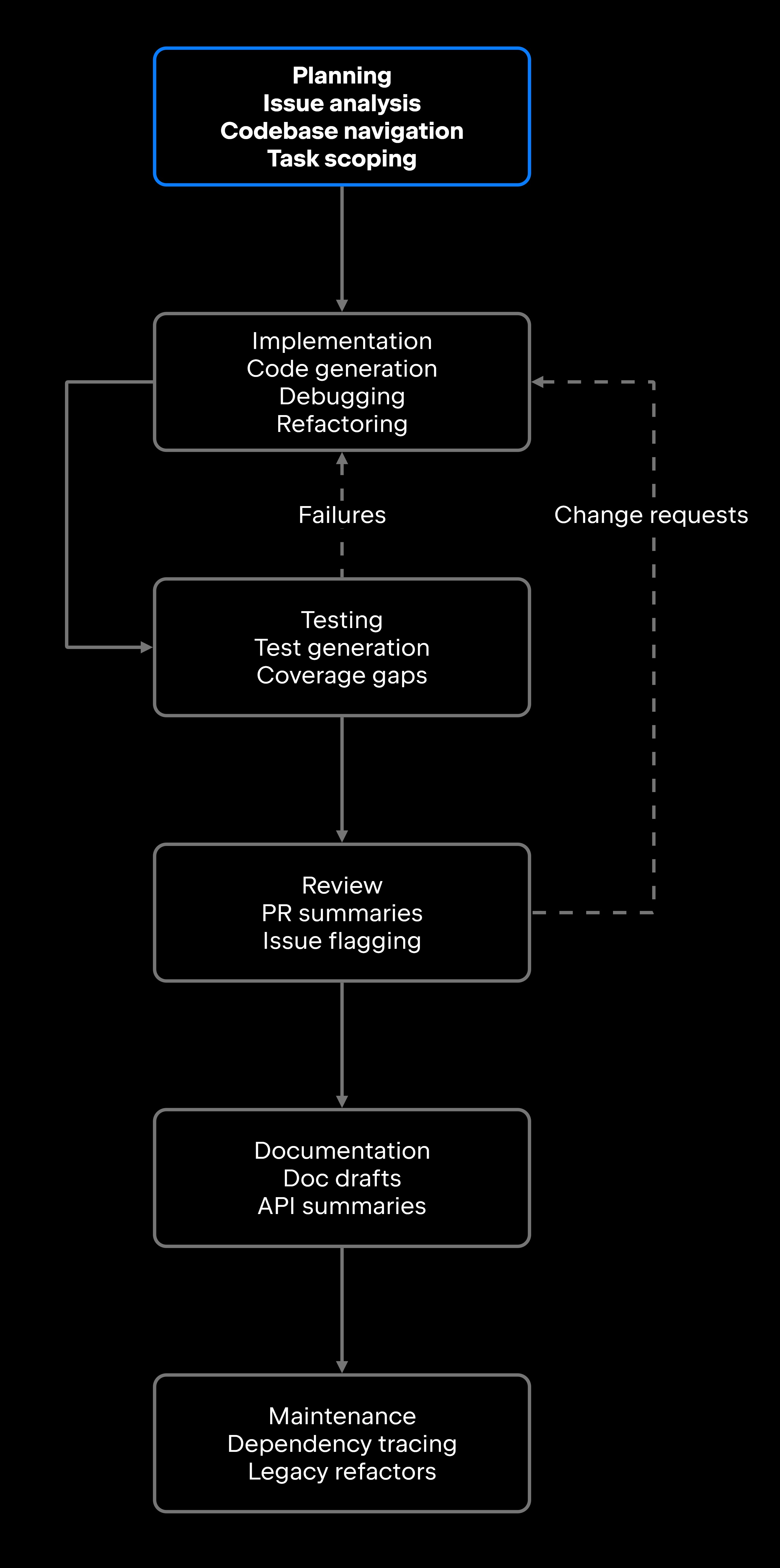
No agent is equally good at every stage of the software development lifecycle (SDLC). The diagram below maps where agent-assisted work tends to land, and the dotted return paths are the part worth noticing: The testing and review phases feed back into implementation, so the work loops instead of running once end to end.

Across the software development lifecycle

Specialization follows from that shape. An agent pointed at planning reads issues and traces code paths; one pointed at maintenance works across a whole repository over a longer run and touches more files. Expecting one agent to cover all six stages equally well is how teams end up unimpressed with all of them.

Common AI agent use cases for software teams

The value of AI agents in software development shows up most clearly in the work developers find repetitive, time-consuming, or awkward to hand off.

Codebase understanding and repository analysis

The questions that stall a developer in an unfamiliar codebase are narrow ones. Which module owns this field. What breaks if this signature changes. Why this service calls that one twice on every request. Answering them means reading code rather than documentation, and the reading is the expensive part.

An agent with real repository access answers those by traversing the code: following a call graph from an entry point, listing the call sites a signature change would touch, or describing what a module does from its implementation and its tests rather than its README.

The limit is what it can see. Given a handful of pasted files, an agent answers those same questions with the same confidence and no way to mention the three call sites outside the snippet. Saying the context is incomplete, instead of filling the gap with something plausible, is what separates a useful agent from a fast one.

JetBrains Air Context, part of the JetBrains Air product system, addresses this gap by providing semantic search across indexed codebases. It incrementally indexes repositories, allowing coding agents to find relevant files, APIs, tests, and code patterns without relying solely on repeated keyword searches or individual file reads. Its multi-repository search capabilities help agents discover dependencies and reusable patterns beyond the project currently open in the developer's environment.

Code generation, refactoring, and debugging

The slow parts of a change are rarely the typing. A bug report arrives with a stack trace and no reproduction steps. A deprecated API call turns up in 40 files, three of them inside configuration strings that a rename will silently skip. A method has grown to hundreds of lines, and every way of splitting it risks a behavior change nobody notices until staging.

These are tasks an AI agent can assist with. Depending on its access to project context and development tools, an agent can investigate a stack trace and propose a fix, identify configuration references that automated renaming might miss, or help refactor a method and update affected call sites. The resulting changes still require verification to ensure that behavior and dependencies remain correct.

What it cannot tell you is whether the change is correct. A patch that passes the existing suite still says nothing about the assumption in an adjacent module that no test covers, or the project convention that lives in review habits rather than in a linter. Review it, run it, and validate it before it merges: the agent gets you to a draft worth reading, not to a merge. The implementation side of that loop, how an agent generates and applies patches on its own, is worked through in Building Autonomous Coding Agents.

Testing, code review, and documentation

These three share a failure mode: They are the first work to be deferred when a deadline moves. Coverage stops wherever it stood when the release shipped. A multi-file pull request arrives with the title "fixes" and no description. The API reference still documents the parameter that was renamed two releases ago.

An agent closes those gaps from material that already exists. It can read a function and generate the cases for it, name the branches nothing currently exercises, and propose the edge cases the suite skipped. On review, it can say what a diff changed and where the risky parts are. For documentation, it can update the reference from the signature that changed and draft the note that should have gone with the release.

None of it removes the reviewer. It changes what the reviewer opens with. A summary of a 40-file diff means the first pass starts on the two files that matter rather than on the file listing all the changes, and a generated suite covering the obvious cases saves a developer's attention for the case that actually needs judgment.

AI agents in developer workflows

Where an agent runs shapes what it is good for. AI agents in developer workflows arrive on three surfaces, and they are not interchangeable. IDE-native agents suit implementation and debugging, with the project already open around them. CLI agents fit terminal work and scripted pipelines. Cloud agents take the long-running jobs that should not tie up a local machine. Most teams end up running more than one.

IDE-based agent workflows

The editor is also where the output gets checked. In the JetBrains Developer Ecosystem Survey 2026, 69% of developers who review agent-generated code do so in their IDE or code editor. Generating and reviewing in the same window is most of the appeal.

JetBrains Air in IDEs provides an integrated environment for agentic software development, allowing developers to run coding agents, follow their progress, and review changes within JetBrains IDEs. It supports agents such as Junie alongside third-party coding agents, while providing access to IDE project context and development tools. JetBrains Air Context can further support agent workflows with semantic search across indexed repositories, helping agents find relevant code and understand project dependencies. Available capabilities and controls depend on the selected agent and integration, so teams should verify that their chosen setup supports the workflows they need.

Issue-to-code and pull request workflows

Issue quality varies. Some tickets carry acceptance criteria and a defined scope; others just say "fix the login bug". An agent can read the ticket, ask for what is missing, identify the files most likely affected, and propose a plan before writing anything.

With JetBrains Air Teams, teams can automate parts of this workflow. For example, an agent can investigate a reported issue, propose a fix, and open a pull request with the suggested changes for developer review.

Who signs off does not change. The agent drafts; a developer owns the merge, and architecture decisions and high-risk changes should reach that developer earlier than the merge button.

Benefits and limitations for software teams

Agents move a team's work in two directions at once. They take real friction out of routine tasks, and they introduce failure modes that need guardrails.

Faster feedback and less repetitive work

Agents handle work that is necessary but doesn't need creative engineering judgment: navigating unfamiliar code to find where a change belongs, writing boilerplate tests, updating documentation after a change, or drafting the changelog entry when a feature ships. Taking that category of work off a developer's day adds up.

What it buys is attention. Developers who spend less time on routine work have more of it for system design, performance analysis, hard production debugging, and decisions with long-term consequences.

Context, quality, and security limitations

Agents fail in predictable ways. Starve one of project context, and it generates plausible code that fits the general pattern while missing project-specific constraints. Vague requirements produce output that satisfies the literal description and misses the intent. And an agent with too much permission can take actions that are expensive to reverse.

Test coverage, review gates, and clear limits on what an agent may do unsupervised (running terminal commands, editing files outside the project scope, making network requests) keep agent errors from reaching production. Pre-release testing as a deliberate release gate is laid out in AI Agent Testing Strategies for Production, and the wider control set in AI Agent Security Best Practices for Developers.

How teams should adopt AI agents

Adoption tends to follow a pattern. Teams that start agents on a narrow set of tasks build trust faster than teams that hand over broad autonomy on day one.

Start with low-risk use cases

Read-only and review-oriented tasks are good starting points because they generally avoid modifying code or system state. However, access to sensitive information still requires appropriate permissions and safeguards. Good starting points include:

  • Codebase explanations and architecture summaries for developers new to a project
  • Documentation drafts for existing code or recent changes
  • PR summaries and review preparation
  • Test suggestions against existing functions

These produce output that's straightforward to evaluate. An architecture summary that matches the code builds confidence; one that doesn't is easy to spot, and nothing has merged. Once quality and safety hold up, teams can extend to agent-assisted code changes, refactors, and supervised terminal commands.

Keep human review for code changes

Every code change an agent produces should go through the review a developer's code goes through: PR review for logic and intent, automated testing for correctness, and security review for anything touching authentication, authorization, data handling, or external integrations.

Worth defining explicitly: which directories an agent may modify, whether it can run terminal commands without confirmation, and which changes need a senior reviewer regardless of who wrote them. Junie's Brave mode, documented for the IDE, lets the agent run commands and modify files without per-step confirmation. It speeds up multistep work, which is exactly why those scope boundaries belong in place before anyone enables it.

Dependency updates and generated tests deserve particular attention. An agent can propose an upgrade that passes the existing tests and still introduce a behavioral change that only surfaces in production. Generated tests verify that the code does what the agent implemented, which is not the same as verifying the implementation is right.

Measure quality and developer adoption

Knowing whether agents improve development workflows takes more than a usage count. The signals that matter: how often developers accept agent output without significant edits, whether completion times drop for agent-assisted work, how review effort changes on agent-produced PRs, and whether developers keep using the features after the novelty passes. Turning those signals into a formal program, with metric families and a purpose-built evaluation set, is the subject of How to Evaluate AI Agents.

JetBrains Air Governance provides organization-wide visibility into AI adoption, usage, and costs across JetBrains and third-party agents. It allows organizations to manage access to AI models and agents, configure policies, and monitor consumption. Its analytics also help teams understand which AI tools developers use and how often they accept AI-generated code. Combined with measures such as task completion time and review effort, these insights can help engineering managers evaluate the impact of AI adoption and make informed decisions about expanding agent-assisted workflows.

AI agents as software development teammates

Effective AI agents absorb enough of the routine work to allow developers to focus on the tasks that are genuinely hard.

That happens when a team embeds agents in the workflows it already runs, gives them the project context their output depends on, and keeps review processes that catch errors before production. An agent that runs in your IDE, can ask that IDE for the code it needs, plans before it edits, and verifies by running your tests is a different tool from one generating code in isolation.

Teams that build toward that model, starting narrow and widening access as trust grows while keeping humans on consequential decisions, end up with agents that work as reliable development teammates.

FAQ

How are AI agents used in software development?

AI agents support software development by handling multistep tasks that go past single code suggestions. In practice, that means navigating an unfamiliar codebase, investigating a bug, drafting an implementation change, or writing the tests and the PR summary that go with it. What separates a useful agent from a novelty is where it runs and what it can reach: inside the developer's tools, with access to real project context, and able to check its own output by running the suite.

Can AI agents replace developers?

AI agents automate specific tasks inside the development workflow, but software development also involves system design, stakeholder communication, architectural judgment, and calls whose cost shows up years later, none of which an agent makes reliably on its own. In the JetBrains Developer Ecosystem Survey 2026, only 5% of agent users reported rewriting or editing none of their agent-generated code (n = 13,294), so human review and editing remain a standard part of the workflow even when an agent writes the first draft.

What are the main risks of using AI agents for code changes?

Three risks dominate: code that passes its tests and is still wrong, constraints nobody wrote down and the agent therefore missed, and one-way doors like a terminal command or an edit outside the intended scope. Teams hold those down by reviewing agent-written code as they would any other human's, deciding in advance which actions need confirmation, and treating generated tests as a supplement to human-written coverage.

What software development tasks are best suited for AI agents?

Agents work well on tasks that are repetitive, context-dependent, or slow without being creatively demanding: boilerplate tests, PR summaries, explanations of unfamiliar code, and identifying which files a change touches. Work that turns on architectural judgment, business context, or nuanced security decisions belongs under close human oversight.

How should teams start using AI agents in developer workflows?

Start with read-only or review-oriented tasks: codebase explanations, PR summaries, documentation drafts, test suggestions. The output is easy to evaluate and carries little risk, since nothing merges. Once a team knows how far that output can be trusted, code changes and more autonomous work follow, with review gates in place.

How can teams measure whether AI agents improve software development?

Usage volume is the easiest number to collect, but it doesn't tell the whole story. Acceptance rate shows how often developers keep agent-generated output without substantial edits, while task completion time and review effort help assess productivity gains. Long-term adoption also indicates whether developers find the tools useful. JetBrains Air Governance provides organization-wide visibility into AI usage, adoption, and costs, helping teams combine these insights with broader software development performance metrics.

Damaso Sanoja

Damaso Sanoja is an engineer who is passionate about helping others make data-driven decisions to achieve their goals. This has motivated him to write numerous articles on the most popular relational databases, customer relationship management systems, enterprise resource planning systems, master data management tools, and, more recently, data warehouse systems used for machine learning and AI projects. You can blame this fixation on data management on his first computer being a Commodore 64 without a floppy disk.

Use AI agents in your development workflow

Explore JetBrains AI solutions that help you build, use, and scale AI agents across the software development lifecycle.

Air Gateway

Run terminal agents through one JetBrains account, with access, models, and usage governed centrally.

Junie

Plan, code, debug, and automate tasks with a coding agent that works across your terminal, IDE, GitHub, and GitLab.

Air in IDEs

Orchestrate AI agents and verify their output directly in JetBrains IDEs, with full control over how changes are reviewed.

Air Teams

Automate software delivery workflows, coordinate agentic work across teams, identify bottlenecks affecting delivery.

Air Governance

Govern AI usage, models, policies, and costs across your organization, including JetBrains and third-party tools.

Air Context

Give agents shared organizational memory and context that carries across tools, workflows, and execution environments.

JetBrains Air

An open system of AI products for developers, teams, and organizations – from coding with agents to automating workflows and governing AI at scale.

Continue Exploring the AI Agents for Developers Guide

Building Autonomous Coding Agents

Learn how to build autonomous coding agents that understand codebases, use developer tools, execute workflows, and assist with software development tasks.

AI Agent Testing Strategies for Production

Learn how to test AI agents in production using evaluation frameworks, benchmarks, monitoring, and reliability practices for autonomous systems.

AI Agent Architecture Explained

Explores AI agent architecture, including core components, planning, memory, tool use, orchestration, and design patterns for building reliable AI agents.