Qodana / Static Code Analysis Guide / Quality Gates in Software Development
Quality Gates
in Software Development
Quality gates ensure every change in your codebase meets a set of predetermined reliability and efficiency standards before the development life cycle progresses. This article explains what quality gates are, why they matter, and expands on key features and best practices for implementation. Read on to learn about the crucial role quality gates play in product reliability and how tools such as Qodana automate and enforce these standards for SMEs to enterprise and Fortune 500 companies.
What is a quality gate in software development?
Quality gates are checkpoints within your development pipeline that evaluate your code against specific, predefined criteria. You can tailor the gates to the specific requirements of a project.
For example, in a payment processing application, a quality gate might block code changes that introduce unhandled exceptions or fail to meet PCI DSS (Payment Card Industry Data Security Standard) compliance checks. The gates may also check for SQL injection vulnerabilities to make sure the app’s data encryption methods meet the security rules payment companies require.
Think of quality gates as tests your code can pass or fail. If your code passes, it moves further down the pipeline. If it fails, the code gets sent back for improvements. Implementing quality gates helps you catch issues early and prevents little mistakes from evolving into expensive errors later in the process.
Manual vs. automated quality gates
Quality gate development is an essential part of DevOps practices. You can enforce quality gates manually through peer code reviews or automatically via scripts and tools. Both approaches aim to improve code quality but are different in execution and efficiency.
Manual quality gates
Human review of code changes
Automated quality gates
Scripted checks integrated into CI/CD pipelines
Code reviews and checklists
Scripted tests and static code analysis
Slower, dependent on human availability
Fast, executed automatically on each commit
Can vary between reviewers
Uniform enforcement every time
Challenging for larger teams or codebases
Scales easily across projects
Often delayed due to review cycles
Instant feedback within CI/CD
Why are quality gates important?
Quality gates help maintain high standards throughout the development processes. These high standards improve the final product's quality, which helps build trust and loyalty for early adopters and long-term users. Beyond code error detection, quality gates bring several benefits to software developers.
- Supporting regulatory compliance: Quality gates help enforce adherence to industry standards like General Data Protection Regulation (GDPR), Health Insurance Portability and Accountability Act (HIPAA), and the Payment Card Industry Data Security Standard (PCI-DSS), keeping technical debt in check. However, full compliance also requires legal, organizational, and security measures beyond code quality gates.
- Mitigating late-stage failures: Without quality gates, developers risk discovering critical issues (like broken authentication flows or performance bottlenecks that cause the application to crash) late in development or post-deployment, when they are more expensive and harder to fix. Studies show that the cost of catching errors in live software can be up to 100 times higher than fixing errors during early development.
- Boosting developer confidence: Automated quality checks enforce standards that allow developers to focus on innovation rather than fire-fighting bugs. Developers gain confidence knowing automated reviews will check their code before they commit it to the main branch.
Failing to implement quality gates within a CI/CD pipeline can lead to future issues. The level of technical debt throughout the development process could increase, further impacting software quality, with code defects and security vulnerabilities likely to slip through the net.
Business impact of quality gates
Before developers apply quality gates, they may struggle with irregular, unpredictable quality reviews and frequent integration problems. After implementation, the gates catch problems early, and releases become more stable. Additionally, developers can respond more effectively to market needs, which improves operational efficiency.
Before quality gates
Issues could slip through
After quality gates
Issues caught early
Irregular delays can occur due to uncaught bugs.
Easier to stay on schedule and achieve smoother release cycles
More fixes are required post-deployment.
Most issues are addressed during development.
Low, due to constant firefighting.
High, thanks to proactive quality assurance.
Key aspects of a quality gate
Quality gates should have the following components to be effective.
Metrics
- Code quality metrics: Measures like cyclomatic complexity, code duplication, and the maintainability index assess the overall health of the codebase.
- Security checks: Static analysis tools scan for vulnerabilities such as SQL injection and cross-site scripting (XSS).
- Performance benchmarks: Automated tests verify that new changes do not degrade application performance.
- Compliance checks: Ensure adherence to regulatory and industry standards.
- Test coverage: Unit, integration, and end-to-end tests confirm that new code does not break existing functionality.
- Documentation and commenting: Specialized tools help maintain consistency in documentation and inline comments, supporting long-term maintainability.
Integration with CI/CD pipelines
One of the major advantages of quality gates is how they seamlessly integrate into CI/CD pipelines when you establish them with Qodana. Here’s a simplified flow:
1. Developer commits code
2. CI/CD pipeline triggers
3. Automated quality gate runs checks
4. If checks pass → proceed to build and test
5. If checks fail → developer gets feedback and must fix errors
6. Once all checks pass → deployment continues
Each commit triggers a CI/CD process that automatically validates the code. Developers receive immediate feedback if the gate finds issues and can address them before merging.
Customizability
Developers can tailor quality gates to a project's specific needs. A startup developing a consumer app may prioritize performance and security, whereas an enterprise solution might emphasize compliance and maintainability. Flexibility in adjusting these priorities ensures quality gates remain effective as the project evolves.
Best practices for implementing quality gates
Effective quality gate implementation requires careful resource planning and continuous iteration. Industry standards bodies like ISO/IEC (the International Organization for Standardization and the International Electrotechnical Commission) and IEEE Computer Society recommend the following best practices to get the most benefit from quality gates.
- Automate where possible: Use tools to enforce automated checks at every stage of your CI/CD, ensuring faster feedback and consistent quality.
- Define clear and measurable criteria: Establish specific, objective criteria (e.g., requiring unit tests to cover at least 80% of the codebase) that directly support your project’s goals. Ambiguous guidelines can lead to inconsistent enforcement and frustrate developers.
- Integrate seamlessly with DevOps tools: Whether you use TeamCity, Jenkins, GitLab CI, or another tool, ensure your integration is smooth and set up to prevent bottlenecks.
- Refine your criteria regularly: As your project evolves, so should your quality gates. Periodically assess and update quality gate parameters based on evolving project requirements, new compliance standards, and developer feedback to keep up with changing needs.
- Use dashboards and reports: Use dashboards and detailed reports to provide stakeholders with clear insights into code quality metrics. The transparency will help them track progress and identify recurring issues. Qodana’s insights dashboard, for example, shows the overall health of your code across projects, pointing out trends and areas that need more testing or have licensing problems.
- Encourage a culture of quality: Educate your team to view quality gates as tools for improvement rather than obstacles. Quality gates free up developer time to focus on innovation rather than debugging by automating security, compliance, and performance checks.
- Avoid overburdening the process: Focus on the most important metrics to balance being thorough with being efficient. These might include code coverage (i.e., how much of your code is tested), the number and severity of code issues, duplication rate, technical debt ratio, and whether coding standards are being followed.
Common pitfalls and how to avoid them
Conversely, developers make a few common mistakes when setting up quality gates. These include:
Over-engineering
Overly strict checks and rules can lead to analysis paralysis, where developers spend more time fixing small issues than building new features. To avoid this, group minor issues together and label them as low-priority so you can focus on more important issues. Review and adjust your standards regularly based on what the team actually experiences. Qodana can let you set how serious a problem needs to be before it's flagged.
Inconsistent application
Inconsistencies in quality gate configuration can lead to gaps in enforcement, allowing issues to slip through. To prevent inconsistencies, enforce quality gates across all branches and repositories where appropriate. Consistency ensures a balance between flexibility for development branches and strict enforcement for main releases.
Ignoring developer feedback
A minor annoyance to one developer could be a larger issue to another. Regularly gather feedback from the development team and refine quality gate criteria to fit workflows, reduce friction, and improve results.
Ignoring context
Adjust quality gates to meet specific project needs. Configure quality gates to prioritize critical issues while allowing less important suggestions to pass or be flagged for later review, ensuring that non-blocking issues do not disrupt the development flow.
How Qodana can help
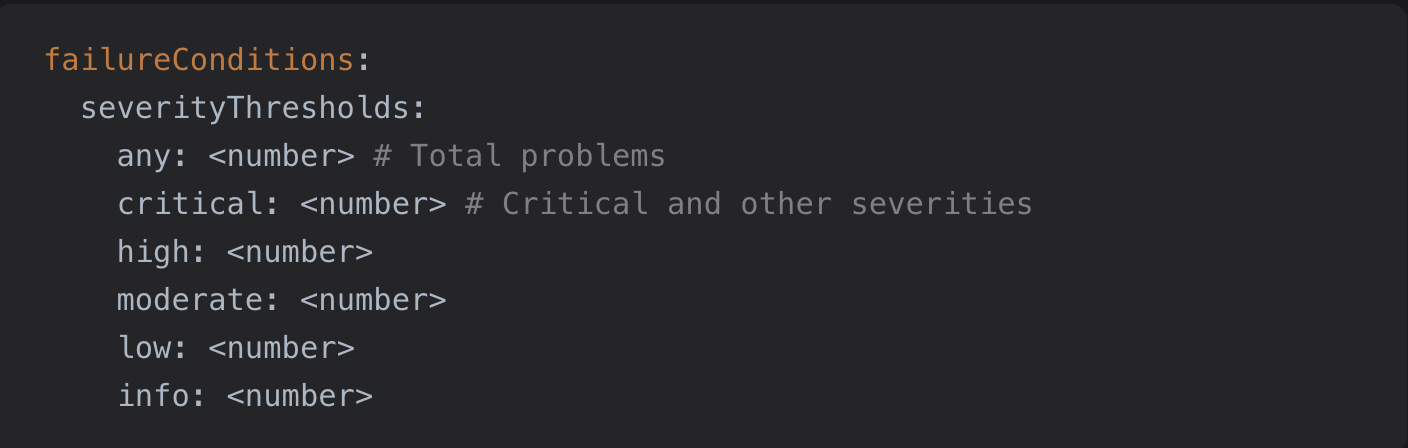
Qodana is a powerful static code analysis tool that helps you get your code up to the highest possible standard. It serves as a customizable gatekeeper in your development lifecycle that streamlines the enforcement of best practices and quality coding standards across your teams and projects.
Here are a few more ways Qodana improves your development process by working alongside you:
Enforcing quality gates
Automated quality checks: Qodana plugs into your CI/CD pipelines, running automated checks on your codebase as part of your process with every build.
Customized quality gates: You set your quality thresholds according to your needs and Qodana enforces them, just like a personalized security system that only lets the best code pass through.
Implementing best practices
Detailed reporting: Qodana generates comprehensive reports that provide actionable insights into code quality. These reports highlight potential issues, code smells, security vulnerabilities, and performance bottlenecks, enabling you to prioritize and address problems effectively.
Collated feedback: Qodana supports a culture of continuous learning and adherence to best practices. It’s like having a mentor by your side, providing clear feedback to help refine your code where you need to, at every point of the developer lifecycle.
Integration with CI/CD pipelines
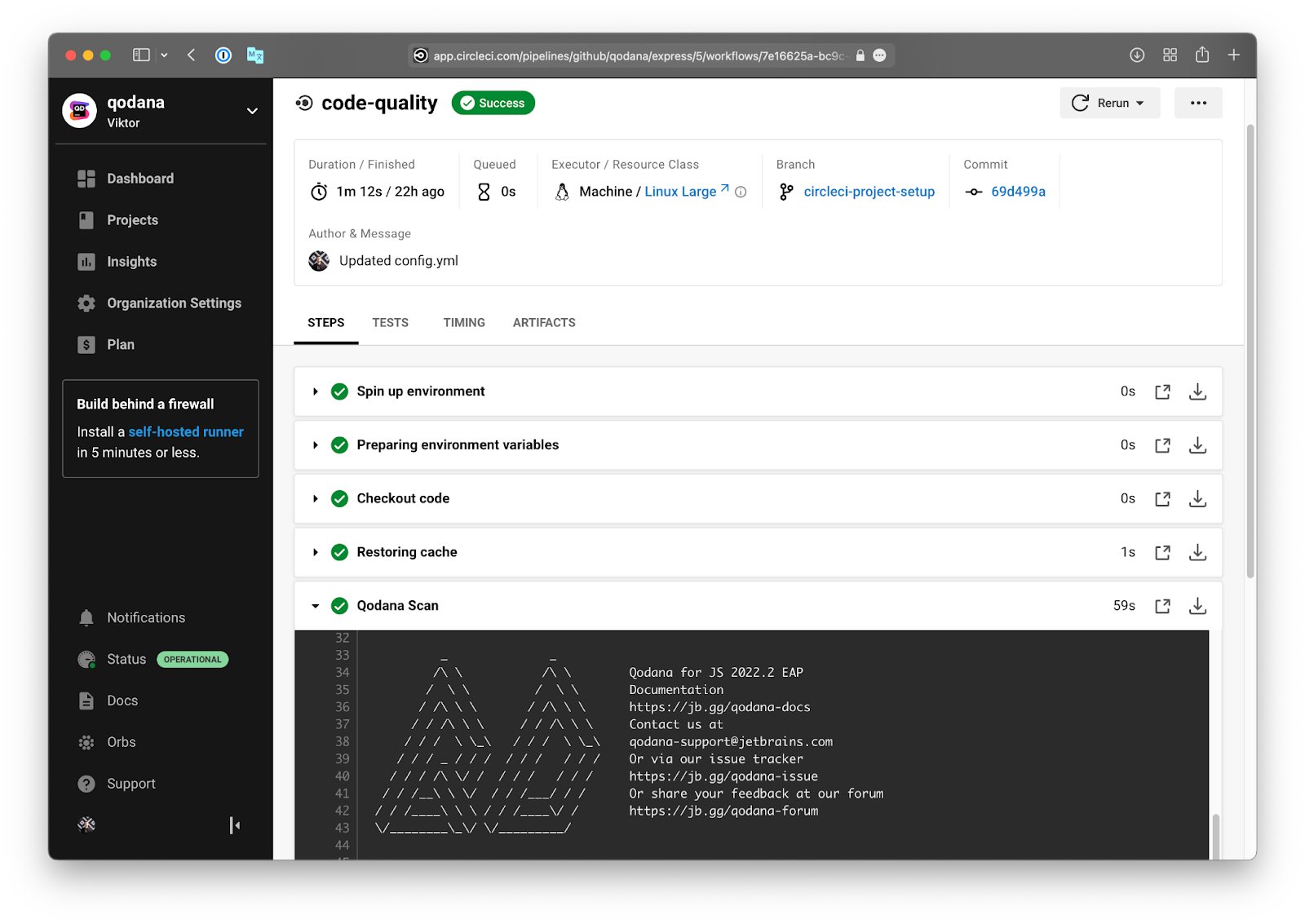
Better workflows: Qodana works natively with popular CI/CD platforms to embed quality control into every software development lifecycle. This feature ensures developers can contribute confidently to big projects without risking breaking the codebase or impacting performance.
Collaborative quality assurance: Qodana scales with your development team by incorporating quality gates directly into the main CI/CD pipeline. Unlike tools that limit inspections to individual development environments, Qodana enables team-wide code reviews, fostering collaboration, continuous learning, and improvement.
Are you ready to improve the quality of your code and your development processes as a team? Use Qodana to set up quality gates that empower your team to deliver high-quality software consistently.